


- Introduction
If you are actively developing an application, using Docker can simplify your workflow and the process of deploying your application to production. Working with containers in development offers the following benefits:
Environments are consistent, meaning that you can choose the languages and dependencies you want for your project without worrying about system conflicts.
Environments are isolated, making it easier to troubleshoot issues and onboard new team members.
Environments are portable, allowing you to package and share your code with others.
This tutorial will show you how to set up a development environment for a Node.js application using Docker. You will create three containers — one for the Node application and one for the MongoDB database and another for mongo-express — with Docker Compose. Because this application works with Node, MongoDB, and Mongo-express our setup will do the following:
Synchronize the application code on the host with the code in the container to facilitate changes during development.
Ensure that changes to the application code work without a restart.Create a user and password-protected database for the application’s data.
Persist data.
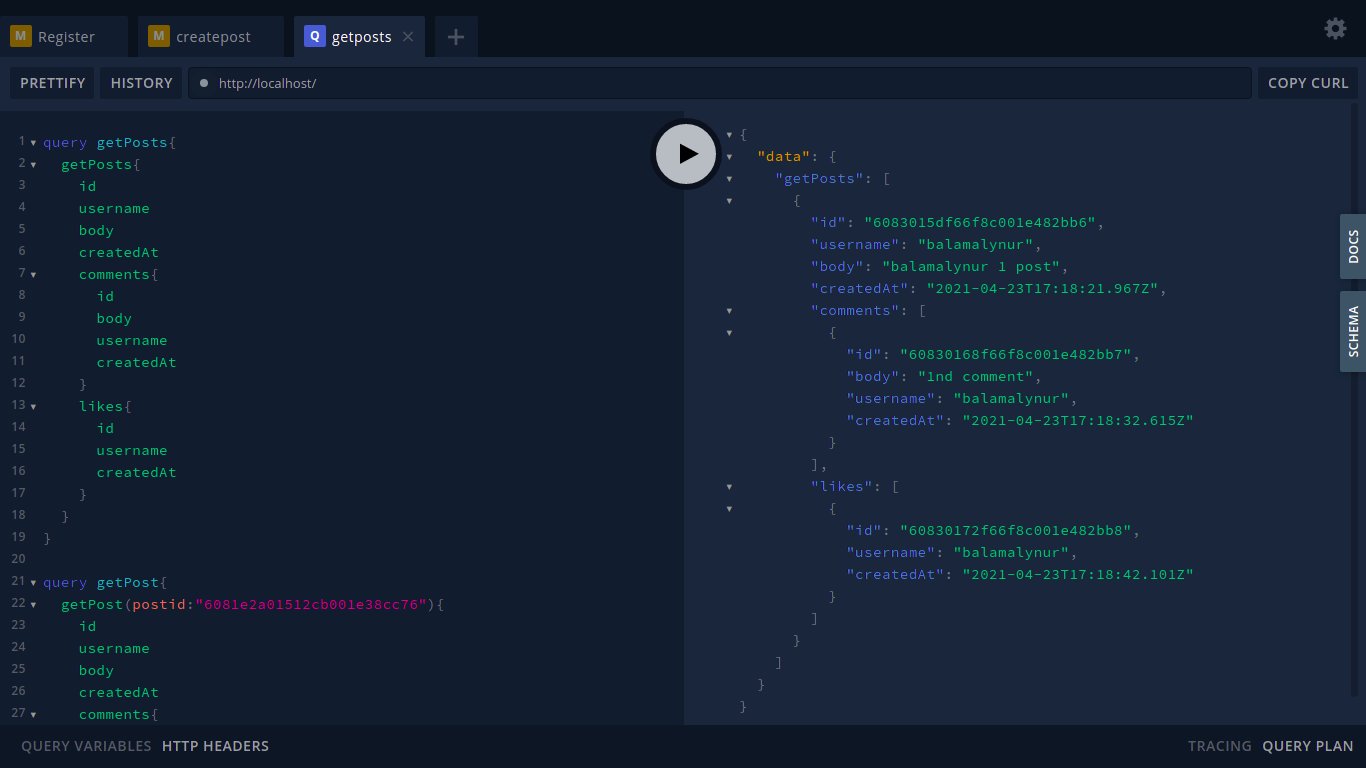
At the end of this tutorial, you will have a working social media nodejs application with graphql play environment running on Docker containers:

- Prerequisites
To follow this tutorial, you will need:
- A development server running Ubuntu 20.04.2 LTS.
- Node.js and npm installed.
- GitHub account.
- MongoDB Atlas cluster
- Docker and Docker Compose installed on your server.
- A Docker Hub account.
DATABASE:
- For this smserver node application MongoDB atlas cluster database is connected, please create one if not.

CHAPTER: I
Clone node app and build a docker image and start docker container running on port 5000.
Step 1 — Cloning the Project and Modifying Dependencies
- Clone the repository into a directory called smserver:

$ git clone https://github.com/kiran-taylor/server-socialmedia.git smserver
- Navigate to the smserver directory:
$ cd smserver
$ vim config.js
- And change mongourl here,
$ MONGODB: "YOUR MONGODB CLUSTER DATABASE URI"
- Open the project’s package.json file using vim or your favorite editor:
$ vim package.json

- install application dependencies
$ npm install
- With the project code in place and its dependencies installed, you can run the application locally.
$ node index
have a look at running app snap: click here to see running app
localhost running on port 80 so no ip:80
- Docker can build images automatically by reading the instructions from a Dockerfile. A Dockerfile is a text document that contains all the commands a user could call on the command line to assemble an image. Using docker build users can create an automated build that executes several command-line instructions in succession.
Create a Dockerfile in your repo:smserver :
- It must look like below image:

A context is processed recursively. So, a PATH includes any subdirectories and the URL includes the repository and its submodules. This example shows a build command that uses the current directory as context:
$ docker build -t smserver:1.0 .

- Once it builds check images:
$ docker images

- Run the conatiner of smserver:1.0:
$ docker run -d -p5000:5000 smserver:1.0
Tap on me: click here to see running app
You need a resource for playing with social-media nodejs application here they are:
For Register Tab:
mutation register{
  register(registerInput:{
    username:"user"
    password:"123"
    confirmPassword:"123"
    email:"balamalynur@123.com"
  }){
    id
    username
    createdAt
    email
    token
  }
}

mutation login{
  login(username:"user",password:"123") {
    id
    username
    createdAt
    email
    token
  }
}
- For createPost Tab:
mutation register{
  register(registerInput:{
    username:"user"
    password:"123"
    confirmPassword:"123"
    email:"balamalynur@123.com"
  }){
    id
    username
    createdAt
    email
    token
  }
}

mutation login{
  login(username:"user",password:"123") {
    id
    username
    createdAt
    email
    token
  }
}
- For getPosts Tab:
query getPosts{
  getPosts{
    id
    username
    body
    createdAt
    comments{
      id
      body
      username
      createdAt
    }
    likes{
      id
      username
      createdAt
    }
  }
}

query getPost{
  getPost(postid:"60821d475590d2ab4191474b"){
    id
    username
    body
    createdAt
    comments{
      id
      body
      username
      createdAt
    }
    likes{
      id
      username
      createdAt
    }
    likesCount
    commentCount
  }
}
- Graphql playground will allow us to write a query against the API.Graphql
We just built docker image locally and smserver container running locally.
wait for,
CHAPTER: II
Run Docker image [smserver:1.0] with official Mongo Docker image and mongo-express to visualize the database. It looks like this,


Top comments (0)