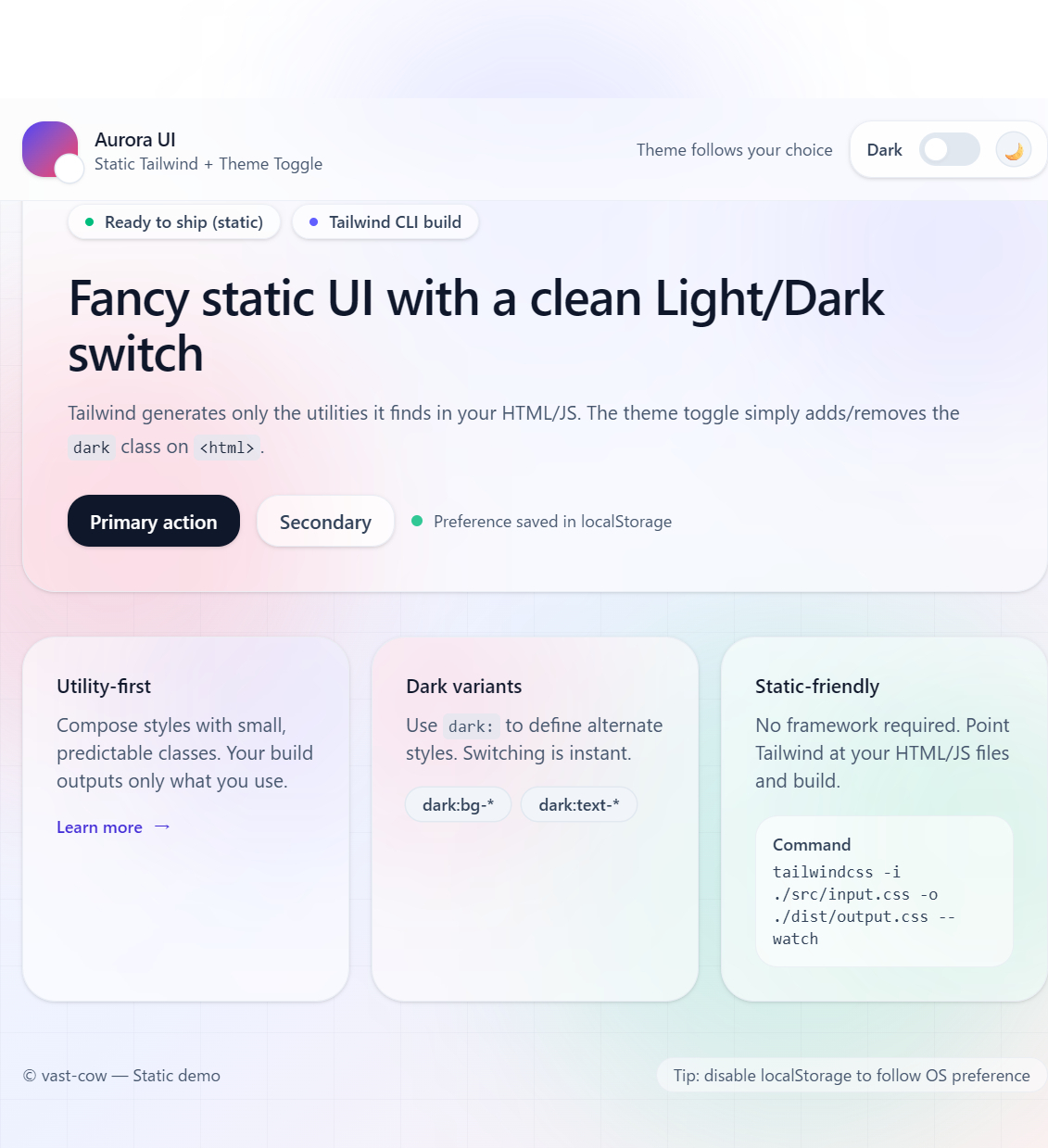
A practical setup that builds only the CSS you actually use — with a polished Light/Dark toggle UI.
Tailwind CSS is often described as “utility-first CSS,” but the part that matters for static sites is this:
- Tailwind scans your HTML/JS files
- It then generates only the utilities you used
- Result: a compact
output.cssyou can ship as a single file
This article walks through a static HTML + vanilla JavaScript workflow using Tailwind CSS v4.1.18, including a modern-looking UI and a manual theme toggle (Light/Dark) that persists via localStorage.
What you’ll build
- Static site (no framework)
- Tailwind CSS built via CLI
- A “fancy” UI (glass header, gradients, blurred blobs, grid overlay)
- Light/Dark toggle that works by adding/removing
.darkon<html>
Project structure
project/
index.html
src/
app.js
input.css
dist/
output.css # generated
tailwind.config.js
package.json
1) Install Tailwind CSS (v4.1.18)
From the project root:
npm init -y
npm i -D tailwindcss
npx tailwindcss init
2) Configure content scanning
Tailwind builds from what it finds in your source. For static sites, this is the single most important config.
Create/confirm tailwind.config.js:
/** @type {import('tailwindcss').Config} */
module.exports = {
content: [
"./index.html",
"./src/**/*.{js,html}",
],
theme: {
extend: {},
},
plugins: [],
};
Rule of thumb:
If a file contains Tailwind class names, it must be included in content.
3) Create the Tailwind entry CSS (Tailwind v4 style)
Tailwind v4 uses @import "tailwindcss"; as the baseline.
Create src/input.css:
@import "tailwindcss";
/* Make `dark:` respond to the `.dark` class (manual toggle) */
@custom-variant dark (&:where(.dark, .dark *));
Why this matters in v4
Tailwind v4’s dark: variant commonly defaults to the OS theme (prefers-color-scheme).
If you want a manual toggle button that adds/removes .dark, you need the @custom-variant override above. Otherwise, your “dark mode” classes may not respond to your JS toggle.
4) Build your CSS
Build once (production-style)
npx tailwindcss -i ./src/input.css -o ./dist/output.css --minify
Watch mode (development)
npx tailwindcss -i ./src/input.css -o ./dist/output.css --watch
5) Fancy static HTML example (drop-in)
Save the following as index.html (this is your “polished design” example):
<!doctype html>
<html lang="en" class="h-full">
<head>
<meta charset="UTF-8" />
<meta name="viewport" content="width=device-width, initial-scale=1.0" />
<title>Fancy Tailwind Theme Toggle (Static)</title>
<link rel="stylesheet" href="./dist/output.css" />
</head>
<body class="h-full antialiased selection:bg-indigo-500/30 selection:text-slate-900 dark:selection:text-slate-100">
<!-- Background -->
<div aria-hidden="true" class="fixed inset-0 -z-10">
<div
class="absolute inset-0 bg-gradient-to-br from-slate-50 via-indigo-50 to-rose-50 dark:from-slate-950 dark:via-indigo-950/30 dark:to-rose-950/20"
></div>
<!-- soft blobs -->
<div class="absolute -top-20 left-1/2 h-72 w-72 -translate-x-1/2 rounded-full bg-indigo-400/20 blur-3xl dark:bg-indigo-400/10"></div>
<div class="absolute top-40 -left-20 h-80 w-80 rounded-full bg-rose-400/20 blur-3xl dark:bg-rose-400/10"></div>
<div class="absolute bottom-0 right-0 h-96 w-96 rounded-full bg-emerald-400/15 blur-3xl dark:bg-emerald-400/10"></div>
<!-- subtle grid -->
<div class="absolute inset-0 bg-[linear-gradient(to_right,rgba(15,23,42,0.06)_1px,transparent_1px),linear-gradient(to_bottom,rgba(15,23,42,0.06)_1px,transparent_1px)] bg-[size:48px_48px] opacity-40 dark:opacity-20"></div>
</div>
<div class="min-h-full">
<!-- Header -->
<header class="sticky top-0 z-20 border-b border-slate-200/60 bg-white/60 backdrop-blur-xl dark:border-slate-800/60 dark:bg-slate-950/40">
<div class="mx-auto flex max-w-5xl items-center justify-between px-4 py-4">
<div class="flex items-center gap-3">
<div class="relative">
<div class="h-10 w-10 rounded-2xl bg-gradient-to-br from-indigo-600 to-rose-500 shadow-sm"></div>
<div class="absolute -bottom-1 -right-1 h-5 w-5 rounded-full bg-white shadow ring-1 ring-slate-200 dark:bg-slate-950 dark:ring-slate-800"></div>
</div>
<div>
<p class="text-sm font-semibold tracking-tight text-slate-900 dark:text-slate-100">Aurora UI</p>
<p class="text-xs text-slate-600 dark:text-slate-400">Static Tailwind + Theme Toggle</p>
</div>
</div>
<!-- Toggle -->
<div class="flex items-center gap-3">
<div class="hidden text-xs text-slate-600 dark:text-slate-400 sm:block" id="themeHint">
Theme follows your choice
</div>
<button
id="themeToggle"
type="button"
class="group relative inline-flex items-center gap-3 rounded-2xl border border-slate-200/70 bg-white/70 px-3 py-2 shadow-sm backdrop-blur transition hover:bg-white/90 active:translate-y-px dark:border-slate-800/70 dark:bg-slate-900/60 dark:hover:bg-slate-900/80"
aria-label="Toggle theme"
>
<span class="text-xs font-semibold text-slate-700 dark:text-slate-200" id="themeModeLabel">Dark</span>
<!-- switch track -->
<span class="relative inline-flex h-6 w-11 items-center rounded-full bg-slate-200 p-1 transition dark:bg-slate-700">
<!-- knob -->
<span
id="themeKnob"
class="inline-block h-4 w-4 translate-x-0 rounded-full bg-white shadow-sm ring-1 ring-slate-200 transition-transform duration-300 dark:translate-x-5 dark:bg-slate-950 dark:ring-slate-700"
></span>
</span>
<!-- icon -->
<span class="grid h-6 w-6 place-items-center rounded-xl bg-slate-100 text-sm ring-1 ring-slate-200 transition dark:bg-slate-800 dark:ring-slate-700" id="themeIcon">
🌙
</span>
<!-- subtle glow on hover -->
<span class="pointer-events-none absolute inset-0 -z-10 rounded-2xl opacity-0 blur-xl transition group-hover:opacity-100 dark:opacity-0"
style="background: radial-gradient(120px 60px at 70% 30%, rgba(99,102,241,0.25), transparent 60%);"></span>
</button>
</div>
</div>
</header>
<main class="mx-auto max-w-5xl px-4 py-10">
<!-- Hero -->
<section class="relative overflow-hidden rounded-3xl border border-slate-200/60 bg-white/60 p-8 shadow-sm backdrop-blur-xl dark:border-slate-800/60 dark:bg-slate-950/40">
<div class="absolute -right-16 -top-16 h-64 w-64 rounded-full bg-indigo-500/10 blur-3xl dark:bg-indigo-500/10"></div>
<div class="absolute -bottom-24 -left-16 h-72 w-72 rounded-full bg-rose-500/10 blur-3xl dark:bg-rose-500/10"></div>
<div class="relative">
<div class="flex flex-wrap items-center gap-2">
<span class="inline-flex items-center gap-2 rounded-full border border-slate-200/60 bg-white/60 px-3 py-1 text-xs font-semibold text-slate-700 shadow-sm dark:border-slate-800/60 dark:bg-slate-900/50 dark:text-slate-200">
<span class="h-1.5 w-1.5 rounded-full bg-emerald-500"></span>
Ready to ship (static)
</span>
<span class="inline-flex items-center gap-2 rounded-full border border-slate-200/60 bg-white/60 px-3 py-1 text-xs font-semibold text-slate-700 shadow-sm dark:border-slate-800/60 dark:bg-slate-900/50 dark:text-slate-200">
<span class="h-1.5 w-1.5 rounded-full bg-indigo-500"></span>
Tailwind CLI build
</span>
</div>
<h1 class="mt-5 text-3xl font-semibold tracking-tight text-slate-900 dark:text-slate-100 sm:text-4xl">
Fancy static UI with a clean Light/Dark switch
</h1>
<p class="mt-3 max-w-2xl text-sm leading-6 text-slate-600 dark:text-slate-400">
Tailwind generates only the utilities it finds in your HTML/JS. The theme toggle simply adds/removes the
<code class="rounded bg-slate-200/70 px-1 py-0.5 text-xs text-slate-800 dark:bg-slate-800/70 dark:text-slate-100">dark</code>
class on <code class="rounded bg-slate-200/70 px-1 py-0.5 text-xs text-slate-800 dark:bg-slate-800/70 dark:text-slate-100"><html></code>.
</p>
<div class="mt-6 flex flex-wrap gap-3">
<a
href="#"
class="inline-flex items-center justify-center rounded-2xl bg-slate-900 px-4 py-2 text-sm font-semibold text-white shadow-sm transition hover:translate-y-[-1px] hover:shadow dark:bg-white dark:text-slate-900"
>
Primary action
</a>
<a
href="#"
class="inline-flex items-center justify-center rounded-2xl border border-slate-200/70 bg-white/60 px-4 py-2 text-sm font-semibold text-slate-700 shadow-sm backdrop-blur transition hover:bg-white/80 dark:border-slate-800/70 dark:bg-slate-900/50 dark:text-slate-200 dark:hover:bg-slate-900/70"
>
Secondary
</a>
<div class="flex items-center gap-2 text-xs text-slate-600 dark:text-slate-400">
<span class="inline-block h-2 w-2 rounded-full bg-emerald-500/80"></span>
Preference saved in localStorage
</div>
</div>
</div>
</section>
<!-- Feature grid -->
<section class="mt-8 grid gap-4 md:grid-cols-3">
<!-- Card -->
<article class="group relative overflow-hidden rounded-3xl border border-slate-200/60 bg-white/60 p-6 shadow-sm backdrop-blur transition hover:shadow-md dark:border-slate-800/60 dark:bg-slate-950/40">
<div class="absolute -right-16 -top-16 h-56 w-56 rounded-full bg-indigo-500/10 blur-3xl"></div>
<h2 class="relative text-sm font-semibold text-slate-900 dark:text-slate-100">Utility-first</h2>
<p class="relative mt-2 text-sm text-slate-600 dark:text-slate-400">
Compose styles with small, predictable classes. Your build outputs only what you use.
</p>
<div class="relative mt-4 inline-flex items-center gap-2 text-xs font-semibold text-indigo-700 dark:text-indigo-300">
Learn more
<span class="transition-transform group-hover:translate-x-0.5">→</span>
</div>
</article>
<article class="group relative overflow-hidden rounded-3xl border border-slate-200/60 bg-white/60 p-6 shadow-sm backdrop-blur transition hover:shadow-md dark:border-slate-800/60 dark:bg-slate-950/40">
<div class="absolute -left-16 -top-16 h-56 w-56 rounded-full bg-rose-500/10 blur-3xl"></div>
<h2 class="relative text-sm font-semibold text-slate-900 dark:text-slate-100">Dark variants</h2>
<p class="relative mt-2 text-sm text-slate-600 dark:text-slate-400">
Use <code class="rounded bg-slate-200/70 px-1 py-0.5 text-xs dark:bg-slate-800/70">dark:</code> to define
alternate styles. Switching is instant.
</p>
<div class="relative mt-4 flex flex-wrap gap-2">
<span class="rounded-full bg-slate-100 px-3 py-1 text-xs font-semibold text-slate-700 ring-1 ring-slate-200 dark:bg-slate-800 dark:text-slate-200 dark:ring-slate-700">
dark:bg-*
</span>
<span class="rounded-full bg-slate-100 px-3 py-1 text-xs font-semibold text-slate-700 ring-1 ring-slate-200 dark:bg-slate-800 dark:text-slate-200 dark:ring-slate-700">
dark:text-*
</span>
</div>
</article>
<article class="group relative overflow-hidden rounded-3xl border border-slate-200/60 bg-white/60 p-6 shadow-sm backdrop-blur transition hover:shadow-md dark:border-slate-800/60 dark:bg-slate-950/40">
<div class="absolute -right-20 bottom-0 h-60 w-60 rounded-full bg-emerald-500/10 blur-3xl"></div>
<h2 class="relative text-sm font-semibold text-slate-900 dark:text-slate-100">Static-friendly</h2>
<p class="relative mt-2 text-sm text-slate-600 dark:text-slate-400">
No framework required. Point Tailwind at your HTML/JS files and build.
</p>
<div class="relative mt-4 rounded-2xl border border-slate-200/60 bg-white/60 p-3 text-xs text-slate-700 dark:border-slate-800/60 dark:bg-slate-900/50 dark:text-slate-200">
<div class="font-semibold">Command</div>
<div class="mt-1 font-mono">
tailwindcss -i ./src/input.css -o ./dist/output.css --watch
</div>
</div>
</article>
</section>
<!-- Footer -->
<footer class="mt-10 flex flex-wrap items-center justify-between gap-3 text-xs text-slate-600 dark:text-slate-400">
<span>© 2026 vast-cow — Static demo</span>
<span class="rounded-full border border-slate-200/60 bg-white/50 px-3 py-1 dark:border-slate-800/60 dark:bg-slate-950/40">
Tip: disable localStorage to follow OS preference
</span>
</footer>
</main>
</div>
<script src="./src/app.js"></script>
</body>
</html>
6) Theme toggle JavaScript (class-based dark mode)
Create src/app.js:
(function () {
const STORAGE_KEY = "theme"; // "light" | "dark"
const root = document.documentElement;
const toggleBtn = document.getElementById("themeToggle");
const themeIcon = document.getElementById("themeIcon");
const themeModeLabel = document.getElementById("themeModeLabel");
const themeHint = document.getElementById("themeHint");
function systemPref() {
return window.matchMedia("(prefers-color-scheme: dark)").matches ? "dark" : "light";
}
function savedTheme() {
const v = localStorage.getItem(STORAGE_KEY);
return v === "dark" || v === "light" ? v : null;
}
function applyTheme(theme, source) {
const isDark = theme === "dark";
root.classList.toggle("dark", isDark);
// Button label shows the *next* mode
themeModeLabel.textContent = isDark ? "Light" : "Dark";
themeIcon.textContent = isDark ? "☀️" : "🌙";
if (themeHint) {
themeHint.textContent =
source === "saved" ? "Theme follows your choice" : "Theme follows system preference";
}
}
// init
const initial = savedTheme() ?? systemPref();
applyTheme(initial, savedTheme() ? "saved" : "system");
toggleBtn.addEventListener("click", () => {
const next = root.classList.contains("dark") ? "light" : "dark";
localStorage.setItem(STORAGE_KEY, next);
applyTheme(next, "saved");
});
// If user has not chosen explicitly, follow OS changes
const mql = window.matchMedia("(prefers-color-scheme: dark)");
mql.addEventListener?.("change", () => {
if (savedTheme() === null) applyTheme(systemPref(), "system");
});
})();
7) Build commands (same as before)
npx tailwindcss -i ./src/input.css -o ./dist/output.css --minify
# or
npx tailwindcss -i ./src/input.css -o ./dist/output.css --watch
Debugging: “The design doesn’t apply”
In static setups, problems are almost always one of these:
1) The CSS file isn’t loading
Check DevTools → Network → dist/output.css returns 200.
2) Tailwind isn’t generating utilities
Your content globs don’t include the files with class names.
3) Dark mode doesn’t toggle (Tailwind v4 gotcha)
If your generated CSS contains rules like:
.dark\:... { @media (prefers-color-scheme: dark) { ... } }
then dark: is responding to OS theme, not .dark.
Fix: use the @custom-variant dark ... snippet in src/input.css.
Summary
For Tailwind CSS v4.1.18 on static HTML/JS:
- Use
contentto scan your HTML + JS - Use
@import "tailwindcss";for the v4 entry CSS - For a manual toggle, redefine dark mode with:
@custom-variant dark (&:where(.dark, .dark *));
This gives you a clean “build only what you used” workflow, plus a polished UI that works without any framework.

Top comments (0)