

Day 1
📌 Day 1: Why I Chose Java as My First Programming Language
🔹 Why Java?
As a beginner in programming, I chose Java because:
✔ It follows a structured approach (Object-Oriented Programming)
✔ It is platform-independent (Write Once, Run Anywhere)
✔ It has strong memory management and automatic garbage collection
✔ It is widely used in enterprise applications, Android development, and backend systems
✔ It helps me learn other languages faster because of its strict rules
🔹 What is a Compiler vs. Interpreter?
Before understanding Java, we need to know how programs are executed.
- Compiler: Converts the entire source code into machine code before execution (e.g., C, C++)
- Interpreter: Converts code line by line and executes it immediately (e.g., Python, JavaScript)
- Java uses both! → Java compiles code into bytecode, which is later interpreted by the JVM
🔹 What is a Platform?
A platform is a combination of the Operating System (OS) and Processor (CPU) that runs programs.
- Java is platform-independent because it runs on a Java Virtual Machine (JVM), not directly on the OS.
🔹 Java Origins & Why Java Was Created
Java was created in 1995 by James Gosling at Sun Microsystems.
- Initially called Oak, then renamed Java
- Designed for embedded systems, later became popular for web, mobile, and enterprise applications
- Needed because C++ was complex, and Java offered better security, memory management, and simplicity
🔹 Java Architecture: How It Works
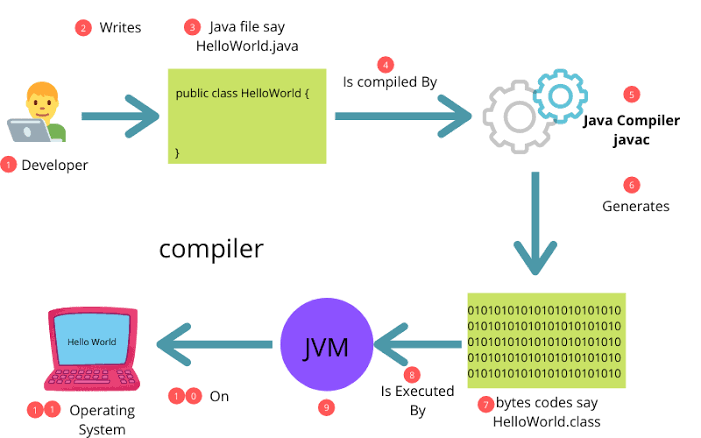
Java code goes through multiple stages before execution:
1️⃣ Source Code (.java file) → Written by the developer
2️⃣ Compilation (javac) → Converts to Bytecode (.class file)
3️⃣ Execution in JVM → Runs on any OS because of the Java Virtual Machine (JVM)
🔹 Key Java Components:
- JDK (Java Development Kit) → Includes compiler, libraries, and tools
- JVM (Java Virtual Machine) → Runs Java bytecode on any OS
- JRE (Java Runtime Environment) → Provides libraries needed to run Java programs
🔹 Common Errors in Java
✔ Syntax Errors → Mistakes in writing the code (e.g., missing semicolon)
✔ Runtime Errors → Errors that occur while running the program (e.g., dividing by zero)
📌 My Doubts (Let’s Explore Together!)
1️⃣ Which Language is Used to Build Java?
- Java was originally written in C and C++
- Modern versions use Java itself (Bootstrapping Concept)
2️⃣ Why is the File Extension .java, Not .Java?
- File extensions are case-insensitive in most operating systems
-
.javais the standard convention used across all Java tools and compilers
3️⃣ Why Do We Use File Extensions?
- To identify file types easily
- To let the compiler know how to process the file
-
.javatells the compiler that it contains Java source code
4️⃣ Why Was Java Created When Python Already Existed?
- Python (created in 1991) is easy but interpreted, making it slower
- Java (created in 1995) was designed for performance, security, and scalability
- Java runs on JVM (bytecode execution), while Python runs on an interpreter


Top comments (0)