

title: [Gemini][Golang] Build a LINE file backup bot to Google Drive with Golang
published: false
date: 2025-08-28 00:00:00 UTC
tags:
canonical_url: https://www.evanlin.com/til-linebot-google-drive-golang/
---
When chatting with friends and family on LINE, you always receive many different files. For example, children's school schedules, travel agency travel information, or some documents. At this time, you may worry about the files becoming invalid after a certain period of time, so you can use the function that I will share with you this time. " **LINE Bot File Backup Bot** ": This powerful LINE bot is developed using **Golang** and can automatically back up multimedia files in the chat room to your Google Drive, and can also intelligently organize folders and provide simple query functions. This technical blog will introduce you to the core functions of this bot and teach you how to deploy it step by step.
## Sample Code
#### [https://github.com/kkdai/linebot-file](https://github.com/kkdai/linebot-file)
Welcome to give Star and share, and if you find it useful, you are also welcome to participate in contributions to add some new features.
## ✨ Main Feature Introduction
This LINE bot built with Golang provides the following super practical functions:
- **Multimedia File Backup**: Supports backing up pictures, videos, audio, and general files from LINE chats to Google Drive.
- **Smart Folder Organization**: Automatically creates a `LINE Bot Uploads` folder in Google Drive and creates subfolders by year and month (`YYYY-MM`), keeping your cloud drive clean and tidy.
- **Secure Account Linking**: Uses Google OAuth 2.0 authorization to ensure secure and reliable connections.
- **Quick File Query**: Enter the `/recent_files` command to quickly view the 5 most recently uploaded files.
- **Flexible Connection Control**: Disconnect from Google Drive and revoke authorization at any time via the `/disconnect_drive` command.
# Comparison of Two Upload Methods for LINE Bot File Backup to Google Drive
This LINE file backup bot written in Golang allows users to easily back up files in the chat room to Google Drive. The project supports two ways to upload to Google Drive: **Google Cloud Service Account** and **Google OAuth 2.0**. The following is a comparison table that details the operation, advantages, and disadvantages of these two methods to help developers choose the most suitable implementation method.
## Comparison Table
| **Item** | **Google Cloud Service Account** | **Google OAuth 2.0** |
| --- | --- | --- |
| **Operation Method** | Uses the service account credentials (JSON file) in the Google Cloud project, representing the application directly accessing the Google Drive API, without the need for users to manually authorize. | Users authorize through the OAuth 2.0 process, allowing the bot to access their Google Drive account as the user. |
| **Configuration Complexity** | Medium: Requires creating a service account in the Google Cloud Console, generating credentials, and sharing a specific Google Drive folder with the service account. | Higher: Requires setting up an OAuth consent screen, creating a Web application credential, and handling the callback URL and token management. |
| **User Experience** | No user intervention required, files are uploaded directly to the default Google Drive folder (usually owned or shared by the service account). | Users need to manually click the authorization link to complete the OAuth process, and after authorization, files are uploaded to the user's own Google Drive. |
| **Permission Control** | The service account has fixed access permissions, and you need to manually share the folder with the service account, and permission management is more centralized. | Users can control the authorization scope (e.g., only allowing access to specific folders) and can revoke permissions at any time (`/disconnect_drive`). |
| **Main Advantages** | - High degree of automation, no need for users to manually authorize. - Suitable for centralized file management (e.g., enterprise scenarios). - Almost no user interaction is required after deployment. | - Users have full control over files, meeting personalized needs. - Supports dynamic permission management, with higher security. - Suitable for multi-user scenarios, each person backs up to their own Google Drive. |
| **Main Disadvantages** | - Files are stored in the service account's Google Drive or shared folder, and individual users may not be able to manage them directly. - Requires additional folder sharing settings, increasing the initial configuration complexity. - Not suitable for multi-user scenarios (unless a separate folder is set up for each user). | - Users need to complete the OAuth authorization process, affecting the initial experience. - Need to manage token updates (refresh token), the code is more complex. - Requires handling the callback URL during deployment, increasing the setup steps. |
| **Suitable Scenarios** | Enterprises or centralized applications, where administrators want to centrally manage all backup files. | Personalized applications, where users want files to be stored in their own Google Drive and retain full control. |
| **Code Implementation Example** | (Here you can paste the Golang code snippet using Google Cloud Service Account, such as the logic for initializing the service account and uploading files.) | (Here you can paste the Golang code snippet using Google OAuth 2.0, such as the logic for handling the OAuth process and uploading files.) |
## Detailed Explanation of the Two Methods
### Google Cloud Service Account
- **Operating Principle**: A service account is a non-human account provided by Google Cloud, which is authenticated through a JSON credential file. Your LINE bot uses the service account's credentials to directly call the Google Drive API and upload files to the specified folder. This folder can be the service account's own Google Drive, or a folder shared by the administrator with the service account.
- **Advantages**:
- No user intervention is required, suitable for fully automated processes.
- Suitable for enterprise scenarios, such as backing up all employees' LINE chat files to a company-managed Google Drive.
- The code is relatively simple, only requiring initialization of the service account and setting up API calls.
- **Disadvantages**:
- Files are stored in the service account's Google Drive or shared folder, and users cannot manage them directly (unless through shared permissions).
- If each user needs an independent folder, additional program logic is required to dynamically manage folder sharing.
- The initial setup requires manually sharing the Google Drive folder with the service account's email address.
(You can paste the Golang code for the service account here, such as using the `google.golang.org/api/drive/v3` package to initialize the service account and upload file snippets.)
### Google OAuth 2.0
- **Operating Principle**: Users click the `/connect_drive` command through the LINE bot, triggering the OAuth 2.0 authorization process, allowing the bot to access their Google Drive. The bot will obtain an access token and a refresh token to represent the user and upload files to their personal Google Drive.
- **Advantages**:
- Users have full control over the files, and the files are stored directly in their own Google Drive.
- Supports dynamic permission management, and users can revoke authorization at any time (through `/disconnect_drive`).
- Suitable for personalized applications, especially multi-user scenarios, where each person backs up to their own Google Drive.
- **Disadvantages**:
- Users need to manually complete the OAuth authorization process, which may affect the initial experience.
- The code needs to handle token management (e.g., updating expired access tokens), increasing the development complexity.
- The callback URL (redirect URI) needs to be set up during deployment and ensure it is consistent with the Cloud Run URL.
(You can paste the OAuth Golang code here, such as using the `golang.org/x/oauth2` package to handle the authorization process and file upload snippets.)
## 🚀 Deploy on Google Cloud Platform
This project is developed using Golang and has been containerized (including Dockerfile), which is very suitable for deployment on Google Cloud Run. Cloud Run provides a fully managed serverless environment, and automatic scaling is super convenient! Here are the complete deployment steps.
### Preliminary Preparation
Before you start, please make sure you have prepared:
- A Google Cloud account.
- Install and set up the Google Cloud SDK (gcloud CLI).
- A LINE Bot channel and obtain the Channel Secret and Channel Access Token.
### Deployment Steps
#### 1. Enable Required APIs
In order for the bot to function properly, you need to enable the following services in your Google Cloud project:
- Cloud Run API
- Cloud Build API (used to automatically build container images)
- Firestore API (used to store user authorization data)
Run the following command in the terminal to quickly enable:
gcloud services enable run.googleapis.com cloudbuild.googleapis.com firestore.googleapis.com
#### 2. Create a Firestore Database
- Go to the Firestore page in the Google Cloud Console.
- Select "Native mode".
- Choose the region closest to your users, and then create a database.
#### 3. Get Google OAuth Credentials
This is a key step to enable the bot to access Google Drive:
- Go to Google Cloud Console > APIs & Services > Credentials. ([Google Auth Platform](https://console.cloud.google.com/auth))
- Click **+ CREATE CREDENTIALS** , select **OAuth client ID** .
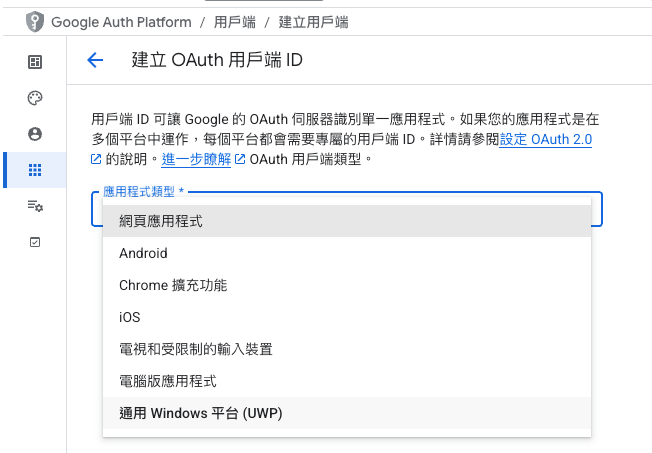
- Select **Web application** in Application type, and name it (e.g., "LINE Bot File Uploader").
- Do not fill in **Authorized redirect URIs** in this step, and come back to set it up after Cloud Run is deployed.
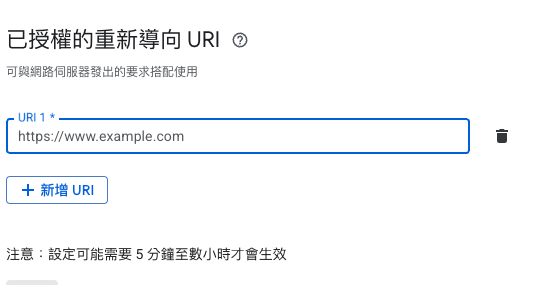
- After creation, you will get a set of **Client ID** and **Client Secret**, please keep them safe, they will be used later.
## Results Display
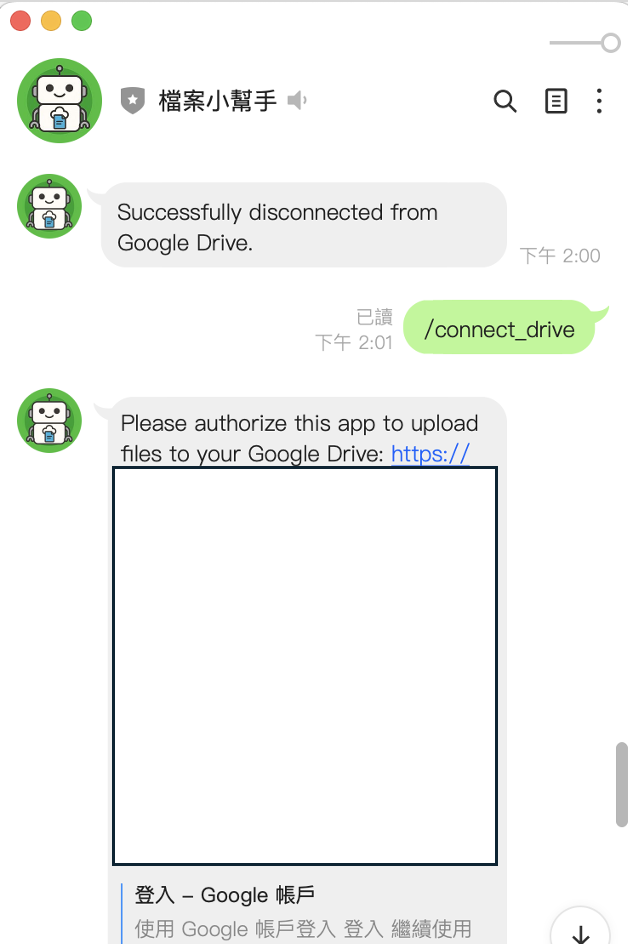
- If not authenticated, the instructions for authentication will appear.
- Click the URL to authenticate the Google Drive upload permission.
- If you don't want to use it, you can also use `/disconnect_drive` to revoke the relevant authorization.
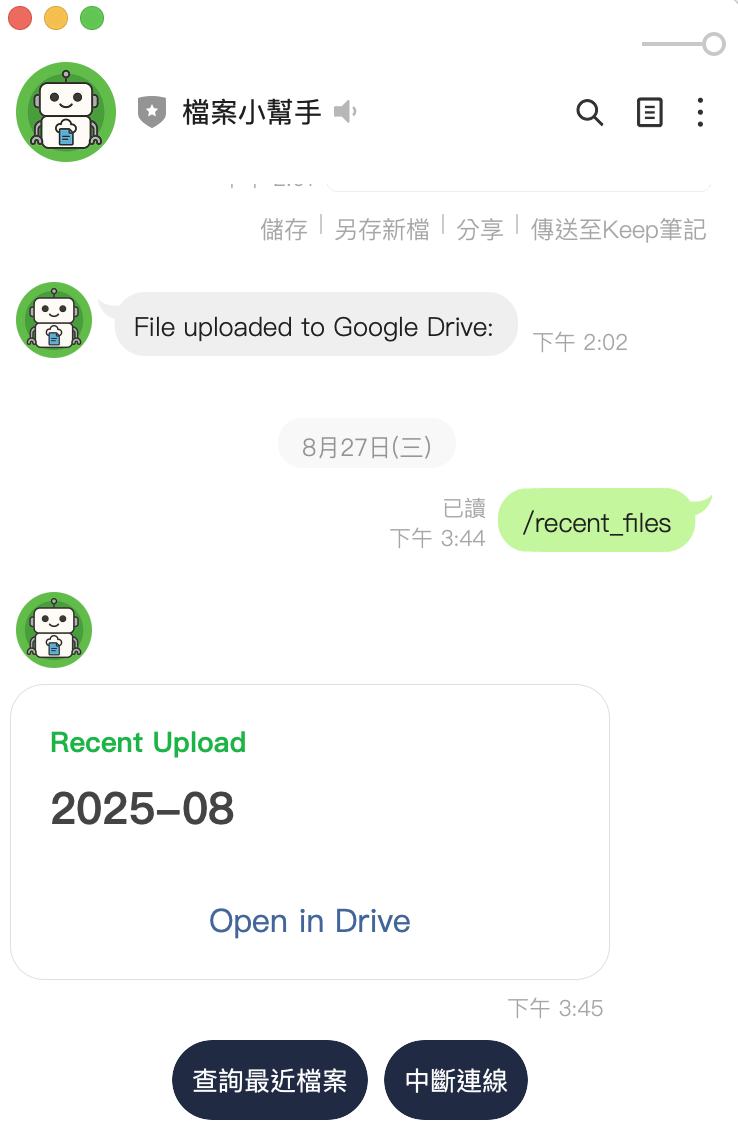
- Uploading files is also very simple, supporting two formats.
- Upload pictures directly, and the pictures will be uploaded to Google Drive for storage.
- Paste PDF or any file format through iOS / AOS to the chat window. It can also be accurately uploaded to Google Drive. Files can also exceed 50MB
- To view the files, click on the query recent files, and the Google Drive webpage will open to view the file list.
## Future Prospects
This LINE file backup bot developed with Golang opens up many interesting application scenarios:
- **Automated File Management**: Automatically organize your LINE chat files to Google Drive, saving time and effort.
- **Team Collaboration**: Quickly back up and share files in group chats, improving work efficiency.
- **Personalized Features**: Expand features according to needs, such as customizing folder structures or file naming rules.
- **Data Analysis**: Analyze the types and frequency of uploaded files, optimize bot functions or provide usage statistics.
(If you have other Golang code snippets, such as the part that handles the Google Drive API or Firestore, you can paste them here to further demonstrate the application of Golang in this project.)
These applications can not only improve the file management experience for individuals and teams, but also bring more creative application inspiration to developers. Quickly deploy your LINE file backup bot and experience the convenience of Golang and cloud integration!


Top comments (0)