

See Video Documentation :-
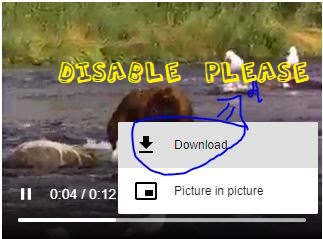
Before - When video tag Download is Enabled .
Here is a Simple Video Tag :-
    <video width\="320" height\="240" controls loop\>

        <source src\="https://www.w3schools.com/tags/movie.mp4" type\="video/mp4"\>

        Your browser does not support the video tag.

    </video\>
-- Preview --
Your browser does not support the video tag.
For Disabling the Download Option
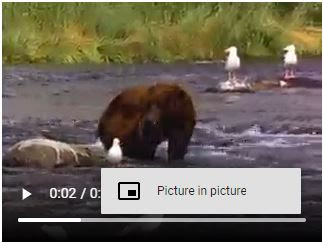
After Disabling Download
Add This Attribute
controlslist\="nodownload"
Now the Full Code Will Look Like :-
    <video width\="320" height\="240" controls loop controlslist\="nodownload"\>

        <source src\="https://www.w3schools.com/tags/movie.mp4" type\="video/mp4"\>

        Your browser does not support the video tag.

    </video\>
-- Preview --
Your browser does not support the video tag.
Possible controlslist Values :-
- nofullscreen
- nodownload
- noremoteplayback
Download Files Used in This Video :- https://github.com/CXDI/youtube-files/blob/main/Tips/Disable_Download_option_in_HTML5_Video.html


Top comments (1)
Worth mentioning that this does nothing to stop a user downloading the video on their own, only hides the option in the controls menu. It's trivial to grab the
srcfrom your site's source code:And download it using
wgetor any number of other methods: