
title: [Learning Notes][Golang] How to Develop OAuth2 PKCE with Golang - Taking LINE Login as an Example
published: false
date: 2021-05-12 00:00:00 UTC
tags:
canonical_url: http://www.evanlin.com/go-oauth-pkce/
---
## Preface:
[In the news on 2021/04/09](https://developers.line.biz/en/news/2021/04/09/line-login-pkce-support/), LINE Login officially supports the PKCE (Proof Key for Code Exchange) process. This article will clearly explain what LINE Login is? Why does LINE Login need to support PKCE? Finally, through an example, it will lead readers to introduce and experience LINE Login with PKCE.
The code in this article is divided into three parts, briefly explained below:
- **LINE Login Go SDK**:
- Github: [github.com/kkdai/line-login-sdk-go](https://github.com/kkdai/line-login-sdk-go)
- **LINE Login Starter:**
- GitHub: [github.com/kkdai/line-login-go](https://github.com/kkdai/line-login-go)
- Website: https://login-tester-evan.herokuapp.com/
- **LINE Login PKCE Starter:**
- GitHub: [github.com/kkdai/line-login-go](https://github.com/kkdai/line-login-go)
- Website: https://line-login-pkce.herokuapp.com/
# TL;DR
This article will introduce the following parts:
- [What is LINE Login? What is OAuth?](#line-login-oauth)
- [What situations are recommended to use LINE Login?](#when-line-login)
- [LINE Login process](#line-login-flow)
- [What are the disadvantages of OAuth2?](#oauth-issue)
- [What is PKCE?](#what-is-pkce)
- [How to introduce PKCE in LINE Login?](#how-to-migrate-pkce)
- [Conclusion](#summary)
- [Reference articles](#refer)
-
# What is LINE Login? What is OAuth 2.0?

Many commercial services will provide many exclusive offers or reward activities through membership mechanisms, but the registration and login process of members often makes many users feel difficult. In addition to filling in a lot of information, users also need to remember another set of account passwords. LINE has a very high market share in Taiwan, and almost every user has a LINE account. In this case, wouldn't it be very convenient if you could directly use your LINE account to register and log in to website services?
In addition to providing a way to log in, LINE Login can also provide user names and profile picture information. And through LINE Login, users can also join the LINE official account of commercial services at the same time, allowing users to use related services at any time.
# What situations are recommended to use LINE Login
Here are the situations where it is recommended to use LINE Login as a reader to evaluate whether you need to use LINE Login:
- When you are about to establish e-commerce services or websites, you want to reduce the time for users to register and join quickly.
- Want to promote your own official account chatbot service.
- Even if you have promoted e-commerce services for a period of time, you want to reach different customer groups through LINE.
After understanding why to use LINE Login and what situations are recommended, the next step is to guide readers on how to use the example code
### Example code
https://github.com/kkdai/line-login-go
### Test website
https://login-tester-evan.herokuapp.com/
# How to deploy the example code:
- Go to [LINE Developer Console](https://developers.line.biz/console/) to create related Providers and Channels.
- Create a LINE Login account and remember the following two pieces of information:
- Channel ID
- Channel Secret
- Also create a [LINE@](https://at.line.me/tw/) and open the MessageAPI function (that is, build a chatbot), and remember the following two pieces of information:
- Channel Secret
- Channel Token
- Go to https://github.com/kkdai/line-login-go and press Heroku Deploy to create the account and deploy the service. At this time, you will need to enter three pieces of information:
- LINECORP\_PLATFORM\_CHANNEL\_CHANNELID
- Fill in the LINE login channel ID
- LINECORP\_PLATFORM\_CHANNEL\_CHANNELSECRET
- Fill in the LINE login channel Secret
- LINECORP\_PLATFORM\_CHATBOT\_CHANNELSECRET
- Fill in the Chatbot channel Secret
- LINECORP\_PLATFORM\_CHATBOT\_CHANNELTOKEN
- Fill in the Chatbot channel Token
- LINECORP\_PLATFORM\_SERVERURL
- This information is determined by your heroku app name. Assuming your Heroku app name is `test-api-1234`, then you should fill in `https://test-api-1234.herokuapp.com`
- Go back to the LINE Login account settings, [App setting] write the callback URL `https://test-api-1234.herokuapp.com/auth` in the following location
- Go back to the LINE chatbot account settings, remember to add `https://test-api-1234.herokuapp.com/callback` to the LINE chatbot web hook to correctly start the chatbot.
# LINE Login process

(Use `Profile` (that is, OAuth 2.0) to allow users to obtain user information through LINE Login)
LINE Login provides two ways for developers to securely obtain user information:
- [OAuth 2.0 authorization code grant flow (opens new window)](https://tools.ietf.org/html/rfc6749)
- [OpenID Connect](https://openid.net/connect/)
The difference between the two methods is that developers can mark whether to request `openid` or `profile` when requesting `scope` to obtain related information.
The following content refers to [Integrating LINE Login with your web app](https://developers.line.biz/en/docs/line-login/web/integrate-line-login/)
- (1). First, the browser visits the website (assuming you directly use `https://login-tester-evan.herokuapp.com/`), and enters `browse()` to display three LINE Login buttons.
- (2). If the user clicks on LINE Web Login, it will enter `gotoauthpage()` and directly generate a set of API URLs and directly redirect to `https://access.line.me/oauth2/v2.1/authorize`. There are actually some parameters that can be set here, you can refer to [LINE Login parameter settings](https://developers.line.biz/en/docs/line-login/web/integrate-line-login/#spy-making-an-authorization-request).
- (3). The user will then connect to the LINE Platform to perform the login steps, whether it is logging in through the App or entering an account password. After the login is complete, a code will be returned through the `redirect_uri` website address, which is used to access user data. At this time, `auth()` will be called to parse the code.
- (4). In the same `auth()`, after parsing the code, state, and friendship\_status\_changed, and checking the correctness of the state. You can then use the code to retrieve the user's data. At this time, the API of `https://api.line.me/oauth2/v2.1/token` will be called, and the relevant necessary parameters can also refer to [this website](https://developers.line.biz/en/docs/line-login/web/integrate-line-login/#spy-getting-an-access-token).
- (5). Also in `auth()`, the returned result can get id\_token, and through id\_token, it needs to be decoded to restore it to the user's data. This is also packaged as `DecodeIDToken()`
- Through `DecodeIDToken()`, you can get the user's name and profile picture. (email needs to be applied separately)
The above is the general introduction process of e-commerce websites.
## What are the disadvantages of OAuth2
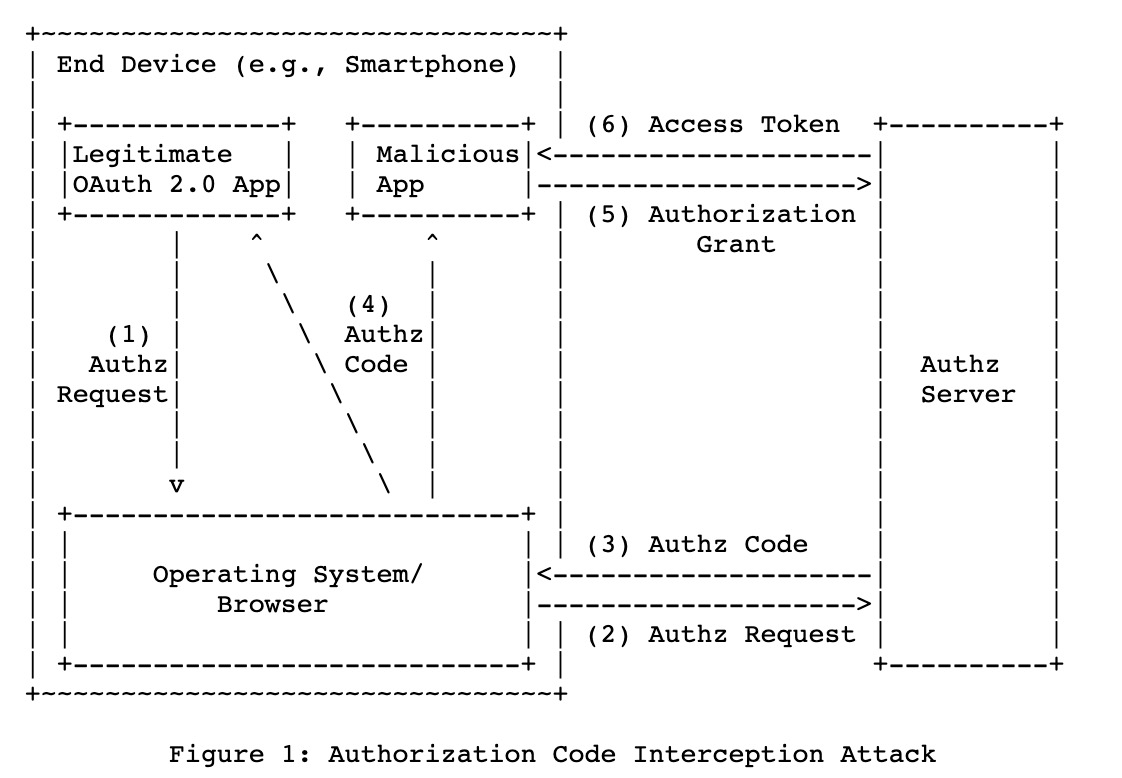
After OAuth2 was proposed, Google also proposed some points worth considering in [RFC 7636](https://tools.ietf.org/html/rfc7636) proposed by Google in 2015. This article mentions that if the OAuth2 process is introduced in the App on the mobile phone, it may be stolen by other maliciously installed mobile phone Apps during the transmission process. For related details, please refer to [the detailed case provided by the LINE Login official website](https://developers.line.biz/en/docs/line-login/integrate-pkce/#pkce-merit).

(For details, please refer to [Benefits of implementing PKCE for LINE Login](https://developers.line.biz/en/docs/line-login/integrate-pkce/#pkce-merit))
Here is a brief explanation of the relevant process and problems:
- Users use an App with OAuth2 integrated on their mobile phones to do Authorization
- Enter the account login screen of the OAuth2 service provider
- After the authentication is complete, the OAuth2 platform will open the relevant App according to the URL registered at the beginning (on the mobile phone is a certain login URI Scheme).
- At this time, if the user accidentally installs a malicious App, it can register the same URI Scheme, but because of the mobile phone design principle, both Apps will receive the relevant URI Callback.
- `Malicious App` receives the URI Callback call and gets the `code` and `state` and obtains the Channel ID and Channel Secret through other methods (the principle is through App scanning, which will not be described in detail here).
- At this time, the malicious program that gets the `code` and `state` can obtain the relevant Token and obtain the permission by calling `GetAccessToken`.
Because the original OAuth2 has such defects on the client App side, the PKCE method can be used to remedy the relevant problems.
## What is PKCE?

(from [LINE Login introduction PKCE in LINE Login process diagram](https://developers.line.biz/en/docs/line-login/integrate-pkce/#how-to-integrate-pkce))
PKCE (Proof Key for Code Exchange) is a Code Exchange mechanism proposed by Google in [RFC 7636](https://tools.ietf.org/html/rfc7636). Through this exchange of information, it can avoid the theft attacks caused by the Callback URI. The detailed description is as follows:
First, explain two parameters:
- `Code Verifier`: A special string, with a length limit between 43 ~ 128.
- `Code Chanllenge`: A string converted from `Code Verifier` through SHA 256.
Next, I will explain how these two strings can increase security in the OAuth2 process:
- When generating the Web Login URL, first throw `Code Chanllenge` in the passing parameters.
- Connect to LINE to start the authentication process, and after completing the authentication process. Pass the `code` and `state` back through the Callback URI.
- At this time, the authenticator will send the `Code Verifier` to the authentication server to obtain the Access Token.
- The authentication server will use `Code Verifier` and `Code Chanllenge` to confirm whether it is a request from the same demand side.
- Return `Access Token` to complete the authentication and obtain information requirements.
## How to introduce PKCE in LINE Login?
Next, I will use the two example codes line-login-SDK-go and LINE-login-pkce-go to demonstrate:
- **LINE Login Go SDK**:
- Github: [github.com/kkdai/line-login-sdk-go](https://github.com/kkdai/line-login-sdk-go)
- **LINE Login PKCE Starter:**
- GitHub: [github.com/kkdai/line-login-go](https://github.com/kkdai/line-login-go)
- Website: https://line-login-pkce.herokuapp.com/
### How to generate Code Verifier
<script src="https://gist.github.com/kkdai/bad1aa6851057bffe1ae61e68910700b.js"></script>
### How to generate Code Challenge
The document provides [Code Challenge's python psuedo code](https://developers.line.biz/en/docs/line-login/integrate-pkce/#generate-code-challenge), here it is converted into Golang code. The more complex part is `sha256.Sum256()` and the string needs to be URLEncoded. The main thing is to do it according to [Base 64 Encoding with URL and Filename Safe Alphabet (opens new window)](https://tools.ietf.org/html/rfc4648#section-5). In fact, it can be done in one line in Golang.
<script src="https://gist.github.com/kkdai/bbca6d6ab463bd53e7fa3b7c4d73ae33.js"></script>
## Conclusion:
## Related articles:
-
[LINE Login now supports PKCE](https://developers.line.biz/en/news/2021/04/09/line-login-pkce-support/)
-
[RFC7636 - Proof Key for Code Exchange by OAuth Public Clients](https://tools.ietf.org/html/rfc7636)
-
[RFC7523 - JSON Web Token (JWT) Profile for OAuth 2.0 Client Authentication and Authorization Grants](https://tools.ietf.org/html/rfc7523)
-
[RFC6749- The OAuth 2.0 Authorization Framework](https://tools.ietf.org/html/rfc6749)
-
[Developer News: LINE Login now supports PKCE](https://developers.line.biz/en/news/2021/04/09/line-login-pkce-support/)
-
[Developer Doc - PKCE support for LINE Login](https://developers.line.biz/en/docs/line-login/integrate-pkce/#how-to-integrate-pkce)
-
[OAuth 2.0 in Go](https://dev.to/treyhuffine/oauth-2-0-in-go-1gn0-temp-slug-4209668)

Evan Lin
Posted on Originally published at evanlin.com on
[Learning Notes] [Golang] How to Develop OAuth2 PKCE with Golang - Using LINE Login as an Example
For further actions, you may consider blocking this person and/or reporting abuse


Top comments (0)