

title: [Learning Experience][Golang] Writing a console ChatGPT with Cobra and go-gpt3
published: false
date: 2022-12-06 00:00:00 UTC
tags:
canonical_url: http://www.evanlin.com/go-chatgpt/
---
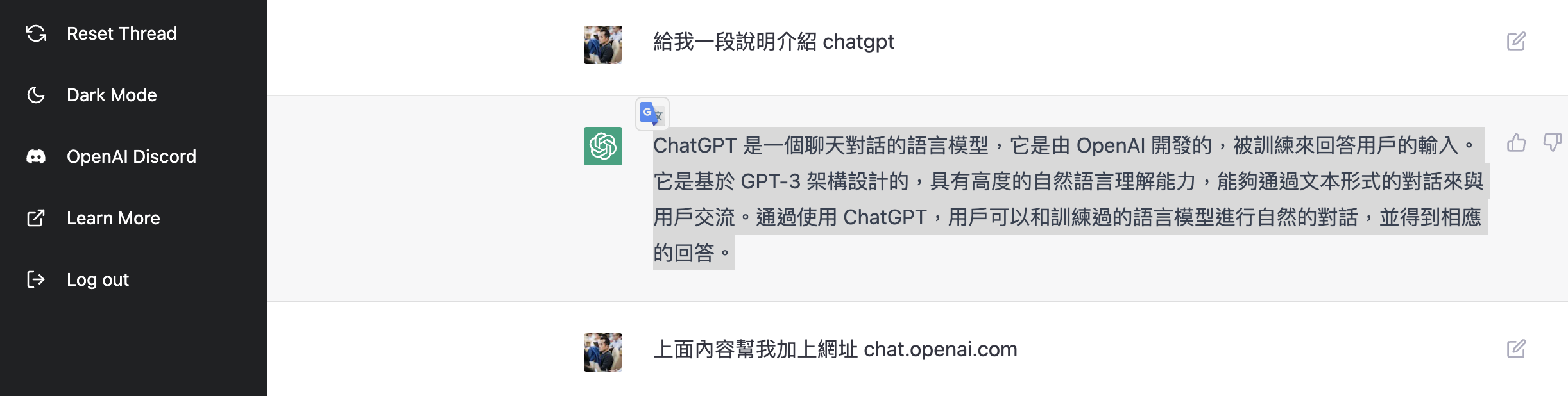
ChatGPT is a conversational language model that is developed by OpenAI and trained to answer user inputs. It is designed based on the GPT-3 architecture and has a high degree of natural language understanding, capable of communicating with users through text-based conversations. By using ChatGPT, users can have natural conversations with the trained language model and receive corresponding answers.
The hottest website recently is probably:
[https://chat.openai.com/chat](https://chat.openai.com/chat)
## Github
[https://github.com/kkdai/chatgpt](https://github.com/kkdai/chatgpt)

### References:
- [https://chat.openai.com/chat](https://chat.openai.com/chat)
- [I tried integrating GPT-3 into a LINE chatbot](https://dev.classmethod.jp/articles/chatgpt-line-chat-bot/)
- [https://beta.openai.com/docs/api-reference/completions/create](https://beta.openai.com/docs/api-reference/completions/create)
- [https://github.com/isdaviddong/chatGPTLineBot](https://github.com/isdaviddong/chatGPTLineBot)
# Let AI do the work
The following article was written by ChatGPT, and it's surprisingly convenient overall. The correctness is also acceptable.
Help me write an article introducing how to use cobra and go-gpt3 to write a golang console client
Since `MaxToken` can only be limited to 4000, when ChatGPT gets stuck, just type `continue`.

* * *

## What is Cobra

Cobra is a Go library for building powerful command-line user clients. It provides a template engine that allows you to easily define commands and subcommands, and provides support for help and prompt information.

Go-gpt3 is a Go language library that provides a simple way to use OpenAI's GPT-3 machine learning model. GPT-3 is a very powerful language model that can be used to handle natural language processing tasks, such as text generation and classification.

Now let's see how to use these two libraries to write a Golang console client. First, you need to install Go and Cobra:
$ go get github.com/spf13/cobra/cobra
Next, create a new Go project and write the following code in the `main.go` file:
package main
import (
"fmt"
"github.com/spf13/cobra"
)
func main() {
// Create a new Cobra command-line application
var cmd = &cobra.Command{
Use: "gpt3-console-client",
Short: "A simple GPT-3 console client",
Long: "A simple GPT-3 console client built with Cobra and Go-gpt3",
}
// Define subcommands
cmd.AddCommand(...)

// Execute the command
cmd.Execute()
}
This program defines a Cobra command-line application named `gpt3-console-client` and adds some subcommands.

## Import Go-GPT3

Next, you need to install the Go-gpt3 library and import it:
$ go get github.com/gpt3/go-gpt3
import (
"fmt"
"log"
"github.com/gpt3/go-gpt3"
"github.com/spf13/cobra"
)
Now, you can use the Go-gpt3 library to create a GPT-3 client and perform operations such as text generation. First, you need to create a GPT-3 client and authenticate with your OpenAI API key:
func main() {
// Create a new GPT-3 client
client := gpt3.NewClient(gpt3.ClientConfig{
APIKey: "YOUR_API_KEY",
})
// Create a new Cobra command-line application
var cmd = &cobra.Command{
    Use: "gpt3-console-client",
    Short: "A simple GPT-3 console client",
    Long: "A simple GPT-3 console client built with Cobra and Go-gpt3",
}

// Define subcommands
cmd.AddCommand(...)

// Execute the command
cmd.Execute()
}
Next, you can define a subcommand to perform text generation operations. For example, the following code defines a subcommand named `generate`, which accepts a `prompt` parameter and uses the GPT-3 model to generate text:
// Define generate subcommand
var generateCmd = &cobra.Command{
Use: "generate",
Short: "Generate text using GPT-3",
Long: "Generate text using GPT-3 with the given prompt",
Args: cobra.MinimumNArgs(1),
Run: func(cmd *cobra.Command, args []string) {
// Get the prompt entered by the user
prompt := args[0]
// Use the GPT-3 model to generate text
generatedText, err := client.Generate(prompt)
if err != nil {
    log.Fatal(err)
}

// Output the generated text
fmt.Println(generatedText)
},
}
func main() {
// Create a new GPT-3 client
client := gpt3.NewClient(gpt3.ClientConfig{
APIKey: "YOUR_API_KEY",
})
// Create a new Cobra command-line application
var cmd = &cobra.Command{
Use: "gpt3-console-client",
Short: "A simple GPT-3 console client",
Long: "A simple GPT-3 console client built with Cobra and Go-gpt3",
}
// Add the generate subcommand to the main command
cmd.AddCommand(generateCmd)
// Execute the command
cmd.Execute()
}
Now, you can run the application and use the `generate` subcommand to generate text. For example, you can enter the following command:
$ gpt3-console-client generate "Once upon a time"
This will generate a piece of text with "Once upon a time" as the prompt:
Once upon a time, there was a beautiful princess who lived in a far-off kingdom. She had long, flowing hair and a kind heart. One day, a handsome prince came to her kingdom and asked for her hand in marriage. The princess was overjoyed, and the two of them lived happily ever after.
I hope this article has been helpful and allows you to easily use Cobra and Go-gpt3 to write a Golang console client.


Top comments (0)