

This post shows how to set up routing in a modern React app using React Router v6.4+, connecting layouts, pages, and error handling so your application renders correctly and behaves like a real product.
Click here for Act 2 · Scene 1
Table of Contents
- Overview
- First Things First: A Proper Home
- Error Handling with an Error Page
- Structuring App.tsx
- UI Consistency: Global CSS Reset
- Refining the Home Component
- Mental Model
- Why This Scene Matters
In this scene, I wire up a real React application using React Router v6.4+, turning App.tsx into a routing hub that connects layouts, pages, and error handling so the UI finally renders like a real product.
Overview:
In the previous scene, I introduced a proper layout system using RootLayout and a persistent MainNav. Structurally, everything was in place, but visually, nothing showed up.
In fact, to be very specific, I built the frame. And it comprised of; The navigation and The Layout. But for some reason, the app said: “nice try fella, but I aint gonna render anything”.
Frustrating right?
This scene focuses on connecting the pieces:
- Defining routes
- Introducing a home page
- Handling invalid routes
- Making the layout actually render
First things first: a proper Home
Rather than leaving placeholder content inside the App.tsx, I introduced a dedicated HomePage component. Simply because that Voke is going in… text sitting inside App.tsx had overstayed its welcome. So I pulled it out into its own HomePage component.
This would ensure App.tsx handles routing and configuration, and Pages define structure. While Components handle UI. Each would have a responsibility of its own.
So the Home page looked like this:
const HomePage = () => {
  return <h2>Voke is going in...</h2>;
};

export default HomePage;
Not to worry, I come back to this in a minute.
Error Handling with an Error Page
Next, I introduced an ErrorPage component to handle undefined routes and routing errors. This is an answer to a question that kept hitting me like a punching bag receiving jabs from Balrog in Street Fighter.
And that is: what happens when someone types a random URL?
Instead of letting the app break silently, I introduced an ErrorPage.
Not flashy. Just responsible.
import { Link } from "react-router-dom";
import MainNav from "../components/main-nav/MainNav";

const ErrorPage = () => {
  return (
    <>
      <MainNav />
      <main style={{ width: "100%", maxWidth: "70rem", margin: "5rem auto" }}>
        <h2>Page not found</h2>
        <p>
          <Link to="/">Go back home</Link>
        </p>
      </main>
    </>
  );
};

export default ErrorPage;
This ensures:
- Invalid URLs don’t crash the app
- Users always have a recovery path
- Navigation remains consistent even on error states.
So in plain English, if a route doesn’t exist, the user sees the navigation, gets a clear message, and has a way back home.
That’s basic UX hygiene. And it’s easier to do now than later.
Structuring App.tsx
Now comes the heart of the app.
With pages in place, App.tsx became the central routing configuration using React Router v6.4+. I intentionally chose React Router v6.4+ because it introduces the data router APIs (createBrowserRouter). This gives me a more scalable routing setup with first-class support for layouts and error boundaries. So I stuck with v6.4+.
And it’s best I spell this out here. App.tsx isn’t a UI file anymore, it’s now the traffic controller.
This is how the App.tsx file looks like now:
import { createBrowserRouter, RouterProvider } from "react-router-dom";
import RootLayout from "./pages/RootLayout";
import HomePage from "./pages/HomePage";
import ErrorPage from "./pages/ErrorPage";
function App() {
const router = createBrowserRouter([
{
path: "/",
element: <RootLayout />,
errorElement: <ErrorPage />,
children: [{ path: "/", element: <HomePage /> }],
},
]);
return <RouterProvider router={router} />;
}
export default App;
At this point:
- Layouts were nested correctly
- Routes were declarative
- Errors were handled centrally
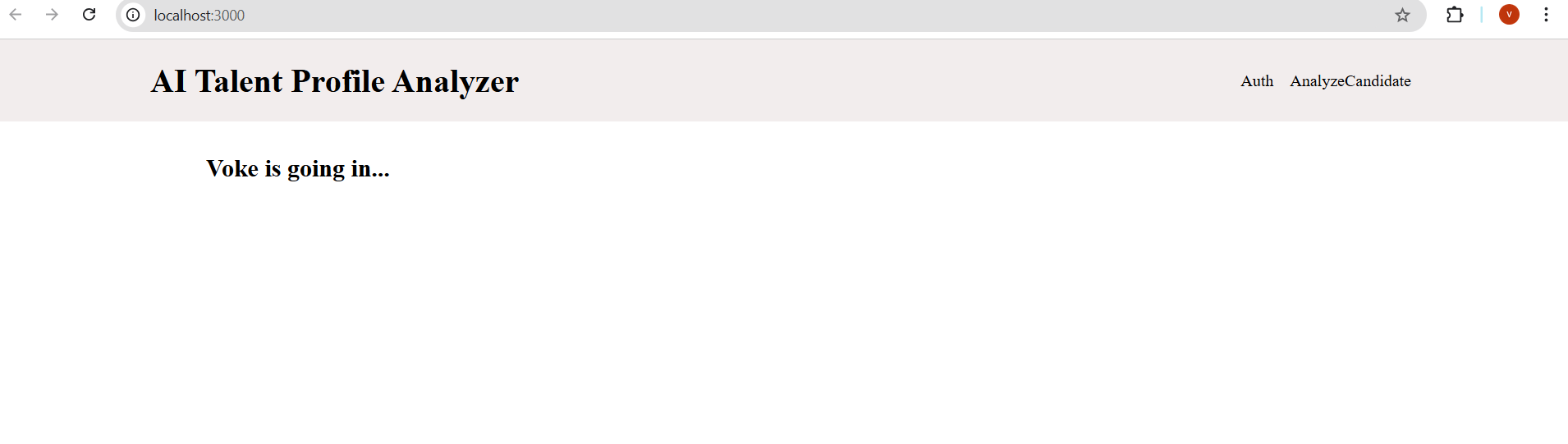
This simply meant that the application was beginning to have a pulse. Did I hear some say breathe [in the voice of the uncredited singer of the fabolous song breathe].
So if I save and reload the page, I will get this:

UI Consistency: Global CSS Reset
As you can see from the image above, once everything was rendered, spacing issues became obvious. The layout felt… off. This happened because default browser margins and padding were creeping in
A quick global reset fixed it:
* {
  box-sizing: border-box;
  margin: 0;
  padding: 0;
}
With that code block added in, saw this:

This brought the layout back under control and gave the UI a predictable baseline to build on.
Refining the Home Component
At this point, it felt wrong to keep UI markup inside HomePage.
Pages shouldn’t worry about how things look, they should worry about where things live.
So I pushed the UI one level down and introduced a dedicated Home component which also had its own style file.
HomePage now handles routing, while Home focuses purely on presentation.
The Home component:
import classes from "./Home.module.scss";

const Home = () => {
  return (
    <div className={classes["home-container"]}>
      <h1>Analyze candidate-job fit using AI</h1>
      <p>Get instant insights on CVs and job descriptions with AI</p>
    </div>
  );
};

export default Home;
This component is then rendered inside HomePage, keeping concerns separated.
That separation already feels like it will pay off later.
Saved it, and checked my browser and saw this:

That's more like it...
Mental Model
At this stage:
- App.tsx is the heart
- RootLayout can be compared to a skeleton
- While pages are meant for destinations
- And Components render the presentations
Well, they all seem to play a role. They all know their role, like the video game tagline SmackDown 2: Know your role. 😊
And with all these, the foundation seems stable.
Why This Scene Matters
This scene demonstrates that I:
- Understand modern React Router architecture (v6.4+)
- Separate configuration, layout, pages, and UI cleanly
- Build structure before features
- can refactor when needed
Thanks for reading.
Let’s move on to the Next Scene.
We in the Building…
Building in Progress…


Top comments (0)