

title: [Gemini][LINEBot] Building an Agent LINE Bot with Google ADK
published: false
date: 2025-04-09 00:00:00 UTC
tags:
canonical_url: https://www.evanlin.com/google-adk-linebot/
---
# Preface
Although I just integrated the [OpenAI Agents SDK into a simple LINE Bot example program](https://dev.to/evanlin/geminilinebot-da-zao-ge-openai-agents-line-bot-bing-qie-shi-yong-google-gemini-model-66k-temp-slug-8051372) a few days ago, Google announced the release of ADK (Google Agent SDK) on the morning of 20250410.
This article will introduce how to build a simplest LINE Bot function using Google Agent SDK (ADK) as the starting project for MCP and other functions. (I didn't expect that I could switch to Google ADK so soon XD)
#### Sample Code: [https://github.com/kkdai/linebot-adk](https://github.com/kkdai/linebot-adk)
## Quick Introduction to Google ADK
#### Repo: [https://github.com/google/adk-python](https://github.com/google/adk-python)
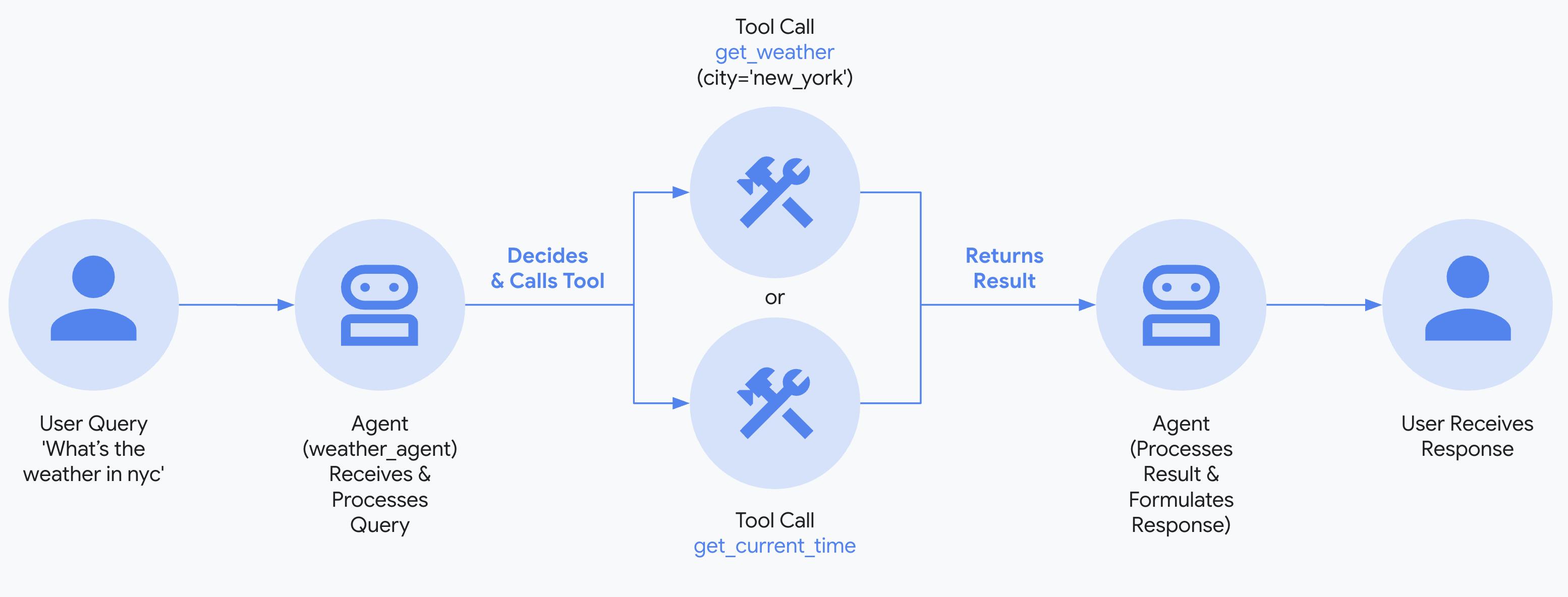
Google's Agent Development Kit (ADK) is an open-source framework designed to simplify the development of intelligent multi-agent systems. Here are the key points:
- ADK is an open-source framework designed for developing multi-agent systems, providing comprehensive support from building to deployment.
- It supports modular and scalable application development, allowing collaboration between multiple professional agents.
**Functional Features**:
- **Built-in Streaming**: Supports two-way audio and video streaming, providing natural human-computer interaction.
- **Flexible Orchestration**: Supports workflow agents and LLM-driven dynamic routing.
- **Integrated Developer Experience**: Provides a powerful CLI and visual Web UI for easy development, testing, and debugging.
- **Built-in Evaluation**: Systematically evaluates agent performance.
- **Easy Deployment**: Supports containerized deployment.
## Supporting Visual Testing WebUI
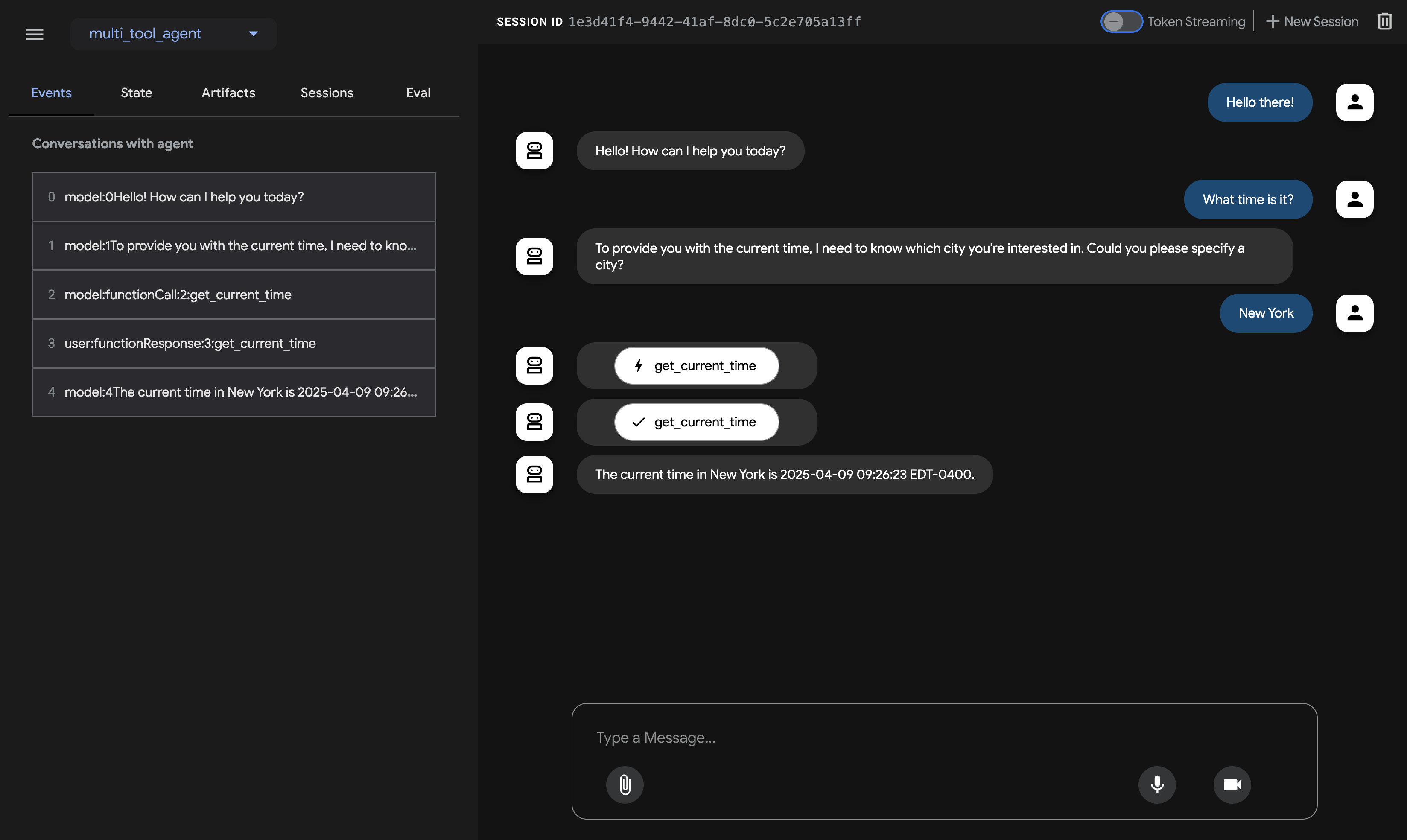
(Refer: [https://google.github.io/adk-docs/get-started/quickstart/#run-your-agent)](https://google.github.io/adk-docs/get-started/quickstart/#run-your-agent))
You can do some quick testing on the local end through the WebUI and quickly deploy it to Google Cloud. Related functions will also be mentioned in subsequent articles.
### Matters Needing Attention for Integrating LINE Bot SDK:
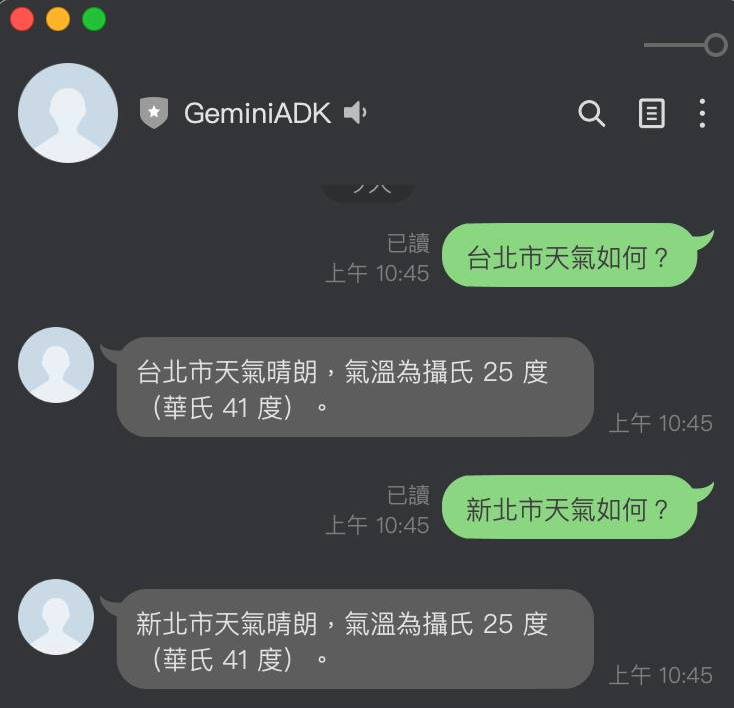
Next, I'll tell you what you need to pay attention to when adding the LINE Bot SDK.
#### Sample Code: [https://github.com/kkdai/linebot-adk](https://github.com/kkdai/linebot-adk)
#### Agent Initialization Flow
Currently, the Agent is initialized when Services starts.
Initialize ADK client
root_agent = Agent(
name="weather_time_agent",
model="gemini-2.0-flash-exp",
description=(
"Agent to answer questions about the time and weather in a city."
),
instruction=(
"I can answer your questions about the time and weather in a city."
),
tools=[get_weather, get_current_time],
)
print(f"Agent '{root_agent.name}' created.")
After creating the Agent, you need to prepare the Runner to execute the Agent communication work.
Key Concept: Runner orchestrates the agent execution loop.
runner = Runner(
agent=root_agent, # The agent we want to run
app_name=APP_NAME, # Associates runs with our app
session_service=session_service # Uses our session manager
)
After that, you can call this runner through async to get the agent's results. (Will be mentioned later)
### Using Memory to Remember Conversations for Different Users
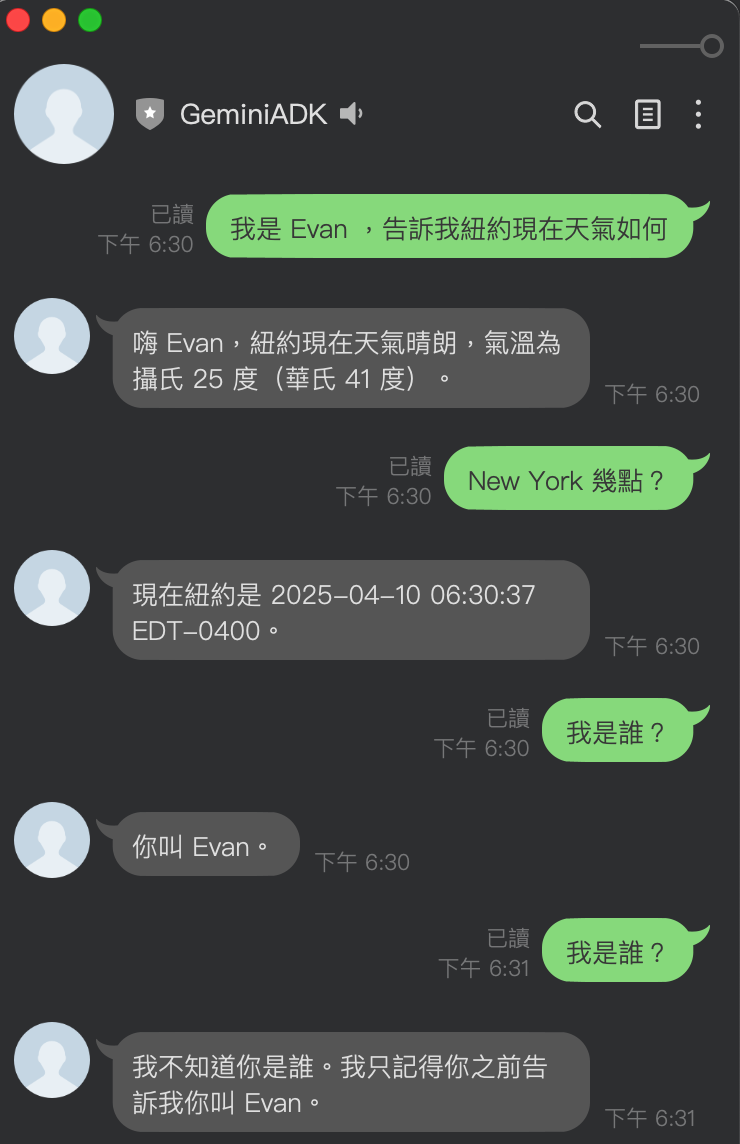
In [ADK](https://github.com/google/adk-python), there are many related [Memory Services that can be used](https://google.github.io/adk-docs/sessions/memory/#the-memoryservice-role):
- **`InMemoryMemoryService`**
- Uses the memory of Serives for storage, which can be used as a basic storage method. However, if using CloudRun, it will disappear when the service restarts.
- **`VertexAiRagMemoryService`**
- Uses VertexAI's RAG service, which may incur additional storage space fees.
Next, I'll share how to use **InMemoryMemoryService** to store conversation memories of different users.
def get_or_create_session(user_id):
if user_id not in active_sessions:
# Create a new session for this user
session_id = f"session_{user_id}"
session_service.create_session(
app_name=APP_NAME,
user_id=user_id,
session_id=session_id
)
active_sessions[user_id] = session_id
print(
f"New session created: App='{APP_NAME}', User='{user_id}', Session='{session_id}'")
else:
# Use existing session
session_id = active_sessions[user_id]
print(
f"Using existing session: App='{APP_NAME}', User='{user_id}', Session='{session_id}'")
return session_id
First, the above **get\_or\_create\_session()** can create or get the user's Session ID through user\_id. This allows ADK to continue relevant conversations through the correct Session ID.
async def call_agent_async(query: str, user_id: str) -> str:
"""Sends a query to the agent and prints the final response."""
print(f"\n>>> User Query: {query}")
# Get or create a session for this user
session_id = get_or_create_session(user_id)

# Prepare the user's message in ADK format
content = types.Content(role='user', parts=[types.Part(text=query)])

final_response_text = "Agent did not produce a final response." # Default

try:
    # Key Concept: run_async executes the agent logic and yields Events.
    # We iterate through events to find the final answer.
    async for event in runner.run_async(user_id=user_id, session_id=session_id, new_message=content):
        # Key Concept: is_final_response() marks the concluding message for the turn.
        if event.is_final_response():
            if event.content and event.content.parts:
                # Assuming text response in the first part
                final_response_text = event.content.parts[0].text
            elif event.actions and event.actions.escalate: # Handle potential errors/escalations
                final_response_text = f"Agent escalated: {event.error_message or 'No specific message.'}"
            # Add more checks here if needed (e.g., specific error codes)
            break # Stop processing events once the final response is found
except ValueError as e:
    # Handle errors, especially session not found
    print(f"Error processing request: {str(e)}")
    # Recreate session if it was lost
    if "Session not found" in str(e):
        active_sessions.pop(user_id, None) # Remove the invalid session
        session_id = get_or_create_session(user_id) # Create a new one
        # Try again with the new session
        try:
            async for event in runner.run_async(user_id=user_id, session_id=session_id, new_message=content):
                # Same event handling code as above
                if event.is_final_response():
                    if event.content and event.content.parts:
                        final_response_text = event.content.parts[0].text
                    elif event.actions and event.actions.escalate:
                        final_response_text = f"Agent escalated: {event.error_message or 'No specific message.'}"
                    break
        except Exception as e2:
            final_response_text = f"Sorry, I encountered an error: {str(e2)}"
    else:
        final_response_text = f"Sorry, I encountered an error: {str(e)}"

print(f"<<< Agent Response: {final_response_text}")
return final_response_text
Through the above code, after each user's information (Query, User\_ID) is passed in, different communication records (Session) are created (or obtained) through the user\_id of different users.
Then, run the ADK function query through different Sessions. (Mainly through `async for event in runner.run_async(user_id=user_id, session_id=session_id, new_message=content):`)
This way, different users can have different memory content. There is also no need to call related memory-related Functions separately.
## Quick Summary and Future Development
Learning to this point, perhaps everyone will have the same question as me: "What is the difference between OpenAI Agents SDK and Google ADK?"
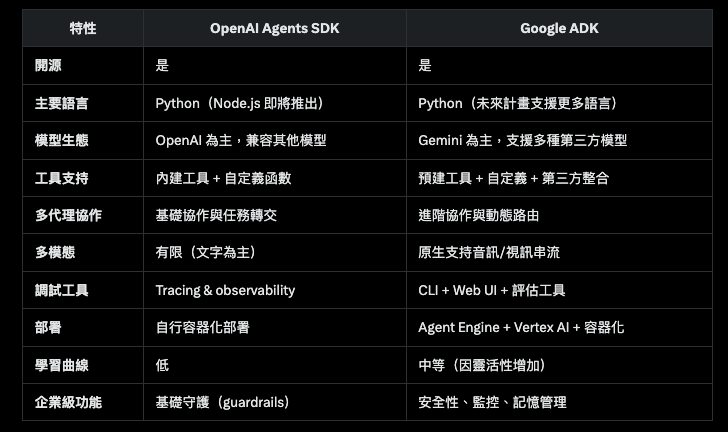
(Table compiled by Grok3)
Just like this table, I think ADK is not easier to use than OpenAI Agent SDK. But because it has many useful WebUI built-in and has already packaged many tools. This will eliminate future worries in development. Next, I will also organize MCP Server, voice or multi-modal related applications into ADK to share with everyone, so stay tuned.


Top comments (0)