


In our first CSS episode, we discussed the foundations. In this special bonus episode, we continued the conversation by covering some more in-depth areas of CSS, like layouts with Grid and Flexbox, animations, media queries, naming conventions, pre-processors, and frameworks.
Here are some Flexbox cheat sheets to go along with the episode! 🐞
Shoutout to Emma for making these!
![[deleted user] image](https://media2.dev.to/dynamic/image/width=800%2Cheight=%2Cfit=scale-down%2Cgravity=auto%2Cformat=auto/https%3A%2F%2Fthepracticaldev.s3.amazonaws.com%2Fi%2F99mvlsfu5tfj9m7ku25d.png)
[Deleted User]
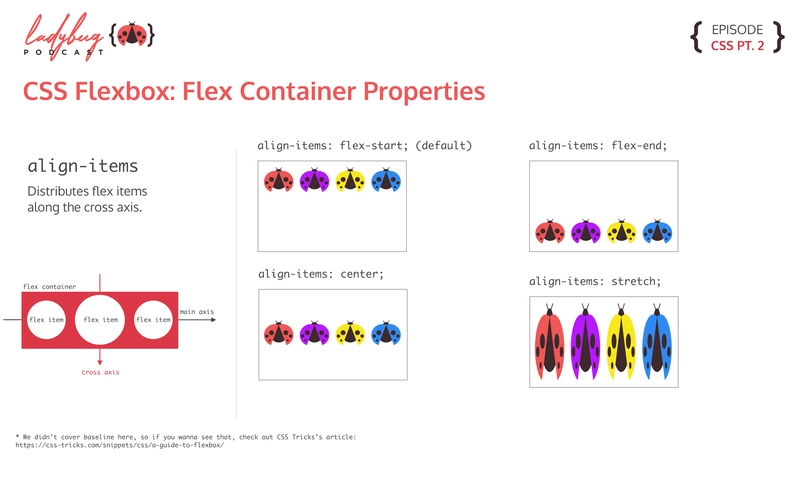
Align Items
Flex Direction and Flex Wrap

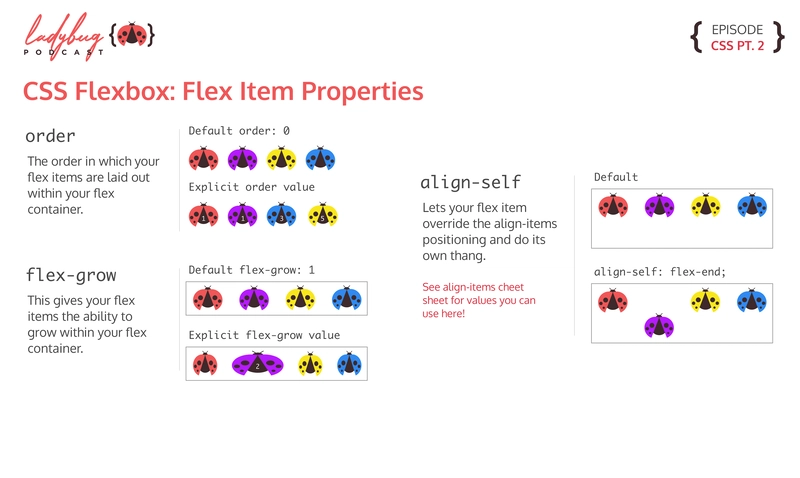
Flex Items
Justify Content

You can also check out our CSS cheat sheets here:


You can listen to the full episode wherever you listen to podcasts!

Latest comments (21)
These cheat sheets are amazing!
📝Copy paste-able infographics please 👍
Thanks for making these!<3
I'm visual and it helps to see what each method does.
Would it be possible to make some kind of reference or links on whatever tech or resources ya'll are talking about for all your episodes?
I want to check them all out but I can't remember them all.
Hey! I think we have that, check out our show notes! ladybug.dev/episode/css-part-2/
Thank you so much! This is exactly what I was needing!
I did not know that you are on spotify too. From now on I am one of your listeners too 😅
This is exactly what I've been needing to see. I have been away from web design for years and have been recently brushing up on css and these are perfect examples; simple, but elegant.
Love love LOVE these infographics! I just signed up to listen to your podcasts so I can keep up with y'all!
This is awesome!!!
I'm going to print these out to have at work.
Thank you all so much!
Nice work. This reminds me of flexboxfroggy.com
One of the things that confuses me is the difference between
justify-contentandalign-items.So simple and so well explained at the same time.
Thank you so much!
Hey y'all, big fan of the podcast! Really love these cheat sheets you’ve been releasing as well. I did notice that for align-items it mentions flex-start as the default, but it’s my understanding (I went and confirmed here:
developer.mozilla.org/en-US/docs/W...) that ‘stretch’ is the default for flex items. Wanted to let you know! Again, really great stuff and can’t wait to see more like this!
Not to be super corrective, but to future readers the "initial value" of align-items is
normal, which behaves similar to flex-start. MDN is kinda confusing because the demo starts with stretch but clearly states the initial value at the bottom of the screen.Source: developer.mozilla.org/en-US/docs/W...