


Hello, I'm Maneshwar. I'm building git-lrc, an AI code reviewer that runs on every commit. It is free, unlimited, and source-available on Github. Star Us to help devs discover the project. Do give it a try and share your feedback for improving the product.
Face comparison used to sound like a "hackathon-only" feature. Now? You can plug it into your side project or SaaS in an evening—thanks to tools like AWS Rekognition.Let’s talk about how you can compare faces in images, real use cases, and how to integrate it with a few lines of code.
What is Face Comparison?
At its core, face comparison is the ability to determine if two images contain the same person.
This involves sophisticated algorithms that analyze facial features like:
- Eye distance
- Nose shape
- Mouth width
- Jawline
These features are mathematically represented as vectors, allowing for a numerical comparison.
Real World Applications
The ability to compare faces has far-reaching implications across various industries:
Security and Surveillance: Facial recognition systems can identify individuals in real-time, aiding in security checks, access control, and criminal investigations.
Marketing and Advertising: Personalized advertising based on facial expressions and demographics can be implemented.
Healthcare: Patients can be identified accurately, streamlining medical records and ensuring proper care.
How to Implement Face Comparison core, it answers this:
"Does this face match another face?"
Behind the scenes, Rekognition scans both images, detects faces, and returns a similarity score.
Here's the CompareFaces API for that.
Common Use Cases
You’ll see this in real-world projects like:
- eKYC (Know Your Customer): Compare a selfie with a government ID photo.
- Duplicate Account Detection: Flag same-person signups with different emails.
- Event Check-ins: Snap a selfie, match with registered photo.
- Visitor Validation: Match new visitors to previously stored images.
- Internal Tools: Audit employee check-ins with face scan verification.
All of these can be implemented by storing the original photo once in S3, and comparing it with real-time uploads whenever needed.
Pricing?
Rekognition pricing is pay-as-you-go, and here's a quick breakdown for Group 1 APIs like CompareFaces and IndexFaces:
| Images Processed | Price/Image |
|---|---|
| First 1 million | $0.001 |
| Next 4 million | $0.0008 |
| Next 30 million | $0.0006 |
| Over 35 million | $0.0004 |
⚡ That’s less than a cent per comparison.
And you get free tier access to test things out.
Code in Action (Node.js + S3)
Let’s say you’ve got two images in an S3 bucket:
-
bezos_original.jpeg– stored reference image -
bezos_current.jpeg– new upload to compare
Here’s the minimal setup:
var AWS = require("aws-sdk");
const bucket = "fd-23";
const photo_source = "face-recognition/bezos_current.jpeg";
const photo_target = "face-recognition/bezos_original.jpeg";

var credentials = new AWS.SharedIniFileCredentials({ profile: "default" });
AWS.config.credentials = credentials;
AWS.config.update({ region: "ap-south-1" });

const client = new AWS.Rekognition();
const params = {
  SourceImage: {
    S3Object: { Bucket: bucket, Name: photo_source },
  },
  TargetImage: {
    S3Object: { Bucket: bucket, Name: photo_target },
  },
  SimilarityThreshold: 70,
};

client.compareFaces(params, function (err, response) {
  if (err) {
    console.log("error : ", err, err.stack);
  } else {
    response.FaceMatches.forEach((data) => {
      let position = data.Face.BoundingBox;
      let similarity = data.Similarity;
      console.log(
        `The face at: ${position.Left}, ${position.Top} matches with ${similarity.toFixed(2)}% confidence`
      );
    });
  }
});
Output:

Got not authorized Error?
If you see something like:
is not authorized to perform: rekognition:CompareFaces
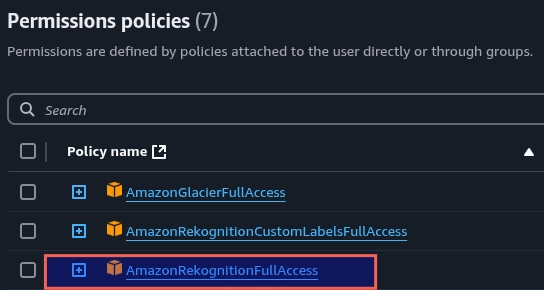
Then your IAM user needs the correct permissions.
Attach the policy:
Should You Use Face Indexing?
If you want to compare future images to previously added ones, then indexing is your friend.
Use IndexFaces to add a face to a collection and search it later.
TL;DR
- Face comparison is easy with AWS Rekognition.
- Use cases? From eKYC to event apps.
- Pricing is scalable and dev-friendly.
- Store one reference image in S3 and reuse it for all comparisons.
- IAM permissions matter—set them right.
Want to try it out?
Check the Rekognition docs, throw two images in S3, and you're good to go.
Got any use case in mind for your own project? Let me know in the comments.
With LiveAPI, you can quickly generate interactive API documentation that allows users to execute APIs directly from the browser.
Let me know if you have any questions.

*AI agents write code fast. They also silently remove logic, change behavior, and introduce bugs -- without telling you. You often find out in production.
git-lrc fixes this. It hooks into git commit and reviews every diff before it lands. 60-second setup. Completely free.*
Any feedback or contributors are welcome! It's online, source-available, and ready for anyone to use.
⭐ Star it on GitHub:
 HexmosTech
/
git-lrc
HexmosTech
/
git-lrc
Free, Micro AI Code Reviews That Run on Commit
| 🇩🇰 Dansk | 🇪🇸 Español | 🇮🇷 Farsi | 🇫🇮 Suomi | 🇯🇵 日本語 | 🇳🇴 Norsk | 🇵🇹 Português | 🇷🇺 Русский | 🇦🇱 Shqip | 🇨🇳 中文 | 🇮🇳 हिन्दी |

git-lrc
Free, Micro AI Code Reviews That Run on Commit




AI agents write code fast. They also silently remove logic, change behavior, and introduce bugs -- without telling you. You often find out in production.
git-lrc fixes this. It hooks into git commit and reviews every diff before it lands. 60-second setup. Completely free.
See It In Action
See git-lrc catch serious security issues such as leaked credentials, expensive cloud operations, and sensitive material in log statements
git-lrc-intro-60s.mp4
Why
- 🤖 AI agents silently break things. Code removed. Logic changed. Edge cases gone. You won't notice until production.
- 🔍 Catch it before it ships. AI-powered inline comments show you exactly what changed and what looks wrong.
- …


Top comments (0)