


How I Built Nucleon CLI: One Tool to Replace My Entire Development Workflow
"There has to be a better way..."
That's what I thought after spending 20 minutes just to set up a new React project, configure deployment, and run basic health checks. I was juggling 15+ different CLI tools, and frankly, I was tired of it.
So I built Nucleon CLI - a universal developer workflow engine that replaces your entire toolchain with one intelligent interface.
The Problem: Tool Fragmentation Hell
My typical project setup looked like this:
Project setup
npx create-next-app my-app
cd my-app
# Manual folder restructuring for 10 minutes...
# Deployment setup
npm install -g vercel
vercel login
vercel link
# Environment variable configuration...
# Code analysis
npm install -g eslint
# Manual configuration files...
# Environment debugging
node --version
npm --version
"Works on my machine" debugging for 30 minutes...
Total time: 45+ minutes before writing a single line of business logic.
The real kicker? I had to remember different commands, flags, and configurations for each tool. Context switching was killing my productivity.
The Solution: One CLI to Rule Them All
What if you could replace all of that with:
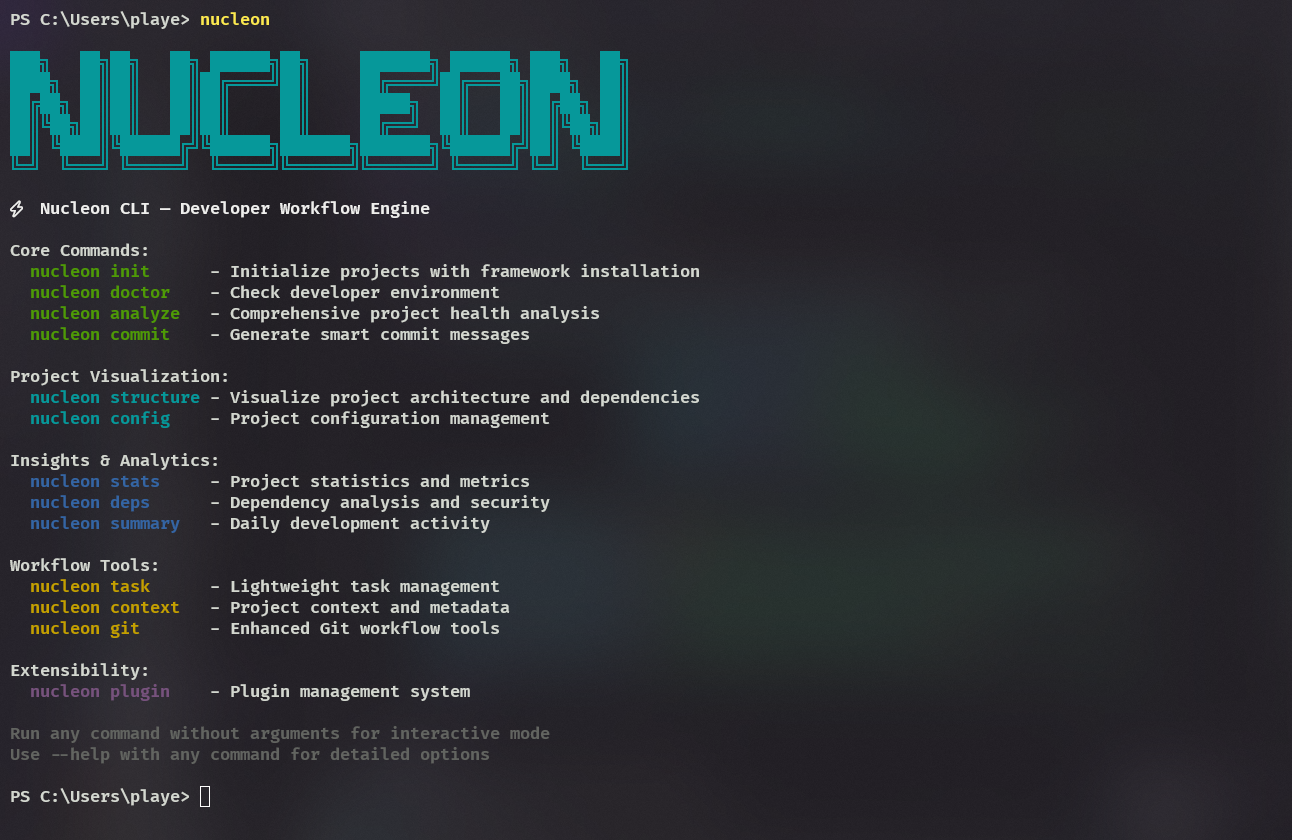
npm install -g nucleon-cli

nucleon init      # Professional project setup in 30 seconds
nucleon analyze   # Instant codebase health check
nucleon deploy    # Smart deployment with pre-flight checks
nucleon doctor    # Fix environment issues automatically
That's exactly what Nucleon CLI does.
*What Makes It Different
*🧠 Context-Aware Intelligence
Unlike generic scaffolding tools, Nucleon understands your project context:
Express projects get full MVC architecture (controllers, routes, services, models)
Next.js projects get proper component organization with barrel exports
FastAPI projects get layered architecture (api, controllers, services, schemas)
React+Vite gets complete folder structure with hooks, services, and utils
🏗️ Professional Structures, Not Toy Examples
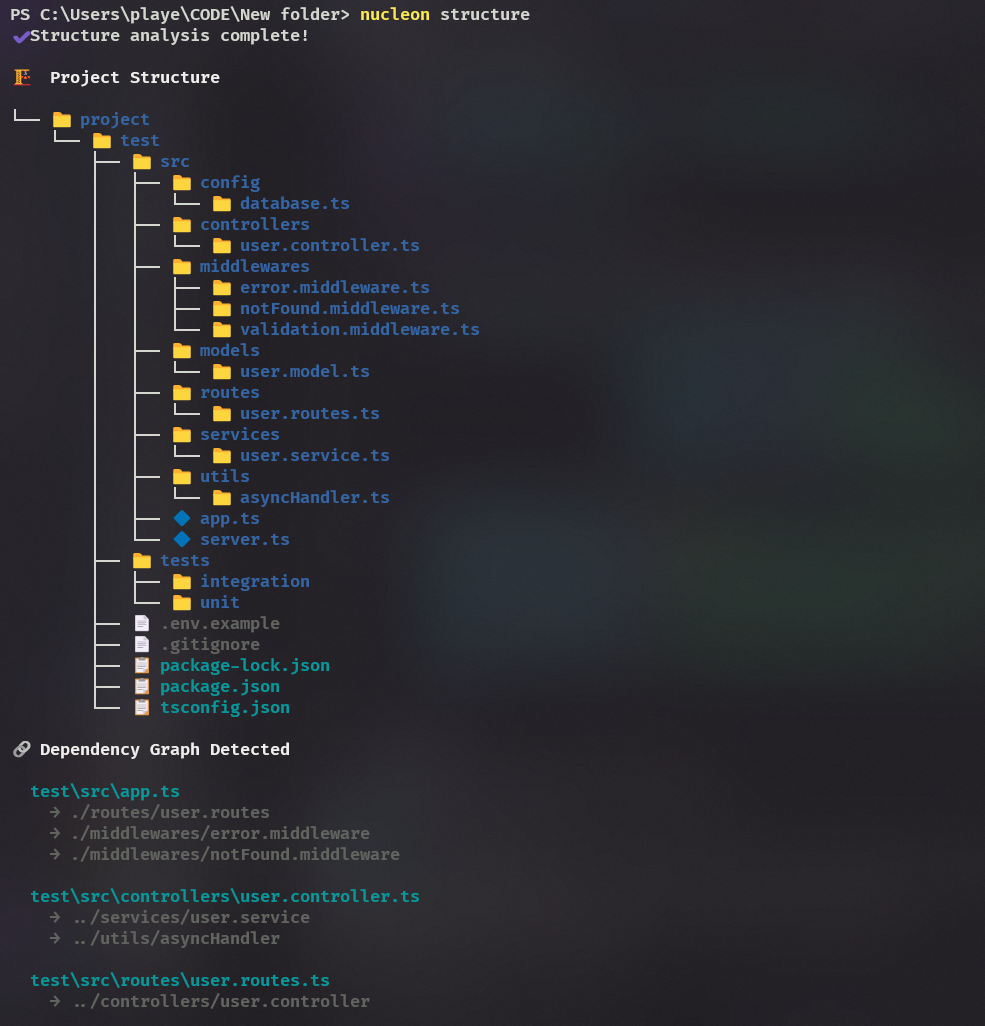
Here's what nucleon init creates for an Express API:
src/
├── controllers/ # Request handlers
├── routes/ # API endpoints
├── services/ # Business logic
├── models/ # Data models
├── middlewares/ # Custom middleware
├── config/ # App configuration
└── utils/ # Helper functions
Complete with error handling, validation middleware, and TypeScript configuration.
⚡ Smart Deployment
nucleon deploy doesn't just run vercel deploy. It:
✅ Checks git status for uncommitted changes
✅ Validates environment variables
✅ Runs pre-flight health checks
✅ Provides rollback capability if deployment fails
🔧 Environment Diagnostics
nucleon doctor catches issues before they break your flow:
⚡ Nucleon Doctor Report
✔ Node.js installed (v18.17.0)
✔ npm installed (v9.6.7)
✔ Git installed (v2.41.0)
⚠ TypeScript not found (optional)
✔ Vercel CLI installed
📋 Project Requirements
✔ package.json found
✔ Dependencies installed
⚠ Uncommitted changes detected
💡 Suggestions
• Run npm install -g typescript for better development experience
• Commit your changes before deploying
Technical Deep Dive
Architecture Decisions
TypeScript First: Built entirely in TypeScript for better developer experience and maintainability.
Commander.js: Chose Commander.js for CLI framework - excellent TypeScript support and intuitive API.
Cross-Platform: Handles Windows, macOS, and Linux PATH configuration automatically.
Plugin Architecture: Extensible system for community contributions.
Key Features Implementation
Smart Project Detection:
// Detects project type and applies appropriate structure
const projectType = detectFramework(process.cwd());
const template = templates[projectType];
await createProfessionalStructure(template);
Intelligent Analysis:
// Analyzes codebase and provides actionable insights
const analysis = analyzeProject(process.cwd());
console.log(`Health Score: ${analysis.healthScore}/100`);
console.log(`Suggestions: ${analysis.suggestions.join(', ')}`);
Community Response
The response has been incredible:
"Finally, a CLI that understands modern development workflows!" - Early user feedback
"The project structures are exactly what I'd set up manually - but in 30 seconds" - Community member
Real Impact Numbers
Project setup: 45 minutes → 30 seconds
Environment debugging: Hours of "works on my machine" → 2 minutes
Deployment prep: 15 minutes of configuration → 1 command
Code analysis: Manual guesswork → Instant insights with actionable recommendations
Try It Yourself
npm install -g nucleon-cli

# Create a professional Next.js project
nucleon init

# Analyze your existing codebase
nucleon analyze

# Deploy with confidence
nucleon deploy

# Check your development environment
nucleon doctor
GitHub: github.com/namansharma28/nucleon
What's Next
The roadmap includes:
More framework support (Vue, Svelte, Angular)
Database integration templates
CI/CD pipeline generation
Team collaboration features
Plugin marketplace
Contributing
This is an open-source project and I'd love your contributions! Whether it's:
🐛 Bug reports and feature requests
💻 Code contributions for new commands
📚 Documentation improvements
🎨 New project templates
Check out the contributing guide to get started.
Final Thoughts
Building Nucleon CLI taught me that the best tools don't just automate tasks - they understand context and adapt to your workflow.
Instead of learning 20+ different CLI tools, developers can now focus on what they do best: building amazing products.
What's your biggest development workflow pain point? I'm always looking for the next feature to build!
If you found this helpful, give Nucleon CLI a try and let me know what you think. Star the repo if you like it - it really helps with visibility! ⭐
Try Nucleon CLI: npm install -g nucleon-cli
GitHub: https://github.com/namansharma28/nucleon


Top comments (0)