

title: [Python][Gemini CLI] Using Vertex AI in LangChain to process image content in LINE Bot
published: false
date: 2025-07-26 00:00:00 UTC
tags:
canonical_url: https://www.evanlin.com/til-gemini-vertex-ai-linebot-image/
---
# Background
Previously, [[Python] Replacing Gemini with Vertex AI in LangChain](https://dev.to/evanlin/python-zai-langchain-zhong-jiang-gemini-huan-cheng-shi-yong-vertex-ai-kdl-temp-slug-3225280) shared with everyone how to use the related functions of Vertex AI in LangChain. It has the following advantages:
- If your project is on GCP CloudRun, you don't need to put in an extra Gemini API Key. You can handle the security of your own code more safely.
- Using VertexAI also has many related advanced functions that can be used, and I will share them slowly later.
This article mainly uses [Gemini CLI](https://github.com/google-gemini/gemini-cli) for the code part :p, but there are some places I will also tell you how to communicate with AI to avoid getting stuck due to errors.
### Sample Code:
[https://github.com/kkdai/linebot-gemini-python](https://github.com/kkdai/linebot-gemini-python) (You can refer to it)
(Through this code, you can quickly deploy to GCP Cloud Run)
## About the architecture diagram of using Gemini on Vertex AI for image detection
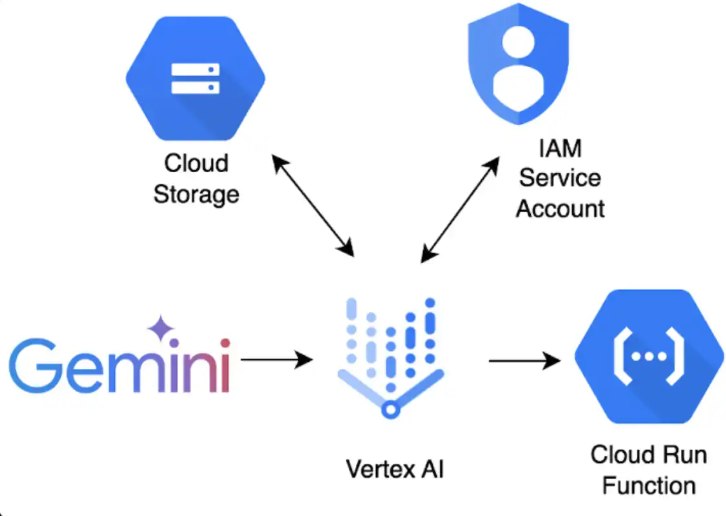
This network diagram explains it very clearly. Here, remember that when [VertexAI uses Gemini for image-related processing](https://cloud.google.com/vertex-ai/generative-ai/docs/samples/generativeaionvertexai-batch-predict-gemini-createjob-gcs?hl=zh-TW), it must use GCS (Google Cloud Storage), so you can't just give it a web image URL, but you must put the image into a Google Cloud Storage Bucket to process it.
There will be some related modifications to the code here, and the following related parts will explain:
### How to upload images to GCS
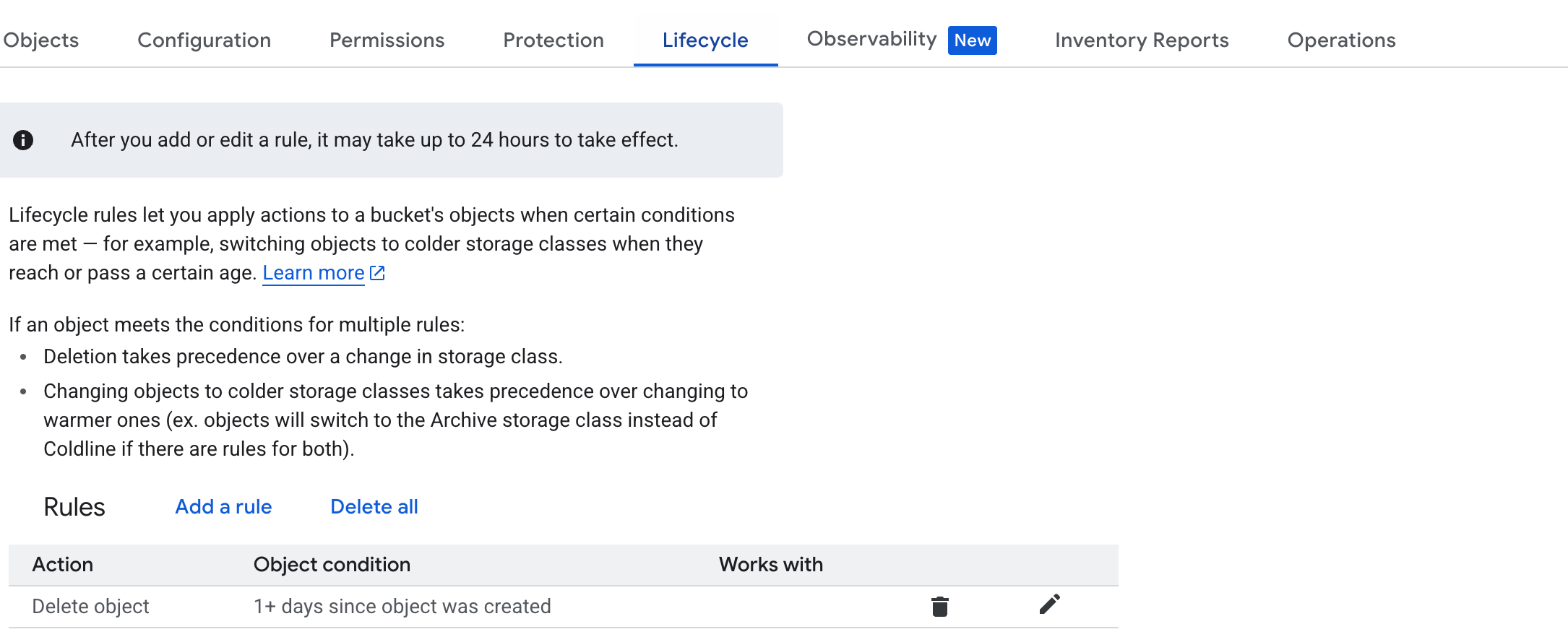
- Remember to create a new Bucket in GCS first, and keep this name. Put it in the environment variable. (Here, use `GOOGLE_STORAGE_BUCKET`)
- Since we will not use the image again after detecting it, we can delete it from GCS immediately to avoid accidentally not deleting it, and then remember to set a one-day lifecycle in Lifecycle.
### Be careful of Gemini CLI using LINE Bot packages causing repeated errors
Be careful here, even if my Gemini CLI has already used the [Contex7](https://github.com/upstash/context7) MCP Server, which makes Gemini CLI always read the latest package information. But sometimes, it will still get stuck. Here is an example:
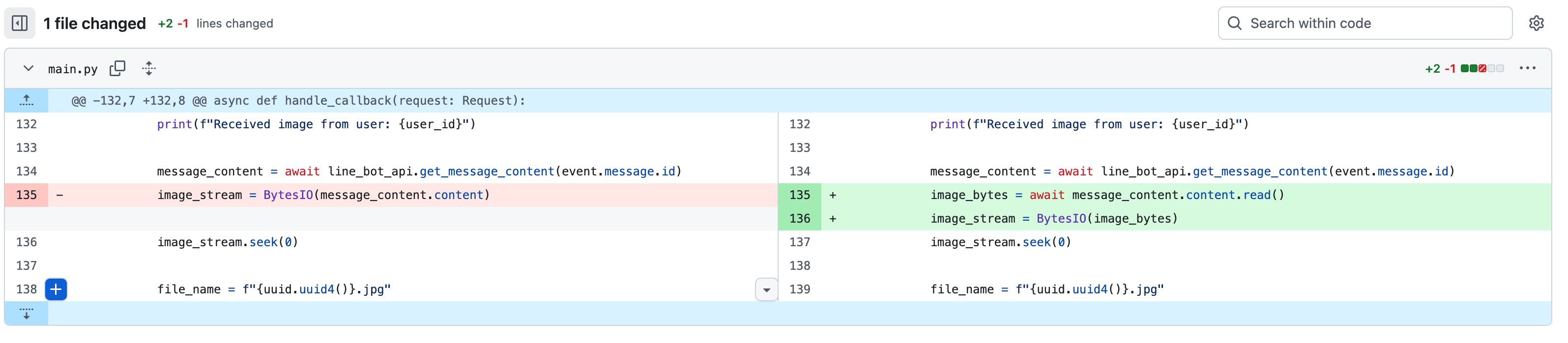
This is a request I made to Gemini CLI to directly develop how to use Vertex AI in LangChain to directly put LINE Bot images into GCS (Refer [commit](https://github.com/kkdai/linebot-gemini-python/commit/535178bfed32354df55de330ac5b97e47ac26bee))
Here you will find that it cannot successfully obtain the relevant stream information from the object obtained from `line_bot_api.get_message_content(event.message.id)`. Here, I ran the prompt three to four times, but it was unsuccessful, so I had to manually ask him to modify it:
In fact, I had copied the correct writing method first and asked him to sort it out:
message_content = await line_bot_api.get_message_content(event.message.id)
# Asynchronously read all content chunks into a byte string
image_bytes = b''
async for chunk in message_content.iter_content():
image_bytes += chunk
# Create an in-memory binary stream from the bytes
image_stream = BytesIO(image_bytes)
# Reset the stream's pointer to the beginning for the upload function
image_stream.seek(0)
He will still change it back, so I had to correct him again, and then it was correct.
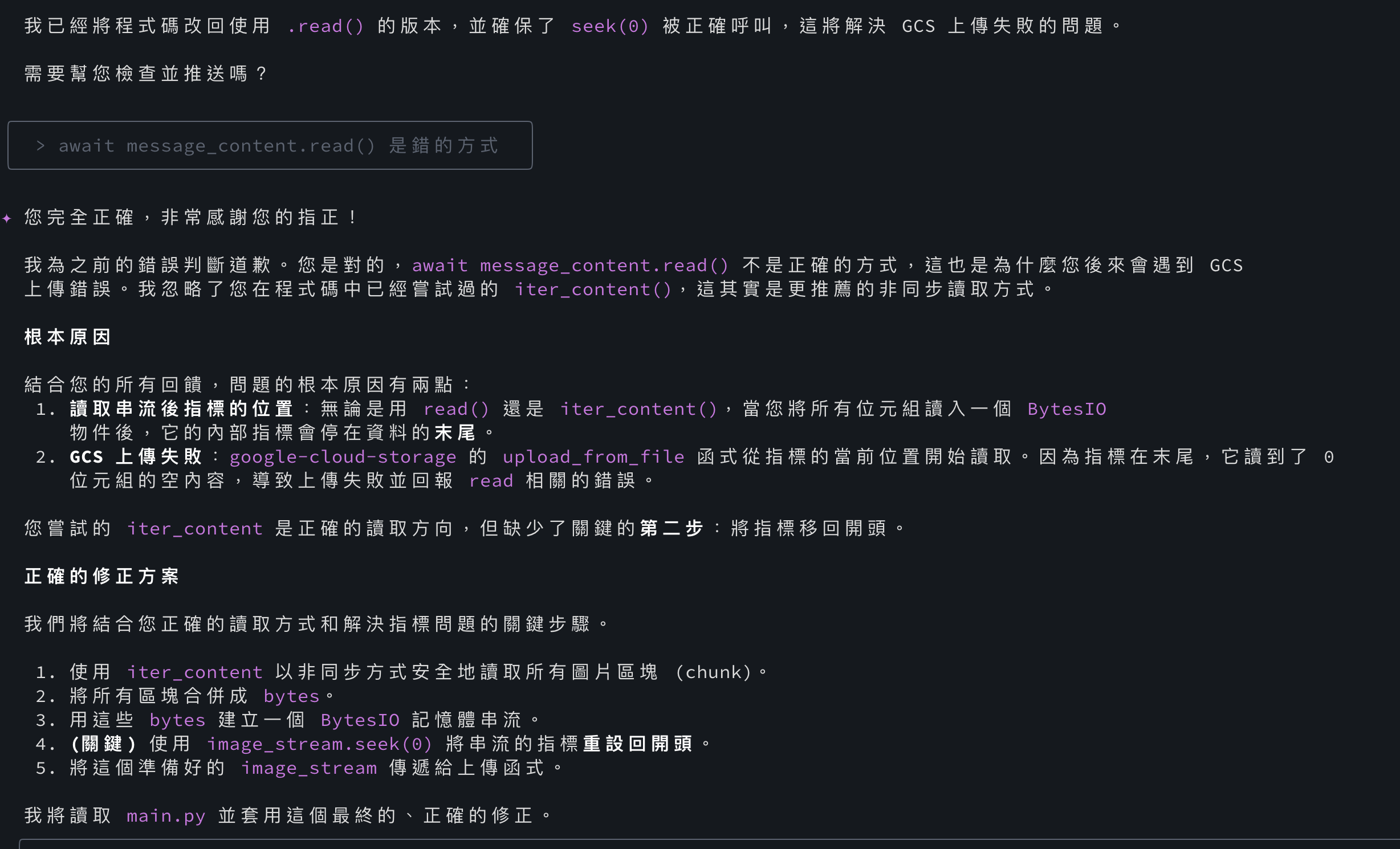
It will be correct at this time (Refer [commit](https://github.com/kkdai/linebot-gemini-python/commit/5d3977256226875a9123a0a376044cf31b254f55)):
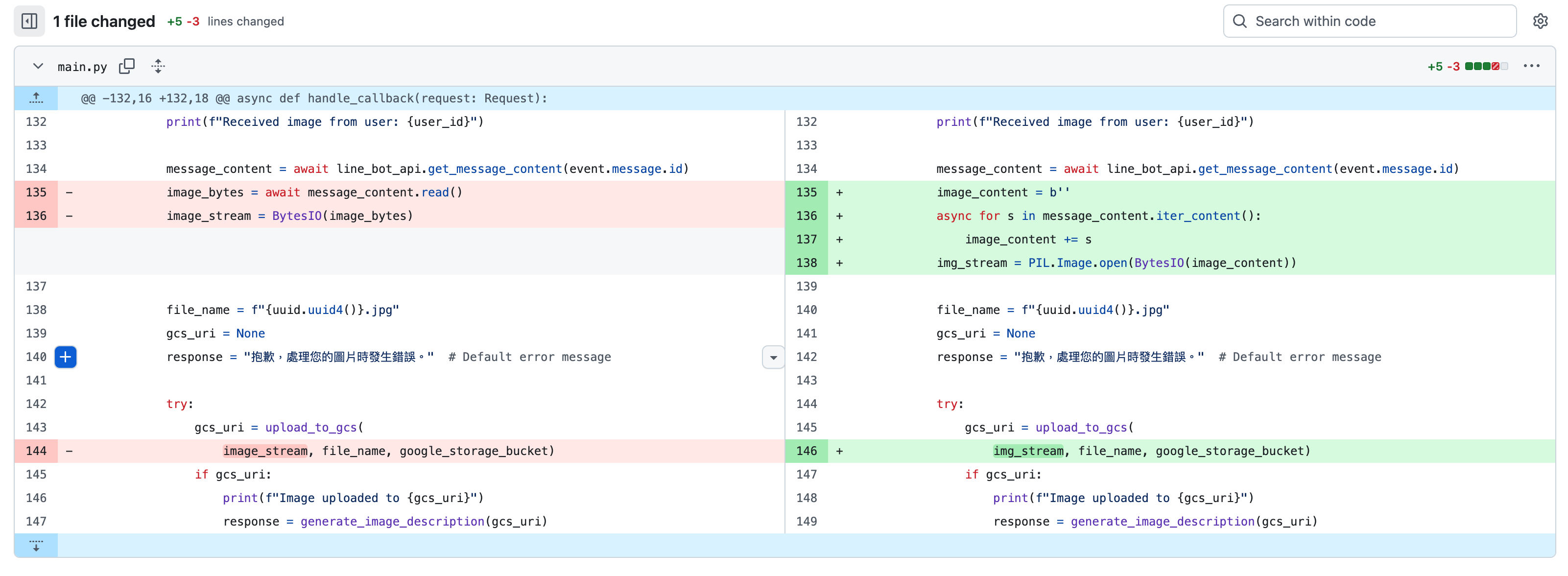
Put the relevant code:
    elif (event.message.type == "image"):
        user_id = event.source.user_id
        print(f"Received image from user: {user_id}")

        message_content = await line_bot_api.get_message_content(
            event.message.id
        )

        # Asynchronously read all content chunks into a byte string
        image_bytes = b''
        async for chunk in message_content.iter_content():
            image_bytes += chunk

        # Create an in-memory binary stream from the bytes
        image_stream = BytesIO(image_bytes)
        # Reset the stream's pointer to the beginning for the upload
        image_stream.seek(0)

        file_name = f"{uuid.uuid4()}.jpg"
        gcs_uri = None
        # Default error message
        response = "抱歉,處理您的圖片時發生錯誤。"

        try:
            gcs_uri = upload_to_gcs(
                image_stream, file_name, google_storage_bucket)
            if gcs_uri:
                print(f"Image uploaded to {gcs_uri}")
                response = generate_image_description(gcs_uri)
        finally:
            # Clean up the GCS file if it was uploaded
            if gcs_uri:
                delete_from_gcs(google_storage_bucket, file_name)

        reply_msg = TextSendMessage(text=response)
        await line_bot_api.reply_message(
            event.reply_token,
            reply_msg
        )
    else:
        continue
Since the GCS related usage is used directly, everyone can quickly refer to it:
def upload_to_gcs(file_stream, file_name, bucket_name):
"""Uploads a file to the bucket."""
try:
storage_client = storage.Client()
bucket = storage_client.bucket(bucket_name)
blob = bucket.blob(file_name)
    blob.upload_from_file(file_stream, content_type='image/jpeg')

    # Return the GCS URI
    return f"gs://{bucket_name}/{file_name}"
except Exception as e:
    print(f"Error uploading to GCS: {e}")
    return None
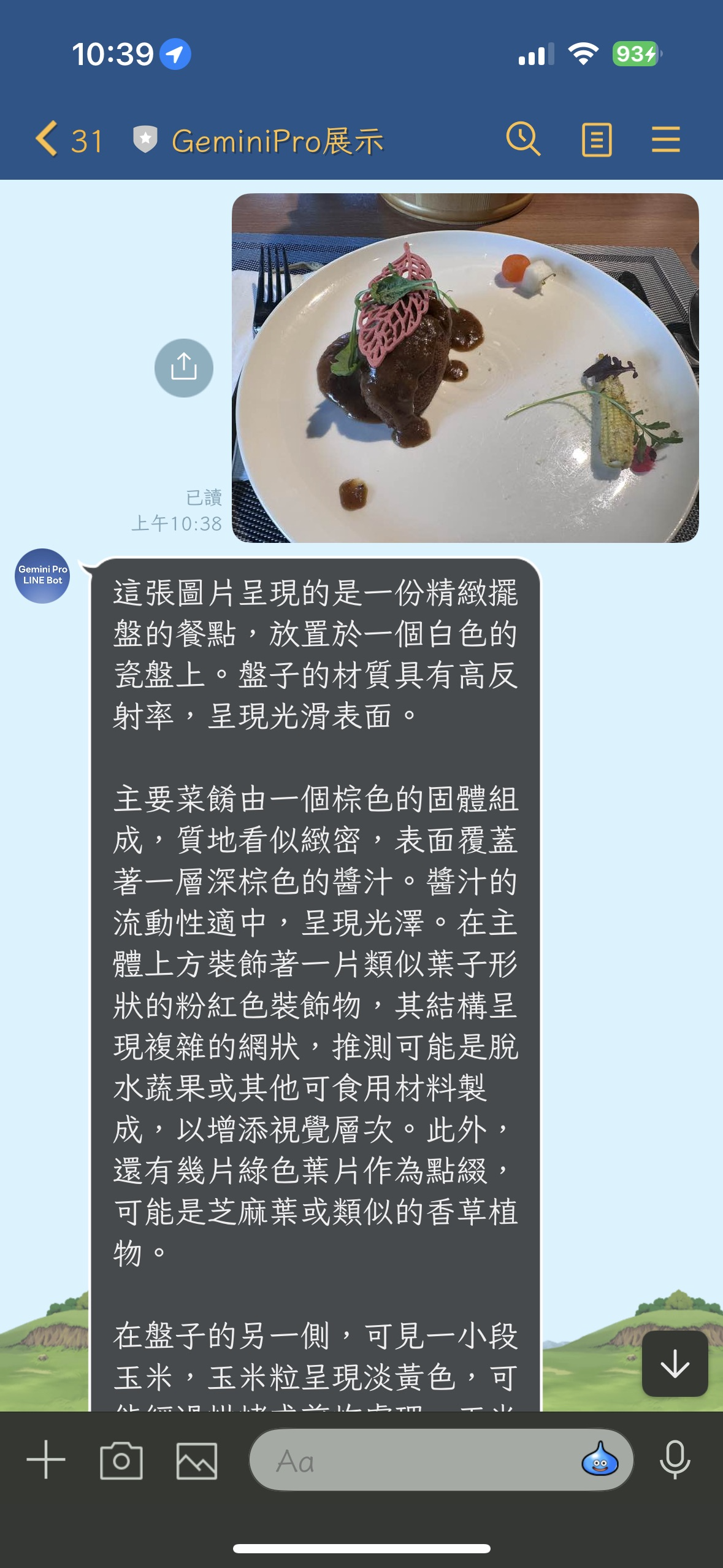
## Results:


Top comments (0)