


We've all heard the jokes from practically anyone with their development environments on Docker for Mac: it makes your Mac sound like a jet plane at takeoff.
However, their counterpart developers on Linux simply go 🤷🏻♂️ and develop with no such problems.
Why is Docker for Mac a quantifiably worse experience than running Docker on a Linux machine? We'll explore the reasons in this post.
Containers vs. Virtual Machines
First, a word on container architecture and how it differs from your standard Virtual Machine (VM).
Generically speaking, both are similar in that you're running "computers inside your computer". The difference comes in how this occurs.
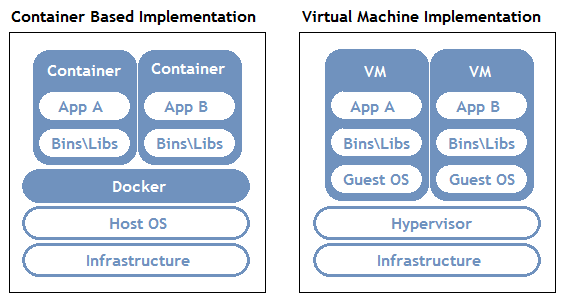
(Source: https://wiki.aquasec.com/display/containers/Docker+Architecture)
Container Disk Changes
As you can see above, Containers make use of your Host OS and its kernel, and therefore are "closer to the iron". For example, in order for a Container to read/write from your Host OS hard drive, it has to:
- Mount the disk on the Container natively (i.e. it has direct access to the disk on the Host OS thanks to the kernel)
- Work as if you were directly on the Host OS
VM Disk Changes
VM's run an additional operating system on top of your Host Operating System, as well as an additional abstraction layer (called the Hypervisor) for the "Guest OS" to talk to the Host OS. For example, in order for a VM to read/write from your Host OS hard drive, it has to:
- Mount the disk on the Guest OS
- Mount the disk from the Host OS on the Hypervisor
- Have the Hypervisor synchronize changes between both
Docker for macOS
Now, while it may be called Docker for macOS, it is architecturally different than Docker on Linux.
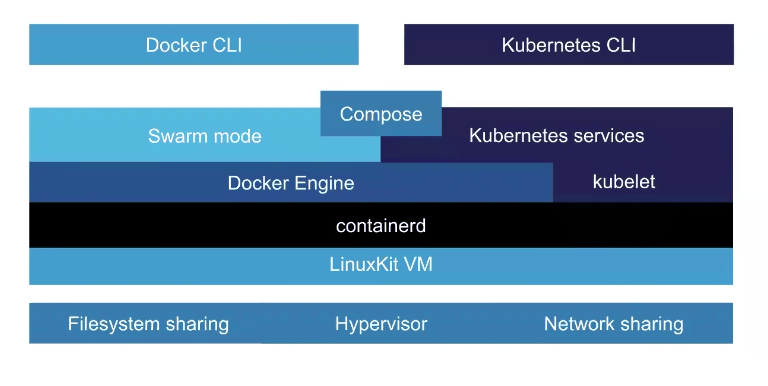
(Source: https://collabnix.com/how-docker-for-mac-works-under-the-hood/)
As you can see above, instead of accessing the Host OS directly, Docker for macOS instead has to spin up its own Linux VM.
It then can only access the kernel of that VM, which then has to go through the steps above to synchronize the disks of your Containers and the Host OS.
Whereas Docker for Linux essentially has a direct line to the Host OS (and, by extension, the disk, network, GPU, etc), Docker for macOS has to go through several abstractions to do low-level tasks.
Development Machine Implications
Your typical Docker development setup is usually as follows:
Host OS
- Developer tooling (IDE's, text editors, linters, etc)
- Source code editing
- Source control
Container
- Application code and dependencies
- Some kind of hot or live reloading mechanism when code changes
- A copy or reference to the host OS source code
The jet plane taking off when you do a docker-compose up on macOS? It's your Host OS' resources hard at work to synchronize low-level I/O (specifically disk and network) between the Host OS and Containers; this is on top of having to run the Containers themselves.
This is also why you see the Hyperkit process usually consuming much of your CPU even at idle. All that synchronizing work between these layers is not trivial!
Options for macOS
This is the part where many would tell you to "just develop on Linux". While it is true that Docker on Linux is the architecture as intended (and therefore is the best experience), simply switching is not tenable for most folks.
The options below will get you closer to parity with the experience on Linux. At the very least, the jet plane taking off might only happen every once in a while versus all the time.
Docker for Mac Edge Build (with Mutagen)
As of this date, Docker has a blessed approach for minimizing resource consumption on disk changes using something under the hood called Mutagen. You won't have to worry about the details though, as they package it as part of the Docker for Mac Edge build.
Instructions
- Install Docker for Mac Edge Build
- In the Docker UI, go to Resources => File Sharing and specify what folders you want mounted to Docker containers
Pros
- "Blessed" by the Docker team
- Minimal setup -- use docker-compose and docker files as normal
- Drastically reduces CPU on hot/live reloads
- File changes are considerably faster
Cons
- Still working out the kinks
- Requires Docker Edge Build
docker-sync
An alternative that's been on the scene for several years now is called docker-sync.
docker-sync is essentially a container running in parallel with your own containers whose job is to efficiently let your container know when files change. It is, in effect, another abstraction layer to speed up the process.
Instructions
- Install docker-sync
- Modify your docker-sync.yml according to your dev setup
Pros
- Works on across Docker platforms
- Drastically reduces CPU on hot/live reloads
- File changes are considerably faster
Cons
- Configuration modifications needed
- More docker resources consumed due to additional parallel containers
- Additional orchestration needed to spin your containers up and down
- Occasionally has syncing issues; i.e. the container doesn't get updated with Host OS changes, and it needs restarting
In Summary
Docker was mainly built with Linux in mind. As it proved out its utility, it was eventually ported to macOS and Windows.
Since both operating systems are vastly different than Linux under the hood, virtualization was the only feasible way to get things working. This unfortunately results in these low-level inefficiencies that we otherwise take for granted.
With Mutagen being packaged as part of Docker for Mac in the future, there is hope for macOS developers that the "jet engine" problem starts to diminish.
However, as it currently stands, the best developer experience for Docker still remains its native Linux.


Latest comments (29)
Hi!
Do you know where can I found information about Mac's performance when running a Linux Docker image vs running a Linux VM without having to run them myself? I am sure someone has measured it!
It's end of 2021. The docker for mac is updated at 4.2.0. Is these problems still there?
a new Docker 3.6 had been released recently…. is Mutagen included in there ?
or maybe the Mac OS sluggishness had been treated in same other way (?!)
Is it not better to just install vm on your Mac, spin up a Linux OS and then install docker on that?
I keep revisiting these posts every few months. Looks like Mutagen integration isn't happening now so I think I'll try the Linux VM as well.
Better performing, definitely.
However, it does come with the additional tax of more networking overhead in the form of port forwards to/from the host/guest, or reverse proxying for more complicated setups.
I used to work with Docker on MacOS for almost two years but some weeks ago I just gave up. After a comparison that I did running Docker on Linux, the MacOS version (Including the use of NFS volumes) is too slow.
If you can get rid of MacOS and use Linux, go ahead, I'm pretty sure, you won't regret.
Inspired by Windows WSL which runs a Linux VM that is integrated with Windows. I decided to setup a Linux VM on Mac and install my Docker dev environment on the Linux VM. It actually runs a lot better than my native Mac Docker environment. I'm using Parallels Desktop which is a lot more performant than Virtual Box so that could also help things as well. I haven't seen or heard of anyone else doing this but it was the only way for me to get my dev environment to run from my Mac without running out of resources.
Right there with you! I actually use a VirtualBox VM and just hook my host tooling up to it via SSH. Works so much better than Docker for Mac!
Awesome! You should write a post about :)
Eric, thanks for the docker edge tip!.....
I had this issue for a month and at some point, I thought about taking my mac to a repair shop but this really helps me .....
Keep it up...
Great article! Built a solution to this problem that runs your local containers on remote linux machines: getporter.dev - I would love your honest thoughts on how this compares to your experience with Mutagen.
Idunno man, some people on my team at work just use Ubuntu, and I hear it works great for them!
Great explanation though, thanks.
Oh, you. 😆
Wouldn't the same happens when you try to run a windows based docker image on a Linux Machine?