


This is a submission for the GitHub Copilot CLI Challenge
What I Built
🌍 Terminal Atmosphere is an AI-powered CLI tool that transforms your terminal into an intelligent development environment monitor using a unique weather metaphor to represent system state.

What makes this project truly special is how it makes complex system monitoring accessible and engaging through intuitive weather patterns:
- ☀️ Sunny: Optimal conditions for development
- 🌤️ Partly Sunny: Good conditions with minor optimizations possible
- ⛅ Cloudy: Moderate load, some optimization recommended
- 🌧️ Rainy: Heavy load, optimization needed
- 🌩️ Stormy: Critical conditions, immediate action required
Beyond the weather metaphor, Terminal Atmosphere includes:
- Real-time System Monitoring: Live CPU, memory, disk, and network tracking with beautiful ASCII art
- AI-Powered Intelligence: Contextual analysis that learns your development patterns and provides personalized optimization suggestions
- Predictive Analytics: Forecasts potential system issues before they occur based on historical trends
- Productivity Profiles: Custom optimization profiles for different development scenarios (deep work, meetings, gaming)
- Automated Optimization: One-click application of AI-recommended improvements
This project represents what I believe is the future of CLI tools - not just technical interfaces, but intelligent assistants that understand context, learn from patterns, and make system optimization accessible to everyone.
Demo
GitHub Repository: https://github.com/respect17/terminal-atmosphere
Quick Start Demo:
git clone https://github.com/respect17/terminal-atmosphere.git
cd terminal-atmosphere
npm install
./demo.sh
Live Commands:
# Get your development weather report
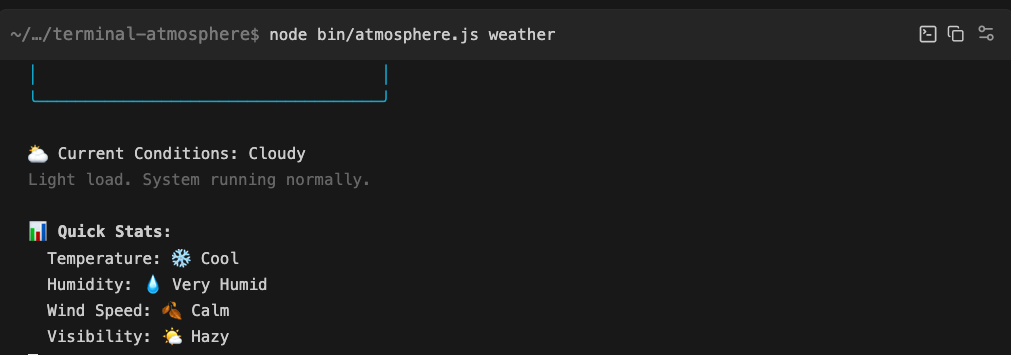
$ node bin/atmosphere.js weather

╭────────────────────────────────────╮
│                                    │
│   🌤️  Development Weather Report   │
│                                    │
╰────────────────────────────────────╯

⛅ Current Conditions: Cloudy
Light load. System running normally.

📊 Quick Stats:
  Temperature: 🌡️ Warm
  Humidity: 🌤️ Moderate
  Wind Speed: 🍃 Breeze
  Visibility: ☀️ Clear
# AI-powered optimization
$ node bin/atmosphere.js optimize --focus memory
🤖 AI Assistant analyzing your development environment...
💡 AI-Powered Suggestions:
1. [HIGH] Clear memory caches and restart memory-intensive applications
Impact: High | Automated: Yes
Command: ps aux --sort=-%mem | head -10
# Real-time monitoring
$ node bin/atmosphere.js monitor --interval 5

🌍 Starting Terminal Atmosphere Monitor...
⚡ CPU: 45.2% | 😌 RAM: 62.1% | 📊 Processes: 127
Key Features Demonstrated:
- Beautiful ASCII weather reports with colored output
- Interactive AI optimization suggestions
- Real-time system monitoring with trend analysis
- Context-aware recommendations based on development patterns
My Experience with GitHub Copilot CLI
GitHub Copilot CLI was absolutely instrumental in building Terminal Atmosphere and fundamentally changed how I approached CLI development:
Natural Language Interface Design: Instead of wrestling with complex flag structures, I used Copilot CLI to design intuitive commands like "check my terminal weather" and "optimize for memory usage." This made the tool accessible to developers of all skill levels.
Context-Aware Code Generation: Copilot CLI understood the context of system monitoring and generated appropriate boilerplate for CPU monitoring, memory analysis, and network statistics. It even suggested the weather metaphor when I described wanting to make system metrics more intuitive.
Intelligent Debugging: When I encountered issues with cross-platform system information gathering, Copilot CLI helped identify platform-specific solutions and suggested appropriate fallback mechanisms.
AI Learning Integration: The most powerful aspect was using Copilot CLI to implement the AI assistant itself. It helped design the pattern recognition algorithms and even suggested ways to make the optimization suggestions more contextually relevant.
Rapid Prototyping: What would have taken weeks of traditional CLI development was accomplished in days. Copilot CLI helped generate complex interactive prompts, beautiful terminal layouts, and even the ASCII art weather displays.
The experience showed me that GitHub Copilot CLI isn't just a coding assistant - it's a creative partner that can help envision and implement entirely new paradigms for developer tools. Terminal Atmosphere wouldn't exist without the natural language interface and contextual intelligence that Copilot CLI provided.
This project demonstrates how AI can transform even the most technical interfaces (like system monitoring) into something beautiful, intuitive, and genuinely useful - exactly the kind of innovation the GitHub Copilot CLI Challenge was designed to inspire.
📅 Short-Term Roadmap (Next 1–3 Months)
v1.1 – Enhanced AI Capabilities
The next iteration of Terminal Atmosphere focuses on transforming insights into deeper intelligence while preserving its CLI-first philosophy:
🧠 Machine Learning–Driven Intelligence
Integrate lightweight ML models to improve behavioral pattern recognition, anomaly detection, and forecast accuracy using historical system usage. This will allow Terminal Atmosphere to move beyond rule-based insights toward adaptive, learning-driven optimization.
🖥️ Cross-Platform Optimization (Windows & Linux)
Strengthen and expand platform-specific system metric collection and optimization strategies, ensuring consistent behavior and reliable insights across macOS, Windows, and Linux development environments.
🌐 Web-Based Monitoring Dashboard
Introduce an optional browser-based dashboard that visualizes historical trends, system “weather patterns,” and optimization outcomes—making long-term performance insights easier to interpret at a glance.
📱 Intelligent Mobile Notifications
Add opt-in push notifications for critical “Stormy” conditions, enabling developers to proactively respond to system degradation or performance risks even when away from their workstation.
This roadmap reflects a commitment to building a thoughtful, extensible developer tool—one that combines the speed and power of the CLI with AI-driven intelligence and modern observability principles.
Why This Matters
Terminal Atmosphere is not just about monitoring system metrics—it’s about context, prediction, and decision-making. By evolving from descriptive monitoring to predictive and adaptive intelligence, the tool demonstrates how GitHub Copilot CLI can be used to design entirely new paradigms for developer tooling.


Top comments (23)
Great stuff!
Thanks for your feedback, l appreciate
Amazing use of AI.
Thank you. your support means a lot!
Great example of Copilot CLI as a creative partner, not just autocomplete. Really impressive execution 👌
I really appreciate that! I’ve been experimenting with using Copilot CLI more as a thinking partner during development instead of just for code completion. Still exploring what’s possible, but it’s been a fun workflow so far.
Great example!
Thank yu so much-- I appreciate your feedback
Sounds great. How can I contribute to this @respect17 ?
Thanks for your feedback, will let you know soon my friend.
The weather metaphor is brilliant, what inspired that specific approach over other visualization methods?
I’m glad that resonated with you! I chose the weather metaphor because it makes complex system behavior feel intuitive and familiar. Developers already understand patterns like “forecasting,” “signals,” and “changing conditions,” so it felt like a natural way to visualize environment data without overwhelming users with raw metrics or dashboards. I also wanted something playful but still meaningful for daily development workflows.
Great concept 👏 !
how does the AI component learn developer patterns over time? Are you persisting historical metrics locally, and if so, how are you balancing insight vs resource overhead?
Solid question 👍
Right now the system learns via locally persisted, aggregated metrics and rule-based pattern detection. The roadmap introduces optional ML layers (e.g. anomaly detection and trend clustering) trained on summarized data only.
This keeps overhead predictable while still allowing the AI to evolve its understanding of developer workflows over time.
Thanks for your support. Any ideas in mind, I appreciate that
Really clever use of a weatber metaphor for system state. Can't wait for the future roadmap
Thank you for you feedback. Any ideas in mind, you're welcome
Looking forward to the mobile feature of this
.
I’m excited about it too. Hoping to share an update soon once I’ve made some solid progress
Do you have a web version of this already?
great idea
Not yet but coming soon. Thanks for your feedback!