


I built a multi-agent project, for users to ask questions about their AWS infrastructure (3 AWS accounts managed by AWS Organizations) and get answers in human readable way.
The system connects to users AWS infrastructure and provide the answer by reading various log types and creating API calls to multiple AWS resources.
This project was build with Kiro, Kiro spec driven development and Kiro powers.
The system connects to users AWS infrastructure and provide the answer by reading various log types and creating API calls to multiple AWS resources.
Project repo
Part 1: I built a multi-agent project on AWS, with Strands AI and AgentCore
Part 2: Give 'em something to read! Building a data pipeline for your agentic AI project
Part 3: Make 'em safe! Security for your agentic AI project
Part 4: Make 'em remember! Memory in the agentic AI project
Part 5: Make 'em visible! See what is happening inside your agentic workflow
Part 6: When shebangs party hard with your MAC path on OpenTelemetry
Part 7: Make 'em behave! Don't let your AI agents hallucinate
Putting all your eggs into one bucket
For CIA project to work successfully, the agents need data. When user asks "Who created the S3 bucket yesterday?", the CloudTrail sub-agent queries API activity logs in the CloudTrail. When question is "What are the top 5 most expensive services this month?", the CUR sub-agent needs billing data.
There were 2 directions I was thinking when designing that:
query each service separately vs. gather all logs into one central place and query it from there
Both have the pros ans cons, end I decided to go with option 2 for reasons like:
- query the historical data no matter how old
- use same SQL logic on any kind of service
Just a remark, in my previous article I mentioned all data sources I use in this project, but I built this pipeline only for those I need historical data from:
- AWS Cloudtrail
- AWS Cloudwatch
- AWS Config
- AWS Cost and Usage Report
- AWS VPC Flowlogs
- AWS GuardDuty
The challenges
Even if I'd want to skip the historical data (which I did not), querying them from their native location would be a nightmare because:
AWS services store their data in different locations
Data have different formats
Different retention policies
Some are region specific while others are not
Therefore a data pipeline was necessary and its job is to collect all of this into a single S3 data lake where Athena can query it with SQL.
Because of the different data format, a Glue Data Catalog was necessary to create a table schema for Athena.
The S3 Data Lake
It all starts with the storage. For central data storage, I decided to go with S3 data lake which I named lttm-datalake and honestly there are not many other options.
This is the central storage for all log data across three AWS accounts (main, dev, prod) within AWS Organizations and it lives in the main accounts, so all other accounts doing cross-region and cross-account deliveries.
The bucket is organized into prefixes by data source:
s3://lttm-datalake/
├── cloudtrail/AWSLogs/{account_id}/CloudTrail/{region}/{year}/{month}/{day}/
├── cloudwatch/log_group={name}/account_id={id}/year={y}/month={m}/
├── config/account_id={id}/year={y}/month={m}/day={d}/
├── cur/lttm-cur-export/data/BILLING_PERIOD={yyyy-MM}/
├── flowlogs/AWSLogs/{account_id}/vpcflowlogs/{region}/{year}/{month}/{day}/
├── guardduty/account_id={id}/year={y}/month={m}/day={d}/
└── athena-results/
As you can see, the prefixes are not the same, but it's easier to write SQL queries against that, vs. against where and how data are originally stored.
Not to mention, with this setup you don't really have to care about retention policies - all logs are stored in S3 forever.
Each data source has its own prefix with a partition structure that matches how the data arrives. This is important — Athena uses these partitions to skip irrelevant data when querying.
A query for "CloudTrail events in the main account today" only scans one day's folder, not years of data across three accounts.
The bucket has:
- AES256 encryption (SSE-S3) — every object encrypted at rest
- All public access blocked — four separate flags, belt and suspenders
-
prevent_destroy lifecycle — which prevents event
terraform destroyto destroy the bucket - No versioning — no reason for that
How each data source gets to S3
Not every AWS service delivers data the same way and not all of them do it natively to S3. For some, additional AWS services are needed.
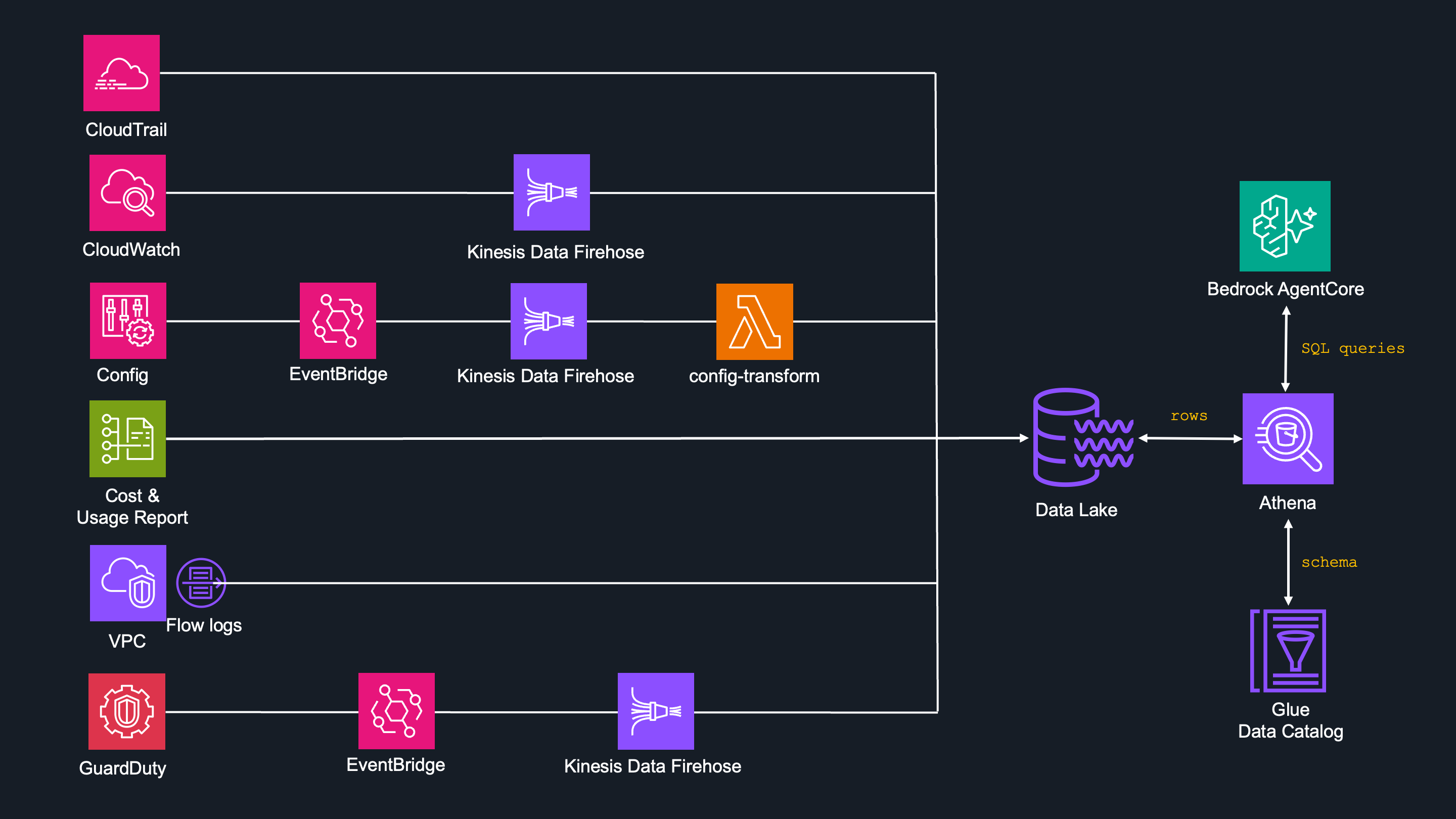
AWS CloudTrail

This is the simplest pipeline, as CloudTrail is able to send data to S3 natively. There's a single organization trail (lttm-org-trail), which captures API activity from all three accounts automatically and writes JSON files directly to S3.
It also logs non-region specific events and integrity of the logs are confirmed by SHA-256 digest
Simple terraform example:
resource "aws_cloudtrail" "lttm_org_trail" {
  name = "lttm-org-trail"
  s3_bucket_name = var.prefix
  s3_key_prefix  = "cloudtrail"         # S3 prefix
  is_organization_trail = true          # single trail for all accounts in AWS Org
  include_global_service_events = true  # for non region specific trails
  is_multi_region_trail = true          # captures all regions
  enable_log_file_validation = true     # integrity of the logs
}
AWS CloudWatch

Not as simple as CloudTrail - CloudWatch logs are not sent to S3 natively. In this case some kind of delivery mechanism is needed, for which I decided to go with Kinesis Data Firehose with account-level subscription filter policies.
Kinesis Data Firehose streams are region based, meaning you have to create one in each region you want to see logs from and also you have to do it per account.
Having 3 accounts with eu-central-1 = 3 subscriptions.
My Bedrock runs in us-wes-2: +1 subscription.
For "non-region" specific stuff like IAM or Route53 which actually run in us-east-1: +1 subscription.
So that counts to 5 subscribtions:
lttm-firehose-mainlttm-firehose-devlttm-firehose-prodlttm-firehose-main-uswest2lttm-firehose-main-useast1
Normally I'd crate 2 more for us-east-1 for dev and prod account, but there is nothing going in on, as those just historical data from my old projects. Just keep that in mind, you'd need additional 2 subscribtions if using 3 AWS accounts.
When creating a Kinesis delivery stream and you want to create the prefix in S3, you must enable dynamic_partitioning_configuration:
resource "aws_kinesis_firehose_delivery_stream" "main" {
  name        = "lttm-firehose-main"
  destination = "extended_s3"

  extended_s3_configuration {
    role_arn = aws_iam_role.firehose_main.arn
    bucket_arn = "arn:aws:s3:::lttm-datalake"

    # creating prefix for logs and errors
    prefix = "cloudwatch/log_group=!{partitionKeyFromQuery:log_group}/account_id=!{partitionKeyFromQuery:account_id}/year=!{timestamp:yyyy}/month=!{timestamp:MM}/"
    error_output_prefix = "cloudwatch-errors/!{firehose:error-output-type}/year=!{timestamp:yyyy}/month=!{timestamp:MM}/"

    compression_format = "UNCOMPRESSED"
    buffering_size     = 64 # minimum required for dynamic partitioning - learned the hard way
    buffering_interval = 60 # s.
    dynamic_partitioning_configuration {
      enabled = true # must be enabled to be able to define prefix
    }
Extracting the metadata
This was a real deal, because:
- In order to create a prefix, you have to extract some metadata from the log.
- CloudWatch logs are gzip compressed by default.
Logs had to be decompressed first, for metadata to be extracted.
If you do it right, dynamic partitioning can be done on Firehose level and no Lambda function is needed between Firehose and S3.
    # Processing pipeline
    processing_configuration {
      enabled = true

      # Decompress
      processors {
        type = "Decompression"
        parameters {
          parameter_name  = "CompressionFormat"
          parameter_value = "GZIP"
        }
      }

      # Extract the metadata
      processors {
        type = "MetadataExtraction"
        parameters {
          parameter_name  = "JsonParsingEngine"
          parameter_value = "JQ-1.6"
        }
        parameters {
          parameter_name = "MetadataExtractionQuery"
          parameter_value = "{log_group:.logGroup,account_id:.owner}" # log_group and account_id extracted
        }
      }
    }
  }
}
There is a lessons learned behind "if you do it right" from above.
I initially usedRecordDeAggregationinstead ofDecompression.
Every record failed with Non UTF-8 record provided error and landed in the error prefix (at least I prove that worked!).
I was too lazy to wait for some logs being created and delivered then I did not check it. When the agents were ready and I was testing it, I started to receive no responses. That's how I ended up with 6 days of zero logs, but full error prefix.
Each Firehose stream has a matching subscription filter policy:
# subscription filter policy for main
resource "aws_cloudwatch_log_account_policy" "main" {
  policy_name = "lttm-account-policy-main"
  policy_type = "SUBSCRIPTION_FILTER_POLICY"
  policy_document = jsonencode({
    DestinationArn = aws_kinesis_firehose_delivery_stream.main.arn
    FilterPattern  = ""
    Distribution   = "Random"
    RoleArn        = aws_iam_role.cwl_to_firehose_main.arn
  })

  depends_on = [aws_iam_role_policy.cwl_to_firehose_main]
}
Now repeat all that per number of streasm (5x in my case).
Cross-account delivery
There was one more challenge to solve: S3 data lake exists in main account. That means, dev and prod Firehose streams have to deliver cross-account.
There is a IAM roles in main, called lttm-firehose-cross-account-dev and lttm-firehose-cross-account-prod which both Firehose streams assume.
AWS Config

It's great to have AWS Config logs like returning last changes in the account or historical configuration of resources. Even greater that Config can write directly to S3.
Well yes but... it writes it in its own format and style and time and path structure...
I had no choice but to create a data pipeline for that, but as soon as I realized what's going on (too late!), I started to feel sorry for myself.
This one was by far the most challenging one of all!
There's a whole story behind it, and it all started with lack of knowledge! Just follow the hint: EventBridge -> S3
Enable Config
First thing's first - Config have to be enabled because it's not enabled by default and it has to be enabled i*n every region for every account*.
In my case Config in eu-central-1 region for all accounts already existed, however I had to create it into us-east-1 and us-west-2 for every account (similar to Firehose). Because this is repetitive task I created a terraform code for that.
Lessons learned - just do it in AWS Console
Anyway, if you still insist on terraform, you need 3 resources:
- configuration recorder - what to record (all except globals)
- delivery channel - where to send the data (s3 datalake)
- configuration recorder status - enabling the config
# regions, accounts and its pairing are defined above in 'locals'
# main account
resource "aws_config_configuration_recorder" "main_multiregion" {
  for_each = { for r in local.forwarding_regions : r => r }
  region   = each.value
  name     = "default"
  role_arn = "arn:aws:iam::${var.main_account_id}:role/aws-service-role/config.amazonaws.com/AWSServiceRoleForConfig"
  recording_group {
    all_supported                 = true
    include_global_resource_types = false # already done in eu-central-1
  }
}
resource "aws_config_delivery_channel" "main_multiregion" {
  for_each = { for r in local.forwarding_regions : r => r }
  region         = each.value
  name           = "default"
  s3_bucket_name = "lttm-datalake"
  depends_on = [aws_config_configuration_recorder.main_multiregion]
}
resource "aws_config_configuration_recorder_status" "main_multiregion" {
  for_each = { for r in local.forwarding_regions : r => r }
  region     = each.value
  name       = aws_config_configuration_recorder.main_multiregion[each.key].name
  is_enabled = true
  depends_on = [aws_config_delivery_channel.main_multiregion]
}
I knew AWS Config is event driven service and for whatever reason I always thought EventBridge can write directly to S3.
Well, it can't.

This guy can write to almost anything, except S3!
But this is the time where I still did not know it.
Create AWS EventBridge rules
As Config config was created, EventBridge rules had to be written. Anytime there is a change into a resource, Config create event Config Configuration Item Change and that's what I wanted to capture.
With EventBridge you need 2 resources:
- event rule
- event target - that's eventbus in eu-central-1 in main account
# main
resource "aws_cloudwatch_event_rule" "config_forward_main" {
  for_each = { for r in local.forwarding_regions : r => r }
  region      = each.value
  name        = "lttm-config-forward-to-eu-central-1"
  description = "Forwards AWS Config events from ${each.value} to eu-central-1 for LTTM pipeline"

  event_pattern = jsonencode({
    source      = ["aws.config"]
    detail-type = ["Config Configuration Item Change"]
  })
}
resource "aws_cloudwatch_event_target" "config_forward_main" {
  for_each = { for r in local.forwarding_regions : r => r }
  region    = each.value
  rule      = aws_cloudwatch_event_rule.config_forward_main[each.key].name
  target_id = "forward-to-eu-central-1"
  arn       = "arn:aws:events:${var.region}:${var.main_account_id}:event-bus/default"
  role_arn  = aws_iam_role.config_cross_region_main.arn
}
This have to be done for all other accounts
Making EventBus in main account in eu-central-1 the ultimate target for all EventBridge rules, requires a bunch of cross-account rules, which I am not going to paste here, but codebase for whole project is available here.
About now I started to realize the truth about EventBridge.
I already knew this is not going well, but I refused to admit it. After some investigation it turned out I can go 2 ways:
Config -> EventBridge -> Lambda -> S3
vs.
Config -> EventBridge -> Firehose -> S3
I choose the Firehose, thinking that's less work than writing a Lambda function.
AWS Data Firehose Stream
Having one already for CloudWatch, building Firehose stream is similar (no decompression though), you just need to extract account_id, year, month, day.
resource "aws_kinesis_firehose_delivery_stream" "config_main" {
  name        = "lttm-config-firehose-main"
  destination = "extended_s3"

  extended_s3_configuration {
    role_arn = aws_iam_role.config_firehose_main.arn
    bucket_arn = "arn:aws:s3:::lttm-datalake"
    prefix = "config/account_id=!{partitionKeyFromQuery:account_id}/year=!{partitionKeyFromQuery:year}/month=!{partitionKeyFromQuery:month}/day=!{partitionKeyFromQuery:day}/"
    error_output_prefix = "config-errors/!{firehose:error-output-type}/year=!{timestamp:yyyy}/month=!{timestamp:MM}/"
    compression_format = "UNCOMPRESSED"
    buffering_size     = 64partitioning is enabled
    buffering_interval = 60
    dynamic_partitioning_configuration {
      enabled = true
    }

    processing_configuration {
      processors {
        type = "MetadataExtraction"
        parameters {
          parameter_name  = "JsonParsingEngine"
          parameter_value = "JQ-1.6"
        }
        parameters {
          parameter_name  = "MetadataExtractionQuery"
          parameter_value = "{account_id:.awsaccountid, year:(.configurationitemcapturetime[0:4]), month:(.configurationitemcapturetime[5:7]), day:(.configurationitemcapturetime[8:10])}"
        }
      }
    }
  }
}
It worked and I received data to S3, allthough in that lovely EventBridge envelope:
{"configurationitemcapturetime":"2026-04-21T14:30:00Z","resourcetype":"AWS::EC2::SecurityGroup","resourceid":"sg-abc123","awsregion":"eu-central-1","awsaccountid":"012345678910","configuration":"{...}","configurationitemstatus":"OK"}
That would make SQL query a difficult, and since SQL queries are written by agent and not human, it should be as simple as possible.
So guess what was needed? Yes, a Lambda! Remember when I went with Firehose instead of Lambda? Well now I have Firehose AND Lambda!

Long story short - lambda function narrows it to something like this:
{"configurationitemcapturetime":"2026-04-21T14:30:00Z","resourcetype":"AWS::EC2::SecurityGroup","resourceid":"sg-abc123","awsregion":"eu-central-1","awsaccountid":"012345678910","configuration":"{...}","configurationitemstatus":"OK"}
This pattern requires a simpler SQL query, kinda like:
SELECT resourcetype FROM lttm_logs.config_logs
AWS Cost and Usage Report

This is one of the simplest pipeline, as Billing and Cost management can send directly to S3.
All you have to do is to enable it, make it parquet format and you are good to go.
s3_output_configurations {
  output_type = "CUSTOM"
  format      = "PARQUET"
  compression = "PARQUET"
  overwrite   = "OVERWRITE_REPORT"
}
It exports for all accounts and thanks to parquet format, Athena reads only the columns user actually query.
AWS VPC Flowlogs

If CUR was simple, this is the next level of simplicity. You literally just have to enable it per account and per region, define S3 prefix and file format (parquet in my case) and bang! - they are in.
# Main account — eu-central-1 VPCs
# accounts, region and combinations defined in 'locals'
resource "aws_flow_log" "main_eu" {
  for_each             = toset(data.aws_vpcs.main_eu.ids)
  vpc_id               = each.value
  log_destination_type = "s3"
  log_destination      = "arn:aws:s3:::${var.prefix}/flowlogs/"
  traffic_type         = "ALL"

  destination_options {
    file_format                = "parquet"
    per_hour_partition         = true
    hive_compatible_partitions = true
  }

  tags = { Project = var.prefix }
}
AWS GuardDuty

I really wanted to have this resource in my project and this is the only resource where agent have to decide if to create the SQL query for Athena, or API call for GuardDuty.
The reason is that GuadrdDuty only archives its findings for 90 days, then they are removed.
Therefore I built a pipeline, which transfers the findings do S3 directly as they are created.
Since the findings are stored natively for 90 days, most of the questions create API call, but still I wanted to store historical data forever.
That means the logic goes like:
- Requesting findings younger than 90 days? -> API call to GuardDuty
- Requesting fiundings older than 90 days -> SQL query to S3 DataLake
First you have to enable GuardDuty detector, in every account and region
resource "aws_guardduty_detector" "main_eu" {
  enable = true
  tags   = { Project = var.prefix }
}
GuardDuty works well with AWS Organizations, where you delegate one of the AWS accounts as GuardDuty administrator and enable thread detection in all member accounts:
resource "aws_guardduty_organization_admin_account" "main" {
  admin_account_id = var.main_account_id
  depends_on       = [aws_guardduty_detector.main_eu]
}
resource "aws_guardduty_organization_configuration" "main" {
  detector_id                      = aws_guardduty_detector.main_eu.id
  auto_enable_organization_members = "ALL"
  depends_on                       = [aws_guardduty_organization_admin_account.main]
}
Next you need to register all other accounts as GuardDuty member:
resource "aws_guardduty_member" "prod" {
  detector_id = aws_guardduty_detector.main_eu.id
  account_id  = var.prod_account_id
  email       = var.prod_account_email
  invite      = false
  depends_on  = [aws_guardduty_organization_configuration.main]

  lifecycle {
    ignore_changes = [email, invite]
  }
}
GuardDuty doen't send the findings to S3 natively, so again Eventbridge and Firehose stream had to be used. (this time I am using no lambda).
It's similar to what we've seen before, with the prefix and error prefix speicifcs:
prefix              = "guardduty/account_id=!{partitionKeyFromQuery:account_id}/year=!{partitionKeyFromQuery:year}/month=!{partitionKeyFromQuery:month}/day=!{partitionKeyFromQuery:day}/"
error_output_prefix = "guardduty-errors/!{firehose:error-output-type}/year=!{timestamp:yyyy}/month=!{timestamp:MM}/"
So why no Lambda function to narrow the EventBridge envelope? Honestly, 99% of the queries would be younger than 90 days, than means direct API call.
SQL queries would probably never be used, but if there is an option to store the historical data then I took it.
Athena is using json_extract() here, which I wanted to avoid with config but I created it before I decided to simplify it with lambda.
And if you feel like you just red a 5 lines begging for attention to show you SQL rule using json_extract() - that's also 100% true.
Just for you to see, it's this:
SELECT resourcetype, resourceid, configurationitemstatus
FROM lttm_logs.config_logs
WHERE account_id = '012345678910' AND year = '2026' AND month = '04' AND day = '21'
vs. that:
SELECT json_extract_scalar(detail, '$.type') AS finding_type,
       json_extract_scalar(detail, '$.severity') AS severity,
       json_extract_scalar(detail, '$.title') AS title,
       json_extract_scalar(detail, '$.resource.resourceType') AS resource_type
FROM lttm_logs.guardduty_findings
WHERE account_id = '012345678910' AND year = '2026' AND month = '04' AND day = '21'
The Query Layer: Glue + Athena
Data in S3 are just files, so to run SQL query against them two additional things are required:
- Glue Data Catalog — to define the table schema
- Amazon Athena — SQL engine that reads from S3 using those schemas
Glue Data Catalog
It creates a schema - it basically tells Athena, that this S3 prefix contains files in JSON or Parquet, with these columns, partitioned by these keys, etc...
In terraform each of 6 data sources have its own aws_glue_catalog_table resource, where all specifications are defined.
Athena
This is the SQL engine, which reads files from S3, applies the Glue schemas for each data source individually and returns rows to the subagent.
Combo of Athena and Glue Data Catalog is essential for smooth and easy creation of SQL queries. The agent never touches S3 directly — Athena scans the relevant S3 partitions, handles all the file readings and returns the results.
There are 6 tables in the lttm_logs database:
| Table | Format | Partition Keys |
|---|---|---|
cloudtrail_logs |
JSON | account_id, year, month, day |
cloudwatch_logs |
JSON | log_group, account_id, year, month |
config_logs |
JSON | account_id, year, month, day |
cur_data |
Parquet | billing_period (YYYY-MM) |
flowlogs |
Parquet | aws_account_id, aws_region, year, month, day |
guardduty_findings |
JSON | account_id, year, month, day |
Other data sources
Just to make the Data Sources picture complete, are are others which I do not send SQL queries, but standard API calls instead.
That's services like:
- IAM Access Analyzer
- Health
- Organizations
- Quotas
- GardDututy
- Macie
- Inspector
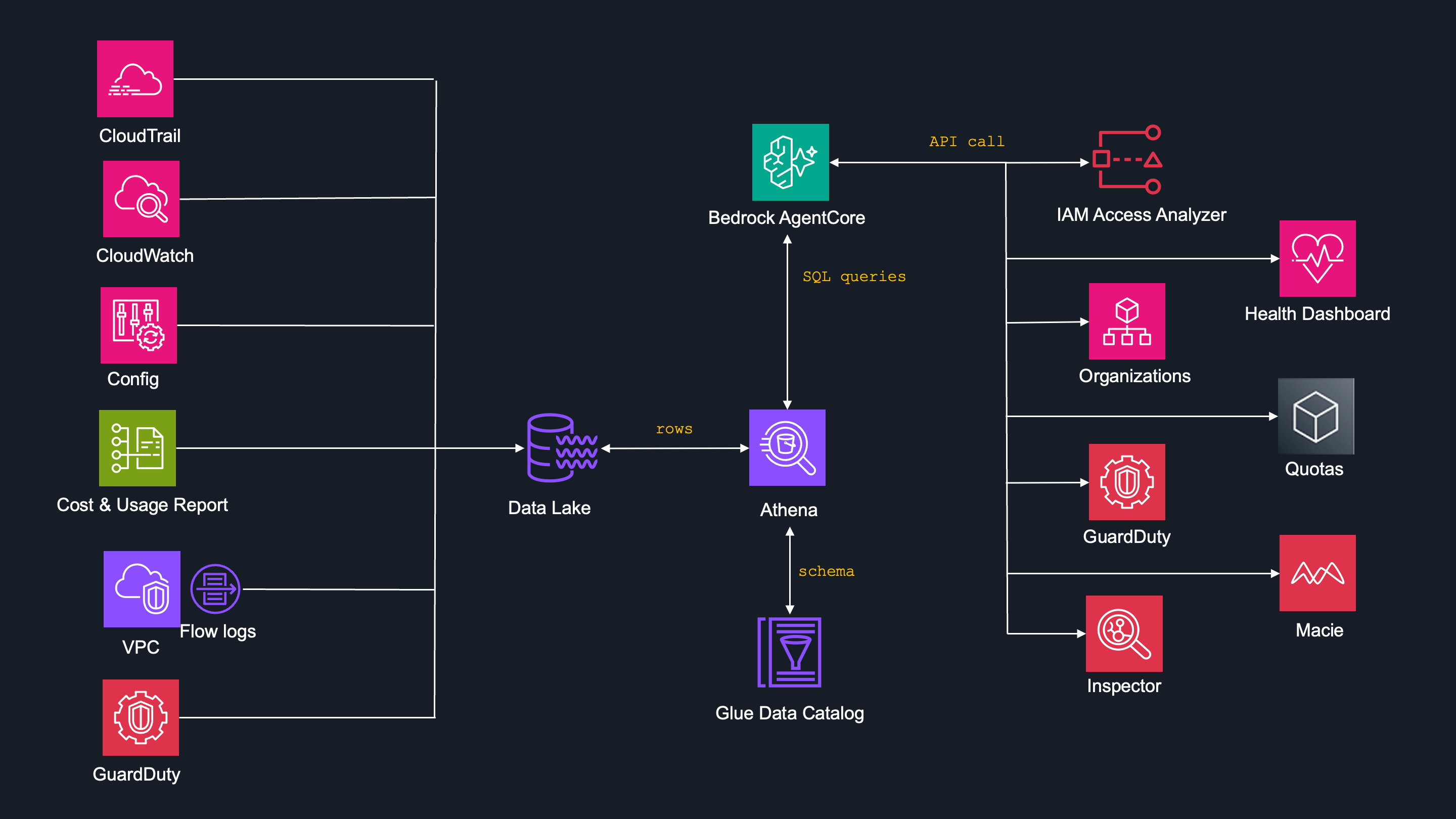
As mentioned above, GuardDuty agent decides if to use SQL query or API call.
I have never built such a complex data pipeline in my life, so with clear conscious I can say that I learned basically everything here, but what you should especially take care are:
Cross-account permissions - You have to think about before, saves a lot of time.
Decompression ≠ Deaggregation - Using the wrong processor to decompress creates silent failure — records land in the error prefix with no obvious error message.
Glue is your friend - Creating solid Data Catalog is crucial.
What's next
This article covered building a pipeline for the logs to be stored in S3 Data Lake.
In the rest of the articles in these series I cover:
- Projext overview
- Security
- Memory
- Observability here and here
- Antihallucination


Top comments (0)