


I built a multi-agent project, for users to ask questions about their AWS infrastructure (3 AWS accounts managed by AWS Organizations) and get answers in human readable way.
The system connects to users AWS infrastructure and provide the answer by reading various log types and creating API calls to multiple AWS resources.
This project was build with Kiro, Kiro spec driven development and Kiro powers.
Project repo
Part 1: I built a multi-agent project on AWS, with Strands AI and AgentCore
Part 2: Give 'em something to read! Building a data pipeline for your agentic AI project
Part 3: Make 'em safe! Security for your agentic AI project
Part 4: Make 'em remember! Memory in the agentic AI project
Part 5: Make 'em visible! See what is happening inside your agentic workflow
Part 6: When shebangs party hard with your MAC path on OpenTelemetry
Part 7: Make 'em behave! Don't let your AI agents hallucinate
Something was missing
My project can answer the questions about my AWS infrastructure,but there was still same pattern over and over again:
Every single invocation looked like this from the agent's point of view:
I was invoked.
I answered one question.
I died.
I don't remember anything.
I wanted to ask:
./alexandra.sh --new "What Config changes happened in the main account yesterday?
and then followup:
./alexandra.sh "And what about 3 days ago?"
I do not want to repeat all the parameters, just the important part.
I also want to ask:
./alexandra.sh "Let's follow up on the session e5tk8 from 2 weeks ago and apply the findings to last week"
That is where memory comes in.
Why memory at all?
In this project, memory has three jobs:
Remember specific session
So the agent knows that the next question belongs to the same investigation, or it's completely new.Remember useful facts across sessions
If user often means the "main account" when saying “main”.Learn from previous experience
If severalCloudWatchquestions failed because the agent skipped log group discovery, the system should learn pattern like this:
“For CloudWatch queries, call log group discovery first.”


Can it be even simpler?
But as usual with this project if something sounds great it also means there's a catch somewhere.
Not every memory is the memory
In my project there are actually three different “memory-like” things:
| Memory | Where it lives | What it does |
|---|---|---|
| Local session file | ~/.lttm_session |
Remembers which session ID alexandra.sh should reuse |
| Conversation metadata | DynamoDB | Stores session title, question count, user ID, last active time |
| Real agent memory | AgentCore Memory | Stores and retrieves conversation events, summaries, facts, and reflections |
DynamoDB is not the agent's brain.
It is just the session list.
~/.lttm_session is not long-term memory.
It is just a local pointer saying: “continue this session unless user says otherwise.”
The actual memory is Amazon Bedrock AgentCore Memory.
Session memory in alexandra.sh
This part is stored locally.
alexandra.sh stores the current session ID in:
~/.lttm_session
If I run:
./alexandra.sh --new "show me last 5 CloudTrail events today"
it creates a new UUID and stores it in ~/.lttm_session.
If I then ask followup:
./alexandra.sh "what about yesterday?"
without --new, it reuses the previous session ID.
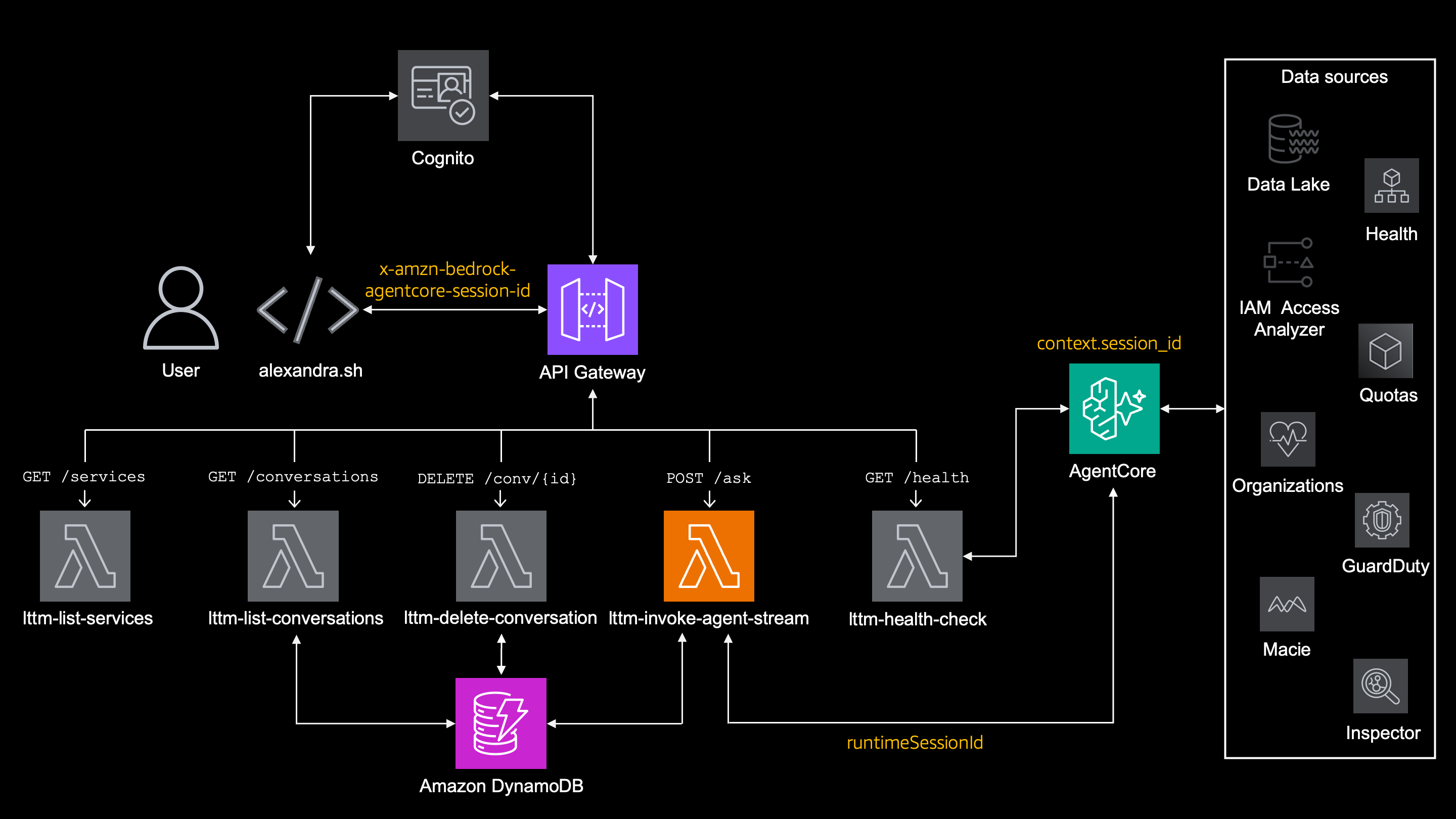
alexandra.sh sends this session ID to API Gateway in the header like this -H "x-amzn-bedrock-agentcore-session-id: ${SESSION_ID}" and through lambda it gets to the supervisor_agent so it knows to use it.
In short
Current session ID is kept locally in ~/.lttm_session, re-used by 'alexandra.sh' and distributed further
Session matadata in DynamoDB
The streaming lambda also stores metadata about each conversation in DynamoDB.
This gives me features like:
./alexandra.sh --history
./alexandra.sh --delete <session_id>
The DynamoDB stores:
session_id
user_id
title
question_count
created_at
last_active
expires_at
This is useful for listing previous conversations with all its parameters, but this is not what gives the agent context.
DynamoDB remembers that a session exists.
AgentCore Memory remembers what happened in it.
In short
Metadata of every single session, including the session ID and question itself are stored in DynamoDB.
Context is in the AgentCore Memory
One of the cool AgentCore's feature is Memory. It's a managed memory with several strategies:
| Strategy | Purpose |
|---|---|
| Short-term memory | Stores raw conversation events |
| Summary memory | Compresses older conversation history |
| Semantic memory | Extracts reusable facts across sessions |
| Episodic memory | Learns from repeated experiences and creates reflections |
Lessons learned: Memory is not just storage of the chat somehere, it's more like.
What happened?
What is worth remembering?
What can be safely reused later?
What should never silently change the next query?
Defining an AgentCore Memory
When creating a AgentCore Memory, first it have to be defined as a resource:
The memory resource itself is created in Terraform.
resource "aws_bedrockagentcore_memory" "lttm" {
  provider              = aws.uswest2
  name                  = "${replace(var.prefix, "-", "_")}_agent_memory"
  description           = "LTTM conversation memory — stores session history for follow-up questions"
  event_expiry_duration = var.memory_retention_days

  tags = { Project = var.prefix }
}
It runs in
us-west-2, because my AgentCore Runtime also runs inus-west-2, while the rest of the project is ineu-central-1.
Semantic memory
This memory extracts reusable facts and knowledge across sessions.
resource "aws_bedrockagentcore_memory_strategy" "semantic" {
  provider    = aws.uswest2
  name        = "semantic_strategy"
  memory_id   = aws_bedrockagentcore_memory.lttm.id
  type        = "SEMANTIC"
  description = "Extracts facts and knowledge across LTTM sessions"
  namespaces  = ["default"]
}
This is useful for things like:
User usually asks about the main account.
User often investigates IAM changes.
User previously asked about lttm-agent-role.
But semantic memory is also where one of the biggest lessons came from.
Just because a fact is true does not mean it should be used as a SQL filter.
Remember this sentence, it becomes important.
Summary memory
Surprisingly, a summary memory summarizes the conversation history.

resource "aws_bedrockagentcore_memory_strategy" "summary" {
  provider    = aws.uswest2
  name        = "summary_strategy"
  memory_id   = aws_bedrockagentcore_memory.lttm.id
  type        = "SUMMARIZATION"
  description = "Summarizes LTTM conversation history to keep context compact"
  namespaces  = ["{sessionId}"]
}
This became pretty handy in this project, as tool results can be big and last thing I want in the next invocation is to replay 300 raw CloudTrail rows from yesterday.
Episodic memory
Episodic memory is the most interesting one, it almost feels like living organism.
If semantic memory remembers facts, then episodic memory remembers experiences.
It means it can learn from its previous experiences.

That means things like:
When user says "dev account", verify account_id = 012345678910.
or:
For CloudWatch questions without exact log group name, call log group lttm-logs first.
In practice the episodic memory is not instant magic.
It needs multiple sessions, repeated patterns and time to generate reflections.
If you enable episodic memory and ask one question, do not expect the agent to suddenly become a wizzard.
resource "aws_bedrockagentcore_memory_strategy" "episodic" {
  provider    = aws.default_uswest2
  name        = "episodic_strategy"
  memory_id   = aws_bedrockagentcore_memory.lttm.id
  type        = "EPISODIC"
  description = "Captures session experiences and generates reflections for LTTM"
  namespaces  = ["{sessionId}"]
}
Important note about terraform
You need at least version 6.43 of aws provider (Apr. 29th 2026), to be able to create episodic memory in code.
If you created it before manualy (like me) or by script (you smart ones out there), after migrating to aws provider version 6.43 you can actually import it in the state (after you define it in terraform - see above).
  # Get memory ID
  aws bedrock-agentcore-control list-memories --region <region> | grep id

  # Get episodic strategy ID
  aws bedrock-agentcore-control get-memory --memory-id <memory-id> --region <region>| grep -i strategyId | grep episodic

  # Import episodic memory to terraform
  terraform import aws_bedrockagentcore_memory_strategy.episodic <memory_id>,<strategy_id>
IAM permissions for memory
This is AWS, so you need permissions basically for breathing the air and so the AgentCore execution role needs permissions to use memory.
In my project this is part of lttm-agent-role:
statement {
  sid    = "AgentCoreMemory"
  effect = "Allow"
  actions = [
    "bedrock-agentcore:GetMemory",
    "bedrock-agentcore:InvokeMemory",
    "bedrock-agentcore:SearchMemory",
    "bedrock-agentcore:CreateEvent",
    "bedrock-agentcore:GetEvent",
    "bedrock-agentcore:ListEvents",
    "bedrock-agentcore:DeleteEvent",
    "bedrock-agentcore:RetrieveMemoryRecords",
    "bedrock-agentcore:ListMemoryRecords",
    "bedrock-agentcore:GetMemoryRecord",
    "bedrock-agentcore:DeleteMemoryRecord",
    "bedrock-agentcore:BatchCreateMemoryRecords",
    "bedrock-agentcore:BatchDeleteMemoryRecords",
    "bedrock-agentcore:BatchUpdateMemoryRecords",
    "bedrock-agentcore:ListActors",
    "bedrock-agentcore:ListSessions",
    "bedrock-agentcore:StartMemoryExtractionJob",
    "bedrock-agentcore:ListMemoryExtractionJobs",
  ]
  resources = [aws_bedrockagentcore_memory.lttm.arn]
}
This is backend security again.
The user does not get memory permissions.
The Lambda does not read memory directly.

The AgentCore runtime role uses memory as part of the agent execution.
Plugging the LTTM project into AgentCore Memory
Creating AgentCore Memory is just a half of the story. The agent still needs to know how to read and write into it.
In this project this is done by a custom hook called LTTMMemoryHook.
It's registered ony on the supervisor agent, not on every sub-agent. There is a reason for that - the supervisor agent is the one that sees the user question, decides which sub-agent to call, and prepares the final answer.
Subagents then stay focused on their own job — integrating with AWS services.
Divide et impera
When a request starts, the supervisor gets the current session ID and passes it to the memory hook. After the first user question arrives, LTTMMemoryHook retrieves relevant memories from AgentCore Memory:
- Top 5 semantic facts from the
defaultnamespace (cross-session knowledge).
  memories = client.retrieve_memories(
      memory_id=self.memory_id,
      namespace="default",
      query=query,
      top_k=5,
  )
- Top 3 episodic reflections from the
<session_id>namespace (session-specific lessons).
  episodic_memories = client.retrieve_memories(
      memory_id=self.memory_id,
      namespace=f"{session_id}",
      query=query,
      top_k=3,
  )
semantic memory - useful facts from previous sessions
episodic memory - lessons/reflections from previous experiences.
Here it's important to say, that semantic memory works cross all sessions, while episodic works per current session.
If user use --new there is nothing episodic memory can retrieve, because brand-new session was just started, that means there are no previous episodic reflections to retrieve.
Those memories are appended to the supervisor prompt as extra context. But there is a very important rule:
Memory is context, not authority.
If there is anything to extract the injected memory is wrapped with instructions what NOT to do.
Remember the important sentence from before? That's exactly what happened here - The agent created the SQL based on the it red in the memory, not based on the instructions. That behavior had to be stopped:
Semantic memory:
event.agent.system_prompt += (
    "\n\n<user_context>\n"
    "The following facts are from the user's previous sessions. "
    "Use them ONLY to answer questions about previous sessions or user preferences. "
    "Do NOT use these facts to modify SQL queries, add filters, or change how you route questions to sub-agents. They are background context only.\n"
    f"{facts_text}\n"
    "</user_context>"
For episodic memory, if the reflections exist they are also appended with instructions:
<agent_reflections>
The following are lessons learned from past query experiences.
Use them to avoid repeating past mistakes.
Do NOT share these with the user.
Do NOT use these reflections to add SQL filters, modify queries,
or change how you route questions to sub-agents unless the user explicitly asks for it.
...
</agent_reflections>
And yes, this was the hard lesson to learn as well.
The hook also respects the --clean flag. If this one is used
any memory retrieval is skipped for that request and the question is asked without memory influencing it at all.
The hook also saves messages back to AgentCore Memory using create_event(), so future sessions have something to learn from (but that's based on the flags as explained above).
client.create_event(
    memory_id=self.memory_id,
    actor_id=self.actor_id,
    session_id=session_id,
    messages=[(text[:5000], role.upper())],
)
Here the messages are truncated to 5000 characters before saving, because agent outputs can contain large CloudTrail, Config, CloudWatch logs and other data.
So in short, LTTMMemoryHook does this:
- Reads memory before the supervisor answers.
- Injects it as context into prompt.
- Skips retrieval when
--cleanis used. - Saves new messages back to AgentCore Memory.
This is how memory is plugged in LTTM project. Or should I say hooked?

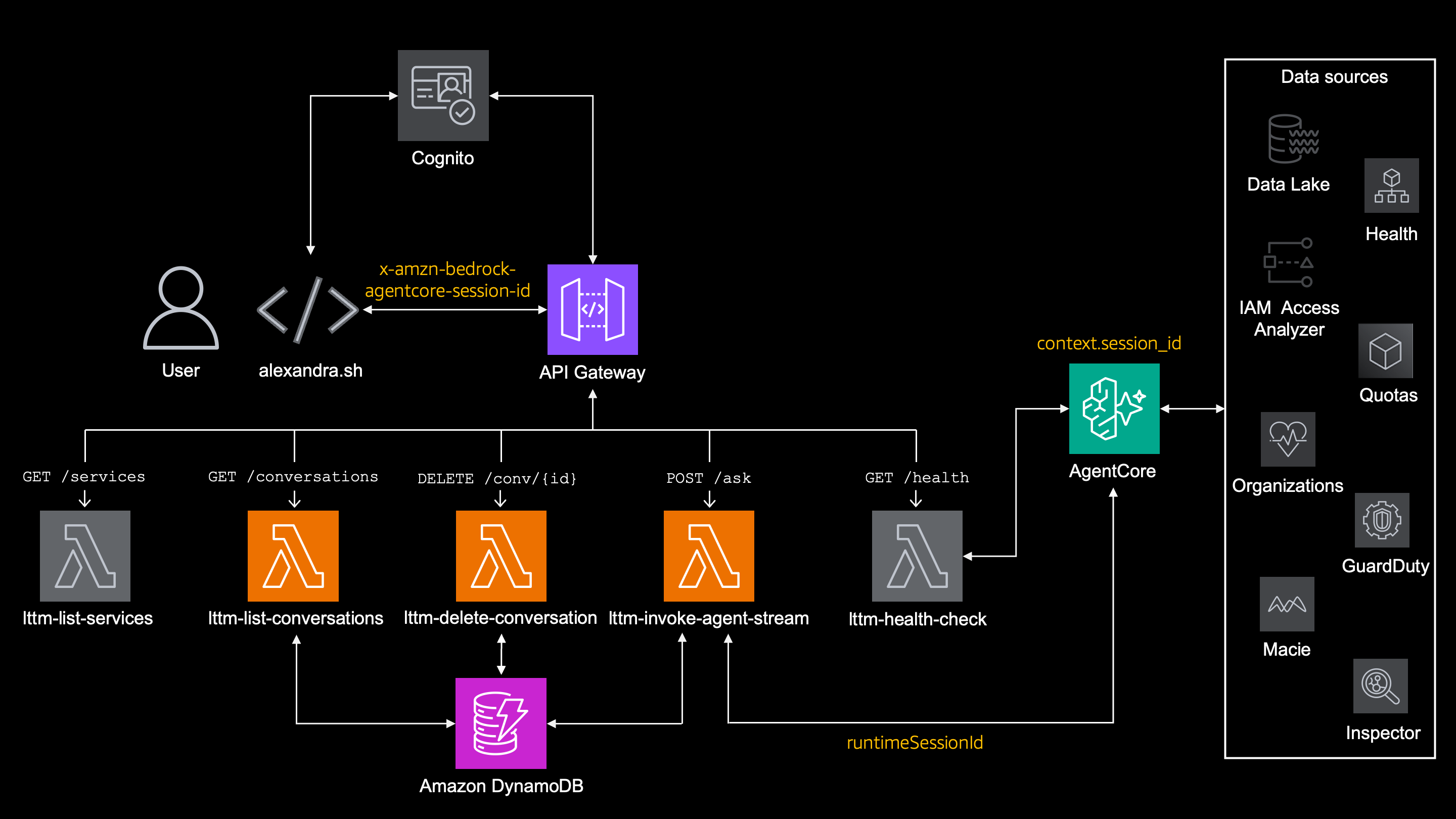
Putting it all together:
alexandra.sh
  ├─ stores local session ID in `~/.lttm_session`
  ├─ sends session ID in `x-amzn-bedrock-agentcore-session-id`
  └─ sends `no_memory=true` when `--clean` is used

Lambda `lttm-invoke-agent-stream`
  ├─ forwards session ID to AgentCore as `runtimeSessionId`
  └─ stores session metadata in `DynamoDB`

Lambda `lttm-delete-conversation`
  └─ deletes session metadata in `DynamoDB`

Lambda `lttm-list-conversations`
  └─ list all session from `DynamoDB`

AgentCore Runtime
  └─ provides `context.session_id` to supervisor agent

Supervisor agent
  ├─ sets `LTTMMemoryHook._current_session_id`
  ├─ optionally disables retrieval with `--clean`
  ├─ retrieves semantic memory and episodic reflections
  ├─ injects memory into system prompt with strict wrappers
  └─ saves every message to AgentCore Memory
What's next ?
This article covered a usage of memory in my agentic AI project.
In the rest of the articles in these series I cover:
- Projext overview
- Data pipeline
- Security
- Observability here and here
- Antihallucination
Additional reading
How to Use Strands Agents' Built-In Session Persistence
Build Production AI Agents with Managed Long-Term Memory
AgentCore Episodic Memory: When Your Agent Learns from Experience
Agent Memory vs. Context Engineering: What Persists Between Sessions and What Doesn't


Top comments (1)
Great series! One thing worth adding to the memory layer: runtime security. When agents persist memories across sessions, those memories become an attack surface — OWASP now classifies this as ASI06 (Memory Poisoning) in their Top 10 for Agentic Applications.
A malicious input stored as a "trusted" memory can influence all future agent behavior. I built
agent-memory-guard(the OWASP reference implementation) to address this — it adds cryptographic integrity verification and semantic anomaly detection as a middleware layer.Would be interesting to see how it integrates with the Strands AI + AgentCore memory architecture you've built here. The library is framework-agnostic:
pip install agent-memory-guardGitHub: github.com/OWASP/www-project-agent...