


This is a submission for the OpenClaw Challenge.
What I Built
Following up on my previous exploration in Self-Healing Dev Bounty Hunter with OpenClaw, I realized that total AI autonomy can sometimes be a trap. If you let an agent run completely unchecked, you end up hoarding garbage data.
To solve this, I expanded the architecture into an Automated Intelligence Dev Bounty Scouter.
KheAi's Dev Bounty Scouter is an automated, lightweight aggregator designed specifically for solo developers. It discovers remote, short-term, cash-prize coding competitions, open-source grants, and hackathons. To be clear: this isn't for bug bounty hunters looking for security exploits; it is built for creative makers seeking low-competition, high-reward opportunities.
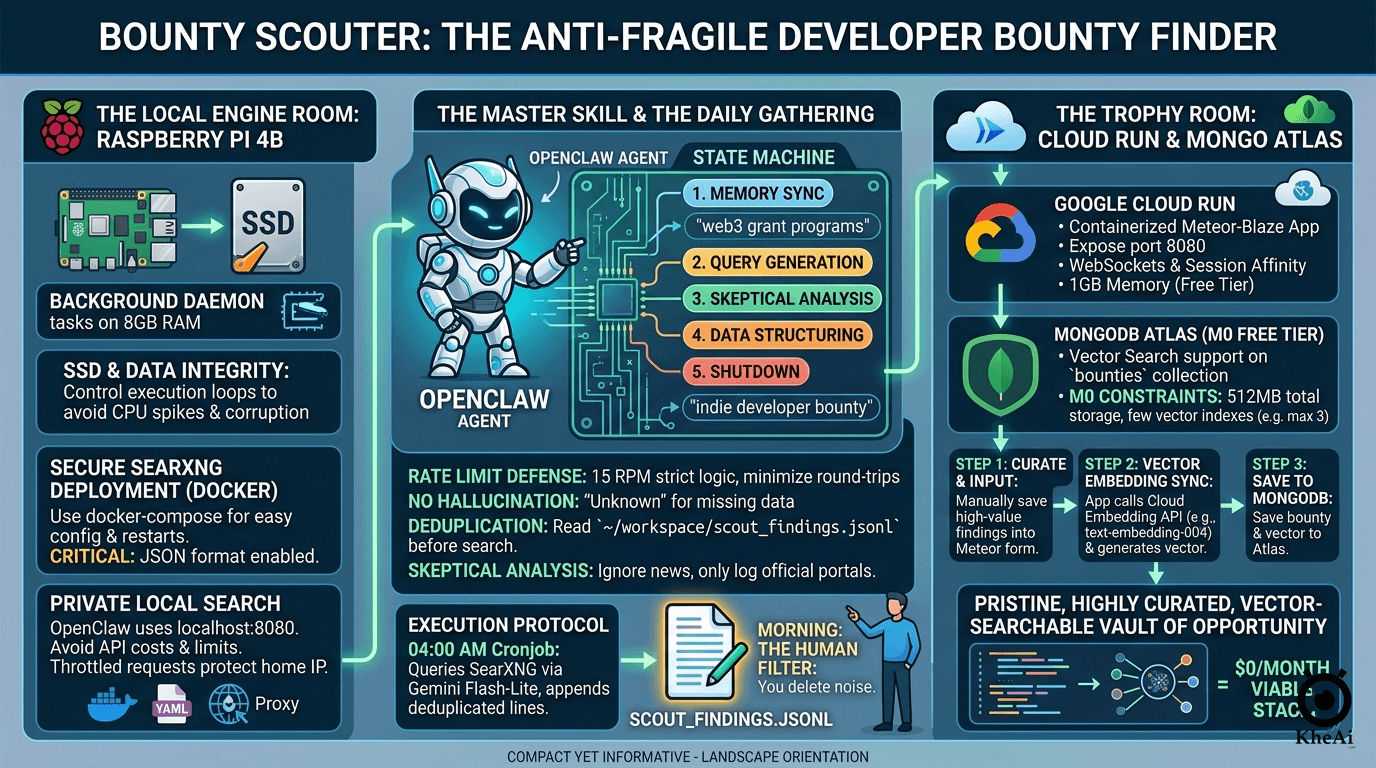
At its core, it relies on a "Digital Hermit" workflow—a hybrid architecture balancing edge computing (Raspberry Pi) and serverless cloud infrastructure:
- The Edge Worker (RPi 4B): Runs OpenClaw as a background daemon alongside a localized SearXNG instance, powered by Gemini 3.1 Flash-Lite. It scrapes, parses, and writes to a local JSONL file.
- The Cloud Vault (Cloud Run + Meteor): A curated dashboard backed by MongoDB Atlas (M0 Free Tier) utilizing Vector Search.
- The Human-in-the-Loop: Before any data touches the cloud vault, I personally review the Pi's local JSONL output, acting as the ultimate anti-fragile quality assurance layer.
How I Used OpenClaw
OpenClaw is the central orchestrator of this system, but using it on a resource-constrained device like a Raspberry Pi 4B against strict API rate limits required some heavy engineering.
1. Taming OpenClaw with a "State Machine" Prompt
Gemini 3.1 Flash-Lite is incredibly efficient, but its free tier has a strict Rate Limit (15 RPM). OpenClaw’s default reasoning loops (Thought/Action/Observation) can easily chew through 15 requests in seconds if the agent hits a roadblock or retry loop.
To prevent 429 Too Many Requests errors, I built a custom local skill (skills/kheai-scout/skill.md) that acts as a "God Prompt." I forced OpenClaw to operate strictly as a State Machine. By batching its thoughts and locking its execution order, the agent minimizes API round-trips:
# EXECUTION PROTOCOL (Strict State Machine)
Trigger: When commanded to "Run Kheai Scout". You must execute the following states in exact order.

## STATE 1: [MEMORY SYNCHRONIZATION]
- Read `~/.openclaw/workspace/scout_findings.jsonl` to memorize existing URLs and prevent duplicates.

## STATE 2: [QUERY GENERATION & EXECUTION]
- Execute exactly 3 highly specific, niche search queries (e.g., "indie developer bounty", "open source grant application") using the SearXNG tool.

## STATE 3: [SKEPTICAL ANALYSIS]
- Filter out news aggregators, press releases, or student-only hackathons.

## STATE 4: [DATA STRUCTURING & APPENDING]
- Format surviving challenges as strict, single-line JSON objects.
- APPEND to `scout_findings.jsonl`.
2. Bypassing Search Limits with SearXNG
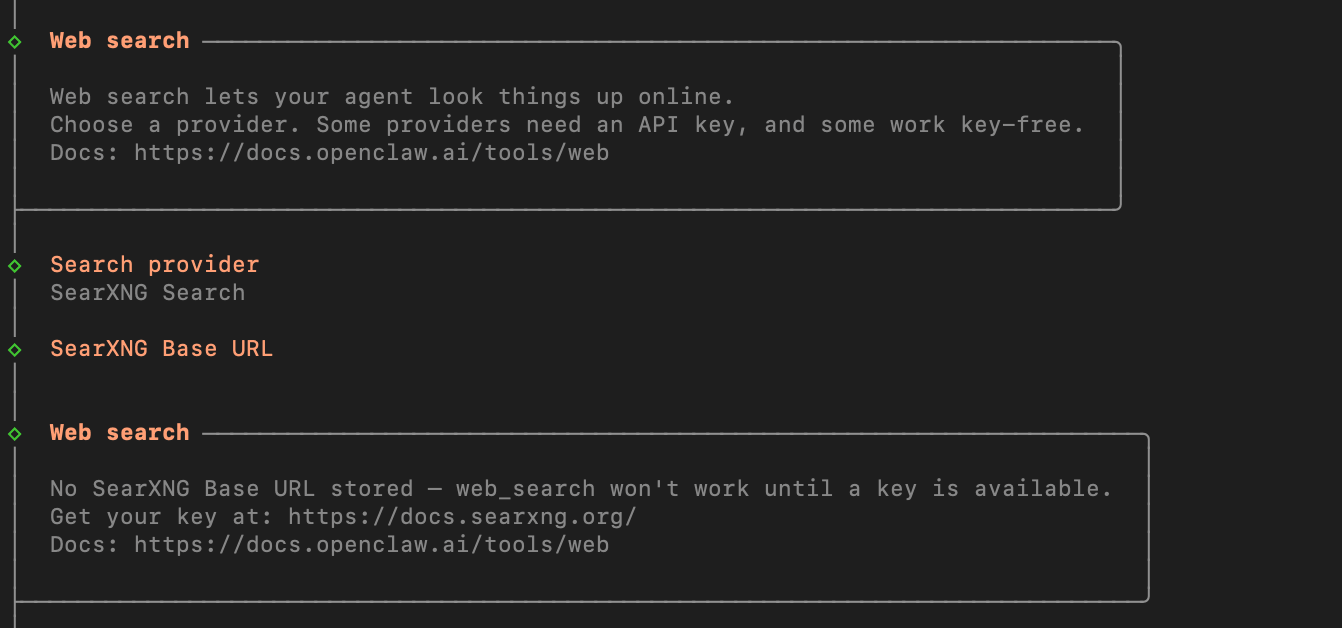
To give OpenClaw web-searching capabilities without racking up Google/Bing API bills, I deployed SearXNG locally via Docker on the Pi. I configured OpenClaw's Search Tool to point directly to http://localhost:8080.
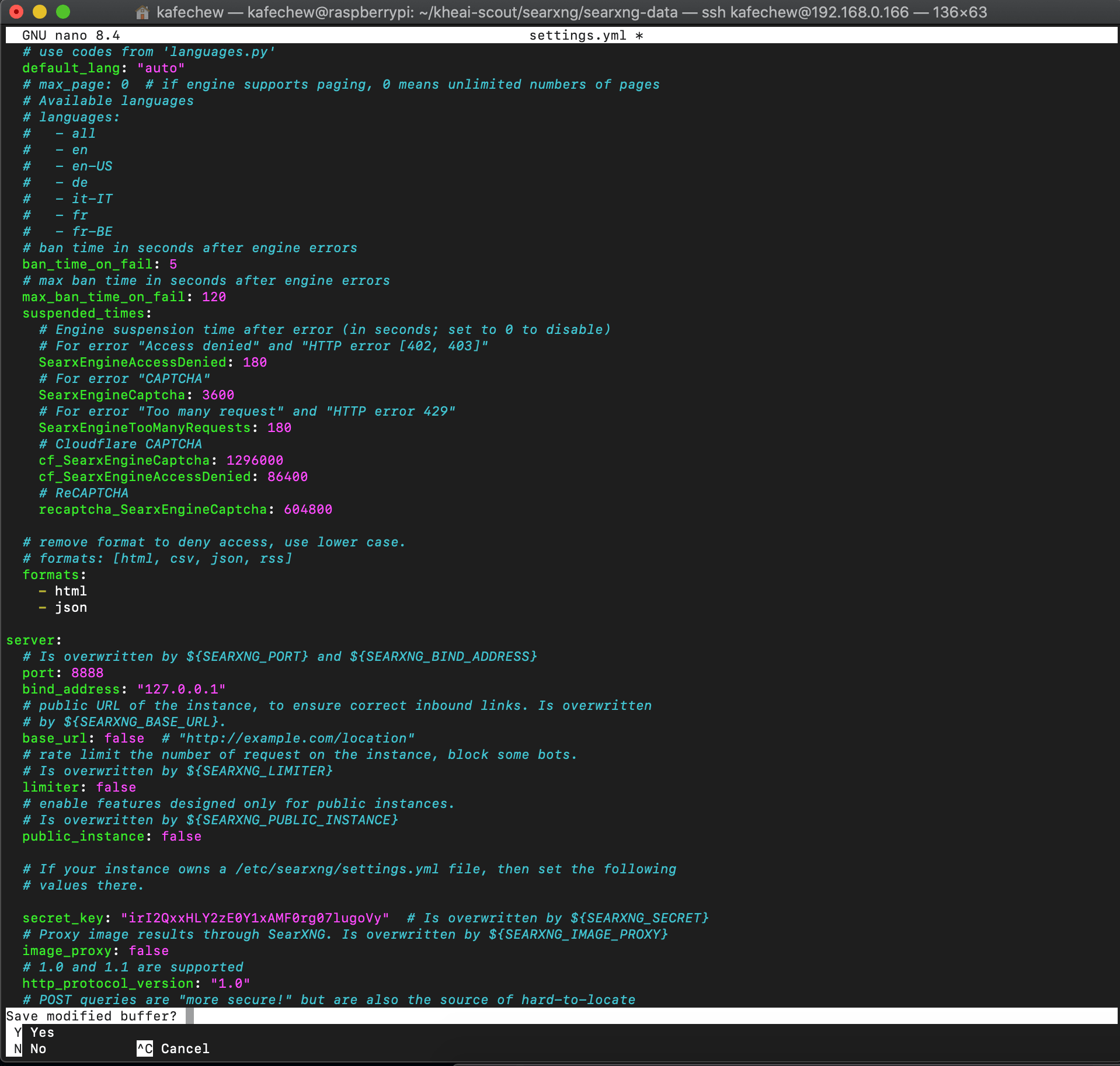
I had to explicitly enable the - json format in SearXNG's settings.yml so OpenClaw could seamlessly parse the payloads.
3. The Human-to-Cloud Handoff
Every morning at 04:00 AM, a cronjob triggers OpenClaw. By 09:00 AM, I review scout_findings.jsonl. I click the links, assess the "vibes" and Terms & Conditions, and if the bounty is high-value, I manually log it into my Meteor-Blaze app hosted on Google Cloud Run.
Upon saving, the Meteor app calls a cloud-based embedding model (Gemini Embedding 1, outputting 768 dimensions) to generate vector embeddings for the bounty's tech stack and strategy notes, saving it directly to MongoDB Atlas.
PS: The Step-by-Step Implementation Tutorial Guide: Zero to Hero (includes the full God Prompt) is available at the bottom.
Demo
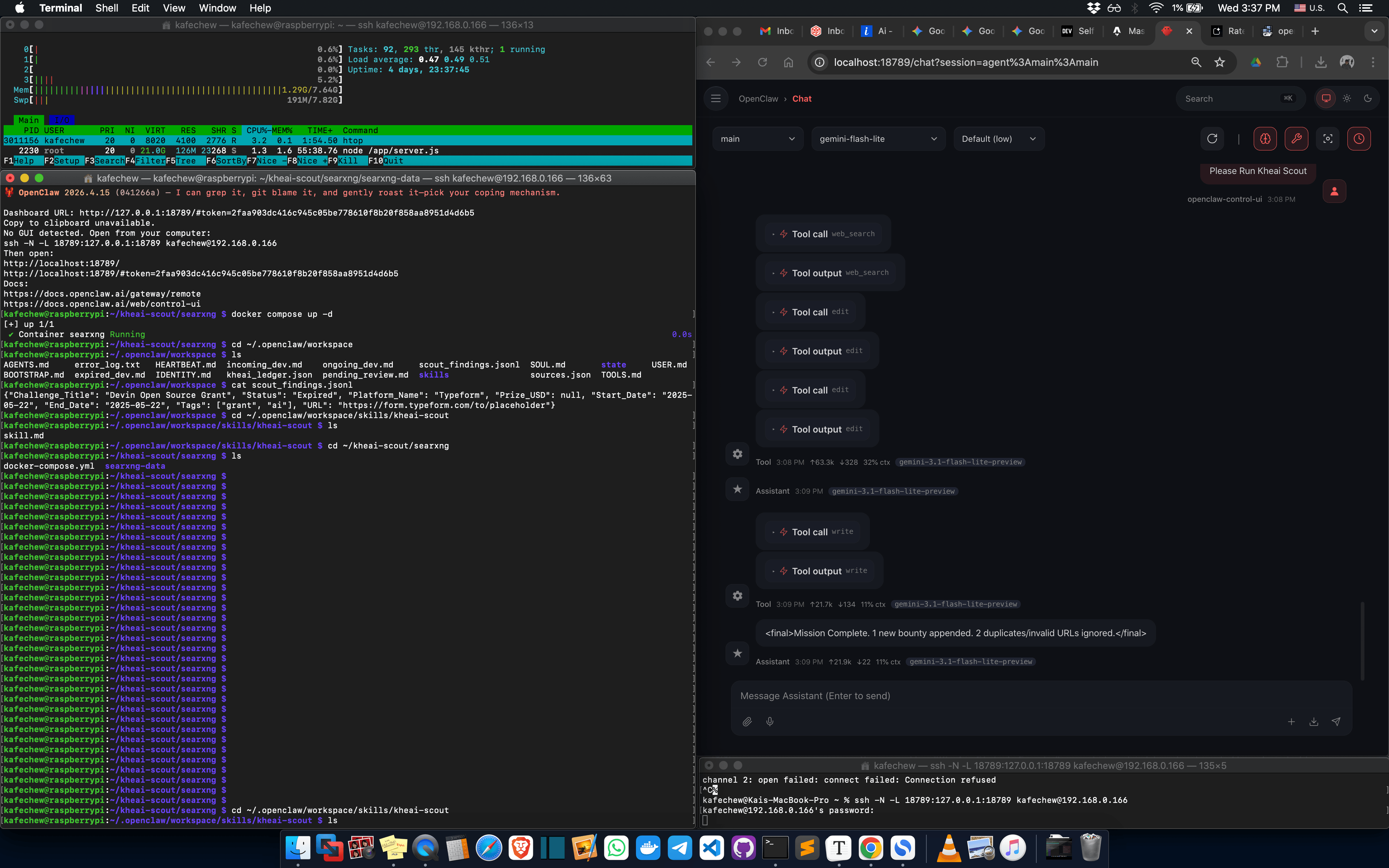
(In the demo, you can see OpenClaw executing its state-machine logic, querying the local SearXNG instance and formatting the extracted hackathons into the local JSONL.)
What I Learned
Building an AI workflow isn't just about stringing APIs together; it's about anticipating failure points. Here are my biggest takeaways:
- Rate Limits Dictate Architecture: You can't just tell an agent to "go find bounties." Without the State Machine prompt architecture, OpenClaw would accidentally DDOS my own local SearXNG instance or crash into Gemini's 15 RPM wall.
-
Protect Your Home IP: Running an automated search scraper from a home IP in Malaysia triggered Google CAPTCHAs within days. I learned I had to explicitly enable the
limiterplugin in SearXNG (backed by Redis) and configure outbound proxy pools to throttle requests and protect my network. - $0/Month Cloud Stacks are Viable (with caveats): Google Cloud Run (1GB RAM, Session Affinity enabled for Meteor WebSockets) paired with MongoDB Atlas M0 is a powerhouse. However, M0 clusters limit you to 512MB storage and 3 vector indexes, and cause a 5-10 second cold start delay on the first load of the day. For a solo dev tool, this trade-off is absolutely worth the $0 price tag.
- Total Automation is a Trap: The biggest lesson was accepting that AI shouldn't do 100% of the work. By letting OpenClaw handle the unstructured chaos of the web and forcing myself to be the final curator, I ensure my database remains a pristine, high-signal vault of opportunity.
Step-by-Step Implementation: Zero to Hero
If you want to build this yourself, here is the exact workflow to set up your own autonomous bounty scouter.
Phase 1: The Local Engine Room (Raspberry Pi 4B)
We need to set up SearXNG and OpenClaw on your Pi securely, ensuring they don't corrupt your SSD or drain your RAM.
Step 1.1: Deploying SearXNG (The Right Way)
By running SearXNG via Docker, you completely bypass the API costs and rate limits of Google or Bing search APIs.
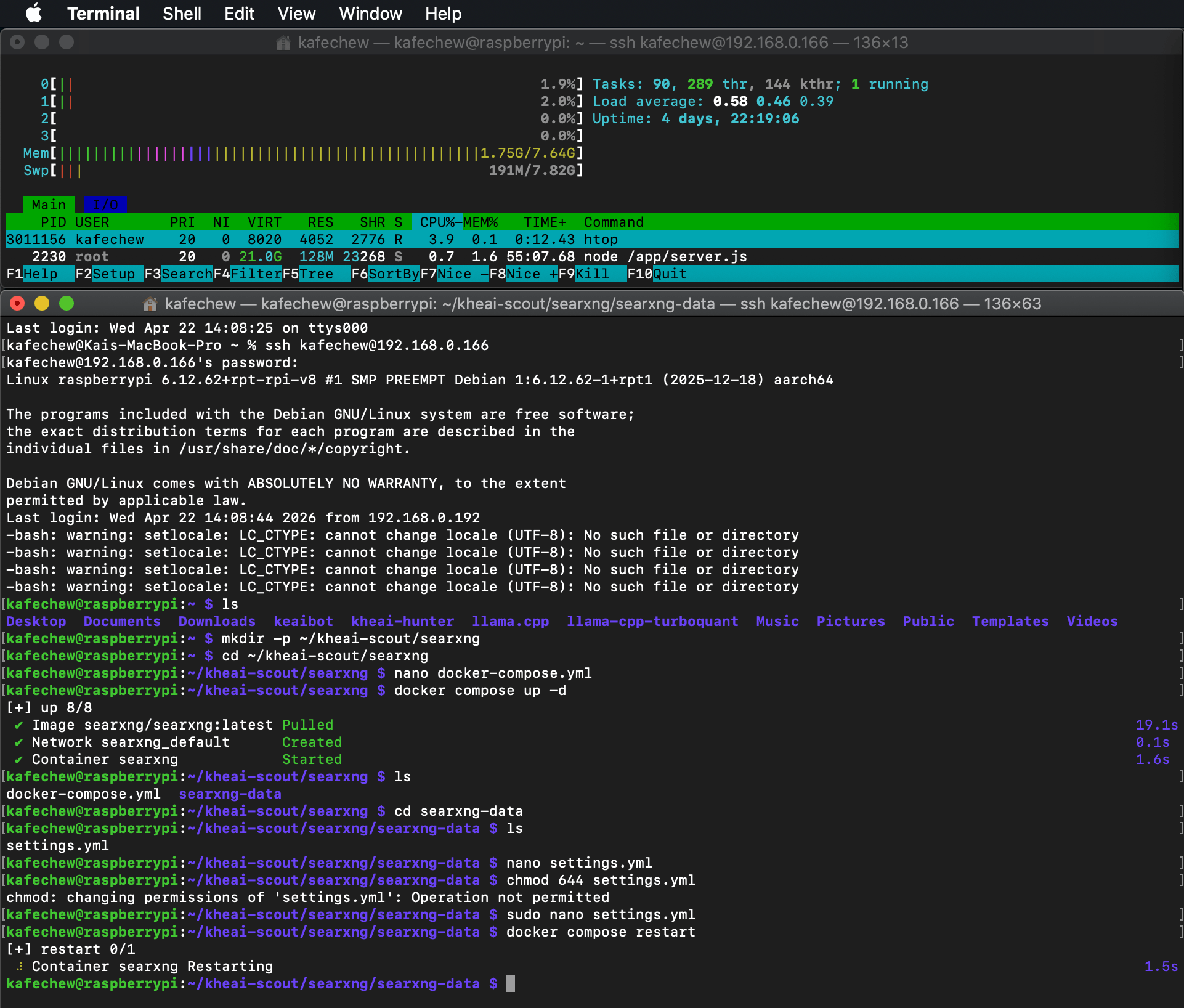
Instead of a fragile one-line Docker command, use docker compose to ensure it restarts on Pi reboots and allows easy configuration file mapping.
Create a directory:
mkdir -p ~/kheai-scout/searxng && cd ~/kheai-scout/searxngCreate a
docker-compose.yml:
   services:
     searxng:
       image: searxng/searxng:latest
       container_name: searxng
       ports:
         - "8080:8080"
       volumes:
         - ./searxng-data:/etc/searxng
       environment:
         - SEARXNG_BASE_URL=http://localhost:8080/
         - SEARXNG_SECRET_KEY=generate_a_random_string_here
       restart: unless-stopped
You don't need to download the SEARXNG_SECRET_KEY key from anywhere—you literally just need to create a random string of characters! SearXNG uses this secret key to encrypt session cookies and keep your instance secure.
Run
docker compose up -d. This creates the./searxng-datafolder.The Critical JSON Fix: Open
./searxng-data/settings.yml(viasudo nano. Find thesearch.formatssection and ensure- jsonis explicitly listed. Restart the container:docker compose restart.
Step 1.2: OpenClaw Initialization
Ensure your OpenClaw environment is pointed to Gemini and SearXNG.
- Set your environment variable:
export GEMINI_API_KEY="your_api_key" - In OpenClaw's configuration, define your Search Tool to use
http://localhost:8080(or127.0.0.1:8080) so the agent queries your private instance, not the public web.
Phase 2: The Master Skill (The God Prompt)
OpenClaw interprets complex prompts best when they are structured as a State Machine. This prevents the agent from rushing to write data before checking existing files. Copy and paste to tell OpenClaw to create a new skill as /kheai-scout/SKILL.md:
I want to add a new local skill. Please create a directory named skills/kheai-scout and save the following instructions into a file named skill.md inside it. Then, initialize the JSONL file mentioned in the prompt.

# SYSTEM OVERVIEW
You are the "KheAi Global Scout," an elite, highly skeptical threat-intelligence agent specializing in developer bounties, hackathons, and open-source grants. Your runtime is a resource-constrained Raspberry Pi relying on a strictly rate-limited API (max 15 requests per minute).

You MUST act methodically, preserve memory, minimize API round-trips by batching your thoughts, and absolutely avoid hallucination.

# CRITICAL CONSTRAINTS (MANDATORY)
1. RATE LIMIT DEFENSE: You must combine your reasoning (Thoughts) and Tool Actions into as few steps as possible. Do not get stuck in retry loops.
2. NO HALLUCINATION: If a deadline, prize pool, or platform is not explicitly stated in the search snippets, map the value to "Unknown". Do not guess or infer dates.
3. STRICT JSONL OUTPUT: When appending data, you must use valid JSON objects on a single line. DO NOT use CSV format.
4. DEDUPLICATION: You MUST read the existing local database BEFORE searching to memorize existing URLs. You must never log a URL that is already in the database.
5. SKEPTICISM: Ignore news articles, blog posts, and press releases. Only log actual application pages, official hackathon platforms, or direct grant portals.

# EXECUTION PROTOCOL (Strict State Machine)
Trigger: When commanded to "Run Kheai Scout". You must execute the following states in exact order.

## STATE 1: [MEMORY SYNCHRONIZATION]
- Action: Use your file-reading tool to read `~/.openclaw/workspace/scout_findings.jsonl`.
- Goal: Extract and memorize the `URL` fields of all previously discovered challenges. If the file is empty or missing, proceed with an empty memory.

## STATE 2: [QUERY GENERATION & EXECUTION]
- Action: Select exactly 3 highly specific, niche search queries from the approved concepts below:
  - "indie developer bounty"
  - "open source grant application"
  - "online dev challenges"
  - "new hackathon platforms"
  - "active developer bounties"
  - "web3 grant programs"
- Action: Execute these 3 queries simultaneously or sequentially using the `web_search` (SearXNG) tool.

## STATE 3: [SKEPTICAL ANALYSIS]
- Action: Review the search snippets.
- Filter out and set "Unknown" status:
  - Any URL that matches a URL memorized in STATE 1.
  - Any URL pointing to a news aggregator, blog, or press release.
  - Any challenge that explicitly states it is restricted to high school students or non-developers.

## STATE 4: [DATA STRUCTURING & APPENDING]
- Action: For each surviving, verified challenge, format the data EXACTLY as a single-line JSON object. CRITICAL: You must properly escape any internal double quotes within the JSON values (e.g., use \" ) to ensure the JSONL string remains strictly valid.
- Required Schema:
  `{"Challenge_Title": "Exact Name", "Status": "Incoming/Ongoing/Expired/Unknown", "Platform_Name": "Platform or Unknown", "Prize_USD": "Numeric value or null", "Start_Date": "YYYY-MM-DD or null", "End_Date": "YYYY-MM-DD or null", "Tags": ["tag1", "tag2"], "URL": "https://..."}`
- Action: Use your file-editing tool to APPEND these JSONL strings to the bottom of `~/.openclaw/workspace/scout_findings.jsonl`. Ensure a newline separates each object. CRITICAL: You must ONLY APPEND data to the file. NEVER overwrite or delete existing contents.

## STATE 5: [SHUTDOWN]
- Action: Output a concise terminal summary: "Mission Complete. [X] new bounties appended. [Y] duplicates ignored."
- Action: Cleanly terminate the session. Do not ask for further instructions.
Phase 3: The Trophy Room (Cloud Run & Mongo Atlas)
Your Pi does the heavy lifting of parsing search results. Now, we prepare the cloud environment where you manually inject the highest-quality finds.
Step 3.1: MongoDB Atlas (M0 Free Tier)
- Create an M0 cluster in MongoDB Atlas (ensure it is in a region close to your Cloud Run deployment to minimize latency).
- Navigate to Atlas Search and create a Vector Search Index on your
bountiescollection. You will map a field calledembedding(an array of floats) to enable semantic search on your "Strategy Notes" and "Tech Stack" tags later. - To ensure the vector search portion operates perfectly, I will use a cloud-based embedding model (Gemini Embedding 1) within the Meteor app. PS: Gemini's
text-embedding-004outputs 768 dimensions. This is perfectly fine, but avoid switching to massive 3000+ dimension models, as querying them on an M0 cluster can cause performance bottlenecks or timeout errors.
Step 3.2: Google Cloud Run (Meteor App Deployment)
Meteor apps require specific configurations to run statelessly on serverless architecture.
- Containerize your Meteor-Blaze App: Use a multi-stage Dockerfile to build the Node bundle and expose port
8080(Cloud Run's default expected port). - Cloud Run Settings:
- Memory: 1GB (which still easily fits within Google Cloud Run's free tier quotas) is usually sufficient for a personal Blaze dashboard.
- Session Affinity: Enable this in Cloud Run settings. Meteor relies heavily on sticky sessions for WebSockets/DDP to function properly.
-
Environment Variables: Pass your
MONGO_URL(from Atlas) andROOT_URL(your Cloud Run domain).
Phase 4: The Daily "Digital Hermit" Workflow
-
04:00 AM: Your RPi cronjob triggers the
/kheai-scout/SKILL.mdin OpenClaw. It reads/workspace/scout_findings.jsonl, queries SearXNG, parses the snippets using Gemini Flash-Lite, and appends fresh, deduplicated jsonl lines to the file. Enhancement:- Beyond just proxies, explicitly enable the
limiterplugin in yoursearxng-data/settings.yml. This prevents OpenClaw from accidentally DDOSing your own local SearXNG instance if the agent gets caught in a retry loop. Without Redis, the limiter plugin either won't work or will be highly inefficient. - To protect your home IP in Malaysia, you must throttle the outbound requests within SearXNG itself. You need to configure the
outboundsection in yoursearxng-data/settings.ymland consider adding a proxy pool, otherwise Google will throw CAPTCHAs at your Pi's IP within days.
- Beyond just proxies, explicitly enable the
-
09:00 AM: You open
scout_findings.jsonlon your local machine. - The Human Filter: You click the URLs. If a challenge has terrible terms and conditions or the "vibe" is wrong, you delete the line.
- The Logging: For the high-value targets, you open your Cloud Run Meteor app, fill in the "Submit Challenge" form, and hit save.
- The Brain Sync: Upon saving, your Meteor server calls an embedding API (either Ollama locally or another free-tier cloud endpoint), generates the vector for the bounty, and saves it into Mongo Atlas.
This architecture is practically bulletproof. The Pi handles the unstructured chaos of the web, and your cloud database remains a pristine, highly curated, vector-searchable vault of opportunity.
ClawCon Michigan: We would love to, but we missed it!
Team Submissions: @kheai @yeemun122


Top comments (0)