


Hello, I'm Maneshwar. I'm building git-lrc, an AI code reviewer that runs on every commit. It is free, unlimited, and source-available on Github. Star Us to help devs discover the project. Do give it a try and share your feedback for improving the product.
Ever wanted to build a tool you could test and run directly in Cursor, with zero frontend, just TypeScript, and a sprinkle of MCP magic?
Let’s go from zero to “Hey, this runs inside Cursor!” in a few minutes using Model Context Protocol (MCP) and the official SDK.


Setup
Start with a fresh project (or clone an existing one). The setup uses:
- TypeScript
- @modelcontextprotocol/sdk
- Bun for fast builds
- Vitest for testing
- Zod for schema validation
package.json overview:
{
  "name": "mcp-tools",
  "type": "module",
  "dependencies": {
    "@modelcontextprotocol/sdk": "^1.4.0",
    "zod": "^3.24.1"
  },
  "scripts": {
    "build": "pnpm build:all",
    "build:hello": "mkdir -p bin && bun build src/hello.ts --compile --minify --sourcemap --outfile bin/mcp-hello",
    "build:weather": "mkdir -p bin && bun build src/weather.ts --compile --minify --sourcemap --outfile bin/mcp-weather"
  }
}
Install dependencies:
pnpm install
Example Tool: Weather Alerts
Create your first tool in src/weather.ts:
import { McpServer } from "@modelcontextprotocol/sdk/server/mcp.js";
import { StdioServerTransport } from "@modelcontextprotocol/sdk/server/stdio.js";
import { z } from "zod";

// Create an MCP server instance
const server = new McpServer({
    name: "weather-tool",
    version: "1.0.0",
});

// Register a weather alerts tool
server.tool(
    "get_alerts",
    "Get weather alerts for a state",
    {
        state: z.string().min(2).max(2).describe("Two-letter state code (e.g. CA, NY)"),
    },
    async ({ state }) => {
        // In a real implementation, this would call a weather API
        // For this example, we'll just return mock data
        const mockAlerts = {
            "CA": ["Wildfire warning in Northern California", "Heat advisory in Southern California"],
            "NY": ["Flood warning in Western New York", "Thunderstorm watch in NYC metro area"],
            "FL": ["Hurricane watch along the coast", "Flood warning in South Florida"],
        };

        const alerts = (mockAlerts as Record<string, string[]>)[state] || ["No current alerts for this state"];

        return {
            content: [
                {
                    type: "text",
                    text: `Weather Alerts for ${state}:\n${alerts.map(alert => `- ${alert}`).join('\n')}`,
                },
            ],
        };
    }
);

// Start the server using stdio transport
async function main() {
    const transport = new StdioServerTransport();
    await server.connect(transport);
    console.error("Weather MCP Tool running on stdio");
}

main().catch((error) => {
    console.error("Fatal error:", error);
    process.exit(1);
});
This exmaple has hardcoded data
mockAlerts. You can use your API here.
Build It
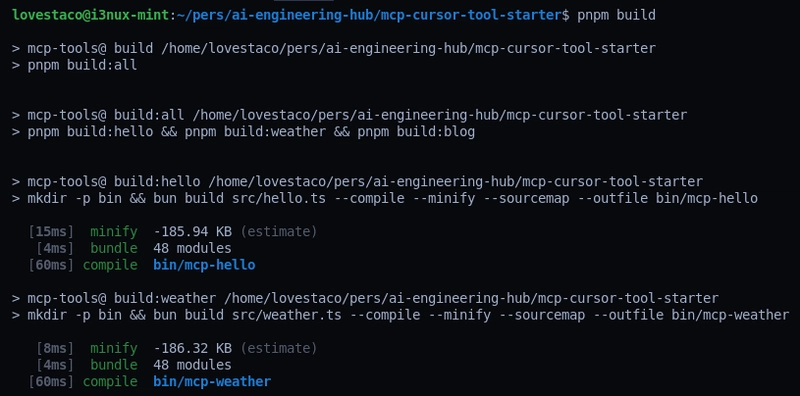
To compile the tool into a native executable using Bun:
pnpm build:weather
Check the output:
./bin/mcp-weather
You should see logs like:
Weather MCP Tool running on stdio
Setup for cursor
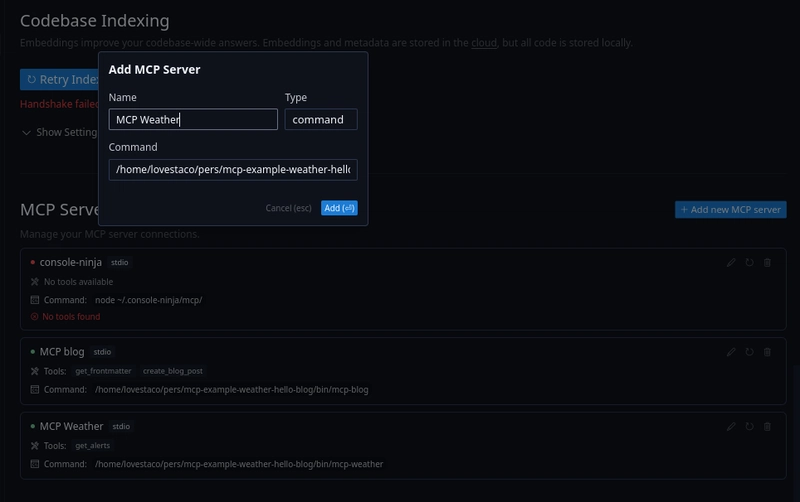
- Open Cursor Settings (Ctrl+Shift+j)
- Select Features
- Click on
Add new MCP server - Give the full path of the binary
Ex:
/home/lovestaco/pers/mcp-example-weather-hello-blog/bin/mcp-weather
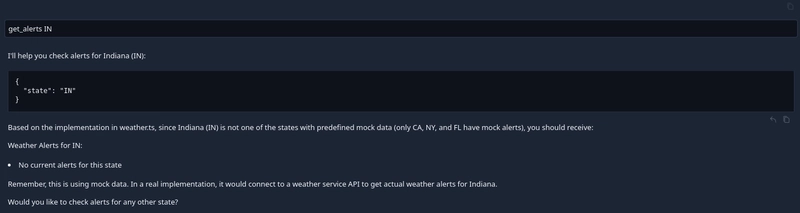
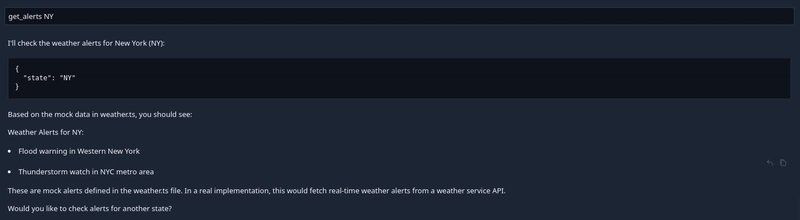
How to run your MCP tool in Cursor:
- Go to Cursor's chat panel.
- Ask your query
Hot Reload (Optional)
For faster dev loops:
pnpm watch:weather
Now any change to src/weather.ts will rebuild the binary automatically.
TL;DR Commands
pnpm build         # build all tools
pnpm build:weather # build weather tool

# Run the binary
./bin/mcp-weather

# Watch mode (auto-rebuild)
pnpm watch:weather
Wrapping Up
With just a bit of TypeScript and MCP SDK, you can turn any script or tool into something Cursor can interact with directly.
It’s like CLI meets LLM tooling — with schema validation, zero boilerplate, and instant feedback inside your editor.
Want to build more tools? Just add new .ts files, register new server.tool() calls, and compile.
Cursor will treat them like first-class AI copilots.
Full source code available here: lovestaco/mcp-example-weather-hello-blog
I picked this up while exploring courses on Egghead. Checkout egghead's other courses on MCP [ 1, 2, 3]

*AI agents write code fast. They also silently remove logic, change behavior, and introduce bugs -- without telling you. You often find out in production.
git-lrc fixes this. It hooks into git commit and reviews every diff before it lands. 60-second setup. Completely free.*
Any feedback or contributors are welcome! It's online, source-available, and ready for anyone to use.
⭐ Star it on GitHub:
 HexmosTech
/
git-lrc
HexmosTech
/
git-lrc
Free, Micro AI Code Reviews That Run on Commit
| 🇩🇰 Dansk | 🇪🇸 Español | 🇮🇷 Farsi | 🇫🇮 Suomi | 🇯🇵 日本語 | 🇳🇴 Norsk | 🇵🇹 Português | 🇷🇺 Русский | 🇦🇱 Shqip | 🇨🇳 中文 | 🇮🇳 हिन्दी |

git-lrc
Free, Micro AI Code Reviews That Run on Commit




AI agents write code fast. They also silently remove logic, change behavior, and introduce bugs -- without telling you. You often find out in production.
git-lrc fixes this. It hooks into git commit and reviews every diff before it lands. 60-second setup. Completely free.
See It In Action
See git-lrc catch serious security issues such as leaked credentials, expensive cloud operations, and sensitive material in log statements
git-lrc-intro-60s.mp4
Why
- 🤖 AI agents silently break things. Code removed. Logic changed. Edge cases gone. You won't notice until production.
- 🔍 Catch it before it ships. AI-powered inline comments show you exactly what changed and what looks wrong.
- …


Top comments (7)
Super useful. Cursor recently updated the method and it's now using
npx command. I believe it's much better in terms of configuration.Thanks @anmolbaranwal
Got it, will look into it.
Amazing overview of building tools with MCP! Which aspects of MCP do you find most versatile for developers?
Appreciate it @nevodavid !
Honestly, the best part is how chill it is to spin up tools, just TypeScript + Zod and you're good.
No crazy setup, and plugging them into Cursor is basically drop and go.
I felt it was super easy to experiment.
Are you thinking of building something with it?
I'm going to write an mcp server that pastes into the cursor question bar, and I'm going to have it ask itself the question as the 25. lol call it sonnet-2.7-MIN
LOL I’d pay to see that in action, sonnet-2.7-MIN, the existential AI loop.
Like an echo-chamber as a feature xD
thanks!