


Hello, I'm Maneshwar. I'm building git-lrc, an AI code reviewer that runs on every commit. It is free, unlimited, and source-available on Github. Star Us to help devs discover the project. Do give it a try and share your feedback for improving the product.
JavaScript’sthis keyword often confuses developers because its value depends on how a function is called, not just where it’s written.
Unlike many other languages, this doesn’t always point to the object you're working with. This guide walks you through different contexts where this behaves differently—with real examples and explanations.
1. this in Object Methods
When a function is called as a method of an object, this refers to the object that owns the method.
const user = {
  name: "Alex",
  greet() {
    console.log(`Hello, I'm ${this.name}`);
  },
};

user.greet();

In this case, this points to the user object, because the method is invoked using the object itself. It refers to the object to the left of the dot used to call the method.
2. this in the Global Context
When this is used outside any function or object, it refers to the global object in non-strict mode.
console.log(this);
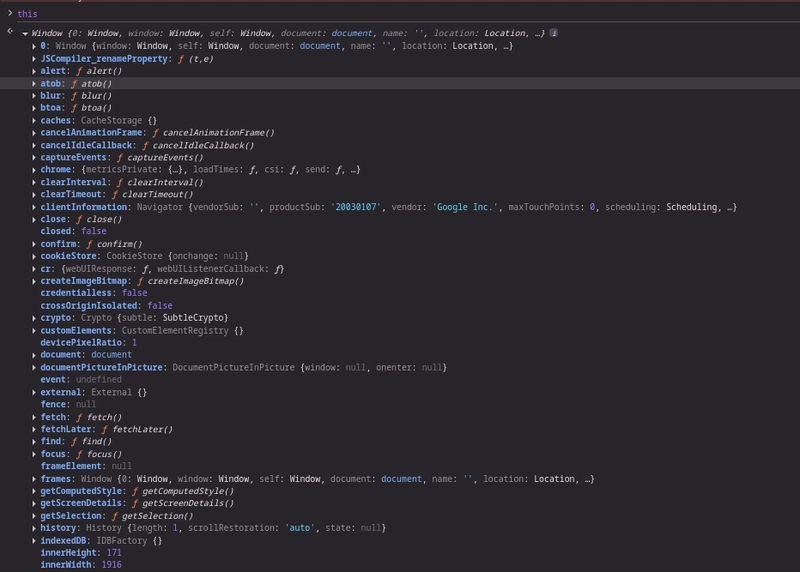
In browsers, this will output the window object. In Node.js, it points to the global object. However, in strict mode, the value of this in the global context is undefined.
3. this in Regular Functions
Inside a normal function, this depends on whether strict mode is enabled.
function show() {
  console.log(this);
}

show();
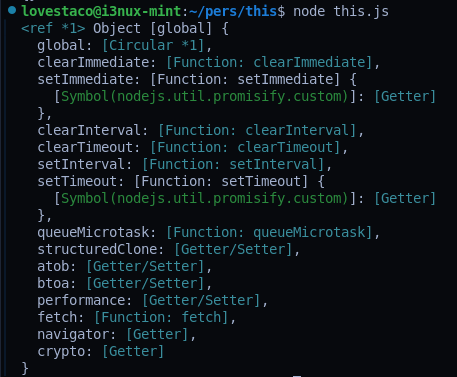
When the function is called without an object context in non-strict mode, this defaults to the global object. In strict mode, this is undefined, which can often lead to errors if not accounted for.
4. this in Arrow Functions
Arrow functions do not have their own this. Instead, they inherit this from the surrounding lexical context.
const obj = {
  name: "Sophie",
  sayHi() {
    const arrow = () => {
      console.log(`Hi, I'm ${this.name}`);
    };
    arrow();
  },
};

obj.sayHi();

Since the arrow function is inside a method of obj, and it doesn’t have its own this, it uses the this value from sayHi, which is obj. This makes arrow functions useful when you want to retain the outer context.
5. this with call, apply, and bind
You can explicitly set the value of this using call, apply, or bind.
function sayHi() {
  console.log(`Hi from ${this.name}`);
}

const user = { name: "Liam" };

sayHi.call(user);
sayHi.apply(user);

const bound = sayHi.bind(user);
bound();

call and apply immediately invoke the function with this set to the provided object. bind returns a new function with the specified this, which can be called later.
6. this in Event Handlers
In DOM event listeners using regular functions, this refers to the element that received the event.
<button id="clickMe">Click me</button>
<script>
  const btn = document.getElementById("clickMe");
  btn.addEventListener("click", function () {
    console.log(this);
  });
</script>
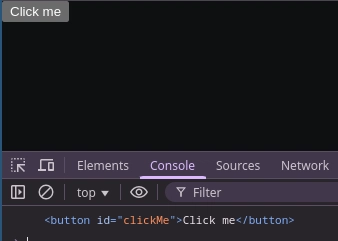
Here, this points to the <button> element that was clicked. This behavior is helpful for manipulating the element directly within the event handler.
Summary Table
| Context |
this refers to |
|---|---|
| Global scope (non-strict) | Global object (window/global) |
| Global scope (strict) | undefined |
| Regular function | Global object (non-strict) or undefined (strict) |
| Object method | The object owning the method |
| Arrow function | The enclosing lexical context |
| DOM event (function) | The HTML element that received the event |
| DOM event (arrow function) | Inherited from parent scope |
With call, apply
|
Explicitly set object |
With bind
|
Bound object for later use |
Understanding this is all about recognizing the calling context.
Keep these examples in mind, and next timethis gets confusing, just walk through how the function is being invoked.
With LiveAPI, you can quickly generate interactive API documentation that allows users to execute APIs directly from the browser.

*AI agents write code fast. They also silently remove logic, change behavior, and introduce bugs -- without telling you. You often find out in production.
git-lrc fixes this. It hooks into git commit and reviews every diff before it lands. 60-second setup. Completely free.*
Any feedback or contributors are welcome! It's online, source-available, and ready for anyone to use.
⭐ Star it on GitHub:
 HexmosTech
/
git-lrc
HexmosTech
/
git-lrc
Free, Micro AI Code Reviews That Run on Commit
| 🇩🇰 Dansk | 🇪🇸 Español | 🇮🇷 Farsi | 🇫🇮 Suomi | 🇯🇵 日本語 | 🇳🇴 Norsk | 🇵🇹 Português | 🇷🇺 Русский | 🇦🇱 Shqip | 🇨🇳 中文 | 🇮🇳 हिन्दी |

git-lrc
Free, Micro AI Code Reviews That Run on Commit




AI agents write code fast. They also silently remove logic, change behavior, and introduce bugs -- without telling you. You often find out in production.
git-lrc fixes this. It hooks into git commit and reviews every diff before it lands. 60-second setup. Completely free.
See It In Action
See git-lrc catch serious security issues such as leaked credentials, expensive cloud operations, and sensitive material in log statements
git-lrc-intro-60s.mp4
Why
- 🤖 AI agents silently break things. Code removed. Logic changed. Edge cases gone. You won't notice until production.
- 🔍 Catch it before it ships. AI-powered inline comments show you exactly what changed and what looks wrong.
- …


Top comments (1)
This article was very insightful to read, thanks.