


Get Started!
Customize your Readme.md on your GitHub profile to make it look attractive by following the steps in this simple walkthrough below. I have also provided some cool elements to spice things up!

If your GitHub profile looks something like THIS 👇...

Turn it to something like THIS 👇 or even cooler!

Follow these steps-
1. Create a new Repository
- Go to 👉 repo.new
- Type the repository name, which should be same as your username. This creates a secret repository.
- Make the repository Public.
- Check the box - Add a README file.
- Then click Create Repository.

2. Update README file
- The initial file looks something like this with a simple message.
- You can edit the file by clicking on the Edit README button on the right.

- As you can see, the file is provided with a template made using markdown. You can edit it according to your preference.
- Click on Commit changes.You can also add a commit message.

3. ✨Beautify your profile!✨
There's a lot of open source elements available to achieve a beautiful Profile page. Here's a list of resources to choose from!
GitHub README Stats


 anuraghazra
/
github-readme-stats
anuraghazra
/
github-readme-stats
⚡ Dynamically generated stats for your github readmes

GitHub Readme Stats
Get dynamically generated GitHub stats on your READMEs!






Love the project? Please consider donating to support the original creator!
Caution
This repository is no longer maintained. Please use the successor project GitHub Stats Extended instead! GitHub Stats Extended is an actively maintained fork of this repository with additional features and improved stability. Alternatively you can also use GitHub Readme Stats Action.
Click here to view the outdated documentation. Kept for reference only.
View Demo · Report Bug · Request Feature · FAQ · Ask Question
Table of contents (Click to show)
GitHub profile Trophy

ryo-ma
/
github-profile-trophy
🏆 Add dynamically generated GitHub Stat Trophies on your readme

GitHub Profile Trophy
🏆 Add dynamically generated GitHub Stat Trophies on your README


You can use this service for free. I'm looking for sponsors to help us keep up with this service❤️

⚠️ Notice from the Project OwnerHello everyone,
I am the owner of this project.Currently, due to the increase in users and traffic, the cost of maintaining this service has become quite high, and it is becoming financially difficult to sustain.
As costs continue to rise, there is a possibility that the service may have to be discontinued.
We are now at a stage where monetization and financial support are essential.Your support in the following ways would be greatly appreciated:
- Financial support: GitHub Sponsors
- Reducing server load through self-hosting (by forking on GitHub and deploying to Vercel)
- Share your github-profile-trophy URL deployed to Vercel for load balancing (Send email: saka_ro@yahoo.co.jp or Pull Request)
Load balancing endpoints
…Add a header or cover picture
[](your GitHub link)
Add a floating image or GIF.
  <img align="right" alt="Coding" width="400" src="add your link
  here">

Social icons section.
<h3 align="left">Connect with me:</h3>
<p align="left">
<a href="your link" target="blank"><img align="center" src="https://cdn.jsdelivr.net/npm/simple-icons@3.0.1/icons/twitter.svg" alt="" height="30" width="40" /></a>
<a href="your link" target="blank"><img align="center" src="https://cdn.jsdelivr.net/npm/simple-icons@3.0.1/icons/linkedin.svg" alt="" height="30" width="40" /></a>
<a href="your link" target="blank"><img align="center" src="https://cdn.jsdelivr.net/npm/simple-icons@3.0.1/icons/instagram.svg" alt="" height="30" width="40" /></a>
<a href="your link" target="blank"><img align="center" src="https://cdn.jsdelivr.net/npm/simple-icons@3.0.1/icons/youtube.svg" alt="" height="30" width="40" /></a>
</p>
Languages and tools section.
<h3 align="left">Languages and Tools:</h3>
<p align="left"> <a href="https://www.cprogramming.com/" target="_blank"> <img src="https://devicons.github.io/devicon/devicon.git/icons/c/c-original.svg" alt="c" width="40" height="40"/> </a> <a href="https://www.w3schools.com/cpp/" target="_blank"> <img src="https://devicons.github.io/devicon/devicon.git/icons/cplusplus/cplusplus-original.svg" alt="cplusplus" width="40" height="40"/> </a> <a href="https://www.w3schools.com/css/" target="_blank"> <img src="https://devicons.github.io/devicon/devicon.git/icons/css3/css3-original-wordmark.svg" alt="css3" width="40" height="40"/> </a> <a href="https://www.figma.com/" target="_blank"> <img src="https://www.vectorlogo.zone/logos/figma/figma-icon.svg" alt="figma" width="40" height="40"/> </a> <a href="https://flutter.dev" target="_blank"> <img src="https://www.vectorlogo.zone/logos/flutterio/flutterio-icon.svg" alt="flutter" width="40" height="40"/> </a> <a href="https://git-scm.com/" target="_blank"> <img src="https://www.vectorlogo.zone/logos/git-scm/git-scm-icon.svg" alt="git" width="40" height="40"/> </a> <a href="https://www.w3.org/html/" target="_blank"> <img src="https://devicons.github.io/devicon/devicon.git/icons/html5/html5-original-wordmark.svg" alt="html5" width="40" height="40"/> </a> <a href="https://www.linux.org/" target="_blank"> <img src="https://devicons.github.io/devicon/devicon.git/icons/linux/linux-original.svg" alt="linux" width="40" height="40"/> </a> <a href="https://www.photoshop.com/en" target="_blank"> <img src="https://devicons.github.io/devicon/devicon.git/icons/photoshop/photoshop-plain.svg" alt="photoshop" width="40" height="40"/> </a> <a href="https://www.python.org" target="_blank"> <img src="https://devicons.github.io/devicon/devicon.git/icons/python/python-original.svg" alt="python" width="40" height="40"/> </a> </p>
GitHub streak

- Copy-paste the markdown below into your GitHub profile README
- Replace the value after ?user= with your GitHub username
[](https://git.io/streak-stats)
Customize it here 👉 Click me!
Spotify playing

JeffreyCA
/
spotify-recently-played-readme
Display your recently played Spotify tracks on your GitHub profile README.
Spotify Recently Played README
Display your recently played Spotify tracks on your GitHub profile README. Powered by Vercel.
Check out lastfm-recently-played-readme for a similar integration for Last.fm scrobbles.
Getting Started
Click the button below to connect your Spotify account with the Vercel app. This is needed to access your recently played tracks.
By authorizing the app, you agree to have your Spotify username, access token, and refresh token stored on a secure Firebase database. This is required so you only need to authorize once and the app can automatically refresh access tokens in order to retrieve recent tracks.
You can revoke the app at https://www.spotify.com/account/apps.

After granting permission, just add the following into your README and set the user query parameter to your Spotify username.

Link to Spotify profile
Use the following snippet to make the widget link to your…
Badges - Shields
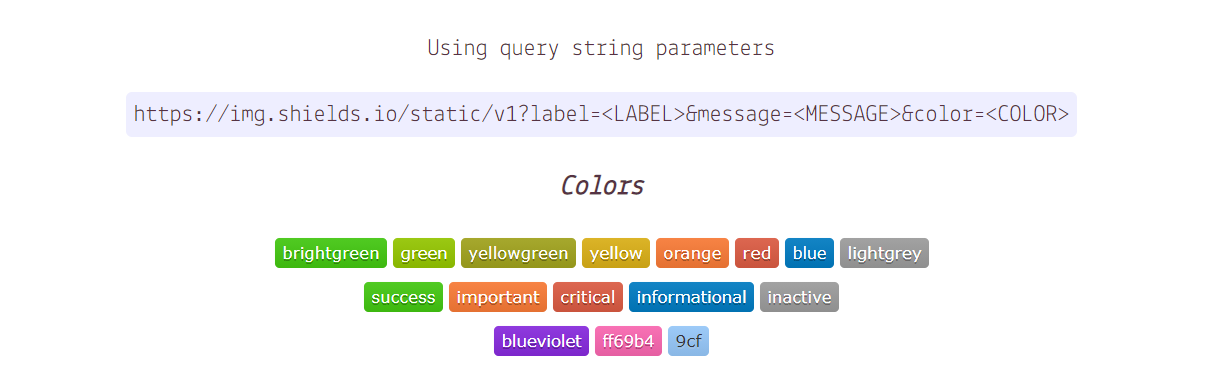
Languages,tools and social icons badges
Readme Typing SVG ⌨️

Views counter

antonkomarev
/
github-profile-views-counter
It counts how many times your GitHub profile has been viewed. Free cloud micro-service.
GitHub Profile Views Counter


Introduction
Try Ÿ HŸPE service as the more robust and feature rich solution.
GHPVС project is proof of concept. This counter designed to be an analytical instrument for you, but not for people who are visiting your profile It could be used to see profile views dynamics as result of development activity, blogging or taking part in a conference.
It counts how many times your GitHub profile has been viewed and displays them in your profile, for free.
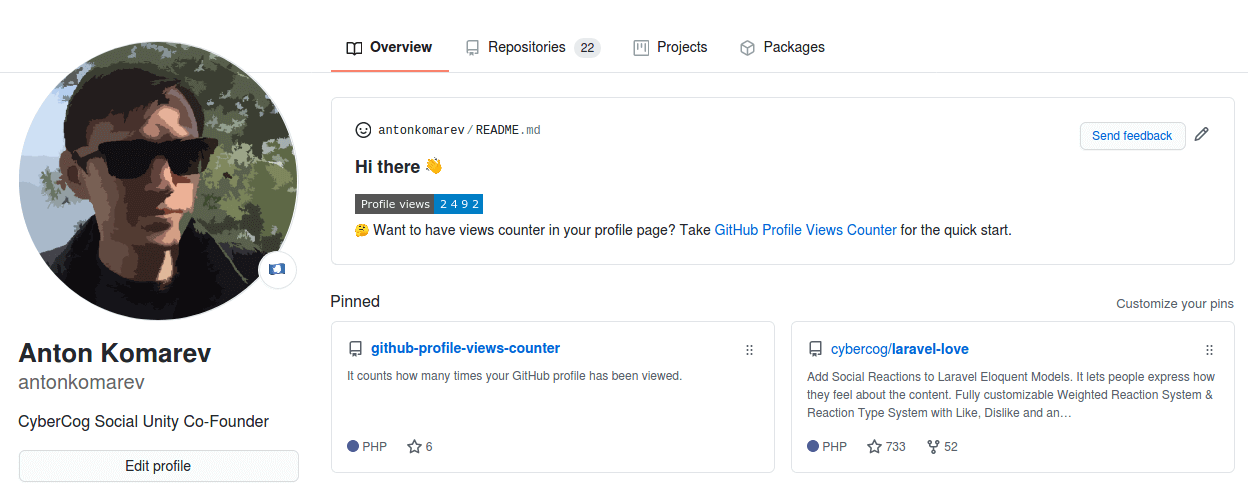
Usage
Cloud solution launched as 100% free experience. Help me cut server costs if you like this service.
If you want to see big numbers in your profile, deploy a standalone solution to draw any views count you want without spamming our server. Everybody knows that any counters could be faked.
A billion fake profile views doesn't make you a very popular person, it makes you a person…
Blog Post workflow

gautamkrishnar
/
blog-post-workflow
Show your latest blog posts from any sources or StackOverflow activity or Youtube Videos on your GitHub profile/project readme automatically using the RSS feed
Blog post workflow 


How to use
-
Star this repo 😉
-
Go to your repository
-
Add the following section to your README.md file, you can give whatever title you want. Just make sure that you use
<!-- BLOG-POST-LIST:START --><!-- BLOG-POST-LIST:END -->in your readme. The workflow will replace this comment with the actual blog post list:# Blog posts <!-- BLOG-POST-LIST:START --> <!-- BLOG-POST-LIST:END -->
-
Create a folder named
.githuband create aworkflowsfolder inside it, if it doesn't exist. -
Create a new file named
blog-post-workflow.ymlwith the following contents inside the workflows folder:name: Latest blog post workflow on schedule: # Run workflow automatically - cron: '0 0 * * *' # Runs once a day at 00:00 UTC workflow_dispatch: # Run workflow manually (without waiting for the cron to be called), through the GitHub Actions Workflow page directly permissions: contents
…
Add emojis - Markdown Icons

README Jokes 👀
ABSphreak
/
readme-jokes
😄 Jokes for your GitHub READMEs
README Jokes

Random programming jokes on your README.



Usage
Endpoint URL: https://readme-jokes.vercel.app/api
Embed one of these in your README:
<!-- Markdown -->

or
<!-- HTML -->
<img src="https://readme-jokes.vercel.app/api" alt="Jokes Card" />
Customization Guide
Customize using ? after /api in the https link, example here with no borders using the hideBorder parameter.
Markdown method:

Image method:
<img src="https://readme-jokes.vercel.app/api?hideBorder" alt="Jokes Card" />
Both methods will produce the following jokes card without border:
To use multiple parameters use '&' after the first parameter, e.g. ?hideBorder&theme=cobalt&qColor=%23944bcc&aColor=%23bbdb51
will produce a jokes card without border, with cobalt theme, answer color #944bcc and question color #bbdb51 like so:
Parameters Available
-
bgColor→ Background Color -
borderColor→ Border Color -
qColor→ Question Color -
aColor→ Answer Color -
textColor→ Normal text Color -
codeColor→ Code…
README Quotes ❝
PiyushSuthar
/
github-readme-quotes
🔥 Add Programming Quotes To Your GitHub Readme

Github Readme Quotes
Developer Quotes for your Github Readme.



Features ✨
Usage ⚡️
Copy the markdown below and paste it in your Github Readme.
[](https://github.com/piyushsuthar/github-readme-quotes)
Options
| Options | Default | Description |
|---|---|---|
| type | vertical | Available: horizontal, vertical |
| theme | light | Available themes |
| quote | - | Customize your quote |
| author | - | The name of the quote's author |
| border | false | Available: true, false |
Themes
- light
- dark
- algolia
- catppuccin
- catppuccin_frappe
- catppuccin_latte
- catppuccin_macchiato
- catppuccin_mocha
- chartreuse-dark
- dracula
- github
- github_dark
- github_blue
- graywhite
- gruvbox
- hackerman
- merko
- monokai
- moonlight
- nord
- radical
- shadow_blue
- shadow_green
- shadow_red
- tokyonight
Installation and Development 🚀
To get started with developing this app locally, here are the steps:
Install the dependencies for the app using,
pnpm install
And then run the app using:
npx vercel dev
Customization
Horizontal
Add the ?type=horizontal parameter.
Border
Add the ?border=true…
Dev Metrics
anmol098
/
waka-readme-stats
This GitHub action helps to add cool dev metrics to your github profile Readme
Important
We are looking for translators for this project.
Any kind of help would be greatly appreciated.
Please see issue #23 if you would like to help!
Dev Metrics in README with added feature flags 🎌
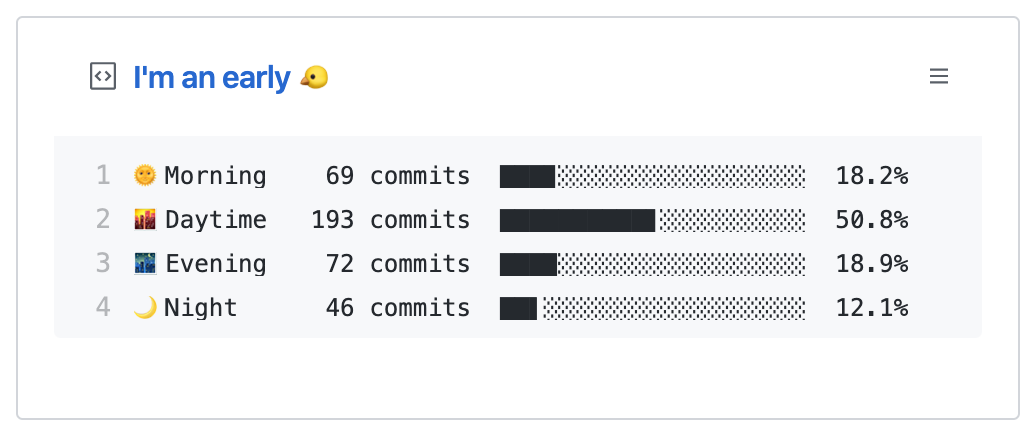
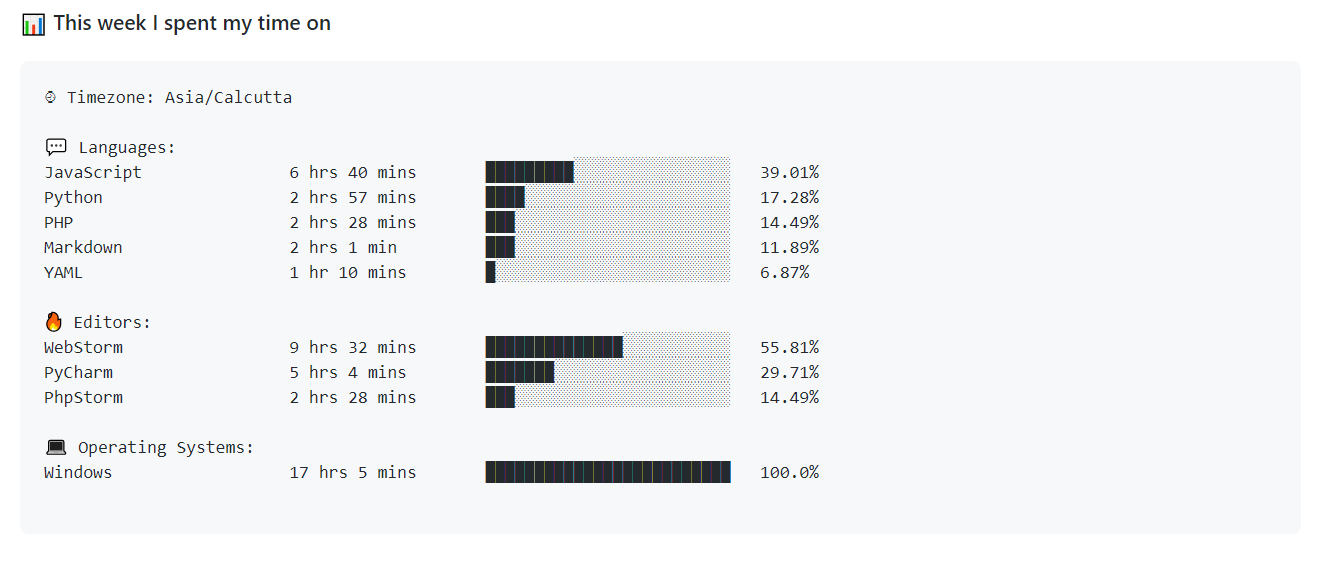
📌✨Awesome README Stats



Are you an early 🐤 or a night 🦉?
When are you most productive during the day?
What are the languages that you code in?
Let's check it out in your profile's README!
Prep Work
4. ALTERNATIVE WAY!
If you found things overwhelming, not to worry!
Here's how to do it (The Easy Way)
- GitHub profile README generator created by @rahuldkjain
👉(https://rahuldkjain.github.io/gh-profile-readme-generator/)

- GitHub Profilinator
OR
You can simply fork someone's repository

Click the edit icon in the README file

Copy the code and paste it onto your README file. Of course, you can modify it according to your choice.

5. Here's some inspiration and ideas!
abhisheknaiidu
/
awesome-github-profile-readme
😎 A curated list of awesome GitHub Profile which updates in real time
Awesome GitHub Profile README






A curated list of awesome Github Profile READMEs







Loved the project? Please consider donating to help it improve!
Contents:
Categories
GitHub Actions 🤖
- Abhishek Naidu
- Thomas Guibert
- Brian Douglas
- Shawn Wang
- Simon Willison
- Mike Coutermarsh
- Michael Hoffmann (Mokkapps)
- Athul Cyriac Ajay
- Gautam Krishna R
- Roald Nefs
- Leo
- Dhruv Jain
- Erwin Lejeune
- Jessica Lim
- 侑夕-Tw93
- liununu
- Filippo Rossi (qu4k)
- Moe Poi ~
- Elon Tang (blackcater)
- Stanley Lim (Spiderpig86)
- Akshit Garg (gargakshit)
- Yufan You
- Danny Koppenhagen
- Vidya Bhandary
- Rao Hai
- Jatin Rao
- teoxoy
- Aral Roca
- codeSTACKr
- itgoyo
- lifeparticle
Game Mode 🚀
EddieHubCommunity
/
awesome-github-profiles
List of GitHub profiles that have awesome customisation, that you can use for inspiration
Note: This repository is not included in the Hacktoberfest event, as it is for practice only!
Awesome GitHub profiles

List of GitHub profiles that have awesome customization, that you can use for inspiration.
Feel free to submit a pull request with your suggestions for awesome GitHub profiles.





How can I add my GitHub profile? 🤷♀️🤷♂️
-
Create an issue, with the title as your name, and in the description put a screenshot of the customised GitHub profile page (copy the generated image URL, this will be needed in the next step). The URL will look something like this
https://github.com/EddieHubCommunity/awesome-github-profiles/assets/51878265/ee31b832-d549-4df9-8ffe-24419f9d0e46 -
Fork the project, using the top right corner button, that states
fork -
Create a file named
your-username.jsonin the directoryprofileswith the following content.
Your entry should be similar to this example:
{
  "image": "https://user-images.githubusercontent.com/624760/91057573-48531300-e61f-11ea-9e13-2d7384e42000.png"
  "issueId": 66,
  "name": "Eddie Jaoude",
…Thank you for reading!🙌
Share your amazing GitHub profile in the comments down below for the world to see! :)


Top comments (36)
Great article! Thanks for sharing 👏
Here is a suggestion to add to the list: github.com/Platane/snk 🟩 ⬜️
It allows you to generate a SVG file with a snake eating your contribution grid on your README profile, using Github Actions 🐍
You can check the result on my profile if you want to get an idea of how it works: github.com/GuillaumeFalourd/Guilla... 🙂
Cool! Will add it soon :)
Hmm.. except doesn't seem you can actually play it, and it just makes it more difficult to determine how active you've been...
GitHub profiles are becoming the new MySpace profile.
Awesome article @supritha !
It received a super positive reaction in our discord community The Fast Tracked Programmer and has been bookmarked :D.
Keep up the great work!
That's really great! Thank you :)
This is so awesome! I started using this feature lately, and I like it very much.
Also I saw some tuts on how to get the 3d commit chart on your profile.
here it is - dev.to/github/view-your-github-con...
thanks @supritha
Thank you :)
Wow that's really cool.
good Information
Thank you :)
nice
You might also like: How to Master Python Fast and easy: A complete simple Tutorial based on the officiel documentation
So many creative ideas!
Also another suggestion to be added to the list is pacman game github.com/abozanona/pacman-contri...
It turns your GitHub contribution graph into a Pac-Man SVG animation.
You can check how it's working here github.com/abozanona
Good information, I was gonna complain about no header/banner generator link then gladly I found them!
Yes, I'm glad I found it too.
Can you pls share it.
Check this Spotify now playing feature too.
Link 👉 github.com/novatorem/novatorem
It's actually cool and if you wanna see my repo style, click here 👉 github.com/lostgirljourney
Thanks for the article. It's so cool
Thank you :)
Some comments have been hidden by the post's author - find out more