

This is a submission for the Hacktoberfest Open-Source AI Challenge Week 4: Slow and Steady
What I Built
Study Trail Builder turns any study topic into an ordered, beginner-to-advanced learning trail of videos. You type a topic — say "limits in calculus" — and you get back at least ten YouTube videos, sequenced and grouped into Basic, Intermediate, and Advanced, each shown as a title next to its link.
The tedious part of self-teaching from YouTube is not watching the videos — it is the curation that comes first. You search, skim a dozen results, guess which ones are beginner-friendly, figure out a sensible order, and only then start learning. Study Trail Builder does all of that boring groundwork for you: it searches, vets candidates by popularity signals, sequences them easiest-to-hardest, and splits them into three difficulty tiers. True to the Slow and Steady spirit, it rewards laziness by taking a slow, methodical chore off your plate so you can just press play and move at your own pace.
Who benefits: anyone picking up a new subject on their own — students, career switchers, the perpetually curious — who wants a ready-made path instead of a wall of search results.
The product's defining property is that it is never allowed to fail you. Artificial intelligence does the smart part (ordering and grouping), but every AI call is wrapped in a bounded timeout with a deterministic fallback, so a result always comes back.
Demo
Run it locally with Docker under WSL (see the ordered run steps below) and open http://localhost:8080.
Type a topic, submit, and the app returns a grouped trail. Links open in a new tab, so your trail stays put while you watch.
Code
All code lives in desafio4/ and is deliberately small — a Django backend, an Angular micro frontend, and a three-service Docker stack.
Backend (backend/trail/) — Django with plain JsonResponse views (no DRF for a single endpoint). The risky logic is pure and unit-testable; the network lives at the edges.
-
search.py— theyt-dlpwrapper. Runs a keylessytsearchN:query, normalizes raw entries intoVideorecords, and drops anything missing a title, URL, or positive duration. -
ai.py— the Ollama client, prompt builder, and reply parser. CallsPOST /api/generatewith a bounded timeout and parses the id-to-level mapping; it never raises. -
heuristic.py— the deterministic fallback. Orders candidates by views, then likes, then duration, with the video id as the final tie-break, and splits them into three tiers. -
builder.py— the AI-first orchestration. Tries the AI ranking; if the result is unusable, it falls back to the heuristic. Either path produces the same shape. -
views.py— the singlePOST /api/trailendpoint: validate the topic, search, build the trail, and serialize it Basic → Intermediate → Advanced. -
tests/— minimal pytest + Hypothesis property tests covering heuristic determinism and AI-reply parsing.
Frontend (frontend/src/app/) — a minimal single-view Angular standalone app.
-
app.ts— the topic-entry component: one input (1–200 chars), submit, loading state, and client-side validation. -
trail-view.component.ts— renders the three sections top-to-bottom, each video's title and link on the same row. -
trail.service.ts— POSTs/api/trailwith a 30-second client timeout. -
nginx.conf— serves the static Angular build and reverse-proxies/api/*to the backend (same-origin, no CORS preflight).
docker-compose.yml — the three services: frontend (Angular + nginx), backend (Django + gunicorn), and ollama (the AI service), wired with depends_on and healthchecks.
How I Built It
The whole thing runs on an open-source stack with a locally hosted open-weight model at its core:
- Django + gunicorn serve a single REST-style endpoint in a lightweight container.
-
yt-dlp searches YouTube with no API key — a
ytsearchN:query with flat extraction returns titles, URLs, durations, and popularity counts without a paid developer account. -
Ollama runs the open-weight
llama3.2:1bmodel entirely on the host. It does two narrow jobs through short prompts to keep token counts low: (1) order the candidate videos basic-to-advanced, and (2) assign each one a Basic / Intermediate / Advanced level. - Angular + nginx make up the micro frontend — a static build served by nginx, which also proxies API calls to the backend.
Graceful degradation is the headline design decision. Every call into the AI layer is bounded by a 10-second timeout and guarded against connection failures, non-200 responses, and malformed output. On any failure — Ollama slow, down, or returning something unparseable — the backend silently routes to a deterministic heuristic that orders by view count, then like count, then duration. Both paths return the identical three-section shape, so the frontend never knows or cares which one ran. The AI makes the trail smarter; it is never a single point of failure. The app does not error out just because the model had a bad moment.
Why Does Open Innovation Matter?
Running an open-weight model locally instead of calling a closed, hosted API is what makes this project practical:
- No per-call cost. Build as many trails as you like at zero marginal cost. For a free learning tool, metered API calls would be a non-starter.
- Privacy by default. The topics you study never leave your machine. There is no third party logging what you are trying to learn.
- Works offline. The model is local, and even if it is unavailable, the heuristic fallback keeps every trail working — no dependency on a paid cloud API staying up.
-
Swappable model.
llama3.2:1bis the small default, but because it is just an Ollama model behind an env var, you can point the app at a larger open-weight model without touching the code.
An open approach wins here precisely because the valuable part — curating a learning path — is something you want to run cheaply, privately, and repeatedly. A closed API would push the intelligence, the cost, and your search history into someone else's cloud. Open weights plus a tiny footprint keep all of that on hardware you control.
My First User
Prize Categories
Run it with Docker under WSL
From the desafio4/ directory, under WSL:
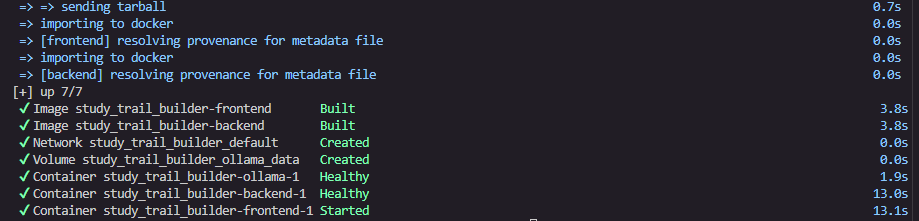
# 1. Build and start all three services (frontend, backend, ollama)
docker compose up --build
# 2. In a second terminal, pull the model into the ollama service
# (one time only; the model is cached on the ollama_data volume afterwards)
docker compose exec ollama ollama pull llama3.2:1b
# 3. Open the app
# http://localhost:8080
The model download in step 2 is a one-time operation — it is cached on the ollama_data named volume and survives container restarts, so you only pull it once.
Configuration
The defaults work for a standard local run; none of these need to change.
| Setting | Default | Purpose |
|---|---|---|
OLLAMA_URL |
http://ollama:11434 |
URL of the Ollama service inside the compose network. |
OLLAMA_MODEL |
llama3.2:1b |
The open-weight model the backend asks to order and group videos. |
Ports used by the stack:
| Port | Service | Notes |
|---|---|---|
8080 |
frontend (nginx) | The only port you open in a browser → http://localhost:8080. |
8000 |
backend (gunicorn) | Published for debugging; nginx proxies to it internally. |
11434 |
ollama | The AI service; the backend talks to it over the compose network. |
OLLAMA_URL and OLLAMA_MODEL are set as environment variables on the backend service in docker-compose.yml; override them there if you want to point at a different Ollama host or model.
Example

"I want to learn about Python"


Top comments (0)