


Why Angular?
- Component based architecture:
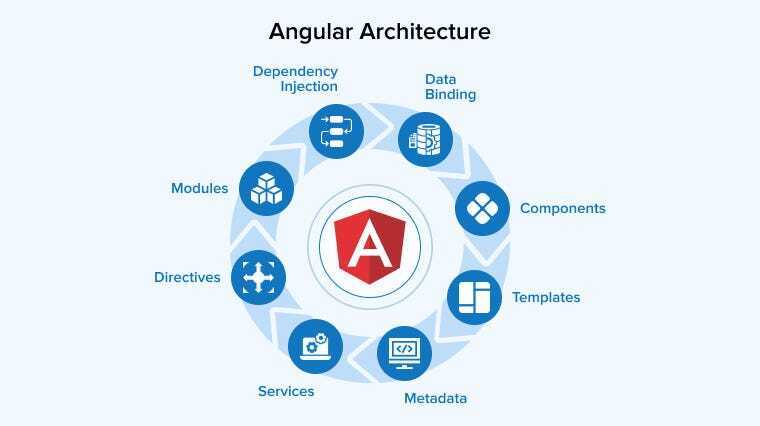
Angular applications are built using a component-based structure, where each component encapsulates its own logic, template, and styles, enhancing modularity and reusability.
TypeScript:
Angular is developed with TypeScript, a JavaScript superset that introduces static typing, improving code readability, maintainability, and scalability.
Data Binding:
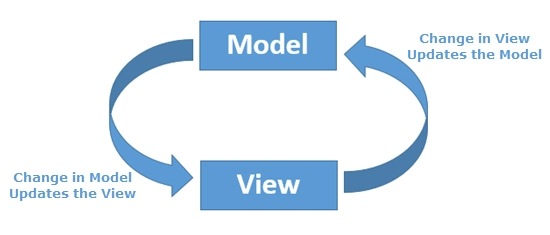
Angular supports two-way data binding, ensuring real-time synchronization between the UI and the underlying data model, simplifying DOM manipulation.
Dependency Injection:
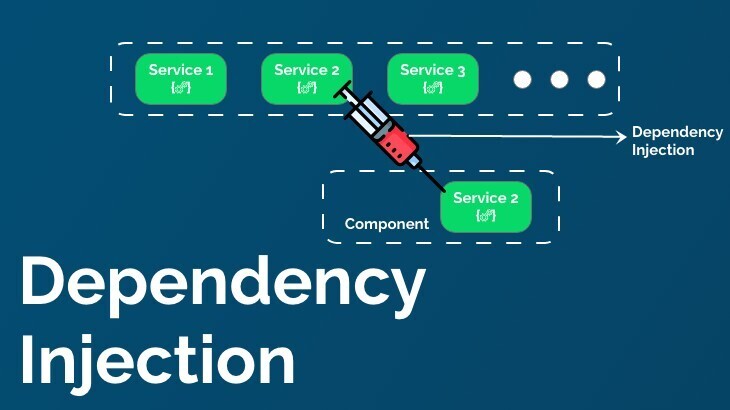
The framework incorporates dependency injection to efficiently manage dependencies, promoting loose coupling and improving testability.
Routing:
Angular includes a built-in routing module, allowing seamless navigation between different components and views within the application.
CLI (Command Line Interface):
The Angular CLI simplifies development by providing powerful tools for project setup, component generation, and dependency management.
Angular Material:
A rich library of UI components based on Google’s Material Design, enabling developers to create visually consistent and responsive interfaces.
Open-Source & Community Support:
Maintained by Google and a vast developer community, Angular benefits from continuous enhancements, regular updates, and extensive support.
Scalability:
Designed to support complex and large-scale applications, Angular is well-suited for enterprise-level projects.
Why Upgrade to the latest version of Angular?
New features:
Angular 17 introduced Signals, a new approach to managing reactive data, along with improved hydration, resulting in faster and more efficient applications.
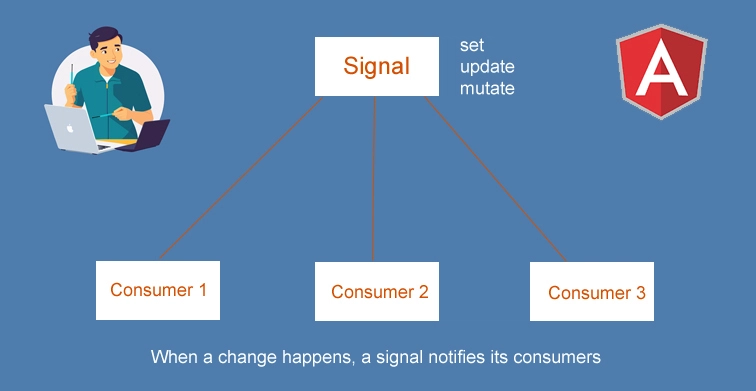
The Angular team consistently enhances the framework to improve runtime performance, reduce bundle sizes, and accelerate build times.
Keeping your Angular version up to date reduces security risks and ensures your application remains stable and reliable.
Angular initially lagged behind React in terms of performance and efficiency, but with Angular 17's introduction of zone-less change detection, it has made a strong comeback, enabling faster rendering and more optimized change detection by removing
zone.js from the picture.
Angular Update from v14 to v19
v14 - v15:
Steps:
- Verify and update the Node.js version to v18.13.0.
- Verify and update the TypeScript version to v4.8.2 or above.
npm install typescript@4.8.2- Serve the application and fix any errors in the specified files.
ng serve- Update to Angular 15.
ng update @angular/core@15 @angular/cli@15- After updating to v15, visually review the application and its interactions to ensure everything functions correctly.
v15 - v16:
Steps:
- Since we have already updated Node.js to v18.13.0, there is no need to update Node.js again.
- Verify and update the TypeScript version to v4.8.2 or above.
npm install typescript@4.9.5- Serve the application and fix any errors in the specified files.
ng serve- Update to Angular 16.
ng update @angular/core@16 @angular/cli@16- I used 'ng-idle' to track timeout settings along with 'rxjs' modules. After upgrading to Angular v16, I can no longer find their declarations in the NgModule class, and I encountered the following error while serving the application:
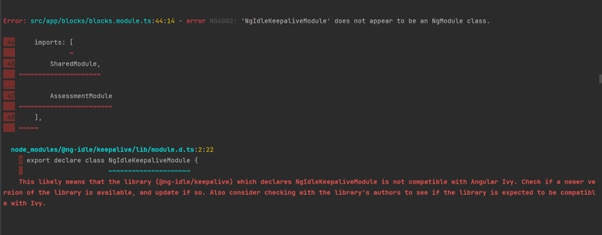
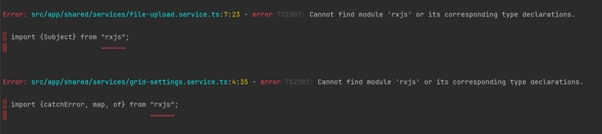
- So i need to update those modules using:
- Update @ng-idle/core to 15.0.0 and @ng-idle/keepalive to 15.0.0.
npm install @ng-idle/core@15.0.0 @ng-idle/keepalive@15.0.0- Update rxjs.
npm install rxjs@latest- After the update to Angular v16, visually review the application and its interactions to ensure everything is functioning correctly.
v16 - v17:
Steps:
- Since we have already updated Node.js to v18.13.0, there is no need to update Node.js again.
- Verify and update the TypeScript version to v5.2.2 or above
npm install typescript@5.2.2- Issues faced while updating TypeScript:
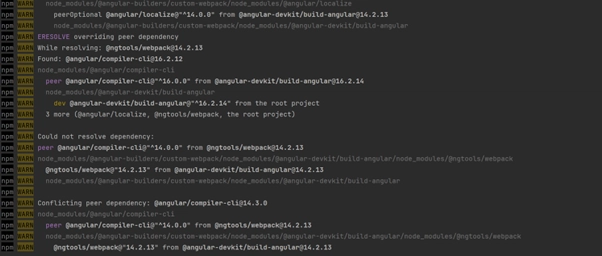
- Need to update @angular-builders/custom-webpack to v16.0.1.
npm install @angular-builders/custom-webpack@^16.0.1- Check the Zone.js version and update it to 0.14 or later
npm install zone.js@0.14- Update to Angular 17
ng update @angular/core@17 @angular/cli@17- Serve the application and fix any errors in the specified files.
ng serve - After the update to Angular v17, visually review the application and its interactions to ensure everything is functioning correctly.
v17 - v18:
Steps:
- Verify and update the Node.js version to v18.19.0.
- Update to Angular 18
ng update @angular/core@18 @angular/cli@18- Verify and update the TypeScript version to v5.4 or above.
npm i typescript@5.4- Serve the application and fix any errors in the specified files.
ng serve- After updating to v18, visually review the application and its interactions to ensure everything functions correctly.
v18 - v19:
Steps:
- Update to Angular 18.
ng update @angular/core@19 @angular/cli@19- While updating, this will automatically set standalone to false if the component is not a standalone component as below.

- The Angular CLI will automatically update your code to reflect that.
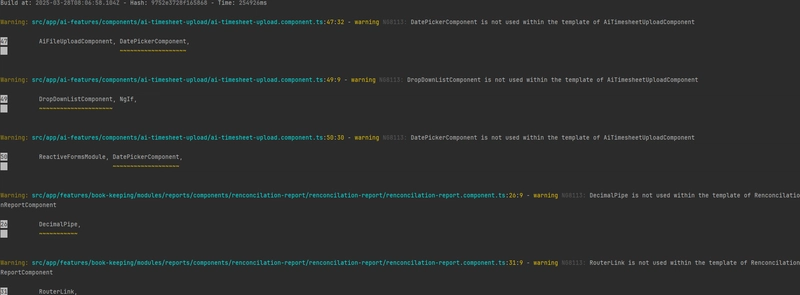
- If your component doesn’t use the module imported in the template, it will only show the following warning:
- Verify and update the TypeScript version to v5.5 or above.
npm i typescript@5.5- Serve the application and fix any errors in the specified files.
ng serve- After updating to v19, visually review the application and its interactions to ensure everything functions correctly.
- After the update , you can be able to use:
- Use withNavigationErrorHandler if you are using provideRouter (modern Angular applications with standalone APIs).
- Use errorHandler inside RouterModule.forRoot if you are still using the traditional NgModule-based routing.
- Both approaches provide a cleaner way to handle navigation errors compared to directly modifying Router.errorHandler
Kindly let me know your thoughts. Thanks

Top comments (4)
Wonderful.. Keep up the good work
Could u give us a detailed insights on the new features in angular with examples in your next blog? Really looking forward to it .
Sure mate
Insightful