

What are JavaScript Objects?
Objects are variables that can store both values and functions.
Values are stored as key:value pairs called properties.
Functions are stored as key:function() pairs called methods.
Real Life Comparison
In real life, we can describe subjects as objects (a car, a person, a house)

Different cars have the same properties, but the property values can differ from car to car.
Different cars have the same methods, but the methods can be performed at different times.
Object Example
This code example assigns many values (Fiat, 500, white) to an object named car:
Example
const car = {
  type: "Fiat",
  model: "500",
  color: "white"
};
type, model, and color are properties
"Fiat", "500", and "white" are property values
Object Literal
An object literal "literally" describes an object using a concise syntax with zero or more key:value pairs inside curly braces to describe all the object properties:
{firstName:"John", lastName:"Doe", age:50, eyeColor:"blue"}
How to Create a JavaScript Object
An object literal is the simplest and most common way to define a JavaScript object.
All the examples below, create the same JavaScript object:
Example 1
// Create an Object
const person = {firstName:"John", lastName:"Doe", age:50, eyeColor:"blue"};
Spaces and line breaks are not important. An object literal can span multiple lines:
Example 2
// Create an Object
const person = {
  firstName: "John",
  lastName: "Doe",
  age: 50,
  eyeColor: "blue"
};
JavaScript Object Properties
Properties are key:value Pairs
A JavaScript object is a collection of properties
Properties can be changed, added, and deleted.
Accessing JavaScript Properties
You can access object properties in these ways:
Dot notation
Bracket notation
Expression
Examples
// objectName.property
let age = person.age;
//objectName["property"]
let age = person["age"];
//objectName[expression]
let age = person[x];
Dot Notation
objectName.propertyName
person.firstname + " is " + person.age;
In general, dot notation is preferred for readability and simplicity.
Bracket notation is necessary in some cases:
The property name is stored in a variable:
person[myVariable]
The property name is not a valid identifier:
person["last-name"]
JavaScript Object Methods
What are Object Methods?
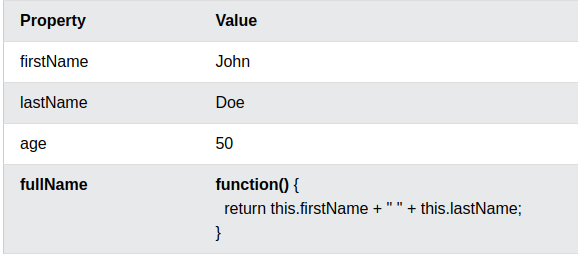
Methods are actions that can be performed on objects.
Methods are functions stored as property values.
Example
const person = {
firstName: "John",
lastName: "Doe",
age: 50,
fullName: function() {
return this.firstName + " " + this.lastName;
}
};
Reference
https://www.w3schools.com/js/js_object_methods.asp


Top comments (0)