

Author: liaodingjiu
I use Obsidian to organize my notes, ideas, and development work. One thing I really like about Obsidian is that I can sync my vault with a Git repository and keep my notes under version control.
But I ran into a problem.
I often add screenshots and images to my notes. Over time, these images can take up a lot of space. When they are stored directly inside my Obsidian vault, they also end up in my Git repository.
As the number and size of images grow, the repository becomes larger and more difficult to manage.
I didn't want to stop using images in my notes. I just wanted a better way to store them.
So I started thinking: What if I could upload images to a separate hosting service and simply reference them using URLs?
That was the idea behind Photo2URL, an image hosting website I created to make this workflow easier.
1. Store Images Separately from Your Git Repository
Git is great for managing source code, configuration files, and Markdown notes. But not every image needs to be stored alongside your code.
For my workflow, I wanted to keep my Obsidian notes in Git while storing larger images separately.
Instead of saving every screenshot in my vault, I can upload it to an image hosting service and reference it through a URL.
This keeps the image files out of the repository while allowing me to continue using images in my notes.
Of course, the Markdown files themselves can still be committed to Git. The difference is that the actual image files are hosted separately.
2. Three Ways to Add Images with Photo2URL
I wanted the image uploading process to be as simple as possible, so Photo2URL supports different ways to add images.
Upload a Local Image
If you already have an image saved on your computer, you can select it and upload it directly.
This is useful for existing screenshots, diagrams, photos, and other image files.
Paste a Screenshot with Ctrl+V
This is particularly convenient for my development workflow.
When I take a screenshot, I don't need to save it as a separate file first.
I can simply open Photo2URL and press Ctrl+V to paste the screenshot from my clipboard.
The image can then be uploaded without going through the extra steps of saving a file and selecting it manually.
For developers who frequently take screenshots of websites, code, or bugs, this can make the process much faster.
Copy a Direct URL or Markdown Format
After uploading an image, I can get a URL and use it wherever I need it.
For my Obsidian workflow, having a Markdown format is especially useful because I can copy it directly into a note.
Instead of manually writing the image syntax every time, I can use the generated Markdown and continue writing.
3. My Obsidian Workflow
Here is how I use this approach in practice:
- Take a screenshot of something I want to include in my notes.

Open Photo2URL and press Ctrl+V to upload the screenshot.
Copy the generated Markdown image format.

Paste it into my Obsidian note.

Commit the Markdown note to Git without adding the original screenshot file to the repository.
A Markdown image reference looks like this:
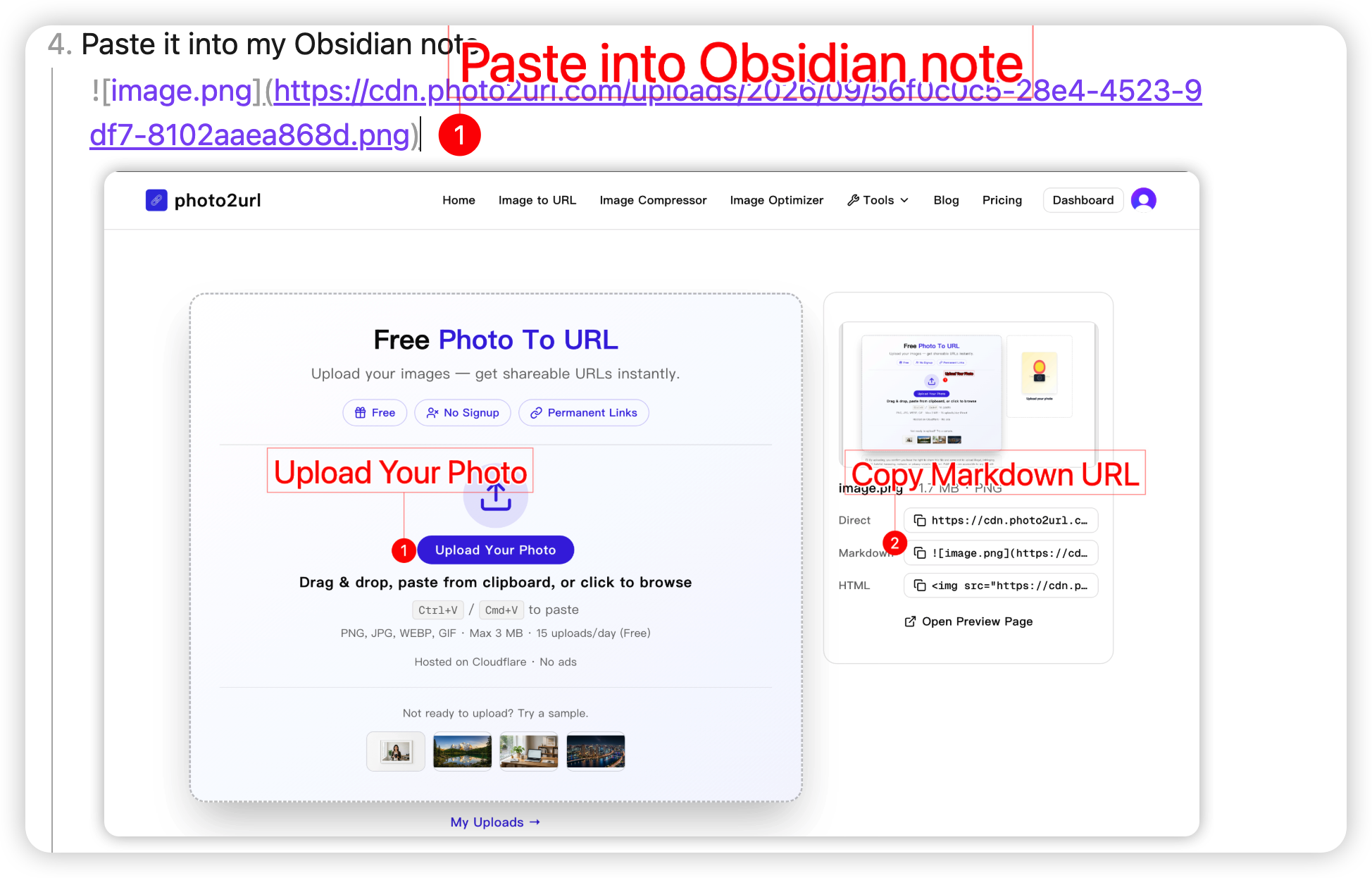
Replace YOUR_IMAGE_URL with the actual image URL generated by the hosting service.
The Markdown note stays in my Git repository, while the image itself is stored separately.
This makes it easier to reuse images in different notes or projects without keeping multiple copies in the repository.
4. Why I Built Photo2URL
Photo2URL started with a problem I encountered in my own development workflow.
I wanted a simple place to store images, get reusable URLs, and use them in my notes and websites without making my Git repositories unnecessarily large.
I also wanted the process to be convenient. Uploading a local file is useful, but being able to paste a screenshot directly from the clipboard makes it much easier to use during everyday development.
That is why I built Photo2URL.
It is designed to make image uploading and link generation straightforward, whether you are working on a website, writing documentation, or organizing notes in Obsidian.
You can try it here:
Photo2URL — Upload an Image and Get a URL
Conclusion
For me, separating image storage from my Obsidian vault has made my Git-based workflow much easier to manage.
That's exactly why I built Photo2URL — a simple image hosting tool that lets you upload local images, paste screenshots directly with Ctrl+V, and get direct image URLs or Markdown links ready to use.
If you use Obsidian, Git, or Markdown and want a simpler way to manage your images, give Photo2URL a try.
Upload an image, get a link, and keep your repository lightweight.Try it now:
Photo2URL — Upload an Image and Get a URL


Top comments (0)