


This is a submission for the Hacktoberfest Open-Source AI Challenge Week 1: Touch Grass
What I Built
Nature Quest is an offline scavenger hunt for families and kids. You pick a place (park, forest, garden, urban walk), how many things to find (5, 8 or 12) and the age of the youngest player. Then an open-source AI model running on the phone writes a hunt list for that place, season and age: "a red leaf", "something with a spiral shape", "bark with moss on it". The app reads the list aloud and asks everyone to put the phone away.
When someone finds something, they tap it on the list and take one photo. The same model checks it, answers with a short, encouraging message (plus a friendly hint if it is not a match), and reads that aloud too. When the hunt ends, there is a bronze, silver or gold medal and the time spent outside.
The theme was "Touch Grass", so every design decision started from one question: how do I make the screen the shortest part of the experience?
- Setup is one screen with everything pre-selected, so starting a hunt is one tap.
- The list and every piece of feedback are read aloud, so nobody needs to look at the phone.
- Big tap targets and a high-contrast palette, because the phone is used outdoors in the sun, for a few seconds at a time.
- One photo per find. No camera roll, no feed, nothing to scroll.
It is for families and kids on a walk, with an adult, in English and Spanish. The first screen always says: hunt with an adult, only look and take photos, never pick or touch anything.
| Setup | The hunt, written on the phone | Medal and time outside |
|---|---|---|
 |
 |
 |
Demo
There is no web demo, because the whole point is that it runs on a phone.
- Install it: Nature Quest 1.0.1 on GitHub Releases (signed APK, about 55 MB, Android 12+, 64-bit ARM). On first launch the app offers to download the AI model (2.59 GB, Wi-Fi recommended). That is the only time it uses the internet.
Taking it outside
WIP
Code
 RZEROSTERN
/
hacktoberfest-week2
RZEROSTERN
/
hacktoberfest-week2
Second submission for hacktoberfest. The theme: Touch Grass
Nature Quest
An offline nature scavenger hunt for families and kids. The AI runs on the phone; the fun happens outside.
Nature Quest is an Android app. You pick a place (park, forest, garden, urban walk), how many things to find, and the age of the youngest player. An open-source AI model running on the phone writes a hunt list ("a red leaf" "something with a spiral shape", "bark with moss on it"), reads it aloud, and invites everyone to put the phone away When someone finds something they take one photo; the same on-device model checks it, answers with a short, encouraging message (also read aloud) and gives a friendly hint if it is not a match. At the end there is a bronze, silver or gold medal and the time spent outside.
The phone is a tool for a few seconds at a time. The screen is…
MIT licensed (plus a Beerware clause). The repo has 154 unit tests, the architecture in the README, and docs/DECISIONS.md, a log of 32 technical decisions with the reasons behind each, written as I went. docs/BENCHMARKS.md has every number quoted below.
How I Built It
The open pieces. The model is Gemma 4 E2B (open weights, Apache-2.0) in LiteRT-LM's .litertlm format. It runs through LiteRT-LM (Apache-2.0), Google's on-device runtime, with no network and no server. The rest is a normal Android stack: Kotlin, Jetpack Compose, Hilt, CameraX and Android's own text-to-speech. Nothing closed runs in the app. (I built it with Claude Code, which is not open source. It was my pair programmer, not part of the product.)
The shape of it. The app talks to the model through one interface, InferenceEngine, so ViewModels and use cases never touch LiteRT-LM and tests use a fake. The model answers in strict JSON, which I parse with kotlinx.serialization. If the JSON is bad I retry once, then fall back to something safe: "I'm not sure, try another photo", or a built-in hunt list. Prompts are versioned text files, not strings in Kotlin.
I benchmarked before I built. The first real step was a debug-only screen that loaded the model and timed it on my Pixel 10. That changed the design:
- The CPU backend was about twice as fast as the GPU: a hunt list took 5.7 s on average on CPU and 11.9 s on GPU, and the first GPU load took 25 s against 3 s. Google's published numbers for a flagship phone did not carry over to mine.
- Decoding is slow (7 to 23 tokens per second), so every answer is kept short. "Twelve words at most" in a prompt is a performance feature.
- The phone slows about 1.6x after 25 minutes of back-to-back runs, even though the OS reported no thermal throttling. So I picked settings that hit my targets in the slow state: 140 visual tokens and a 640 px photo. A photo check takes 4.5 to 5 s on a cool phone and 5.7 to 6.5 s on a warm one.
- Peak memory is 2.2 to 2.6 GB, so the app loads the model for each use and releases it right after. A warm reload is about half a second, and memory drops to about 240 MB.
Safety cannot live in the prompt. The prompt asks for safe items. The model still produced "a coiled snake", "orange fungus" and "a bird's nest hidden in a hollow", and later "a cloud shaped like a deer". For a kids' app that is not acceptable, so every item now passes a deterministic validator in code (English and Spanish word lists: no picking or touching, no animals, insects or mushrooms, nothing near water or roads, no climbing, nothing to eat, no photos of people). Rejected items are regenerated, and if the model still falls short, a built-in safe list fills the gap. The model's feedback is checked too, because it is read aloud to children.
Bugs the phone found that tests did not.
- The same settings produced the identical hunt three times in a row. LiteRT-LM's sampler seed defaults to 0, which makes sampling deterministic. Each request now gets a random seed.
- A regex that passed every JVM test crashed on Android, because Android's regex engine rejects a bare
}that Java accepts. - Cancelling the Kotlin Flow does not stop native inference. You have to call
cancelProcess()yourself. - CameraX's in-memory JPEG already carries its EXIF rotation, so rotating it again turns the photo sideways.
- A Compose cleanup effect unbound the camera I had just bound. It read state when disposed instead of when created.
Privacy and delivery. Photos are processed in memory. A small copy of each found photo stays in private cache only for the summary and is deleted when you close it, unless you tap "Save to gallery". The only code that opens a network connection is the model downloader: it resumes interrupted downloads, pins an exact model revision, and verifies the SHA-256 before using the file. I tested that on the phone by killing the app at 17% and resuming. The manifest asks for CAMERA, INTERNET (download only) and network state.
Limits, stated plainly. I could not measure how accurate the photo check is: I did not have a set of real photos to score the model against, so treat its verdicts as fun and encouraging, not as a judge. I tested on one phone. Reading aloud needs a voice installed for the phone's language.
Why Does Open Innovation Matter?
Four things an open model made possible that a closed API would not:
- It works with no signal on the trail. After a one-time download, there is no server to reach. The people this is for are standing in a field.
- Kids' photos never leave the phone. With a hosted model, "check this photo" means sending a child's picture to someone else's server. Here it is a function call on the device, and the only network code in the app is the downloader. Because the code is open, anyone can check that claim.
- It costs nothing per hunt. No API bill, so a family, a school or a scout group can use it as much as they like. The cost is the phone's time: about 5 to 12 seconds per hunt list and 5 to 7 per photo.
-
It is swappable and pinned. The model is a file plus one entry in
ModelSpec(URL, size, SHA-256), behind an interface. The app behaves identically next year, because the exact revision is pinned and checksummed instead of changing under me. And I could turn the knobs a hosted API hides: backend (the CPU-versus-GPU finding above), image resolution and memory.
The honest counterpoint: a server GPU would be faster, and probably more accurate. I traded speed and a 2.6 GB first download for privacy and offline use. For a hunt in a forest, I think that is the right trade, but it is a trade.
My Agent Session
I built Nature Quest with Claude Code, from an empty repository to two signed releases. Here is the whole conversation: my prompts, Claude's replies and every tool call, from the benchmark spike to the release. Claude's private reasoning is not included, long tool outputs are truncated, and anything personal (emails, local paths, device serial numbers) is scrubbed.
let's start the next development:
<pasted_content id="5de6">
Context
I'm entering the DEV Hacktoberfest Open-Source AI Challenge, Week 1: "Touch Grass".
The project MUST comply with these rules:
- Build something with open-source AI at its core that gets people off the screen and
into the world. The best builds make the screen the shortest part of the experience.
- Open-source AI must be what makes the product work: at runtime, NO closed-model APIs
and NO server inference. Everything runs on the phone. You're helping me build it, but
the product runs entirely on open components.
- The repo is created and completed within the challenge window, which closes Monday,
October 12, 00:59 Mexico City time.
- Hard internal deadline: the app must be installed and working on my phone by Friday
night. On Saturday I take it outside with real users (that's a bonus criterion), and
Sunday is for the write-up.
All architecture decisions below are already made. Build the whole project end to end,
following the build order, without waiting for confirmation between steps unless a step
explicitly says to stop. Time is the main constraint: always choose the simplest solution
that works.
Git workflow: GitFlow with non-stacked PRs (ESSENTIAL, never skip)
STRICTLY FORBIDDEN: a branch named "main". The production branch is "master".
Never create, push, reference, or target "main" in any command, PR, config, or doc.
Branches:
- master: production only. Changes arrive only through release/* or hotfix/* PRs.
- develop: integration branch. Changes arrive only through feature/* PRs.
- feature/<short-name>: one per build step, always created from the latest develop.
- release/<version>: created from develop when the MVP is ready; PR into master, then
merged back into develop.
- hotfix/<short-name>: from master, only for urgent fixes; PR into master and merged back
into develop.
Rules:
- Never commit directly to master or develop.
- One feature branch per build step, one PR per feature branch, base branch = develop.
- NO stacked PRs: never create a branch from another feature branch, and never open a PR
whose base is anything other than develop (or master for release/hotfix).
- Sequence for every step:
1. git checkout develop && git pull
2. git checkout -b feature/<name>
3. Work with small Conventional Commits.
4. Run lint + unit tests for the parts touched; all must pass, and the app must build.
5. Push and open the PR with gh pr create --base develop.
6. Merge it with gh pr merge (merge commit, delete the branch).
7. Only then start the next step from the updated develop.
- PR description: what changed, why, how it was tested, and whether DECISIONS.md was
updated. PR title follows Conventional Commits.
The product: "Nature Quest" (working title)
An offline nature scavenger hunt for families and kids. The phone is only a tool for a
few seconds at a time; the hunt happens outside.
Flow:
1. Setup (one screen, under 30 seconds): pick the place type (park, forest, garden,
urban walk), the hunt length (5, 8, or 12 items), and the youngest player's age range.
The current month and the device language are used automatically.
2. Gemma 4, on device, generates a hunt list suited to the place, the season (central
Mexico in October: end of the rainy season, early fall), and the age range. Items are
observable and safe, e.g., "a red leaf", "something with a spiral shape",
"a feather", "bark with moss on it", "a flower with five petals".
3. The app reads the list aloud with Android's TextToSpeech and invites everyone to put
the phone away. The list stays available with a single tap.
4. When players find something, they open the camera, take one photo, and Gemma 4
verifies whether it matches an item on the list. The response is a short, fun,
encouraging message, also read aloud, and the item is checked off. If the photo
doesn't match, a friendly hint is given.
5. When the hunt ends (all items found or the players end it), a summary screen shows the
items found, the time spent outside, and a medal (bronze, silver, gold).
Safety rules for generated content (non-negotiable):
- Photograph, don't pick: never ask players to pick plants or flowers, collect, touch, or
approach animals, insects, or mushrooms.
- No items that require leaving paths, climbing, going near water or roads, or touching
anything that could be harmful.
- Never suggest eating or tasting anything.
- Encourage kids to hunt with an adult.
Language: all UI strings in Android resources, English as the default (values/) and
Spanish (values-es/). Model prompts and responses follow the device language.
Privacy:
- Photos are processed in memory for verification and never uploaded anywhere.
- During a hunt, photos may be kept only in app-private cache for the summary screen,
and are deleted when the hunt ends unless the user taps "Save to gallery".
- No analytics, no telemetry, no network calls except the one-time model download.
Architecture
Single Android app module, Kotlin, Jetpack Compose, MVVM, Clean Architecture
(data / domain / ui packages), Hilt, Coroutines + Flow, CameraX, Android TextToSpeech,
Gradle version catalog. Room only if the history step is reached.
On-device inference:
- Runtime: LiteRT-LM via its Kotlin Android library (check the official docs at
ai.google.dev/edge/litert-lm and the google-ai-edge/LiteRT-LM repo for the current
artifact, version, and API; never guess).
- Model: Gemma 4 E2B in .litertlm format from litert-community/gemma-4-E2B-it-litert-lm
on Hugging Face. E4B only if the spike shows my phone handles it well.
- Wrap the engine behind a domain interface (e.g., InferenceEngine) so ViewModels never
depend on LiteRT-LM directly and unit tests can use a fake.
- Generation and verification responses use strict JSON, parsed with kotlinx.serialization.
On invalid output, retry once, then fall back to a safe default (for verification:
"I'm not sure, try another photo").
- Model delivery: during development, load the model from a file pushed with adb.
For release, download it once on first launch (Wi-Fi recommended, progress shown,
resumable, checksum verified), stored in app-private storage.
Repo layout:
/app Android app.
/samples Test photos (leaves, flowers, bark, feathers, etc.), already provided.
/docs DECISIONS.md and BENCHMARKS.md.
Root: README.md, CLAUDE.md, .claude/rules/, .gitignore, gradle files.
Build order (each step = one feature branch + one PR into develop)
Git setup: verify the GitHub remote and that gh is authenticated, and confirm that
master exists and is the default branch on GitHub. If any of these fails, STOP and
tell me. Create develop from master and push it.feature/scaffold: Compose app with Hilt, version catalog, navigation, theme,
English + Spanish string resources, lint configured, docs/DECISIONS.md.-
feature/claude-memory: Claude Code project memory, following current Claude Code
practices. Keep every file short: only what you can't infer from the code and what
differs from standard conventions.
a. CLAUDE.md at the repo root (committed), under ~60 lines:- One-paragraph project overview and the repo layout.
- Exact commands: build, install on device, push the model with adb, unit tests, lint.
- The GitFlow and non-stacked PR rules above, condensed.
- Workflow: lint + tests + build before each commit; Conventional Commits; update docs/DECISIONS.md when a technical decision is made or changed; check official docs instead of guessing LiteRT-LM, CameraX, or Hugging Face APIs.
- Non-negotiables: never use a branch named "main" (production is "master"); no closed-model APIs or server inference; photos never leave the device; the safety rules for generated content; all UI strings in resources.
- A "Gotchas" section, updated as we discover them. b. .claude/rules/inference.md with paths frontmatter scoped to the inference/data packages: engine behind a domain interface; strict JSON + retry once + safe fallback; prompts in versioned files under app/src/main/assets/prompts/; model loading and inference always off the main thread; release the engine when not needed. c. .claude/rules/ui.md with paths frontmatter scoped to the ui package: screens designed to be used in a few seconds; large tap targets and high contrast for outdoor sunlight; no strings outside resources; every long operation shows progress and can be cancelled. d. CLAUDE.local.md (in .gitignore) only for machine-specific settings: my device model, the local path of the .litertlm file, and adb details.
feature/model-spike: integrate LiteRT-LM, load Gemma 4 E2B from the adb-pushed file,
and add a debug-only screen that (a) generates a hunt list and (b) verifies each photo
in /samples against a given item. Record in docs/BENCHMARKS.md: model load time,
time to first token, total time for generation and for one verification, peak memory,
and the accuracy of verification on /samples.
Targets on my device: model load under 20 s, verification under 10 s, generation under
20 s, and correct verification on at least 8 of 10 samples.
If any target is clearly missed, STOP before opening the PR and show me the results
with options (E4B vs E2B, smaller image resolution, shorter prompts, fewer tokens).
Otherwise, continue. Also check whether the Hugging Face model repo is gated; if it
requires a token to download, STOP and propose how to deliver the model without
embedding any token in the app.feature/hunt-generation: setup screen and on-device list generation with the safety
rules enforced in the prompt and validated in code (reject and regenerate any item
that violates them).feature/photo-verification: CameraX capture and on-device verification with feedback
and hints.feature/game-loop: checklist, TextToSpeech for the list and feedback, end of hunt,
summary screen with time outside and medal, private photo cache cleanup.feature/model-download: first-launch download with progress, resume, and checksum.
feature/history (only if time allows): past hunts stored with Room.
feature/readme: README in English: what it is, who it's for, screenshots, how to
install the APK and get the model, architecture, benchmarks, the branching model, and
a "Why open source matters here" section (works with no signal on the trail, kids'
photos never leave the phone, zero cost per hunt, swappable model).release/1.0.0: from develop, PR into master, merge, tag v1.0.0, merge master back
into develop, and create a GitHub Release with the APK attached.
Priority if time runs short: spike > generation > verification > game loop >
model download > TextToSpeech > history. For Saturday's outdoor test, an adb-pushed
model is acceptable; the download step matters for judges installing the APK.
Even when cutting scope, never skip the GitFlow sequence.
General rules
- Code, comments, commits, PRs, and README in English.
- Don't invent LiteRT-LM, CameraX, TextToSpeech, or Hugging Face APIs or flags: when unsure, check the official docs before writing code, and tell me if something isn't documented.
- Unit tests for ViewModels, JSON parsing, and safety validation using a fake InferenceEngine.
- Ask before installing anything globally or touching anything outside the repo.
- Keep docs/DECISIONS.md logging each technical decision and why; I'll use it for the post.
- Whenever I correct you on something that should apply to future sessions, propose adding it to CLAUDE.md or the right rules file instead of only fixing the code. </pasted_content id="5de6">
Starting with Step 0: verifying the git remote, gh auth, and that master is the GitHub default branch.
$ {"command": "echo \"--- pwd/ls\" && ls -la && echo \"--- branches\" && git branch -a && echo \"--- remotes\" && git remote -v && echo \"--- log\" && git log --oneline -5 2>&1 | head", "description": "Inspect local git state"}--- pwd/ls
total 0
drwxr-xr-x@ 3 <user> staff 96 Oct 5 14:14 .
drwxr-xr-x 15 <user> staff 480 Oct 5 12:44 ..
drwxr-xr-x@ 9 <user> staff 288 Oct 5 14:16 .git
--- branches
--- remotes
origin git@github.com:RZEROSTERN/hacktoberfest-week2.git (fetch)
origin git@github.com:RZEROSTERN/hacktoberfest-week2.git (push)
--- log
fatal: your current branch 'master' does not have any commits yet$ {"command": "gh auth status 2>&1; echo \"--- gh version\"; gh --version | head -1", "description": "Check GitHub CLI authentication"}github.com
✓ Logged in to github.com account RZEROSTERN (keyring)
- Active account: true
- Git operations protocol: ssh
- Token: <redacted-token>
- Token scopes: 'admin:public_key', 'gist', 'read:org', 'repo'
--- gh version
gh version 2.90.0 (2026-04-16)Local repo has a remote and no commits yet. Now checking what GitHub has.
$ {"command": "echo \"--- repo view\" && gh repo view RZEROSTERN/hacktoberfest-week2 --json name,visibility,defaultBranchRef,isEmpty,createdAt,url 2>&1; echo \"--- remote branches (ls-remote)\"; git ls-remote --heads origin 2>&1; echo \"exit: $?\"", "description": "Check GitHub repo default branch and remote heads"}--- repo view
{"createdAt":"2026-10-05T20:14:51Z","defaultBranchRef":{"name":""},"isEmpty":true,"name":"hacktoberfest-week2","url":"https://github.com/RZEROSTERN/hacktoberfest-week2","visibility":"PUBLIC"}
--- remote branches (ls-remote)
exit: 0GitHub's side is empty, so the master check fails. Before stopping, I'll run a few read-only checks on the toolchain so I can report everything in one go.
$ {"command": "echo \"ANDROID_HOME=$ANDROID_HOME ANDROID_SDK_ROOT=$ANDROID_SDK_ROOT\"; ls ~/Library/Android/sdk 2>&1 | head -20; echo \"--- adb\"; (which adb && adb version | head -1 && adb devices -l) 2>&1; echo \"--- java\"; (java -version 2>&1 | head -2); /usr/libexec/java_home -V 2>&1 | head -5; echo \"--- gradle\"; (which gradle && gradle --version 2>&1 | sed -n 1,4p) 2>&1; echo \"--- git default branch cfg\"; git config --get init.defaultBranch; echo \"--- samples\"; ls ~/Documents/Repositorios/Training/hacktoberfest-week2/samples 2>&1; ls /Applications | grep -i \"android studio\"", "description": "Check Android toolchain and device availability"}ANDROID_HOME= ANDROID_SDK_ROOT=
build-tools
cmake
cmdline-tools
emulator
extras
fonts
icons
licenses
ndk
patcher
platform-tools
platforms
skins
sources
system-images
tools
--- adb
~/Library/Android/sdk/platform-tools/adb
Android Debug Bridge version 1.0.41
List of devices attached
<device-serial> device usb:0-1.1.1 product:frankel model:Pixel_10 device:frankel transport_id:6
--- java
openjdk version "17.0.7" 2023-04-18 LTS
OpenJDK Runtime Environment Zulu17.42+19-CA (build 17.0.7+7-LTS)
Matching Java Virtual Machines (1):
11.0.12 (arm64) "Azul Systems, Inc." - "Zulu 11.50.19" /Library/Java/JavaVirtualMachines/zulu-11.jdk/Contents/Home
/Library/Java/JavaVirtualMachines/zulu-11.jdk/Contents/Home
--- gradle
gradle not found
--- git default branch cfg
master
--- samples
ls: ~/Documents/Repositorios/Training/hacktoberfest-week2/samples: No such file or directory
Android Studio.appStopped at Step 0. The GitHub repo exists and gh is authenticated, but master doesn't exist on GitHub yet, so the check you asked me to stop on fails.
| Check | Result |
|---|---|
| Remote | ✅ origin is [REDACTED]:RZEROSTERN/hacktoberfest-week2.git, public, created 2026-10-05 |
gh auth |
✅ logged in as RZEROSTERN with repo scope |
master is the default branch on GitHub |
❌ The repo is empty: no branches, and defaultBranchRef is blank |
| Local repo | ⚠️ Branch master, zero commits, so I can't create develop from it yet |
Decision for you: an empty repo gets its default branch from the first push, and develop can't be cut from a branch with no commits. The only way forward is a one-time bootstrap commit on master, which technically breaks "never commit directly to master". I recommend this:
- Make a single commit on
mastercontaining only.gitignore(withCLAUDE.local.md,local.properties,*.litertlmand build outputs) and a one-lineREADME.md. - Push it. GitHub then sets
masteras the default, and I confirm that withgh repo view. - Create
developfrom it, push it, and go straight intofeature/scaffold. Every later change goes through the GitFlow sequence.
If you'd rather keep master untouched, you can create it from the GitHub UI by adding a README, but the result is the same.
Other findings (none block Step 0; some will block later steps):
- Phone: a Pixel 10 (<device-serial>) is connected over adb.
- Android SDK: found at ~/Library/Android/sdk, but ANDROID_HOME isn't set. I'll point local.properties at it instead of changing your shell.
- JDK: Java 17 (Zulu) is on PATH.
- Gradle: there is no global gradle, so I need a way to generate the Gradle wrapper for Step 1. I'll ask before installing anything.
- /samples is missing. You said it was already provided, but there's no samples/ directory in the repo. I need the photos before Step 3. Drop them in, or tell me where they are.
Reply "go" to use the bootstrap plan above, or tell me if you want something different.
make initial commit with README.md so you can continue
$ {"command": "cat > README.md <<'EOF'\n# Nature Quest\n\nAn offline nature scavenger hunt for families and kids, powered by on-device open-source AI (Gemma 4 via LiteRT-LM).\n\nWork in progress for the DEV Hacktoberfest Open-Source AI Challenge, Week 1: \"Touch Grass\".\nEOF\ngit add README.md && git commit -m \"chore: initial commit\n\nCo-Authored-By: Claude Sonnet 5.5 <noreply@anthropic.com>\" && git push -u origin master 2>&1 && echo \"--- verify\" && gh repo view RZEROSTERN/hacktoberfest-week2 --json defaultBranchRef,isEmpty", "description": "Create bootstrap commit on master and push"}[master (root-commit) 077eec9] chore: initial commit
1 file changed, 5 insertions(+)
create mode 100644 README.md
To github.com:RZEROSTERN/hacktoberfest-week2.git
* [new branch] master -> master
branch 'master' set up to track 'origin/master'.
--- verify
{"defaultBranchRef":{"name":"master"},"isEmpty":false}master is now the GitHub default branch. Creating develop from it and pushing.
$ {"command": "git checkout -b develop && git push -u origin develop 2>&1 && echo \"--- remote heads\" && git ls-remote --heads origin", "description": "Create and push develop branch"}Switched to a new branch 'develop'
remote:
remote: Create a pull request for 'develop' on GitHub by visiting:
remote: https://github.com/RZEROSTERN/hacktoberfest-week2/pull/new/develop
remote:
To github.com:RZEROSTERN/hacktoberfest-week2.git
* [new branch] develop -> develop
branch 'develop' set up to track 'origin/develop'.
--- remote heads
077eec9368036e23d1690809b32fefeb0b293904 refs/heads/develop
077eec9368036e23d1690809b32fefeb0b293904 refs/heads/master$ {"command": "SDK=~/Library/Android/sdk; echo \"--- platforms\"; ls $SDK/platforms; echo \"--- build-tools\"; ls $SDK/build-tools; echo \"--- cmdline-tools\"; ls $SDK/cmdline-tools; echo \"--- Android Studio\"; defaults read \"/Applications/Android Studio.app/Contents/Info\" CFBundleShortVersionString 2>&1; ls \"/Applications/Android Studio.app/Contents\" | head -20; echo \"--- bundled gradle?\"; find \"/Applications/Android Studio.app/Contents\" -maxdepth 3 -iname \"gradle*\" 2>/dev/null | head; echo \"--- ~/.gradle\"; ls ~/.gradle 2>&1 | head; ls ~/.gradle/wrapper/dists 2>&1 | head; echo \"--- jbr\"; \"/Applications/Android Studio.app/Contents/jbr/Contents/Home/bin/java\" -version 2>&1 | head -2", "description": "Inspect SDK platforms, Android Studio, and Gradle caches"}--- platforms
android-23
android-26
android-28
android-29
android-30
android-31
android-32
android-33
android-34
android-35
android-35-ext14
android-35-ext15
android-36
android-36-ext19
android-36.1
--- build-tools
28.0.3
29.0.2
29.0.3
30.0.0
30.0.2
30.0.3
31.0.0
33.0.1
34.0.0
35.0.0
36.0.0
36.1.0
--- cmdline-tools
19.0
--- Android Studio
2025.3
CodeResources
Info.plist
MacOS
Resources
_CodeSignature
bin
jbr
lib
license
modules
plugins
--- bundled gradle?
/Applications/Android Studio.app/Contents/plugins/gradle
/Applications/Android Studio.app/Contents/plugins/gradle-declarative
/Applications/Android Studio.app/Contents/plugins/gradle-java
/Applications/Android Studio.app/Contents/plugins/gradle-dsl
--- ~/.gradle
android
android.lock
caches
daemon
jdks
kotlin-profile
native
notifications
workers
wrapper
CACHEDIR.TAG
gradle-6.7-all
gradle-8.10-all
gradle-8.11.1-bin
gradle-8.14.3-bin
gradle-8.7-all
gradle-9.2.1-bin
gradle-9.5.1-bin
--- jbr
openjdk version "21.0.9" 2025-10-21
OpenJDK Runtime Environment (build 21.0.9+-14649483-b1163.86){
"query": "select:WebFetch,WebSearch",
"max_results": 5
}Gradle 9.5.1 is already cached from your previous projects, so I can generate the wrapper from it without downloading anything. Next I'll check current stable versions in the official sources.
{
  "url": "https://developer.android.com/build/releases/about-agp",
  "prompt": "What is the latest stable Android Gradle Plugin version, and what Gradle version, JDK version, and compileSdk/SDK build tools does it require? Also note any AGP 9 breaking changes regarding built-in Kotlin (org.jetbrains.kotlin.android plugin), KSP/kapt, and Hilt compatibility. Be concise and specific."
}# Latest Android Gradle Plugin (AGP) Requirements
## Latest Stable Version
**AGP 9.4.0** is the latest stable version.
## Required Versions
| Component | Version |
|-----------|---------|
| **Gradle** | 9.6.0 (minimum) |
| **Android Studio** | Rabbit 1 (2026.2.1) or Quail 4 (2026.1.4) |
| **compileSdk** | API 37 requires AGP 9.1.1 minimum |
## AGP 9 Breaking Changes
### Built-in Kotlin Support
- AGP 9 includes **built-in Kotlin support** via the `org.jetbrains.kotlin.android` plugin
- You must specify the Kotlin version explicitly in your `build.gradle.kts`:
```kotlin
plugins {
id("com.android.application") version "9.4.0" apply false
id("com.android.library") version "9.4.0" apply false
id("org.jetbrains.kotlin.android") version "2.4.10" apply false
}
```
### KSP/KAPT Compatibility
- AGP 9 requires migration to **Kotlin Symbol Processing (KSP)** as KAPT is being phased out
- Use the [AGP 9 Upgrade skill](/tools/agents/android-skills) or [JetBrains KMP migration skill](https://github.com/Kotlin/kotlin-agent-skills/tree/main/skills/kotlin-tooling-agp9-migration) for assistance
### Hilt Compatibility
- Ensure your Hilt version is compatible with AGP 9.x
- Update to the latest Hilt release when upgrading AGP
**⚠️ Caution:** Avoid dynamic version dependencies like `'9.4.+'` as they cause unexpected updates.{
"url": "https://developer.android.com/develop/ui/compose/bom/bom-mapping",
"prompt": "What is the latest stable Compose BOM version and which compose library versions does it map to? List the newest few BOM versions."
}# Latest Stable Compose BOM Versions
Based on the content, here are the newest BOM versions:
## Most Recent Versions
1. **2026.09.00** (Latest)
2. **2026.08.00**
3. **2026.06.01**
4. **2026.06.00**
5. **2026.05.01**
## Library Version Mappings for 2026.09.00
The latest BOM version **2026.09.00** maps to the following Compose library versions:
| Library | Version |
|---------|---------|
| `androidx.compose.animation:animation` | 1.12.1 |
| `androidx.compose.foundation:foundation` | 1.12.1 |
| `androidx.compose.material:material` | 1.12.1 |
| `androidx.compose.material3:material3` | 1.4.0 |
| `androidx.compose.runtime:runtime` | 1.12.1 |
| `androidx.compose.ui:ui` | 1.12.1 |
All core Compose UI libraries are at version **1.12.1**, while Material Design 3 components are at **1.4.0**.
## Key Notes
- These versions appear to follow a date-based versioning scheme (YYYY.MM.DD format)
- The BOM (Bill of Materials) simplifies dependency management by providing tested, compatible versions
- All libraries in a single BOM version are guaranteed to work together without compatibility issues{
"url": "https://dagger.dev/hilt/gradle-setup.html",
"prompt": "What is the current Hilt Gradle setup: plugin id, latest version number, whether it uses KSP or kapt, and the artifact coordinates for hilt-android, hilt-compiler, and androidx.hilt:hilt-navigation-compose. Also note any AGP 9 / built-in Kotlin caveats."
}# Current Hilt Gradle Setup
Based on the documentation provided, here's the current Hilt configuration:
**Plugin ID & Version:**
`id 'com.google.dagger.hilt.android' version '2.60.1'`
**Artifact Coordinates:**
- hilt-android: `com.google.dagger:hilt-android:2.60.1`
- hilt-compiler: `com.google.dagger:hilt-compiler:2.60.1`
- hilt-android-testing: `com.google.dagger:hilt-android-testing:2.60.1`
**Kotlin Processing:**
The documentation presents both options as equally viable: "If using Kotlin, you have the choice of using either KSP or kapt." Users select one based on preference; KSP is presented first but neither is mandated as the default.
**Missing Information:**
The document does not contain information about `androidx.hilt:hilt-navigation-compose` or any specific caveats regarding AGP 9 or built-in Kotlin compatibility issues. Those topics fall outside the scope of this gradle setup guide.Those summaries disagree with what's cached on your machine (Gradle 9.6.0 vs 9.5.1 cached), so I'll check the primary sources, the Maven metadata and Gradle's version API, directly.
$ {"command": "cd /tmp 2>/dev/null; latest() { curl -fsS \"$1\" | grep -oE '<(release|latest)>[^<]+' | head -2 | tr '\\n' ' '; echo; }\nstable() { curl -fsS \"$1\" | grep -oE '<version>[^<]+' | sed 's/<version>//' | grep -vE 'alpha|beta|rc|RC|SNAPSHOT|dev|-M[0-9]|eap' | tail -${2:-3} | tr '\\n' ' '; echo; }\necho \"== Gradle current\"; curl -fsS https://services.gradle.org/versions/current | grep -E '\"version\"'\necho \"== AGP (stable tail)\"; stable https://dl.google.com/android/maven2/com/android/tools/build/gradle/maven-metadata.xml 4\necho \"== Kotlin gradle plugin\"; stable https://repo1.maven.org/maven2/org/jetbrains/kotlin/kotlin-gradle-plugin/maven-metadata.xml 4\necho \"== KSP plugin\"; stable https://repo1.maven.org/maven2/com/google/devtools/ksp/com.google.devtools.ksp.gradle.plugin/maven-metadata.xml 4\necho \"== Hilt android\"; stable https://repo1.maven.org/maven2/com/google/dagger/hilt-android/maven-metadata.xml 3\necho \"== androidx hilt-navigation-compose\"; stable https://dl.google.com/android/maven2/androidx/hilt/hilt-navigation-compose/maven-metadata.xml 3\necho \"== navigation compose\"; stable https://dl.google.com/android/maven2/androidx/navigation/navigation-compose/maven-metadata.xml 3\necho \"== navigation3-ui\"; stable https://dl.google.com/android/maven2/androidx/navigation3/navigation3-ui/maven-metadata.xml 3\necho \"== compose bom\"; stable https://dl.google.com/android/maven2/androidx/compose/compose-bom/maven-metadata.xml 3\necho \"== activity-compose\"; stable https://dl.google.com/android/maven2/androidx/activity/activity-compose/maven-metadata.xml 2\necho \"== lifecycle-runtime-compose\"; stable https://dl.google.com/android/maven2/androidx/lifecycle/lifecycle-runtime-compose/maven-metadata.xml 2\necho \"== core-ktx\"; stable https://dl.google.com/android/maven2/androidx/core/core-ktx/maven-metadata.xml 2\necho \"== coroutines\"; stable https://repo1.maven.org/maven2/org/jetbrains/kotlinx/kotlinx-coroutines-android/maven-metadata.xml 2\necho \"== serialization-json\"; stable https://repo1.maven.org/maven2/org/jetbrains/kotlinx/kotlinx-serialization-json/maven-metadata.xml 2\necho \"== camerax-core\"; stable https://dl.google.com/android/maven2/androidx/camera/camera-core/maven-metadata.xml 2\necho \"== junit\"; stable https://repo1.maven.org/maven2/junit/junit/maven-metadata.xml 1\necho \"== coroutines-test\"; stable https://repo1.maven.org/maven2/org/jetbrains/kotlinx/kotlinx-coroutines-test/maven-metadata.xml 1\necho \"== turbine\"; stable https://repo1.maven.org/maven2/app/cash/turbine/turbine/maven-metadata.xml 1\necho \"== mockk\"; stable https://repo1.maven.org/maven2/io/mockk/mockk/maven-metadata.xml 1", "description": "Query Maven/Gradle metadata for current stable versions"}== Gradle current
"version" : "9.8.0",
== AGP (stable tail)
9.3.2 9.3.3 9.4.0 9.4.1
== Kotlin gradle plugin
2.4.20-Beta1 2.4.20-Beta2 2.4.20 2.5.0-Beta1
== KSP plugin
2.3.9 2.3.10 2.3.11 2.3.12
== Hilt android
2.59.2 2.60 2.60.1
== androidx hilt-navigation-compose
1.2.0 1.3.0 1.4.0
== navigation compose
2.10.0 2.10.1 2.10.2
== navigation3-ui
1.1.6 1.1.7 1.2.0
== compose bom
2026.06.01 2026.08.00 2026.09.00
== activity-compose
1.12.4 1.13.0
== lifecycle-runtime-compose
2.10.0 2.11.0
== core-ktx
1.19.0 1.19.1
== coroutines
1.10.2 1.11.0
== serialization-json
1.10.0 1.11.0
== camerax-core
1.6.1 1.6.2
== junit
4.13.2
== coroutines-test
1.11.0
== turbine
1.2.1
== mockk
1.14.11
Shell cwd was reset to ~/Documents/Repositorios/Training/hacktoberfest-week2The primary sources give me real numbers. Two things left before writing the scaffold: AGP 9.4.1's exact Gradle/SDK requirements, and LiteRT-LM's Android requirements (they decide minSdk).
{
  "url": "https://developer.android.com/build/releases/agp-9-4-0-release-notes",
  "prompt": "For AGP 9.4: the compatibility table (minimum Gradle version, default build tools version, minimum/max supported API level/compileSdk, JDK requirement). Also any notes on built-in Kotlin, the kotlin-android plugin, KSP, and the 'android.builtInKotlin' flags. Quote exact version numbers."
}# Android Gradle Plugin 9.4.0 Compatibility
## Compatibility Requirements
| Component | Minimum Version | Default Version | Notes |
|-----------|-----------------|-----------------|-------|
| **Gradle** | 9.6.0 | 9.6.0 | Required for AGP 9.4 |
| **SDK Build Tools** | 36.0.0 | 36.0.0 | Install via SDK Manager or configure manually |
| **NDK** | N/A | 28.2.13676358 | Optional; install or configure a different version as needed |
| **JDK** | 17 | 17 | Required Java version |
## API Level Support
- **Maximum API level supported**: API level 37
- **compileSdk**: API 37
## Key Changes in AGP 9.4
### 1. Variant API Module Opt-Out
Starting with AGP 10, the new Variant API will be mandatory. For gradual migration, temporarily opt out specific modules by adding to `gradle.properties`:
```properties
android.newDsl.optOut=:example-lib1
```
### 2. Strict Dynamic Feature Variant Parity
AGP 9.4 enforces 1:1 flavor dimension parity between Android app modules and dynamic feature modules:
- **Default behavior**: Warnings for dimension mismatches
- **Optional strict mode**: Enable with:
```properties
android.enforceDynamicFeatureVariantMatching=true
```
- **AGP 10.0+**: Strict validation becomes mandatory (fatal build failures)
## Notable Fixed Issues
- **Issue #499166350**: AGP SigningConfig is too eager (alpha02+)
- **Issue #257765153**: "Unable to get provider" ClassNotFoundException with dynamic feature modules (alpha02+)
- **Issue #146403477**: L8 obfuscation mapping not included in app mapping.txt (alpha03+){
"url": "https://ai.google.dev/edge/litert-lm/android",
"prompt": "Android LiteRT-LM Kotlin setup: exact Gradle dependency coordinate and version, minSdk or Android version requirements, required manifest entries/permissions/native library declarations (uses-native-library for GPU/OpenCL etc.), supported ABIs, and a minimal code sample of creating an Engine, loading a .litertlm model, and generating text (including image input). Quote exact API names."
}REDIRECT DETECTED: The URL redirects to a location that was not fetched automatically.
Original URL: https://ai.google.dev/edge/litert-lm/android
Redirect URL (from the server's Location header — server-supplied, not verified): https://developers.google.com/edge/litert-lm/android
Status: 301 Moved Permanently
To complete your request, I need to fetch content from the redirected URL. Please use WebFetch again with these parameters:
- url: "https://developers.google.com/edge/litert-lm/android"
- prompt: "Android LiteRT-LM Kotlin setup: exact Gradle dependency coordinate and version, minSdk or Android version requirements, required manifest entries/permissions/native library declarations (uses-native-library for GPU/OpenCL etc.), supported ABIs, and a minimal code sample of creating an Engine, loading a .litertlm model, and generating text (including image input). Quote exact API names."{
"url": "https://developers.google.com/edge/litert-lm/android",
"prompt": "Android LiteRT-LM Kotlin setup: exact Gradle dependency coordinate and version, minSdk or Android version requirements, required manifest entries/permissions/native library declarations (uses-native-library for GPU/OpenCL etc.), supported ABIs, and a minimal code sample of creating an Engine, loading a .litertlm model, and generating text (including image input). Quote exact API names."
}# Android LiteRT-LM Setup Guide
## Gradle Dependency
```kotlin
implementation("com.google.ai.edge.litertlm:litertlm-android:latest.release")
```
## Android Version & Permissions
The documentation does not specify explicit minSdk requirements. For GPU usage, add to `AndroidManifest.xml`:
```xml
<application>
<uses-native-library android:name="libvndksupport.so" android:required="false"/>
<uses-native-library android:name="libOpenCL.so" android:required="false"/>
</application>
```
## Minimal Code Sample
```kotlin
import com.google.ai.edge.litertlm.*
val engineConfig = EngineConfig(
modelPath = "/path/to/model.litertlm",
backend = Backend.GPU(),
cacheDir = context.cacheDir.path
)
val engine = Engine(engineConfig)
engine.initialize() // Call on background thread
engine.createConversation().use { conversation ->
val response = conversation.sendMessage("Hello, world!")
println(response)
}
engine.close()
```
## Multi-Modal Example (with image)
```kotlin
conversation.sendMessage(Contents.of(
Content.ImageFile("/path/to/image"),
Content.Text("Describe this image.")
))
```
## Key API Names
- `Engine`, `EngineConfig`, `Backend`
- `Conversation`, `ConversationConfig`
- `sendMessage()`, `sendMessageAsync()`
- `Content.ImageFile()`, `Contents.of()`
**Note:** The documentation does not specify supported ABIs or explicit Android API level minimums.{
"url": "https://developer.android.com/build/migrate-to-built-in-kotlin",
"prompt": "How to set up a new AGP 9 app module with built-in Kotlin: which plugins to apply (is org.jetbrains.kotlin.android removed?), how to configure kotlin jvmTarget/compilerOptions, how the Compose compiler plugin (org.jetbrains.kotlin.plugin.compose) and kotlinx serialization plugin are applied, how to use KSP (com.google.devtools.ksp) and whether kapt/KSP need extra gradle.properties flags such as android.disallowKotlinSourceSets or android.builtInKotlin. Include exact snippets."
}# Setting Up AGP 9 App Module with Built-in Kotlin
## Plugin Configuration
### Required Plugins
With AGP 9.0+, **do NOT apply** `org.jetbrains.kotlin.android`:
```kotlin
// Module-level build.gradle.kts
plugins {
id("com.android.application") // Built-in Kotlin support included
kotlin("plugin.compose") // For Compose compiler (still required)
kotlin("plugin.serialization") // For kotlinx serialization (if needed)
id("com.google.devtools.ksp") // For KSP (if needed)
}
```
```groovy
// Module-level build.gradle
plugins {
id 'com.android.application'
id 'kotlin-plugin-compose'
id 'kotlin-plugin-serialization'
id 'com.google.devtools.ksp'
}
```
**Note:** The `org.jetbrains.kotlin.android` plugin is **no longer required** and will cause errors if included.
## Kotlin Compiler Options
Use the new `kotlin.compilerOptions{}` DSL (not `android.kotlinOptions{}`):
```kotlin
// Module-level build.gradle.kts
kotlin {
compilerOptions {
languageVersion.set(org.jetbrains.kotlin.gradle.dsl.KotlinVersion.KOTLIN_2_0)
// jvmTarget defaults to android.compileOptions.targetCompatibility
// No need to set it explicitly
}
}
```
```groovy
// Module-level build.gradle
kotlin {
compilerOptions {
languageVersion = org.jetbrains.kotlin.gradle.dsl.KotlinVersion.KOTLIN_2_0
// jvmTarget defaults to android.compileOptions.targetCompatibility
}
}
```
## KAPT vs KSP
### Migrate to KSP (Recommended)
Replace
… [1417 characters truncated] …
``kotlin
// Module-level build.gradle.kts
android {
enableKotlin = false // Removes Kotlin task & stdlib dependency
}
```
## Compose Compiler Plugin
Still required separately:
```kotlin
plugins {
kotlin("plugin.compose") version "2.0.0"
}
```
This is **not** replaced by built-in Kotlin.{
"url": "https://github.com/google/ksp/releases",
"prompt": "Latest KSP releases: version numbers, and any notes about compatibility with AGP 9 / built-in Kotlin, Kotlin 2.4.x, and any required gradle.properties flags."
}# Latest KSP Releases Summary
## Current Versions
**Latest:** 2.3.12 (September 9, 2024)
Other recent releases: 2.3.11, 2.3.10, 2.3.9, 2.3.8, 2.3.7, 2.3.6
## Key Compatibility Notes
**Kotlin 2.4.x Support:**
Version 2.3.10 "sanitized ':' in internal-name module suffix so KSP works with Kotlin 2.4.0 default module names" to prevent compatibility issues.
**AGP 9 & Built-in Kotlin:**
Version 2.3.10 addresses "R-class resolution in KSP when AGP 9 built-in Kotlin is enabled." Version 2.3.6 improved detection by "removing the reliance on KotlinBaseApiPlugin."
**Gradle Properties Flags:**
- `ksp.useKSP2`: Now deprecated
- `org.gradle.isolated-projects`: Supported as of 2.3.11
- `warn.on.ksp1.usage=false`: Mutes KSP1 usage warnings (version 2.2.21-2.0.5+)
- `ksp.project.isolation`: Enabled by default in 2.3.8 when Gradle isolated projects are active
## Major Features (2.3.12)
The latest release introduces backing field support, requiring processors to opt-in via `registerProcessorForNewFeatures()` and migrate visitors to `KSVisitorNext`.$ {"command": "git checkout develop && git pull && git checkout -b feature/scaffold && git branch --show-current", "description": "Update develop and create feature/scaffold branch"}Already on 'develop'
Your branch is up to date with 'origin/develop'.
Already up to date.
Switched to a new branch 'feature/scaffold'
feature/scaffold{
"file_path": "~/Documents/Repositorios/Training/hacktoberfest-week2/.gitignore",
"content": "# Gradle / build\n.gradle/\nbuild/\n!gradle/wrapper/gradle-wrapper.jar\n\n# Machine-specific\nlocal.properties\nCLAUDE.local.md\n.claude/settings.local.json\n\n# IDE / OS\n.idea/\n*.iml\n.DS_Store\ncaptures/\n.externalNativeBuild/\n.cxx/\n\n# Never commit models or signing material\n*.litertlm\n*.jks\n*.keystore\n"
}File created successfully at: ~/Documents/Repositorios/Training/hacktoberfest-week2/.gitignore (file state is current in your context — no need to Read it back){
"file_path": "~/Documents/Repositorios/Training/hacktoberfest-week2/settings.gradle.kts",
"content": "pluginManagement {\n repositories {\n google()\n mavenCentral()\n gradlePluginPortal()\n }\n}\n\ndependencyResolutionManagement {\n repositoriesMode.set(RepositoriesMode.FAIL_ON_PROJECT_REPOS)\n repositories {\n google()\n mavenCentral()\n }\n}\n\nrootProject.name = \"NatureQuest\"\ninclude(\":app\")\n"
}File created successfully at: ~/Documents/Repositorios/Training/hacktoberfest-week2/settings.gradle.kts (file state is current in your context — no need to Read it back){
"file_path": "~/Documents/Repositorios/Training/hacktoberfest-week2/build.gradle.kts",
"content": "plugins {\n alias(libs.plugins.android.application) apply false\n alias(libs.plugins.kotlin.compose) apply false\n alias(libs.plugins.kotlin.serialization) apply false\n alias(libs.plugins.ksp) apply false\n alias(libs.plugins.hilt) apply false\n}\n"
}File created successfully at: ~/Documents/Repositorios/Training/hacktoberfest-week2/build.gradle.kts (file state is current in your context — no need to Read it back){
"file_path": "~/Documents/Repositorios/Training/hacktoberfest-week2/gradle.properties",
"content": "org.gradle.jvmargs=-Xmx3g -Dfile.encoding=UTF-8\norg.gradle.parallel=true\norg.gradle.caching=true\nkotlin.code.style=official\n"
}File created successfully at: ~/Documents/Repositorios/Training/hacktoberfest-week2/gradle.properties (file state is current in your context — no need to Read it back){
"file_path": "~/Documents/Repositorios/Training/hacktoberfest-week2/gradle/libs.versions.toml",
"content": "[versions]\nagp = \"9.4.1\"\nkotlin = \"2.4.20\"\nksp = \"2.3.12\"\nhilt = \"2.60.1\"\ncomposeBom = \"2026.09.00\"\ncoreKtx = \"1.19.1\"\nactivityCompose = \"1.13.0\"\nlifecycle = \"2.11.0\"\nnavigationCompose = \"2.10.2\"\nhiltNavigationCompose = \"1.4.0\"\ncoroutines = \"1.11.0\"\nserialization = \"1.11.0\"\njunit = \"4.13.2\"\nturbine = \"1.2.1\"\n\n[libraries]\nandroidx-core-ktx = { module = \"androidx.core:core-ktx\", version.ref = \"coreKtx\" }\nandroidx-activity-compose = { module = \"androidx.activity:activity-compose\", version.ref = \"activityCompose\" }\nandroidx-lifecycle-runtime-compose = { module = \"androidx.lifecycle:lifecycle-runtime-compose\", version.ref = \"lifecycle\" }\nandroidx-navigation-compose = { module = \"androidx.navigation:navigation-compose\", version.ref = \"navigationCompose\" }\nandroidx-hilt-navigation-compose = { module = \"androidx.hilt:hilt-navigation-compose\", version.ref = \"hiltNavigationCompose\" }\nandroidx-compose-bom = { module = \"androidx.compose:compose-bom\", version.ref = \"composeBom\" }\nandroidx-compose-ui = { module = \"androidx.compose.ui:ui\" }\nandroidx-compose-ui-tooling = { module = \"androidx.compose.ui:ui-tooling\" }\nandroidx-compose-ui-tooling-preview = { module = \"androidx.compose.ui:ui-tooling-preview\" }\nandroidx-compose-material3 = { module = \"androidx.compose.material3:material3\" }\nhilt-android = { module = \"com.google.dagger:hilt-android\", version.ref = \"hilt\" }\nhilt-compiler = { module = \"com.google.dagger:hilt-compiler\", version.ref = \"hilt\" }\nkotlinx-coroutines-android = { module = \"org.jetbrains.kotlinx:kotlinx-coroutines-android\", version.ref = \"coroutines\" }\nkotlinx-coroutines-test = { module = \"org.jetbrains.kotlinx:kotlinx-coroutines-test\", version.ref = \"coroutines\" }\nkotlinx-serialization-json = { module = \"org.jetbrains.kotlinx:kotlinx-serialization-json\", version.ref = \"serialization\" }\njunit = { module = \"junit:junit\", version.ref = \"junit\" }\nturbine = { module = \"app.cash.turbine:turbine\", version.ref = \"turbine\" }\n\n[plugins]\nandroid-application = { id = \"com.android.application\", version.ref = \"agp\" }\nkotlin-compose = { id = \"org.jetbrains.kotlin.plugin.compose\", version.ref = \"kotlin\" }\nkotlin-serialization = { id = \"org.jetbrains.kotlin.plugin.serialization\", version.ref = \"kotlin\" }\nksp = { id = \"com.google.devtools.ksp\", version.ref = \"ksp\" }\nhilt = { id = \"com.google.dagger.hilt.android\", version.ref = \"hilt\" }\n"
}File created successfully at: ~/Documents/Repositorios/Training/hacktoberfest-week2/gradle/libs.versions.toml (file state is current in your context — no need to Read it back){
"file_path": "~/Documents/Repositorios/Training/hacktoberfest-week2/local.properties",
"content": "sdk.dir=~/Library/Android/sdk\n"
}File created successfully at: ~/Documents/Repositorios/Training/hacktoberfest-week2/local.properties (file state is current in your context — no need to Read it back)Now the Gradle wrapper, generated from the Gradle 9.5.1 already cached in ~/.gradle (no global install).
$ {"command": "GBIN=$(ls -d ~/.gradle/wrapper/dists/gradle-9.5.1-bin/*/gradle-9.5.1/bin/gradle | head -1) && echo \"using $GBIN\" && \"$GBIN\" wrapper --gradle-version 9.6.0 --distribution-type bin --no-daemon 2>&1 | tail -15; echo \"--- result\"; ls -la gradlew gradlew.bat gradle/wrapper; cat gradle/wrapper/gradle-wrapper.properties", "description": "Generate Gradle 9.6.0 wrapper using cached Gradle", "timeout": 300000}Exit code 1
using ~/.gradle/wrapper/dists/gradle-9.5.1-bin/iq79hdu3mqx29lgffhp8bfmx/gradle-9.5.1/bin/gradle
To honour the JVM settings for this build a single-use Daemon process will be forked. For more on this, please refer to https://docs.gradle.org/9.5.1/userguide/gradle_daemon.html#sec:disabling_the_daemon in the Gradle documentation.
FAILURE: Build failed with an exception.
* What went wrong:
Gradle requires JVM 17 or later to run. Your build is currently configured to use JVM 11.
* Try:
> Run with --stacktrace option to get the stack trace.
> Run with --info or --debug option to get more log output.
> Run with --scan to get full insights from a Build Scan (powered by Develocity).
> Get more help at https://help.gradle.org.
--- result
ls: gradle/wrapper: No such file or directory
ls: gradlew: No such file or directory
ls: gradlew.bat: No such file or directory
cat: gradle/wrapper/gradle-wrapper.properties: No such file or directory$ {"command": "echo \"JAVA_HOME=$JAVA_HOME\"; which java; ls /Library/Java/JavaVirtualMachines ~/.sdkman/candidates/java 2>&1 | head; ls ~/.gradle/jdks 2>&1 | head; /usr/libexec/java_home -v 17 2>&1", "description": "Locate available JDKs and JAVA_HOME"}JAVA_HOME=/Library/Java/JavaVirtualMachines/zulu-11.jdk/Contents/Home
~/.sdkman/candidates/java/current/bin/java
/Library/Java/JavaVirtualMachines:
zulu-11.jdk
~/.sdkman/candidates/java:
11.0.16-zulu
17.0.7-zulu
8.0.382-zulu
current
CACHEDIR.TAG
OpenJDK21U-jdk_aarch64_mac_hotspot_21-any-vendor-21.0.7_6.tar.gz
OpenJDK21U-jdk_aarch64_mac_hotspot_21-any-vendor-21.0.7_6.tar.gz.lock
eclipse_adoptium-21-aarch64-os_x.2
eclipse_adoptium-21-aarch64-os_x.2.reserved.lock
/Library/Java/JavaVirtualMachines/zulu-11.jdk/Contents/HomeJAVA_HOME in your shell points at JDK 11, but SDKMAN has Zulu 17.0.7. I'll use that for builds and record it as a machine-specific gotcha for CLAUDE.local.md in Step 2.
$ {"command": "export JAVA_HOME=$HOME/.sdkman/candidates/java/17.0.7-zulu && \"$JAVA_HOME/bin/java\" -version 2>&1 | head -1 && GBIN=$(ls -d ~/.gradle/wrapper/dists/gradle-9.5.1-bin/*/gradle-9.5.1/bin/gradle | head -1) && \"$GBIN\" wrapper --gradle-version 9.6.0 --distribution-type bin --no-daemon 2>&1 | tail -8; echo \"--- result\"; ls -la gradlew gradlew.bat gradle/wrapper; cat gradle/wrapper/gradle-wrapper.properties", "description": "Generate Gradle 9.6.0 wrapper with JDK 17", "timeout": 300000}Exit code 1
openjdk version "17.0.7" 2023-04-18 LTS
Configuring project ':app' without an existing directory is not allowed. The configured projectDirectory '~/Documents/Repositorios/Training/hacktoberfest-week2/app' does not exist, can't be written to or is not a directory.
* Try:
> Make sure the project directory exists and is writable.
> For more information, see https://docs.gradle.org/9.5.1/userguide/multi_project_builds.html#include_existing_projects_only
> Run with --scan to get full insights from a Build Scan (powered by Develocity).
BUILD FAILED in 5s
--- result
ls: gradle/wrapper: No such file or directory
ls: gradlew: No such file or directory
ls: gradlew.bat: No such file or directory
cat: gradle/wrapper/gradle-wrapper.properties: No such file or directory$ {"command": "export JAVA_HOME=$HOME/.sdkman/candidates/java/17.0.7-zulu\nSCRATCH=<scratch>/scratchpad\nREPO=~/Documents/Repositorios/Training/hacktoberfest-week2\nrm -rf $SCRATCH/wrapgen && mkdir -p $SCRATCH/wrapgen && cd $SCRATCH/wrapgen && echo 'rootProject.name = \"wrapgen\"' > settings.gradle.kts\nGBIN=$(ls -d ~/.gradle/wrapper/dists/gradle-9.5.1-bin/*/gradle-9.5.1/bin/gradle | head -1)\n\"$GBIN\" wrapper --gradle-version 9.6.0 --distribution-type bin --no-daemon 2>&1 | tail -5\necho \"--- generated\"; ls -la gradlew gradlew.bat gradle/wrapper; cat gradle/wrapper/gradle-wrapper.properties\ncp gradlew gradlew.bat $REPO/ && mkdir -p $REPO/gradle/wrapper && cp gradle/wrapper/gradle-wrapper.jar gradle/wrapper/gradle-wrapper.properties $REPO/gradle/wrapper/ && echo \"--- copied into repo\" && ls -la $REPO/gradle/wrapper", "description": "Generate wrapper in scratch dir and copy into repo", "timeout": 300000}> Task :wrapper
BUILD SUCCESSFUL in 5s
1 actionable task: 1 executed
Consider enabling configuration cache to speed up this build: https://docs.gradle.org/9.5.1/userguide/configuration_cache_enabling.html
--- generated
-rwxr-xr-x@ 1 <user> wheel 8654 Oct 5 14:21 gradlew
-rw-r--r--@ 1 <user> wheel 2846 Oct 5 14:21 gradlew.bat
gradle/wrapper:
total 104
drwxr-xr-x@ 4 <user> wheel 128 Oct 5 14:21 .
drwxr-xr-x@ 3 <user> wheel 96 Oct 5 14:21 ..
-rw-r--r--@ 1 <user> wheel 48462 Oct 5 14:21 gradle-wrapper.jar
-rw-r--r--@ 1 <user> wheel 281 Oct 5 14:21 gradle-wrapper.properties
distributionBase=GRADLE_USER_HOME
distributionPath=wrapper/dists
distributionUrl=https\://services.gradle.org/distributions/gradle-9.6.0-bin.zip
networkTimeout=10000
retries=0
retryBackOffMs=500
validateDistributionUrl=true
zipStoreBase=GRADLE_USER_HOME
zipStorePath=wrapper/dists
--- copied into repo
total 104
drwxr-xr-x@ 4 <user> staff 128 Oct 5 14:21 .
drwxr-xr-x@ 4 <user> staff 128 Oct 5 14:21 ..
-rw-r--r--@ 1 <user> staff 48462 Oct 5 14:21 gradle-wrapper.jar
-rw-r--r--@ 1 <user> staff 281 Oct 5 14:21 gradle-wrapper.properties
Shell cwd was reset to ~/Documents/Repositorios/Training/hacktoberfest-week2The wrapper is in place. Now the app module: build config, manifest, theme, navigation, placeholder screens, and EN/ES resources.
{
  "file_path": "~/Documents/Repositorios/Training/hacktoberfest-week2/app/build.gradle.kts",
  "content": "plugins {\n    alias(libs.plugins.android.application)\n    alias(libs.plugins.kotlin.compose)\n    alias(libs.plugins.kotlin.serialization)\n    alias(libs.plugins.ksp)\n    alias(libs.plugins.hilt)\n}\n\nandroid {\n    namespace = \"mx.dev1.naturequest\"\n    compileSdk = 36\n\n    defaultConfig {\n        applicationId = \"mx.dev1.naturequest\"\n        minSdk = 31\n        targetSdk = 36\n        versionCode = 1\n        versionName = \"0.1.0\"\n    }\n\n    buildTypes {\n        release {\n            isMinifyEnabled = false\n        }\n    }\n\n    compileOptions {\n        sourceCompatibility = JavaVersion.VERSION_17\n        targetCompatibility = JavaVersion.VERSION_17\n    }\n\n    buildFeatures {\n        compose = true\n    }\n\n    lint {\n        abortOnError = true\n        warningsAsErrors = true\n        // Missing/extra translations and hardcoded text must fail the build (EN default + ES).\n        error += setOf(\"MissingTranslation\", \"ExtraTranslation\", \"HardcodedText\")\n        // Version-bump nags are noise for a time-boxed build; versions live in the catalog.\n        disable += setOf(\"GradleDependency\", \"NewerVersionAvailable\", \"AndroidGradlePluginVersion\")\n    }\n}\n\ndependencies {\n    implementation(platform(libs.androidx.compose.bom))\n    implementation(libs.androidx.core.ktx)\n    implementation(libs.androidx.activity.compose)\n    implementation(libs.androidx.lifecycle.runtime.compose)\n    implementation(libs.androidx.compose.ui)\n    implementation(libs.androidx.compose.ui.tooling.preview)\n    implementation(libs.androidx.compose.material3)\n    implementation(libs.androidx.navigation.compose)\n    implementation(libs.androidx.hilt.navigation.compose)\n    implementation(libs.hilt.android)\n    ksp(libs.hilt.compiler)\n    implementation(libs.kotlinx.coroutines.android)\n    implementation(libs.kotlinx.serialization.json)\n\n    debugImplementation(libs.androidx.compose.ui.tooling)\n\n    testImplementation(libs.junit)\n    testImplementation(libs.kotlinx.coroutines.test)\n    testImplementation(libs.turbine)\n}\n"
}File created successfully at: ~/Documents/Repositorios/Training/hacktoberfest-week2/app/build.gradle.kts (file state is current in your context — no need to Read it back){
"file_path": "~/Documents/Repositorios/Training/hacktoberfest-week2/app/src/main/AndroidManifest.xml",
"content": "<?xml version=\"1.0\" encoding=\"utf-8\"?>\n<manifest xmlns:android=\"http://schemas.android.com/apk/res/android\">\n\n <application\n android:name=\".NatureQuestApp\"\n android:allowBackup=\"false\"\n android:icon=\"@mipmap/ic_launcher\"\n android:label=\"@string/app_name\"\n android:supportsRtl=\"true\"\n android:theme=\"@style/Theme.NatureQuest\">\n <activity\n android:name=\".MainActivity\"\n android:exported=\"true\">\n <intent-filter>\n <action android:name=\"android.intent.action.MAIN\" />\n <category android:name=\"android.intent.category.LAUNCHER\" />\n </intent-filter>\n </activity>\n </application>\n\n</manifest>\n"
}File created successfully at: ~/Documents/Repositorios/Training/hacktoberfest-week2/app/src/main/AndroidManifest.xml (file state is current in your context — no need to Read it back){
"file_path": "~/Documents/Repositorios/Training/hacktoberfest-week2/app/src/main/java/mx/dev1/naturequest/NatureQuestApp.kt",
"content": "package mx.dev1.naturequest\n\nimport android.app.Application\nimport dagger.hilt.android.HiltAndroidApp\n\n@HiltAndroidApp\nclass NatureQuestApp : Application()\n"
}File created successfully at: ~/Documents/Repositorios/Training/hacktoberfest-week2/app/src/main/java/mx/dev1/naturequest/NatureQuestApp.kt (file state is current in your context — no need to Read it back){
"file_path": "~/Documents/Repositorios/Training/hacktoberfest-week2/app/src/main/java/mx/dev1/naturequest/MainActivity.kt",
"content": "package mx.dev1.naturequest\n\nimport android.os.Bundle\nimport androidx.activity.ComponentActivity\nimport androidx.activity.compose.setContent\nimport androidx.activity.enableEdgeToEdge\nimport dagger.hilt.android.AndroidEntryPoint\nimport mx.dev1.naturequest.ui.navigation.NatureQuestNavHost\nimport mx.dev1.naturequest.ui.theme.NatureQuestTheme\n\n@AndroidEntryPoint\nclass MainActivity : ComponentActivity() {\n override fun onCreate(savedInstanceState: Bundle?) {\n super.onCreate(savedInstanceState)\n enableEdgeToEdge()\n setContent {\n NatureQuestTheme {\n NatureQuestNavHost()\n }\n }\n }\n}\n"
}File created successfully at: ~/Documents/Repositorios/Training/hacktoberfest-week2/app/src/main/java/mx/dev1/naturequest/MainActivity.kt (file state is current in your context — no need to Read it back){
"file_path": "~/Documents/Repositorios/Training/hacktoberfest-week2/app/src/main/java/mx/dev1/naturequest/ui/theme/Color.kt",
"content": "package mx.dev1.naturequest.ui.theme\n\nimport androidx.compose.ui.graphics.Color\n\n// High-contrast palette meant to stay readable in direct sunlight.\nval Green40 = Color(0xFF1B5E20)\nval Green80 = Color(0xFF81C784)\nval GreenContainerLight = Color(0xFFC8E6C9)\nval OnGreenContainerLight = Color(0xFF00210A)\nval Amber40 = Color(0xFF8A4B00)\nval Amber80 = Color(0xFFFFB870)\nval AmberContainerLight = Color(0xFFFFDCBE)\nval OnAmberContainerLight = Color(0xFF2D1600)\nval SurfaceLight = Color(0xFFFBFDF7)\nval OnSurfaceLight = Color(0xFF101510)\nval SurfaceDark = Color(0xFF101510)\nval OnSurfaceDark = Color(0xFFE1E3DC)\n"
}File created successfully at: ~/Documents/Repositorios/Training/hacktoberfest-week2/app/src/main/java/mx/dev1/naturequest/ui/theme/Color.kt (file state is current in your context — no need to Read it back){
"file_path": "~/Documents/Repositorios/Training/hacktoberfest-week2/app/src/main/java/mx/dev1/naturequest/ui/theme/Type.kt",
"content": "package mx.dev1.naturequest.ui.theme\n\nimport androidx.compose.material3.Typography\nimport androidx.compose.ui.text.TextStyle\nimport androidx.compose.ui.text.font.FontWeight\nimport androidx.compose.ui.unit.sp\n\n// Slightly larger than the Material defaults: the phone is glanced at, not read.\nval AppTypography = Typography().copy(\n headlineMedium = TextStyle(fontSize = 32.sp, lineHeight = 40.sp, fontWeight = FontWeight.Bold),\n bodyLarge = TextStyle(fontSize = 20.sp, lineHeight = 28.sp),\n labelLarge = TextStyle(fontSize = 20.sp, lineHeight = 24.sp, fontWeight = FontWeight.SemiBold),\n)\n"
}File created successfully at: ~/Documents/Repositorios/Training/hacktoberfest-week2/app/src/main/java/mx/dev1/naturequest/ui/theme/Type.kt (file state is current in your context — no need to Read it back){
"file_path": "~/Documents/Repositorios/Training/hacktoberfest-week2/app/src/main/java/mx/dev1/naturequest/ui/theme/Theme.kt",
"content": "package mx.dev1.naturequest.ui.theme\n\nimport androidx.compose.foundation.isSystemInDarkTheme\nimport androidx.compose.material3.MaterialTheme\nimport androidx.compose.material3.darkColorScheme\nimport androidx.compose.material3.lightColorScheme\nimport androidx.compose.runtime.Composable\nimport androidx.compose.ui.graphics.Color\n\nprivate val LightColors = lightColorScheme(\n primary = Green40,\n onPrimary = Color.White,\n primaryContainer = GreenContainerLight,\n onPrimaryContainer = OnGreenContainerLight,\n secondary = Amber40,\n onSecondary = Color.White,\n secondaryContainer = AmberContainerLight,\n onSecondaryContainer = OnAmberContainerLight,\n background = SurfaceLight,\n onBackground = OnSurfaceLight,\n surface = SurfaceLight,\n onSurface = OnSurfaceLight,\n)\n\nprivate val DarkColors = darkColorScheme(\n primary = Green80,\n onPrimary = Color(0xFF00390F),\n primaryContainer = Green40,\n onPrimaryContainer = GreenContainerLight,\n secondary = Amber80,\n onSecondary = Color(0xFF4A2800),\n secondaryContainer = Color(0xFF6B3A00),\n onSecondaryContainer = AmberContainerLight,\n background = SurfaceDark,\n onBackground = OnSurfaceDark,\n surface = SurfaceDark,\n onSurface = OnSurfaceDark,\n)\n\n// Dynamic color is intentionally off: a fixed palette keeps contrast predictable outdoors.\n@Composable\nfun NatureQuestTheme(\n darkTheme: Boolean = isSystemInDarkTheme(),\n content: @Composable () -> Unit,\n) {\n MaterialTheme(\n colorScheme = if (darkTheme) DarkColors else LightColors,\n typography = AppTypography,\n content = content,\n )\n}\n"
}File created successfully at: ~/Documents/Repositorios/Training/hacktoberfest-week2/app/src/main/java/mx/dev1/naturequest/ui/theme/Theme.kt (file state is current in your context — no need to Read it back){
"file_path": "~/Documents/Repositorios/Training/hacktoberfest-week2/app/src/main/java/mx/dev1/naturequest/ui/navigation/NatureQuestNavHost.kt",
"content": "package mx.dev1.naturequest.ui.navigation\n\nimport androidx.compose.runtime.Composable\nimport androidx.navigation.compose.NavHost\nimport androidx.navigation.compose.composable\nimport androidx.navigation.compose.rememberNavController\nimport kotlinx.serialization.Serializable\nimport mx.dev1.naturequest.ui.hunt.HuntScreen\nimport mx.dev1.naturequest.ui.setup.SetupScreen\n\n@Serializable\ndata object Setup\n\n@Serializable\ndata object Hunt\n\n@Composable\nfun NatureQuestNavHost() {\n val navController = rememberNavController()\n NavHost(navController = navController, startDestination = Setup) {\n composable<Setup> {\n SetupScreen(onStart = { navController.navigate(Hunt) })\n }\n composable<Hunt> {\n HuntScreen(onBack = { navController.popBackStack() })\n }\n }\n}\n"
}File created successfully at: ~/Documents/Repositorios/Training/hacktoberfest-week2/app/src/main/java/mx/dev1/naturequest/ui/navigation/NatureQuestNavHost.kt (file state is current in your context — no need to Read it back){
"file_path": "~/Documents/Repositorios/Training/hacktoberfest-week2/app/src/main/java/mx/dev1/naturequest/ui/setup/SetupScreen.kt",
"content": "package mx.dev1.naturequest.ui.setup\n\nimport androidx.compose.foundation.layout.Arrangement\nimport androidx.compose.foundation.layout.Column\nimport androidx.compose.foundation.layout.fillMaxSize\nimport androidx.compose.foundation.layout.fillMaxWidth\nimport androidx.compose.foundation.layout.heightIn\nimport androidx.compose.foundation.layout.padding\nimport androidx.compose.foundation.layout.safeDrawingPadding\nimport androidx.compose.material3.Button\nimport androidx.compose.material3.MaterialTheme\nimport androidx.compose.material3.Surface\nimport androidx.compose.material3.Text\nimport androidx.compose.runtime.Composable\nimport androidx.compose.ui.Alignment\nimport androidx.compose.ui.Modifier\nimport androidx.compose.ui.res.stringResource\nimport androidx.compose.ui.tooling.preview.Preview\nimport androidx.compose.ui.unit.dp\nimport mx.dev1.naturequest.R\nimport mx.dev1.naturequest.ui.theme.NatureQuestTheme\n\n@Composable\nfun SetupScreen(onStart: () -> Unit, modifier: Modifier = Modifier) {\n Surface(modifier = modifier.fillMaxSize(), color = MaterialTheme.colorScheme.background) {\n Column(\n modifier = Modifier\n .safeDrawingPadding()\n .padding(24.dp),\n verticalArrangement = Arrangement.spacedBy(16.dp, Alignment.CenterVertically),\n ) {\n Text(\n text = stringResource(R.string.setup_title),\n style = MaterialTheme.typography.headlineMedium,\n )\n Text(\n text = stringResource(R.string.setup_subtitle),\n style = MaterialTheme.typography.bodyLarge,\n )\n Button(\n onClick = onStart,\n modifier = Modifier\n .fillMaxWidth()\n .heightIn(min = 72.dp),\n ) {\n Text(text = stringResource(R.string.setup_start))\n }\n }\n }\n}\n\n@Preview(showBackground = true)\n@Composable\nprivate fun SetupScreenPreview() {\n NatureQuestTheme { SetupScreen(onStart = {}) }\n}\n"
}File created successfully at: ~/Documents/Repositorios/Training/hacktoberfest-week2/app/src/main/java/mx/dev1/naturequest/ui/setup/SetupScreen.kt (file state is current in your context — no need to Read it back){
"file_path": "~/Documents/Repositorios/Training/hacktoberfest-week2/app/src/main/java/mx/dev1/naturequest/ui/hunt/HuntScreen.kt",
"content": "package mx.dev1.naturequest.ui.hunt\n\nimport androidx.compose.foundation.layout.Arrangement\nimport androidx.compose.foundation.layout.Column\nimport androidx.compose.foundation.layout.fillMaxSize\nimport androidx.compose.foundation.layout.fillMaxWidth\nimport androidx.compose.foundation.layout.heightIn\nimport androidx.compose.foundation.layout.padding\nimport androidx.compose.foundation.layout.safeDrawingPadding\nimport androidx.compose.material3.MaterialTheme\nimport androidx.compose.material3.OutlinedButton\nimport androidx.compose.material3.Surface\nimport androidx.compose.material3.Text\nimport androidx.compose.runtime.Composable\nimport androidx.compose.ui.Alignment\nimport androidx.compose.ui.Modifier\nimport androidx.compose.ui.res.stringResource\nimport androidx.compose.ui.tooling.preview.Preview\nimport androidx.compose.ui.unit.dp\nimport mx.dev1.naturequest.R\nimport mx.dev1.naturequest.ui.theme.NatureQuestTheme\n\n// Placeholder: replaced by the real checklist in the game-loop step.\n@Composable\nfun HuntScreen(onBack: () -> Unit, modifier: Modifier = Modifier) {\n Surface(modifier = modifier.fillMaxSize(), color = MaterialTheme.colorScheme.background) {\n Column(\n modifier = Modifier\n .safeDrawingPadding()\n .padding(24.dp),\n verticalArrangement = Arrangement.spacedBy(16.dp, Alignment.CenterVertically),\n ) {\n Text(\n text = stringResource(R.string.hunt_placeholder_title),\n style = MaterialTheme.typography.headlineMedium,\n )\n Text(\n text = stringResource(R.string.hunt_placeholder_body),\n style = MaterialTheme.typography.bodyLarge,\n )\n OutlinedButton(\n onClick = onBack,\n modifier = Modifier\n .fillMaxWidth()\n .heightIn(min = 72.dp),\n ) {\n Text(text = stringResource(R.string.action_back))\n }\n }\n }\n}\n\n@Preview(showBackground = true)\n@Composable\nprivate fun HuntScreenPreview() {\n NatureQuestTheme { HuntScreen(onBack = {}) }\n}\n"
}File created successfully at: ~/Documents/Repositorios/Training/hacktoberfest-week2/app/src/main/java/mx/dev1/naturequest/ui/hunt/HuntScreen.kt (file state is current in your context — no need to Read it back){
"file_path": "~/Documents/Repositorios/Training/hacktoberfest-week2/app/src/main/res/values/strings.xml",
"content": "<?xml version=\"1.0\" encoding=\"utf-8\"?>\n<resources>\n <string name=\"app_name\" translatable=\"false\">Nature Quest</string>\n\n <string name=\"setup_title\">Ready for a nature hunt?</string>\n <string name=\"setup_subtitle\">Find things outside, together. Keep the phone in your pocket.</string>\n <string name=\"setup_start\">Start hunt</string>\n\n <string name=\"hunt_placeholder_title\">Hunt in progress</string>\n <string name=\"hunt_placeholder_body\">Your hunt list will show up here.</string>\n\n <string name=\"action_back\">Back</string>\n</resources>\n"
}File created successfully at: ~/Documents/Repositorios/Training/hacktoberfest-week2/app/src/main/res/values/strings.xml (file state is current in your context — no need to Read it back){
"file_path": "~/Documents/Repositorios/Training/hacktoberfest-week2/app/src/main/res/values-es/strings.xml",
"content": "<?xml version=\"1.0\" encoding=\"utf-8\"?>\n<resources>\n <string name=\"setup_title\">¿Listos para una búsqueda en la naturaleza?</string>\n <string name=\"setup_subtitle\">Encuentren cosas al aire libre, juntos. Guarden el teléfono en el bolsillo.</string>\n <string name=\"setup_start\">Empezar búsqueda</string>\n\n <string name=\"hunt_placeholder_title\">Búsqueda en curso</string>\n <string name=\"hunt_placeholder_body\">Aquí aparecerá la lista de la búsqueda.</string>\n\n <string name=\"action_back\">Atrás</string>\n</resources>\n"
}File created successfully at: ~/Documents/Repositorios/Training/hacktoberfest-week2/app/src/main/res/values-es/strings.xml (file state is current in your context — no need to Read it back){
"file_path": "~/Documents/Repositorios/Training/hacktoberfest-week2/app/src/main/res/values/themes.xml",
"content": "<?xml version=\"1.0\" encoding=\"utf-8\"?>\n<resources>\n <style name=\"Theme.NatureQuest\" parent=\"android:Theme.Material.Light.NoActionBar\" />\n</resources>\n"
}File created successfully at: ~/Documents/Repositorios/Training/hacktoberfest-week2/app/src/main/res/values/themes.xml (file state is current in your context — no need to Read it back){
"file_path": "~/Documents/Repositorios/Training/hacktoberfest-week2/app/src/main/res/values-night/themes.xml",
"content": "<?xml version=\"1.0\" encoding=\"utf-8\"?>\n<resources>\n <style name=\"Theme.NatureQuest\" parent=\"android:Theme.Material.NoActionBar\" />\n</resources>\n"
}File created successfully at: ~/Documents/Repositorios/Training/hacktoberfest-week2/app/src/main/res/values-night/themes.xml (file state is current in your context — no need to Read it back){
"file_path": "~/Documents/Repositorios/Training/hacktoberfest-week2/app/src/main/res/values/colors.xml",
"content": "<?xml version=\"1.0\" encoding=\"utf-8\"?>\n<resources>\n <color name=\"ic_launcher_background\">#2E7D32</color>\n</resources>\n"
}File created successfully at: ~/Documents/Repositorios/Training/hacktoberfest-week2/app/src/main/res/values/colors.xml (file state is current in your context — no need to Read it back){
"file_path": "~/Documents/Repositorios/Training/hacktoberfest-week2/app/src/main/res/mipmap-anydpi/ic_launcher.xml",
"content": "<?xml version=\"1.0\" encoding=\"utf-8\"?>\n<adaptive-icon xmlns:android=\"http://schemas.android.com/apk/res/android\">\n <background android:drawable=\"@color/ic_launcher_background\" />\n <foreground android:drawable=\"@drawable/ic_launcher_foreground\" />\n <monochrome android:drawable=\"@drawable/ic_launcher_monochrome\" />\n</adaptive-icon>\n"
}File created successfully at: ~/Documents/Repositorios/Training/hacktoberfest-week2/app/src/main/res/mipmap-anydpi/ic_launcher.xml (file state is current in your context — no need to Read it back){
"file_path": "~/Documents/Repositorios/Training/hacktoberfest-week2/app/src/main/res/drawable/ic_launcher_foreground.xml",
"content": "<?xml version=\"1.0\" encoding=\"utf-8\"?>\n<vector xmlns:android=\"http://schemas.android.com/apk/res/android\"\n android:width=\"108dp\"\n android:height=\"108dp\"\n android:viewportWidth=\"108\"\n android:viewportHeight=\"108\">\n <path\n android:fillColor=\"#FFFFFF\"\n android:pathData=\"M54,30 C74,34 80,54 74,70 C60,76 40,72 34,56 C32,44 40,34 54,30 Z\" />\n <path\n android:pathData=\"M42,68 L66,40\"\n android:strokeColor=\"#1B5E20\"\n android:strokeWidth=\"3\"\n android:strokeLineCap=\"round\" />\n</vector>\n"
}File created successfully at: ~/Documents/Repositorios/Training/hacktoberfest-week2/app/src/main/res/drawable/ic_launcher_foreground.xml (file state is current in your context — no need to Read it back){
"file_path": "~/Documents/Repositorios/Training/hacktoberfest-week2/app/src/main/res/drawable/ic_launcher_monochrome.xml",
"content": "<?xml version=\"1.0\" encoding=\"utf-8\"?>\n<vector xmlns:android=\"http://schemas.android.com/apk/res/android\"\n android:width=\"108dp\"\n android:height=\"108dp\"\n android:viewportWidth=\"108\"\n android:viewportHeight=\"108\">\n <path\n android:fillColor=\"#000000\"\n android:pathData=\"M54,30 C74,34 80,54 74,70 C60,76 40,72 34,56 C32,44 40,34 54,30 Z\" />\n</vector>\n"
}File created successfully at: ~/Documents/Repositorios/Training/hacktoberfest-week2/app/src/main/res/drawable/ic_launcher_monochrome.xml (file state is current in your context — no need to Read it back)Everything is written. Running the first build with lint and unit tests; it may take a few minutes since it downloads Gradle 9.6.0 and the dependencies.
$ {"command": "export JAVA_HOME=$HOME/.sdkman/candidates/java/17.0.7-zulu && ./gradlew assembleDebug lintDebug testDebugUnitTest --console=plain 2>&1 | tail -60", "description": "Build debug APK, run lint and unit tests", "timeout": 600000} Note that updating a library or application's compileSdk (which
allows newer APIs to be used) can be done separately from updating
targetSdk (which opts the app in to new runtime behavior) and
minSdk (which determines which devices the app can be installed
on).
16. Dependency 'androidx.lifecycle:lifecycle-runtime-compose-android:2.11.0' requires libraries and applications that
depend on it to compile against version 37 or later of the
Android APIs.
:app is currently compiled against android-36.
Recommended action: Update this project to use a newer compileSdk
of at least 37, for example 37.2.
Note that updating a library or application's compileSdk (which
allows newer APIs to be used) can be done separately from updating
targetSdk (which opts the app in to new runtime behavior) and
minSdk (which determines which devices the app can be installed
on).
17. Dependency 'androidx.compose.ui:ui-android:1.12.1' requires libraries and applications that
depend on it to compile against version 37 or later of the
Android APIs.
:app is currently compiled against android-36.
Recommended action: Update this project to use a newer compileSdk
of at least 37, for example 37.2.
Note that updating a library
… [993 characters truncated] …
y:
> Run with --stacktrace option to get the stack trace.
> Run with --info or --debug option to get more log output.
> Run with --scan to get full insights from a Build Scan (powered by Develocity).
> Get more help at https://help.gradle.org.
BUILD FAILED in 1m 26s
14 actionable tasks: 14 executed$ {"command": "export JAVA_HOME=$HOME/.sdkman/candidates/java/17.0.7-zulu && SCRATCH=<scratch>/scratchpad && ./gradlew assembleDebug --console=plain > $SCRATCH/build1.log 2>&1; grep -nE \"What went wrong|Execution failed|FAILED|warning:|^e: |error:\" $SCRATCH/build1.log | head -20; echo \"--- affected deps:\"; grep -oE \"Dependency '[^']+'\" $SCRATCH/build1.log | sort -u; echo \"--- tasks that succeeded before failure\"; grep -E \"^> Task\" $SCRATCH/build1.log | tail -12", "description": "Summarize build failure causes", "timeout": 600000}20:> Task :app:checkDebugAarMetadata FAILED
26:* What went wrong:
27:Execution failed for task ':app:checkDebugAarMetadata' (registered by plugin 'com.android.internal.application').
307:BUILD FAILED in 12s
--- affected deps:
Dependency 'androidx.compose.animation:animation-android:1.12.1'
Dependency 'androidx.compose.animation:animation-core-android:1.12.1'
Dependency 'androidx.compose.foundation:foundation-android:1.12.1'
Dependency 'androidx.compose.foundation:foundation-layout-android:1.12.1'
Dependency 'androidx.compose.material:material-ripple-android:1.12.1'
Dependency 'androidx.compose.runtime:runtime-saveable-android:1.12.1'
Dependency 'androidx.compose.ui:ui-android:1.12.1'
Dependency 'androidx.compose.ui:ui-graphics-android:1.12.1'
Dependency 'androidx.compose.ui:ui-text-android:1.12.1'
Dependency 'androidx.compose.ui:ui-tooling-android:1.12.1'
Dependency 'androidx.compose.ui:ui-tooling-data-android:1.12.1'
Dependency 'androidx.core:core-ktx:1.19.1'
Dependency 'androidx.core:core:1.19.1'
Dependency 'androidx.hilt:hilt-lifecycle-viewmodel-compose:1.4.0'
Dependency 'androidx.hilt:hilt-navigation-compose:1.4.0'
Dependency 'androidx.lifecycle:lifecycle-runtime-compose-android:2.11.0'
Dependency 'androidx.lifecycle:lifecycle-viewmodel-compose-android:2.11.0'
Dependency 'androidx.navigation:navigation-compose-android:2.10.2'
--- tasks that succeeded before failure
> Task :app:generateDebugAssets UP-TO-DATE
> Task :app:mergeDebugAssets UP-TO-DATE
> Task :app:compressDebug
… [92 characters truncated] …
gDuplicateClasses UP-TO-DATE
> Task :app:desugarDebugFileDependencies UP-TO-DATE
> Task :app:mergeExtDexDebug UP-TO-DATE
> Task :app:mergeLibDexDebug
> Task :app:mapDebugSourceSetPaths
> Task :app:checkDebugAarMetadata FAILED
> Task :app:compileDebugNavigationResources
> Task :app:compileDebugKotlin$ {"command": "export JAVA_HOME=$HOME/.sdkman/candidates/java/17.0.7-zulu; SDKM=~/Library/Android/sdk/cmdline-tools/19.0/bin/sdkmanager; $SDKM --sdk_root=$HOME/Library/Android/sdk --list 2>&1 | grep -E \"platforms;android-3[6-9]|build-tools;3[6-9]\" | head -20; echo \"--- installed\"; $SDKM --sdk_root=$HOME/Library/Android/sdk --list_installed 2>&1 | grep -E \"platforms;|build-tools\" | head -30", "description": "List available Android SDK platforms (read-only)", "timeout": 120000} build-tools;36.0.0 | 36.0.0 | Android SDK Build-Tools 36 | build-tools/36.0.0
build-tools;36.1.0 | 36.1.0 | Android SDK Build-Tools 36.1 | build-tools/36.1.0
platforms;android-36 | 2 | Android SDK Platform 36 | platforms/android-36
platforms;android-36-ext19 | 1 | Android SDK Platform 36-ext19 | platforms/android-36-ext19
platforms;android-36.1 | 1 | Android SDK Platform 36.1 | platforms/android-36.1
build-tools;36.0.0 | 36.0.0 | Android SDK Build-Tools 36
build-tools;36.0.0-rc1 | 36.0.0 rc1 | Android SDK Build-Tools 36-rc1
build-tools;36.0.0-rc3 | 36.0.0 rc3 | Android SDK Build-Tools 36-rc3
build-tools;36.0.0-rc4 | 36.0.0 rc4 | An
… [6353 characters truncated] …
ms;android-36-ext19 | 1 | Android SDK Platform 36-ext19 | platforms/android-36-ext19
platforms;android-36.1 | 1 | Android SDK Platform 36.1 | platforms/android-36.1{
"questions": [
{
"question": "The current AndroidX libraries (Compose 1.12.1, core-ktx 1.19.1, lifecycle 2.11.0, navigation 2.10.2) all require compileSdk 37, but your SDK only has up to API 36.1. How should I fix the build?",
"header": "compileSdk 37",
"multiSelect": false,
"options": [
{
"label": "Install SDK platform 37 (Recommended)",
"description": "Run `sdkmanager \"platforms;android-37.0\"` into ~/Library/Android/sdk (shared with Android Studio, one package, no build-tools change). Keeps latest libs and avoids repeating this for CameraX/LiteRT-LM later. Output goes to the SDK only; nothing else on the machine changes."
},
{
"label": "Pin older AndroidX versions",
"description": "No install. I downgrade Compose BOM, core, lifecycle, navigation and hilt-navigation to releases that compile against API 36. Costs research time now and will likely recur with each new dependency (CameraX etc.)."
}
]
}
]
}Your questions have been answered: "The current AndroidX libraries (Compose 1.12.1, core-ktx 1.19.1, lifecycle 2.11.0, navigation 2.10.2) all require compileSdk 37, but your SDK only has up to API 36.1. How should I fix the build?"="Install SDK platform 37 (Recommended)". You can now continue with these answers in mind.Installing platform 37 as agreed, into the SDK directory only.
$ {"command": "export JAVA_HOME=$HOME/.sdkman/candidates/java/17.0.7-zulu; SDKM=~/Library/Android/sdk/cmdline-tools/19.0/bin/sdkmanager; $SDKM --sdk_root=$HOME/Library/Android/sdk \"platforms;android-37.0\" 2>&1 | tail -8; echo \"--- installed?\"; ls ~/Library/Android/sdk/platforms | grep 37", "description": "Install Android SDK platform 37", "timeout": 300000}Loading package information...
Loading local repository...
[ ] 3% Loading local repository...
[ ] 3% Fetch remote repository...
[= ] 3% Fetch remote repository...
[= ] 4% Fetch remote repository...
[= ] 5% Fetch remote repository...
[== ] 5% Fetch remote repository...
[== ] 6% Fetch remote repository...
[== ] 7% Fetch remote repository...
[== ] 7% Computing updates...
[=== ] 8% Computing updates...
[=== ] 10% Computing updates...
[=== ] 10% Installing Android SDK Platform 37
[=== ] 10% Downloading platform-37.0_r02.zip.
[==== ] 10% Downloading platform-37.0_r02.zip.
[==== ] 11% Downloading platform-37.0_r02.zip.
[==== ] 12% Downloading platform-37.0_r02.zip.
[===== ]
… [6248 characters truncated] …
ng... android-37.0/template
[===================== ] 54% Unzipping... android-37.0/uiautoma
[===================== ] 55% Unzipping... android-37.0/uiautoma
[=======================================] 100% Unzipping... android-37.0/uiautom
--- installed?
android-37.0Platform 37 is installed. Bumping compileSdk and rebuilding with lint and unit tests.
{
  "replace_all": false,
  "file_path": "~/Documents/Repositorios/Training/hacktoberfest-week2/app/build.gradle.kts",
  "old_string": "    compileSdk = 36",
  "new_string": "    compileSdk = 37"
}The file ~/Documents/Repositorios/Training/hacktoberfest-week2/app/build.gradle.kts has been updated successfully. (file state is current in your context — no need to Read it back)$ {"command": "export JAVA_HOME=$HOME/.sdkman/candidates/java/17.0.7-zulu && SCRATCH=<scratch>/scratchpad && ./gradlew assembleDebug lintDebug testDebugUnitTest --console=plain > $SCRATCH/build2.log 2>&1; echo \"exit: $?\"; grep -nE \"What went wrong|FAILED|^e: |^w: |warning:|error:|BUILD\" $SCRATCH/build2.log | head -40", "description": "Build, lint and unit test after compileSdk bump", "timeout": 600000}exit: 1
83:> Task :app:lintDebug FAILED
114:* What went wrong:
163:BUILD FAILED in 39sThe build compiled; lint failed, which is what strict lint is for. Reading the report.
$ {"command": "SCRATCH=<scratch>/scratchpad && sed -n 83,135p $SCRATCH/build2.log", "description": "Read lint failure output"}> Task :app:lintDebug FAILED
Lint found 2 errors. First failure:
~/Documents/Repositorios/Training/hacktoberfest-week2/app/build.gradle.kts:16: Error: Not targeting the latest versions of Android; compatibility modes apply. Consider testing and updating this version. Consult the android.os.Build.VERSION_CODES javadoc for details. [OldTargetApi]
targetSdk = 36
~~~~~~~~~~~~~~
Explanation for issues of type "OldTargetApi":
When your application or sdk runs on a version of Android that is more
recent than your targetSdk specifies that it has been tested with, various
compatibility modes kick in. This ensures that your application continues
to work, but it may look out of place. For example, if the targetSdk is
less than 14, your app may get an option button in the UI.
To fix this issue, set the targetSdk to the highest available value. Then
test your app to make sure everything works correctly. You may want to
consult the compatibility notes to see what changes apply to each version
you are adding support for:
https://developer.android.com/reference/android/os/Build.VERSION_CODES.html
as well as follow this guide:
https://developer.android.com/distribute/best-practices/develop/target-sdk.
html
https://developer.android.com/distribute/best-practices/develop/target-sdk.html
The full lint text report is located at:
~/Documents/Repositorios/Training/hacktoberfest-week2/app/build/intermediates/lint_intermediate_text_
… [781 characters truncated] …
Not targeting the latest versions of Android; compatibility modes apply. Consider testing and updating this version. Consult the android.os.Build.VERSION_CODES javadoc for details. [OldTargetApi]
targetSdk = 36
~~~~~~~~~~~~~~
Explanation for issues of type "OldTargetApi":$ {"command": "grep -nE \"Error:|Warning:\" app/build/intermediates/lint_intermediate_text_report/debug/lintReportDebug/lint-results-debug.txt", "description": "List lint findings"}1:~/Documents/Repositorios/Training/hacktoberfest-week2/app/build.gradle.kts:16: Error: Not targeting the latest versions of Android; compatibility modes apply. Consider testing and updating this version. Consult the android.os.Build.VERSION_CODES javadoc for details. [OldTargetApi]
23:~/Documents/Repositorios/Training/hacktoberfest-week2/app/src/main/AndroidManifest.xml:6: Error: The attribute android:allowBackup is deprecated from Android 12 and may be removed in future versions. Consider adding the attribute android:dataExtractionRules specifying an @xml resource which configures backups and device transfers on Android 12 and higher. [DataExtractionRules]{
"replace_all": false,
"file_path": "~/Documents/Repositorios/Training/hacktoberfest-week2/app/build.gradle.kts",
"old_string": " targetSdk = 36",
"new_string": " targetSdk = 37"
}The file ~/Documents/Repositorios/Training/hacktoberfest-week2/app/build.gradle.kts has been updated successfully. (file state is current in your context — no need to Read it back){
"replace_all": false,
"file_path": "~/Documents/Repositorios/Training/hacktoberfest-week2/app/src/main/AndroidManifest.xml",
"old_string": " android:allowBackup=\"false\"\n",
"new_string": " android:allowBackup=\"false\"\n android:dataExtractionRules=\"@xml/data_extraction_rules\"\n"
}The file ~/Documents/Repositorios/Training/hacktoberfest-week2/app/src/main/AndroidManifest.xml has been updated successfully. (file state is current in your context — no need to Read it back){
"file_path": "~/Documents/Repositorios/Training/hacktoberfest-week2/app/src/main/res/xml/data_extraction_rules.xml",
"content": "<?xml version=\"1.0\" encoding=\"utf-8\"?>\n<!-- Privacy: nothing leaves the device, not even through cloud backup or device-to-device transfer. -->\n<data-extraction-rules>\n <cloud-backup>\n <exclude domain=\"root\" path=\".\" />\n <exclude domain=\"file\" path=\".\" />\n <exclude domain=\"database\" path=\".\" />\n <exclude domain=\"sharedpref\" path=\".\" />\n <exclude domain=\"external\" path=\".\" />\n </cloud-backup>\n <device-transfer>\n <exclude domain=\"root\" path=\".\" />\n <exclude domain=\"file\" path=\".\" />\n <exclude domain=\"database\" path=\".\" />\n <exclude domain=\"sharedpref\" path=\".\" />\n <exclude domain=\"external\" path=\".\" />\n </device-transfer>\n</data-extraction-rules>\n"
}File created successfully at: ~/Documents/Repositorios/Training/hacktoberfest-week2/app/src/main/res/xml/data_extraction_rules.xml (file state is current in your context — no need to Read it back)$ {"command": "export JAVA_HOME=$HOME/.sdkman/candidates/java/17.0.7-zulu && SCRATCH=<scratch>/scratchpad && ./gradlew assembleDebug lintDebug testDebugUnitTest --console=plain > $SCRATCH/build3.log 2>&1; echo \"exit: $?\"; grep -nE \"What went wrong|FAILED|^e: |^w: |warning:|error:|BUILD\" $SCRATCH/build3.log | head -20; ls -la app/build/outputs/apk/debug/ 2>&1; echo \"--- Hilt codegen present?\"; find app/build -name \"Hilt_NatureQuestApp*\" -o -name \"Hilt_MainActivity*\" | head", "description": "Re-run build, lint and unit tests", "timeout": 600000}exit: 0
72:BUILD SUCCESSFUL in 8s
total 63712
drwxr-xr-x@ 4 <user> staff 128 Oct 5 14:25 .
drwxr-xr-x@ 3 <user> staff 96 Oct 5 14:25 ..
-rw-r--r--@ 1 <user> staff 32047268 Oct 5 14:25 app-debug.apk
-rw-r--r--@ 1 <user> staff 403 Oct 5 14:25 output-metadata.json
--- Hilt codegen present?
app/build/generated/ksp/debug/java/mx/dev1/naturequest/Hilt_MainActivity.java
app/build/generated/hilt/component_sources/debug/mx/dev1/naturequest/Hilt_NatureQuestApp.java
app/build/kspCaches/debug/backups/java/mx/dev1/naturequest/Hilt_MainActivity.java
app/build/intermediates/project_dex_archive/debug/dexBuilderDebug/out/mx/dev1/naturequest/Hilt_MainActivity$1.dex
app/build/intermediates/project_dex_archive/debug/dexBuilderDebug/out/mx/dev1/naturequest/Hilt_NatureQuestApp$1.dex
app/build/intermediates/project_dex_archive/debug/dexBuilderDebug/out/mx/dev1/naturequest/Hilt_NatureQuestApp.dex
app/build/intermediates/project_dex_archive/debug/dexBuilderDebug/out/mx/dev1/naturequest/Hilt_MainActivity.dex
app/build/intermediates/classes/debug/hiltJavaCompileDebug/mx/dev1/naturequest/Hilt_NatureQuestApp.class
app/build/intermediates/classes/debug/hiltJavaCompileDebug/mx/dev1/naturequest/Hilt_NatureQuestApp$1.class
app/build/intermediates/classes/debug/transformDebugClassesWithAsm/dirs/mx/dev1/naturequest/Hilt_NatureQuestApp.class$ {"command": "ADB=~/Library/Android/sdk/platform-tools/adb && $ADB devices | sed -n 2p && $ADB shell getprop ro.build.version.release && $ADB shell getprop ro.build.version.sdk && $ADB install -r app/build/outputs/apk/debug/app-debug.apk 2>&1 | tail -2 && $ADB logcat -c && $ADB shell am start -n mx.dev1.naturequest/.MainActivity 2>&1 | tail -2; sleep 3; echo \"--- pid\"; $ADB shell pidof mx.dev1.naturequest; echo \"--- focus\"; $ADB shell dumpsys window | grep -E \"mCurrentFocus\" | head -2; echo \"--- fatal logs\"; $ADB logcat -d -b crash 2>&1 | head -10; $ADB logcat -d 2>&1 | grep -E \"FATAL|AndroidRuntime|hilt|Hilt\" | head -5", "description": "Install debug APK on device and launch it", "timeout": 120000}<device-serial> device
16
36
Performing Streamed Install
Success
Starting: Intent { cmp=mx.dev1.naturequest/.MainActivity }
--- pid
29580
--- focus
mCurrentFocus=Window{c116433 u0 NotificationShade}
--- fatal logs$ {"command": "ADB=~/Library/Android/sdk/platform-tools/adb; echo \"--- displayed / lifecycle\"; $ADB logcat -d 2>&1 | grep -E \"Displayed mx.dev1.naturequest|mx.dev1.naturequest.*(Fully drawn|crash|died)\" | head -5; echo \"--- resumed\"; $ADB shell dumpsys activity activities | grep -E \"ResumedActivity|topResumedActivity\" | head -3; echo \"--- keyguard\"; $ADB shell dumpsys window | grep -E \"mDreamingLockscreen|isKeyguardShowing|KeyguardShown\" | head -3; echo \"--- still alive\"; $ADB shell pidof mx.dev1.naturequest", "description": "Check whether the app reached resumed state"}--- displayed / lifecycle
10-05 14:26:17.687 1795 1884 I ActivityTaskManager: Displayed mx.dev1.naturequest/.MainActivity for user 0: +1s34ms
--- resumed
ResumedActivity: ActivityRecord{242137369 u0 mx.dev1.naturequest/.MainActivity t366}
--- keyguard
mShowingDream=false mDreamingLockscreen=true
isKeyguardShowing=true
--- still alive
29580The scaffold builds and launches on your Pixel without crashing. The screen is locked, so I can't see the UI. Next I'm writing docs/DECISIONS.md, then committing and opening the PR.
{"file_path": "~/Documents/Repositorios/Training/hacktoberfest-week2/docs/DECISIONS.md", "content": "# Decisions log\n\nTechnical decisions for Nature Quest, newest at the bottom. Each entry: what was decided, why, and what was rejected.\nUpdate this file whenever a decision is made or changed (it feeds the write-up).\n\n## D-001 GitFlow with `master` as production (2026-10-05)\n- **Decision:** `master` (production), `develop` (integration), `feature/*` (one per build step), `release/*`, `hotfix/*`. A branch named `main` is never used.\n- **Why:** challenge rule set by the author; one PR per step keeps history reviewable.\n- **Rules:** PRs are never stacked: every feature branch is cut from the latest `develop` and its PR targets `develop`.\n- **Bootstrap exception:** GitHub repo was empty, so one initial commit (`README.md`) went straight to `master` to create the branch. `develop` was cut from it. No other direct commits.\n\n## D-002 Toolchain: AGP 9.4.1, Gradle 9.6.0, Kotlin 2.4.20, KSP (2026-10-05)\n- **Decision:** AGP 9.4.1 with built-in Kotlin (no `org.jetbrains.kotlin.android` plugin), Gradle 9.6.0 (AGP 9.4 minimum), Kotlin 2.4.20, KSP 2.3.12 for Hilt (no kapt), JDK 17, version catalog in `gradle/libs.versions.toml`.\n- **Why:** current stable versions at build time (checked on Maven metadata, not from memory). AGP 9 removes the need for the Kotlin Android plugin; kapt is being phased out.\n- **Rejected:** older AGP 8.x (extra setup debt for no benefit).\n\n## D-003 `compileSdk`/`targetSdk` 37, `minSdk` 31 (2026-10-05)\n- **Decision:** `compileSdk = 37`, `targetSdk = 37`, `minSdk = 31` (Android 12).\n- **Why:** the current AndroidX releases (Compose 1.12.1, core-ktx 1.19.1, lifecycle 2.11.0, navigation 2.10.2) require `compileSdk` 37, which meant installing SDK platform 37 on the dev machine. Pinning older AndroidX was rejected: it would recur with every new dependency (CameraX, LiteRT-LM). `minSdk 31` because on-device Gemma 4 needs a recent, capable phone anyway and it lets us use a single adaptive-icon/`dataExtractionRules` code path.\n- **Open:** LiteRT-LM docs do not state a minimum Android version. Re-check against the AAR manifest in the model-spike step and adjust.\n\n## D-004 UI stack: Compose + Material 3, Navigation Compose with type-safe routes (2026-10-05)\n- **Decision:** Compose BOM 2026.09.00, Material 3, Navigation Compose 2.10.2 with `@Serializable` route objects, Hilt via `hilt-navigation-compose`.\n- **Why:** simplest well-documented combo; the app has about four screens. Navigation 3 exists but adds learning cost with no payoff here.\n- **Theme:** dynamic color is off and the palette is fixed and high-contrast so the UI stays legible in direct sunlight; type is scaled up slightly because the phone is glanced at, not read.\n\n## D-005 Privacy defaults in the manifest (2026-10-05)\n- **Decision:** `allowBackup=\"false\"` plus `dataExtractionRules` that exclude everything from cloud backup and device transfer. No `INTERNE
… [1028 characters truncated] …
File created successfully at: ~/Documents/Repositorios/Training/hacktoberfest-week2/docs/DECISIONS.md (file state is current in your context — no need to Read it back)Checking what's about to be committed (build outputs and local.properties must be ignored).
$ {"command": "git status --short --untracked-files=all | grep -v \"^?? app/src/\" ; echo \"--- ignored check\"; git check-ignore -v local.properties app/build .gradle 2>&1", "description": "Review untracked files and ignore rules"}?? .gitignore
?? app/build.gradle.kts
?? build.gradle.kts
?? docs/DECISIONS.md
?? gradle.properties
?? gradle/libs.versions.toml
?? gradle/wrapper/gradle-wrapper.jar
?? gradle/wrapper/gradle-wrapper.properties
?? gradlew
?? gradlew.bat
?? settings.gradle.kts
--- ignored check
.gitignore:7:local.properties local.properties
.gitignore:3:build/ app/build
.gitignore:2:.gradle/ .gradleClean. I'll add .kotlin/ (Kotlin 2.x session files) to .gitignore as a precaution, then commit in three small Conventional Commits.
{
  "replace_all": false,
  "file_path": "~/Documents/Repositorios/Training/hacktoberfest-week2/.gitignore",
  "old_string": ".gradle/\nbuild/",
  "new_string": ".gradle/\n.kotlin/\nbuild/"
}The file ~/Documents/Repositorios/Training/hacktoberfest-week2/.gitignore has been updated successfully. (file state is current in your context — no need to Read it back)$ {"command": "git add .gitignore gradle.properties gradle/ gradlew gradlew.bat && git commit -q -m \"chore(build): add Gradle 9.6.0 wrapper, version catalog and gitignore\n\nCo-Authored-By: Claude Sonnet 5.5 <noreply@anthropic.com>\" && git add settings.gradle.kts build.gradle.kts app/ && git commit -q -m \"feat(app): add Compose app shell with Hilt, theme, navigation and EN/ES strings\n\nCo-Authored-By: Claude Sonnet 5.5 <noreply@anthropic.com>\" && git add docs/DECISIONS.md && git commit -q -m \"docs: add DECISIONS.md with scaffold decisions\n\nCo-Authored-By: Claude Sonnet 5.5 <noreply@anthropic.com>\" && git log --oneline && git status --short | head", "description": "Create three Conventional Commits"}fa4eb46 docs: add DECISIONS.md with scaffold decisions
6872f77 feat(app): add Compose app shell with Hilt, theme, navigation and EN/ES strings
9b1c454 chore(build): add Gradle 9.6.0 wrapper, version catalog and gitignore
077eec9 chore: initial commitPushing and opening the PR into develop.
$ {"command": "git push -u origin feature/scaffold 2>&1 | tail -3 && gh pr create --base develop --head feature/scaffold --title \"feat: scaffold Compose app with Hilt, navigation, theme and EN/ES resources\" --body \"$(cat <<'EOF'\n## What changed\n- Gradle project: wrapper (9.6.0), version catalog, AGP 9.4.1 with built-in Kotlin, KSP, Hilt, Compose BOM 2026.09.00.\n- `app` module (`mx.dev1.naturequest`): `@HiltAndroidApp` application, edge-to-edge `MainActivity`, Material 3 theme (fixed high-contrast palette, no dynamic color), type-safe Navigation Compose with placeholder `Setup` and `Hunt` screens.\n- English (`values/`) and Spanish (`values-es/`) string resources; lint fails the build on missing/extra translations and hardcoded XML text.\n- Privacy defaults in the manifest: `allowBackup=false` and `dataExtractionRules` excluding everything; no `INTERNET` permission yet.\n- `docs/DECISIONS.md` with D-001..D-007.\n\n## Why\nStep 1 of the build order: a buildable, lint-clean base that every later feature branch starts from.\n\n## How it was tested\n- `./gradlew assembleDebug lintDebug testDebugUnitTest` passes (JDK 17).\n- Hilt/KSP codegen verified (`Hilt_NatureQuestApp`, `Hilt_MainActivity` generated).\n- Installed and launched on a Pixel 10 (Android 16): activity reached resumed state, no crash in logcat. The screen was locked, so the UI was not visually checked.\n- No unit tests yet: there is no ViewModel or logic to test in this step.\n\n## DECISIONS.md\nUpdated: created, with the toolchain, SDK levels (installing SDK platform 37 was needed), UI stack, privacy and lint decisions.\n\n🤖 Generated with [Claude Code](https://claude.com/claude-code)\nEOF\n)\" 2>&1 | tail -3", "description": "Push feature branch and open PR into develop"}To github.com:RZEROSTERN/hacktoberfest-week2.git
* [new branch] feature/scaffold -> feature/scaffold
branch 'feature/scaffold' set up to track 'origin/feature/scaffold'.
https://github.com/RZEROSTERN/hacktoberfest-week2/pull/1PR #1 is open. Following the app's PR workflow, I'll check its status with the PR tools before merging.
{
  "query": "select:mcp__ccd_pr__get_status,mcp__ccd_pr__bind_pr",
  "max_results": 5
}{
}{
"bound": true,
"pr": {
"number": 1,
"url": "https://github.com/RZEROSTERN/hacktoberfest-week2/pull/1",
"repo": "RZEROSTERN/hacktoberfest-week2",
"host": "github.com",
"title": "feat: scaffold Compose app with Hilt, navigation, theme and EN/ES resources",
"state": "open",
"draft": false,
"base": "develop",
"head": "feature/scaffold"
},
"checks": {
"available": true,
"passing": 0,
"failing": 0,
"pending": 0,
"skipped": 0,
"failingChecks": [
]
},
"mergeQueue": {
"enabled": false,
"queued": false
},
"monitor": {
"auto_fix": false,
"address_comments": false,
"auto_merge": false,
"auto_archive_on_close": false
}
}$ {"command": "gh pr merge 1 --merge --delete-branch 2>&1 | tail -5; git checkout develop 2>&1 | tail -1 && git pull 2>&1 | tail -3 && echo \"--- log\" && git log --oneline --graph -8 && echo \"--- branches\" && git branch -a", "description": "Merge PR #1 and sync local develop"} create mode 100644 gradle/wrapper/gradle-wrapper.jar
create mode 100644 gradle/wrapper/gradle-wrapper.properties
create mode 100755 gradlew
create mode 100644 gradlew.bat
create mode 100644 settings.gradle.kts
Your branch is up to date with 'origin/develop'.
Already up to date.
--- log
* 65ccb69 Merge pull request #1 from RZEROSTERN/feature/scaffold
|\
| * fa4eb46 docs: add DECISIONS.md with scaffold decisions
| * 6872f77 feat(app): add Compose app shell with Hilt, theme, navigation and EN/ES strings
| * 9b1c454 chore(build): add Gradle 9.6.0 wrapper, version catalog and gitignore
|/
* 077eec9 chore: initial commit
--- branches
* develop
master
remotes/origin/HEAD -> origin/master
remotes/origin/develop
remotes/origin/feature/scaffold
remotes/origin/masterStep 1 is merged into develop. The stale origin/feature/scaffold ref is just a leftover local tracking ref, so I'll prune it and confirm.
$ {"command": "git fetch --prune 2>&1 | tail -2; git ls-remote --heads origin", "description": "Prune stale remote refs and list remote heads"}From github.com:RZEROSTERN/hacktoberfest-week2
- [deleted] (none) -> origin/feature/scaffold
65ccb690d927e2daca4d504ace4f94130d9bf848 refs/heads/develop
077eec9368036e23d1690809b32fefeb0b293904 refs/heads/master$ {"command": "git checkout develop 2>&1 | tail -1 && git pull 2>&1 | tail -1 && git checkout -b feature/claude-memory && git branch --show-current", "description": "Create feature/claude-memory from latest develop"}Your branch is up to date with 'origin/develop'.
Already up to date.
Switched to a new branch 'feature/claude-memory'
feature/claude-memory{
"url": "https://code.claude.com/docs/en/memory",
"prompt": "Details on: (1) CLAUDE.md locations and recommended size/length; (2) .claude/rules/ directory: file format, the exact YAML frontmatter key for path scoping (paths? globs?) with an exact example including glob syntax and list vs string format; when path-scoped rules load; (3) CLAUDE.local.md: is it still supported, how it is loaded, gitignore behavior; (4) @import syntax; (5) any best-practice guidance about what to put in CLAUDE.md vs rules. Quote exact snippets."
}<persisted-output>
Output too large (49.3KB). Full output saved to: ~/.claude/projects/-~-Documents-Repositorios-Training-hacktoberfest-week2/2dd2d0af-891d-4aa1-950c-d013338d8f0d/tool-results/toolu_01LrV4nZ5LxRrmskC7ZmLFdY.txt
Preview (first 2KB):
> ## Documentation Index
> Fetch the complete documentation index at: https://code.claude.com/docs/llms.txt
> Use this file to discover all available pages before exploring further.
# How Claude remembers your project
> Give Claude persistent instructions with CLAUDE.md or AGENTS.md files, and let Claude accumulate learnings automatically with auto memory.
Each Claude Code session begins with a fresh context window. Two mechanisms carry knowledge across sessions:
* **CLAUDE.md files**: instructions you write to give Claude persistent context. Claude can also read a repository's [`AGENTS.md` files](#agents-md), on their own or alongside CLAUDE.md
* **Auto memory**: notes Claude writes itself based on your corrections and preferences
This page covers how to:
* [Write and organize CLAUDE.md files](#claude-md-files)
* [Use an existing AGENTS.md](#agents-md) as your project instructions, on its own or alongside CLAUDE.md
* [Scope rules to specific file types](#organize-rules-with-claude/rules/) with `.claude/rules/`
* [Configure auto memory](#auto-memory) so Claude takes notes automatically
* [Troubleshoot](#troubleshoot-memory-issues) when instructions aren't being followed
## CLAUDE.md vs auto memory
Claude Code has two comple
… [383 characters truncated] …
| :- |
| **Who writes it** | You | Claude |
| **What it contains** | Instructions and rules | Learnings and patterns |
| **Scope** | Project, user, or org | Per repository, shared across worktrees |
| **Loaded into** | Every session | Every session (first 200 lines or 25KB) |
...
</persisted-output>The page was large, so I'll pull just the sections I need from the saved copy.
$ {"command": "F=~/.claude/projects/-~-Documents-Repositorios-Training-hacktoberfest-week2/2dd2d0af-891d-4aa1-950c-d013338d8f0d/tool-results/toolu_01LrV4nZ5LxRrmskC7ZmLFdY.txt; wc -l $F; echo \"=== CLAUDE.local.md mentions\"; grep -n -i \"CLAUDE.local\" $F | head -20; echo \"=== paths / frontmatter mentions\"; grep -n -iE \"paths:|frontmatter|glob\" $F | head -30; echo \"=== size guidance\"; grep -n -iE \"200 lines|under [0-9]+ lines|concise|too long|size\" $F | head -15", "description": "Locate relevant sections in the saved docs page"} 631 ~/.claude/projects/-~-Documents-Repositorios-Training-hacktoberfest-week2/2dd2d0af-891d-4aa1-950c-d013338d8f0d/tool-results/toolu_01LrV4nZ5LxRrmskC7ZmLFdY.txt
=== CLAUDE.local.md mentions
62:| **Local instructions** | `./CLAUDE.local.md` | Personal project-specific preferences; add to `.gitignore` | Your sandbox URLs, preferred test data | Just you (current project) |
64:CLAUDE.md and CLAUDE.local.md files in the directory hierarchy above the working directory are loaded at launch. Files in subdirectories load on demand when Claude reads files in those directories. See [How CLAUDE.md files load](#how-claude-md-files-load) for the full resolution order.
96:By default, the audit covers your CLAUDE.md, CLAUDE.local.md, and AGENTS.md files, plus the rules, skills, commands, subagents, and output styles under `.claude/` and `~/.claude/`. To audit one file or directory instead, pass its path, for example `/doctor prompt-audit .claude/skills/deploy`.
123:For private per-project preferences that shouldn't be checked into version control, create a `CLAUDE.local.md` at the project root. It loads alongside `CLAUDE.md` and is treated the same way. Add `CLAUDE.local.md` to your `.gitignore` so it isn't committed. With `CLAUDE_CODE_NEW_INIT=1` set, running `/init` and choosing the personal option does this for you.
125:If you work across multiple git worktrees of the same repository, a gitignored `CLAUDE.local.md` only exists in the worktree where you created it. To share personal
… [8209 characters truncated] …
t that isn't needed in every session. Splitting into [`@path` imports](#import-additional-files) helps organization but doesn't reduce context, since imported files load at launch.
624:See [Write effective instructions](#write-effective-instructions) for guidance on size, structure, and specificity.$ {"command": "F=~/.claude/projects/-~-Documents-Repositorios-Training-hacktoberfest-week2/2dd2d0af-891d-4aa1-950c-d013338d8f0d/tool-results/toolu_01LrV4nZ5LxRrmskC7ZmLFdY.txt; sed -n 84,100p $F; echo \"=========== path-specific\"; sed -n 192,236p $F", "description": "Read size guidance and path-scoped rules section"}* "API handlers live in `src/api/handlers/`" instead of "Keep files organized"
Keep your files short, organized, and consistent:
* **Size**: target under 200 lines per CLAUDE.md file. Longer files consume more context and reduce adherence. Move instructions that matter for only part of the codebase into [path-scoped rules](#path-specific-rules), which load only when Claude works with matching files. [Imports](#import-additional-files) help you organize a long file but don't reduce its context cost, because imported files also load at launch.
* **Structure**: group related instructions under markdown headers and bullets. Organized sections are easier for Claude to follow than dense paragraphs.
* **Consistency**: if two instructions contradict each other, Claude may pick one arbitrarily. Review your CLAUDE.md files, nested CLAUDE.md files in subdirectories, and [`.claude/rules/`](#organize-rules-with-claude/rules/) periodically to remove outdated or conflicting instructions. To have Claude find them for you, [run a prompt audit](#audit-your-instruction-files).
#### Audit your instruction files
To have Claude check your instruction files for outdated or conflicting content, run `/doctor prompt-audit` in a session. Claude looks for problems such as instructions written for older models, references to files or commands that don't exist, and files that contradict each other. You get a report of findings with proposed edits, and nothing in your files changes until you ask Claude
… [2716 characters truncated] …
otos [2024/**`, is invalid: it matches nothing, and the rule's other patterns keep working. To match a literal `[` in a file name, escape it as `photos \[2024/**`. Before v2.1.207, one invalid pattern made the Read tool fail for every file the rule was evaluated against, instead of matching nothing.$ {"command": "echo \"=== local .litertlm files (Spotlight)\"; mdfind -name \".litertlm\" 2>/dev/null | head; find ~/Downloads ~/Documents ~/Desktop -maxdepth 3 -iname \"*.litertlm\" 2>/dev/null | head\necho \"=== HF repo metadata (public API, no token)\"; curl -fsS \"https://huggingface.co/api/models/litert-community/gemma-4-E2B-it-litert-lm\" 2>&1 | python3 -c \"\nimport sys, json\nd = json.load(sys.stdin)\nprint('gated:', d.get('gated'), '| private:', d.get('private'), '| license tag:', [t for t in d.get('tags', []) if t.startswith('license')])\nfor s in d.get('siblings', []): print(' file:', s['rfilename'])\n\" 2>&1 | head -20", "description": "Find local model file and read HF repo metadata", "timeout": 60000}=== local .litertlm files (Spotlight)
=== HF repo metadata (public API, no token)
gated: False | private: False | license tag: ['license:apache-2.0']
file: .gitattributes
file: README.md
file: chat_template.jinja
file: gemini4_2b_sizes.png
file: gemma-4-E2B-it-gpu.litertlm
file: gemma-4-E2B-it-web.litertlm
file: gemma-4-E2B-it-web.task
file: gemma-4-E2B-it.litertlm
file: gemma-4-E2B-it_Google_Tensor_G5.litertlm
file: gemma-4-E2B-it_Google_Tensor_G6.litertlm
file: gemma-4-E2B-it_intel_LNL.litertlm
file: gemma-4-E2B-it_intel_PTL.litertlm
file: gemma-4-E2B-it_qualcomm_qcs8275.litertlm
file: gemma-4-E2B-it_qualcomm_sm8750.litertlm
file: notebook.ipynb$ {"command": "ADB=adb; D=/sdcard/Android/data/mx.dev1.naturequest/files; echo probe > /tmp/nq_probe.txt 2>/dev/null || echo probe > <scratch>/scratchpad/nq_probe.txt; P=<scratch>/scratchpad/nq_probe.txt; echo probe > $P; $ADB shell mkdir -p $D && $ADB push $P $D/nq_probe.txt 2>&1 | tail -1; echo \"--- read as the app uid (run-as, debug build)\"; $ADB shell run-as mx.dev1.naturequest cat $D/nq_probe.txt 2>&1; echo \"--- cleanup\"; $ADB shell rm -f $D/nq_probe.txt; rm -f /tmp/nq_probe.txt", "description": "Verify adb push location is readable by the app", "timeout": 60000}<scratch>/scratchpad/nq_probe.txt: 1 file pushed, 0 skipped. 0.0 MB/s (6 bytes in 0.001s)
--- read as the app uid (run-as, debug build)
cat: /sdcard/Android/data/mx.dev1.naturequest/files/nq_probe.txt: Permission denied
--- cleanup$ {"command": "P=<scratch>/scratchpad/nq_probe.txt; adb push $P /data/local/tmp/nq_probe.txt 2>&1 | tail -1; echo \"--- copy into app-private files/ via run-as\"; adb shell run-as mx.dev1.naturequest sh -c \"mkdir -p files && cp /data/local/tmp/nq_probe.txt files/nq_probe.txt && ls -la files/ && cat files/nq_probe.txt\" 2>&1; echo \"--- cleanup\"; adb shell run-as mx.dev1.naturequest rm -f files/nq_probe.txt; adb shell rm -f /data/local/tmp/nq_probe.txt; adb shell rm -f /sdcard/Android/data/mx.dev1.naturequest/files/nq_probe.txt; echo done", "description": "Verify run-as copy into app-private storage works", "timeout": 60000}<scratch>/scratchpad/nq_probe.txt: 1 file pushed, 0 skipped. 0.0 MB/s (6 bytes in 0.000s)
--- copy into app-private files/ via run-as
mkdir: Needs 1 argument (see "mkdir --help")
--- cleanup
doneThat was a quoting problem on my side (adb splitting the sh -c string), not a permission result. Retrying with the command quoted for the device shell.
$ {"command": "P=<scratch>/scratchpad/nq_probe.txt; adb push $P /data/local/tmp/nq_probe.txt 2>&1 | tail -1; echo \"--- copy into app-private files/ via run-as\"; adb shell \"run-as mx.dev1.naturequest sh -c 'mkdir -p files && cp /data/local/tmp/nq_probe.txt files/nq_probe.txt && ls -la files/ && cat files/nq_probe.txt'\" 2>&1; echo \"--- cleanup\"; adb shell \"run-as mx.dev1.naturequest rm -f files/nq_probe.txt\"; adb shell rm -f /data/local/tmp/nq_probe.txt; echo done", "description": "Retry run-as copy with correct quoting", "timeout": 60000}<scratch>/scratchpad/nq_probe.txt: 1 file pushed, 0 skipped. 0.0 MB/s (6 bytes in 0.000s)
--- copy into app-private files/ via run-as
total 14
drwxrwx--x 2 u0_a381 u0_a381 3452 2026-10-05 14:29 .
drwx------ 5 u0_a381 u0_a381 3452 2026-10-05 14:26 ..
-rw-rw-rw- 1 u0_a381 u0_a381 6 2026-10-05 14:29 nq_probe.txt
-rw------- 1 u0_a381 u0_a381 24 2026-10-05 14:26 profileInstalled
probe
--- cleanup
done{"file_path": "~/Documents/Repositorios/Training/hacktoberfest-week2/CLAUDE.md", "content": "# Nature Quest\n\nOffline Android nature scavenger hunt for families and kids (DEV \"Touch Grass\" challenge entry). Gemma 4 E2B runs on the phone via LiteRT-LM to generate the hunt list and verify photos; no network at runtime. Kotlin, Compose, MVVM, Clean Architecture (`data/` `domain/` `ui/`), Hilt, CameraX, TextToSpeech.\n\n## Layout\n- `app/` Android app, package `mx.dev1.naturequest`\n- `samples/` test photos for the model spike\n- `docs/` `DECISIONS.md` (technical decisions), `BENCHMARKS.md` (spike numbers)\n- `.claude/rules/` path-scoped rules: `inference.md`, `ui.md`\n\n## Commands\nNeeds JDK 17+ (see Gotchas).\n- Build: `./gradlew assembleDebug`\n- Unit tests: `./gradlew testDebugUnitTest`\n- Lint: `./gradlew lintDebug`\n- Required before every commit: `./gradlew assembleDebug lintDebug testDebugUnitTest`\n- Install on device: `./gradlew installDebug`\n- Push the dev model (debug build installed; lands in app-private `files/`):\n `adb push <path>/gemma-4-E2B-it.litertlm /data/local/tmp/ && adb shell \"run-as mx.dev1.naturequest sh -c 'mkdir -p files && cp /data/local/tmp/gemma-4-E2B-it.litertlm files/'\" && adb shell rm /data/local/tmp/gemma-4-E2B-it.litertlm`\n\n## Git: GitFlow, non-stacked PRs\n- Production branch is `master`. NEVER create, push, reference or target a branch named `main`.\n- Never commit directly to `master` or `develop`. `develop` changes only via `feature/*` PRs; `master` only via `release/*` or `hotfix/*` PRs.\n- One `feature/<name>` per build step, cut from the latest `develop` (`git checkout develop && git pull`). Never branch from another feature branch.\n- One PR per branch: `gh pr create --base develop`, then `gh pr merge --merge --delete-branch`. Start the next step only after the merge.\n- PR title is a Conventional Commit; body says what changed, why, how tested, and whether `docs/DECISIONS.md` changed.\n\n## Workflow\n- Lint + unit tests + build must pass before each commit. Small Conventional Commits.\n- Log every technical decision (made or changed) in `docs/DECISIONS.md`.\n- Check the official docs instead of guessing LiteRT-LM, CameraX, TextToSpeech or Hugging Face APIs; say so when something is undocumented.\n- Unit tests for ViewModels, JSON parsing and safety validation, using a fake `InferenceEngine`.\n- When corrected on something that should outlive the session, propose adding it here or to `.claude/rules/`.\n\n## Non-negotiables\n- No closed-model APIs, no server inference. The only network call is the one-time model download.\n- Photos never leave the device: in memory for verification, app-private cache only during a hunt, deleted when it ends unless the user taps \"Save to gallery\". No analytics or telemetry.\n- Generated content is safe: photograph, don't pick (never ask to pick plants or flowers, or to collect, touch or approach animals, insects or mushrooms); nothing that needs leaving paths, cli
… [956 characters truncated] …
File created successfully at: ~/Documents/Repositorios/Training/hacktoberfest-week2/CLAUDE.md (file state is current in your context — no need to Read it back){
"file_path": "~/Documents/Repositorios/Training/hacktoberfest-week2/.claude/rules/inference.md",
"content": "---\npaths:\n - \"app/src/main/java/mx/dev1/naturequest/data/**/*.kt\"\n - \"app/src/main/java/mx/dev1/naturequest/domain/**/*.kt\"\n - \"app/src/main/assets/prompts/**\"\n---\n\n# Inference and data rules\n\n- The engine sits behind a domain interface (`InferenceEngine`). Only its data-layer implementation may import LiteRT-LM types; ViewModels and use cases depend on the interface, and unit tests use a fake.\n- Generation and verification responses are strict JSON, parsed with kotlinx.serialization. On invalid output retry once, then use a safe fallback: verification returns \"I'm not sure, try another photo\"; generation returns a bundled default hunt (EN/ES string resources).\n- Prompts live in versioned files under `app/src/main/assets/prompts/` (for example `hunt_generation_v1.txt`), never inline in Kotlin. Bump the version when a prompt changes and note why in `docs/DECISIONS.md`. Prompts and responses follow the device language.\n- Safety is enforced twice: in the prompt and in code. Validate every generated item and reject and regenerate any that breaks the rules in `CLAUDE.md`.\n- Model loading and inference always run off the main thread (inject the dispatcher so tests can replace it). Engine initialization is blocking.\n- Release the engine when it is not needed (hunt over, app backgrounded, ViewModel cleared). It holds gigabytes of memory.\n- Photos are handled in memory and are never uploaded. This layer makes no network calls except the model download.\n- Check the official LiteRT-LM docs before using its API. Do not guess.\n"
}File created successfully at: ~/Documents/Repositorios/Training/hacktoberfest-week2/.claude/rules/inference.md (file state is current in your context — no need to Read it back){
"file_path": "~/Documents/Repositorios/Training/hacktoberfest-week2/.claude/rules/ui.md",
"content": "---\npaths:\n - \"app/src/main/java/mx/dev1/naturequest/ui/**/*.kt\"\n - \"app/src/main/res/values*/strings.xml\"\n---\n\n# UI rules\n\n- Design every screen to be used in a few seconds: one primary action, short text. The phone goes back in the pocket.\n- Large tap targets (primary actions at least 72dp tall, nothing under 48dp) and high contrast for outdoor sunlight. Use the app theme; dynamic color stays off.\n- No strings outside resources: use `stringResource(R.string.…)`. Every new string goes in both `values/strings.xml` (English) and `values-es/strings.xml` (Spanish).\n- Every long operation (model load, generation, verification, download) shows progress and can be cancelled.\n- ViewModels expose a single `UiState` through `StateFlow`; screens collect it with `collectAsStateWithLifecycle()`.\n"
}File created successfully at: ~/Documents/Repositorios/Training/hacktoberfest-week2/.claude/rules/ui.md (file state is current in your context — no need to Read it back){
"file_path": "~/Documents/Repositorios/Training/hacktoberfest-week2/CLAUDE.local.md",
"content": "# Local machine settings (gitignored)\n\n- Device: Pixel 10 (`frankel`, Tensor G5), Android 16 / API 36, adb serial `<device-serial>`. Add `-s <device-serial>` to adb if a second device is attached.\n- adb is on PATH (`~/Library/Android/sdk/platform-tools`). Android SDK: `~/Library/Android/sdk` (set in `local.properties`).\n- JDK: the shell exports JDK 11. Before Gradle run `export JAVA_HOME=$HOME/.sdkman/candidates/java/17.0.7-zulu`.\n- Model file: `models/gemma-4-E2B-it.litertlm` inside the repo (ignored by the `*.litertlm` rule). Not downloaded yet as of 2026-10-05.\n- Hugging Face repo `litert-community/gemma-4-E2B-it-litert-lm` is public (not gated, Apache-2.0).\n"
}File created successfully at: ~/Documents/Repositorios/Training/hacktoberfest-week2/CLAUDE.local.md (file state is current in your context — no need to Read it back)Now logging the decisions from this step, then verifying line count, frontmatter parsing, and that the local file is ignored.
{
"replace_all": false,
"file_path": "~/Documents/Repositorios/Training/hacktoberfest-week2/docs/DECISIONS.md",
"old_string": "- **Why:** LiteRT-LM uses JNI and reflection; shrinking risks runtime crashes that would cost time we do not have. Revisit only if APK size becomes a problem.\n",
"new_string": "- **Why:** LiteRT-LM uses JNI and reflection; shrinking risks runtime crashes that would cost time we do not have. Revisit only if APK size becomes a problem.\n\n## D-008 Dev and release share one model location: app-private `files/` (2026-10-05)\n- **Decision:** the app looks for the `.litertlm` model in its own `files/` directory. In development it gets there with `adb push` to `/data/local/tmp/`, then `adb shell run-as … cp` into `files/` (debug builds only). The release download writes to the same directory.\n- **Why:** verified on the target phone. `run-as` could not read `/sdcard/Android/data/<pkg>/files/` after an `adb push` there (permission denied), so that route was rejected. Using one location means the dev path exercises the same code as the release path, and the model never sits in shared storage.\n- **Cost:** the model is briefly on disk twice during the push (once in `/data/local/tmp`, once in `files/`).\n\n## D-009 Claude Code project memory layout (2026-10-05)\n- **Decision:** a short `CLAUDE.md` (project, commands, GitFlow, non-negotiables, gotchas), two path-scoped rules (`.claude/rules/inference.md` for `data/`, `domain/` and prompts; `.claude/rules/ui.md` for `ui/` and `strings.xml`), and a gitignored `CLAUDE.local.md` for machine-specific details (device, JDK path, model path).\n- **Why:** the official docs say instructions get followed more reliably when they are short and specific, and that anything relevant to only part of the codebase belongs in `paths:`-scoped rules, which load only when Claude touches matching files. Path scoping uses the `paths` frontmatter key (a YAML list of globs), the only field Claude Code reads from a rule.\n"
}The file ~/Documents/Repositorios/Training/hacktoberfest-week2/docs/DECISIONS.md has been updated successfully. (file state is current in your context — no need to Read it back)$ {"command": "echo \"CLAUDE.md lines: $(wc -l < CLAUDE.md)\"; echo \"--- ignored?\"; git check-ignore -v CLAUDE.local.md; echo \"--- frontmatter parses?\"; python3 - <<'EOF'\nimport re, sys\ntry:\n import yaml\nexcept ImportError:\n print(\"pyyaml not installed; skipping strict parse\"); sys.exit(0)\nfor f in [\".claude/rules/inference.md\", \".claude/rules/ui.md\"]:\n t = open(f).read()\n m = re.match(r\"^---\\n(.*?)\\n---\\n\", t, re.S)\n print(f, \"->\", yaml.safe_load(m.group(1)))\nEOF\necho \"--- globs match real files?\"; ls app/src/main/java/mx/dev1/naturequest/ui/*/ app/src/main/res/values*/strings.xml | head -12; echo \"--- git status\"; git status --short", "description": "Verify CLAUDE.md size, YAML frontmatter and ignore rules"}CLAUDE.md lines: 47
--- ignored?
.gitignore:9:CLAUDE.local.md CLAUDE.local.md
--- frontmatter parses?
pyyaml not installed; skipping strict parse
--- globs match real files?
app/src/main/res/values-es/strings.xml
app/src/main/res/values/strings.xml
app/src/main/java/mx/dev1/naturequest/ui/hunt/:
HuntScreen.kt
app/src/main/java/mx/dev1/naturequest/ui/navigation/:
NatureQuestNavHost.kt
app/src/main/java/mx/dev1/naturequest/ui/setup/:
SetupScreen.kt
--- git status
M docs/DECISIONS.md
?? .claude/
?? CLAUDE.md$ {"command": "export JAVA_HOME=$HOME/.sdkman/candidates/java/17.0.7-zulu && ./gradlew assembleDebug lintDebug testDebugUnitTest --console=plain 2>&1 | grep -E \"BUILD|FAILED|error\" ; git add CLAUDE.md && git commit -q -m \"docs: add CLAUDE.md project memory\n\nCo-Authored-By: Claude Sonnet 5.5 <noreply@anthropic.com>\" && git add .claude/rules && git commit -q -m \"docs: add path-scoped Claude rules for inference and UI\n\nCo-Authored-By: Claude Sonnet 5.5 <noreply@anthropic.com>\" && git add docs/DECISIONS.md && git commit -q -m \"docs: log model location and Claude memory decisions\n\nCo-Authored-By: Claude Sonnet 5.5 <noreply@anthropic.com>\" && git log --oneline -4 && git status --short --untracked-files=all", "description": "Run checks and commit memory files", "timeout": 600000}BUILD SUCCESSFUL in 3s
0e82eed docs: log model location and Claude memory decisions
6ffdfdf docs: add path-scoped Claude rules for inference and UI
92413c5 docs: add CLAUDE.md project memory
65ccb69 Merge pull request #1 from RZEROSTERN/feature/scaffold$ {"command": "git push -u origin feature/claude-memory 2>&1 | tail -2 && gh pr create --base develop --head feature/claude-memory --title \"docs: add Claude Code project memory (CLAUDE.md and path-scoped rules)\" --body \"$(cat <<'EOF'\n## What changed\n- `CLAUDE.md` (47 lines): project overview and layout, exact build/test/lint/install/model-push commands, condensed GitFlow and non-stacked PR rules, workflow, non-negotiables (no `main`, no closed models or server inference, photos stay on device, content safety, strings in resources) and a Gotchas section.\n- `.claude/rules/inference.md`, scoped with `paths:` to `data/`, `domain/` and `assets/prompts/`: engine behind a domain interface, strict JSON with one retry then safe fallback, versioned prompt files, off-main-thread inference, release the engine.\n- `.claude/rules/ui.md`, scoped to `ui/` and `strings.xml`: few-second screens, large tap targets and high contrast, no strings outside resources, progress and cancel on long operations.\n- `CLAUDE.local.md` (machine-specific: device, JDK path, model path) is gitignored and not part of this PR.\n\n## Why\nStep 2 of the build order. Keeps future sessions consistent with the decisions already made, with each rule loaded only when relevant.\n\n## How it was tested\n- Format checked against the official Claude Code memory docs (`paths` frontmatter as a YAML list of globs; `CLAUDE.local.md` is loaded and gitignored).\n- The adb model-push command was verified on the target Pixel 10 with a probe file (push to `/data/local/tmp`, then `run-as` copy into app-private `files/`).\n- Rule globs match the existing `ui/` files and both `strings.xml` files.\n- `./gradlew assembleDebug lintDebug testDebugUnitTest` passes. No code changed.\n- Not verified: the frontmatter was not machine-parsed (no YAML parser installed).\n\n## DECISIONS.md\nUpdated: D-008 (one app-private model location for dev and release) and D-009 (memory layout).\n\n🤖 Generated with [Claude Code](https://claude.com/claude-code)\nEOF\n)\" 2>&1 | tail -2", "description": "Push branch and open PR into develop"} * [new branch] feature/claude-memory -> feature/claude-memory
branch 'feature/claude-memory' set up to track 'origin/feature/claude-memory'.
https://github.com/RZEROSTERN/hacktoberfest-week2/pull/2{
}{
"bound": true,
"pr": {
"number": 2,
"url": "https://github.com/RZEROSTERN/hacktoberfest-week2/pull/2",
"repo": "RZEROSTERN/hacktoberfest-week2",
"host": "github.com",
"title": "docs: add Claude Code project memory (CLAUDE.md and path-scoped rules)",
"state": "open",
"draft": false,
"base": "develop",
"head": "feature/claude-memory"
},
"checks": {
"available": true,
"passing": 0,
"failing": 0,
"pending": 0,
"skipped": 0,
"failingChecks": [
]
},
"mergeQueue": {
"enabled": false,
"queued": false
},
"monitor": {
"auto_fix": false,
"address_comments": false,
"auto_merge": false,
"auto_archive_on_close": false
},
"otherBoundPrs": [
{
"number": 1,
"repo": "RZEROSTERN/hacktoberfest-week2",
"state": "merged"
}
]
}PR #2 is bound with base develop and no CI checks to wait on. Merging and syncing.
$ {"command": "gh pr merge 2 --merge --delete-branch 2>&1 | tail -2; git checkout develop 2>&1 | tail -1 && git pull 2>&1 | tail -1 && git fetch --prune 2>&1 | tail -1; echo \"--- log\"; git log --oneline --graph -6; echo \"--- remote heads\"; git ls-remote --heads origin; echo \"--- memory files present on develop\"; ls CLAUDE.md .claude/rules/", "description": "Merge PR #2 and sync develop"} create mode 100644 .claude/rules/ui.md
create mode 100644 CLAUDE.md
Your branch is up to date with 'origin/develop'.
Already up to date.
- [deleted] (none) -> origin/feature/claude-memory
--- log
* d78769f Merge pull request #2 from RZEROSTERN/feature/claude-memory
|\
| * 0e82eed docs: log model location and Claude memory decisions
| * 6ffdfdf docs: add path-scoped Claude rules for inference and UI
| * 92413c5 docs: add CLAUDE.md project memory
|/
* 65ccb69 Merge pull request #1 from RZEROSTERN/feature/scaffold
|\
| * fa4eb46 docs: add DECISIONS.md with scaffold decisions
--- remote heads
d78769fcad32f52c6279bc645d2f30d0a9d7147a refs/heads/develop
077eec9368036e23d1690809b32fefeb0b293904 refs/heads/master
--- memory files present on develop
CLAUDE.md
.claude/rules/:
inference.md
ui.mdStep 2 is merged. Step 3 (model-spike) is the risky one, and it needs inputs I flagged at the start, so I'll check what exists now: the samples/ photos and the model file sizes.
$ {"command": "echo \"=== samples/ now?\"; ls -la samples 2>&1 | head -30; echo \"=== any images anywhere in repo (excluding build)?\"; find . -path ./app/build -prune -o -path ./.git -prune -o \\( -iname \"*.jpg\" -o -iname \"*.jpeg\" -o -iname \"*.png\" -o -iname \"*.webp\" -o -iname \"*.heic\" \\) -print 2>/dev/null | head; echo \"=== HF file sizes\"; curl -fsS \"https://huggingface.co/api/models/litert-community/gemma-4-E2B-it-litert-lm?blobs=true\" | python3 -c \"\nimport sys, json\nd = json.load(sys.stdin)\nfor s in d.get('siblings', []):\n if s['rfilename'].endswith(('.litertlm','.task')): print('%8.2f GB %s' % (s.get('size',0)/1e9, s['rfilename']))\n\"; echo \"=== disk free on this Mac\"; df -h . | tail -1; echo \"=== phone free storage\"; adb shell df -h /data 2>&1 | tail -1", "description": "Check samples, model sizes, and free disk space", "timeout": 60000}=== samples/ now?
ls: samples: No such file or directory
=== any images anywhere in repo (excluding build)?
=== HF file sizes
2.01 GB gemma-4-E2B-it-gpu.litertlm
2.01 GB gemma-4-E2B-it-web.litertlm
2.00 GB gemma-4-E2B-it-web.task
2.59 GB gemma-4-E2B-it.litertlm
3.11 GB gemma-4-E2B-it_Google_Tensor_G5.litertlm
3.31 GB gemma-4-E2B-it_Google_Tensor_G6.litertlm
2.96 GB gemma-4-E2B-it_intel_LNL.litertlm
2.95 GB gemma-4-E2B-it_intel_PTL.litertlm
3.29 GB gemma-4-E2B-it_qualcomm_qcs8275.litertlm
3.02 GB gemma-4-E2B-it_qualcomm_sm8750.litertlm
=== disk free on this Mac
/dev/disk3s1 926Gi 765Gi 98Gi 89% 8.3M 1.0G 1% /System/Volumes/Data
=== phone free storage
/dev/block/dm-63 109G 32G 77G 30% /data/user/0$ {"command": "git checkout develop 2>&1 | tail -1 && git pull 2>&1 | tail -1 && git checkout -b feature/model-spike && mkdir -p models && git check-ignore -v models/gemma-4-E2B-it.litertlm && curl -fsS \"https://huggingface.co/api/models/litert-community/gemma-4-E2B-it-litert-lm?blobs=true\" | python3 -c \"\nimport sys, json\nd = json.load(sys.stdin)\nfor s in d['siblings']:\n if s['rfilename'] in ('gemma-4-E2B-it.litertlm','gemma-4-E2B-it_Google_Tensor_G5.litertlm'):\n print(s['rfilename'], s['size'], (s.get('lfs') or {}).get('sha256'))\n\"", "description": "Create model-spike branch and fetch expected checksums", "timeout": 60000}Your branch is up to date with 'origin/develop'.
Already up to date.
Switched to a new branch 'feature/model-spike'
.gitignore:21:*.litertlm models/gemma-4-E2B-it.litertlm
gemma-4-E2B-it.litertlm 2588147712 181938105e0eefd105961417e8da75903eacda102c4fce9ce90f50b97139a63c
gemma-4-E2B-it_Google_Tensor_G5.litertlm 3113545589 af1082986639ecde7db95d91be6fe54f8b6b458104734c5bafc204e69d6852dc$ {"command": "curl -fL -C - --retry 5 --retry-delay 3 -o models/gemma-4-E2B-it.litertlm \"https://huggingface.co/litert-community/gemma-4-E2B-it-litert-lm/resolve/main/gemma-4-E2B-it.litertlm\" 2>&1 | tr '\\r' '\\n' | tail -3; ls -l models/; echo \"expected: 2588147712\"; echo -n \"sha256: \"; shasum -a 256 models/gemma-4-E2B-it.litertlm | cut -d' ' -f1; echo \"expect: 181938105e0eefd105961417e8da75903eacda102c4fce9ce90f50b97139a63c\"", "description": "Download Gemma 4 E2B model and verify checksum", "timeout": 3600000, "run_in_background": true}Command running in background with ID: bej6b6y3z. Output is being written to: <scratch>/tasks/bej6b6y3z.output. You will be notified when it completes. To check interim output, use Read on that file path.The download is running in the background. Meanwhile, I'll read the LiteRT-LM repo directly for the exact Kotlin API, since summarized docs can drop signatures and I'm not allowed to guess them.
$ {"command": "cd /tmp 2>/dev/null; echo \"=== repo root\"; gh api repos/google-ai-edge/LiteRT-LM/contents/ --jq '.[] | .type[0:1] + \" \" + .name' 2>&1 | head -40; echo \"=== docs/ tree\"; gh api repos/google-ai-edge/LiteRT-LM/contents/docs --jq '.[] | .type[0:1] + \" \" + .name' 2>&1 | head -30; echo \"=== latest releases\"; gh api repos/google-ai-edge/LiteRT-LM/releases --jq '.[0:5][] | .tag_name + \" \" + .published_at' 2>&1", "description": "List LiteRT-LM repo contents and releases", "timeout": 60000}=== repo root
f .bazeliskrc
f .bazelrc
f .bazelversion
f .gitattributes
d .github
f .gitignore
f BUILD
f BUILD.llguidance
f CMakeLists.txt
f CMakePresets.json
f CONTRIBUTING.md
f Cargo.lock
f Cargo.toml
f GOVERNANCE.md
f LICENSE
f PATCH.llguidance_grammar
f PATCH.llguidance_numeric
f PATCH.llguidance_parser
f PATCH.llguidance_perf
f PATCH.llguidance_regexvec
f PATCH.toktrie
f Package.swift
f README.md
f WORKSPACE
f __init__.py
d agents
f android_ndk_env.bzl
d build_config
d c
f cargo-bazel-lock.json
d cmake
d cxxbridge_cmd
d docs
d js
d kotlin
d models
d omni
d prebuilt
d python
f requirements.txt
=== docs/ tree
f README.md
d api
d getting-started
d images
f litert_lm_builder.md
=== latest releases
v0.17.1 2026-09-16T19:59:09Z
v0.17.0 2026-09-09T17:06:13Z
v0.16.1 2026-08-18T16:59:00Z
v0.16.0 2026-08-11T18:25:33Z
v0.15.0 2026-08-04T00:17:05Z
Shell cwd was reset to ~/Documents/Repositorios/Training/hacktoberfest-week2$ {"command": "echo \"=== docs/api\"; gh api repos/google-ai-edge/LiteRT-LM/contents/docs/api --jq '.[] | .type[0:1] + \" \" + .name' ; echo \"=== docs/api/kotlin\"; gh api repos/google-ai-edge/LiteRT-LM/contents/docs/api/kotlin --jq '.[] | .type[0:1] + \" \" + .name' 2>&1; echo \"=== docs/getting-started\"; gh api repos/google-ai-edge/LiteRT-LM/contents/docs/getting-started --jq '.[] | .type[0:1] + \" \" + .name'; echo \"=== kotlin/\"; gh api repos/google-ai-edge/LiteRT-LM/contents/kotlin --jq '.[] | .type[0:1] + \" \" + .name'", "description": "List Kotlin API docs in LiteRT-LM repo", "timeout": 60000}=== docs/api
d cpp
d kotlin
=== docs/api/kotlin
f demo.gif
f getting_started.md
=== docs/getting-started
f build-and-run.md
f cmake.md
=== kotlin/
f README.md
d java$ {"command": "gh api repos/google-ai-edge/LiteRT-LM/contents/docs/api/kotlin/getting_started.md --jq '.content' | base64 -d", "description": "Read the official Kotlin getting-started doc", "timeout": 60000}# LiteRT-LM Kotlin API
The Kotlin API of LiteRT-LM for **Android** and **JVM (Linux, MacOS, Windows)**
with features like **GPU and NPU acceleration**, **multi-modality**, and
**tools use**.
## Introduction
Here is a sample terminal chat app built with the Kotlin API:
```kotlin
import com.google.ai.edge.litertlm.*
suspend fun main() {
Engine.setNativeMinLogSeverity(LogSeverity.ERROR) // Hide log for TUI app
val engineConfig = EngineConfig(modelPath = "/path/to/model.litertlm")
Engine(engineConfig).use { engine ->
engine.initialize()
engine.createConversation().use { conversation ->
while (true) {
print("\n>>> ")
conversation.sendMessageAsync(readln()).collect { print(it) }
}
}
}
}
```

To try out the above sample, clone the repo and run with
[example/Main.kt](../../../kotlin/java/com/google/ai/edge/litertlm/example/Main.kt):
```bazel
bazel run -c opt //kotlin/java/com/google/ai/edge/litertlm/example:main -- <abs_model_path>
```
Available `.litertlm` models are on the
[HuggingFace LiteRT Community](https://huggingface.co/litert-community). The
above animation was using the
[Gemma3-1B-IT](https://huggingface.co/litert-community/Gemma3-1B-IT).
For Android sample, check out the
[Google AI Edge Gallery](https://github.com/google-ai-edge/gallery) app.
## Getting Started with Gradle
While LiteRT-LM is developed with Bazel, we provide the Maven packages for
Gradle/Maven users.
### 1. Add the Gradle dependency
… [14739 characters truncated] …
PI methods can throw `LiteRtLmJniException` for errors from the native layer or
standard Kotlin exceptions like `IllegalStateException` for lifecycle issues.
Always wrap API calls in try-catch blocks. The `onError` callback in
`MessageCallback` will also report errors during asynchronous operations.$ {"command": "echo \"=== kotlin source files\"; gh api \"repos/google-ai-edge/LiteRT-LM/git/trees/main?recursive=1\" --jq '.tree[] | select(.path | startswith(\"kotlin/java/com/google/ai/edge/litertlm/\")) | select(.type==\"blob\") | .path' | sed 's#kotlin/java/com/google/ai/edge/litertlm/##' | head -60; echo; echo \"=== Maven versions (google maven)\"; curl -fsS https://dl.google.com/android/maven2/com/google/ai/edge/litertlm/litertlm-android/maven-metadata.xml | grep -oE \"<version>[^<]+\" | sed 's/<version>//' | tail -8 | tr '\\n' ' '; echo", "description": "List Kotlin sources and published Maven versions", "timeout": 60000}=== kotlin source files
BUILD
Benchmark.kt
Config.kt
Conversation.kt
EmbeddingConfig.kt
EmbeddingEngine.kt
Engine.kt
ExperimentalFlags.kt
JsonConverters.kt
LiteRtLmJni.kt
LiteRtLmJniException.kt
Message.kt
ModelInfo.kt
NativeLibraryLoader.kt
ResponseFormat.kt
Session.kt
Tool.kt
example/BUILD
example/BenchmarkMain.kt
example/Main.kt
example/ToolMain.kt
jni/BUILD
jni/jni_utils.cc
jni/jni_utils.h
jni/litertlm.cc
=== Maven versions (google maven)
0.13.1 0.14.0 0.15.0 0.16.0 0.16.1 0.17.0-alpha1 0.17.0 0.17.1$ {"command": "curl -fsS \"https://huggingface.co/litert-community/gemma-4-E2B-it-litert-lm/raw/main/README.md\" | head -150", "description": "Read Gemma 4 E2B model card", "timeout": 60000}---
license: apache-2.0
base_model:
- google/gemma-4-E2B-it
tags:
- litert-lm
---
# litert-community/gemma-4-E2B-it-litert-lm
Main Model Card: [google/gemma-4-E2B-it](https://huggingface.co/google/gemma-4-E2B-it)
This model card provides the Gemma 4 E2B model in a way that is ready for deployment on Android, iOS, Desktop, IoT and Web.
Gemma is a family of lightweight, state-of-the-art open models from Google, built from the same research and technology used to create the Gemini models. This particular Gemma 4 model is small so it is ideal for on-device use cases. By running this model on device, users can have private access to Generative AI technology without even requiring an internet connection.
These models are provided in the `.litertlm` format for use with the LiteRT-LM framework. LiteRT-LM is a specialized orchestration layer built directly on top of LiteRT, Google’s high-performance multi-platform runtime trusted by millions of Android and edge developers. LiteRT provides the foundational hardware acceleration via XNNPack for CPU and ML Drift for GPU. LiteRT-LM adds the specialized GenAI libraries and APIs, such as KV-cache management, prompt templating, and function calling. This integrated stack is the same technology powering the Google AI Edge Gallery showcase app.
LiteRT-LM uses a state of the art [Gemma-4 mobile quantization scheme](https://blog.google/innovation-and-ai/technology/developers-tools/quantization-aware-training-gemma-4/) that uses a mixture
… [11940 characters truncated] …
/main/gemma-4-E2B-it-web.task) model file and run with our [sample web page](https://github.com/google-ai-edge/mediapipe-samples/blob/main/examples/llm_inference/js/README.md), or follow the [guide](https://ai.google.dev/edge/mediapipe/solutions/genai/llm_inference/web_js) to add it to your own app.The model card confirms CPU/GPU Android support, with vision/audio loaded on demand. Now the exact signatures from source, which I need for the engine wrapper.
$ {"command": "B=kotlin/java/com/google/ai/edge/litertlm; for f in Config.kt Message.kt; do echo \"################ $f\"; gh api repos/google-ai-edge/LiteRT-LM/contents/$B/$f --jq '.content' | base64 -d | grep -vE \"^\\s*$\" | grep -vE \"^ \\*|^/\\*\\*|^ \\*/|Copyright|Licensed|limitations|WITHOUT WARRANTIES|distributed under|you may not use|You may obtain|http://www.apache\" ; done 2>&1 | head -400", "description": "Read Config.kt and Message.kt source", "timeout": 60000}################ Config.kt
/*
package com.google.ai.edge.litertlm
import com.google.gson.JsonObject
data class Channel(val channelName: String, val start: String, val end: String) {
internal fun toJson() =
JsonObject().apply {
addProperty("channel_name", channelName)
addProperty("start", start)
addProperty("end", end)
}
}
data class RepetitionPenaltyConfig
@JvmOverloads
constructor(
val repetitionPenalty: Float? = null,
val presencePenalty: Float? = null,
val frequencyPenalty: Float? = null,
val windowSize: Int? = null,
) {
init {
require(repetitionPenalty == null || repetitionPenalty >= 1.0f) {
"repetitionPenalty should be >= 1.0, but got $repetitionPenalty."
}
require(windowSize == null || windowSize >= 0) {
"windowSize should be >= 0, but got $windowSize."
}
}
}
data class NoRepeatNgramConfig
@JvmOverloads
constructor(val noRepeatNgramSize: Int? = null, val windowSize: Int? = null) {
init {
require(noRepeatNgramSize == null || noRepeatNgramSize >= 0) {
"noRepeatNgramSize should be >= 0, but got $noRepeatNgramSize."
}
require(windowSize == null || windowSize >= 0) {
"windowSize should be >= 0, but got $windowSize."
}
}
}
data class SuppressTokensConfig(val suppressTokens: Collection<Int>)
data class ThinkingConfig
@JvmOverloads
constructor(val enableThinking: Boolean = true, val thinkingTokenBudget: Int = -1)
sealed class Backend(val name: String) {
/**
* @property threa
… [8917 characters truncated] …
calling is disabled. */
data class ToolResponse(val name: String, val response: Any?) : Content() {
override fun toJson() =
JsonObject().apply {
addProperty("type", "tool_response")
addProperty("name", name)
add("response", response.toJsonElement())
}
}
}$ {"command": "B=kotlin/java/com/google/ai/edge/litertlm; for f in ResponseFormat.kt Benchmark.kt Engine.kt; do echo \"################ $f\"; gh api repos/google-ai-edge/LiteRT-LM/contents/$B/$f --jq '.content' | base64 -d | sed -n '14,$p' | grep -vE \"^\\s*$\" ; done 2>&1 | head -330", "description": "Read ResponseFormat, Benchmark and Engine sources", "timeout": 60000}################ ResponseFormat.kt
* limitations under the License.
*/
package com.google.ai.edge.litertlm
import com.google.gson.JsonParser
/**
* Response format for constrained decoding.
*
* Currently supports JSON Schema and Regex.
*
* @property type The type of constraint (e.g. REGEX, JSON_OBJECT).
* @property schemaOrPattern The schema (for JSON_OBJECT) or pattern (for REGEX) string.
*/
data class ResponseFormat(val type: Type, val schemaOrPattern: String) {
enum class Type(val value: Int) {
REGEX(1),
JSON_OBJECT(2),
}
companion object {
/**
* Creates a JSON Schema response format.
*
* @param schema The JSON schema as a JSON string.
*/
@JvmStatic
fun json(schema: String): ResponseFormat {
try {
val unused = JsonParser.parseString(schema)
} catch (e: Exception) {
throw IllegalArgumentException("Invalid JSON schema string: ${e.message}", e)
}
return ResponseFormat(Type.JSON_OBJECT, schema)
}
/**
* Creates a JSON Schema response format.
*
* @param schema The JSON schema as a Map.
*/
@JvmStatic
fun json(schema: Map<String, Any?>): ResponseFormat {
return json(schema.toJsonObject().toString())
}
/**
* Creates a Regex response format.
*
* @param pattern The regex pattern string.
*/
@JvmStatic
fun regex(pattern: String): ResponseFormat {
return ResponseFormat(Type.REGEX, pattern)
}
}
}
##########
… [11969 characters truncated] …
audioLoraPath,
conversationConfig.prefillPrefaceOnInit,
conversationConfig.maxOutputToken ?: -1,
conversationConfig.thinkingConfig,
conversationConfig.enableResponseFormat,
conversationConfig.enableSpeculativeDecoding,
),
toolManager,$ {"command": "B=kotlin/java/com/google/ai/edge/litertlm; echo \"################ Conversation.kt (signatures)\"; gh api repos/google-ai-edge/LiteRT-LM/contents/$B/Conversation.kt --jq '.content' | base64 -d | grep -nE \"^\\s*(fun|suspend fun|@ExperimentalApi|class|@Throws)|responseFormat|getBenchmarkInfo|enableBenchmark\" | head -50; echo; echo \"################ ExperimentalFlags.kt\"; gh api repos/google-ai-edge/LiteRT-LM/contents/$B/ExperimentalFlags.kt --jq '.content' | base64 -d | sed -n '14,$p' | grep -vE \"^\\s*$\" | head -90", "description": "Read Conversation signatures and ExperimentalFlags", "timeout": 60000}################ Conversation.kt (signatures)
69:class Conversation(
83: responseFormat: ResponseFormat?,
85: if (responseFormat == null) return null
90: return responseFormat
116: fun sendMessage(
124: responseFormat: ResponseFormat? = null,
126: if (responseFormat != null && !enableResponseFormat) {
138: val activeResponseFormat = resolveResponseFormat(currentMessageJson, responseFormat)
194: fun sendMessage(
202: responseFormat: ResponseFormat? = null,
212: responseFormat,
239: fun sendMessage(
247: responseFormat: ResponseFormat? = null,
257: responseFormat,
282: fun sendMessageAsync(
291: responseFormat: ResponseFormat? = null,
293: if (responseFormat != null && !enableResponseFormat) {
303: val activeResponseFormat = resolveResponseFormat(currentMessageJson, responseFormat)
312: responseFormat,
352: fun sendMessageAsync(
361: responseFormat: ResponseFormat? = null,
372: responseFormat,
397: fun sendMessageAsync(
406: responseFormat: ResponseFormat? = null,
417: responseFormat,
441: fun sendMessageAsync(
449: responseFormat: ResponseFormat? = null,
472: responseFormat,
498: fun sendMessageAsync(
506: responseFormat: ResponseFormat? = null,
516: responseFormat,
540: fun sendMessageAsync(
548: responseFormat: ResponseFormat? = null,
558: responseFormat,
595: private val responseFormat: ResponseFormat? = null,
628: val activeResponseFormat = resolveResponseFormat(l
… [4202 characters truncated] …
reated, it determines the max visual tokens per
* image for the [Engine]. For [Conversation] using the same [Engine], if the value is updated
* after the [Conversation] is created, the value should not be set to a value that exceeds the
* engine's max visual tokens per image.
*/$ {"command": "B=kotlin/java/com/google/ai/edge/litertlm; gh api repos/google-ai-edge/LiteRT-LM/contents/$B/Conversation.kt --jq '.content' | base64 -d > <scratch>/scratchpad/Conversation.kt; S=<scratch>/scratchpad/Conversation.kt; sed -n 60,80p $S; echo \"......\"; sed -n 270,300p $S; echo \"......\"; sed -n 430,475p $S; echo \"...... cancel + benchmark\"; sed -n 660,700p $S", "description": "Read Conversation cancellation and Flow handling", "timeout": 60000} * conversation.close()
* ```
*
* This class is AutoCloseable, so you can use `use` block to ensure resources are released.
*
* @property handle The native handle to the conversation object.
* @property toolManager The ToolManager instance to use for this conversation.
* @property automaticToolCalling Whether to enable automatic tool calling.
*/
class Conversation(
private val handle: Long,
val toolManager: ToolManager = ToolManager(),
val automaticToolCalling: Boolean = true,
val enableResponseFormat: Boolean = false,
) : AutoCloseable {
private val _isAlive = AtomicBoolean(true)
/** Whether the conversation is alive and ready to be used, */
val isAlive: Boolean
get() = _isAlive.get()
......
* @param extraContext Optional context used for prompt template rendering.
* @param repetitionPenaltyConfig Optional configuration for repetition penalty.
* @param noRepeatNgramConfig Optional configuration for no repeat ngram.
* @param suppressTokensConfig Optional configuration for suppressing specific tokens.
* @param maxOutputToken Optional override for the maximum number of output tokens per decode
* step. For thinking models, both thinking (reasoning) tokens and the final response tokens
* count towards this limit.
* @param thinkingConfig Optional configuration for thinking/reasoning generation.
* @throws IllegalStateException if the conversation has already been closed or the content is
* empty.
*/
@JvmOverloads
… [3311 characters truncated] …
the conversation is not alive.
* @throws LiteRtLmJniException if an error occurs during the native call.
*/
fun getTokenCount(): Int {
checkIsAlive()
return LiteRtLmJni.nativeConversationGetTokenCount(handle)
}
/**
* Renders the message into a string for testing and logging.$ {"command": "ls -l models/ 2>&1; echo \"target: 2588147712\"; tail -c 300 <scratch>/tasks/bej6b6y3z.output 2>&1 | tr '\\r' '\\n' | tail -3", "description": "Check model download progress"}total 4818848
-rw-r--r--@ 1 <user> staff 2451808256 Oct 5 14:33 gemma-4-E2B-it.litertlm
target: 2588147712$ {"command": "ls -l models/ && echo \"--- download task status:\" && (tail -c 400 <scratch>/tasks/bej6b6y3z.output | tr '\\r' '\\n' | tail -4)", "description": "Check download completion and checksum output"}total 5080992
-rw-r--r--@ 1 <user> staff 2588147712 Oct 5 14:33 gemma-4-E2B-it.litertlm
--- download task status:
sha256: 181938105e0eefd105961417e8da75903eacda102c4fce9ce90f50b97139a63c
expect: 181938105e0eefd105961417e8da75903eacda102c4fce9ce90f50b97139a63c
[exited with code 0]The model finished downloading (2.59 GB) and the SHA-256 matches Hugging Face's published checksum exactly. Now writing the spike code: first the dependency and build wiring.
{
"replace_all": false,
"file_path": "~/Documents/Repositorios/Training/hacktoberfest-week2/gradle/libs.versions.toml",
"old_string": "serialization = \"1.11.0\"\njunit",
"new_string": "serialization = \"1.11.0\"\nlitertlm = \"0.17.1\"\njunit"
}The file ~/Documents/Repositorios/Training/hacktoberfest-week2/gradle/libs.versions.toml has been updated successfully. (file state is current in your context — no need to Read it back){
"replace_all": false,
"file_path": "~/Documents/Repositorios/Training/hacktoberfest-week2/gradle/libs.versions.toml",
"old_string": "kotlinx-serialization-json = { module = \"org.jetbrains.kotlinx:kotlinx-serialization-json\", version.ref = \"serialization\" }\n",
"new_string": "kotlinx-serialization-json = { module = \"org.jetbrains.kotlinx:kotlinx-serialization-json\", version.ref = \"serialization\" }\nlitertlm-android = { module = \"com.google.ai.edge.litertlm:litertlm-android\", version.ref = \"litertlm\" }\n"
}The file ~/Documents/Repositorios/Training/hacktoberfest-week2/gradle/libs.versions.toml has been updated successfully. (file state is current in your context — no need to Read it back){
"replace_all": false,
"file_path": "~/Documents/Repositorios/Training/hacktoberfest-week2/app/build.gradle.kts",
"old_string": " implementation(libs.kotlinx.serialization.json)\n\n debugImplementation",
"new_string": " implementation(libs.kotlinx.serialization.json)\n implementation(libs.litertlm.android)\n\n debugImplementation"
}The file ~/Documents/Repositorios/Training/hacktoberfest-week2/app/build.gradle.kts has been updated successfully. (file state is current in your context — no need to Read it back){
"replace_all": false,
"file_path": "~/Documents/Repositorios/Training/hacktoberfest-week2/app/build.gradle.kts",
"old_string": " buildFeatures {\n compose = true\n }\n",
"new_string": " buildFeatures {\n compose = true\n }\n\n sourceSets {\n // Spike only: /samples photos are bundled into debug builds, never into release.\n getByName(\"debug\") {\n assets.directories.add(rootProject.file(\"samples\").path)\n }\n }\n"
}The file ~/Documents/Repositorios/Training/hacktoberfest-week2/app/build.gradle.kts has been updated successfully. (file state is current in your context — no need to Read it back){
"replace_all": false,
"file_path": "~/Documents/Repositorios/Training/hacktoberfest-week2/app/src/main/AndroidManifest.xml",
"old_string": " android:theme=\"@style/Theme.NatureQuest\">\n <activity",
"new_string": " android:theme=\"@style/Theme.NatureQuest\">\n <!-- Required by LiteRT-LM to use the GPU backend (official Android setup). -->\n <uses-native-library\n android:name=\"libvndksupport.so\"\n android:required=\"false\" />\n <uses-native-library\n android:name=\"libOpenCL.so\"\n android:required=\"false\" />\n <activity"
}The file ~/Documents/Repositorios/Training/hacktoberfest-week2/app/src/main/AndroidManifest.xml has been updated successfully. (file state is current in your context — no need to Read it back)Before writing the engine wrapper, I'll confirm the exact sendMessageAsync overload that takes Contents and returns a Flow, so I call a signature that exists.
$ {"command": "S=<scratch>/scratchpad/Conversation.kt; grep -nE \"^\\s+(fun sendMessage|fun sendMessageAsync)\\(|^\\s+(message|contents): |^\\s+\\): (Flow|Message)|^\\s+callback:\" $S | awk '{print}' | head -60", "description": "List sendMessage overload signatures"}116: fun sendMessage(
117: message: Message,
125: ): Message {
194: fun sendMessage(
195: contents: Contents,
203: ): Message {
239: fun sendMessage(
248: ): Message =
282: fun sendMessageAsync(
283: message: Message,
284: callback: MessageCallback,
352: fun sendMessageAsync(
353: contents: Contents,
354: callback: MessageCallback,
397: fun sendMessageAsync(
399: callback: MessageCallback,
441: fun sendMessageAsync(
442: message: Message,
450: ): Flow<Message> = callbackFlow {
498: fun sendMessageAsync(
499: contents: Contents,
507: ): Flow<Message> =
540: fun sendMessageAsync(
549: ): Flow<Message> =
713: message: Message,Both Message and Contents Flow overloads exist. Writing the domain layer, the data layer, the prompts and the unit tests now.
{
"file_path": "~/Documents/Repositorios/Training/hacktoberfest-week2/app/src/main/java/mx/dev1/naturequest/domain/inference/InferenceEngine.kt",
"content": "package mx.dev1.naturequest.domain.inference\n\nimport kotlinx.serialization.Serializable\n\n/**\n * On-device model access. ViewModels and use cases depend on this interface only, never on\n * LiteRT-LM, so tests can swap in a fake.\n *\n * All calls run off the main thread and are safe to cancel: cancelling the calling coroutine\n * stops generation.\n */\ninterface InferenceEngine {\n val isLoaded: Boolean\n\n /** Loads the model into memory. Idempotent. Slow (seconds): show progress. */\n suspend fun load()\n\n /** Runs one stateless request. Requires [load] first. */\n suspend fun generate(request: InferenceRequest): InferenceResult\n\n /** Frees the model's memory. Call when the engine is not needed (it holds gigabytes). */\n suspend fun release()\n}\n\nclass InferenceRequest(\n val prompt: String,\n /** Optional photo as JPEG bytes. Kept in memory only, never written to disk or uploaded. */\n val imageJpeg: ByteArray? = null,\n val temperature: Double = 0.7,\n val maxOutputTokens: Int = 512,\n)\n\nclass InferenceResult(\n val text: String,\n val stats: InferenceStats,\n)\n\n/** Timings for one request. Engine-reported values are null when unavailable. */\n@Serializable\ndata class InferenceStats(\n val totalMs: Long,\n val timeToFirstTokenMs: Long? = null,\n val prefillTokens: Int? = null,\n val decodeTokens: Int? = null,\n val prefillTokensPerSecond: Double? = null,\n val decodeTokensPerSecond: Double? = null,\n)\n"
}File created successfully at: ~/Documents/Repositorios/Training/hacktoberfest-week2/app/src/main/java/mx/dev1/naturequest/domain/inference/InferenceEngine.kt (file state is current in your context — no need to Read it back){
"file_path": "~/Documents/Repositorios/Training/hacktoberfest-week2/app/src/main/java/mx/dev1/naturequest/domain/inference/ModelResponses.kt",
"content": "package mx.dev1.naturequest.domain.inference\n\nimport kotlinx.serialization.Serializable\n\n/** Strict JSON the model must return when generating a hunt list. */\n@Serializable\ndata class HuntListResponse(\n val items: List<String>,\n)\n\n/** Strict JSON the model must return when verifying a photo against a hunt item. */\n@Serializable\ndata class VerificationResponse(\n val match: Boolean,\n val message: String,\n val hint: String = \"\",\n)\n"
}File created successfully at: ~/Documents/Repositorios/Training/hacktoberfest-week2/app/src/main/java/mx/dev1/naturequest/domain/inference/ModelResponses.kt (file state is current in your context — no need to Read it back){
"file_path": "~/Documents/Repositorios/Training/hacktoberfest-week2/app/src/main/java/mx/dev1/naturequest/domain/inference/ModelJsonParser.kt",
"content": "package mx.dev1.naturequest.domain.inference\n\nimport kotlinx.serialization.KSerializer\nimport kotlinx.serialization.json.Json\n\n/**\n * Parses the model's JSON output. Models sometimes wrap JSON in prose or code fences, so the first\n * balanced JSON object in the text is extracted before decoding. Anything that does not decode\n * into the expected shape is a failure; callers retry once and then use a safe fallback.\n */\nclass ModelJsonParser(\n private val json: Json = Json { ignoreUnknownKeys = true },\n) {\n fun parseHuntList(raw: String): Result<HuntListResponse> =\n parse(raw, HuntListResponse.serializer()).mapCatching {\n require(it.items.isNotEmpty() && it.items.none { item -> item.isBlank() }) {\n \"Hunt list is empty or has blank items\"\n }\n it\n }\n\n fun parseVerification(raw: String): Result<VerificationResponse> =\n parse(raw, VerificationResponse.serializer()).mapCatching {\n require(it.message.isNotBlank()) { \"Verification message is blank\" }\n it\n }\n\n private fun <T> parse(raw: String, serializer: KSerializer<T>): Result<T> = runCatching {\n val jsonObject = extractJsonObject(raw) ?: error(\"No JSON object found in model output\")\n json.decodeFromString(serializer, jsonObject)\n }\n}\n\n/** Returns the first balanced `{...}` in [raw], ignoring braces inside string literals. */\ninternal fun extractJsonObject(raw: String): String? {\n val start = raw.indexOf('{')\n if (start < 0) return null\n var depth = 0\n var inString = false\n var escaped = false\n for (i in start until raw.length) {\n val c = raw[i]\n when {\n escaped -> escaped = false\n inString && c == '\\\\' -> escaped = true\n c == '\"' -> inString = !inString\n inString -> Unit\n c == '{' -> depth++\n c == '}' -> {\n depth--\n if (depth == 0) return raw.substring(start, i + 1)\n }\n }\n }\n return null\n}\n"
}File created successfully at: ~/Documents/Repositorios/Training/hacktoberfest-week2/app/src/main/java/mx/dev1/naturequest/domain/inference/ModelJsonParser.kt (file state is current in your context — no need to Read it back){
"file_path": "~/Documents/Repositorios/Training/hacktoberfest-week2/app/src/main/java/mx/dev1/naturequest/data/model/ModelStore.kt",
"content": "package mx.dev1.naturequest.data.model\n\nimport android.content.Context\nimport java.io.File\n\n/**\n * Where the on-device model lives. Development pushes it here with adb (see CLAUDE.md) and the\n * release download writes to the same place: app-private storage, never shared storage.\n */\nclass ModelStore(private val context: Context) {\n fun modelFile(): File = File(context.filesDir, MODEL_FILE_NAME)\n\n fun isAvailable(): Boolean = modelFile().let { it.isFile && it.length() > 0 }\n\n companion object {\n const val MODEL_FILE_NAME = \"gemma-4-E2B-it.litertlm\"\n }\n}\n"
}File created successfully at: ~/Documents/Repositorios/Training/hacktoberfest-week2/app/src/main/java/mx/dev1/naturequest/data/model/ModelStore.kt (file state is current in your context — no need to Read it back){
"file_path": "~/Documents/Repositorios/Training/hacktoberfest-week2/app/src/main/java/mx/dev1/naturequest/data/prompts/PromptTemplate.kt",
"content": "package mx.dev1.naturequest.data.prompts\n\n/** Fills `{{name}}` placeholders in a prompt file. A placeholder without a value is a bug. */\nobject PromptTemplate {\n private val placeholder = Regex(\"\"\"\\{\\{(\\w+)}}\"\"\")\n\n fun render(template: String, values: Map<String, String>): String =\n placeholder.replace(template) { match ->\n val name = match.groupValues[1]\n values[name] ?: throw IllegalArgumentException(\"Missing prompt variable: $name\")\n }\n}\n"
}File created successfully at: ~/Documents/Repositorios/Training/hacktoberfest-week2/app/src/main/java/mx/dev1/naturequest/data/prompts/PromptTemplate.kt (file state is current in your context — no need to Read it back){
"file_path": "~/Documents/Repositorios/Training/hacktoberfest-week2/app/src/main/java/mx/dev1/naturequest/data/prompts/PromptRepository.kt",
"content": "package mx.dev1.naturequest.data.prompts\n\nimport android.content.Context\n\n/** Loads versioned prompt files from `assets/prompts/` (for example `hunt_generation_v1`). */\nclass PromptRepository(private val context: Context) {\n fun render(name: String, values: Map<String, String>): String {\n val template = context.assets.open(\"prompts/$name.txt\").bufferedReader().use { it.readText() }\n return PromptTemplate.render(template, values)\n }\n}\n"
}File created successfully at: ~/Documents/Repositorios/Training/hacktoberfest-week2/app/src/main/java/mx/dev1/naturequest/data/prompts/PromptRepository.kt (file state is current in your context — no need to Read it back){
"file_path": "~/Documents/Repositorios/Training/hacktoberfest-week2/app/src/main/java/mx/dev1/naturequest/data/image/ImageDownscaler.kt",
"content": "package mx.dev1.naturequest.data.image\n\nimport android.graphics.Bitmap\nimport android.graphics.ImageDecoder\nimport java.io.ByteArrayOutputStream\nimport java.nio.ByteBuffer\nimport kotlin.math.max\nimport kotlin.math.roundToInt\n\n/**\n * Shrinks a photo before it goes to the model. Phone photos are 12 MP and several MB; the model\n * only needs a small image, and a big one costs time and memory. Everything stays in memory.\n */\nobject ImageDownscaler {\n /**\n * Decodes [source] (any format Android supports), applies its EXIF rotation, scales the longest\n * side down to at most [maxSidePx] and returns JPEG bytes.\n */\n fun toJpeg(source: ByteArray, maxSidePx: Int, quality: Int = 85): ByteArray {\n require(maxSidePx > 0) { \"maxSidePx must be positive\" }\n val bitmap = ImageDecoder.decodeBitmap(ImageDecoder.createSource(ByteBuffer.wrap(source))) { decoder, info, _ ->\n decoder.allocator = ImageDecoder.ALLOCATOR_SOFTWARE\n val longest = max(info.size.width, info.size.height)\n if (longest > maxSidePx) {\n val scale = maxSidePx.toFloat() / longest\n decoder.setTargetSize(\n (info.size.width * scale).roundToInt().coerceAtLeast(1),\n (info.size.height * scale).roundToInt().coerceAtLeast(1),\n )\n }\n }\n return ByteArrayOutputStream().use { out ->\n bitmap.compress(Bitmap.CompressFormat.JPEG, quality, out)\n bitmap.recycle()\n out.toByteArray()\n }\n }\n}\n"
}File created successfully at: ~/Documents/Repositorios/Training/hacktoberfest-week2/app/src/main/java/mx/dev1/naturequest/data/image/ImageDownscaler.kt (file state is current in your context — no need to Read it back){
"file_path": "~/Documents/Repositorios/Training/hacktoberfest-week2/app/src/main/java/mx/dev1/naturequest/data/inference/EngineOptions.kt",
"content": "package mx.dev1.naturequest.data.inference\n\nenum class InferenceBackend { CPU, GPU }\n\n/**\n * Tunables for the on-device engine.\n *\n * @property visualTokenBudget tokens spent per image; Gemma 4 accepts 70, 140, 280, 560 or 1120.\n * Lower is faster and uses less memory, higher sees more detail. Null uses the engine default.\n * @property maxNumTokens context window (prompt + image + answer). Null uses the model default.\n */\ndata class EngineOptions(\n val backend: InferenceBackend = InferenceBackend.GPU,\n val visualTokenBudget: Int? = 280,\n val maxNumTokens: Int? = 2048,\n) {\n init {\n require(visualTokenBudget == null || visualTokenBudget in ALLOWED_VISUAL_TOKEN_BUDGETS) {\n \"visualTokenBudget must be one of $ALLOWED_VISUAL_TOKEN_BUDGETS\"\n }\n }\n\n companion object {\n val ALLOWED_VISUAL_TOKEN_BUDGETS = listOf(70, 140, 280, 560, 1120)\n }\n}\n"
}File created successfully at: ~/Documents/Repositorios/Training/hacktoberfest-week2/app/src/main/java/mx/dev1/naturequest/data/inference/EngineOptions.kt (file state is current in your context — no need to Read it back){"file_path": "~/Documents/Repositorios/Training/hacktoberfest-week2/app/src/main/java/mx/dev1/naturequest/data/inference/LiteRtInferenceEngine.kt", "content": "package mx.dev1.naturequest.data.inference\n\nimport android.content.Context\nimport android.os.SystemClock\nimport com.google.ai.edge.litertlm.Backend\nimport com.google.ai.edge.litertlm.Content\nimport com.google.ai.edge.litertlm.ConversationConfig\nimport com.google.ai.edge.litertlm.Contents\nimport com.google.ai.edge.litertlm.Engine\nimport com.google.ai.edge.litertlm.EngineConfig\nimport com.google.ai.edge.litertlm.ExperimentalApi\nimport com.google.ai.edge.litertlm.ExperimentalFlags\nimport com.google.ai.edge.litertlm.SamplerConfig\nimport com.google.ai.edge.litertlm.ThinkingConfig\nimport kotlinx.coroutines.CoroutineDispatcher\nimport kotlinx.coroutines.Dispatchers\nimport kotlinx.coroutines.NonCancellable\nimport kotlinx.coroutines.sync.Mutex\nimport kotlinx.coroutines.sync.withLock\nimport kotlinx.coroutines.withContext\nimport mx.dev1.naturequest.data.model.ModelStore\nimport mx.dev1.naturequest.domain.inference.InferenceEngine\nimport mx.dev1.naturequest.domain.inference.InferenceRequest\nimport mx.dev1.naturequest.domain.inference.InferenceResult\nimport mx.dev1.naturequest.domain.inference.InferenceStats\nimport kotlin.coroutines.cancellation.CancellationException\n\n/**\n * [InferenceEngine] backed by LiteRT-LM running Gemma 4 on the phone. This is the only class that\n * touches LiteRT-LM types. Requests are serialized: the engine runs one conversation at a time.\n */\n@OptIn(ExperimentalApi::class)\nclass LiteRtInferenceEngine(\n private val context: Context,\n private val modelStore: ModelStore,\n private val options: EngineOptions = EngineOptions(),\n private val dispatcher: CoroutineDispatcher = Dispatchers.Default,\n) : InferenceEngine {\n\n private val mutex = Mutex()\n\n @Volatile\n private var engine: Engine? = null\n\n override val isLoaded: Boolean get() = engine != null\n\n override suspend fun load() {\n withContext(dispatcher) {\n mutex.withLock {\n if (engine != null) return@withLock\n check(modelStore.isAvailable()) { \"Model file not found: ${modelStore.modelFile()}\" }\n // Engine-reported timings (time to first token, tokens per second).\n ExperimentalFlags.enableBenchmark = true\n ExperimentalFlags.visualTokenBudget = options.visualTokenBudget\n val created = Engine(\n EngineConfig(\n modelPath = modelStore.modelFile().absolutePath,\n backend = options.backend.toLiteRt(),\n visionBackend = options.backend.toLiteRt(),\n maxNumTokens = options.maxNumTokens,\n maxNumImages = 1,\n // Writable dir; LiteRT-LM uses it to speed up the second load.\n cach
… [2929 characters truncated] …
File created successfully at: ~/Documents/Repositorios/Training/hacktoberfest-week2/app/src/main/java/mx/dev1/naturequest/data/inference/LiteRtInferenceEngine.kt (file state is current in your context — no need to Read it back){
"file_path": "~/Documents/Repositorios/Training/hacktoberfest-week2/app/src/main/assets/prompts/hunt_generation_v1.txt",
"content": "You create scavenger hunt lists for families and kids who are outdoors in nature. The phone stays in a pocket; the hunt happens outside.\n\nCreate a list of exactly {{count}} things to find.\n\nContext:\n- Place: {{place}}\n- Month: {{month}}, in central Mexico (end of the rainy season, early fall)\n- Age of the youngest player: {{age_range}}\n- Language of the items: {{language}}\n\nRules for every item:\n- It must be something players can SEE and photograph. Short, concrete, one idea, at most 8 words.\n- Safe: players only look and take photos. Never ask anyone to pick, collect, touch or take anything.\n- Never mention touching, approaching, feeding or catching animals, insects or mushrooms. Never mention eating or tasting anything.\n- Nothing that needs leaving the path, climbing, or going near water, roads, holes or cliffs.\n- Easy to find in this place and season, and easy to recognize in a photo. No repeated items.\n- Match the youngest player's age: simple colors and shapes for young kids, a little more challenge for older kids.\n\nExamples of good items: \"a red leaf\", \"something with a spiral shape\", \"a feather\", \"bark with moss on it\", \"a flower with five petals\".\n\nAnswer with JSON only, no other text, in exactly this form:\n{\"items\": [\"first item\", \"second item\"]}\n"
}File created successfully at: ~/Documents/Repositorios/Training/hacktoberfest-week2/app/src/main/assets/prompts/hunt_generation_v1.txt (file state is current in your context — no need to Read it back){
"file_path": "~/Documents/Repositorios/Training/hacktoberfest-week2/app/src/main/assets/prompts/verification_v1.txt",
"content": "You are the judge of a family scavenger hunt in nature. The player took the attached photo because they think it shows: \"{{item}}\".\n\nDecide whether the photo clearly shows that. Be fair and encouraging: accept reasonable matches, and reject photos that clearly show something else.\n\nReply in {{language}}. Answer with JSON only, no other text, in exactly this form:\n{\"match\": true, \"message\": \"...\", \"hint\": \"...\"}\n\n- \"match\": true if the photo shows the item, otherwise false.\n- \"message\": one short, fun, encouraging sentence for a child (at most 20 words). If it matches, celebrate what you see. If not, be kind and say what you see instead.\n- \"hint\": if \"match\" is false, one short, friendly tip for finding or photographing the item (at most 20 words). If \"match\" is true, use an empty string.\n- Never suggest picking, touching or approaching animals, insects, mushrooms or plants, and never suggest eating anything.\n"
}File created successfully at: ~/Documents/Repositorios/Training/hacktoberfest-week2/app/src/main/assets/prompts/verification_v1.txt (file state is current in your context — no need to Read it back)Now the unit tests for the parser and template, then a compile check before I write the debug spike on top.
{"file_path": "~/Documents/Repositorios/Training/hacktoberfest-week2/app/src/test/java/mx/dev1/naturequest/domain/inference/ModelJsonParserTest.kt", "content": "package mx.dev1.naturequest.domain.inference\n\nimport org.junit.Assert.assertEquals\nimport org.junit.Assert.assertFalse\nimport org.junit.Assert.assertNull\nimport org.junit.Assert.assertTrue\nimport org.junit.Test\n\nclass ModelJsonParserTest {\n private val parser = ModelJsonParser()\n\n @Test\n fun `parses a clean hunt list`() {\n val result = parser.parseHuntList(\"\"\"{\"items\": [\"a red leaf\", \"a feather\"]}\"\"\")\n assertEquals(listOf(\"a red leaf\", \"a feather\"), result.getOrThrow().items)\n }\n\n @Test\n fun `parses JSON wrapped in code fences and prose`() {\n val raw = \"\"\"\n Sure! Here is your list:\n ```json\n {\"items\": [\"bark with moss on it\"]}\n ```\n Have fun!\n \"\"\".trimIndent()\n assertEquals(listOf(\"bark with moss on it\"), parser.parseHuntList(raw).getOrThrow().items)\n }\n\n @Test\n fun `ignores unknown keys`() {\n val result = parser.parseHuntList(\"\"\"{\"items\": [\"a leaf\"], \"notes\": \"extra\"}\"\"\")\n assertTrue(result.isSuccess)\n }\n\n @Test\n fun `fails on empty or blank hunt items`() {\n assertTrue(parser.parseHuntList(\"\"\"{\"items\": []}\"\"\").isFailure)\n assertTrue(parser.parseHuntList(\"\"\"{\"items\": [\"a leaf\", \" \"]}\"\"\").isFailure)\n }\n\n @Test\n fun `fails when there is no JSON or it has the wrong shape`() {\n assertTrue(parser.parseHuntList(\"I cannot help with that.\").isFailure)\n assertTrue(parser.parseHuntList(\"\"\"{\"things\": [\"a leaf\"]}\"\"\").isFailure)\n assertTrue(parser.parseHuntList(\"\"\"{\"items\": [\"a leaf\"]\"\"\").isFailure)\n }\n\n @Test\n fun `parses a verification response`() {\n val raw = \"\"\"{\"match\": true, \"message\": \"Great red leaf!\", \"hint\": \"\"}\"\"\"\n val response = parser.parseVerification(raw).getOrThrow()\n assertTrue(response.match)\n assertEquals(\"Great red leaf!\", response.message)\n assertEquals(\"\", response.hint)\n }\n\n @Test\n fun `hint is optional in a verification response`() {\n val response = parser.parseVerification(\"\"\"{\"match\": false, \"message\": \"That looks like a rock.\"}\"\"\")\n assertFalse(response.getOrThrow().match)\n assertEquals(\"\", response.getOrThrow().hint)\n }\n\n @Test\n fun `fails on a blank verification message or a non boolean match`() {\n assertTrue(parser.parseVerification(\"\"\"{\"match\": true, \"message\": \" \"}\"\"\").isFailure)\n assertTrue(parser.parseVerification(\"\"\"{\"match\": \"maybe\", \"message\": \"hm\"}\"\"\").isFailure)\n }\n\n @Test\n fun `extractor ignores braces inside strings and handles escapes`() {\n val raw = \"\"\
… [490 characters truncated] …
File created successfully at: ~/Documents/Repositorios/Training/hacktoberfest-week2/app/src/test/java/mx/dev1/naturequest/domain/inference/ModelJsonParserTest.kt (file state is current in your context — no need to Read it back){
"file_path": "~/Documents/Repositorios/Training/hacktoberfest-week2/app/src/test/java/mx/dev1/naturequest/data/prompts/PromptTemplateTest.kt",
"content": "package mx.dev1.naturequest.data.prompts\n\nimport org.junit.Assert.assertEquals\nimport org.junit.Assert.assertThrows\nimport org.junit.Test\n\nclass PromptTemplateTest {\n @Test\n fun `replaces every placeholder`() {\n val rendered = PromptTemplate.render(\n \"Find {{count}} things in a {{place}}. Again: {{count}}.\",\n mapOf(\"count\" to \"5\", \"place\" to \"park\"),\n )\n assertEquals(\"Find 5 things in a park. Again: 5.\", rendered)\n }\n\n @Test\n fun `leaves JSON examples with single braces untouched`() {\n val template = \"\"\"Answer: {\"items\": [\"a\"]} for {{place}}\"\"\"\n assertEquals(\"\"\"Answer: {\"items\": [\"a\"]} for forest\"\"\", PromptTemplate.render(template, mapOf(\"place\" to \"forest\")))\n }\n\n @Test\n fun `inserts values literally`() {\n assertEquals(\"a \\$1 {{x}}\", PromptTemplate.render(\"{{v}}\", mapOf(\"v\" to \"a \\$1 {{x}}\")))\n }\n\n @Test\n fun `fails fast on a missing variable`() {\n val error = assertThrows(IllegalArgumentException::class.java) {\n PromptTemplate.render(\"Hello {{name}}\", emptyMap())\n }\n assertEquals(\"Missing prompt variable: name\", error.message)\n }\n}\n"
}File created successfully at: ~/Documents/Repositorios/Training/hacktoberfest-week2/app/src/test/java/mx/dev1/naturequest/data/prompts/PromptTemplateTest.kt (file state is current in your context — no need to Read it back)$ {"command": "mkdir -p samples && export JAVA_HOME=$HOME/.sdkman/candidates/java/17.0.7-zulu && SCRATCH=<scratch>/scratchpad && ./gradlew assembleDebug testDebugUnitTest --console=plain > $SCRATCH/build4.log 2>&1; echo \"exit: $?\"; grep -nE \"^e: |^w: |FAILED|What went wrong|BUILD|tests completed|Execution failed\" $SCRATCH/build4.log | head -30", "description": "Compile main code and run new unit tests", "timeout": 900000}exit: 0
65:BUILD SUCCESSFUL in 51s$ {"command": "python3 - <<'EOF'\nimport glob, xml.etree.ElementTree as ET\nt=f=e=s=0\nfor p in glob.glob(\"app/build/test-results/testDebugUnitTest/*.xml\"):\n r=ET.parse(p).getroot()\n print(r.get(\"name\"), \"tests=\",r.get(\"tests\"), \"failures=\",r.get(\"failures\"), \"errors=\",r.get(\"errors\"))\n t+=int(r.get(\"tests\")); f+=int(r.get(\"failures\")); e+=int(r.get(\"errors\"))\nprint(\"TOTAL\", t, \"failures\", f, \"errors\", e)\nEOF\necho \"--- AAR: native libs / ABIs / manifest minSdk\"; AAR=$(find ~/.gradle/caches -name \"litertlm-android-0.17.1.aar\" 2>/dev/null | head -1); echo \"$AAR\"; unzip -l \"$AAR\" | awk '{print $4, $1}' | grep -E \"jni/|AndroidManifest\" | head -12", "description": "Verify unit test counts and inspect LiteRT-LM AAR contents"}mx.dev1.naturequest.domain.inference.ModelJsonParserTest tests= 10 failures= 0 errors= 0
mx.dev1.naturequest.data.prompts.PromptTemplateTest tests= 4 failures= 0 errors= 0
TOTAL 14 failures 0 errors 0
--- AAR: native libs / ABIs / manifest minSdk
~/.gradle/caches/modules-2/files-2.1/com.google.ai.edge.litertlm/litertlm-android/0.17.1/9c8ab948b4a010ccd783dfbf82affc541246d3e6/litertlm-android-0.17.1.aar
AndroidManifest.xml 243
jni/arm64-v8a/liblitertlm_jni.so 21802960
jni/x86_64/liblitertlm_jni.so 25968008{
"file_path": "~/Documents/Repositorios/Training/hacktoberfest-week2/app/src/debug/AndroidManifest.xml",
"content": "<?xml version=\"1.0\" encoding=\"utf-8\"?>\n<manifest xmlns:android=\"http://schemas.android.com/apk/res/android\">\n\n <application>\n <!-- Debug-only benchmark screen. Shows over the lock screen so adb can run it headlessly. -->\n <activity\n android:name=\".debug.SpikeActivity\"\n android:exported=\"true\"\n android:label=\"@string/spike_label\"\n android:showWhenLocked=\"true\"\n android:turnScreenOn=\"true\">\n <intent-filter>\n <action android:name=\"android.intent.action.MAIN\" />\n <category android:name=\"android.intent.category.LAUNCHER\" />\n </intent-filter>\n </activity>\n </application>\n\n</manifest>\n"
}File created successfully at: ~/Documents/Repositorios/Training/hacktoberfest-week2/app/src/debug/AndroidManifest.xml (file state is current in your context — no need to Read it back){
"file_path": "~/Documents/Repositorios/Training/hacktoberfest-week2/app/src/debug/res/values/strings.xml",
"content": "<?xml version=\"1.0\" encoding=\"utf-8\"?>\n<resources>\n <string name=\"spike_label\" translatable=\"false\">NQ Spike</string>\n <string name=\"spike_title\" translatable=\"false\">Model spike (debug only)</string>\n <string name=\"spike_backend\" translatable=\"false\">Backend</string>\n <string name=\"spike_image_side\" translatable=\"false\">Max image side (px)</string>\n <string name=\"spike_visual_tokens\" translatable=\"false\">Visual tokens per image</string>\n <string name=\"spike_run\" translatable=\"false\">Run spike</string>\n <string name=\"spike_cancel\" translatable=\"false\">Cancel</string>\n</resources>\n"
}File created successfully at: ~/Documents/Repositorios/Training/hacktoberfest-week2/app/src/debug/res/values/strings.xml (file state is current in your context — no need to Read it back){
"file_path": "~/Documents/Repositorios/Training/hacktoberfest-week2/app/src/debug/java/mx/dev1/naturequest/debug/SpikeReport.kt",
"content": "package mx.dev1.naturequest.debug\n\nimport kotlinx.serialization.Serializable\nimport mx.dev1.naturequest.data.inference.InferenceBackend\nimport mx.dev1.naturequest.domain.inference.InferenceStats\n\ndata class SpikeConfig(\n val backend: InferenceBackend = InferenceBackend.GPU,\n val maxImageSidePx: Int = 768,\n val visualTokenBudget: Int = 280,\n val maxNumTokens: Int = 2048,\n /** How many of the built-in hunt generation cases to run (max 4). */\n val generationCases: Int = 4,\n /** Also verify every sample against a different label; the model should say \"no match\". */\n val includeNegatives: Boolean = true,\n /** Release the engine and load it again to measure the cached (second) load. */\n val measureSecondLoad: Boolean = true,\n)\n\n@Serializable\ndata class MemoryPoint(val label: String, val vmHwmMb: Long, val vmRssMb: Long, val pssMb: Long)\n\n@Serializable\ndata class GenerationRun(\n val place: String,\n val count: Int,\n val ageRange: String,\n val language: String,\n val parsedOk: Boolean,\n val itemCount: Int,\n val countMatches: Boolean,\n /** Items containing risky words (rough keyword check, only to inform the real validator). */\n val flaggedItems: List<String>,\n val rawText: String,\n val stats: InferenceStats? = null,\n val error: String? = null,\n)\n\n@Serializable\ndata class VerificationRun(\n val sample: String,\n val item: String,\n val expectedMatch: Boolean,\n val parsedOk: Boolean,\n val match: Boolean? = null,\n val correct: Boolean,\n val message: String? = null,\n val hint: String? = null,\n val rawText: String,\n val prepMs: Long,\n val stats: InferenceStats? = null,\n val error: String? = null,\n)\n\n@Serializable\ndata class SpikeSummary(\n val generationMsAvg: Long?,\n val generationMsMax: Long?,\n val generationParsedOk: String,\n val verificationMsAvg: Long?,\n val verificationMsMax: Long?,\n val positivesCorrect: String,\n val negativesCorrect: String,\n val verificationParsedOk: String,\n)\n\n@Serializable\ndata class SpikeReport(\n val startedAt: String,\n val device: String,\n val modelFile: String,\n val modelBytes: Long,\n val backend: String,\n val maxImageSidePx: Int,\n val visualTokenBudget: Int,\n val maxNumTokens: Int,\n val firstLoadMs: Long? = null,\n val secondLoadMs: Long? = null,\n val loadError: String? = null,\n val memory: List<MemoryPoint> = emptyList(),\n val generation: List<GenerationRun> = emptyList(),\n val verification: List<VerificationRun> = emptyList(),\n val summary: SpikeSummary? = null,\n)\n"
}File created successfully at: ~/Documents/Repositorios/Training/hacktoberfest-week2/app/src/debug/java/mx/dev1/naturequest/debug/SpikeReport.kt (file state is current in your context — no need to Read it back){"file_path": "~/Documents/Repositorios/Training/hacktoberfest-week2/app/src/debug/java/mx/dev1/naturequest/debug/SpikeRunner.kt", "content": "package mx.dev1.naturequest.debug\n\nimport android.content.Context\nimport android.os.Build\nimport android.os.Debug\nimport android.os.SystemClock\nimport android.util.Log\nimport kotlinx.coroutines.Dispatchers\nimport kotlinx.coroutines.currentCoroutineContext\nimport kotlinx.coroutines.ensureActive\nimport kotlinx.coroutines.withContext\nimport kotlinx.serialization.encodeToString\nimport kotlinx.serialization.json.Json\nimport mx.dev1.naturequest.data.image.ImageDownscaler\nimport mx.dev1.naturequest.data.inference.EngineOptions\nimport mx.dev1.naturequest.data.inference.LiteRtInferenceEngine\nimport mx.dev1.naturequest.data.model.ModelStore\nimport mx.dev1.naturequest.data.prompts.PromptRepository\nimport mx.dev1.naturequest.domain.inference.InferenceRequest\nimport mx.dev1.naturequest.domain.inference.InferenceStats\nimport mx.dev1.naturequest.domain.inference.ModelJsonParser\nimport java.io.File\nimport java.time.Instant\nimport java.time.LocalDate\nimport java.time.format.TextStyle\nimport java.util.Locale\nimport kotlin.coroutines.cancellation.CancellationException\n\n/**\n * Runs the model spike: load time, hunt generation, and photo verification against /samples.\n * Debug builds only. Results go to the on-screen log, logcat (tag NQ_SPIKE) and a JSON report in\n * the app's files dir.\n */\nclass SpikeRunner(\n private val context: Context,\n private val log: (String) -> Unit,\n) {\n private val modelStore = ModelStore(context)\n private val prompts = PromptRepository(context)\n private val parser = ModelJsonParser()\n private val json = Json { prettyPrint = true; encodeDefaults = true }\n\n suspend fun run(config: SpikeConfig): SpikeReport = withContext(Dispatchers.Default) {\n val modelFile = modelStore.modelFile()\n var report = SpikeReport(\n startedAt = Instant.now().toString(),\n device = \"${Build.MANUFACTURER} ${Build.MODEL} (Android ${Build.VERSION.RELEASE}, API ${Build.VERSION.SDK_INT})\",\n modelFile = modelFile.name,\n modelBytes = if (modelFile.isFile) modelFile.length() else 0,\n backend = config.backend.name,\n maxImageSidePx = config.maxImageSidePx,\n visualTokenBudget = config.visualTokenBudget,\n maxNumTokens = config.maxNumTokens,\n )\n say(\"Spike: ${report.device}\")\n say(\"Config: backend=${config.backend} maxSide=${config.maxImageSidePx}px visualTokens=${config.visualTokenBudget} maxTokens=${config.maxNumTokens}\")\n if (!modelStore.isAvailable()) {\n say(\"MODEL MISSING at $modelFile. Push it first (see CLAUDE.md).\")\n return@withContext report.copy(loadError = \"Model file missing\").also(::save)\n }\n\n val memory = mutableListOf(readMemory(\"before load\"))\n val engine = Lit
… [11124 characters truncated] …
File created successfully at: ~/Documents/Repositorios/Training/hacktoberfest-week2/app/src/debug/java/mx/dev1/naturequest/debug/SpikeRunner.kt (file state is current in your context — no need to Read it back){
"file_path": "~/Documents/Repositorios/Training/hacktoberfest-week2/app/src/debug/java/mx/dev1/naturequest/debug/SpikeViewModel.kt",
"content": "package mx.dev1.naturequest.debug\n\nimport android.app.Application\nimport androidx.lifecycle.AndroidViewModel\nimport androidx.lifecycle.viewModelScope\nimport kotlinx.coroutines.Job\nimport kotlinx.coroutines.flow.MutableStateFlow\nimport kotlinx.coroutines.flow.StateFlow\nimport kotlinx.coroutines.flow.update\nimport kotlinx.coroutines.launch\nimport kotlin.coroutines.cancellation.CancellationException\n\nclass SpikeViewModel(application: Application) : AndroidViewModel(application) {\n private val _log = MutableStateFlow<List<String>>(emptyList())\n val log: StateFlow<List<String>> = _log\n\n private val _running = MutableStateFlow(false)\n val running: StateFlow<Boolean> = _running\n\n private var job: Job? = null\n\n fun run(config: SpikeConfig) {\n if (job?.isActive == true) return\n _log.value = emptyList()\n job = viewModelScope.launch {\n _running.value = true\n try {\n SpikeRunner(getApplication(), ::append).run(config)\n } catch (e: CancellationException) {\n throw e\n } catch (e: Exception) {\n append(\"FAILED: ${e::class.simpleName}: ${e.message}\")\n } finally {\n _running.value = false\n append(\"Done.\")\n }\n }\n }\n\n fun cancel() {\n job?.cancel()\n }\n\n private fun append(line: String) = _log.update { (it + line).takeLast(MAX_LINES) }\n\n private companion object {\n const val MAX_LINES = 400\n }\n}\n"
}File created successfully at: ~/Documents/Repositorios/Training/hacktoberfest-week2/app/src/debug/java/mx/dev1/naturequest/debug/SpikeViewModel.kt (file state is current in your context — no need to Read it back){"file_path": "~/Documents/Repositorios/Training/hacktoberfest-week2/app/src/debug/java/mx/dev1/naturequest/debug/SpikeActivity.kt", "content": "package mx.dev1.naturequest.debug\n\nimport android.content.Intent\nimport android.os.Bundle\nimport android.view.WindowManager\nimport androidx.activity.ComponentActivity\nimport androidx.activity.compose.setContent\nimport androidx.activity.enableEdgeToEdge\nimport androidx.activity.viewModels\nimport androidx.compose.foundation.layout.Arrangement\nimport androidx.compose.foundation.layout.Column\nimport androidx.compose.foundation.layout.Row\nimport androidx.compose.foundation.layout.fillMaxSize\nimport androidx.compose.foundation.layout.fillMaxWidth\nimport androidx.compose.foundation.layout.heightIn\nimport androidx.compose.foundation.layout.padding\nimport androidx.compose.foundation.layout.safeDrawingPadding\nimport androidx.compose.foundation.lazy.LazyColumn\nimport androidx.compose.foundation.lazy.items\nimport androidx.compose.foundation.lazy.rememberLazyListState\nimport androidx.compose.material3.Button\nimport androidx.compose.material3.FilterChip\nimport androidx.compose.material3.MaterialTheme\nimport androidx.compose.material3.OutlinedButton\nimport androidx.compose.material3.Surface\nimport androidx.compose.material3.Text\nimport androidx.compose.runtime.Composable\nimport androidx.compose.runtime.LaunchedEffect\nimport androidx.compose.runtime.getValue\nimport androidx.compose.runtime.mutableStateOf\nimport androidx.compose.runtime.remember\nimport androidx.compose.runtime.setValue\nimport androidx.compose.ui.Modifier\nimport androidx.compose.ui.res.stringResource\nimport androidx.compose.ui.text.font.FontFamily\nimport androidx.compose.ui.unit.dp\nimport androidx.compose.ui.unit.sp\nimport androidx.lifecycle.compose.collectAsStateWithLifecycle\nimport mx.dev1.naturequest.R\nimport mx.dev1.naturequest.data.inference.EngineOptions\nimport mx.dev1.naturequest.data.inference.InferenceBackend\nimport mx.dev1.naturequest.ui.theme.NatureQuestTheme\n\n/**\n * Debug-only benchmark screen. Run it from adb without touching the phone:\n * `adb shell am start -n mx.dev1.naturequest/.debug.SpikeActivity --ez auto true --es backend GPU --ei maxSide 768 --ei budget 280`\n */\nclass SpikeActivity : ComponentActivity() {\n private val viewModel: SpikeViewModel by viewModels()\n\n override fun onCreate(savedInstanceState: Bundle?) {\n super.onCreate(savedInstanceState)\n enableEdgeToEdge()\n // Keep the screen on and visible while the benchmark runs: a locked phone throttles it.\n window.addFlags(WindowManager.LayoutParams.FLAG_KEEP_SCREEN_ON)\n val initial = configFrom(intent)\n if (savedInstanceState == null && intent.getBooleanExtra(EXTRA_AUTO, false)) {\n viewModel.run(initial)\n }\n setContent {\n NatureQuestTheme {\n val log by viewModel.log.collectAsStateWithLifecycle()\n val running b
… [3742 characters truncated] …
File created successfully at: ~/Documents/Repositorios/Training/hacktoberfest-week2/app/src/debug/java/mx/dev1/naturequest/debug/SpikeActivity.kt (file state is current in your context — no need to Read it back){
"replace_all": false,
"file_path": "~/Documents/Repositorios/Training/hacktoberfest-week2/app/build.gradle.kts",
"old_string": " versionName = \"0.1.0\"\n }",
"new_string": " versionName = \"0.1.0\"\n\n // LiteRT-LM ships arm64-v8a and x86_64; the model needs a real phone, so arm64 only.\n ndk {\n abiFilters += \"arm64-v8a\"\n }\n }"
}The file ~/Documents/Repositorios/Training/hacktoberfest-week2/app/build.gradle.kts has been updated successfully. (file state is current in your context — no need to Read it back)Adding a samples/README.md so the folder exists in git and documents the naming convention the spike uses for expected labels, then a full build with lint.
{
"file_path": "~/Documents/Repositorios/Training/hacktoberfest-week2/samples/README.md",
"content": "# Test photos\n\nPhotos used by the debug-only model spike to check photo verification. They are bundled into\n**debug builds only** and never into release builds.\n\nName each file after what it shows, optionally followed by a number:\n\n- `leaf1.jpg`, `leaf2.jpg` -> label `leaf`\n- `red_leaf_3.jpg` -> label `red leaf`\n- `bark-with-moss.jpg` -> label `bark with moss`\n\nFor every photo the spike asks the model whether it shows its own label (expected: match) and\nwhether it shows a different label from the set (expected: no match). Supported formats: JPG, PNG,\nWebP. Use real, un-edited phone photos: that is what players will send.\n"
}File created successfully at: ~/Documents/Repositorios/Training/hacktoberfest-week2/samples/README.md (file state is current in your context — no need to Read it back)$ {"command": "export JAVA_HOME=$HOME/.sdkman/candidates/java/17.0.7-zulu && SCRATCH=<scratch>/scratchpad && ./gradlew assembleDebug lintDebug testDebugUnitTest --console=plain > $SCRATCH/build5.log 2>&1; echo \"exit: $?\"; grep -nE \"^e: |^w: |FAILED|What went wrong|BUILD|Execution failed\" $SCRATCH/build5.log | head -30", "description": "Full build, lint and tests with the spike code", "timeout": 900000}exit: 1
79:> Task :app:lintDebug FAILED
98:* What went wrong:
99:Execution failed for task ':app:lintDebug' (registered by plugin 'com.android.internal.application').
135:BUILD FAILED in 18sCompilation succeeded; lint has findings. Reading them.
$ {"command": "grep -nE \"Error:|Warning:\" app/build/intermediates/lint_intermediate_text_report/debug/lintReportDebug/lint-results-debug.txt | sed 's#~/Documents/Repositorios/Training/hacktoberfest-week2/##'", "description": "List lint findings"}1:app/build.gradle.kts:22: Error: Missing x86_64 ABI support for ChromeOS [ChromeOsAbiSupport]{
"replace_all": false,
"file_path": "~/Documents/Repositorios/Training/hacktoberfest-week2/app/build.gradle.kts",
"old_string": " disable += setOf(\"GradleDependency\", \"NewerVersionAvailable\", \"AndroidGradlePluginVersion\")",
"new_string": " disable += setOf(\"GradleDependency\", \"NewerVersionAvailable\", \"AndroidGradlePluginVersion\")\n // Phones only: the on-device model runs on arm64 hardware, so x86_64 (ChromeOS) is not shipped.\n disable += \"ChromeOsAbiSupport\""
}The file ~/Documents/Repositorios/Training/hacktoberfest-week2/app/build.gradle.kts has been updated successfully. (file state is current in your context — no need to Read it back)$ {"command": "export JAVA_HOME=$HOME/.sdkman/candidates/java/17.0.7-zulu && SCRATCH=<scratch>/scratchpad && ./gradlew assembleDebug lintDebug testDebugUnitTest --console=plain > $SCRATCH/build6.log 2>&1; echo \"exit: $?\"; grep -nE \"^e: |^w: |FAILED|What went wrong|BUILD|Execution failed\" $SCRATCH/build6.log | head; ls -la app/build/outputs/apk/debug/*.apk", "description": "Rebuild with lint after ChromeOS check change", "timeout": 900000}exit: 0
72:BUILD SUCCESSFUL in 7s
-rw-r--r--@ 1 <user> staff 57315153 Oct 5 14:39 app/build/outputs/apk/debug/app-debug.apk{
"replace_all": false,
"file_path": "~/Documents/Repositorios/Training/hacktoberfest-week2/app/src/debug/java/mx/dev1/naturequest/debug/SpikeReport.kt",
"old_string": " val verification: List<VerificationRun> = emptyList(),\n val summary: SpikeSummary? = null,\n)",
"new_string": " val verification: List<VerificationRun> = emptyList(),\n /** Latency-only runs on a drawn image, used when /samples is empty. Never scored for accuracy. */\n val synthetic: List<VerificationRun> = emptyList(),\n val summary: SpikeSummary? = null,\n)"
}The file ~/Documents/Repositorios/Training/hacktoberfest-week2/app/src/debug/java/mx/dev1/naturequest/debug/SpikeReport.kt has been updated successfully. (file state is current in your context — no need to Read it back){
"replace_all": false,
"file_path": "~/Documents/Repositorios/Training/hacktoberfest-week2/app/src/debug/java/mx/dev1/naturequest/debug/SpikeRunner.kt",
"old_string": " val verification = runVerification(engine, config)\n memory += readMemory(\"after verification\")",
"new_string": " val verification = runVerification(engine, config)\n // No real photos yet: still prove the vision path works and measure its latency.\n val synthetic = if (verification.isEmpty()) runSyntheticVerification(engine, config) else emptyList()\n memory += readMemory(\"after verification\")"
}The file ~/Documents/Repositorios/Training/hacktoberfest-week2/app/src/debug/java/mx/dev1/naturequest/debug/SpikeRunner.kt has been updated successfully. (file state is current in your context — no need to Read it back){
"replace_all": false,
"file_path": "~/Documents/Repositorios/Training/hacktoberfest-week2/app/src/debug/java/mx/dev1/naturequest/debug/SpikeRunner.kt",
"old_string": " verification = verification,\n summary = summarize(generation, verification),",
"new_string": " verification = verification,\n synthetic = synthetic,\n summary = summarize(generation, verification),"
}The file ~/Documents/Repositorios/Training/hacktoberfest-week2/app/src/debug/java/mx/dev1/naturequest/debug/SpikeRunner.kt has been updated successfully. (file state is current in your context — no need to Read it back){"replace_all": false, "file_path": "~/Documents/Repositorios/Training/hacktoberfest-week2/app/src/debug/java/mx/dev1/naturequest/debug/SpikeRunner.kt", "old_string": " private fun summarize(generation: List<GenerationRun>, verification: List<VerificationRun>): SpikeSummary {", "new_string": " /** Latency check on a drawn red \"leaf\": proves image input works. Results are not accuracy data. */\n private suspend fun runSyntheticVerification(engine: LiteRtInferenceEngine, config: SpikeConfig): List<VerificationRun> {\n say(\"Synthetic image (timing only, NOT scored): 3 runs\")\n val original = syntheticPhoto()\n val prepStart = SystemClock.elapsedRealtime()\n val jpeg = ImageDownscaler.toJpeg(original, config.maxImageSidePx)\n val prepMs = SystemClock.elapsedRealtime() - prepStart\n val item = \"a red leaf\"\n val prompt = prompts.render(\"verification_v1\", mapOf(\"item\" to item, \"language\" to \"English\"))\n return (1..3).map { n ->\n currentCoroutineContext().ensureActive()\n try {\n val result = engine.generate(InferenceRequest(prompt, imageJpeg = jpeg, temperature = 0.2, maxOutputTokens = 200))\n val parsed = parser.parseVerification(result.text)\n say(\" run $n: ${result.stats.totalMs} ms (first token ${result.stats.timeToFirstTokenMs} ms, prefill ${result.stats.prefillTokens} tok, decode ${result.stats.decodeTokens} tok), parsed=${parsed.isSuccess}\")\n say(\" raw: ${result.text.take(300)}\")\n VerificationRun(\n sample = \"synthetic.jpg\", item = item, expectedMatch = true, parsedOk = parsed.isSuccess,\n match = parsed.getOrNull()?.match, correct = false, message = parsed.getOrNull()?.message,\n hint = parsed.getOrNull()?.hint, rawText = result.text, prepMs = prepMs, stats = result.stats,\n error = parsed.exceptionOrNull()?.message,\n )\n } catch (e: CancellationException) {\n throw e\n } catch (e: Exception) {\n say(\" run $n: ERROR ${e::class.simpleName}: ${e.message}\")\n VerificationRun(\"synthetic.jpg\", item, true, false, null, false, null, null, \"\", prepMs, null, e.message)\n }\n }\n }\n\n private fun syntheticPhoto(): ByteArray {\n val bitmap = Bitmap.createBitmap(4000, 3000, Bitmap.Config.ARGB_8888) // phone-photo sized\n val canvas = Canvas(bitmap)\n canvas.drawColor(0xFF3B7D3A.toInt())\n val paint = Paint(Paint.ANTI_ALIAS_FLAG)\n canvas.rotate(-25f, 2000f, 1500f)\n paint.color = 0xFFC62828.toInt()\n canvas.drawOval(RectF(1000f, 900f, 3000f, 2100f), paint)\n paint.color = 0xFF5D4037.toInt()\n paint.strokeWidth = 30f\n canvas.drawLine(1050f, 1500f, 2950f, 1500f, paint)\n return ByteArrayOutputStream().use {
… [269 characters truncated] …
The file ~/Documents/Repositorios/Training/hacktoberfest-week2/app/src/debug/java/mx/dev1/naturequest/debug/SpikeRunner.kt has been updated successfully. (file state is current in your context — no need to Read it back){
"replace_all": false,
"file_path": "~/Documents/Repositorios/Training/hacktoberfest-week2/app/src/debug/java/mx/dev1/naturequest/debug/SpikeRunner.kt",
"old_string": "import android.content.Context\nimport android.os.Build",
"new_string": "import android.content.Context\nimport android.graphics.Bitmap\nimport android.graphics.Canvas\nimport android.graphics.Paint\nimport android.graphics.RectF\nimport android.os.Build"
}The file ~/Documents/Repositorios/Training/hacktoberfest-week2/app/src/debug/java/mx/dev1/naturequest/debug/SpikeRunner.kt has been updated successfully. (file state is current in your context — no need to Read it back){
"replace_all": false,
"file_path": "~/Documents/Repositorios/Training/hacktoberfest-week2/app/src/debug/java/mx/dev1/naturequest/debug/SpikeRunner.kt",
"old_string": "import mx.dev1.naturequest.domain.inference.ModelJsonParser\nimport java.io.File",
"new_string": "import mx.dev1.naturequest.domain.inference.ModelJsonParser\nimport java.io.ByteArrayOutputStream\nimport java.io.File"
}The file ~/Documents/Repositorios/Training/hacktoberfest-week2/app/src/debug/java/mx/dev1/naturequest/debug/SpikeRunner.kt has been updated successfully. (file state is current in your context — no need to Read it back)Building, installing on your Pixel, and pushing the model (2.6 GB over USB, copied into the app's private storage, then the temp copy removed).
$ {"command": "export JAVA_HOME=$HOME/.sdkman/candidates/java/17.0.7-zulu && SCRATCH=<scratch>/scratchpad && ./gradlew assembleDebug --console=plain > $SCRATCH/build7.log 2>&1; echo \"build exit: $?\"; grep -nE \"^e: |FAILED\" $SCRATCH/build7.log | head; adb install -r app/build/outputs/apk/debug/app-debug.apk 2>&1 | tail -1 && time (adb push models/gemma-4-E2B-it.litertlm /data/local/tmp/ 2>&1 | tail -1) && adb shell \"run-as mx.dev1.naturequest sh -c 'mkdir -p files && cp /data/local/tmp/gemma-4-E2B-it.litertlm files/'\" && adb shell rm /data/local/tmp/gemma-4-E2B-it.litertlm && echo \"--- model in app-private files:\" && adb shell \"run-as mx.dev1.naturequest ls -l files/\"", "description": "Build, install, and push the model to the device", "timeout": 900000}build exit: 0
Success
models/gemma-4-E2B-it.litertlm: 1 file pushed, 0 skipped. 37.8 MB/s (2588147712 bytes in 65.358s)
( adb push models/gemma-4-E2B-it.litertlm /data/local/tmp/ 2>&1 | tail -1; ) 5.20s user 2.35s system 11% cpu 1:05.70 total
--- model in app-private files:
total 2529976
-rw-rw-rw- 1 u0_a381 u0_a381 2588147712 2026-10-05 14:41 gemma-4-E2B-it.litertlm
-rw------- 1 u0_a381 u0_a381 24 2026-10-05 14:26 profileInstalled$ {"command": "SCRATCH=<scratch>/scratchpad && LOG=$SCRATCH/spike_gpu.log && rm -f $LOG && adb logcat -c && (adb logcat -v time NQ_SPIKE:I AndroidRuntime:E libc:F DEBUG:F \"*:S\" > $LOG &) && sleep 1 && adb shell am start -n mx.dev1.naturequest/.debug.SpikeActivity --ez auto true --es backend GPU --ei maxSide 768 --ei budget 280 2>&1 | tail -2; WAIT=0; until grep -qE \"Done\\.|FATAL|Fatal signal|MODEL MISSING\" $LOG; do sleep 5; WAIT=$((WAIT+5)); if [ $WAIT -ge 540 ]; then echo \"TIMEOUT waiting\"; break; fi; done; pkill -f \"adb logcat -v time NQ_SPIKE\" ; echo \"=== captured log\"; sed 's/^[0-9-]* //' $LOG | cut -c1-260 | head -120", "description": "Run the GPU spike and capture its log", "timeout": 600000}Starting: Intent { cmp=mx.dev1.naturequest/.debug.SpikeActivity (has extras) }
=== captured log
beginning of main
14:42:01.166 I/NQ_SPIKE(30584): Spike: Google Pixel 10 (Android 16, API 36)
14:42:01.166 I/NQ_SPIKE(30584): Config: backend=GPU maxSide=768px visualTokens=280 maxTokens=2048
14:42:01.193 I/NQ_SPIKE(30584): Memory [before load]: peak RSS 156 MB, RSS 156 MB, PSS 65 MB
14:42:01.195 I/NQ_SPIKE(30584): Loading model...
14:42:26.295 I/NQ_SPIKE(30584): Memory [after load]: peak RSS 1759 MB, RSS 759 MB, PSS 1942 MB
14:42:26.296 I/NQ_SPIKE(30584): Model loaded in 25025 ms
14:42:26.361 I/NQ_SPIKE(30584): Generating: urban walk, 5 items, age 4-6, English
beginning of crash
14:42:26.746 E/AndroidRuntime(30584): FATAL EXCEPTION: main
14:42:26.746 E/AndroidRuntime(30584): Process: mx.dev1.naturequest, PID: 30584
14:42:26.746 E/AndroidRuntime(30584): java.lang.ExceptionInInitializerError
14:42:26.746 E/AndroidRuntime(30584): at mx.dev1.naturequest.data.prompts.PromptRepository.render(PromptRepository.kt:9)
14:42:26.746 E/AndroidRuntime(30584): at mx.dev1.naturequest.debug.SpikeRunner.runGeneration(SpikeRunner.kt:126)
14:42:26.746 E/AndroidRuntime(30584): at mx.dev1.naturequest.debug.SpikeRunner.access$runGeneration(SpikeRunner.kt:39)
14:42:26.746 E/AndroidRuntime(30584): at mx.dev1.naturequest.debug.SpikeRunner$run$2.invokeSuspend(SpikeRunner.kt:80)
14:42:26.746 E/AndroidRuntime(30584): at kotlin.coroutines.jvm.internal.BaseContinuationImpl.resumeWith(ContinuationImpl.kt:34
… [1617 characters truncated] …
java.util.regex.Pattern.compile(Pattern.java:915)
14:42:26.746 E/AndroidRuntime(30584): at kotlin.text.Regex.<init>(Regex.kt:90)
14:42:26.746 E/AndroidRuntime(30584): at mx.dev1.naturequest.data.prompts.PromptTemplate.<clinit>(PromptTemplate.kt:5)
14:42:26.746 E/AndroidRuntime(30584): ... 10 more{
"replace_all": false,
"file_path": "~/Documents/Repositorios/Training/hacktoberfest-week2/app/src/main/java/mx/dev1/naturequest/data/prompts/PromptTemplate.kt",
"old_string": " private val placeholder = Regex(\"\"\"\\{\\{(\\w+)}}\"\"\")",
"new_string": " // Both braces escaped: Android's ICU regex rejects a bare `}` that the JVM tolerates.\n private val placeholder = Regex(\"\"\"\\{\\{(\\w+)\\}\\}\"\"\")"
}The file ~/Documents/Repositorios/Training/hacktoberfest-week2/app/src/main/java/mx/dev1/naturequest/data/prompts/PromptTemplate.kt has been updated successfully. (file state is current in your context — no need to Read it back){
"replace_all": false,
"file_path": "~/Documents/Repositorios/Training/hacktoberfest-week2/app/src/debug/java/mx/dev1/naturequest/debug/SpikeViewModel.kt",
"old_string": " } catch (e: Exception) {\n append(\"FAILED: ${e::class.simpleName}: ${e.message}\")",
"new_string": " } catch (e: Throwable) {\n // Errors too (for example ExceptionInInitializerError): show them instead of crashing.\n append(\"FAILED: ${e::class.simpleName}: ${e.message} ${e.cause?.message.orEmpty()}\")"
}The file ~/Documents/Repositorios/Training/hacktoberfest-week2/app/src/debug/java/mx/dev1/naturequest/debug/SpikeViewModel.kt has been updated successfully. (file state is current in your context — no need to Read it back)I'll put the launch-and-wait cycle in a small scratch script, since I'll repeat it for several configurations.
{
"file_path": "<scratch>/scratchpad/run_spike.sh",
"content": "#!/bin/bash\n# usage: run_spike.sh <backend GPU|CPU> <maxSide> <visualTokens> <logname> [maxWaitSeconds]\nSCRATCH=<scratch>/scratchpad\nBACKEND=$1; SIDE=$2; BUDGET=$3; LOG=$SCRATCH/$4.log; MAXWAIT=${5:-900}\nrm -f \"$LOG\"\nadb shell am force-stop mx.dev1.naturequest\nadb logcat -c\n(adb logcat -v time NQ_SPIKE:I AndroidRuntime:E libc:F DEBUG:F \"*:S\" > \"$LOG\" &)\nsleep 1\nadb shell am start -n mx.dev1.naturequest/.debug.SpikeActivity --ez auto true --es backend \"$BACKEND\" --ei maxSide \"$SIDE\" --ei budget \"$BUDGET\" | tail -1\nWAIT=0\nuntil grep -qE \"Done\\.|FATAL|Fatal signal|MODEL MISSING\" \"$LOG\"; do\n sleep 5; WAIT=$((WAIT+5))\n if [ $WAIT -ge $MAXWAIT ]; then echo \"TIMEOUT after ${MAXWAIT}s\"; break; fi\ndone\npkill -f \"adb logcat -v time NQ_SPIKE\"\necho \"waited ${WAIT}s\"\n"
}File created successfully at: <scratch>/scratchpad/run_spike.sh (file state is current in your context — no need to Read it back)$ {"command": "export JAVA_HOME=$HOME/.sdkman/candidates/java/17.0.7-zulu && SCRATCH=<scratch>/scratchpad && chmod +x $SCRATCH/run_spike.sh && ./gradlew assembleDebug --console=plain > $SCRATCH/build8.log 2>&1; echo \"build exit: $?\"; grep -nE \"^e: |FAILED\" $SCRATCH/build8.log | head -5; adb install -r app/build/outputs/apk/debug/app-debug.apk 2>&1 | tail -1; $SCRATCH/run_spike.sh GPU 768 280 spike_gpu_768_280 600; echo \"=== log\"; sed 's/^[0-9-]* //' $SCRATCH/spike_gpu_768_280.log | cut -c1-300 | head -90", "description": "Rebuild, install and run the GPU spike", "timeout": 900000}Command did not complete within its 600s timeout and was moved to the background (ID: br1ylmr01). Output is being written to: <scratch>/tasks/br1ylmr01.output. You will be notified when it completes. If it is still running after 30m in the background, it will be stopped and you will be notified. To check interim output, use Read on that file path.It's still running after 10 minutes, so something is slow. Checking the live log to see where.
$ {"command": "SCRATCH=<scratch>/scratchpad; sed 's/^[0-9-]* //' $SCRATCH/spike_gpu_768_280.log | cut -c1-320 | head -60; echo \"--- app process alive?\"; adb shell pidof mx.dev1.naturequest; echo \"--- thermal/cpu\"; adb shell dumpsys thermalservice 2>/dev/null | grep -E \"Current temperatures|mStatus|Thermal Status\" | head -3", "description": "Read live spike log and check app state", "timeout": 60000}beginning of main
14:43:07.976 I/NQ_SPIKE(30856): Spike: Google Pixel 10 (Android 16, API 36)
14:43:07.976 I/NQ_SPIKE(30856): Config: backend=GPU maxSide=768px visualTokens=280 maxTokens=2048
14:43:08.006 I/NQ_SPIKE(30856): Memory [before load]: peak RSS 157 MB, RSS 157 MB, PSS 69 MB
14:43:08.007 I/NQ_SPIKE(30856): Loading model...
14:43:11.041 I/NQ_SPIKE(30856): Memory [after load]: peak RSS 722 MB, RSS 722 MB, PSS 1849 MB
14:43:11.041 I/NQ_SPIKE(30856): Model loaded in 2989 ms
14:43:11.051 I/NQ_SPIKE(30856): Generating: urban walk, 5 items, age 4-6, English
14:43:22.964 I/NQ_SPIKE(30856): -> 11896 ms (first token 1240 ms, 62 tokens), parsed=true, items=5
14:43:22.965 I/NQ_SPIKE(30856): - Bright orange fallen leaf
14:43:22.965 I/NQ_SPIKE(30856): - A rough gray stone texture
14:43:22.965 I/NQ_SPIKE(30856): - A yellow wildflower petal
14:43:22.965 I/NQ_SPIKE(30856): - A patch of green moss
14:43:22.965 I/NQ_SPIKE(30856): - A brown, textured tree trunk
14:43:22.969 I/NQ_SPIKE(30856): Generating: park, 8 items, age 7-9, English
14:43:33.143 I/NQ_SPIKE(30856): -> 10166 ms (first token 655 ms, 104 tokens), parsed=true, items=8
14:43:33.145 I/NQ_SPIKE(30856): - Bright orange fallen leaf
14:43:33.145 I/NQ_SPIKE(30856): - A patch of vibrant yellow wildflower
14:43:33.145 I/NQ_SPIKE(30856): - A textured tree trunk with rough bark
14:43:33.145 I/NQ_SPIKE(30856): - A patch of green moss on a rock
14:43:33.145 I/NQ_SPIKE(30856): - A f
… [2883 characters truncated] …
(first token 869 ms, prefill 497 tok, decode 59 tok), parsed=true
--- app process alive?
30856
--- thermal/cpu
Thermal Status: 0
Temperature{mValue=0.0, mType=-1, mName=BG-TASKS-THROTTLING-EXP-PROPERTY, mStatus=0}
Temperature{mValue=34.136166, mType=-1, mName=VIRTUAL-SKIN-SPEAKER-MODEL, mStatus=0}Rich data already, and the run seems to have finished or stalled past my head. Looking at the tail of the log.
$ {"command": "SCRATCH=<scratch>/scratchpad; echo \"lines: $(wc -l < $SCRATCH/spike_gpu_768_280.log)\"; sed 's/^[0-9-]* //' $SCRATCH/spike_gpu_768_280.log | cut -c1-420 | tail -22; echo \"--- date now: $(date +%H:%M:%S)\"; echo \"--- task output:\"; tail -5 <scratch>/tasks/br1ylmr01.output | cut -c1-200", "description": "Read tail of spike log and task status", "timeout": 30000}lines: 81
14:44:16.407 I/NQ_SPIKE(30856): run 2: 9043 ms (first token 869 ms, prefill 497 tok, decode 59 tok), parsed=true
14:44:16.408 I/NQ_SPIKE(30856): raw: ```json
14:44:16.408 I/NQ_SPIKE(30856): {
14:44:16.408 I/NQ_SPIKE(30856): "match": false,
14:44:16.408 I/NQ_SPIKE(30856): "message": "That is a beautiful red seed pod! Keep looking for other colorful treasures in nature.",
14:44:16.408 I/NQ_SPIKE(30856): "hint": "Look for leaves with a vibrant red color to find your next clue!"
14:44:16.408 I/NQ_SPIKE(30856): }
14:44:16.408 I/NQ_SPIKE(30856): ```
14:44:24.123 I/NQ_SPIKE(30856): run 3: 7713 ms (first token 915 ms, prefill 497 tok, decode 44 tok), parsed=true
14:44:24.124 I/NQ_SPIKE(30856): raw: ```json
14:44:24.124 I/NQ_SPIKE(30856): {
14:44:24.124 I/NQ_SPIKE(30856): "match": true,
14:44:24.124 I/NQ_SPIKE(30856): "message": "Wow, you found a beautiful red leaf! Nature is full of amazing colors.",
14:44:24.124 I/NQ_SPIKE(30856): "hint": ""
14:44:24.124 I/NQ_SPIKE(30856): }
14:44:24.124 I/NQ_SPIKE(30856): ```
14:44:24.278 I/NQ_SPIKE(30856): Memory [after verification]: peak RSS 1598 MB, RSS 1410 MB, PSS 4208 MB
14:44:26.010 I/NQ_SPIKE(30856): Reloading to measure the cached load...
14:44:31.052 I/NQ_SPIKE(30856): Second load: 5040 ms
14:44:31.990 I/NQ_SPIKE(30856): Memory [after release]: peak RSS 1598 MB, RSS 1116 MB, PSS 2353 MB
14:44:32.005 I/NQ_SPIKE(30856): Report saved: files/spike_report_gpu_b280_s768.json
14:44:32.005 I/NQ_SPIKE(308
… [359 characters truncated] …
32.005 I/NQ_SPIKE(30856): Report saved: files/spike_report_gpu_b280_s768.json
14:44:32.005 I/NQ_SPIKE(30856): SUMMARY SpikeSummary(generationMsAvg=11943, generationMsMax=15554, generationParsedOk=4/4, verificationMsAvg=null, verificationMsMax=null, positivesCorrect=0/0, negativ
[exited with code 0]{
"replace_all": false,
"file_path": "~/Documents/Repositorios/Training/hacktoberfest-week2/app/src/debug/java/mx/dev1/naturequest/debug/SpikeViewModel.kt",
"old_string": " } finally {\n _running.value = false\n append(\"Done.\")",
"new_string": " } finally {\n _running.value = false\n append(\"Done.\")\n Log.i(SpikeRunner.TAG, \"Done.\") // lets adb scripts know the run is over"
}The file ~/Documents/Repositorios/Training/hacktoberfest-week2/app/src/debug/java/mx/dev1/naturequest/debug/SpikeViewModel.kt has been updated successfully. (file state is current in your context — no need to Read it back){
"replace_all": false,
"file_path": "~/Documents/Repositorios/Training/hacktoberfest-week2/app/src/debug/java/mx/dev1/naturequest/debug/SpikeViewModel.kt",
"old_string": "import android.app.Application\nimport androidx.lifecycle.AndroidViewModel",
"new_string": "import android.app.Application\nimport android.util.Log\nimport androidx.lifecycle.AndroidViewModel"
}The file ~/Documents/Repositorios/Training/hacktoberfest-week2/app/src/debug/java/mx/dev1/naturequest/debug/SpikeViewModel.kt has been updated successfully. (file state is current in your context — no need to Read it back)$ {"command": "SCRATCH=<scratch>/scratchpad; adb shell \"run-as mx.dev1.naturequest cat files/spike_report_gpu_b280_s768.json\" > $SCRATCH/report_gpu_768_280.json; python3 - <<EOF\nimport json\nr = json.load(open(\"$SCRATCH/report_gpu_768_280.json\"))\nprint(\"load first/second ms:\", r[\"firstLoadMs\"], r[\"secondLoadMs\"])\nprint(\"memory:\", [(m[\"label\"], m[\"vmHwmMb\"], m[\"pssMb\"]) for m in r[\"memory\"]])\ndef row(x):\n s = x[\"stats\"] or {}\n return (s.get(\"totalMs\"), s.get(\"timeToFirstTokenMs\"), s.get(\"prefillTokens\"), s.get(\"decodeTokens\"),\n round(s.get(\"prefillTokensPerSecond\") or 0,1), round(s.get(\"decodeTokensPerSecond\") or 0,1))\nprint(\"generation (total, ttft, prefill tok, decode tok, prefill tok/s, decode tok/s):\")\nfor g in r[\"generation\"]: print(\" \", g[\"place\"], row(g), \"flagged:\", g[\"flaggedItems\"])\nprint(\"synthetic verification:\")\nfor g in r[\"synthetic\"]: print(\" \", row(g), \"prepMs\", g[\"prepMs\"])\nEOF", "description": "Pull the JSON report and print engine token rates", "timeout": 30000}load first/second ms: 2989 5040
memory: [('before load', 157, 69), ('after load', 722, 1849), ('after generation', 1598, 3706), ('after verification', 1598, 4208), ('after release', 1598, 2353)]
generation (total, ttft, prefill tok, decode tok, prefill tok/s, decode tok/s):
urban walk (11896, 1240, 309, 62, 270.9, 10.0) flagged: []
park (10166, 655, 308, 104, 547.2, 10.9) flagged: []
forest (15554, 680, 310, 147, 535.2, 9.8) flagged: []
garden (10159, 715, 308, 92, 502.9, 9.7) flagged: []
synthetic verification:
(8213, 1024, 497, 57, 532.5, 11.0) prepMs 31
(9043, 869, 497, 59, 648.0, 9.8) prepMs 31
(7713, 915, 497, 44, 612.2, 9.6) prepMs 31$ {"command": "export JAVA_HOME=$HOME/.sdkman/candidates/java/17.0.7-zulu && SCRATCH=<scratch>/scratchpad && ./gradlew assembleDebug --console=plain > $SCRATCH/build9.log 2>&1; echo \"build exit: $?\"; grep -nE \"^e: |FAILED\" $SCRATCH/build9.log | head -5; adb install -r app/build/outputs/apk/debug/app-debug.apk 2>&1 | tail -1; $SCRATCH/run_spike.sh CPU 768 280 spike_cpu_768_280 420; grep -E \"Model loaded|Second load|Memory| -> | run |SUMMARY|FAILED|FATAL|ERROR\" $SCRATCH/spike_cpu_768_280.log | sed 's/^[0-9-]* //' | cut -c1-230", "description": "Run the CPU backend spike and show key lines", "timeout": 600000}build exit: 0
Success
Starting: Intent { cmp=mx.dev1.naturequest/.debug.SpikeActivity (has extras) }
waited 55s
14:54:01.250 I/NQ_SPIKE(31377): Memory [before load]: peak RSS 149 MB, RSS 149 MB, PSS 73 MB
14:54:04.359 I/NQ_SPIKE(31377): Memory [after load]: peak RSS 687 MB, RSS 687 MB, PSS 633 MB
14:54:04.359 I/NQ_SPIKE(31377): Model loaded in 3075 ms
14:54:09.477 I/NQ_SPIKE(31377): -> 5101 ms (first token 1597 ms, 62 tokens), parsed=true, items=5
14:54:14.936 I/NQ_SPIKE(31377): -> 5452 ms (first token 1117 ms, 99 tokens), parsed=true, items=8
14:54:22.361 I/NQ_SPIKE(31377): -> 7422 ms (first token 1134 ms, 145 tokens), parsed=true, items=12
14:54:27.901 I/NQ_SPIKE(31377): -> 5537 ms (first token 1134 ms, 98 tokens), parsed=true, items=8
14:54:27.988 I/NQ_SPIKE(31377): Memory [after generation]: peak RSS 1943 MB, RSS 1943 MB, PSS 1896 MB
14:54:35.763 I/NQ_SPIKE(31377): run 1: 7655 ms (first token 1619 ms, prefill 497 tok, decode 44 tok), parsed=true
14:54:43.034 I/NQ_SPIKE(31377): run 2: 7270 ms (first token 1515 ms, prefill 497 tok, decode 44 tok), parsed=true
14:54:50.365 I/NQ_SPIKE(31377): run 3: 7328 ms (first token 1520 ms, prefill 497 tok, decode 44 tok), parsed=true
14:54:50.469 I/NQ_SPIKE(31377): Memory [after verification]: peak RSS 2545 MB, RSS 2441 MB, PSS 2612 MB
14:54:51.519 I/NQ_SPIKE(31377): Second load: 643 ms
14:54:51.633 I/NQ_SPIKE(31377): Memory [after release]: peak RSS 2545 MB, RSS 225 MB, PSS 205 MB
14:54:51.639 I/NQ_SPIKE(31377): SUMMARY SpikeSummary(generationMsAvg=5878, generationMsMax=7422, generationParsedOk=4/4, verificationMsAvg=null, verificationMsMax=null, positivesCorrect=0/0, negativesCorrect=0/0, verificationParse{
"file_path": "~/Documents/Repositorios/Training/hacktoberfest-week2/app/src/main/assets/prompts/verification_v1.txt",
"content": "You are the judge of a family scavenger hunt in nature. The player took the attached photo because they think it shows: \"{{item}}\".\n\nDecide whether the photo clearly shows that. Be fair and encouraging: accept reasonable matches, and reject photos that clearly show something else.\n\nReply in {{language}} with ONE line of raw JSON. No markdown, no code fences, no other text. Use exactly one of these two forms:\n{\"match\": true, \"message\": \"...\"}\n{\"match\": false, \"message\": \"...\", \"hint\": \"...\"}\n\n- \"message\": a fun, encouraging sentence for a child, 12 words at most. If it matches, celebrate what you see. If not, kindly say what you see instead.\n- \"hint\": only when \"match\" is false: a friendly tip for finding the item, 12 words at most.\n- Never suggest picking, touching or approaching animals, insects, mushrooms or plants, and never suggest eating anything.\n"
}The file ~/Documents/Repositorios/Training/hacktoberfest-week2/app/src/main/assets/prompts/verification_v1.txt has been updated successfully. (file state is current in your context — no need to Read it back){
"replace_all": false,
"file_path": "~/Documents/Repositorios/Training/hacktoberfest-week2/app/src/main/java/mx/dev1/naturequest/data/inference/EngineOptions.kt",
"old_string": " val backend: InferenceBackend = InferenceBackend.GPU,",
"new_string": " val backend: InferenceBackend = InferenceBackend.CPU,"
}The file ~/Documents/Repositorios/Training/hacktoberfest-week2/app/src/main/java/mx/dev1/naturequest/data/inference/EngineOptions.kt has been updated successfully. (file state is current in your context — no need to Read it back){
"replace_all": false,
"file_path": "~/Documents/Repositorios/Training/hacktoberfest-week2/app/src/debug/java/mx/dev1/naturequest/debug/SpikeReport.kt",
"old_string": " val backend: InferenceBackend = InferenceBackend.GPU,",
"new_string": " val backend: InferenceBackend = InferenceBackend.CPU,"
}The file ~/Documents/Repositorios/Training/hacktoberfest-week2/app/src/debug/java/mx/dev1/naturequest/debug/SpikeReport.kt has been updated successfully. (file state is current in your context — no need to Read it back){
"replace_all": false,
"file_path": "~/Documents/Repositorios/Training/hacktoberfest-week2/app/src/debug/java/mx/dev1/naturequest/debug/SpikeActivity.kt",
"old_string": " ?.let { InferenceBackend.valueOf(it.uppercase()) } ?: InferenceBackend.GPU,",
"new_string": " ?.let { InferenceBackend.valueOf(it.uppercase()) } ?: InferenceBackend.CPU,"
}The file ~/Documents/Repositorios/Training/hacktoberfest-week2/app/src/debug/java/mx/dev1/naturequest/debug/SpikeActivity.kt has been updated successfully. (file state is current in your context — no need to Read it back){
"replace_all": false,
"file_path": "~/Documents/Repositorios/Training/hacktoberfest-week2/app/src/debug/java/mx/dev1/naturequest/debug/SpikeRunner.kt",
"old_string": " val result = engine.generate(InferenceRequest(prompt, imageJpeg = jpeg, temperature = 0.2, maxOutputTokens = 200))\n val parsed = parser.parseVerification(result.text)\n say(\" run $n:",
"new_string": " val result = engine.generate(InferenceRequest(prompt, imageJpeg = jpeg, temperature = 0.2, maxOutputTokens = 120))\n val parsed = parser.parseVerification(result.text)\n say(\" run $n:"
}The file ~/Documents/Repositorios/Training/hacktoberfest-week2/app/src/debug/java/mx/dev1/naturequest/debug/SpikeRunner.kt has been updated successfully. (file state is current in your context — no need to Read it back){
"replace_all": false,
"file_path": "~/Documents/Repositorios/Training/hacktoberfest-week2/app/src/debug/java/mx/dev1/naturequest/debug/SpikeRunner.kt",
"old_string": " InferenceRequest(prompt, imageJpeg = jpeg, temperature = 0.2, maxOutputTokens = 200),",
"new_string": " InferenceRequest(prompt, imageJpeg = jpeg, temperature = 0.2, maxOutputTokens = 120),"
}The file ~/Documents/Repositorios/Training/hacktoberfest-week2/app/src/debug/java/mx/dev1/naturequest/debug/SpikeRunner.kt has been updated successfully. (file state is current in your context — no need to Read it back)$ {"command": "export JAVA_HOME=$HOME/.sdkman/candidates/java/17.0.7-zulu && SCRATCH=<scratch>/scratchpad && ./gradlew assembleDebug --console=plain > $SCRATCH/build10.log 2>&1; echo \"build exit: $?\"; grep -nE \"^e: |FAILED\" $SCRATCH/build10.log | head -5; adb install -r app/build/outputs/apk/debug/app-debug.apk 2>&1 | tail -1; $SCRATCH/run_spike.sh CPU 768 280 spike_cpu_768_280_v2 420; grep -E \"Model loaded|Second load| run |raw:|SUMMARY|FAILED|FATAL|ERROR\" $SCRATCH/spike_cpu_768_280_v2.log | sed 's/^[0-9-]* //' | cut -c1-260; echo \"--- full raw of the verification runs:\"; sed 's/^[0-9-]* //' $SCRATCH/spike_cpu_768_280_v2.log | sed -n '/Synthetic image/,/Memory \\[after verification\\]/p' | cut -c1-260", "description": "Run CPU spike with the shorter verification prompt", "timeout": 600000}build exit: 0
Success
Starting: Intent { cmp=mx.dev1.naturequest/.debug.SpikeActivity (has extras) }
waited 50s
14:55:45.322 I/NQ_SPIKE(31582): Model loaded in 452 ms
14:56:16.298 I/NQ_SPIKE(31582): run 1: 8232 ms (first token 1740 ms, prefill 485 tok, decode 44 tok), parsed=true
14:56:16.298 I/NQ_SPIKE(31582): raw: {"match": false, "message": "This is a red bean, not a leaf. Look for green foliage next time!", "hint": "Check for green leaves or other red items in the garden."}
14:56:23.748 I/NQ_SPIKE(31582): run 2: 7449 ms (first token 1553 ms, prefill 485 tok, decode 44 tok), parsed=true
14:56:23.748 I/NQ_SPIKE(31582): raw: {"match": false, "message": "This is a red bean, not a leaf. Look for green foliage next time!", "hint": "Check for green leaves or other red items in the garden."}
14:56:31.221 I/NQ_SPIKE(31582): run 3: 7472 ms (first token 1545 ms, prefill 485 tok, decode 44 tok), parsed=true
14:56:31.222 I/NQ_SPIKE(31582): raw: {"match": false, "message": "This is a red bean, not a leaf. Look for green foliage next time!", "hint": "Check for green leaves or other red items in the garden."}
14:56:32.026 I/NQ_SPIKE(31582): Second load: 431 ms
14:56:32.147 I/NQ_SPIKE(31582): SUMMARY SpikeSummary(generationMsAvg=5631, generationMsMax=7259, generationParsedOk=4/4, verificationMsAvg=null, verificationMsMax=null, positivesCorrect=0/0, negativesCorrect=0/0, verificationParsedOk=0/0)
--- full raw of the verification runs:
14:56:07.963 I/NQ_SPIKE(31582): Sy
… [820 characters truncated] …
22 I/NQ_SPIKE(31582): raw: {"match": false, "message": "This is a red bean, not a leaf. Look for green foliage next time!", "hint": "Check for green leaves or other red items in the garden."}
14:56:31.326 I/NQ_SPIKE(31582): Memory [after verification]: peak RSS 2677 MB, RSS 2657 MB, PSS 2575 MB{
"replace_all": false,
"file_path": "~/Documents/Repositorios/Training/hacktoberfest-week2/app/src/main/java/mx/dev1/naturequest/domain/inference/InferenceEngine.kt",
"old_string": " val prefillTokensPerSecond: Double? = null,\n val decodeTokensPerSecond: Double? = null,\n)",
"new_string": " val prefillTokensPerSecond: Double? = null,\n val decodeTokensPerSecond: Double? = null,\n /** Engine-reported stage timings in seconds, e.g. \"vision_executor\" (image encoding). */\n val stageSeconds: Map<String, Double> = emptyMap(),\n)"
}The file ~/Documents/Repositorios/Training/hacktoberfest-week2/app/src/main/java/mx/dev1/naturequest/domain/inference/InferenceEngine.kt has been updated successfully. (file state is current in your context — no need to Read it back){
"replace_all": false,
"file_path": "~/Documents/Repositorios/Training/hacktoberfest-week2/app/src/main/java/mx/dev1/naturequest/data/inference/LiteRtInferenceEngine.kt",
"old_string": " decodeTokensPerSecond = info?.lastDecodeTokensPerSecond,\n ),",
"new_string": " decodeTokensPerSecond = info?.lastDecodeTokensPerSecond,\n stageSeconds = info?.markDurationsInSecond.orEmpty(),\n ),"
}The file ~/Documents/Repositorios/Training/hacktoberfest-week2/app/src/main/java/mx/dev1/naturequest/data/inference/LiteRtInferenceEngine.kt has been updated successfully. (file state is current in your context — no need to Read it back){
"replace_all": false,
"file_path": "~/Documents/Repositorios/Training/hacktoberfest-week2/app/src/main/java/mx/dev1/naturequest/data/inference/LiteRtInferenceEngine.kt",
"old_string": " visionBackend = options.backend.toLiteRt(),",
"new_string": " visionBackend = (options.visionBackend ?: options.backend).toLiteRt(),"
}The file ~/Documents/Repositorios/Training/hacktoberfest-week2/app/src/main/java/mx/dev1/naturequest/data/inference/LiteRtInferenceEngine.kt has been updated successfully. (file state is current in your context — no need to Read it back){
"replace_all": false,
"file_path": "~/Documents/Repositorios/Training/hacktoberfest-week2/app/src/main/java/mx/dev1/naturequest/data/inference/EngineOptions.kt",
"old_string": " * @property visualTokenBudget",
"new_string": " * @property visionBackend backend for the image encoder; null means the same as [backend].\n * @property visualTokenBudget"
}The file ~/Documents/Repositorios/Training/hacktoberfest-week2/app/src/main/java/mx/dev1/naturequest/data/inference/EngineOptions.kt has been updated successfully. (file state is current in your context — no need to Read it back){
"replace_all": false,
"file_path": "~/Documents/Repositorios/Training/hacktoberfest-week2/app/src/main/java/mx/dev1/naturequest/data/inference/EngineOptions.kt",
"old_string": " val backend: InferenceBackend = InferenceBackend.CPU,\n val visualTokenBudget",
"new_string": " val backend: InferenceBackend = InferenceBackend.CPU,\n val visionBackend: InferenceBackend? = null,\n val visualTokenBudget"
}The file ~/Documents/Repositorios/Training/hacktoberfest-week2/app/src/main/java/mx/dev1/naturequest/data/inference/EngineOptions.kt has been updated successfully. (file state is current in your context — no need to Read it back){
"replace_all": false,
"file_path": "~/Documents/Repositorios/Training/hacktoberfest-week2/app/src/debug/java/mx/dev1/naturequest/debug/SpikeReport.kt",
"old_string": " val backend: InferenceBackend = InferenceBackend.CPU,\n val maxImageSidePx",
"new_string": " val backend: InferenceBackend = InferenceBackend.CPU,\n /** Null means the image encoder uses the same backend as the text model. */\n val visionBackend: InferenceBackend? = null,\n val maxImageSidePx"
}The file ~/Documents/Repositorios/Training/hacktoberfest-week2/app/src/debug/java/mx/dev1/naturequest/debug/SpikeReport.kt has been updated successfully. (file state is current in your context — no need to Read it back){
"replace_all": false,
"file_path": "~/Documents/Repositorios/Training/hacktoberfest-week2/app/src/debug/java/mx/dev1/naturequest/debug/SpikeReport.kt",
"old_string": " val backend: String,\n val maxImageSidePx: Int,",
"new_string": " val backend: String,\n val visionBackend: String,\n val maxImageSidePx: Int,"
}The file ~/Documents/Repositorios/Training/hacktoberfest-week2/app/src/debug/java/mx/dev1/naturequest/debug/SpikeReport.kt has been updated successfully. (file state is current in your context — no need to Read it back){
"replace_all": false,
"file_path": "~/Documents/Repositorios/Training/hacktoberfest-week2/app/src/debug/java/mx/dev1/naturequest/debug/SpikeRunner.kt",
"old_string": " backend = config.backend.name,\n maxImageSidePx = config.maxImageSidePx,",
"new_string": " backend = config.backend.name,\n visionBackend = (config.visionBackend ?: config.backend).name,\n maxImageSidePx = config.maxImageSidePx,"
}The file ~/Documents/Repositorios/Training/hacktoberfest-week2/app/src/debug/java/mx/dev1/naturequest/debug/SpikeRunner.kt has been updated successfully. (file state is current in your context — no need to Read it back){
"replace_all": false,
"file_path": "~/Documents/Repositorios/Training/hacktoberfest-week2/app/src/debug/java/mx/dev1/naturequest/debug/SpikeRunner.kt",
"old_string": " say(\"Config: backend=${config.backend} maxSide=",
"new_string": " say(\"Config: backend=${config.backend} vision=${config.visionBackend ?: config.backend} maxSide="
}The file ~/Documents/Repositorios/Training/hacktoberfest-week2/app/src/debug/java/mx/dev1/naturequest/debug/SpikeRunner.kt has been updated successfully. (file state is current in your context — no need to Read it back){
"replace_all": false,
"file_path": "~/Documents/Repositorios/Training/hacktoberfest-week2/app/src/debug/java/mx/dev1/naturequest/debug/SpikeRunner.kt",
"old_string": " options = EngineOptions(config.backend, config.visualTokenBudget, config.maxNumTokens),",
"new_string": " options = EngineOptions(config.backend, config.visionBackend, config.visualTokenBudget, config.maxNumTokens),"
}The file ~/Documents/Repositorios/Training/hacktoberfest-week2/app/src/debug/java/mx/dev1/naturequest/debug/SpikeRunner.kt has been updated successfully. (file state is current in your context — no need to Read it back){
"replace_all": false,
"file_path": "~/Documents/Repositorios/Training/hacktoberfest-week2/app/src/debug/java/mx/dev1/naturequest/debug/SpikeRunner.kt",
"old_string": " say(\" raw: ${result.text.take(300)}\")",
"new_string": " say(\" stages: ${result.stats.stageSeconds.entries.joinToString { \"${it.key}=${\"%.2f\".format(it.value)}s\" }}; decode ${\"%.1f\".format(result.stats.decodeTokensPerSecond ?: 0.0)} tok/s\")\n say(\" raw: ${result.text.take(300)}\")"
}The file ~/Documents/Repositorios/Training/hacktoberfest-week2/app/src/debug/java/mx/dev1/naturequest/debug/SpikeRunner.kt has been updated successfully. (file state is current in your context — no need to Read it back){
"replace_all": false,
"file_path": "~/Documents/Repositorios/Training/hacktoberfest-week2/app/src/debug/java/mx/dev1/naturequest/debug/SpikeRunner.kt",
"old_string": " val name = \"spike_report_${report.backend.lowercase()}_b${report.visualTokenBudget}_s${report.maxImageSidePx}.json\"",
"new_string": " val name = \"spike_report_${report.backend.lowercase()}-v${report.visionBackend.lowercase()}_b${report.visualTokenBudget}_s${report.maxImageSidePx}.json\""
}The file ~/Documents/Repositorios/Training/hacktoberfest-week2/app/src/debug/java/mx/dev1/naturequest/debug/SpikeRunner.kt has been updated successfully. (file state is current in your context — no need to Read it back){
"replace_all": false,
"file_path": "~/Documents/Repositorios/Training/hacktoberfest-week2/app/src/debug/java/mx/dev1/naturequest/debug/SpikeActivity.kt",
"old_string": " maxImageSidePx = intent.getIntExtra(EXTRA_MAX_SIDE, 768),",
"new_string": " visionBackend = intent.getStringExtra(EXTRA_VISION)?.let { InferenceBackend.valueOf(it.uppercase()) },\n maxImageSidePx = intent.getIntExtra(EXTRA_MAX_SIDE, 768),"
}The file ~/Documents/Repositorios/Training/hacktoberfest-week2/app/src/debug/java/mx/dev1/naturequest/debug/SpikeActivity.kt has been updated successfully. (file state is current in your context — no need to Read it back){
"replace_all": false,
"file_path": "~/Documents/Repositorios/Training/hacktoberfest-week2/app/src/debug/java/mx/dev1/naturequest/debug/SpikeActivity.kt",
"old_string": " const val EXTRA_BACKEND = \"backend\"",
"new_string": " const val EXTRA_BACKEND = \"backend\"\n const val EXTRA_VISION = \"vision\""
}The file ~/Documents/Repositorios/Training/hacktoberfest-week2/app/src/debug/java/mx/dev1/naturequest/debug/SpikeActivity.kt has been updated successfully. (file state is current in your context — no need to Read it back){
"file_path": "<scratch>/scratchpad/run_spike.sh",
"content": "#!/bin/bash\n# usage: run_spike.sh <backend GPU|CPU> <maxSide> <visualTokens> <logname> [maxWaitSeconds] [visionBackend]\nSCRATCH=<scratch>/scratchpad\nBACKEND=$1; SIDE=$2; BUDGET=$3; LOG=$SCRATCH/$4.log; MAXWAIT=${5:-900}; VISION=$6\nEXTRA=\"\"\nif [ -n \"$VISION\" ]; then EXTRA=\"--es vision $VISION\"; fi\nrm -f \"$LOG\"\nadb shell am force-stop mx.dev1.naturequest\nadb logcat -c\n(adb logcat -v time NQ_SPIKE:I AndroidRuntime:E libc:F DEBUG:F \"*:S\" > \"$LOG\" &)\nsleep 1\nadb shell am start -n mx.dev1.naturequest/.debug.SpikeActivity --ez auto true --es backend \"$BACKEND\" --ei maxSide \"$SIDE\" --ei budget \"$BUDGET\" $EXTRA | tail -1\nWAIT=0\nuntil grep -qE \"Done\\.|FATAL|Fatal signal|MODEL MISSING\" \"$LOG\"; do\n sleep 5; WAIT=$((WAIT+5))\n if [ $WAIT -ge $MAXWAIT ]; then echo \"TIMEOUT after ${MAXWAIT}s\"; break; fi\ndone\npkill -f \"adb logcat -v time NQ_SPIKE\"\necho \"waited ${WAIT}s\"\n"
}The file <scratch>/scratchpad/run_spike.sh has been updated successfully. (file state is current in your context — no need to Read it back)$ {"command": "export JAVA_HOME=$HOME/.sdkman/candidates/java/17.0.7-zulu && SCRATCH=<scratch>/scratchpad && ./gradlew assembleDebug --console=plain > $SCRATCH/build11.log 2>&1; echo \"build exit: $?\"; grep -nE \"^e: |FAILED\" $SCRATCH/build11.log | head -5; adb install -r app/build/outputs/apk/debug/app-debug.apk 2>&1 | tail -1\nshow() { echo \"##### $1\"; grep -E \"Config:| run |stages:|FAILED|FATAL|ERROR|Model loaded\" $SCRATCH/$2.log | sed 's/^[0-9-]* //' | cut -c1-250; }\n$SCRATCH/run_spike.sh CPU 768 280 exp_cpu_cpu_280 240 CPU; show \"CPU text + CPU vision, 280 tokens\" exp_cpu_cpu_280\n$SCRATCH/run_spike.sh CPU 768 280 exp_cpu_gpu_280 300 GPU; show \"CPU text + GPU vision, 280 tokens\" exp_cpu_gpu_280\n$SCRATCH/run_spike.sh CPU 512 70 exp_cpu_cpu_70 240 CPU; show \"CPU text + CPU vision, 70 tokens, 512px\" exp_cpu_cpu_70", "description": "Run vision backend and token-budget experiments", "timeout": 900000}build exit: 1
36:> Task :app:compileDebugKotlin FAILED
37:e: file://~/Documents/Repositorios/Training/hacktoberfest-week2/app/src/main/java/mx/dev1/naturequest/data/inference/LiteRtInferenceEngine.kt:107:40 Argument type mismatch: actual type is 'String', but 'Map<String, Double>' was expected.
38:e: file://~/Documents/Repositorios/Training/hacktoberfest-week2/app/src/main/java/mx/dev1/naturequest/data/inference/LiteRtInferenceEngine.kt:107:46 Unresolved reference 'markDurationsInSecond' on receiver of type 'BenchmarkInfo'.
58:BUILD FAILED in 3s
Success
Starting: Intent { cmp=mx.dev1.naturequest/.debug.SpikeActivity (has extras) }
waited 50s
##### CPU text + CPU vision, 280 tokens
14:57:26.845 I/NQ_SPIKE(31791): Config: backend=CPU maxSide=768px visualTokens=280 maxTokens=2048
14:57:27.324 I/NQ_SPIKE(31791): Model loaded in 418 ms
14:57:58.257 I/NQ_SPIKE(31791): run 1: 7911 ms (first token 1695 ms, prefill 485 tok, decode 44 tok), parsed=true
14:58:05.652 I/NQ_SPIKE(31791): run 2: 7394 ms (first token 1638 ms, prefill 485 tok, decode 44 tok), parsed=true
14:58:13.094 I/NQ_SPIKE(31791): run 3: 7441 ms (first token 1643 ms, prefill 485 tok, decode 44 tok), parsed=true
Starting: Intent { cmp=mx.dev1.naturequest/.debug.SpikeActivity (has extras) }
waited 60s
##### CPU text + GPU vision, 280 tokens
14:58:18.898 I/NQ_SPIKE(31887): Config: backend=CPU maxSide=768px visualTokens=280 maxTokens=2048
14:58:19.330 I/NQ_SPIKE(31887): Model loaded in 373 ms
14:58:54.663 I/NQ_SPIKE(31
… [660 characters truncated] …
s (first token 1867 ms, prefill 282 tok, decode 40 tok), parsed=true
15:00:08.985 I/NQ_SPIKE(31994): run 2: 5343 ms (first token 1870 ms, prefill 282 tok, decode 40 tok), parsed=true
15:00:14.348 I/NQ_SPIKE(31994): run 3: 5357 ms (first token 1870 ms, prefill 282 tok, decode 40 tok), parsed=true$ {"command": "SCRATCH=<scratch>/scratchpad; AAR=$(find ~/.gradle/caches -name \"litertlm-android-0.17.1.aar\" | head -1); rm -rf $SCRATCH/aar && mkdir -p $SCRATCH/aar && cd $SCRATCH/aar && unzip -q -o \"$AAR\" classes.jar && export JAVA_HOME=$HOME/.sdkman/candidates/java/17.0.7-zulu && echo \"=== BenchmarkInfo (0.17.1)\"; $JAVA_HOME/bin/javap -cp classes.jar com.google.ai.edge.litertlm.BenchmarkInfo | grep -E \"public .*get|BenchmarkInfo\\(\" ; echo \"=== ExperimentalFlags (0.17.1)\"; $JAVA_HOME/bin/javap -cp classes.jar com.google.ai.edge.litertlm.ExperimentalFlags | grep -E \"public .*(get|set)\" | head -20; echo \"=== ConversationConfig ctor\"; $JAVA_HOME/bin/javap -cp classes.jar com.google.ai.edge.litertlm.ConversationConfig | grep -E \"ConversationConfig\\(\" | head -3", "description": "Inspect released LiteRT-LM 0.17.1 API with javap", "timeout": 60000}=== BenchmarkInfo (0.17.1)
public com.google.ai.edge.litertlm.BenchmarkInfo(double, double, int, int, double, double);
public final double getInitTimeInSecond();
public final double getTimeToFirstTokenInSecond();
public final int getLastPrefillTokenCount();
public final int getLastDecodeTokenCount();
public final double getLastPrefillTokensPerSecond();
public final double getLastDecodeTokensPerSecond();
=== ExperimentalFlags (0.17.1)
public final boolean getEnableBenchmark();
public final void setEnableBenchmark(boolean);
public final java.lang.Boolean getEnableSpeculativeDecoding();
public final void setEnableSpeculativeDecoding(java.lang.Boolean);
public final boolean getEnableConversationConstrainedDecoding();
public final void setEnableConversationConstrainedDecoding(boolean);
public final boolean getConvertCamelToSnakeCaseInToolDescription();
public final void setConvertCamelToSnakeCaseInToolDescription(boolean);
public final java.lang.Boolean getFilterChannelContentFromKvCache();
public final void setFilterChannelContentFromKvCache(java.lang.Boolean);
public final java.lang.String getOverwritePromptTemplate();
public final void setOverwritePromptTemplate(java.lang.String);
public final java.lang.Integer getVisualTokenBudget();
public final void setVisualTokenBudget(java.lang.Integer);
=== ConversationConfig ctor
public com.google.ai.edge.litertlm.ConversationConfig(com.google.ai.edge.litertlm.Contents, java.util.List<com.googl
… [1037 characters truncated] …
a.util.List<com.google.ai.edge.litertlm.Channel>, java.util.Map<java.lang.String, ? extends java.lang.Object>, com.google.ai.edge.litertlm.LoraConfig, boolean, java.lang.Integer, com.google.ai.edge.litertlm.ThinkingConfig);
Shell cwd was reset to ~/Documents/Repositorios/Training/hacktoberfest-week2{
"replace_all": false,
"file_path": "~/Documents/Repositorios/Training/hacktoberfest-week2/app/src/main/java/mx/dev1/naturequest/domain/inference/InferenceEngine.kt",
"old_string": " val decodeTokensPerSecond: Double? = null,\n /** Engine-reported stage timings in seconds, e.g. \"vision_executor\" (image encoding). */\n val stageSeconds: Map<String, Double> = emptyMap(),\n)",
"new_string": " val decodeTokensPerSecond: Double? = null,\n)"
}The file ~/Documents/Repositorios/Training/hacktoberfest-week2/app/src/main/java/mx/dev1/naturequest/domain/inference/InferenceEngine.kt has been updated successfully. (file state is current in your context — no need to Read it back){
"replace_all": false,
"file_path": "~/Documents/Repositorios/Training/hacktoberfest-week2/app/src/main/java/mx/dev1/naturequest/data/inference/LiteRtInferenceEngine.kt",
"old_string": " decodeTokensPerSecond = info?.lastDecodeTokensPerSecond,\n stageSeconds = info?.markDurationsInSecond.orEmpty(),\n ),",
"new_string": " decodeTokensPerSecond = info?.lastDecodeTokensPerSecond,\n ),"
}The file ~/Documents/Repositorios/Training/hacktoberfest-week2/app/src/main/java/mx/dev1/naturequest/data/inference/LiteRtInferenceEngine.kt has been updated successfully. (file state is current in your context — no need to Read it back){
"replace_all": false,
"file_path": "~/Documents/Repositorios/Training/hacktoberfest-week2/app/src/debug/java/mx/dev1/naturequest/debug/SpikeRunner.kt",
"old_string": " say(\" stages: ${result.stats.stageSeconds.entries.joinToString { \"${it.key}=${\"%.2f\".format(it.value)}s\" }}; decode ${\"%.1f\".format(result.stats.decodeTokensPerSecond ?: 0.0)} tok/s\")",
"new_string": " say(\" prefill ${\"%.0f\".format(result.stats.prefillTokensPerSecond ?: 0.0)} tok/s, decode ${\"%.1f\".format(result.stats.decodeTokensPerSecond ?: 0.0)} tok/s\")"
}The file ~/Documents/Repositorios/Training/hacktoberfest-week2/app/src/debug/java/mx/dev1/naturequest/debug/SpikeRunner.kt has been updated successfully. (file state is current in your context — no need to Read it back)$ {"command": "export JAVA_HOME=$HOME/.sdkman/candidates/java/17.0.7-zulu && SCRATCH=<scratch>/scratchpad && ./gradlew assembleDebug --console=plain > $SCRATCH/build12.log 2>&1; echo \"build exit: $?\"; grep -nE \"^e: |FAILED\" $SCRATCH/build12.log | head -5; [ -z \"$(grep -E '^e: |FAILED' $SCRATCH/build12.log)\" ] && adb install -r app/build/outputs/apk/debug/app-debug.apk 2>&1 | tail -1\nshow() { echo \"##### $1\"; grep -E \"Config:| run |tok/s|FAILED|FATAL|ERROR|Model loaded\" $SCRATCH/$2.log | sed 's/^[0-9-]* //' | cut -c1-200; }\n$SCRATCH/run_spike.sh CPU 768 280 exp_cpu_cpu_280_b 240 CPU; show \"CPU text + CPU vision, 280 tokens\" exp_cpu_cpu_280_b\n$SCRATCH/run_spike.sh CPU 768 280 exp_cpu_gpu_280_b 300 GPU; show \"CPU text + GPU vision, 280 tokens\" exp_cpu_gpu_280_b", "description": "Rebuild and compare CPU vs GPU vision encoder", "timeout": 900000}build exit: 0
Success
Starting: Intent { cmp=mx.dev1.naturequest/.debug.SpikeActivity (has extras) }
waited 65s
##### CPU text + CPU vision, 280 tokens
15:01:01.005 I/NQ_SPIKE(32184): Config: backend=CPU vision=CPU maxSide=768px visualTokens=280 maxTokens=2048
15:01:01.551 I/NQ_SPIKE(32184): Model loaded in 467 ms
15:01:41.329 I/NQ_SPIKE(32184): run 1: 11846 ms (first token 2621 ms, prefill 485 tok, decode 44 tok), parsed=true
15:01:41.330 I/NQ_SPIKE(32184): prefill 190 tok/s, decode 14.4 tok/s
15:01:52.745 I/NQ_SPIKE(32184): run 2: 11414 ms (first token 2458 ms, prefill 485 tok, decode 44 tok), parsed=true
15:01:52.746 I/NQ_SPIKE(32184): prefill 203 tok/s, decode 14.5 tok/s
15:02:04.008 I/NQ_SPIKE(32184): run 3: 11261 ms (first token 2463 ms, prefill 485 tok, decode 44 tok), parsed=true
15:02:04.008 I/NQ_SPIKE(32184): prefill 203 tok/s, decode 14.4 tok/s
Starting: Intent { cmp=mx.dev1.naturequest/.debug.SpikeActivity (has extras) }
waited 70s
##### CPU text + GPU vision, 280 tokens
15:02:08.119 I/NQ_SPIKE(32375): Config: backend=CPU vision=GPU maxSide=768px visualTokens=280 maxTokens=2048
15:02:08.984 I/NQ_SPIKE(32375): Model loaded in 787 ms
15:02:56.355 I/NQ_SPIKE(32375): run 1: 8544 ms (first token 2988 ms, prefill 485 tok, decode 45 tok), parsed=true
15:02:56.359 I/NQ_SPIKE(32375): prefill 167 tok/s, decode 12.4 tok/s
15:03:04.287 I/NQ_SPIKE(32375): run 2: 7926 ms (first token 2651 ms, prefill 485 tok, decode 45 tok), parsed=true
15:03:04.287 I/NQ_SPIKE(32375): prefill 188 tok/s, decode 14.0 tok/s
15:03:11.636 I/NQ_SPIKE(32375): run 3: 7347 ms (first token 2460 ms, prefill 485 tok, decode 43 tok), parsed=true
15:03:11.636 I/NQ_SPIKE(32375): prefill 202 tok/s, decode 15.3 tok/s$ {"command": "SCRATCH=<scratch>/scratchpad\nthermal() { adb shell dumpsys thermalservice 2>/dev/null | grep -E \"Thermal Status:\" | head -1 | tr -d '\\t'; adb shell dumpsys thermalservice 2>/dev/null | grep -E \"mName=(skin|VIRTUAL-SKIN|BIG|CPU|soc)\" | head -3 | sed 's/.*mValue=\\([0-9.]*\\).*mName=\\([A-Za-z_-]*\\).*/ \\2=\\1C/'; }\nshow() { echo \"##### $1\"; grep -E \" run [0-9]|tok/s\" $SCRATCH/$2.log | sed 's/^[0-9-]* //;s/I\\/NQ_SPIKE([0-9]*): //' | cut -c1-170; }\necho \"thermal before:\"; thermal\n$SCRATCH/run_spike.sh CPU 512 70 exp_cpu_gpu_70 300 GPU; show \"CPU text + GPU vision, 70 tokens/512px\" exp_cpu_gpu_70\n$SCRATCH/run_spike.sh CPU 512 70 exp_cpu_cpu_70b 300 CPU; show \"CPU text + CPU vision, 70 tokens/512px\" exp_cpu_cpu_70b\n$SCRATCH/run_spike.sh CPU 768 280 exp_cpu_cpu_280_c 300 CPU; show \"CPU/CPU 280/768 (baseline repeat)\" exp_cpu_cpu_280_c\necho \"thermal after:\"; thermal", "description": "Run low-token experiments and a baseline repeat with thermal status", "timeout": 900000}thermal before:
Thermal Status: 0
VIRTUAL-SKIN-SPEAKER-MODEL=34.136166C
VIRTUAL-SKIN-CHARGE-PERSIST=35.212734C
soc_therm=41.772003C
Starting: Intent { cmp=mx.dev1.naturequest/.debug.SpikeActivity (has extras) }
waited 55s
##### CPU text + GPU vision, 70 tokens/512px
15:04:22.741 run 1: 5676 ms (first token 1956 ms, prefill 282 tok, decode 43 tok), parsed=true
15:04:22.742 prefill 150 tok/s, decode 13.3 tok/s
15:04:28.703 run 2: 5959 ms (first token 1892 ms, prefill 282 tok, decode 47 tok), parsed=true
15:04:28.704 prefill 155 tok/s, decode 13.1 tok/s
15:04:34.262 run 3: 5556 ms (first token 2116 ms, prefill 282 tok, decode 42 tok), parsed=true
15:04:34.262 prefill 138 tok/s, decode 14.3 tok/s
Starting: Intent { cmp=mx.dev1.naturequest/.debug.SpikeActivity (has extras) }
waited 55s
##### CPU text + CPU vision, 70 tokens/512px
15:05:21.595 run 1: 5559 ms (first token 1897 ms, prefill 282 tok, decode 40 tok), parsed=true
15:05:21.596 prefill 154 tok/s, decode 14.9 tok/s
15:05:26.966 run 2: 5369 ms (first token 1874 ms, prefill 282 tok, decode 40 tok), parsed=true
15:05:26.967 prefill 156 tok/s, decode 14.6 tok/s
15:05:32.369 run 3: 5399 ms (first token 1886 ms, prefill 282 tok, decode 40 tok), parsed=true
15:05:32.370 prefill 155 tok/s, decode 14.5 tok/s
Starting: Intent { cmp=mx.dev1.naturequest/.debug.SpikeActivity (has extras) }
waited 75s
##### CPU/CPU 280/768 (baseline repeat)
15:06:25.087 run 1: 11851 ms (first token 2571 m
… [245 characters truncated] …
14.7 tok/s
15:06:47.669 run 3: 11244 ms (first token 2516 ms, prefill 485 tok, decode 44 tok), parsed=true
15:06:47.670 prefill 198 tok/s, decode 14.3 tok/s
thermal after:
Thermal Status: 0
VIRTUAL-SKIN-SPEAKER-MODEL=34.136166C
VIRTUAL-SKIN-CHARGE-PERSIST=35.212734C
soc_therm=41.772003C$ {"command": "SCRATCH=<scratch>/scratchpad; for f in spike_cpu_768_280 spike_cpu_768_280_v2 exp_cpu_cpu_280_b exp_cpu_cpu_280_c; do echo \"== $f\"; grep -E \" -> \" $SCRATCH/$f.log | sed 's/^[0-9-]* //;s/I\\/NQ_SPIKE([0-9]*): //' | cut -c1-120; done; echo; echo \"=== CPU governor / freq now\"; adb shell \"cat /sys/devices/system/cpu/cpu*/cpufreq/scaling_cur_freq 2>/dev/null | tr '\\n' ' '\"; echo; adb shell dumpsys battery | grep -E \"level|powered|temperature\" | tr -d '\\n'; echo; adb shell dumpsys power | grep -E \"mWakefulness=|Display Power|mScreenBrightness\" | head -3", "description": "Compare generation timings across runs and check device power state", "timeout": 30000}== spike_cpu_768_280
14:54:09.477 -> 5101 ms (first token 1597 ms, 62 tokens), parsed=true, items=5
14:54:14.936 -> 5452 ms (first token 1117 ms, 99 tokens), parsed=true, items=8
14:54:22.361 -> 7422 ms (first token 1134 ms, 145 tokens), parsed=true, items=12
14:54:27.901 -> 5537 ms (first token 1134 ms, 98 tokens), parsed=true, items=8
== spike_cpu_768_280_v2
14:55:49.962 -> 4621 ms (first token 1739 ms, 62 tokens), parsed=true, items=5
14:55:55.274 -> 5310 ms (first token 1137 ms, 99 tokens), parsed=true, items=8
14:56:02.536 -> 7259 ms (first token 1156 ms, 145 tokens), parsed=true, items=12
14:56:07.888 -> 5337 ms (first token 1194 ms, 98 tokens), parsed=true, items=8
== exp_cpu_cpu_280_b
15:01:06.144 -> 4566 ms (first token 1453 ms, 62 tokens), parsed=true, items=5
15:01:11.992 -> 5842 ms (first token 1332 ms, 99 tokens), parsed=true, items=8
15:01:21.163 -> 9168 ms (first token 1496 ms, 145 tokens), parsed=true, items=12
15:01:29.142 -> 7977 ms (first token 1667 ms, 98 tokens), parsed=true, items=8
== exp_cpu_cpu_280_c
15:05:43.946 -> 6637 ms (first token 2094 ms, 62 tokens), parsed=true, items=5
15:05:52.444 -> 8494 ms (first token 1853 ms, 99 tokens), parsed=true, items=8
15:06:04.295 -> 11841 ms (first token 1923 ms, 145 tokens), parsed=true, items=12
15:06:12.925 -> 8626 ms (first token 1941 ms, 98 tokens), parsed=true, items=8
=== CPU governor / freq now
533000 533000 400000 400000 400000 400000 400000 533000
AC powered: false USB powered: true Wireless powered: false Dock powered: false level: 100 temperature: 380 Capacity level: 2
mWakefulness=Awake
mScreenBrightnessBoostInProgress=false
mScreenBrightnessMinimum=0.0$ {"command": "SCRATCH=<scratch>/scratchpad\n$SCRATCH/run_spike.sh CPU 640 140 exp_cpu_cpu_140 300 CPU\necho \"##### CPU/CPU 140 tokens / 640px (device in the 'slow' state)\"; grep -E \" run [0-9]|tok/s\" $SCRATCH/exp_cpu_cpu_140.log | sed 's/^[0-9-]* //;s/I\\/NQ_SPIKE([0-9]*): //' | cut -c1-170\necho; echo \"##### memory per config (peakRSS MB / PSS MB)\"\nfor f in cpu-vcpu_b70_s512 cpu-vcpu_b140_s640 cpu-vcpu_b280_s768 cpu-vgpu_b280_s768 gpu-vgpu_b280_s768; do\n adb shell \"run-as mx.dev1.naturequest cat files/spike_report_$f.json\" 2>/dev/null > $SCRATCH/rep_$f.json\n python3 - \"$SCRATCH/rep_$f.json\" \"$f\" <<'EOF'\nimport json, sys\ntry:\n r = json.load(open(sys.argv[1]))\n m = {x[\"label\"]: (x[\"vmHwmMb\"], x[\"vmRssMb\"], x[\"pssMb\"]) for x in r[\"memory\"]}\n print(sys.argv[2], \"| load\", r[\"firstLoadMs\"], \"/\", r[\"secondLoadMs\"], \"ms | peakRSS\", max(v[0] for v in m.values()), \"MB | after release RSS/PSS\", m.get(\"after release\"))\nexcept Exception as e:\n print(sys.argv[2], \"-> no report\", e)\nEOF\ndone", "description": "Run the 140-token config and summarize memory per report", "timeout": 600000}Starting: Intent { cmp=mx.dev1.naturequest/.debug.SpikeActivity (has extras) }
waited 45s
##### CPU/CPU 140 tokens / 640px (device in the 'slow' state)
15:08:27.592 I/NQ_SPIKE( 507): run 1: 5658 ms (first token 1581 ms, prefill 349 tok, decode 40 tok), parsed=true
15:08:27.593 I/NQ_SPIKE( 507): prefill 229 tok/s, decode 17.7 tok/s
15:08:33.523 I/NQ_SPIKE( 507): run 2: 5929 ms (first token 1704 ms, prefill 349 tok, decode 40 tok), parsed=true
15:08:33.524 I/NQ_SPIKE( 507): prefill 212 tok/s, decode 16.3 tok/s
15:08:39.980 I/NQ_SPIKE( 507): run 3: 6455 ms (first token 1861 ms, prefill 349 tok, decode 40 tok), parsed=true
15:08:39.981 I/NQ_SPIKE( 507): prefill 195 tok/s, decode 14.7 tok/s
##### memory per config (peakRSS MB / PSS MB)
cpu-vcpu_b70_s512 | load 640 / 502 ms | peakRSS 2207 MB | after release RSS/PSS (2207, 243, 214)
cpu-vcpu_b140_s640 | load 439 / 497 ms | peakRSS 2338 MB | after release RSS/PSS (2338, 241, 212)
cpu-vcpu_b280_s768 | load 647 / 493 ms | peakRSS 2644 MB | after release RSS/PSS (2644, 241, 212)
cpu-vgpu_b280_s768 | load 787 / 860 ms | peakRSS 2318 MB | after release RSS/PSS (2318, 286, 348)
gpu-vgpu_b280_s768 -> no report Expecting value: line 1 column 1 (char 0)$ {"command": "SCRATCH=<scratch>/scratchpad; LOG=$SCRATCH/cancel_test.log; rm -f $LOG; adb shell am force-stop mx.dev1.naturequest; adb logcat -c; (adb logcat -v time NQ_SPIKE:I AndroidRuntime:E libc:F DEBUG:F \"*:S\" > $LOG &); sleep 1; adb shell am start -n mx.dev1.naturequest/.debug.SpikeActivity --ez auto true --es backend CPU --ei maxSide 640 --ei budget 140 | tail -1; WAIT=0; until grep -q \"Generating: forest\" $LOG; do sleep 1; WAIT=$((WAIT+1)); [ $WAIT -ge 60 ] && break; done; echo \"reached forest generation after ${WAIT}s\"; echo \"focus: $(adb shell dumpsys window | grep mCurrentFocus | head -1 | sed 's/.*{//')\"; adb exec-out screencap -p > $SCRATCH/spike_screen.png; ls -la $SCRATCH/spike_screen.png; adb shell wm size", "description": "Start a spike run and capture its screen mid-generation", "timeout": 120000}Starting: Intent { cmp=mx.dev1.naturequest/.debug.SpikeActivity (has extras) }
reached forest generation after 16s
focus: d78a0ee u0 mx.dev1.naturequest/mx.dev1.naturequest.debug.SpikeActivity}
-rw-r--r--@ 1 <user> wheel 299276 Oct 5 15:09 <scratch>/scratchpad/spike_screen.png
Physical size: 1080x2424The foreground is our spike activity, so the screenshot is safe to view. Finding the Cancel button.
{
"file_path": "<scratch>/scratchpad/spike_screen.png"
}[image omitted]$ {"command": "SCRATCH=<scratch>/scratchpad; LOG=$SCRATCH/cancel_test.log; adb shell input tap 538 1038; sleep 4; echo \"=== log after cancel\"; sed 's/^[0-9-]* //;s/I\\/NQ_SPIKE([ 0-9]*): //' $LOG | tail -8 | cut -c1-160; echo \"=== crash?\"; grep -cE \"FATAL|Fatal signal|AndroidRuntime\" $LOG; echo \"=== process alive: $(adb shell pidof mx.dev1.naturequest)\"; echo \"=== memory after cancel (RSS):\"; adb shell \"run-as mx.dev1.naturequest cat /proc/\\$(pidof mx.dev1.naturequest)/status\" 2>/dev/null | grep -E \"VmRSS|VmHWM\"", "description": "Tap Cancel mid-generation and check for clean shutdown", "timeout": 60000}=== log after cancel
15:09:23.408 - a small, pale wildflower near the ground
15:09:23.408 - a shape resembling a coiled snake
15:09:23.408 - a patch of bright yellow grass
15:09:23.408 - a piece of interesting wood grain
15:09:23.408 - a shadow cast by a large branch
15:09:23.409 Generating: garden, 8 items, age 7-9, Spanish
15:09:25.355 Cancelled
15:09:25.641 Done.
=== crash?
0
=== process alive: 877
=== memory after cancel (RSS):
VmHWM: 1821648 kB
VmRSS: 241700 kB$ {"command": "SCRATCH=<scratch>/scratchpad; LOG=$SCRATCH/cancel_test.log; adb logcat -c; (adb logcat -v time NQ_SPIKE:I AndroidRuntime:E libc:F DEBUG:F \"*:S\" > $SCRATCH/after_cancel.log &); sleep 1; echo \"focus: $(adb shell dumpsys window | grep mCurrentFocus | head -1 | sed 's/.*{//')\"; adb shell input tap 538 1038; WAIT=0; until grep -qE \"Done\\.|FATAL|Fatal signal\" $SCRATCH/after_cancel.log; do sleep 3; WAIT=$((WAIT+3)); [ $WAIT -ge 150 ] && break; done; pkill -f \"adb logcat -v time NQ_SPIKE\"; echo \"waited ${WAIT}s\"; grep -E \"Model loaded| -> |Second load|SUMMARY|FATAL|Done\" $SCRATCH/after_cancel.log | sed 's/^[0-9-]* //;s/I\\/NQ_SPIKE([ 0-9]*): //' | cut -c1-200", "description": "Re-run in the same process after cancel", "timeout": 200000}focus: d78a0ee u0 mx.dev1.naturequest/mx.dev1.naturequest.debug.SpikeActivity}
waited 57s
15:09:39.344 Model loaded in 456 ms
15:09:45.223 -> 5875 ms (first token 1842 ms, 62 tokens), parsed=true, items=5
15:09:52.700 -> 7475 ms (first token 1681 ms, 99 tokens), parsed=true, items=8
15:10:04.560 -> 11857 ms (first token 1830 ms, 145 tokens), parsed=true, items=12
15:10:13.062 -> 8499 ms (first token 1909 ms, 98 tokens), parsed=true, items=8
15:10:33.974 Second load: 489 ms
15:10:34.180 SUMMARY SpikeSummary(generationMsAvg=8426, generationMsMax=11857, generationParsedOk=4/4, verificationMsAvg=null, verificationMsMax=null, positivesCorrect=0/0, negativesCorrect=0/0, verif
15:10:34.180 Done.{"file_path": "~/Documents/Repositorios/Training/hacktoberfest-week2/docs/BENCHMARKS.md", "content": "# Benchmarks: Gemma 4 E2B on-device (model spike)\n\nMeasured on 2026-10-05 with the debug-only spike screen (`SpikeActivity`), engine-reported timings\n(`ExperimentalFlags.enableBenchmark`) plus wall-clock time around each request.\n\n| | |\n|---|---|\n| Device | Google Pixel 10 (Tensor G5), Android 16 (API 36), 12 GB class phone, USB connected |\n| Runtime | LiteRT-LM `litertlm-android` 0.17.1 |\n| Model | `gemma-4-E2B-it.litertlm` (generic build, 2.59 GB, SHA-256 verified), thinking disabled |\n| Settings | context 2048 tokens, `maxNumImages` 1, temperature 0.8 (generation) / 0.2 (verification) |\n\n## Targets vs results\n\n| Target | Result | Status |\n|---|---|---|\n| Model load < 20 s | CPU: 3.1 s on the first CPU load, 0.4-0.8 s afterwards. GPU: **25.0 s** the first time ever, 3.0-5.0 s afterwards | Met (CPU) |\n| Verification < 10 s | CPU, 140 visual tokens / 640 px: **5.7-6.5 s**; 70 tokens / 512 px: 5.4-5.9 s. At 280 tokens / 768 px: 7.3-8.2 s on a cool phone but **11.2-11.9 s** once the phone was slow | Met with <= 140 visual tokens |\n| Generation < 20 s | CPU: 4.6-11.9 s (5, 8 and 12 items). GPU: 10.2-15.6 s | Met |\n| Verification correct on >= 8 of 10 samples | **Not measured: `/samples` has no photos yet** | Pending |\n\nVerification timing was measured on a drawn red \"leaf\" image (4000x3000, downscaled like a real\nphoto), never scored. It proves the image path works end to end and gives latency, not accuracy.\n\n## Load time\n\n| Backend | First load ever | Next process | Reload in same process |\n|---|---|---|---|\n| CPU | 3.1 s | 0.4-0.8 s | 0.4-0.6 s |\n| GPU | 25.0 s (builds a kernel cache in `cacheDir`) | 3.0 s | 5.0 s |\n\nCaveat: the model file had just been copied, so it was in the OS page cache. A load after a reboot also\nhas to read 2.59 GB from flash, which these numbers do not include.\n\n## Hunt generation (4 cases: urban 5 items, park 8, forest 12, garden 8 in Spanish)\n\n| Backend / phone state | Total per request | Time to first token | Decode speed |\n|---|---|---|---|\n| CPU, cool phone | 4.6-7.4 s (avg ~5.7 s) | 1.1-1.7 s | 17-23 tok/s |\n| CPU, after ~25 min of back-to-back runs | 5.9-11.9 s (avg 8.4 s) | 1.8-2.1 s | slower |\n| GPU | 10.2-15.6 s (avg 11.9 s) | 0.65-1.2 s | ~10 tok/s |\n\nThe output was valid JSON with the requested item count in 4 of 4 cases on every run, including Spanish.\nOutput length (62-147 tokens) dominates the time, because decoding is slow on this phone.\n\n## Photo verification (synthetic image, latency only)\n\n| Config | Prefill tokens | Total per request |\n|---|---|---|\n| CPU, 70 visual tokens, 512 px | 282 | 5.4-5.9 s |\n| CPU, 140 visual tokens, 640 px | 349 | 5.7-6.5 s |\n| CPU, 280 visual tokens, 768 px (cool phone) | 485 | 7.3-8.2 s |\n| CPU, 280 visual tokens, 768 px (slow phone) | 485 | 11.2-11.9 s |\n| CPU text + GPU vision encoder, 280 / 768 (slow phone) | 485 | 7.
… [2911 characters truncated] …
File created successfully at: ~/Documents/Repositorios/Training/hacktoberfest-week2/docs/BENCHMARKS.md (file state is current in your context — no need to Read it back){
"replace_all": false,
"file_path": "~/Documents/Repositorios/Training/hacktoberfest-week2/app/src/main/java/mx/dev1/naturequest/data/inference/EngineOptions.kt",
"old_string": " val visualTokenBudget: Int? = 280,",
"new_string": " val visualTokenBudget: Int? = 140,"
}The file ~/Documents/Repositorios/Training/hacktoberfest-week2/app/src/main/java/mx/dev1/naturequest/data/inference/EngineOptions.kt has been updated successfully. (file state is current in your context — no need to Read it back){
"replace_all": false,
"file_path": "~/Documents/Repositorios/Training/hacktoberfest-week2/app/src/debug/java/mx/dev1/naturequest/debug/SpikeReport.kt",
"old_string": " val maxImageSidePx: Int = 768,\n val visualTokenBudget: Int = 280,",
"new_string": " val maxImageSidePx: Int = 640,\n val visualTokenBudget: Int = 140,"
}The file ~/Documents/Repositorios/Training/hacktoberfest-week2/app/src/debug/java/mx/dev1/naturequest/debug/SpikeReport.kt has been updated successfully. (file state is current in your context — no need to Read it back){
"replace_all": false,
"file_path": "~/Documents/Repositorios/Training/hacktoberfest-week2/app/src/debug/java/mx/dev1/naturequest/debug/SpikeActivity.kt",
"old_string": " maxImageSidePx = intent.getIntExtra(EXTRA_MAX_SIDE, 768),\n visualTokenBudget = intent.getIntExtra(EXTRA_BUDGET, 280),",
"new_string": " maxImageSidePx = intent.getIntExtra(EXTRA_MAX_SIDE, 640),\n visualTokenBudget = intent.getIntExtra(EXTRA_BUDGET, 140),"
}The file ~/Documents/Repositorios/Training/hacktoberfest-week2/app/src/debug/java/mx/dev1/naturequest/debug/SpikeActivity.kt has been updated successfully. (file state is current in your context — no need to Read it back){
"replace_all": false,
"file_path": "~/Documents/Repositorios/Training/hacktoberfest-week2/app/src/debug/java/mx/dev1/naturequest/debug/SpikeActivity.kt",
"old_string": " * `adb shell am start -n mx.dev1.naturequest/.debug.SpikeActivity --ez auto true --es backend GPU --ei maxSide 768 --ei budget 280`",
"new_string": " * `adb shell am start -n mx.dev1.naturequest/.debug.SpikeActivity --ez auto true --es backend CPU --ei maxSide 640 --ei budget 140`\n * Optional extras: `--es vision GPU|CPU` (image encoder backend), `--ei maxTokens 2048`."
}The file ~/Documents/Repositorios/Training/hacktoberfest-week2/app/src/debug/java/mx/dev1/naturequest/debug/SpikeActivity.kt has been updated successfully. (file state is current in your context — no need to Read it back)I wrote "12 GB class" from memory, and I haven't verified the phone's RAM. Checking before it goes into the doc.
$ {"command": "adb shell \"grep MemTotal /proc/meminfo\"; adb shell getprop ro.product.model; adb shell getprop ro.soc.model 2>/dev/null; adb shell getprop ro.board.platform 2>/dev/null", "description": "Verify device RAM and SoC"}MemTotal: 11841016 kB
Pixel 10
Tensor G5
lagunaVerified: 11.3 GiB of RAM (a 12 GB phone) and the SoC reports Tensor G5. Correcting the line to the measured value, then updating DECISIONS.md.
{
"replace_all": false,
"file_path": "~/Documents/Repositorios/Training/hacktoberfest-week2/docs/BENCHMARKS.md",
"old_string": "Android 16 (API 36), 12 GB class phone, USB connected |",
"new_string": "Android 16 (API 36), 11.3 GiB RAM, USB connected |"
}The file ~/Documents/Repositorios/Training/hacktoberfest-week2/docs/BENCHMARKS.md has been updated successfully. (file state is current in your context — no need to Read it back){"replace_all": false, "file_path": "~/Documents/Repositorios/Training/hacktoberfest-week2/docs/DECISIONS.md", "old_string": "## D-009 Claude Code project memory layout (2026-10-05)", "new_string": "## D-010 Inference stack: LiteRT-LM 0.17.1 + Gemma 4 E2B behind `InferenceEngine` (2026-10-05)\n- **Decision:** `com.google.ai.edge.litertlm:litertlm-android:0.17.1` (Google Maven), pinned, not `latest.release`. Model `gemma-4-E2B-it.litertlm` (generic build, 2.59 GB) from `litert-community/gemma-4-E2B-it-litert-lm`. Only `LiteRtInferenceEngine` imports LiteRT-LM; everything else uses the `InferenceEngine` interface.\n- **Why:** the repo is public, **not gated** (no token needed), Apache-2.0, so the app can download it with no embedded credentials. SHA-256 of the download matched the value Hugging Face publishes.\n- **Gotchas found:** the library's `main` branch is ahead of the published AAR (`BenchmarkInfo.markDurationsInSecond` does not exist in 0.17.1), so APIs are checked against the pinned AAR with `javap`. `Message` has no `.text`, use `toString()`. The `sendMessageAsync` Flow ends with `awaitClose {}`, so cancelling a collector does not stop native inference: the engine calls `conversation.cancelProcess()` itself (verified on device: cancel mid-generation, no crash, memory freed, engine reusable).\n\n## D-011 CPU backend by default (2026-10-05)\n- **Decision:** `Backend.CPU` for the text model and the image encoder.\n- **Why:** measured on the Pixel 10 (see `docs/BENCHMARKS.md`): generation about 2x faster than GPU (5.7 s vs 11.9 s average), model load 3 s once and 0.5 s after, memory fully freed on release. The GPU's first-ever load took 25 s and its decode ran at about 10 tok/s.\n- **Rejected:** GPU (slower here, 25 s first load, memory stays resident after release); the `Google_Tensor_G5` model build (3.1 GB, Pixel 10 only, would not work for other people installing the APK).\n\n## D-012 Photo verification defaults: 140 visual tokens, 640 px, short answers (2026-10-05)\n- **Decision:** downscale photos in memory to at most 640 px (JPEG, EXIF rotation applied) and give the model a 140 visual token budget. The verification prompt asks for one line of raw JSON with 12-word messages.\n- **Why:** decode runs at only about 7-23 tok/s and the phone slows about 1.6x under sustained load, so 280 tokens / 768 px missed the 10 s target in the slow state (11.2-11.9 s) while 140 / 640 hit 5.7-6.5 s.\n- **Provisional:** accuracy at this budget is **not measured** because `/samples` has no photos yet. Re-run the spike on real photos and move to 280 / 768 only if 140 loses accuracy.\n\n## D-013 arm64-only APK (2026-10-05)\n- **Decision:** `abiFilters += \"arm64-v8a\"` and the lint check `ChromeOsAbiSupport` disabled.\n- **Why:** LiteRT-LM ships arm64-v8a and x86_64 native libraries; the model needs a real phone, so x86_64 only adds about 26 MB.\n\n## D-014 Prompts and generation parameters (2026-10-05)\n- **Decision:** prompts are versioned files in `assets
… [1210 characters truncated] …
The file ~/Documents/Repositorios/Training/hacktoberfest-week2/docs/DECISIONS.md has been updated successfully. (file state is current in your context — no need to Read it back)I inserted the new entries before D-009 instead of after it, which breaks the "newest at the bottom" order. Fixing the ordering.
$ {"command": "python3 - <<'EOF'\nimport re\np = \"docs/DECISIONS.md\"\nt = open(p).read()\n# split into header + entries on \"## D-\" boundaries\nparts = re.split(r'(?m)^(?=## D-\\d+)', t)\nheader, entries = parts[0], parts[1:]\nentries.sort(key=lambda e: int(re.match(r'## D-(\\d+)', e).group(1)))\nopen(p, \"w\").write(header + \"\".join(e if e.endswith(\"\\n\\n\") or e is entries[-1] else e.rstrip(\"\\n\") + \"\\n\\n\" for e in entries))\nEOF\ngrep -n \"^## D-\" docs/DECISIONS.md; echo \"--- trailing newline ok?\"; tail -c 120 docs/DECISIONS.md", "description": "Sort decision entries by number"}6:## D-001 GitFlow with `master` as production (2026-10-05)
12:## D-002 Toolchain: AGP 9.4.1, Gradle 9.6.0, Kotlin 2.4.20, KSP (2026-10-05)
17:## D-003 `compileSdk`/`targetSdk` 37, `minSdk` 31 (2026-10-05)
22:## D-004 UI stack: Compose + Material 3, Navigation Compose with type-safe routes (2026-10-05)
27:## D-005 Privacy defaults in the manifest (2026-10-05)
31:## D-006 Strict lint, strings only in resources (2026-10-05)
35:## D-007 Release build is not minified (2026-10-05)
39:## D-008 Dev and release share one model location: app-private `files/` (2026-10-05)
44:## D-009 Claude Code project memory layout (2026-10-05)
48:## D-010 Inference stack: LiteRT-LM 0.17.1 + Gemma 4 E2B behind `InferenceEngine` (2026-10-05)
53:## D-011 CPU backend by default (2026-10-05)
58:## D-012 Photo verification defaults: 140 visual tokens, 640 px, short answers (2026-10-05)
63:## D-013 arm64-only APK (2026-10-05)
67:## D-014 Prompts and generation parameters (2026-10-05)
72:## D-015 Debug-only spike tooling (2026-10-05)
--- trailing newline ok?
screen on.
- **Why:** repeatable benchmarks without tapping the phone, and no test photos ever ship in a release APK.{
"replace_all": false,
"file_path": "~/Documents/Repositorios/Training/hacktoberfest-week2/docs/DECISIONS.md",
"old_string": "- **Open:** LiteRT-LM docs do not state a minimum Android version. Re-check against the AAR manifest in the model-spike step and adjust.",
"new_string": "- **Resolved (model spike):** the LiteRT-LM docs do not state a minimum Android version, but the 0.17.1 AAR merged and ran on `minSdk 31` with no changes."
}The file ~/Documents/Repositorios/Training/hacktoberfest-week2/docs/DECISIONS.md has been updated successfully.{
"replace_all": false,
"file_path": "~/Documents/Repositorios/Training/hacktoberfest-week2/CLAUDE.md",
"old_string": "- Push the dev model (debug build installed; lands in app-private `files/`):\n `adb push <path>/gemma-4-E2B-it.litertlm /data/local/tmp/ && adb shell \"run-as mx.dev1.naturequest sh -c 'mkdir -p files && cp /data/local/tmp/gemma-4-E2B-it.litertlm files/'\" && adb shell rm /data/local/tmp/gemma-4-E2B-it.litertlm`",
"new_string": "- Push the dev model (debug build installed; lands in app-private `files/`):\n `adb push <path>/gemma-4-E2B-it.litertlm /data/local/tmp/ && adb shell \"run-as mx.dev1.naturequest sh -c 'mkdir -p files && cp /data/local/tmp/gemma-4-E2B-it.litertlm files/'\" && adb shell rm /data/local/tmp/gemma-4-E2B-it.litertlm`\n- Benchmark on the phone (debug only, results in `docs/BENCHMARKS.md`): `adb shell am start -n mx.dev1.naturequest/.debug.SpikeActivity --ez auto true --es backend CPU --ei maxSide 640 --ei budget 140`, then `adb logcat -s NQ_SPIKE`"
}The file ~/Documents/Repositorios/Training/hacktoberfest-week2/CLAUDE.md has been updated successfully. (file state is current in your context — no need to Read it back){
"replace_all": false,
"file_path": "~/Documents/Repositorios/Training/hacktoberfest-week2/CLAUDE.md",
"old_string": "- Dev model location is app-private `files/`, the same place the release download goes. `run-as` only works on debug builds.",
"new_string": "- Dev model location is app-private `files/`, the same place the release download goes. `run-as` only works on debug builds.\n- LiteRT-LM: its `main` branch is ahead of the pinned 0.17.1 AAR, so check APIs with `javap` on the AAR. `Message` has no `.text`, use `toString()`. Cancelling the `sendMessageAsync` Flow does not stop native inference: call `conversation.cancelProcess()`.\n- Android regex (ICU) throws on a bare `}` that the JVM accepts. Escape both braces; JVM unit tests will not catch it.\n- On the Pixel 10 the CPU backend beats GPU, decode is only ~7-23 tok/s, and the phone slows ~1.6x under sustained load. Keep model output short and benchmark in the slow state."
}The file ~/Documents/Repositorios/Training/hacktoberfest-week2/CLAUDE.md has been updated successfully. (file state is current in your context — no need to Read it back){
"replace_all": false,
"file_path": "~/Documents/Repositorios/Training/hacktoberfest-week2/.claude/rules/inference.md",
"old_string": "- Model loading and inference always run off the main thread (inject the dispatcher so tests can replace it). Engine initialization is blocking.",
"new_string": "- Model loading and inference always run off the main thread (inject the dispatcher so tests can replace it). Engine initialization is blocking.\n- Cancelling a coroutine must also stop native inference: call `conversation.cancelProcess()` (the Flow does not).\n- Decode is slow on the target phone (about 7-23 tok/s), so keep each prompt's answer short and cap `maxOutputTokens`. Defaults: CPU backend, 140 visual tokens, photos downscaled to 640 px. Numbers are in `docs/BENCHMARKS.md`."
}The file ~/Documents/Repositorios/Training/hacktoberfest-week2/.claude/rules/inference.md has been updated successfully. (file state is current in your context — no need to Read it back){
"replace_all": false,
"file_path": "~/Documents/Repositorios/Training/hacktoberfest-week2/CLAUDE.local.md",
"old_string": "- Model file: `models/gemma-4-E2B-it.litertlm` inside the repo (ignored by the `*.litertlm` rule). Not downloaded yet as of 2026-10-05.",
"new_string": "- Model file: `models/gemma-4-E2B-it.litertlm` inside the repo (ignored by the `*.litertlm` rule). Downloaded and SHA-256 verified on 2026-10-05, already pushed to the Pixel 10 (`files/` of the debug app)."
}The file ~/Documents/Repositorios/Training/hacktoberfest-week2/CLAUDE.local.md has been updated successfully. (file state is current in your context — no need to Read it back)Final pre-commit checks: CLAUDE.md length, then the full build, lint and unit tests.
$ {"command": "echo \"CLAUDE.md lines: $(wc -l < CLAUDE.md)\" && export JAVA_HOME=$HOME/.sdkman/candidates/java/17.0.7-zulu && SCRATCH=<scratch>/scratchpad && ./gradlew assembleDebug lintDebug testDebugUnitTest --console=plain > $SCRATCH/build13.log 2>&1; echo \"exit: $?\"; grep -nE \"^e: |^w: .*\\.kt|FAILED|What went wrong|BUILD\" $SCRATCH/build13.log | head; python3 - <<'EOF'\nimport glob, xml.etree.ElementTree as ET\nt=f=e=0\nfor p in glob.glob(\"app/build/test-results/testDebugUnitTest/*.xml\"):\n r=ET.parse(p).getroot(); t+=int(r.get(\"tests\")); f+=int(r.get(\"failures\")); e+=int(r.get(\"errors\"))\nprint(\"unit tests:\", t, \"failures:\", f, \"errors:\", e)\nEOF\necho \"--- release build also compiles (spike must not leak into release)?\"; ./gradlew assembleRelease --console=plain > $SCRATCH/build_rel.log 2>&1; echo \"release exit: $?\"; grep -E \"^e: |FAILED\" $SCRATCH/build_rel.log | head -3; unzip -l app/build/outputs/apk/release/*.apk 2>/dev/null | grep -ciE \"SpikeActivity|\\.jpg\" ; ls app/build/outputs/apk/release/ 2>/dev/null", "description": "Run full checks and confirm release build excludes spike code", "timeout": 900000}CLAUDE.md lines: 51
exit: 1
80:> Task :app:lintDebug FAILED
149:* What went wrong:
236:BUILD FAILED in 15s
unit tests: 14 failures: 0 errors: 0
--- release build also compiles (spike must not leak into release)?
release exit: 0
0
app-release-unsigned.apk
baselineProfiles
output-metadata.jsonLint flagged something in the new code. Reading the findings (unit tests are 14/14 and the release APK correctly contains no spike code).
$ {"command": "grep -nE \"Error:|Warning:\" app/build/intermediates/lint_intermediate_text_report/debug/lintReportDebug/lint-results-debug.txt | sed 's#~/Documents/Repositorios/Training/hacktoberfest-week2/##' | cut -c1-330", "description": "List lint findings"}1:app/src/debug/java/mx/dev1/naturequest/debug/SpikeRunner.kt:247: Error: Use the KTX function createBitmap instead? [UseKtx]Easy fix: use the KTX createBitmap (core-ktx is already a dependency).
{
"replace_all": false,
"file_path": "~/Documents/Repositorios/Training/hacktoberfest-week2/app/src/debug/java/mx/dev1/naturequest/debug/SpikeRunner.kt",
"old_string": " val bitmap = Bitmap.createBitmap(4000, 3000, Bitmap.Config.ARGB_8888) // phone-photo sized",
"new_string": " val bitmap = createBitmap(4000, 3000) // phone-photo sized"
}The file ~/Documents/Repositorios/Training/hacktoberfest-week2/app/src/debug/java/mx/dev1/naturequest/debug/SpikeRunner.kt has been updated successfully. (file state is current in your context — no need to Read it back){
"replace_all": false,
"file_path": "~/Documents/Repositorios/Training/hacktoberfest-week2/app/src/debug/java/mx/dev1/naturequest/debug/SpikeRunner.kt",
"old_string": "import android.util.Log\nimport kotlinx.coroutines.Dispatchers",
"new_string": "import android.util.Log\nimport androidx.core.graphics.createBitmap\nimport kotlinx.coroutines.Dispatchers"
}The file ~/Documents/Repositorios/Training/hacktoberfest-week2/app/src/debug/java/mx/dev1/naturequest/debug/SpikeRunner.kt has been updated successfully. (file state is current in your context — no need to Read it back)$ {"command": "export JAVA_HOME=$HOME/.sdkman/candidates/java/17.0.7-zulu && SCRATCH=<scratch>/scratchpad && ./gradlew assembleDebug lintDebug testDebugUnitTest --console=plain > $SCRATCH/build14.log 2>&1; echo \"exit: $?\"; grep -nE \"^e: |FAILED|What went wrong|BUILD\" $SCRATCH/build14.log | head -5; [ -f app/build/intermediates/lint_intermediate_text_report/debug/lintReportDebug/lint-results-debug.txt ] && grep -nE \"Error:|Warning:\" app/build/intermediates/lint_intermediate_text_report/debug/lintReportDebug/lint-results-debug.txt | cut -c1-250", "description": "Re-run full checks after lint fix", "timeout": 900000}exit: 0
72:BUILD SUCCESSFUL in 13sEverything passes. One last on-device run with the final build and defaults, to make sure what I'm about to commit actually works.
$ {"command": "SCRATCH=<scratch>/scratchpad && adb install -r app/build/outputs/apk/debug/app-debug.apk 2>&1 | tail -1 && $SCRATCH/run_spike.sh CPU 640 140 final_check 300 && grep -E \"Config:|Model loaded| -> | run [0-9]|SUMMARY|FATAL|FAILED|ERROR\" $SCRATCH/final_check.log | sed 's/^[0-9-]* //;s/I\\/NQ_SPIKE([ 0-9]*): //' | cut -c1-190", "description": "Final smoke run of the committed build on the phone", "timeout": 400000}Success
Starting: Intent { cmp=mx.dev1.naturequest/.debug.SpikeActivity (has extras) }
waited 40s
15:14:00.260 Config: backend=CPU vision=CPU maxSide=640px visualTokens=140 maxTokens=2048
15:14:00.728 Model loaded in 414 ms
15:14:04.910 -> 4171 ms (first token 1299 ms, 62 tokens), parsed=true, items=5
15:14:10.367 -> 5453 ms (first token 1178 ms, 99 tokens), parsed=true, items=8
15:14:17.810 -> 7436 ms (first token 1209 ms, 145 tokens), parsed=true, items=12
15:14:23.434 -> 5621 ms (first token 1233 ms, 98 tokens), parsed=true, items=8
15:14:28.396 run 1: 4745 ms (first token 1328 ms, prefill 349 tok, decode 40 tok), parsed=true
15:14:32.900 run 2: 4502 ms (first token 1292 ms, prefill 349 tok, decode 40 tok), parsed=true
15:14:37.886 run 3: 4985 ms (first token 1473 ms, prefill 349 tok, decode 40 tok), parsed=true
15:14:38.868 SUMMARY SpikeSummary(generationMsAvg=5670, generationMsMax=7436, generationParsedOk=4/4, verificationMsAvg=null, verificationMsMax=null, positivesCorrect=0/0, negativesCorrect=0{
"replace_all": false,
"file_path": "~/Documents/Repositorios/Training/hacktoberfest-week2/docs/BENCHMARKS.md",
"old_string": "| CPU, 140 visual tokens, 640 px | 349 | 5.7-6.5 s |",
"new_string": "| CPU, 140 visual tokens, 640 px (slow phone) | 349 | 5.7-6.5 s |\n| CPU, 140 visual tokens, 640 px (cool phone, final build) | 349 | 4.5-5.0 s |"
}The file ~/Documents/Repositorios/Training/hacktoberfest-week2/docs/BENCHMARKS.md has been updated successfully. (file state is current in your context — no need to Read it back)$ {"command": "git status --short --untracked-files=all | cut -c1-110", "description": "Review files to commit"} M .claude/rules/inference.md
M CLAUDE.md
M app/build.gradle.kts
M app/src/main/AndroidManifest.xml
M docs/DECISIONS.md
M gradle/libs.versions.toml
?? app/src/debug/AndroidManifest.xml
?? app/src/debug/java/mx/dev1/naturequest/debug/SpikeActivity.kt
?? app/src/debug/java/mx/dev1/naturequest/debug/SpikeReport.kt
?? app/src/debug/java/mx/dev1/naturequest/debug/SpikeRunner.kt
?? app/src/debug/java/mx/dev1/naturequest/debug/SpikeViewModel.kt
?? app/src/debug/res/values/strings.xml
?? app/src/main/assets/prompts/hunt_generation_v1.txt
?? app/src/main/assets/prompts/verification_v1.txt
?? app/src/main/java/mx/dev1/naturequest/data/image/ImageDownscaler.kt
?? app/src/main/java/mx/dev1/naturequest/data/inference/EngineOptions.kt
?? app/src/main/java/mx/dev1/naturequest/data/inference/LiteRtInferenceEngine.kt
?? app/src/main/java/mx/dev1/naturequest/data/model/ModelStore.kt
?? app/src/main/java/mx/dev1/naturequest/data/prompts/PromptRepository.kt
?? app/src/main/java/mx/dev1/naturequest/data/prompts/PromptTemplate.kt
?? app/src/main/java/mx/dev1/naturequest/domain/inference/InferenceEngine.kt
?? app/src/main/java/mx/dev1/naturequest/domain/inference/ModelJsonParser.kt
?? app/src/main/java/mx/dev1/naturequest/domain/inference/ModelResponses.kt
?? app/src/test/java/mx/dev1/naturequest/data/prompts/PromptTemplateTest.kt
?? app/src/test/java/mx/dev1/naturequest/domain/inference/ModelJsonParserTest.kt
?? docs/BENCHMARKS.md
?? samples/README.mdFour logical commits: domain contract, data layer plus build wiring, debug spike, and docs.
$ {"command": "CO=\"Co-Authored-By: Claude Sonnet 5.5 <noreply@anthropic.com>\" && \\\ngit add app/src/main/java/mx/dev1/naturequest/domain app/src/test/java/mx/dev1/naturequest/domain && git commit -q -m \"feat(domain): add InferenceEngine interface, response models and strict JSON parser\n\n$CO\" && \\\ngit add app/src/main/java/mx/dev1/naturequest/data app/src/main/assets app/src/test/java/mx/dev1/naturequest/data gradle/libs.versions.toml app/build.gradle.kts app/src/main/AndroidManifest.xml && git commit -q -m \"feat(data): add LiteRT-LM engine, model store, versioned prompts and image downscaler\n\n$CO\" && \\\ngit add app/src/debug samples/README.md && git commit -q -m \"feat(debug): add debug-only model spike screen driven by adb\n\n$CO\" && \\\ngit add docs/BENCHMARKS.md docs/DECISIONS.md CLAUDE.md .claude/rules/inference.md && git commit -q -m \"docs: add benchmarks, decisions and gotchas from the model spike\n\n$CO\" && git log --oneline -5 && git status --short | head -3; echo \"(clean if nothing above)\"", "description": "Create four Conventional Commits for the spike"}181d4aa docs: add benchmarks, decisions and gotchas from the model spike
219e70f feat(debug): add debug-only model spike screen driven by adb
fd8654e feat(data): add LiteRT-LM engine, model store, versioned prompts and image downscaler
b8066cb feat(domain): add InferenceEngine interface, response models and strict JSON parser
d78769f Merge pull request #2 from RZEROSTERN/feature/claude-memory
(clean if nothing above)$ {"command": "git push -u origin feature/model-spike 2>&1 | tail -2 && gh pr create --base develop --head feature/model-spike --title \"feat: integrate LiteRT-LM and Gemma 4 E2B with a debug-only model spike\" --body \"$(cat <<'EOF'\n## What changed\n- **Domain:** `InferenceEngine` interface (ViewModels never see LiteRT-LM), `InferenceRequest/Result/Stats`, response models and `ModelJsonParser` (extracts the first balanced JSON object, so code fences or prose around it are tolerated).\n- **Data:** `LiteRtInferenceEngine` (LiteRT-LM 0.17.1, off the main thread, serialized requests, `cancelProcess()` on cancel, engine-reported timings), `ModelStore`, versioned prompts in `assets/prompts/`, `PromptTemplate`, EXIF-aware in-memory `ImageDownscaler`.\n- **Debug only:** `SpikeActivity` benchmark screen, started and read via adb. `/samples` is bundled into debug builds only. Verified: the release APK contains no spike code or photos.\n- **Build:** pinned `litertlm-android`, GPU `uses-native-library` entries, arm64-only ABI.\n- **Docs:** `docs/BENCHMARKS.md` (new), `docs/DECISIONS.md` D-010..D-015, new gotchas in `CLAUDE.md` and `.claude/rules/inference.md`.\n\n## Results on the Pixel 10 (details in docs/BENCHMARKS.md)\n| Target | Result |\n|---|---|\n| Model load < 20 s | **Met on CPU:** 3.1 s first load, 0.4-0.8 s after. GPU missed it on first load (25.0 s) |\n| Verification < 10 s | **Met** at 140 visual tokens / 640 px: 4.5-5.0 s cool, 5.7-6.5 s with a slow phone. The 280 / 768 setting missed it when slow (11.2-11.9 s) |\n| Generation < 20 s | **Met:** 4.6-11.9 s, valid JSON and correct item count in every run, Spanish included |\n| Verification correct on >= 8/10 samples | **NOT MEASURED: `/samples` contains no photos.** Only a drawn image was used, for latency and to prove the vision path works |\n\nThe Hugging Face model repo is **not gated** (Apache-2.0), so no token is needed to download it. I checked: SHA-256 of the 2.59 GB file matches the published value.\n\n## Findings that change the design\n- CPU backend is ~2x faster than GPU on this phone and frees its memory, so it is the default (D-011).\n- Decode is only ~7-23 tok/s and the phone slows ~1.6x under sustained load, so answers are kept short and defaults are 140 visual tokens / 640 px (D-012). **This default is provisional until accuracy is measured on real photos.**\n- Generation still produced items like \"a coiled snake\", \"orange fungus\" and \"a bird's nest\". Prompt rules alone are not enough, so the next step adds the code validator.\n- Android's regex engine rejects a bare `}` that the JVM accepts: the first on-device run crashed while JVM tests passed (fixed, documented).\n- LiteRT-LM's `main` branch is ahead of the 0.17.1 AAR, and cancelling its Flow does not stop native inference (handled and verified on device: cancel mid-generation, no crash, memory freed, engine reusable).\n\n## How it was tested\n- `./gradlew assembleDebug lintDebug testDebugUnitTest` passes; 14 unit tests
… [564 characters truncated] …
* [new branch] feature/model-spike -> feature/model-spike
branch 'feature/model-spike' set up to track 'origin/feature/model-spike'.
https://github.com/RZEROSTERN/hacktoberfest-week2/pull/3{
}{
"bound": true,
"pr": {
"number": 3,
"url": "https://github.com/RZEROSTERN/hacktoberfest-week2/pull/3",
"repo": "RZEROSTERN/hacktoberfest-week2",
"host": "github.com",
"title": "feat: integrate LiteRT-LM and Gemma 4 E2B with a debug-only model spike",
"state": "open",
"draft": false,
"base": "develop",
"head": "feature/model-spike"
},
"checks": {
"available": true,
"passing": 0,
"failing": 0,
"pending": 0,
"skipped": 0,
"failingChecks": [
]
},
"mergeQueue": {
"enabled": false,
"queued": false
},
"monitor": {
"auto_fix": false,
"address_comments": false,
"auto_merge": false,
"auto_archive_on_close": false
},
"otherBoundPrs": [
{
"number": 1,
"repo": "RZEROSTERN/hacktoberfest-week2",
"state": "merged"
},
{
"number": 2,
"repo": "RZEROSTERN/hacktoberfest-week2",
"state": "merged"
}
]
}PR #3 is bound, based on develop, and has no CI checks. Merging and syncing.
$ {"command": "gh pr merge 3 --merge --delete-branch 2>&1 | tail -1; git checkout develop 2>&1 | tail -1 && git pull 2>&1 | tail -1 && git fetch --prune 2>&1 | tail -1; echo \"--- log\"; git log --oneline --graph -4; echo \"--- remote heads\"; git ls-remote --heads origin; git status --short | head -3", "description": "Merge PR #3 and sync develop"} create mode 100644 samples/README.md
Your branch is up to date with 'origin/develop'.
Already up to date.
- [deleted] (none) -> origin/feature/model-spike
--- log
* 7630f8c Merge pull request #3 from RZEROSTERN/feature/model-spike
|\
| * 181d4aa docs: add benchmarks, decisions and gotchas from the model spike
| * 219e70f feat(debug): add debug-only model spike screen driven by adb
| * fd8654e feat(data): add LiteRT-LM engine, model store, versioned prompts and image downscaler
--- remote heads
7630f8c767587862867be2b0d1b125367373aac5 refs/heads/develop
077eec9368036e23d1690809b32fefeb0b293904 refs/heads/master$ {"command": "git checkout develop 2>&1 | tail -1 && git pull 2>&1 | tail -1 && git checkout -b feature/hunt-generation && git branch --show-current && ls app/src/main/java/mx/dev1/naturequest/*", "description": "Create feature/hunt-generation from latest develop"}Your branch is up to date with 'origin/develop'.
Already up to date.
Switched to a new branch 'feature/hunt-generation'
feature/hunt-generation
app/src/main/java/mx/dev1/naturequest/MainActivity.kt
app/src/main/java/mx/dev1/naturequest/NatureQuestApp.kt
app/src/main/java/mx/dev1/naturequest/data:
image
inference
model
prompts
app/src/main/java/mx/dev1/naturequest/domain:
inference
app/src/main/java/mx/dev1/naturequest/ui:
hunt
navigation
setup
themeFirst the domain layer: settings, the safety validator (the core of this step), prompt/fallback interfaces and the generation use case.
{
"file_path": "~/Documents/Repositorios/Training/hacktoberfest-week2/app/src/main/java/mx/dev1/naturequest/domain/hunt/HuntSettings.kt",
"content": "package mx.dev1.naturequest.domain.hunt\n\nimport kotlinx.serialization.Serializable\n\n@Serializable\nenum class PlaceType(val promptName: String) {\n PARK(\"park\"),\n FOREST(\"forest\"),\n GARDEN(\"garden\"),\n URBAN_WALK(\"urban walk\"),\n}\n\n@Serializable\nenum class HuntLength(val items: Int) {\n SHORT(5),\n MEDIUM(8),\n LONG(12),\n}\n\n/** Age range of the youngest player; it sets how simple the items are. */\n@Serializable\nenum class AgeRange(val promptName: String) {\n AGES_4_TO_6(\"4-6\"),\n AGES_7_TO_9(\"7-9\"),\n AGES_10_PLUS(\"10 and older\"),\n}\n\ndata class HuntSettings(\n val place: PlaceType,\n val length: HuntLength,\n val ageRange: AgeRange,\n)\n"
}File created successfully at: ~/Documents/Repositorios/Training/hacktoberfest-week2/app/src/main/java/mx/dev1/naturequest/domain/hunt/HuntSettings.kt (file state is current in your context — no need to Read it back){"file_path": "~/Documents/Repositorios/Training/hacktoberfest-week2/app/src/main/java/mx/dev1/naturequest/domain/hunt/SafetyValidator.kt", "content": "package mx.dev1.naturequest.domain.hunt\n\nimport java.text.Normalizer\nimport javax.inject.Inject\n\n/**\n * Deterministic safety gate for generated hunt items. The prompt asks the model for safe items, but\n * a model cannot be trusted with safety: the spike produced \"a coiled snake\", \"orange fungus\" and \"a\n * bird's nest hidden in a hollow\". Every item must pass here before a child sees it.\n *\n * The rules mirror the product's safety rules: photograph, never pick; no touching or approaching\n * animals, insects or mushrooms; nothing near water or roads, off the path, or climbing; nothing to\n * eat or taste; no photos of people. It blocks by word (English and Spanish, accents ignored). It\n * errs on the side of rejecting: a rejected item is simply regenerated.\n */\nclass SafetyValidator @Inject constructor() {\n\n sealed interface Verdict {\n /** [text] is the cleaned item to show: trimmed, no quotes or final punctuation, capitalized. */\n data class Valid(val text: String) : Verdict\n data class Rejected(val reason: Reason, val detail: String? = null) : Verdict\n }\n\n enum class Reason { EMPTY, TOO_LONG, INVALID_CHARACTERS, UNSAFE, DUPLICATE }\n\n /** Checks [raw] and compares it with the already accepted [existing] items to avoid repeats. */\n fun validate(raw: String, existing: Collection<String> = emptyList()): Verdict {\n val cleaned = clean(raw)\n if (cleaned.isEmpty()) return Verdict.Rejected(Reason.EMPTY)\n if (cleaned.length > MAX_LENGTH || tokens(cleaned).size > MAX_WORDS) return Verdict.Rejected(Reason.TOO_LONG)\n if (cleaned.any { !it.isLetter() && it != ' ' && it != '-' && it != '\\'' && it != ',' }) {\n return Verdict.Rejected(Reason.INVALID_CHARACTERS)\n }\n val normalized = normalize(cleaned)\n tokens(cleaned).firstOrNull { it in BLOCKED_WORDS }?.let { return Verdict.Rejected(Reason.UNSAFE, it) }\n BLOCKED_PHRASES.firstOrNull { normalized.contains(it) }?.let { return Verdict.Rejected(Reason.UNSAFE, it) }\n if (existing.any { normalize(it) == normalized }) return Verdict.Rejected(Reason.DUPLICATE)\n return Verdict.Valid(cleaned)\n }\n\n fun isSafe(raw: String): Boolean = validate(raw) is Verdict.Valid\n\n private fun clean(raw: String): String =\n raw.trim()\n .trim('\"', '\\'', '`', '“', '”', '‘', '’', '.', '!', ';', ':', ' ')\n .replace(Regex(\"\\\\s+\"), \" \")\n .replaceFirstChar { it.uppercase() }\n\n /** Lowercase, accents removed, single spaces: the form used for matching and de-duplication. */\n private fun normalize(text: String): String =\n tokens(text).joinToString(\" \")\n\n private fun tokens(text: String): List<String> {\n val folded = Normalizer.normalize(text.lowerca
… [5976 characters truncated] …
File created successfully at: ~/Documents/Repositorios/Training/hacktoberfest-week2/app/src/main/java/mx/dev1/naturequest/domain/hunt/SafetyValidator.kt (file state is current in your context — no need to Read it back)Now the use case and its collaborators, plus the small changes to existing classes (injectable parser, a dedicated "model missing" exception).
{
"file_path": "~/Documents/Repositorios/Training/hacktoberfest-week2/app/src/main/java/mx/dev1/naturequest/domain/prompt/PromptSource.kt",
"content": "package mx.dev1.naturequest.domain.prompt\n\n/** Supplies ready-to-send prompts from the versioned prompt files. */\ninterface PromptSource {\n fun render(name: String, values: Map<String, String>): String\n}\n"
}File created successfully at: ~/Documents/Repositorios/Training/hacktoberfest-week2/app/src/main/java/mx/dev1/naturequest/domain/prompt/PromptSource.kt (file state is current in your context — no need to Read it back){"file_path": "~/Documents/Repositorios/Training/hacktoberfest-week2/app/src/main/java/mx/dev1/naturequest/domain/hunt/GenerateHuntUseCase.kt", "content": "package mx.dev1.naturequest.domain.hunt\n\nimport mx.dev1.naturequest.domain.inference.InferenceEngine\nimport mx.dev1.naturequest.domain.inference.InferenceRequest\nimport mx.dev1.naturequest.domain.inference.ModelJsonParser\nimport mx.dev1.naturequest.domain.prompt.PromptSource\nimport java.time.LocalDate\nimport java.time.format.TextStyle\nimport java.util.Locale\nimport javax.inject.Inject\n\n/** Safe, curated items in the device language, used when the model cannot produce enough valid ones. */\nfun interface FallbackItems {\n fun items(): List<String>\n}\n\nenum class HuntGenerationProgress { LOADING_MODEL, WRITING_LIST }\n\nclass RejectedItem(val text: String, val reason: SafetyValidator.Reason)\n\nclass HuntGenerationResult(\n val items: List<String>,\n /** Model suggestions that failed the safety validator (kept for tests and debugging only). */\n val rejected: List<RejectedItem>,\n val attempts: Int,\n /** How many of [items] came from the built-in safe list instead of the model. */\n val fallbackCount: Int,\n)\n\n/**\n * Asks the on-device model for a hunt list and guarantees what comes out is safe and complete:\n * every item passes [SafetyValidator]; unsafe or repeated items are rejected and replaced by asking\n * the model again (told what to avoid); invalid JSON gets one retry; and if the model still cannot\n * deliver, the built-in safe list fills the gap. It never fails for model reasons, only if the model\n * file is missing ([mx.dev1.naturequest.domain.inference.ModelNotAvailableException]).\n *\n * The engine is released when done: the next use is minutes away and the model is large.\n */\nclass GenerateHuntUseCase @Inject constructor(\n private val engine: InferenceEngine,\n private val prompts: PromptSource,\n private val fallback: FallbackItems,\n private val parser: ModelJsonParser,\n private val validator: SafetyValidator,\n) {\n suspend operator fun invoke(\n settings: HuntSettings,\n locale: Locale = Locale.getDefault(),\n date: LocalDate = LocalDate.now(),\n onProgress: (HuntGenerationProgress) -> Unit = {},\n ): HuntGenerationResult {\n val target = settings.length.items\n val accepted = mutableListOf<String>()\n val rejected = mutableListOf<RejectedItem>()\n var attempts = 0\n var invalidResponses = 0\n try {\n onProgress(HuntGenerationProgress.LOADING_MODEL)\n engine.load()\n onProgress(HuntGenerationProgress.WRITING_LIST)\n while (accepted.size < target && attempts < MAX_ATTEMPTS && invalidResponses < MAX_INVALID_RESPONSES) {\n attempts++\n // Ask for a couple extra so one pass is usually enough even if some are rejected.\n val requested = target - accepted.size +
… [3125 characters truncated] …
File created successfully at: ~/Documents/Repositorios/Training/hacktoberfest-week2/app/src/main/java/mx/dev1/naturequest/domain/hunt/GenerateHuntUseCase.kt (file state is current in your context — no need to Read it back){
"replace_all": false,
"file_path": "~/Documents/Repositorios/Training/hacktoberfest-week2/app/src/main/java/mx/dev1/naturequest/domain/inference/InferenceEngine.kt",
"old_string": "class InferenceRequest(",
"new_string": "/** The model file is not on the device (not pushed in development, not downloaded yet in release). */\nclass ModelNotAvailableException(message: String) : Exception(message)\n\nclass InferenceRequest("
}The file ~/Documents/Repositorios/Training/hacktoberfest-week2/app/src/main/java/mx/dev1/naturequest/domain/inference/InferenceEngine.kt has been updated successfully. (file state is current in your context — no need to Read it back){
"replace_all": false,
"file_path": "~/Documents/Repositorios/Training/hacktoberfest-week2/app/src/main/java/mx/dev1/naturequest/domain/inference/ModelJsonParser.kt",
"old_string": "class ModelJsonParser(\n private val json: Json = Json { ignoreUnknownKeys = true },\n) {",
"new_string": "class ModelJsonParser @Inject constructor() {\n private val json = Json { ignoreUnknownKeys = true }\n"
}The file ~/Documents/Repositorios/Training/hacktoberfest-week2/app/src/main/java/mx/dev1/naturequest/domain/inference/ModelJsonParser.kt has been updated successfully. (file state is current in your context — no need to Read it back){
"replace_all": false,
"file_path": "~/Documents/Repositorios/Training/hacktoberfest-week2/app/src/main/java/mx/dev1/naturequest/domain/inference/ModelJsonParser.kt",
"old_string": "import kotlinx.serialization.json.Json\n",
"new_string": "import kotlinx.serialization.json.Json\nimport javax.inject.Inject\n"
}The file ~/Documents/Repositorios/Training/hacktoberfest-week2/app/src/main/java/mx/dev1/naturequest/domain/inference/ModelJsonParser.kt has been updated successfully. (file state is current in your context — no need to Read it back){
"replace_all": false,
"file_path": "~/Documents/Repositorios/Training/hacktoberfest-week2/app/src/main/java/mx/dev1/naturequest/data/inference/LiteRtInferenceEngine.kt",
"old_string": " check(modelStore.isAvailable()) { \"Model file not found: ${modelStore.modelFile()}\" }",
"new_string": " if (!modelStore.isAvailable()) {\n throw ModelNotAvailableException(\"Model file not found: ${modelStore.modelFile()}\")\n }"
}The file ~/Documents/Repositorios/Training/hacktoberfest-week2/app/src/main/java/mx/dev1/naturequest/data/inference/LiteRtInferenceEngine.kt has been updated successfully. (file state is current in your context — no need to Read it back){
"replace_all": false,
"file_path": "~/Documents/Repositorios/Training/hacktoberfest-week2/app/src/main/java/mx/dev1/naturequest/data/inference/LiteRtInferenceEngine.kt",
"old_string": "import mx.dev1.naturequest.domain.inference.InferenceStats",
"new_string": "import mx.dev1.naturequest.domain.inference.InferenceStats\nimport mx.dev1.naturequest.domain.inference.ModelNotAvailableException"
}The file ~/Documents/Repositorios/Training/hacktoberfest-week2/app/src/main/java/mx/dev1/naturequest/data/inference/LiteRtInferenceEngine.kt has been updated successfully. (file state is current in your context — no need to Read it back){
"replace_all": false,
"file_path": "~/Documents/Repositorios/Training/hacktoberfest-week2/app/src/main/java/mx/dev1/naturequest/domain/hunt/GenerateHuntUseCase.kt",
"old_string": " val response = engine.generate(\n InferenceRequest(\n prompt = prompt,\n temperature = 0.8,\n maxOutputTokens = maxOf(MIN_OUTPUT_TOKENS, requested * TOKENS_PER_ITEM),\n ),\n )\n val parsed = parser.parseHuntList(response.text).getOrNull()",
"new_string": " val response = try {\n engine.generate(\n InferenceRequest(\n prompt = prompt,\n temperature = 0.8,\n maxOutputTokens = maxOf(MIN_OUTPUT_TOKENS, requested * TOKENS_PER_ITEM),\n ),\n )\n } catch (e: CancellationException) {\n throw e\n } catch (e: Exception) {\n // A native engine error is treated like invalid output: retry once, then fall back.\n invalidResponses++\n continue\n }\n val parsed = parser.parseHuntList(response.text).getOrNull()"
}The file ~/Documents/Repositorios/Training/hacktoberfest-week2/app/src/main/java/mx/dev1/naturequest/domain/hunt/GenerateHuntUseCase.kt has been updated successfully. (file state is current in your context — no need to Read it back){
"replace_all": false,
"file_path": "~/Documents/Repositorios/Training/hacktoberfest-week2/app/src/main/java/mx/dev1/naturequest/domain/hunt/GenerateHuntUseCase.kt",
"old_string": "import java.util.Locale\nimport javax.inject.Inject",
"new_string": "import java.util.Locale\nimport javax.inject.Inject\nimport kotlin.coroutines.cancellation.CancellationException"
}The file ~/Documents/Repositorios/Training/hacktoberfest-week2/app/src/main/java/mx/dev1/naturequest/domain/hunt/GenerateHuntUseCase.kt has been updated successfully. (file state is current in your context — no need to Read it back){
"file_path": "~/Documents/Repositorios/Training/hacktoberfest-week2/app/src/main/java/mx/dev1/naturequest/data/prompts/PromptRepository.kt",
"content": "package mx.dev1.naturequest.data.prompts\n\nimport android.content.Context\nimport dagger.hilt.android.qualifiers.ApplicationContext\nimport mx.dev1.naturequest.domain.prompt.PromptSource\nimport javax.inject.Inject\n\n/** Loads versioned prompt files from `assets/prompts/` (for example `hunt_generation_v2`). */\nclass PromptRepository @Inject constructor(\n @ApplicationContext private val context: Context,\n) : PromptSource {\n override fun render(name: String, values: Map<String, String>): String {\n val template = context.assets.open(\"prompts/$name.txt\").bufferedReader().use { it.readText() }\n return PromptTemplate.render(template, values)\n }\n}\n"
}The file ~/Documents/Repositorios/Training/hacktoberfest-week2/app/src/main/java/mx/dev1/naturequest/data/prompts/PromptRepository.kt has been updated successfully. (file state is current in your context — no need to Read it back){
"file_path": "~/Documents/Repositorios/Training/hacktoberfest-week2/app/src/main/java/mx/dev1/naturequest/data/model/ModelStore.kt",
"content": "package mx.dev1.naturequest.data.model\n\nimport android.content.Context\nimport dagger.hilt.android.qualifiers.ApplicationContext\nimport java.io.File\nimport javax.inject.Inject\n\n/**\n * Where the on-device model lives. Development pushes it here with adb (see CLAUDE.md) and the\n * release download writes to the same place: app-private storage, never shared storage.\n */\nclass ModelStore @Inject constructor(\n @ApplicationContext private val context: Context,\n) {\n fun modelFile(): File = File(context.filesDir, MODEL_FILE_NAME)\n\n fun isAvailable(): Boolean = modelFile().let { it.isFile && it.length() > 0 }\n\n companion object {\n const val MODEL_FILE_NAME = \"gemma-4-E2B-it.litertlm\"\n }\n}\n"
}The file ~/Documents/Repositorios/Training/hacktoberfest-week2/app/src/main/java/mx/dev1/naturequest/data/model/ModelStore.kt has been updated successfully. (file state is current in your context — no need to Read it back){
"file_path": "~/Documents/Repositorios/Training/hacktoberfest-week2/app/src/main/java/mx/dev1/naturequest/data/hunt/ResourceFallbackItems.kt",
"content": "package mx.dev1.naturequest.data.hunt\n\nimport android.content.Context\nimport dagger.hilt.android.qualifiers.ApplicationContext\nimport mx.dev1.naturequest.R\nimport mx.dev1.naturequest.domain.hunt.FallbackItems\nimport javax.inject.Inject\n\n/** The built-in safe hunt items, read from string resources so they follow the device language. */\nclass ResourceFallbackItems @Inject constructor(\n @ApplicationContext private val context: Context,\n) : FallbackItems {\n override fun items(): List<String> =\n context.resources.getStringArray(R.array.fallback_hunt_items).toList()\n}\n"
}File created successfully at: ~/Documents/Repositorios/Training/hacktoberfest-week2/app/src/main/java/mx/dev1/naturequest/data/hunt/ResourceFallbackItems.kt (file state is current in your context — no need to Read it back){
"file_path": "~/Documents/Repositorios/Training/hacktoberfest-week2/app/src/main/java/mx/dev1/naturequest/di/InferenceModule.kt",
"content": "package mx.dev1.naturequest.di\n\nimport android.content.Context\nimport dagger.Binds\nimport dagger.Module\nimport dagger.Provides\nimport dagger.hilt.InstallIn\nimport dagger.hilt.android.qualifiers.ApplicationContext\nimport dagger.hilt.components.SingletonComponent\nimport mx.dev1.naturequest.data.hunt.ResourceFallbackItems\nimport mx.dev1.naturequest.data.inference.LiteRtInferenceEngine\nimport mx.dev1.naturequest.data.model.ModelStore\nimport mx.dev1.naturequest.data.prompts.PromptRepository\nimport mx.dev1.naturequest.domain.hunt.FallbackItems\nimport mx.dev1.naturequest.domain.inference.InferenceEngine\nimport mx.dev1.naturequest.domain.prompt.PromptSource\nimport javax.inject.Singleton\n\n@Module\n@InstallIn(SingletonComponent::class)\nabstract class InferenceModule {\n @Binds\n abstract fun bindPromptSource(impl: PromptRepository): PromptSource\n\n @Binds\n abstract fun bindFallbackItems(impl: ResourceFallbackItems): FallbackItems\n\n companion object {\n /** One engine for the whole app: requests are serialized and the model is loaded on demand. */\n @Provides\n @Singleton\n fun provideInferenceEngine(\n @ApplicationContext context: Context,\n modelStore: ModelStore,\n ): InferenceEngine = LiteRtInferenceEngine(context, modelStore)\n }\n}\n"
}File created successfully at: ~/Documents/Repositorios/Training/hacktoberfest-week2/app/src/main/java/mx/dev1/naturequest/di/InferenceModule.kt (file state is current in your context — no need to Read it back){
"file_path": "~/Documents/Repositorios/Training/hacktoberfest-week2/app/src/main/assets/prompts/hunt_generation_v2.txt",
"content": "You create scavenger hunt lists for families and kids who are outdoors in nature. The phone stays in a pocket; the hunt happens outside.\n\nCreate a list of exactly {{count}} different things to find.\n\nContext:\n- Place: {{place}}\n- Month: {{month}}, in central Mexico (end of the rainy season, early fall)\n- Age of the youngest player: {{age_range}}\n- Language of the items: {{language}}\n- Do not use these items (already chosen or not allowed): {{avoid}}\n\nRules for every item:\n- Something players can SEE and photograph from where they stand. Short and concrete: one idea, at most 8 words.\n- Players only look and take photos. Never ask anyone to pick, collect, touch, smell, hold or take anything.\n- Prefer leaves, bark, flowers, stones, sky, clouds, colors, shapes, patterns, textures and shadows.\n- Never mention animals or insects (a feather is fine), nests, mushrooms, fruit or berries.\n- Never mention people, cars, roads, water, climbing, holes, or anything hidden, under or inside something.\n- Nothing that needs leaving the path.\n- Easy to find in this place and season, and easy to recognize in a photo. No repeated items.\n- Match the youngest player's age: simple colors and shapes for young kids, a little more challenge for older kids.\n\nExamples of good items: \"a red leaf\", \"something with a spiral shape\", \"a feather\", \"bark with moss on it\", \"a flower with five petals\".\n\nAnswer with raw JSON on one line. No markdown, no code fences, no other text:\n{\"items\": [\"first item\", \"second item\"]}\n"
}File created successfully at: ~/Documents/Repositorios/Training/hacktoberfest-week2/app/src/main/assets/prompts/hunt_generation_v2.txt (file state is current in your context — no need to Read it back)Retiring the old prompt version and pointing the spike at v2; then the resources (fallback arrays and all new EN/ES strings).
$ {"command": "git rm -q app/src/main/assets/prompts/hunt_generation_v1.txt && grep -n \"hunt_generation_v1\\|\\\"language\\\" to case.language\" app/src/debug/java/mx/dev1/naturequest/debug/SpikeRunner.kt", "description": "Remove v1 prompt and find its references"}129: "hunt_generation_v1",
135: "language" to case.language,{
"replace_all": false,
"file_path": "~/Documents/Repositorios/Training/hacktoberfest-week2/app/src/debug/java/mx/dev1/naturequest/debug/SpikeRunner.kt",
"old_string": " \"hunt_generation_v1\",",
"new_string": " \"hunt_generation_v2\","
}The file ~/Documents/Repositorios/Training/hacktoberfest-week2/app/src/debug/java/mx/dev1/naturequest/debug/SpikeRunner.kt has been updated successfully. (file state is current in your context — no need to Read it back){
"replace_all": false,
"file_path": "~/Documents/Repositorios/Training/hacktoberfest-week2/app/src/debug/java/mx/dev1/naturequest/debug/SpikeRunner.kt",
"old_string": " \"language\" to case.language,",
"new_string": " \"language\" to case.language,\n \"avoid\" to \"nothing yet\","
}The file ~/Documents/Repositorios/Training/hacktoberfest-week2/app/src/debug/java/mx/dev1/naturequest/debug/SpikeRunner.kt has been updated successfully. (file state is current in your context — no need to Read it back){
"file_path": "~/Documents/Repositorios/Training/hacktoberfest-week2/app/src/main/res/values/strings.xml",
"content": "<?xml version=\"1.0\" encoding=\"utf-8\"?>\n<resources>\n <string name=\"app_name\" translatable=\"false\">Nature Quest</string>\n\n <string name=\"setup_title\">Ready for a nature hunt?</string>\n <string name=\"setup_adult_notice\">Always hunt with an adult. Just look and take photos: never pick or touch anything.</string>\n <string name=\"setup_place_title\">Where are you going?</string>\n <string name=\"setup_length_title\">How many things to find?</string>\n <string name=\"setup_age_title\">Youngest player\\'s age</string>\n <string name=\"setup_start\">Start hunt</string>\n\n <string name=\"place_park\">Park</string>\n <string name=\"place_forest\">Forest</string>\n <string name=\"place_garden\">Garden</string>\n <string name=\"place_urban_walk\">Urban walk</string>\n\n <string name=\"length_short\">5</string>\n <string name=\"length_medium\">8</string>\n <string name=\"length_long\">12</string>\n\n <string name=\"age_4_to_6\">4-6</string>\n <string name=\"age_7_to_9\">7-9</string>\n <string name=\"age_10_plus\">10+</string>\n\n <string name=\"hunt_loading_model\">Waking up the AI…</string>\n <string name=\"hunt_writing_list\">Writing your hunt list…</string>\n <string name=\"hunt_wait_hint\">It all happens on this phone, with no internet. It takes a few seconds.</string>\n <string name=\"hunt_ready_title\">Your hunt</string>\n <string name=\"hunt_ready_hint\">Put the phone away and go find these things!</string>\n <string name=\"hunt_error_model_missing\">The AI model is not on this phone yet.</string>\n <string name=\"hunt_error_generic\">Something went wrong while making your hunt.</string>\n <string name=\"hunt_retry\">Try again</string>\n\n <string name=\"action_back\">Back</string>\n <string name=\"action_cancel\">Cancel</string>\n\n <!-- Safe built-in items, used if the AI cannot make enough valid ones. Photograph only: never pick or touch. -->\n <string-array name=\"fallback_hunt_items\">\n <item>A red leaf</item>\n <item>Something with a spiral shape</item>\n <item>A feather</item>\n <item>Bark with moss on it</item>\n <item>A flower with five petals</item>\n <item>A yellow or orange leaf</item>\n <item>Something perfectly round</item>\n <item>A tree with very rough bark</item>\n <item>A leaf with pointy edges</item>\n <item>A cloud that looks like an animal</item>\n <item>Something blue</item>\n <item>A smooth gray stone</item>\n <item>A very tall tree</item>\n <item>Branches making a pattern against the sky</item>\n </string-array>\n</resources>\n"
}The file ~/Documents/Repositorios/Training/hacktoberfest-week2/app/src/main/res/values/strings.xml has been updated successfully. (file state is current in your context — no need to Read it back){
"file_path": "~/Documents/Repositorios/Training/hacktoberfest-week2/app/src/main/res/values-es/strings.xml",
"content": "<?xml version=\"1.0\" encoding=\"utf-8\"?>\n<resources>\n <string name=\"setup_title\">¿Listos para una búsqueda en la naturaleza?</string>\n <string name=\"setup_adult_notice\">Siempre con un adulto. Solo miren y tomen fotos: nunca corten ni toquen nada.</string>\n <string name=\"setup_place_title\">¿A dónde van?</string>\n <string name=\"setup_length_title\">¿Cuántas cosas quieren encontrar?</string>\n <string name=\"setup_age_title\">Edad del jugador más pequeño</string>\n <string name=\"setup_start\">Empezar búsqueda</string>\n\n <string name=\"place_park\">Parque</string>\n <string name=\"place_forest\">Bosque</string>\n <string name=\"place_garden\">Jardín</string>\n <string name=\"place_urban_walk\">Paseo urbano</string>\n\n <string name=\"length_short\">5</string>\n <string name=\"length_medium\">8</string>\n <string name=\"length_long\">12</string>\n\n <string name=\"age_4_to_6\">4-6</string>\n <string name=\"age_7_to_9\">7-9</string>\n <string name=\"age_10_plus\">10+</string>\n\n <string name=\"hunt_loading_model\">Despertando a la IA…</string>\n <string name=\"hunt_writing_list\">Escribiendo su lista…</string>\n <string name=\"hunt_wait_hint\">Todo pasa en este teléfono, sin internet. Tarda unos segundos.</string>\n <string name=\"hunt_ready_title\">Su búsqueda</string>\n <string name=\"hunt_ready_hint\">¡Guarden el teléfono y vayan a encontrar estas cosas!</string>\n <string name=\"hunt_error_model_missing\">El modelo de IA todavía no está en este teléfono.</string>\n <string name=\"hunt_error_generic\">Algo salió mal al preparar la búsqueda.</string>\n <string name=\"hunt_retry\">Intentar de nuevo</string>\n\n <string name=\"action_back\">Atrás</string>\n <string name=\"action_cancel\">Cancelar</string>\n\n <!-- Elementos seguros incluidos, por si la IA no logra hacer suficientes. Solo fotos: nunca cortar ni tocar. -->\n <string-array name=\"fallback_hunt_items\">\n <item>Una hoja roja</item>\n <item>Algo con forma de espiral</item>\n <item>Una pluma</item>\n <item>Corteza con musgo</item>\n <item>Una flor con cinco pétalos</item>\n <item>Una hoja amarilla o naranja</item>\n <item>Algo perfectamente redondo</item>\n <item>Un árbol con la corteza muy rugosa</item>\n <item>Una hoja con las puntas afiladas</item>\n <item>Una nube que parece un animal</item>\n <item>Algo azul</item>\n <item>Una piedra lisa y gris</item>\n <item>Un árbol muy alto</item>\n <item>Ramas formando un dibujo contra el cielo</item>\n </string-array>\n</resources>\n"
}The file ~/Documents/Repositorios/Training/hacktoberfest-week2/app/src/main/res/values-es/strings.xml has been updated successfully. (file state is current in your context — no need to Read it back){
"replace_all": false,
"file_path": "~/Documents/Repositorios/Training/hacktoberfest-week2/app/src/main/res/values/strings.xml",
"old_string": " <item>A cloud that looks like an animal</item>",
"new_string": " <item>A cloud with an interesting shape</item>"
}The file ~/Documents/Repositorios/Training/hacktoberfest-week2/app/src/main/res/values/strings.xml has been updated successfully. (file state is current in your context — no need to Read it back){
"replace_all": false,
"file_path": "~/Documents/Repositorios/Training/hacktoberfest-week2/app/src/main/res/values-es/strings.xml",
"old_string": " <item>Una nube que parece un animal</item>",
"new_string": " <item>Una nube con una forma interesante</item>"
}The file ~/Documents/Repositorios/Training/hacktoberfest-week2/app/src/main/res/values-es/strings.xml has been updated successfully. (file state is current in your context — no need to Read it back){
"file_path": "~/Documents/Repositorios/Training/hacktoberfest-week2/app/src/main/java/mx/dev1/naturequest/ui/setup/SetupViewModel.kt",
"content": "package mx.dev1.naturequest.ui.setup\n\nimport androidx.lifecycle.ViewModel\nimport dagger.hilt.android.lifecycle.HiltViewModel\nimport kotlinx.coroutines.flow.MutableStateFlow\nimport kotlinx.coroutines.flow.StateFlow\nimport kotlinx.coroutines.flow.asStateFlow\nimport kotlinx.coroutines.flow.update\nimport mx.dev1.naturequest.domain.hunt.AgeRange\nimport mx.dev1.naturequest.domain.hunt.HuntLength\nimport mx.dev1.naturequest.domain.hunt.HuntSettings\nimport mx.dev1.naturequest.domain.hunt.PlaceType\nimport javax.inject.Inject\n\n/** The setup form: three choices, all pre-selected so starting takes a single tap. */\ndata class SetupUiState(\n val place: PlaceType = PlaceType.PARK,\n val length: HuntLength = HuntLength.MEDIUM,\n val ageRange: AgeRange = AgeRange.AGES_7_TO_9,\n) {\n fun toSettings() = HuntSettings(place, length, ageRange)\n}\n\n@HiltViewModel\nclass SetupViewModel @Inject constructor() : ViewModel() {\n private val _state = MutableStateFlow(SetupUiState())\n val state: StateFlow<SetupUiState> = _state.asStateFlow()\n\n fun selectPlace(place: PlaceType) = _state.update { it.copy(place = place) }\n\n fun selectLength(length: HuntLength) = _state.update { it.copy(length = length) }\n\n fun selectAgeRange(ageRange: AgeRange) = _state.update { it.copy(ageRange = ageRange) }\n}\n"
}File created successfully at: ~/Documents/Repositorios/Training/hacktoberfest-week2/app/src/main/java/mx/dev1/naturequest/ui/setup/SetupViewModel.kt (file state is current in your context — no need to Read it back){
"file_path": "~/Documents/Repositorios/Training/hacktoberfest-week2/app/src/main/java/mx/dev1/naturequest/ui/setup/SetupLabels.kt",
"content": "package mx.dev1.naturequest.ui.setup\n\nimport androidx.annotation.StringRes\nimport mx.dev1.naturequest.R\nimport mx.dev1.naturequest.domain.hunt.AgeRange\nimport mx.dev1.naturequest.domain.hunt.HuntLength\nimport mx.dev1.naturequest.domain.hunt.PlaceType\n\n@StringRes\nfun PlaceType.labelRes(): Int = when (this) {\n PlaceType.PARK -> R.string.place_park\n PlaceType.FOREST -> R.string.place_forest\n PlaceType.GARDEN -> R.string.place_garden\n PlaceType.URBAN_WALK -> R.string.place_urban_walk\n}\n\n@StringRes\nfun HuntLength.labelRes(): Int = when (this) {\n HuntLength.SHORT -> R.string.length_short\n HuntLength.MEDIUM -> R.string.length_medium\n HuntLength.LONG -> R.string.length_long\n}\n\n@StringRes\nfun AgeRange.labelRes(): Int = when (this) {\n AgeRange.AGES_4_TO_6 -> R.string.age_4_to_6\n AgeRange.AGES_7_TO_9 -> R.string.age_7_to_9\n AgeRange.AGES_10_PLUS -> R.string.age_10_plus\n}\n"
}File created successfully at: ~/Documents/Repositorios/Training/hacktoberfest-week2/app/src/main/java/mx/dev1/naturequest/ui/setup/SetupLabels.kt (file state is current in your context — no need to Read it back){"file_path": "~/Documents/Repositorios/Training/hacktoberfest-week2/app/src/main/java/mx/dev1/naturequest/ui/setup/SetupScreen.kt", "content": "package mx.dev1.naturequest.ui.setup\n\nimport androidx.compose.foundation.BorderStroke\nimport androidx.compose.foundation.layout.Arrangement\nimport androidx.compose.foundation.layout.Column\nimport androidx.compose.foundation.layout.Row\nimport androidx.compose.foundation.layout.fillMaxSize\nimport androidx.compose.foundation.layout.fillMaxWidth\nimport androidx.compose.foundation.layout.heightIn\nimport androidx.compose.foundation.layout.padding\nimport androidx.compose.foundation.layout.safeDrawingPadding\nimport androidx.compose.foundation.rememberScrollState\nimport androidx.compose.foundation.selection.selectable\nimport androidx.compose.foundation.verticalScroll\nimport androidx.compose.material3.Button\nimport androidx.compose.material3.MaterialTheme\nimport androidx.compose.material3.Surface\nimport androidx.compose.material3.Text\nimport androidx.compose.runtime.Composable\nimport androidx.compose.ui.Alignment\nimport androidx.compose.ui.Modifier\nimport androidx.compose.ui.res.stringResource\nimport androidx.compose.ui.semantics.Role\nimport androidx.compose.ui.text.style.TextAlign\nimport androidx.compose.ui.tooling.preview.Preview\nimport androidx.compose.ui.unit.dp\nimport androidx.hilt.navigation.compose.hiltViewModel\nimport androidx.lifecycle.compose.collectAsStateWithLifecycle\nimport mx.dev1.naturequest.R\nimport mx.dev1.naturequest.domain.hunt.AgeRange\nimport mx.dev1.naturequest.domain.hunt.HuntLength\nimport mx.dev1.naturequest.domain.hunt.HuntSettings\nimport mx.dev1.naturequest.domain.hunt.PlaceType\nimport mx.dev1.naturequest.ui.theme.NatureQuestTheme\n\n@Composable\nfun SetupScreen(\n onStart: (HuntSettings) -> Unit,\n modifier: Modifier = Modifier,\n viewModel: SetupViewModel = hiltViewModel(),\n) {\n val state by viewModel.state.collectAsStateWithLifecycle()\n SetupContent(\n state = state,\n onPlace = viewModel::selectPlace,\n onLength = viewModel::selectLength,\n onAge = viewModel::selectAgeRange,\n onStart = { onStart(state.toSettings()) },\n modifier = modifier,\n )\n}\n\n@Composable\nprivate fun SetupContent(\n state: SetupUiState,\n onPlace: (PlaceType) -> Unit,\n onLength: (HuntLength) -> Unit,\n onAge: (AgeRange) -> Unit,\n onStart: () -> Unit,\n modifier: Modifier = Modifier,\n) {\n Surface(modifier = modifier.fillMaxSize(), color = MaterialTheme.colorScheme.background) {\n Column(\n modifier = Modifier\n .safeDrawingPadding()\n .verticalScroll(rememberScrollState())\n .padding(horizontal = 24.dp, vertical = 16.dp),\n verticalArrangement = Arrangement.spacedBy(16.dp),\n ) {\n Text(\n text = stringResource(R.string.setup_title),\n style = MaterialTheme.typography.head
… [3938 characters truncated] …
The file ~/Documents/Repositorios/Training/hacktoberfest-week2/app/src/main/java/mx/dev1/naturequest/ui/setup/SetupScreen.kt has been updated successfully. (file state is current in your context — no need to Read it back)Now the hunt screen's ViewModel (assisted injection so it's unit-testable without a SavedStateHandle), the screen, and the navigation wiring.
{
"file_path": "~/Documents/Repositorios/Training/hacktoberfest-week2/app/src/main/java/mx/dev1/naturequest/ui/hunt/HuntViewModel.kt",
"content": "package mx.dev1.naturequest.ui.hunt\n\nimport androidx.lifecycle.ViewModel\nimport androidx.lifecycle.viewModelScope\nimport dagger.assisted.Assisted\nimport dagger.assisted.AssistedFactory\nimport dagger.assisted.AssistedInject\nimport dagger.hilt.android.lifecycle.HiltViewModel\nimport kotlinx.coroutines.Job\nimport kotlinx.coroutines.flow.MutableStateFlow\nimport kotlinx.coroutines.flow.StateFlow\nimport kotlinx.coroutines.flow.asStateFlow\nimport kotlinx.coroutines.launch\nimport mx.dev1.naturequest.domain.hunt.GenerateHuntUseCase\nimport mx.dev1.naturequest.domain.hunt.HuntGenerationProgress\nimport mx.dev1.naturequest.domain.hunt.HuntSettings\nimport mx.dev1.naturequest.domain.inference.ModelNotAvailableException\nimport kotlin.coroutines.cancellation.CancellationException\n\nsealed interface HuntUiState {\n data class Generating(val progress: HuntGenerationProgress) : HuntUiState\n data class Ready(val items: List<String>) : HuntUiState\n data class Failed(val reason: FailureReason) : HuntUiState\n}\n\nenum class FailureReason { MODEL_MISSING, GENERIC }\n\n@HiltViewModel(assistedFactory = HuntViewModel.Factory::class)\nclass HuntViewModel @AssistedInject constructor(\n @Assisted private val settings: HuntSettings,\n private val generateHunt: GenerateHuntUseCase,\n) : ViewModel() {\n\n @AssistedFactory\n interface Factory {\n fun create(settings: HuntSettings): HuntViewModel\n }\n\n private val _state = MutableStateFlow<HuntUiState>(HuntUiState.Generating(HuntGenerationProgress.LOADING_MODEL))\n val state: StateFlow<HuntUiState> = _state.asStateFlow()\n\n private var job: Job? = null\n\n init {\n generate()\n }\n\n /** Starts (or restarts) generating the hunt list. Safe to call again after a failure. */\n fun generate() {\n job?.cancel()\n _state.value = HuntUiState.Generating(HuntGenerationProgress.LOADING_MODEL)\n job = viewModelScope.launch {\n _state.value = try {\n val result = generateHunt(settings, onProgress = { _state.value = HuntUiState.Generating(it) })\n HuntUiState.Ready(result.items)\n } catch (e: CancellationException) {\n throw e\n } catch (e: ModelNotAvailableException) {\n HuntUiState.Failed(FailureReason.MODEL_MISSING)\n } catch (e: Exception) {\n HuntUiState.Failed(FailureReason.GENERIC)\n }\n }\n }\n\n /** Stops generation; the use case frees the model on its way out. */\n fun cancel() {\n job?.cancel()\n }\n}\n"
}File created successfully at: ~/Documents/Repositorios/Training/hacktoberfest-week2/app/src/main/java/mx/dev1/naturequest/ui/hunt/HuntViewModel.kt (file state is current in your context — no need to Read it back){"file_path": "~/Documents/Repositorios/Training/hacktoberfest-week2/app/src/main/java/mx/dev1/naturequest/ui/hunt/HuntScreen.kt", "content": "package mx.dev1.naturequest.ui.hunt\n\nimport androidx.compose.foundation.layout.Arrangement\nimport androidx.compose.foundation.layout.Column\nimport androidx.compose.foundation.layout.fillMaxSize\nimport androidx.compose.foundation.layout.fillMaxWidth\nimport androidx.compose.foundation.layout.heightIn\nimport androidx.compose.foundation.layout.padding\nimport androidx.compose.foundation.layout.safeDrawingPadding\nimport androidx.compose.foundation.lazy.LazyColumn\nimport androidx.compose.foundation.lazy.itemsIndexed\nimport androidx.compose.material3.Button\nimport androidx.compose.material3.Card\nimport androidx.compose.material3.CircularProgressIndicator\nimport androidx.compose.material3.MaterialTheme\nimport androidx.compose.material3.OutlinedButton\nimport androidx.compose.material3.Surface\nimport androidx.compose.material3.Text\nimport androidx.compose.runtime.Composable\nimport androidx.compose.runtime.getValue\nimport androidx.compose.ui.Alignment\nimport androidx.compose.ui.Modifier\nimport androidx.compose.ui.res.stringResource\nimport androidx.compose.ui.tooling.preview.Preview\nimport androidx.compose.ui.unit.dp\nimport androidx.lifecycle.compose.collectAsStateWithLifecycle\nimport mx.dev1.naturequest.R\nimport mx.dev1.naturequest.domain.hunt.HuntGenerationProgress\nimport mx.dev1.naturequest.ui.theme.NatureQuestTheme\n\n@Composable\nfun HuntScreen(\n viewModel: HuntViewModel,\n onBack: () -> Unit,\n modifier: Modifier = Modifier,\n) {\n val state by viewModel.state.collectAsStateWithLifecycle()\n HuntContent(\n state = state,\n onCancel = {\n viewModel.cancel()\n onBack()\n },\n onRetry = viewModel::generate,\n onBack = onBack,\n modifier = modifier,\n )\n}\n\n@Composable\nprivate fun HuntContent(\n state: HuntUiState,\n onCancel: () -> Unit,\n onRetry: () -> Unit,\n onBack: () -> Unit,\n modifier: Modifier = Modifier,\n) {\n Surface(modifier = modifier.fillMaxSize(), color = MaterialTheme.colorScheme.background) {\n Column(\n modifier = Modifier\n .safeDrawingPadding()\n .padding(24.dp),\n verticalArrangement = Arrangement.spacedBy(16.dp, Alignment.CenterVertically),\n horizontalAlignment = Alignment.CenterHorizontally,\n ) {\n when (state) {\n is HuntUiState.Generating -> GeneratingContent(state.progress, onCancel)\n is HuntUiState.Ready -> ReadyContent(state.items, onBack)\n is HuntUiState.Failed -> FailedContent(state.reason, onRetry, onBack)\n }\n }\n }\n}\n\n@Composable\nprivate fun GeneratingContent(progress: HuntGenerationProgress, onCancel: () -> Unit) {\n CircularProgressIndicator(modifier = Modifier.padding(16.dp))\n Text(\
… [2840 characters truncated] …
The file ~/Documents/Repositorios/Training/hacktoberfest-week2/app/src/main/java/mx/dev1/naturequest/ui/hunt/HuntScreen.kt has been updated successfully. (file state is current in your context — no need to Read it back){
"file_path": "~/Documents/Repositorios/Training/hacktoberfest-week2/app/src/main/java/mx/dev1/naturequest/ui/navigation/NatureQuestNavHost.kt",
"content": "package mx.dev1.naturequest.ui.navigation\n\nimport androidx.compose.runtime.Composable\nimport androidx.hilt.navigation.compose.hiltViewModel\nimport androidx.navigation.compose.NavHost\nimport androidx.navigation.compose.composable\nimport androidx.navigation.compose.rememberNavController\nimport androidx.navigation.toRoute\nimport kotlinx.serialization.Serializable\nimport mx.dev1.naturequest.domain.hunt.AgeRange\nimport mx.dev1.naturequest.domain.hunt.HuntLength\nimport mx.dev1.naturequest.domain.hunt.HuntSettings\nimport mx.dev1.naturequest.domain.hunt.PlaceType\nimport mx.dev1.naturequest.ui.hunt.HuntScreen\nimport mx.dev1.naturequest.ui.hunt.HuntViewModel\nimport mx.dev1.naturequest.ui.setup.SetupScreen\n\n@Serializable\ndata object Setup\n\n@Serializable\ndata class Hunt(\n val place: PlaceType,\n val length: HuntLength,\n val ageRange: AgeRange,\n)\n\n@Composable\nfun NatureQuestNavHost() {\n val navController = rememberNavController()\n NavHost(navController = navController, startDestination = Setup) {\n composable<Setup> {\n SetupScreen(\n onStart = { settings ->\n navController.navigate(Hunt(settings.place, settings.length, settings.ageRange))\n },\n )\n }\n composable<Hunt> { entry ->\n val route = entry.toRoute<Hunt>()\n val settings = HuntSettings(route.place, route.length, route.ageRange)\n val viewModel = hiltViewModel<HuntViewModel, HuntViewModel.Factory>(\n creationCallback = { factory -> factory.create(settings) },\n )\n HuntScreen(viewModel = viewModel, onBack = { navController.popBackStack() })\n }\n }\n}\n"
}The file ~/Documents/Repositorios/Training/hacktoberfest-week2/app/src/main/java/mx/dev1/naturequest/ui/navigation/NatureQuestNavHost.kt has been updated successfully. (file state is current in your context — no need to Read it back){
"file_path": "~/Documents/Repositorios/Training/hacktoberfest-week2/app/src/test/java/mx/dev1/naturequest/testing/Fakes.kt",
"content": "package mx.dev1.naturequest.testing\n\nimport mx.dev1.naturequest.domain.inference.InferenceEngine\nimport mx.dev1.naturequest.domain.inference.InferenceRequest\nimport mx.dev1.naturequest.domain.inference.InferenceResult\nimport mx.dev1.naturequest.domain.inference.InferenceStats\nimport mx.dev1.naturequest.domain.prompt.PromptSource\n\n/**\n * Scripted stand-in for the on-device model. [responder] receives the request and the 1-based call\n * number and returns the raw text the model would have produced (it may also throw or suspend).\n */\nclass FakeInferenceEngine(\n private val responder: suspend (request: InferenceRequest, call: Int) -> String,\n) : InferenceEngine {\n var loadCalls = 0\n private set\n var releaseCalls = 0\n private set\n val requests = mutableListOf<InferenceRequest>()\n var loadError: Exception? = null\n override var isLoaded = false\n private set\n\n override suspend fun load() {\n loadCalls++\n loadError?.let { throw it }\n isLoaded = true\n }\n\n override suspend fun generate(request: InferenceRequest): InferenceResult {\n requests += request\n return InferenceResult(responder(request, requests.size), InferenceStats(totalMs = 1))\n }\n\n override suspend fun release() {\n releaseCalls++\n isLoaded = false\n }\n\n companion object {\n /** Answers with the given texts in order, repeating the last one when they run out. */\n fun scripted(vararg responses: String) =\n FakeInferenceEngine { _, call -> responses[minOf(call, responses.size) - 1] }\n }\n}\n\n/** Records the values each prompt was rendered with. */\nclass FakePromptSource : PromptSource {\n val rendered = mutableListOf<Pair<String, Map<String, String>>>()\n\n override fun render(name: String, values: Map<String, String>): String {\n rendered += name to values\n return \"$name: \" + values.entries.joinToString(\"; \") { \"${it.key}=${it.value}\" }\n }\n}\n\n/** Builds the JSON the model is asked to return. */\nfun huntJson(vararg items: String): String =\n \"\"\"{\"items\": [${items.joinToString(\", \") { \"\\\"$it\\\"\" }}]}\"\"\"\n"
}File created successfully at: ~/Documents/Repositorios/Training/hacktoberfest-week2/app/src/test/java/mx/dev1/naturequest/testing/Fakes.kt (file state is current in your context — no need to Read it back){
"file_path": "~/Documents/Repositorios/Training/hacktoberfest-week2/app/src/test/java/mx/dev1/naturequest/testing/MainDispatcherRule.kt",
"content": "package mx.dev1.naturequest.testing\n\nimport kotlinx.coroutines.Dispatchers\nimport kotlinx.coroutines.ExperimentalCoroutinesApi\nimport kotlinx.coroutines.test.StandardTestDispatcher\nimport kotlinx.coroutines.test.TestDispatcher\nimport kotlinx.coroutines.test.resetMain\nimport kotlinx.coroutines.test.setMain\nimport org.junit.rules.TestWatcher\nimport org.junit.runner.Description\n\n/** Replaces Dispatchers.Main so ViewModels (viewModelScope) can run in JVM unit tests. */\n@OptIn(ExperimentalCoroutinesApi::class)\nclass MainDispatcherRule(\n val dispatcher: TestDispatcher = StandardTestDispatcher(),\n) : TestWatcher() {\n override fun starting(description: Description) = Dispatchers.setMain(dispatcher)\n\n override fun finished(description: Description) = Dispatchers.resetMain()\n}\n"
}File created successfully at: ~/Documents/Repositorios/Training/hacktoberfest-week2/app/src/test/java/mx/dev1/naturequest/testing/MainDispatcherRule.kt (file state is current in your context — no need to Read it back){"file_path": "~/Documents/Repositorios/Training/hacktoberfest-week2/app/src/test/java/mx/dev1/naturequest/domain/hunt/SafetyValidatorTest.kt", "content": "package mx.dev1.naturequest.domain.hunt\n\nimport mx.dev1.naturequest.domain.hunt.SafetyValidator.Reason\nimport mx.dev1.naturequest.domain.hunt.SafetyValidator.Verdict\nimport org.junit.Assert.assertEquals\nimport org.junit.Assert.assertTrue\nimport org.junit.Test\n\nclass SafetyValidatorTest {\n private val validator = SafetyValidator()\n\n private fun assertRejected(text: String, reason: Reason = Reason.UNSAFE) {\n val verdict = validator.validate(text)\n assertTrue(\"Expected \\\"$text\\\" to be rejected but got $verdict\", verdict is Verdict.Rejected)\n assertEquals(\"Wrong reason for \\\"$text\\\"\", reason, (verdict as Verdict.Rejected).reason)\n }\n\n @Test\n fun `accepts the example items from the product brief`() {\n listOf(\n \"a red leaf\", \"something with a spiral shape\", \"a feather\",\n \"bark with moss on it\", \"a flower with five petals\",\n ).forEach { assertTrue(\"\\\"$it\\\" should be valid\", validator.isSafe(it)) }\n }\n\n @Test\n fun `accepts safe Spanish items with accents`() {\n listOf(\n \"una hoja roja\", \"algo con forma de espiral\", \"una pluma\", \"corteza con musgo\",\n \"una flor con cinco pétalos\", \"una gota de rocío brillante\", \"un árbol muy alto\",\n ).forEach { assertTrue(\"\\\"$it\\\" should be valid\", validator.isSafe(it)) }\n }\n\n @Test\n fun `rejects the unsafe items the model actually produced during the spike`() {\n assertRejected(\"A shape resembling a coiled snake\")\n assertRejected(\"A patch of vibrant orange fungus\")\n assertRejected(\"A bird's nest hidden in a hollow\")\n }\n\n @Test\n fun `rejects asking to pick, touch, take or eat`() {\n assertRejected(\"Pick a yellow flower\")\n assertRejected(\"Collect three leaves\")\n assertRejected(\"Something soft to touch\")\n assertRejected(\"Take a smooth stone\")\n assertRejected(\"A leaf that feels rough\")\n assertRejected(\"Taste a wild berry\")\n assertRejected(\"Recoge una hoja seca\")\n assertRejected(\"Toca la corteza\")\n assertRejected(\"Prueba una fruta\")\n }\n\n @Test\n fun `rejects animals, insects, mushrooms and fruit`() {\n assertRejected(\"A butterfly landing on a spider\")\n assertRejected(\"A bee on a flower\")\n assertRejected(\"A line of ants\")\n assertRejected(\"A brown mushroom\")\n assertRejected(\"Wild berries\")\n assertRejected(\"Una hormiga en una hoja\")\n assertRejected(\"Un hongo naranja\")\n assertRejected(\"Un perro jugando\")\n }\n\n @Test\n fun `rejects water, roads, vehicles, heights and leaving the path`() {\n assertRejected(\"A fish in the lake\")\n as
… [3150 characters truncated] …
File created successfully at: ~/Documents/Repositorios/Training/hacktoberfest-week2/app/src/test/java/mx/dev1/naturequest/domain/hunt/SafetyValidatorTest.kt (file state is current in your context — no need to Read it back){"file_path": "~/Documents/Repositorios/Training/hacktoberfest-week2/app/src/test/java/mx/dev1/naturequest/domain/hunt/GenerateHuntUseCaseTest.kt", "content": "package mx.dev1.naturequest.domain.hunt\n\nimport kotlinx.coroutines.awaitCancellation\nimport kotlinx.coroutines.cancelAndJoin\nimport kotlinx.coroutines.launch\nimport kotlinx.coroutines.test.runCurrent\nimport kotlinx.coroutines.test.runTest\nimport mx.dev1.naturequest.domain.inference.ModelJsonParser\nimport mx.dev1.naturequest.domain.inference.ModelNotAvailableException\nimport mx.dev1.naturequest.testing.FakeInferenceEngine\nimport mx.dev1.naturequest.testing.FakePromptSource\nimport mx.dev1.naturequest.testing.huntJson\nimport org.junit.Assert.assertEquals\nimport org.junit.Assert.assertFalse\nimport org.junit.Assert.assertThrows\nimport org.junit.Assert.assertTrue\nimport org.junit.Test\nimport java.time.LocalDate\nimport java.util.Locale\n\nclass GenerateHuntUseCaseTest {\n private val validator = SafetyValidator()\n private val prompts = FakePromptSource()\n private val settings = HuntSettings(PlaceType.PARK, HuntLength.SHORT, AgeRange.AGES_7_TO_9) // 5 items\n private val fallback = FallbackItems {\n listOf(\n \"Something round\", \"Something blue\", \"A tall tree\", \"A gray stone\",\n \"A yellow leaf\", \"Something striped\", \"A curved branch\", \"Something shiny\",\n )\n }\n\n private fun useCase(engine: FakeInferenceEngine) =\n GenerateHuntUseCase(engine, prompts, fallback, ModelJsonParser(), validator)\n\n @Test\n fun `returns the requested number of valid items from the first answer`() = runTest {\n val engine = FakeInferenceEngine.scripted(\n huntJson(\"a red leaf\", \"a feather\", \"bark with moss\", \"something round\", \"a smooth stone\", \"a tall tree\", \"an extra\"),\n )\n val result = useCase(engine)(settings)\n\n assertEquals(5, result.items.size)\n assertEquals(1, result.attempts)\n assertEquals(0, result.fallbackCount)\n assertEquals(\"A red leaf\", result.items.first())\n assertEquals(1, engine.loadCalls)\n assertEquals(1, engine.releaseCalls)\n }\n\n @Test\n fun `rejects unsafe items and asks again, telling the model what to avoid`() = runTest {\n val engine = FakeInferenceEngine.scripted(\n huntJson(\"a red leaf\", \"a coiled snake\", \"pick a flower\", \"a feather\", \"orange fungus\", \"bark with moss\", \"something round\"),\n huntJson(\"a smooth stone\", \"a tall tree\"),\n )\n val result = useCase(engine)(settings)\n\n assertEquals(listOf(\"A red leaf\", \"A feather\", \"Bark with moss\", \"Something round\", \"A smooth stone\"), result.items)\n assertEquals(2, result.attempts)\n assertEquals(0, result.fallbackCount)\n assertEquals(\n listOf(\"a coiled snake\", \"pick a flower\", \"orange fungus\"),\n result.reject
… [5943 characters truncated] …
File created successfully at: ~/Documents/Repositorios/Training/hacktoberfest-week2/app/src/test/java/mx/dev1/naturequest/domain/hunt/GenerateHuntUseCaseTest.kt (file state is current in your context — no need to Read it back)Two small cleanups in that test file (an awkward runBlocking inside runTest, and a deprecated Locale constructor), then the remaining tests.
{
"replace_all": false,
"file_path": "~/Documents/Repositorios/Training/hacktoberfest-week2/app/src/test/java/mx/dev1/naturequest/domain/hunt/GenerateHuntUseCaseTest.kt",
"old_string": " assertThrows(ModelNotAvailableException::class.java) {\n kotlinx.coroutines.runBlocking { useCase(engine)(settings) }\n }\n assertEquals(1, engine.releaseCalls)",
"new_string": " val error = runCatching { useCase(engine)(settings) }.exceptionOrNull()\n\n assertTrue(\"Expected ModelNotAvailableException but got $error\", error is ModelNotAvailableException)\n assertEquals(1, engine.releaseCalls)"
}The file ~/Documents/Repositorios/Training/hacktoberfest-week2/app/src/test/java/mx/dev1/naturequest/domain/hunt/GenerateHuntUseCaseTest.kt has been updated successfully. (file state is current in your context — no need to Read it back){
"replace_all": false,
"file_path": "~/Documents/Repositorios/Training/hacktoberfest-week2/app/src/test/java/mx/dev1/naturequest/domain/hunt/GenerateHuntUseCaseTest.kt",
"old_string": " locale = Locale(\"es\", \"MX\"),",
"new_string": " locale = Locale.forLanguageTag(\"es-MX\"),"
}The file ~/Documents/Repositorios/Training/hacktoberfest-week2/app/src/test/java/mx/dev1/naturequest/domain/hunt/GenerateHuntUseCaseTest.kt has been updated successfully. (file state is current in your context — no need to Read it back){
"replace_all": false,
"file_path": "~/Documents/Repositorios/Training/hacktoberfest-week2/app/src/test/java/mx/dev1/naturequest/domain/hunt/GenerateHuntUseCaseTest.kt",
"old_string": "import org.junit.Assert.assertFalse\nimport org.junit.Assert.assertThrows\nimport org.junit.Assert.assertTrue",
"new_string": "import org.junit.Assert.assertFalse\nimport org.junit.Assert.assertTrue"
}The file ~/Documents/Repositorios/Training/hacktoberfest-week2/app/src/test/java/mx/dev1/naturequest/domain/hunt/GenerateHuntUseCaseTest.kt has been updated successfully. (file state is current in your context — no need to Read it back){"file_path": "~/Documents/Repositorios/Training/hacktoberfest-week2/app/src/test/java/mx/dev1/naturequest/ui/hunt/HuntViewModelTest.kt", "content": "package mx.dev1.naturequest.ui.hunt\n\nimport kotlinx.coroutines.awaitCancellation\nimport kotlinx.coroutines.test.advanceUntilIdle\nimport kotlinx.coroutines.test.runTest\nimport mx.dev1.naturequest.domain.hunt.AgeRange\nimport mx.dev1.naturequest.domain.hunt.FallbackItems\nimport mx.dev1.naturequest.domain.hunt.GenerateHuntUseCase\nimport mx.dev1.naturequest.domain.hunt.HuntGenerationProgress\nimport mx.dev1.naturequest.domain.hunt.HuntLength\nimport mx.dev1.naturequest.domain.hunt.HuntSettings\nimport mx.dev1.naturequest.domain.hunt.PlaceType\nimport mx.dev1.naturequest.domain.hunt.SafetyValidator\nimport mx.dev1.naturequest.domain.inference.ModelJsonParser\nimport mx.dev1.naturequest.domain.inference.ModelNotAvailableException\nimport mx.dev1.naturequest.testing.FakeInferenceEngine\nimport mx.dev1.naturequest.testing.FakePromptSource\nimport mx.dev1.naturequest.testing.MainDispatcherRule\nimport mx.dev1.naturequest.testing.huntJson\nimport org.junit.Assert.assertEquals\nimport org.junit.Assert.assertTrue\nimport org.junit.Rule\nimport org.junit.Test\n\nclass HuntViewModelTest {\n @get:Rule\n val mainDispatcher = MainDispatcherRule()\n\n private val settings = HuntSettings(PlaceType.FOREST, HuntLength.SHORT, AgeRange.AGES_4_TO_6)\n private val fallback = FallbackItems { listOf(\"Something round\", \"Something blue\", \"A tall tree\") }\n\n private fun viewModel(engine: FakeInferenceEngine) = HuntViewModel(\n settings,\n GenerateHuntUseCase(engine, FakePromptSource(), fallback, ModelJsonParser(), SafetyValidator()),\n )\n\n @Test\n fun `starts generating right away`() = runTest {\n val vm = viewModel(FakeInferenceEngine.scripted(huntJson(\"a\")))\n assertEquals(HuntUiState.Generating(HuntGenerationProgress.LOADING_MODEL), vm.state.value)\n }\n\n @Test\n fun `shows the list when generation succeeds`() = runTest {\n val engine = FakeInferenceEngine.scripted(\n huntJson(\"a red leaf\", \"a feather\", \"bark with moss\", \"something round\", \"a smooth stone\", \"a tall tree\", \"x\"),\n )\n val vm = viewModel(engine)\n\n advanceUntilIdle()\n\n assertEquals(\n HuntUiState.Ready(listOf(\"A red leaf\", \"A feather\", \"Bark with moss\", \"Something round\", \"A smooth stone\")),\n vm.state.value,\n )\n assertEquals(1, engine.releaseCalls)\n }\n\n @Test\n fun `reports a missing model`() = runTest {\n val engine = FakeInferenceEngine.scripted(\"unused\").apply { loadError = ModelNotAvailableException(\"missing\") }\n val vm = viewModel(engine)\n\n advanceUntilIdle()\n\n assertEquals(HuntUiState.Failed(FailureReason.MODEL_MISSING), vm.state.value)\n }\n\n @Test\n fun `reports an unexpected error and can retry`() = runTes
… [1036 characters truncated] …
File created successfully at: ~/Documents/Repositorios/Training/hacktoberfest-week2/app/src/test/java/mx/dev1/naturequest/ui/hunt/HuntViewModelTest.kt (file state is current in your context — no need to Read it back){
"file_path": "~/Documents/Repositorios/Training/hacktoberfest-week2/app/src/test/java/mx/dev1/naturequest/ui/setup/SetupViewModelTest.kt",
"content": "package mx.dev1.naturequest.ui.setup\n\nimport mx.dev1.naturequest.domain.hunt.AgeRange\nimport mx.dev1.naturequest.domain.hunt.HuntLength\nimport mx.dev1.naturequest.domain.hunt.HuntSettings\nimport mx.dev1.naturequest.domain.hunt.PlaceType\nimport org.junit.Assert.assertEquals\nimport org.junit.Test\n\nclass SetupViewModelTest {\n @Test\n fun `everything is pre-selected so one tap starts a hunt`() {\n val settings = SetupViewModel().state.value.toSettings()\n assertEquals(HuntSettings(PlaceType.PARK, HuntLength.MEDIUM, AgeRange.AGES_7_TO_9), settings)\n }\n\n @Test\n fun `each choice updates only its own part of the state`() {\n val vm = SetupViewModel()\n\n vm.selectPlace(PlaceType.FOREST)\n vm.selectLength(HuntLength.LONG)\n vm.selectAgeRange(AgeRange.AGES_4_TO_6)\n\n assertEquals(\n HuntSettings(PlaceType.FOREST, HuntLength.LONG, AgeRange.AGES_4_TO_6),\n vm.state.value.toSettings(),\n )\n }\n}\n"
}File created successfully at: ~/Documents/Repositorios/Training/hacktoberfest-week2/app/src/test/java/mx/dev1/naturequest/ui/setup/SetupViewModelTest.kt (file state is current in your context — no need to Read it back){"file_path": "~/Documents/Repositorios/Training/hacktoberfest-week2/app/src/test/java/mx/dev1/naturequest/data/ShippedContentTest.kt", "content": "package mx.dev1.naturequest.data\n\nimport mx.dev1.naturequest.data.prompts.PromptTemplate\nimport mx.dev1.naturequest.domain.hunt.HuntLength\nimport mx.dev1.naturequest.domain.hunt.SafetyValidator\nimport org.junit.Assert.assertEquals\nimport org.junit.Assert.assertTrue\nimport org.junit.Test\nimport java.io.File\nimport javax.xml.parsers.DocumentBuilderFactory\n\n/**\n * Checks the files we ship rather than code: the built-in safe hunt items and the prompt files.\n * These are exactly the things that break silently on a phone and are cheap to check here.\n */\nclass ShippedContentTest {\n private val validator = SafetyValidator()\n\n /** Unit tests run from the module directory, but be tolerant if run from the repo root. */\n private fun file(path: String): File =\n File(path).takeIf { it.exists() } ?: File(\"app/$path\")\n\n private fun fallbackItems(stringsFile: String): List<String> {\n val document = DocumentBuilderFactory.newInstance().newDocumentBuilder().parse(file(stringsFile))\n val arrays = document.getElementsByTagName(\"string-array\")\n for (i in 0 until arrays.length) {\n val array = arrays.item(i)\n if (array.attributes.getNamedItem(\"name\").nodeValue == \"fallback_hunt_items\") {\n val items = (array as org.w3c.dom.Element).getElementsByTagName(\"item\")\n return (0 until items.length).map { items.item(it).textContent }\n }\n }\n error(\"fallback_hunt_items not found in $stringsFile\")\n }\n\n private fun assertAllSafeAndDistinct(items: List<String>, language: String) {\n assertTrue(\n \"$language fallback list needs at least ${HuntLength.LONG.items} items to fill the longest hunt\",\n items.size >= HuntLength.LONG.items,\n )\n val accepted = mutableListOf<String>()\n items.forEach { item ->\n val verdict = validator.validate(item, accepted)\n assertTrue(\"$language fallback \\\"$item\\\" must pass the safety validator, but got $verdict\", verdict is SafetyValidator.Verdict.Valid)\n accepted += item\n }\n }\n\n @Test\n fun `built-in English hunt items are all safe and distinct`() {\n assertAllSafeAndDistinct(fallbackItems(\"src/main/res/values/strings.xml\"), \"English\")\n }\n\n @Test\n fun `built-in Spanish hunt items are all safe and distinct`() {\n assertAllSafeAndDistinct(fallbackItems(\"src/main/res/values-es/strings.xml\"), \"Spanish\")\n }\n\n @Test\n fun `English and Spanish fallback lists have the same length`() {\n assertEquals(\n fallbackItems(\"src/main/res/values/strings.xml\").size,\n fallbackItems(\"src/main/res/values-es/strings.xml\").size,\n )\n }\n\n @Test\n fun `hunt g
… [983 characters truncated] …
File created successfully at: ~/Documents/Repositorios/Training/hacktoberfest-week2/app/src/test/java/mx/dev1/naturequest/data/ShippedContentTest.kt (file state is current in your context — no need to Read it back){
"replace_all": false,
"file_path": "~/Documents/Repositorios/Training/hacktoberfest-week2/app/src/main/java/mx/dev1/naturequest/ui/hunt/HuntScreen.kt",
"old_string": " text = \"${index + 1}. $item\",",
"new_string": " text = stringResource(R.string.hunt_item_numbered, index + 1, item),"
}The file ~/Documents/Repositorios/Training/hacktoberfest-week2/app/src/main/java/mx/dev1/naturequest/ui/hunt/HuntScreen.kt has been updated successfully. (file state is current in your context — no need to Read it back){
"replace_all": false,
"file_path": "~/Documents/Repositorios/Training/hacktoberfest-week2/app/src/main/res/values/strings.xml",
"old_string": " <string name=\"hunt_retry\">Try again</string>",
"new_string": " <string name=\"hunt_retry\">Try again</string>\n <string name=\"hunt_item_numbered\" translatable=\"false\">%1$d. %2$s</string>"
}The file ~/Documents/Repositorios/Training/hacktoberfest-week2/app/src/main/res/values/strings.xml has been updated successfully. (file state is current in your context — no need to Read it back)$ {"command": "export JAVA_HOME=$HOME/.sdkman/candidates/java/17.0.7-zulu && SCRATCH=<scratch>/scratchpad && ./gradlew assembleDebug testDebugUnitTest --console=plain > $SCRATCH/build15.log 2>&1; echo \"exit: $?\"; grep -nE \"^e: |FAILED|What went wrong|BUILD|tests completed\" $SCRATCH/build15.log | head -20", "description": "Build and run unit tests for hunt generation", "timeout": 900000}exit: 1
39:e: file://~/Documents/Repositorios/Training/hacktoberfest-week2/app/src/main/java/mx/dev1/naturequest/ui/hunt/HuntScreen.kt:99:29 Unresolved reference 'weight'.
40:e: file://~/Documents/Repositorios/Training/hacktoberfest-week2/app/src/main/java/mx/dev1/naturequest/ui/setup/SetupScreen.kt:42:15 Type 'State<SetupUiState>' has no method 'getValue(Nothing?, KProperty0<*>)', so it cannot serve as a delegate.
42:> Task :app:compileDebugKotlin FAILED
48:* What went wrong:
62:BUILD FAILED in 17sTwo straightforward compile errors: a missing getValue import, and weight needing a ColumnScope receiver.
{
"replace_all": false,
"file_path": "~/Documents/Repositorios/Training/hacktoberfest-week2/app/src/main/java/mx/dev1/naturequest/ui/setup/SetupScreen.kt",
"old_string": "import androidx.compose.runtime.Composable\nimport androidx.compose.ui.Alignment",
"new_string": "import androidx.compose.runtime.Composable\nimport androidx.compose.runtime.getValue\nimport androidx.compose.ui.Alignment"
}The file ~/Documents/Repositorios/Training/hacktoberfest-week2/app/src/main/java/mx/dev1/naturequest/ui/setup/SetupScreen.kt has been updated successfully. (file state is current in your context — no need to Read it back){
"replace_all": false,
"file_path": "~/Documents/Repositorios/Training/hacktoberfest-week2/app/src/main/java/mx/dev1/naturequest/ui/hunt/HuntScreen.kt",
"old_string": "private fun ReadyContent(items: List<String>, onBack: () -> Unit) {",
"new_string": "private fun ColumnScope.ReadyContent(items: List<String>, onBack: () -> Unit) {"
}The file ~/Documents/Repositorios/Training/hacktoberfest-week2/app/src/main/java/mx/dev1/naturequest/ui/hunt/HuntScreen.kt has been updated successfully. (file state is current in your context — no need to Read it back){
"replace_all": false,
"file_path": "~/Documents/Repositorios/Training/hacktoberfest-week2/app/src/main/java/mx/dev1/naturequest/ui/hunt/HuntScreen.kt",
"old_string": "import androidx.compose.foundation.layout.Column\nimport androidx.compose.foundation.layout.fillMaxSize",
"new_string": "import androidx.compose.foundation.layout.Column\nimport androidx.compose.foundation.layout.ColumnScope\nimport androidx.compose.foundation.layout.fillMaxSize"
}The file ~/Documents/Repositorios/Training/hacktoberfest-week2/app/src/main/java/mx/dev1/naturequest/ui/hunt/HuntScreen.kt has been updated successfully. (file state is current in your context — no need to Read it back)$ {"command": "export JAVA_HOME=$HOME/.sdkman/candidates/java/17.0.7-zulu && SCRATCH=<scratch>/scratchpad && ./gradlew assembleDebug testDebugUnitTest --console=plain > $SCRATCH/build16.log 2>&1; echo \"exit: $?\"; grep -nE \"^e: |FAILED|What went wrong|BUILD\" $SCRATCH/build16.log | head -20", "description": "Rebuild and run unit tests", "timeout": 900000}exit: 0
77:BUILD SUCCESSFUL in 12sEverything compiles and passes. Verifying test counts and running lint.
$ {"command": "export JAVA_HOME=$HOME/.sdkman/candidates/java/17.0.7-zulu && python3 - <<'EOF'\nimport glob, xml.etree.ElementTree as ET\nt=f=e=s=0\nfor p in sorted(glob.glob(\"app/build/test-results/testDebugUnitTest/*.xml\")):\n r=ET.parse(p).getroot()\n print(\"%-70s tests=%s fail=%s err=%s skipped=%s\" % (r.get(\"name\").split(\"naturequest.\")[-1], r.get(\"tests\"), r.get(\"failures\"), r.get(\"errors\"), r.get(\"skipped\")))\n t+=int(r.get(\"tests\")); f+=int(r.get(\"failures\")); e+=int(r.get(\"errors\")); s+=int(r.get(\"skipped\"))\nprint(\"TOTAL\", t, \"failures\", f, \"errors\", e, \"skipped\", s)\nEOF\nSCRATCH=<scratch>/scratchpad; ./gradlew lintDebug --console=plain > $SCRATCH/lint1.log 2>&1; echo \"lint exit: $?\"; grep -nE \"Error:|Warning:\" app/build/intermediates/lint_intermediate_text_report/debug/lintReportDebug/lint-results-debug.txt 2>/dev/null | sed 's#~/Documents/Repositorios/Training/hacktoberfest-week2/##' | cut -c1-260", "description": "Report test counts and run lint", "timeout": 600000}data.ShippedContentTest tests=5 fail=0 err=0 skipped=0
data.prompts.PromptTemplateTest tests=4 fail=0 err=0 skipped=0
domain.hunt.GenerateHuntUseCaseTest tests=13 fail=0 err=0 skipped=0
domain.hunt.SafetyValidatorTest tests=13 fail=0 err=0 skipped=0
domain.inference.ModelJsonParserTest tests=10 fail=0 err=0 skipped=0
ui.hunt.HuntViewModelTest tests=5 fail=0 err=0 skipped=0
ui.setup.SetupViewModelTest tests=2 fail=0 err=0 skipped=0
TOTAL 52 failures 0 errors 0 skipped 0
lint exit: 1
1:app/src/main/java/mx/dev1/naturequest/domain/hunt/HuntSettings.kt:6: Error: To prevent this Enum's serializer from being obfuscated in minified builds, annotate it with @androidx.annotation.Keep [MissingKeepAnnotation from androidx.navigation.compose]
4:app/src/main/java/mx/dev1/naturequest/domain/hunt/HuntSettings.kt:14: Error: To prevent this Enum's serializer from being obfuscated in minified builds, annotate it with @androidx.annotation.Keep [MissingKeepAnnotation from androidx.navigation.compose]
7:app/src/main/java/mx/dev1/naturequest/domain/hunt/HuntSettings.kt:22: Error: To prevent this Enum's serializer from being obfuscated in minified builds, annotate it with @androidx.annotation.Keep [MissingKeepAnnotation f
… [234 characters truncated] …
en dash" character (–, –) ? [TypographyDashes]
24:app/src/main/res/values/strings.xml:21: Error: Replace "-" with an "en dash" character (–, –) ? [TypographyDashes]
27:app/src/main/res/values/strings.xml:22: Error: Replace "-" with an "en dash" character (–, –) ? [TypographyDashes]$ {"command": "python3 - <<'EOF'\nimport re\np = \"app/src/main/java/mx/dev1/naturequest/domain/hunt/HuntSettings.kt\"\nt = open(p).read()\nt = t.replace(\"import kotlinx.serialization.Serializable\\n\", \"import androidx.annotation.Keep\\nimport kotlinx.serialization.Serializable\\n\")\n# add @Keep above each @Serializable enum\nt = re.sub(r\"@Serializable\\nenum class\", \"@Keep\\n@Serializable\\nenum class\", t)\nopen(p, \"w\").write(t)\nfor p in [\"app/src/main/res/values/strings.xml\", \"app/src/main/res/values-es/strings.xml\"]:\n t = open(p).read()\n t = t.replace('name=\"age_4_to_6\">4-6<', 'name=\"age_4_to_6\">4–6<').replace('name=\"age_7_to_9\">7-9<', 'name=\"age_7_to_9\">7–9<')\n open(p, \"w\").write(t)\nEOF\ngrep -n \"Keep\\|^enum\" app/src/main/java/mx/dev1/naturequest/domain/hunt/HuntSettings.kt; grep -n \"age_\" app/src/main/res/values/strings.xml app/src/main/res/values-es/strings.xml", "description": "Add @Keep to route enums and en dashes to age labels"}3:import androidx.annotation.Keep
6:@Keep
8:enum class PlaceType(val promptName: String) {
15:@Keep
17:enum class HuntLength(val items: Int) {
24:@Keep
26:enum class AgeRange(val promptName: String) {
app/src/main/res/values/strings.xml:9: <string name="setup_age_title">Youngest player\'s age</string>
app/src/main/res/values/strings.xml:21: <string name="age_4_to_6">4–6</string>
app/src/main/res/values/strings.xml:22: <string name="age_7_to_9">7–9</string>
app/src/main/res/values/strings.xml:23: <string name="age_10_plus">10+</string>
app/src/main/res/values-es/strings.xml:7: <string name="setup_age_title">Edad del jugador más pequeño</string>
app/src/main/res/values-es/strings.xml:19: <string name="age_4_to_6">4–6</string>
app/src/main/res/values-es/strings.xml:20: <string name="age_7_to_9">7–9</string>
app/src/main/res/values-es/strings.xml:21: <string name="age_10_plus">10+</string>$ {"command": "export JAVA_HOME=$HOME/.sdkman/candidates/java/17.0.7-zulu && SCRATCH=<scratch>/scratchpad && ./gradlew assembleDebug lintDebug testDebugUnitTest --console=plain > $SCRATCH/build17.log 2>&1; echo \"exit: $?\"; grep -nE \"^e: |FAILED|What went wrong|BUILD\" $SCRATCH/build17.log | head; grep -nE \"Error:|Warning:\" app/build/intermediates/lint_intermediate_text_report/debug/lintReportDebug/lint-results-debug.txt 2>/dev/null | cut -c1-250", "description": "Re-run build, lint and tests", "timeout": 900000}exit: 0
88:BUILD SUCCESSFUL in 18s{
"file_path": "~/Documents/Repositorios/Training/hacktoberfest-week2/app/src/debug/AndroidManifest.xml",
"old_string": " <application>\n <!-- Debug-only benchmark screen.",
"new_str_placeholder": "x",
"new_string": " <application>\n <!-- Debug builds only: lets adb drive the app on a locked phone during on-device tests. -->\n <activity\n android:name=\".MainActivity\"\n android:showWhenLocked=\"true\"\n android:turnScreenOn=\"true\" />\n\n <!-- Debug-only benchmark screen."
}<tool_use_error>InputValidationError: Edit failed due to the following issue:
An unexpected parameter `new_str_placeholder` was provided</tool_use_error>I included a stray parameter by mistake; resending the edit correctly.
{
"replace_all": false,
"file_path": "~/Documents/Repositorios/Training/hacktoberfest-week2/app/src/debug/AndroidManifest.xml",
"old_string": " <application>\n <!-- Debug-only benchmark screen.",
"new_string": " <application>\n <!-- Debug builds only: lets adb drive the app on a locked phone during on-device tests. -->\n <activity\n android:name=\".MainActivity\"\n android:showWhenLocked=\"true\"\n android:turnScreenOn=\"true\" />\n\n <!-- Debug-only benchmark screen."
}The file ~/Documents/Repositorios/Training/hacktoberfest-week2/app/src/debug/AndroidManifest.xml has been updated successfully. (file state is current in your context — no need to Read it back)$ {"command": "export JAVA_HOME=$HOME/.sdkman/candidates/java/17.0.7-zulu && SCRATCH=<scratch>/scratchpad && ./gradlew assembleDebug --console=plain > $SCRATCH/build18.log 2>&1; echo \"build exit: $?\"; grep -nE \"^e: |FAILED|manifest\" $SCRATCH/build18.log | head -5; adb install -r app/build/outputs/apk/debug/app-debug.apk 2>&1 | tail -1; adb shell am force-stop mx.dev1.naturequest; adb logcat -c; adb shell am start -n mx.dev1.naturequest/.MainActivity | tail -1; sleep 3; echo \"focus: $(adb shell dumpsys window | grep mCurrentFocus | head -1 | sed 's/.*{//')\"; adb exec-out screencap -p > $SCRATCH/setup_screen.png; ls -la $SCRATCH/setup_screen.png | awk '{print $5, $9}'", "description": "Install and launch the real app, capture the setup screen", "timeout": 600000}build exit: 0
Success
Starting: Intent { cmp=mx.dev1.naturequest/.MainActivity }
focus: 55d0475 u0 mx.dev1.naturequest/mx.dev1.naturequest.MainActivity}
170575 <scratch>/scratchpad/setup_screen.pngThe foreground is our app, so the screenshot is safe to view.
{
"file_path": "<scratch>/scratchpad/setup_screen.png"
}[image omitted]$ {"command": "SCRATCH=<scratch>/scratchpad; adb logcat -c; adb shell input tap 538 2025; sleep 2; echo \"focus: $(adb shell dumpsys window | grep mCurrentFocus | head -1 | sed 's/.*{//')\"; adb exec-out screencap -p > $SCRATCH/gen_screen.png; sleep 14; adb exec-out screencap -p > $SCRATCH/ready_screen.png; echo \"--- crashes:\"; adb logcat -d -b crash | head -5; adb logcat -d AndroidRuntime:E \"*:S\" | head -5; echo \"--- process: $(adb shell pidof mx.dev1.naturequest)\"", "description": "Tap Start and capture the generating and ready screens", "timeout": 60000}focus: 55d0475 u0 mx.dev1.naturequest/mx.dev1.naturequest.MainActivity}
--- crashes:
--- process: 2136{
"file_path": "<scratch>/scratchpad/gen_screen.png"
}[image omitted]{
"file_path": "<scratch>/scratchpad/ready_screen.png"
}[image omitted]{
"replace_all": false,
"file_path": "~/Documents/Repositorios/Training/hacktoberfest-week2/app/src/main/assets/prompts/hunt_generation_v2.txt",
"old_string": "Examples of good items: \"a red leaf\", \"something with a spiral shape\", \"a feather\", \"bark with moss on it\", \"a flower with five petals\".\n",
"new_string": "Examples of good items in English: \"a red leaf\", \"something with a spiral shape\", \"a feather\", \"bark with moss on it\", \"a flower with five petals\".\nExamples of good items in Spanish: \"una hoja roja\", \"algo con forma de espiral\", \"una pluma\", \"corteza con musgo\", \"una flor con cinco pétalos\".\nWrite every item in {{language}} as a natural, everyday phrase like these examples, never as a label or a literal translation.\n"
}The file ~/Documents/Repositorios/Training/hacktoberfest-week2/app/src/main/assets/prompts/hunt_generation_v2.txt has been updated successfully. (file state is current in your context — no need to Read it back)$ {"command": "export JAVA_HOME=$HOME/.sdkman/candidates/java/17.0.7-zulu && SCRATCH=<scratch>/scratchpad && ./gradlew assembleDebug --console=plain > $SCRATCH/build19.log 2>&1; echo \"build exit: $?\"; adb install -r app/build/outputs/apk/debug/app-debug.apk 2>&1 | tail -1\n# run the real UI flow 3 times and OCR is not available, so read items from the screen via uiautomator dump\nfor i in 1 2 3; do\n adb shell am force-stop mx.dev1.naturequest; adb shell am start -n mx.dev1.naturequest/.MainActivity >/dev/null; sleep 3\n adb shell input tap 538 2025 # Start\n for t in $(seq 1 30); do sleep 2; adb shell uiautomator dump /sdcard/ui.xml >/dev/null 2>&1; if adb shell grep -c \"Su búsqueda\" /sdcard/ui.xml 2>/dev/null | grep -q '^[1-9]'; then break; fi; done\n echo \"=== run $i (after ~$((t*2))s)\"; adb shell cat /sdcard/ui.xml | python3 -c \"\nimport sys, re\nx = sys.stdin.read()\nfor m in re.findall(r'text=\\\"(\\d+\\. [^\\\"]+)\\\"', x): print(' ', m)\n\"\ndone; adb shell rm -f /sdcard/ui.xml", "description": "Rebuild and run the real UI flow three times, reading items from the screen", "timeout": 600000}build exit: 0
Success
=== run 1 (after ~60s)
=== run 2 (after ~60s)
=== run 3 (after ~60s)My screen-scraping approach produced nothing, so I need to look at what's actually on screen before drawing conclusions.
$ {"command": "SCRATCH=/private/tmp/claude-501/-Users-<user>/../..<scratch>/scratchpad; SCRATCH=<scratch>/scratchpad; echo \"focus: $(adb shell dumpsys window | grep mCurrentFocus | head -1 | sed 's/.*{//')\"; echo \"pid: $(adb shell pidof mx.dev1.naturequest)\"; adb logcat -d -b crash | tail -5; adb exec-out screencap -p > $SCRATCH/now.png; echo saved", "description": "Check app focus and capture the current screen", "timeout": 30000}focus: c116433 u0 NotificationShade}
pid: 5167
saved$ {"command": "SCRATCH=<scratch>/scratchpad; rm -f $SCRATCH/now.png\ncat > $SCRATCH/read_hunt.py <<'EOF'\nimport re, sys, subprocess\ndef dump():\n subprocess.run([\"adb\",\"shell\",\"uiautomator\",\"dump\",\"/sdcard/ui.xml\"], capture_output=True)\n return subprocess.run([\"adb\",\"exec-out\",\"cat\",\"/sdcard/ui.xml\"], capture_output=True).stdout.decode(\"utf-8\",\"ignore\")\nimport time\ndeadline = time.time() + 45\nwhile time.time() < deadline:\n x = dump()\n items = re.findall(r'text=\"(\\d+\\. [^\"]+)\"', x)\n if items:\n print(\"\\n\".join(\" \"+i for i in items)); sys.exit(0)\n time.sleep(2)\nprint(\" (no list appeared in 45 s)\")\nEOF\nfor i in 1 2 3; do\n adb shell input keyevent KEYCODE_WAKEUP; adb shell am force-stop mx.dev1.naturequest; adb shell am start -n mx.dev1.naturequest/.MainActivity >/dev/null; sleep 3\n echo \"focus: $(adb shell dumpsys window | grep mCurrentFocus | head -1 | sed 's/.*{//' | cut -c1-70)\"\n adb shell input tap 538 2025\n echo \"=== run $i\"; python3 $SCRATCH/read_hunt.py\ndone; adb shell rm -f /sdcard/ui.xml", "description": "Run the real flow three times and read the generated items from the UI", "timeout": 400000}focus: 630a611 u0 mx.dev1.naturequest/mx.dev1.naturequest.MainActivity}
=== run 1
1. Una hoja de color amarillo intenso
2. La textura rugosa de una rama seca
3. Una nube con forma peculiar
4. Un patrón de hojas secas en el suelo
5. Un tronco con grietas marcadas
6. Un pétalo de color naranja brillante
7. Una sombra alargada y definida
focus: 4d9b86a u0 mx.dev1.naturequest/mx.dev1.naturequest.MainActivity}
=== run 2
1. Una hoja de color amarillo intenso
2. La textura rugosa de una rama seca
3. Una nube con forma peculiar
4. Un patrón de hojas secas en el suelo
5. Un tronco con grietas marcadas
6. Un pétalo de color naranja brillante
7. Una sombra alargada y definida
focus: 57ba054 u0 mx.dev1.naturequest/mx.dev1.naturequest.MainActivity}
=== run 3
1. Una hoja de color amarillo intenso
2. La textura rugosa de una rama seca
3. Una nube con forma peculiar
4. Un patrón de hojas secas en el suelo
5. Un tronco con grietas marcadas
6. Un pétalo de color naranja brillante
7. Una sombra alargada y definida{
"replace_all": false,
"file_path": "~/Documents/Repositorios/Training/hacktoberfest-week2/app/src/main/java/mx/dev1/naturequest/domain/inference/InferenceEngine.kt",
"old_string": " val temperature: Double = 0.7,\n val maxOutputTokens: Int = 512,\n)",
"new_string": " val temperature: Double = 0.7,\n val maxOutputTokens: Int = 512,\n /** Sampling seed. The engine's default is fixed, so the same prompt always gives the same answer. */\n val seed: Int = 0,\n)"
}The file ~/Documents/Repositorios/Training/hacktoberfest-week2/app/src/main/java/mx/dev1/naturequest/domain/inference/InferenceEngine.kt has been updated successfully. (file state is current in your context — no need to Read it back){
"replace_all": false,
"file_path": "~/Documents/Repositorios/Training/hacktoberfest-week2/app/src/main/java/mx/dev1/naturequest/data/inference/LiteRtInferenceEngine.kt",
"old_string": " samplerConfig = SamplerConfig(topK = 40, topP = 0.95, temperature = request.temperature),",
"new_string": " samplerConfig = SamplerConfig(topK = 40, topP = 0.95, temperature = request.temperature, seed = request.seed),"
}The file ~/Documents/Repositorios/Training/hacktoberfest-week2/app/src/main/java/mx/dev1/naturequest/data/inference/LiteRtInferenceEngine.kt has been updated successfully. (file state is current in your context — no need to Read it back){
"replace_all": false,
"file_path": "~/Documents/Repositorios/Training/hacktoberfest-week2/app/src/main/java/mx/dev1/naturequest/domain/hunt/GenerateHuntUseCase.kt",
"old_string": " temperature = 0.8,\n maxOutputTokens = maxOf(MIN_OUTPUT_TOKENS, requested * TOKENS_PER_ITEM),\n ),",
"new_string": " temperature = 0.8,\n maxOutputTokens = maxOf(MIN_OUTPUT_TOKENS, requested * TOKENS_PER_ITEM),\n // Without a fresh seed the engine repeats the same hunt for the same settings.\n seed = Random.nextInt(),\n ),"
}The file ~/Documents/Repositorios/Training/hacktoberfest-week2/app/src/main/java/mx/dev1/naturequest/domain/hunt/GenerateHuntUseCase.kt has been updated successfully. (file state is current in your context — no need to Read it back){
"replace_all": false,
"file_path": "~/Documents/Repositorios/Training/hacktoberfest-week2/app/src/main/java/mx/dev1/naturequest/domain/hunt/GenerateHuntUseCase.kt",
"old_string": "import kotlin.coroutines.cancellation.CancellationException",
"new_string": "import kotlin.coroutines.cancellation.CancellationException\nimport kotlin.random.Random"
}The file ~/Documents/Repositorios/Training/hacktoberfest-week2/app/src/main/java/mx/dev1/naturequest/domain/hunt/GenerateHuntUseCase.kt has been updated successfully. (file state is current in your context — no need to Read it back){
"replace_all": false,
"file_path": "~/Documents/Repositorios/Training/hacktoberfest-week2/app/src/test/java/mx/dev1/naturequest/domain/hunt/GenerateHuntUseCaseTest.kt",
"old_string": " @Test\n fun `reports progress while loading and writing`() = runTest {",
"new_string": " @Test\n fun `uses a different sampling seed for every request so hunts vary`() = runTest {\n val engine = FakeInferenceEngine.scripted(\"not json\", \"not json again\") // forces two requests\n useCase(engine)(settings)\n useCase(engine)(settings)\n\n val seeds = engine.requests.map { it.seed }\n assertEquals(4, seeds.size)\n assertEquals(\"Seeds must not repeat: $seeds\", seeds.size, seeds.distinct().size)\n }\n\n @Test\n fun `reports progress while loading and writing`() = runTest {"
}The file ~/Documents/Repositorios/Training/hacktoberfest-week2/app/src/test/java/mx/dev1/naturequest/domain/hunt/GenerateHuntUseCaseTest.kt has been updated successfully. (file state is current in your context — no need to Read it back)$ {"command": "export JAVA_HOME=$HOME/.sdkman/candidates/java/17.0.7-zulu && SCRATCH=<scratch>/scratchpad && ./gradlew assembleDebug testDebugUnitTest --console=plain > $SCRATCH/build20.log 2>&1; echo \"build+test exit: $?\"; grep -nE \"^e: |FAILED|BUILD\" $SCRATCH/build20.log | head -5; adb install -r app/build/outputs/apk/debug/app-debug.apk 2>&1 | tail -1\nfor i in 1 2 3; do\n adb shell input keyevent KEYCODE_WAKEUP; adb shell am force-stop mx.dev1.naturequest; adb shell am start -n mx.dev1.naturequest/.MainActivity >/dev/null; sleep 3\n adb shell input tap 538 2025\n echo \"=== run $i\"; python3 $SCRATCH/read_hunt.py\ndone; adb shell rm -f /sdcard/ui.xml", "description": "Rebuild with random seed and re-run the real flow three times", "timeout": 900000}build+test exit: 0
73:BUILD SUCCESSFUL in 19s
Success
=== run 1
1. Una hoja de color naranja
2. Una sombra grande en el suelo
3. Una textura rugosa de corteza
4. Un patrón de luz en el follaje
5. Una piedra con forma de triángulo
6. Una flor de color amarillo brillante
7. Una línea curva en el tronco
8. Un cielo azul profundo
=== run 2
1. Una hoja con forma de corazón
2. Una sombra alargada en el suelo
3. Una piedra con textura rugosa
4. Un patrón de hojas secas
5. Un cielo azul brillante
6. Una nube con forma divertida
7. Una rama con textura marcada
8. Un color naranja vibrante
=== run 3
1. Una hoja de color naranja brillante
2. Una forma de nube en el cielo
3. Una textura rugosa de corteza grande
4. Un patrón de sombras en la tierra
5. Una flor con pétalos grandes
6. Un grupo de piedras grises
7. Una hoja con venas visibles
8. Un color verde oscuro intenso$ {"command": "adb shell input keyevent KEYCODE_WAKEUP; adb shell am force-stop mx.dev1.naturequest; adb logcat -c; adb shell am start -n mx.dev1.naturequest/.MainActivity >/dev/null; sleep 3; adb shell input tap 538 2025; sleep 3; echo \"RSS while generating: $(adb shell \"run-as mx.dev1.naturequest cat /proc/\\$(pidof mx.dev1.naturequest)/status\" | grep VmRSS | tr -s ' ')\"; adb shell input tap 538 1545; sleep 4; echo \"RSS after Cancel: $(adb shell \"run-as mx.dev1.naturequest cat /proc/\\$(pidof mx.dev1.naturequest)/status\" | grep VmRSS | tr -s ' ')\"; echo \"focus: $(adb shell dumpsys window | grep mCurrentFocus | head -1 | sed 's/.*{//' | cut -c1-70)\"; echo \"crashes: $(adb logcat -d -b crash | wc -l)\"; python3 - <<'EOF'\nimport subprocess, re\nsubprocess.run([\"adb\",\"shell\",\"uiautomator\",\"dump\",\"/sdcard/ui.xml\"], capture_output=True)\nx = subprocess.run([\"adb\",\"exec-out\",\"cat\",\"/sdcard/ui.xml\"], capture_output=True).stdout.decode(\"utf-8\",\"ignore\")\ntexts = re.findall(r'text=\"([^\"]+)\"', x)\nprint(\"on screen:\", texts[:6])\nEOF\nadb shell rm -f /sdcard/ui.xml", "description": "Cancel generation on the real screen and check memory and navigation", "timeout": 90000}RSS while generating: VmRSS: 1820636 kB
RSS after Cancel: VmRSS: 247188 kB
focus: e1cc1d7 u0 mx.dev1.naturequest/mx.dev1.naturequest.MainActivity}
crashes: 0
on screen: ['¿Listos para una búsqueda en la naturaleza?', 'Siempre con un adulto. Solo miren y tomen fotos: nunca corten ni toquen nada.', '¿A dónde van?', 'Parque', 'Bosque', 'Jardín']Cancel works on the real screen: RSS dropped from 1.82 GB to 247 MB, the app returned to setup, and there were no crashes. Now the full checks, then the docs for this step.
$ {"command": "export JAVA_HOME=$HOME/.sdkman/candidates/java/17.0.7-zulu && SCRATCH=<scratch>/scratchpad && ./gradlew assembleDebug lintDebug testDebugUnitTest assembleRelease --console=plain > $SCRATCH/build21.log 2>&1; echo \"exit: $?\"; grep -nE \"^e: |FAILED|What went wrong|BUILD\" $SCRATCH/build21.log | head; grep -nE \"Error:|Warning:\" app/build/intermediates/lint_intermediate_text_report/debug/lintReportDebug/lint-results-debug.txt 2>/dev/null | cut -c1-250; python3 - <<'EOF'\nimport glob, xml.etree.ElementTree as ET\nt=f=e=0\nfor p in glob.glob(\"app/build/test-results/testDebugUnitTest/*.xml\"):\n r=ET.parse(p).getroot(); t+=int(r.get(\"tests\")); f+=int(r.get(\"failures\")); e+=int(r.get(\"errors\"))\nprint(\"unit tests:\", t, \"failures:\", f, \"errors:\", e)\nEOF", "description": "Run the complete check suite including release build", "timeout": 900000}exit: 1
103:> Task :app:lintAnalyzeDebugUnitTest FAILED
109:* What went wrong:
135:BUILD FAILED in 10s
unit tests: 53 failures: 0 errors: 0A different lint task failed this time (lintAnalyzeDebugUnitTest), so let me read why.
$ {"command": "SCRATCH=<scratch>/scratchpad; sed -n 100,135p $SCRATCH/build21.log | cut -c1-300", "description": "Read the lint task failure"}> Task :app:lintAnalyzeDebugAndroidTest
> Task :app:processReleaseResources
> Task :app:optimizeReleaseResources
> Task :app:lintAnalyzeDebugUnitTest FAILED
> Task :app:kspReleaseKotlin
> Task :app:lintAnalyzeDebug
FAILURE: Build failed with an exception.
* What went wrong:
Execution failed for task ':app:lintAnalyzeDebugUnitTest' (registered by plugin 'com.android.internal.application').
> A failure occurred while executing com.android.build.gradle.internal.lint.AndroidLintWorkAction
> Unexpected failure during lint analysis (this is a bug in lint or one of the libraries it depends on)
Message: Unexpected failure during lint analysis (this is a bug in lint or one of the libraries it depends on)
Message: Unexpected failure during lint analysis of ShippedContentTest.kt (this is a bug in lint or one of the libraries it depends on)
Message: ~/Documents/Repositorios/Training/hacktoberfest-week2/app/build/generated/ksp/release/java/dagger/hilt/internal/aggregatedroot/codegen/_mx_dev1_naturequest_NatureQuestApp.java (No such file or directory)
Stack: \\\`FileNotFoundException:FileInputStream.open0(FileInputStream.java:-2)←FileInputStream.open(FileInputStream.java:216)←FileInputStream.<init>(FileInputStream.java:157)←FileUtil.loadFileBytes(FileUtil.java:225)←KotlinLocalVirtualFile.contentsToByteArray(KotlinLocalVirtualFile.kt:
You can run with --stacktrace or set environment variable \\\`LINT_PRINT_STACKTRACE=true\\\` to dump a f
… [853 characters truncated] …
p a full stacktrace to stdout.
* Try:
> Run with --stacktrace option to get the stack trace.
> Run with --info or --debug option to get more log output.
> Run with --scan to get full insights from a Build Scan (powered by Develocity).
> Get more help at https://help.gradle.org.
BUILD FAILED in 10s$ {"command": "export JAVA_HOME=$HOME/.sdkman/candidates/java/17.0.7-zulu && SCRATCH=<scratch>/scratchpad && ./gradlew assembleDebug lintDebug testDebugUnitTest --console=plain > $SCRATCH/build22.log 2>&1; echo \"debug checks exit: $?\"; grep -nE \"^e: |FAILED|BUILD\" $SCRATCH/build22.log | head -3; grep -nE \"Error:|Warning:\" app/build/intermediates/lint_intermediate_text_report/debug/lintReportDebug/lint-results-debug.txt 2>/dev/null | cut -c1-200; ./gradlew assembleRelease --console=plain > $SCRATCH/build23.log 2>&1; echo \"release exit: $?\"; grep -nE \"^e: |FAILED|BUILD\" $SCRATCH/build23.log | head -3; echo \"spike/photos in release APK: $(unzip -l app/build/outputs/apk/release/*.apk | grep -ciE 'SpikeActivity|\\.jpg|\\.png')\"", "description": "Run debug checks and release build as separate invocations", "timeout": 900000}debug checks exit: 0
72:BUILD SUCCESSFUL in 4s
release exit: 0
66:BUILD SUCCESSFUL in 16s
spike/photos in release APK: 16That count includes .png this time (earlier I only grepped .jpg). I'll confirm those are library resources and not our code or photos.
$ {"command": "echo \"SpikeActivity / jpg: $(unzip -l app/build/outputs/apk/release/*.apk | grep -ciE 'SpikeActivity|\\.jpe?g')\"; unzip -l app/build/outputs/apk/release/*.apk | grep -iE '\\.png' | awk '{print $4}' | head -20; echo \"--- are samples present (should be none; folder only has README)?\"; ls samples", "description": "Inspect png entries in the release APK"}SpikeActivity / jpg: 0
res/2K.9.png
res/5c.png
res/C_.9.png
res/Ma.9.png
res/U-.9.png
res/gK.9.png
res/je.9.png
res/o_.9.png
res/pY.png
res/pu.png
res/s4.png
res/sA.9.png
res/vL.9.png
res/wN.9.png
res/xa.9.png
res/z-.9.png
--- are samples present (should be none; folder only has README)?
README.mdThose are nine-patch images from the UI libraries; there's no spike code and no photos in the release APK. Now the docs for this step.
$ {"command": "cat >> docs/DECISIONS.md <<'EOF'\n\n## D-016 Safety is a deterministic gate in code, not just a prompt (2026-10-05)\n- **Decision:** every generated item passes `SafetyValidator` before a child sees it. It matches whole words (English and Spanish, accents and case ignored) against lists of: touching/taking/approaching/eating verbs; water, heights, roads and vehicles; animals, insects, nests, mushrooms and hiding places; fruit, berries and hazards; and people. Unsafe, repeated, empty, over-long or odd items are rejected and the model is asked again for only what is missing, told what to avoid (up to 3 attempts, 1 retry after invalid JSON, 2 spare items requested). If it still falls short, the built-in safe list (string resources, EN and ES) fills the gap, so a hunt always has the requested number of items.\n- **Why:** the spike showed the prompt alone is not enough: the model produced \"a coiled snake\", \"orange fungus\" and \"a bird's nest hidden in a hollow\" even though the prompt forbade them.\n- **Trade-offs:** it over-blocks on purpose (for example \"a street sign\" and \"something under the sky\"); a rejected item is just regenerated. Birds, butterflies and feathers are allowed because they can be photographed from a distance. Photos of people are blocked as a privacy rule for children. Word lists are a safety net, not a replacement for the adult supervision the app asks for on the first screen.\n- **Guard tests:** every built-in fallback item (EN and ES, read straight from the XML) must pass the validator, and the real prompt files must render with the variables the code sends.\n\n## D-017 Load the model for each use and release it right after (2026-10-05)\n- **Decision:** `GenerateHuntUseCase` loads the engine, generates, and releases it in a `finally`. Photo verification will do the same.\n- **Why:** the model holds 2.2-2.6 GB while loaded and the next use is minutes away, while a warm reload costs only 0.4-0.8 s (see `docs/BENCHMARKS.md`). Verified on the phone: process memory goes from 1.8 GB to 247 MB when a generation is cancelled.\n\n## D-018 Generation parameters and prompt v2 (2026-10-05)\n- **Decision:** `hunt_generation_v2` replaces v1 (the `avoid` list and the spare items needed a new prompt variable). Temperature 0.8, a **fresh random seed per request**, and Spanish plus English examples with the instruction to write natural phrases.\n- **Why:** on the phone the same settings returned the identical hunt three times in a row: LiteRT-LM's `SamplerConfig.seed` defaults to 0, which makes sampling deterministic. And with English-only examples the Spanish items were abstract labels (\"Estaca de piedra lisa\"); with bilingual examples they became natural phrases (\"Un tronco con grietas marcadas\"). Verification keeps seed 0 and temperature 0.2 on purpose, so the same photo gets the same verdict.\n\n## D-019 Hunt settings travel in a type-safe route; ViewModel built with assisted injection (2026-10-05)\n- **Decision:**
… [1374 characters truncated] …
CLAUDE.md lines: 52
CLAUDE.md:49:- LiteRT-LM `SamplerConfig.seed` defaults to 0, so sampling is deterministic: pass a random seed when variety matters (hunt generation does).
.claude/rules/inference.md:17:- Load the engine per use and release it right after (warm reload is 0.4-0.8 s; loaded it holds 2+ GB). Pass a random `seed` when
19Committing in four logical groups.
$ {"command": "CO=\"Co-Authored-By: Claude Sonnet 5.5 <noreply@anthropic.com>\" && git status --short | cut -c1-120 && \\\ngit add app/src/main/java/mx/dev1/naturequest/domain app/src/test/java/mx/dev1/naturequest/domain app/src/test/java/mx/dev1/naturequest/testing/Fakes.kt && git commit -q -m \"feat(domain): add hunt settings, safety validator and hunt generation use case\n\n$CO\" && \\\ngit add app/src/main/java/mx/dev1/naturequest/data app/src/main/java/mx/dev1/naturequest/di app/src/main/assets app/src/test/java/mx/dev1/naturequest/data app/src/debug/java && git commit -q -m \"feat(data): wire engine, prompts and fallback items with Hilt and add prompt v2\n\n$CO\" && \\\ngit add app/src/main/java/mx/dev1/naturequest/ui app/src/main/res app/src/test/java/mx/dev1/naturequest/ui app/src/test/java/mx/dev1/naturequest/testing/MainDispatcherRule.kt app/src/debug/AndroidManifest.xml && git commit -q -m \"feat(ui): add setup screen and on-device hunt generation screen\n\n$CO\" && \\\ngit add docs CLAUDE.md .claude/rules && git commit -q -m \"docs: log hunt generation decisions and gotchas\n\n$CO\" && git log --oneline -5 && echo \"--- leftover:\" && git status --short", "description": "Create four Conventional Commits for hunt generation"} M .claude/rules/inference.md
M CLAUDE.md
M app/src/debug/AndroidManifest.xml
M app/src/debug/java/mx/dev1/naturequest/debug/SpikeRunner.kt
D app/src/main/assets/prompts/hunt_generation_v1.txt
M app/src/main/java/mx/dev1/naturequest/data/inference/LiteRtInferenceEngine.kt
M app/src/main/java/mx/dev1/naturequest/data/model/ModelStore.kt
M app/src/main/java/mx/dev1/naturequest/data/prompts/PromptRepository.kt
M app/src/main/java/mx/dev1/naturequest/domain/inference/InferenceEngine.kt
M app/src/main/java/mx/dev1/naturequest/domain/inference/ModelJsonParser.kt
M app/src/main/java/mx/dev1/naturequest/ui/hunt/HuntScreen.kt
M app/src/main/java/mx/dev1/naturequest/ui/navigation/NatureQuestNavHost.kt
M app/src/main/java/mx/dev1/naturequest/ui/setup/SetupScreen.kt
M app/src/main/res/values-es/strings.xml
M app/src/main/res/values/strings.xml
M docs/DECISIONS.md
?? app/src/main/assets/prompts/hunt_generation_v2.txt
?? app/src/main/java/mx/dev1/naturequest/data/hunt/
?? app/src/main/java/mx/dev1/naturequest/di/
?? app/src/main/java/mx/dev1/naturequest/domain/hunt/
?? app/src/main/java/mx/dev1/naturequest/domain/prompt/
?? app/src/main/java/mx/dev1/naturequest/ui/hunt/HuntViewModel.kt
?? app/src/main/java/mx/dev1/naturequest/ui/setup/SetupLabels.kt
?? app/src/main/java/mx/dev1/naturequest/ui/setup/SetupViewModel.kt
?? app/src/test/java/mx/dev1/naturequest/data/ShippedContentTest.kt
?? app/src/test/java/mx/dev1/naturequest/domain/hunt/
?? app/src/test/java/mx/dev1/natureques
… [138 characters truncated] …
p screen and on-device hunt generation screen
8c632ae feat(data): wire engine, prompts and fallback items with Hilt and add prompt v2
4eaf149 feat(domain): add hunt settings, safety validator and hunt generation use case
7630f8c Merge pull request #3 from RZEROSTERN/feature/model-spike
--- leftover:$ {"command": "git push -u origin feature/hunt-generation 2>&1 | tail -2 && gh pr create --base develop --head feature/hunt-generation --title \"feat: setup screen and safe on-device hunt generation\" --body \"$(cat <<'EOF'\n## What changed\n- **Setup screen** (one screen, three pre-selected choices, so one tap starts a hunt): place type, hunt length (5, 8, 12) and youngest player's age range, with big tap targets, high-contrast tiles and an always-visible \"hunt with an adult, only look and photograph\" notice. Month and device language are used automatically.\n- **`GenerateHuntUseCase`**: loads the on-device model, asks Gemma 4 for a hunt, validates every item, regenerates what was rejected (telling the model what to avoid), retries once on invalid JSON, and fills any gap from a built-in safe list. A hunt always has exactly the requested number of items. The model is released right after (cancellable).\n- **`SafetyValidator`**: deterministic, English and Spanish, accents and case ignored, whole-word matching. Blocks picking/touching/taking/eating, approaching animals, insects, nests, mushrooms, water, roads, vehicles, heights, hiding places, fruit and hazards, and photos of people. Rejects repeats, empty, over-long and odd items.\n- **Hunt screen**: progress with phase text (\"Waking up the AI…\", \"Writing your hunt list…\"), Cancel, a placeholder list (the game-loop step replaces it), and clear errors with Retry (model missing / generic).\n- **Wiring**: Hilt module, `hunt_generation_v2` prompt (replaces v1), EN/ES strings and EN/ES built-in fallback items, type-safe route with enum arguments, assisted-injection `HuntViewModel`.\n\n## Why\nStep 4 of the build order. The model spike showed the prompt alone does not keep content safe: the model produced \"a coiled snake\", \"orange fungus\" and \"a bird's nest hidden in a hollow\". Safety is therefore enforced in code, as required.\n\n## How it was tested\n- `./gradlew assembleDebug lintDebug testDebugUnitTest` passes; `assembleRelease` passes. **53 unit tests** (parser, template, safety validator, use case with a fake `InferenceEngine`, both ViewModels), plus guard tests that run every built-in fallback item (EN and ES, read from the XML) through the validator and render the real prompt files.\n- **On a Pixel 10, through the real UI** (Hilt graph, real model): tap Start, then an 8-item Spanish hunt in about 10 s; three runs in a row give different lists (see below), all natural Spanish phrases, all through the validator. Cancel mid-generation returns to setup with no crash and process memory drops from 1.82 GB to 247 MB.\n\n## Bugs found on the device and fixed here\n- **Identical hunt every time:** LiteRT-LM's `SamplerConfig.seed` defaults to 0, so three runs returned the same list. Each request now gets a random seed (verification stays deterministic on purpose).\n- **Weak Spanish:** with English-only examples the Spanish items were abstract labels. Bilingual examples fixed it.\n- One of my own
… [784 characters truncated] …
* [new branch] feature/hunt-generation -> feature/hunt-generation
branch 'feature/hunt-generation' set up to track 'origin/feature/hunt-generation'.
https://github.com/RZEROSTERN/hacktoberfest-week2/pull/4$ {"command": "gh pr view 4 --json body --jq .body > /tmp/pr4_body.md 2>/dev/null || gh pr view 4 --json body --jq .body > $PWD/../pr4_body.md; F=$( [ -f /tmp/pr4_body.md ] && echo /tmp/pr4_body.md || echo $PWD/../pr4_body.md ); python3 - \"$F\" <<'EOF'\nimport sys\np = sys.argv[1]\nt = open(p).read()\nold = \"tap Start, then an 8-item Spanish hunt in about 10 s;\"\nnew = \"tap Start, progress shown at 2 s and the finished 8-item Spanish hunt on screen by the 16 s check (not timed more precisely than that);\"\nassert old in t, \"text not found\"\nopen(p, \"w\").write(t.replace(old, new))\nEOF\ngh pr edit 4 --body-file \"$F\" 2>&1 | tail -1; gh pr view 4 --json body --jq .body | grep -n \"16 s\" | cut -c1-200; rm -f \"$F\"", "description": "Correct the timing claim in the PR description"}https://github.com/RZEROSTERN/hacktoberfest-week2/pull/4
13:- **On a Pixel 10, through the real UI** (Hilt graph, real model): tap Start, progress shown at 2 s and the finished 8-item Spanish hunt on screen by the 16 s check (not timed more precisely than t{
}{
"bound": true,
"pr": {
"number": 4,
"url": "https://github.com/RZEROSTERN/hacktoberfest-week2/pull/4",
"repo": "RZEROSTERN/hacktoberfest-week2",
"host": "github.com",
"title": "feat: setup screen and safe on-device hunt generation",
"state": "open",
"draft": false,
"base": "develop",
"head": "feature/hunt-generation"
},
"checks": {
"available": true,
"passing": 0,
"failing": 0,
"pending": 0,
"skipped": 0,
"failingChecks": [
]
},
"mergeable": "MERGEABLE",
"mergeStateStatus": "CLEAN",
"mergeQueue": {
"enabled": false,
"queued": false
},
"monitor": {
"auto_fix": false,
"address_comments": false,
"auto_merge": false,
"auto_archive_on_close": false
},
"otherBoundPrs": [
{
"number": 1,
"repo": "RZEROSTERN/hacktoberfest-week2",
"state": "merged"
},
{
"number": 2,
"repo": "RZEROSTERN/hacktoberfest-week2",
"state": "merged"
},
{
"number": 3,
"repo": "RZEROSTERN/hacktoberfest-week2",
"state": "merged"
}
]
}PR #4 is mergeable, with base develop and no CI checks. Merging and syncing.
$ {"command": "gh pr merge 4 --merge --delete-branch 2>&1 | tail -1; git checkout develop 2>&1 | tail -1 && git pull 2>&1 | tail -1 && git fetch --prune 2>&1 | tail -1; git log --oneline --graph -3; git ls-remote --heads origin", "description": "Merge PR #4 and sync develop"} create mode 100644 app/src/test/java/mx/dev1/naturequest/ui/setup/SetupViewModelTest.kt
Your branch is up to date with 'origin/develop'.
Already up to date.
- [deleted] (none) -> origin/feature/hunt-generation
* 85780a0 Merge pull request #4 from RZEROSTERN/feature/hunt-generation
|\
| * bf28221 docs: log hunt generation decisions and gotchas
| * da471e3 feat(ui): add setup screen and on-device hunt generation screen
85780a0a6540e0fdaab019fa34046c343e29d259 refs/heads/develop
077eec9368036e23d1690809b32fefeb0b293904 refs/heads/master$ {"command": "git checkout develop 2>&1 | tail -1 && git pull 2>&1 | tail -1 && git checkout -b feature/photo-verification && git branch --show-current", "description": "Create feature/photo-verification from latest develop"}Your branch is up to date with 'origin/develop'.
Already up to date.
Switched to a new branch 'feature/photo-verification'
feature/photo-verification{
"url": "https://developer.android.com/media/camera/camerax/take-photo",
"prompt": "Exact guidance for ImageCapture.takePicture with an in-memory OnImageCapturedCallback: how to get JPEG bytes from the ImageProxy, how rotation works (imageInfo.rotationDegrees vs EXIF), the default output format, capture modes, and required cleanup (image.close). Include the code snippets."
}# ImageCapture.takePicture with OnImageCapturedCallback
## Basic Usage
To capture images to an in-memory buffer, use the overload that takes an `OnImageCapturedCallback`:
```kotlin
imageCapture.takePicture(
cameraExecutor,
object : ImageCapture.OnImageCapturedCallback {
override fun onCaptureSuccess(image: ImageProxy) {
// Handle the captured image
image.close() // Important: always close the image
}
override fun onError(exception: ImageCaptureException) {
// Handle capture error
}
}
)
```
## Getting JPEG Bytes from ImageProxy
The documentation doesn't provide explicit JPEG conversion code in the provided content, but here's the standard approach:
```kotlin
override fun onCaptureSuccess(image: ImageProxy) {
val nv21 = ImageProxyToNV21(image) // Convert to NV21 if needed
val yuvImage = YuvImage(nv21, ImageFormat.NV21, image.width, image.height, null)
val out = ByteArrayOutputStream()
yuvImage.compressToJpeg(Rect(0, 0, image.width, image.height), 100, out)
val jpegBytes = out.toByteArray()
image.close() // Required cleanup
}
```
## Rotation Handling
**Important distinction:**
- **`imageInfo.rotationDegrees`**: Represents the rotation value that needs to be applied to the image
- **EXIF orientation**: Must be written separately to the image metadata if saving to file
For in-memory capture, apply `imageInfo.rotationDegrees` to rotate the image data as needed.
##
… [654 characters truncated] …
o/options).
## Reference
- API: [`ImageCapture.takePicture(Executor, OnImageCapturedCallback)`](/reference/androidx/camera/core/ImageCapture#takePicture\(java.util.concurrent.Executor,%20androidx.camera.core.ImageCapture.OnImageCapturedCallback\))
- Use case: Real-time image processing or analysis{
"url": "https://developer.android.com/media/camera/camerax/preview",
"prompt": "Exact CameraX Preview setup: PreviewView, ProcessCameraProvider (including awaitInstance suspend function or getInstance future), bindToLifecycle with Preview and ImageCapture, required Gradle dependencies and artifact names for the current version. Mention any Compose-specific viewfinder artifact (camera-compose) and its API. Include snippets."
}# CameraX Preview Setup Guide
## Core Components
### PreviewView
`PreviewView` is the recommended View for displaying camera previews in CameraX. It handles cropping, scaling, and rotation automatically.
```xml
<FrameLayout
android:id="@+id/container">
<androidx.camera.view.PreviewView
android:id="@+id/previewView" />
</FrameLayout>
```
## Getting the ProcessCameraProvider
### Using Futures (Java/Kotlin)
```kotlin
import androidx.camera.lifecycle.ProcessCameraProvider
import com.google.common.util.concurrent.ListenableFuture
class MainActivity : AppCompatActivity() {
private lateinit var cameraProviderFuture: ListenableFuture<ProcessCameraProvider>
override fun onCreate(savedInstanceState: Bundle?) {
super.onCreate(savedInstanceState)
cameraProviderFuture = ProcessCameraProvider.getInstance(this)
}
}
```
### Listening for Availability
```kotlin
cameraProviderFuture.addListener(Runnable {
val cameraProvider = cameraProviderFuture.get()
bindPreview(cameraProvider)
}, ContextCompat.getMainExecutor(this))
```
## Binding Preview and Use Cases
```kotlin
fun bindPreview(cameraProvider: ProcessCameraProvider) {
// Create Preview
val preview = Preview.Builder().build()
// Select camera
val cameraSelector = CameraSelector.Builder()
.requireLensFacing(CameraSelector.LENS_FACING_BACK)
.build()
// Connect preview to PreviewView
preview.setSurfaceProvider(previewView.getSurfa
… [1550 characters truncated] …
LL_END
```
## Important Limitations
When using `PreviewView`, avoid:
- Creating custom `SurfaceTexture` and setting it on `Preview.SurfaceProvider`
- Retrieving `SurfaceTexture` from `TextureView`
- Getting `Surface` from `SurfaceView`
These actions will stop frame streaming to the `PreviewView`.$ {"command": "cd /tmp 2>/dev/null; for a in camera-core camera-camera2 camera-lifecycle camera-view; do echo -n \"$a: \"; curl -fsS https://dl.google.com/android/maven2/androidx/camera/$a/maven-metadata.xml | grep -oE \"<version>[^<]+\" | sed 's/<version>//' | grep -vE \"alpha|beta|rc\" | tail -2 | tr '\\n' ' '; echo; done\nSCRATCH=<scratch>/scratchpad; mkdir -p $SCRATCH/cx && cd $SCRATCH/cx && for a in camera-core camera-lifecycle camera-view; do curl -fsS -o $a.aar https://dl.google.com/android/maven2/androidx/camera/$a/1.6.2/$a-1.6.2.aar && unzip -q -o $a.aar classes.jar -d $a && echo \"downloaded $a\"; done\nexport JAVA_HOME=$HOME/.sdkman/candidates/java/17.0.7-zulu; J=$JAVA_HOME/bin/javap\necho \"=== ProcessCameraProvider (awaitInstance?)\"; $J -cp camera-lifecycle/classes.jar androidx.camera.lifecycle.ProcessCameraProvider | grep -E \"awaitInstance|getInstance|bindToLifecycle|unbindAll\" | head\necho \"=== ImageCapture.takePicture / bufferFormat / outputFormat\"; $J -cp camera-core/classes.jar androidx.camera.core.ImageCapture | grep -E \"takePicture|OUTPUT_FORMAT|setTargetRotation|CAPTURE_MODE_MINIMIZE\" | head\necho \"=== ImageCapture.Builder\"; $J -cp camera-core/classes.jar 'androidx.camera.core.ImageCapture$Builder' | grep -E \"setBufferFormat|setOutputFormat|setCaptureMode|setTargetRotation\" | head\necho \"=== ImageProxy.toBitmap / format\"; $J -cp camera-core/classes.jar androidx.camera.core.ImageProxy | grep -E \"toBitmap|getFormat|getPlanes|getImageInfo\" | head\necho \"=== ImageInfo\"; $J -cp camera-core/classes.jar androidx.camera.core.ImageInfo | grep -E \"getRotationDegrees\" | head -2\necho \"=== PreviewView.getSurfaceProvider\"; $J -cp camera-view/classes.jar androidx.camera.view.PreviewView | grep -E \"getSurfaceProvider|setScaleType|setImplementationMode\" | head", "description": "Inspect CameraX 1.6.2 artifacts and APIs with javap", "timeout": 120000}camera-core: 1.6.1 1.6.2
camera-camera2: 1.6.1 1.6.2
camera-lifecycle: 1.6.1 1.6.2
camera-view: 1.6.1 1.6.2
downloaded camera-core
downloaded camera-lifecycle
downloaded camera-view
=== ProcessCameraProvider (awaitInstance?)
public final void unbindAll();
public final androidx.camera.core.Camera bindToLifecycle(androidx.lifecycle.LifecycleOwner, androidx.camera.core.CameraSelector, androidx.camera.core.UseCase...);
public final androidx.camera.core.Camera bindToLifecycle(androidx.lifecycle.LifecycleOwner, androidx.camera.core.CameraSelector, androidx.camera.core.UseCaseGroup);
public final androidx.camera.core.Camera bindToLifecycle(androidx.lifecycle.LifecycleOwner, androidx.camera.core.CameraSelector, androidx.camera.core.SessionConfig);
public final androidx.camera.core.ConcurrentCamera bindToLifecycle(java.util.List<androidx.camera.core.ConcurrentCamera$SingleCameraConfig>);
public static final com.google.common.util.concurrent.ListenableFuture<androidx.camera.lifecycle.ProcessCameraProvider> getInstance(android.content.Context);
=== ImageCapture.takePicture / bufferFormat / outputFormat
public static final int CAPTURE_MODE_MINIMIZE_LATENCY;
public static final int OUTPUT_FORMAT_JPEG;
public static final int OUTPUT_FORMAT_JPEG_ULTRA_HDR;
public static final int OUTPUT_FORMAT_RAW;
public static final int OUTPUT_FORMAT_RAW_JPEG;
public void setTargetRotation(int);
public void takePicture(java.util.concurrent.Executor, androidx.camera.core.Image
… [1158 characters truncated] …
setImplementationMode(androidx.camera.view.PreviewView$ImplementationMode);
public androidx.camera.core.Preview$SurfaceProvider getSurfaceProvider();
public void setScaleType(androidx.camera.view.PreviewView$ScaleType);
Shell cwd was reset to ~/Documents/Repositorios/Training/hacktoberfest-week2$ {"command": "SCRATCH=<scratch>/scratchpad/cx; cd $SCRATCH; unzip -l camera-lifecycle/classes.jar | awk '{print $4}' | grep -iE \"Ext|Kt\" | head; export JAVA_HOME=$HOME/.sdkman/candidates/java/17.0.7-zulu; for c in $(unzip -l camera-lifecycle/classes.jar | awk '{print $4}' | grep -E \"Kt\\.class$\" | sed 's/\\.class//;s#/#.#g'); do echo \"== $c\"; $JAVA_HOME/bin/javap -cp camera-lifecycle/classes.jar $c | head -5; done", "description": "Look for awaitInstance extension in camera-lifecycle"}androidx/camera/lifecycle/ProcessCameraProviderExtKt.class
== androidx.camera.lifecycle.ProcessCameraProviderExtKt
Compiled from "ProcessCameraProviderExt.kt"
public final class androidx.camera.lifecycle.ProcessCameraProviderExtKt {
public static final java.lang.Object awaitInstance(androidx.camera.lifecycle.ProcessCameraProvider$Companion, android.content.Context, kotlin.coroutines.Continuation<? super androidx.camera.lifecycle.ProcessCameraProvider>);
}
Shell cwd was reset to ~/Documents/Repositorios/Training/hacktoberfest-week2$ {"command": "python3 - <<'EOF'\np = \"gradle/libs.versions.toml\"\nt = open(p).read()\nt = t.replace('litertlm = \"0.17.1\"\\n', 'litertlm = \"0.17.1\"\\ncamerax = \"1.6.2\"\\n')\nt = t.replace('litertlm-android = { module', 'androidx-camera-core = { module = \"androidx.camera:camera-core\", version.ref = \"camerax\" }\\nandroidx-camera-camera2 = { module = \"androidx.camera:camera-camera2\", version.ref = \"camerax\" }\\nandroidx-camera-lifecycle = { module = \"androidx.camera:camera-lifecycle\", version.ref = \"camerax\" }\\nandroidx-camera-view = { module = \"androidx.camera:camera-view\", version.ref = \"camerax\" }\\nlitertlm-android = { module')\nopen(p, \"w\").write(t)\np = \"app/build.gradle.kts\"\nt = open(p).read()\nt = t.replace(\" implementation(libs.litertlm.android)\\n\", \" implementation(libs.litertlm.android)\\n implementation(libs.androidx.camera.core)\\n implementation(libs.androidx.camera.camera2)\\n implementation(libs.androidx.camera.lifecycle)\\n implementation(libs.androidx.camera.view)\\n\")\nopen(p, \"w\").write(t)\nEOF\ngrep -n camera gradle/libs.versions.toml app/build.gradle.kts", "description": "Add CameraX to the version catalog and app dependencies"}app/build.gradle.kts:75: implementation(libs.androidx.camera.core)
app/build.gradle.kts:76: implementation(libs.androidx.camera.camera2)
app/build.gradle.kts:77: implementation(libs.androidx.camera.lifecycle)
app/build.gradle.kts:78: implementation(libs.androidx.camera.view)
gradle/libs.versions.toml:15:camerax = "1.6.2"
gradle/libs.versions.toml:35:androidx-camera-core = { module = "androidx.camera:camera-core", version.ref = "camerax" }
gradle/libs.versions.toml:36:androidx-camera-camera2 = { module = "androidx.camera:camera-camera2", version.ref = "camerax" }
gradle/libs.versions.toml:37:androidx-camera-lifecycle = { module = "androidx.camera:camera-lifecycle", version.ref = "camerax" }
gradle/libs.versions.toml:38:androidx-camera-view = { module = "androidx.camera:camera-view", version.ref = "camerax" }{
"file_path": "~/Documents/Repositorios/Training/hacktoberfest-week2/app/src/main/AndroidManifest.xml",
"content": "<?xml version=\"1.0\" encoding=\"utf-8\"?>\n<manifest xmlns:android=\"http://schemas.android.com/apk/res/android\"\n xmlns:tools=\"http://schemas.android.com/tools\">\n\n <!-- Used only to check the player's photos on the phone. Photos are never uploaded. -->\n <uses-permission android:name=\"android.permission.CAMERA\" />\n <uses-feature\n android:name=\"android.hardware.camera\"\n android:required=\"false\" />\n\n <application\n android:name=\".NatureQuestApp\"\n android:allowBackup=\"false\"\n android:dataExtractionRules=\"@xml/data_extraction_rules\"\n android:icon=\"@mipmap/ic_launcher\"\n android:label=\"@string/app_name\"\n android:supportsRtl=\"true\"\n android:theme=\"@style/Theme.NatureQuest\">\n <!-- Required by LiteRT-LM to use the GPU backend (official Android setup). -->\n <uses-native-library\n android:name=\"libvndksupport.so\"\n android:required=\"false\" />\n <uses-native-library\n android:name=\"libOpenCL.so\"\n android:required=\"false\" />\n <!-- Portrait only: one hand, outdoors. It also keeps camera photo rotation simple. -->\n <activity\n android:name=\".MainActivity\"\n android:exported=\"true\"\n android:screenOrientation=\"portrait\"\n tools:ignore=\"LockedOrientationActivity\">\n <intent-filter>\n <action android:name=\"android.intent.action.MAIN\" />\n <category android:name=\"android.intent.category.LAUNCHER\" />\n </intent-filter>\n </activity>\n </application>\n\n</manifest>\n"
}The file ~/Documents/Repositorios/Training/hacktoberfest-week2/app/src/main/AndroidManifest.xml has been updated successfully. (file state is current in your context — no need to Read it back){
"file_path": "~/Documents/Repositorios/Training/hacktoberfest-week2/app/src/main/java/mx/dev1/naturequest/domain/hunt/HuntSession.kt",
"content": "package mx.dev1.naturequest.domain.hunt\n\nimport kotlinx.coroutines.flow.StateFlow\n\ndata class HuntItem(\n val id: Int,\n val text: String,\n val found: Boolean = false,\n /** App-private cached photo of this find, kept only until the hunt ends. */\n val photoPath: String? = null,\n)\n\ndata class HuntState(\n val settings: HuntSettings,\n val items: List<HuntItem>,\n)\n\n/** The hunt in progress. Lives in memory only: a hunt is a short outing, not saved data. */\ninterface HuntSession {\n val state: StateFlow<HuntState?>\n\n fun start(settings: HuntSettings, items: List<String>)\n\n fun markFound(itemId: Int, photoPath: String?)\n\n fun end()\n}\n"
}File created successfully at: ~/Documents/Repositorios/Training/hacktoberfest-week2/app/src/main/java/mx/dev1/naturequest/domain/hunt/HuntSession.kt (file state is current in your context — no need to Read it back){
"file_path": "~/Documents/Repositorios/Training/hacktoberfest-week2/app/src/main/java/mx/dev1/naturequest/data/hunt/InMemoryHuntSession.kt",
"content": "package mx.dev1.naturequest.data.hunt\n\nimport kotlinx.coroutines.flow.MutableStateFlow\nimport kotlinx.coroutines.flow.StateFlow\nimport kotlinx.coroutines.flow.asStateFlow\nimport kotlinx.coroutines.flow.update\nimport mx.dev1.naturequest.domain.hunt.HuntItem\nimport mx.dev1.naturequest.domain.hunt.HuntSession\nimport mx.dev1.naturequest.domain.hunt.HuntSettings\nimport mx.dev1.naturequest.domain.hunt.HuntState\nimport javax.inject.Inject\nimport javax.inject.Singleton\n\n@Singleton\nclass InMemoryHuntSession @Inject constructor() : HuntSession {\n private val _state = MutableStateFlow<HuntState?>(null)\n override val state: StateFlow<HuntState?> = _state.asStateFlow()\n\n override fun start(settings: HuntSettings, items: List<String>) {\n _state.value = HuntState(settings, items.mapIndexed { index, text -> HuntItem(id = index, text = text) })\n }\n\n override fun markFound(itemId: Int, photoPath: String?) {\n _state.update { hunt ->\n hunt?.copy(\n items = hunt.items.map { if (it.id == itemId) it.copy(found = true, photoPath = photoPath) else it },\n )\n }\n }\n\n override fun end() {\n _state.value = null\n }\n}\n"
}File created successfully at: ~/Documents/Repositorios/Training/hacktoberfest-week2/app/src/main/java/mx/dev1/naturequest/data/hunt/InMemoryHuntSession.kt (file state is current in your context — no need to Read it back){
"file_path": "~/Documents/Repositorios/Training/hacktoberfest-week2/app/src/main/java/mx/dev1/naturequest/domain/verification/Verification.kt",
"content": "package mx.dev1.naturequest.domain.verification\n\nenum class VerificationOutcome {\n /** The model says the photo shows the item. */\n MATCH,\n\n /** The model says it shows something else. */\n NO_MATCH,\n\n /** The model gave no usable answer; the player is asked to try another photo. */\n NOT_SURE,\n}\n\n/** [message] and [hint] are safe to show and read aloud to children. */\nclass PhotoVerification(\n val outcome: VerificationOutcome,\n val message: String,\n val hint: String?,\n)\n\n/** Turns a raw camera shot into the small JPEG sent to the model. Everything stays in memory. */\ninterface PhotoPreprocessor {\n suspend fun prepare(raw: ByteArray, rotationDegrees: Int): ByteArray\n}\n\n/** Keeps found photos in app-private cache until the hunt ends. Nothing is ever uploaded. */\ninterface PhotoStore {\n /** Returns the saved file's path, or null if it could not be written. */\n suspend fun save(itemId: Int, jpeg: ByteArray): String?\n\n /** Deletes every cached photo. */\n fun clear()\n}\n\n/** Safe texts in the device language for when the model's own words cannot be used. */\ninterface VerificationFallbacks {\n fun notSure(): String\n\n fun genericMatch(): String\n\n fun genericMiss(): String\n}\n"
}File created successfully at: ~/Documents/Repositorios/Training/hacktoberfest-week2/app/src/main/java/mx/dev1/naturequest/domain/verification/Verification.kt (file state is current in your context — no need to Read it back){"file_path": "~/Documents/Repositorios/Training/hacktoberfest-week2/app/src/main/java/mx/dev1/naturequest/domain/verification/VerifyPhotoUseCase.kt", "content": "package mx.dev1.naturequest.domain.verification\n\nimport mx.dev1.naturequest.domain.hunt.SafetyValidator\nimport mx.dev1.naturequest.domain.inference.InferenceEngine\nimport mx.dev1.naturequest.domain.inference.InferenceRequest\nimport mx.dev1.naturequest.domain.inference.ModelJsonParser\nimport mx.dev1.naturequest.domain.inference.VerificationResponse\nimport mx.dev1.naturequest.domain.prompt.PromptSource\nimport java.util.Locale\nimport javax.inject.Inject\nimport kotlin.coroutines.cancellation.CancellationException\nimport kotlin.random.Random\n\n/**\n * Asks the on-device model whether a photo shows a hunt item and turns the answer into something\n * safe to show a child. Invalid output gets one retry (with a new seed, since a repeat of the same\n * request would give the same answer), then the safe \"I'm not sure, try another photo\" default.\n * Anything the model says that could tell a child to pick, touch, approach or eat something is\n * replaced by a generic encouraging line. The photo only ever lives in memory here.\n *\n * Like hunt generation, it loads the engine for this one request and releases it after.\n */\nclass VerifyPhotoUseCase @Inject constructor(\n private val engine: InferenceEngine,\n private val prompts: PromptSource,\n private val parser: ModelJsonParser,\n private val validator: SafetyValidator,\n private val fallbacks: VerificationFallbacks,\n) {\n suspend operator fun invoke(\n item: String,\n photoJpeg: ByteArray,\n locale: Locale = Locale.getDefault(),\n ): PhotoVerification {\n val prompt = prompts.render(\n PROMPT_NAME,\n mapOf(\"item\" to item, \"language\" to locale.getDisplayLanguage(Locale.ENGLISH)),\n )\n try {\n engine.load()\n repeat(MAX_ATTEMPTS) { attempt ->\n val response = try {\n engine.generate(\n InferenceRequest(\n prompt = prompt,\n imageJpeg = photoJpeg,\n // Cold and repeatable on the first try; a new seed on the retry.\n temperature = 0.2,\n maxOutputTokens = MAX_OUTPUT_TOKENS,\n seed = if (attempt == 0) 0 else Random.nextInt(),\n ),\n )\n } catch (e: CancellationException) {\n throw e\n } catch (e: Exception) {\n null // a native engine error counts as invalid output\n }\n val parsed = response?.let { parser.parseVerification(it.text).getOrNull() }\n if (parsed != null) return makeSafe(parsed)\n }\n } finally {\n engine.release()\n
… [1060 characters truncated] …
File created successfully at: ~/Documents/Repositorios/Training/hacktoberfest-week2/app/src/main/java/mx/dev1/naturequest/domain/verification/VerifyPhotoUseCase.kt (file state is current in your context — no need to Read it back){
"replace_all": false,
"file_path": "~/Documents/Repositorios/Training/hacktoberfest-week2/app/src/main/java/mx/dev1/naturequest/domain/hunt/SafetyValidator.kt",
"old_string": " fun isSafe(raw: String): Boolean = validate(raw) is Verdict.Valid\n",
"new_string": " fun isSafe(raw: String): Boolean = validate(raw) is Verdict.Valid\n\n /**\n * True if a sentence the model wrote (feedback or a hint) could tell a child to pick, touch,\n * approach, eat or climb something, or to go near water or roads. Looser than [validate]:\n * sentences may describe the photo (\"I see a bee\"), and may say \"take another photo\".\n */\n fun containsUnsafeInstruction(text: String): Boolean =\n tokens(text).any { it in SENTENCE_BLOCKED_WORDS }\n"
}The file ~/Documents/Repositorios/Training/hacktoberfest-week2/app/src/main/java/mx/dev1/naturequest/domain/hunt/SafetyValidator.kt has been updated successfully. (file state is current in your context — no need to Read it back){
"replace_all": false,
"file_path": "~/Documents/Repositorios/Training/hacktoberfest-week2/app/src/main/java/mx/dev1/naturequest/domain/hunt/SafetyValidator.kt",
"old_string": " /** All entries lowercase without accents; matched against whole words only. */",
"new_string": " /** For model-written sentences: harmful instructions and dangerous places only. */\n val SENTENCE_BLOCKED_WORDS: Set<String> = words(\n \"pick picks picked picking pluck plucks plucked plucking collect collects collected collecting\",\n \"gather gathers gathered gathering touch touches touched touching grab grabs grabbed grabbing\",\n \"squeeze squeezes pet pets petting hug hugs kiss kisses lick licks smell smells smelling sniff\",\n \"catch catches caught catching chase chases chasing feed feeds feeding approach approaches\",\n \"approaching climb climbs climbed climbing swim swims swimming dig digs digging eat eats ate\",\n \"eaten eating taste tastes tasted tasting drink drinks bite chew\",\n \"lake lakes river rivers pond ponds stream streams creek creeks canal waterfall sea ocean cliff\",\n \"cliffs road roads street streets traffic highway berry berries mushroom mushrooms fungus fungi\",\n \"toadstool sharp glass needle syringe\",\n \"recoge recoger recogiendo arranca arrancar toca tocar tocando agarra agarrar acaricia acariciar\",\n \"abraza abrazar besa huele oler lame atrapa atrapar persigue perseguir alimenta alimentar acercate\",\n \"acercar trepa trepar escala escalar nadar cava cavar come comer comiendo\",\n \"lago lagos rio rios estanque arroyo cascada mar acantilado barranco calle calles carretera\",\n \"avenida trafico autopista baya bayas hongo hongos seta setas filoso vidrio aguja jeringa\",\n )\n\n /** All entries lowercase without accents; matched against whole words only. */"
}The file ~/Documents/Repositorios/Training/hacktoberfest-week2/app/src/main/java/mx/dev1/naturequest/domain/hunt/SafetyValidator.kt has been updated successfully. (file state is current in your context — no need to Read it back)Now the data layer for verification: rotation-aware downscaling (with EXIF detection to avoid double rotation), the private photo cache, localized fallback texts and DI bindings.
{
"file_path": "~/Documents/Repositorios/Training/hacktoberfest-week2/app/src/main/java/mx/dev1/naturequest/data/image/ImageDownscaler.kt",
"content": "package mx.dev1.naturequest.data.image\n\nimport android.graphics.Bitmap\nimport android.graphics.ImageDecoder\nimport android.graphics.Matrix\nimport java.io.ByteArrayOutputStream\nimport java.nio.ByteBuffer\nimport kotlin.math.max\nimport kotlin.math.roundToInt\n\n/**\n * Shrinks a photo before it goes to the model. Phone photos are 12 MP and several MB; the model\n * only needs a small image, and a big one costs time and memory. Everything stays in memory.\n */\nobject ImageDownscaler {\n /**\n * Decodes [source] (any format Android supports, applying its EXIF rotation if it has one),\n * rotates it clockwise by [rotationDegrees] (for images that carry their rotation separately,\n * like CameraX captures), scales the longest side down to at most [maxSidePx] and returns JPEG\n * bytes.\n */\n fun toJpeg(source: ByteArray, maxSidePx: Int, quality: Int = 85, rotationDegrees: Int = 0): ByteArray {\n require(maxSidePx > 0) { \"maxSidePx must be positive\" }\n var bitmap = ImageDecoder.decodeBitmap(ImageDecoder.createSource(ByteBuffer.wrap(source))) { decoder, info, _ ->\n decoder.allocator = ImageDecoder.ALLOCATOR_SOFTWARE\n val longest = max(info.size.width, info.size.height)\n if (longest > maxSidePx) {\n val scale = maxSidePx.toFloat() / longest\n decoder.setTargetSize(\n (info.size.width * scale).roundToInt().coerceAtLeast(1),\n (info.size.height * scale).roundToInt().coerceAtLeast(1),\n )\n }\n }\n if (rotationDegrees % 360 != 0) {\n val rotated = Bitmap.createBitmap(\n bitmap, 0, 0, bitmap.width, bitmap.height,\n Matrix().apply { postRotate(rotationDegrees.toFloat()) },\n true,\n )\n if (rotated !== bitmap) bitmap.recycle()\n bitmap = rotated\n }\n return ByteArrayOutputStream().use { out ->\n bitmap.compress(Bitmap.CompressFormat.JPEG, quality, out)\n bitmap.recycle()\n out.toByteArray()\n }\n }\n}\n"
}The file ~/Documents/Repositorios/Training/hacktoberfest-week2/app/src/main/java/mx/dev1/naturequest/data/image/ImageDownscaler.kt has been updated successfully. (file state is current in your context — no need to Read it back){
"file_path": "~/Documents/Repositorios/Training/hacktoberfest-week2/app/src/main/java/mx/dev1/naturequest/data/image/DownscalingPhotoPreprocessor.kt",
"content": "package mx.dev1.naturequest.data.image\n\nimport android.media.ExifInterface\nimport android.util.Log\nimport kotlinx.coroutines.Dispatchers\nimport kotlinx.coroutines.withContext\nimport mx.dev1.naturequest.domain.verification.PhotoPreprocessor\nimport java.io.ByteArrayInputStream\nimport javax.inject.Inject\n\n/** Shrinks camera photos to [MAX_SIDE_PX] and straightens them, all in memory. */\nclass DownscalingPhotoPreprocessor @Inject constructor() : PhotoPreprocessor {\n override suspend fun prepare(raw: ByteArray, rotationDegrees: Int): ByteArray =\n withContext(Dispatchers.Default) {\n // A JPEG that already carries its rotation in EXIF is straightened by the decoder;\n // rotating it again would turn it the wrong way.\n val exifRotates = exifOrientation(raw) !in setOf(ExifInterface.ORIENTATION_UNDEFINED, ExifInterface.ORIENTATION_NORMAL)\n Log.d(TAG, \"photo ${raw.size / 1024} KB, cameraRotation=$rotationDegrees, exifRotates=$exifRotates\")\n ImageDownscaler.toJpeg(raw, MAX_SIDE_PX, rotationDegrees = if (exifRotates) 0 else rotationDegrees)\n }\n\n private fun exifOrientation(jpeg: ByteArray): Int =\n runCatching {\n ExifInterface(ByteArrayInputStream(jpeg))\n .getAttributeInt(ExifInterface.TAG_ORIENTATION, ExifInterface.ORIENTATION_UNDEFINED)\n }.getOrDefault(ExifInterface.ORIENTATION_UNDEFINED)\n\n private companion object {\n const val TAG = \"NQ_PHOTO\"\n\n /** Chosen in the model spike: 140 visual tokens at this size verify in about 5 s (docs/BENCHMARKS.md). */\n const val MAX_SIDE_PX = 640\n }\n}\n"
}File created successfully at: ~/Documents/Repositorios/Training/hacktoberfest-week2/app/src/main/java/mx/dev1/naturequest/data/image/DownscalingPhotoPreprocessor.kt (file state is current in your context — no need to Read it back){
"file_path": "~/Documents/Repositorios/Training/hacktoberfest-week2/app/src/main/java/mx/dev1/naturequest/data/photos/CachePhotoStore.kt",
"content": "package mx.dev1.naturequest.data.photos\n\nimport android.content.Context\nimport dagger.hilt.android.qualifiers.ApplicationContext\nimport kotlinx.coroutines.Dispatchers\nimport kotlinx.coroutines.withContext\nimport mx.dev1.naturequest.domain.verification.PhotoStore\nimport java.io.File\nimport javax.inject.Inject\nimport javax.inject.Singleton\n\n/**\n * Found photos live in the app's private cache folder, which no other app can read and the system\n * may clear at any time. They are deleted when the hunt ends and when the app starts.\n */\n@Singleton\nclass CachePhotoStore @Inject constructor(\n @ApplicationContext private val context: Context,\n) : PhotoStore {\n private val directory get() = File(context.cacheDir, DIRECTORY_NAME)\n\n override suspend fun save(itemId: Int, jpeg: ByteArray): String? = withContext(Dispatchers.IO) {\n runCatching {\n directory.mkdirs()\n File(directory, \"item-$itemId.jpg\").also { it.writeBytes(jpeg) }.absolutePath\n }.getOrNull()\n }\n\n override fun clear() {\n directory.deleteRecursively()\n }\n\n private companion object {\n const val DIRECTORY_NAME = \"hunt-photos\"\n }\n}\n"
}File created successfully at: ~/Documents/Repositorios/Training/hacktoberfest-week2/app/src/main/java/mx/dev1/naturequest/data/photos/CachePhotoStore.kt (file state is current in your context — no need to Read it back){
"file_path": "~/Documents/Repositorios/Training/hacktoberfest-week2/app/src/main/java/mx/dev1/naturequest/data/verification/ResourceVerificationFallbacks.kt",
"content": "package mx.dev1.naturequest.data.verification\n\nimport android.content.Context\nimport dagger.hilt.android.qualifiers.ApplicationContext\nimport mx.dev1.naturequest.R\nimport mx.dev1.naturequest.domain.verification.VerificationFallbacks\nimport javax.inject.Inject\n\n/** Safe feedback texts from string resources, so they follow the device language. */\nclass ResourceVerificationFallbacks @Inject constructor(\n @ApplicationContext private val context: Context,\n) : VerificationFallbacks {\n override fun notSure(): String = context.getString(R.string.verify_fallback_not_sure)\n\n override fun genericMatch(): String = context.getString(R.string.verify_fallback_match)\n\n override fun genericMiss(): String = context.getString(R.string.verify_fallback_miss)\n}\n"
}File created successfully at: ~/Documents/Repositorios/Training/hacktoberfest-week2/app/src/main/java/mx/dev1/naturequest/data/verification/ResourceVerificationFallbacks.kt (file state is current in your context — no need to Read it back){
"replace_all": false,
"file_path": "~/Documents/Repositorios/Training/hacktoberfest-week2/app/src/main/java/mx/dev1/naturequest/di/InferenceModule.kt",
"old_string": " @Binds\n abstract fun bindFallbackItems(impl: ResourceFallbackItems): FallbackItems\n",
"new_string": " @Binds\n abstract fun bindFallbackItems(impl: ResourceFallbackItems): FallbackItems\n\n @Binds\n abstract fun bindHuntSession(impl: InMemoryHuntSession): HuntSession\n\n @Binds\n abstract fun bindPhotoPreprocessor(impl: DownscalingPhotoPreprocessor): PhotoPreprocessor\n\n @Binds\n abstract fun bindPhotoStore(impl: CachePhotoStore): PhotoStore\n\n @Binds\n abstract fun bindVerificationFallbacks(impl: ResourceVerificationFallbacks): VerificationFallbacks\n"
}The file ~/Documents/Repositorios/Training/hacktoberfest-week2/app/src/main/java/mx/dev1/naturequest/di/InferenceModule.kt has been updated successfully. (file state is current in your context — no need to Read it back){
"replace_all": false,
"file_path": "~/Documents/Repositorios/Training/hacktoberfest-week2/app/src/main/java/mx/dev1/naturequest/di/InferenceModule.kt",
"old_string": "import mx.dev1.naturequest.data.hunt.ResourceFallbackItems\nimport mx.dev1.naturequest.data.inference.LiteRtInferenceEngine\nimport mx.dev1.naturequest.data.model.ModelStore\nimport mx.dev1.naturequest.data.prompts.PromptRepository\nimport mx.dev1.naturequest.domain.hunt.FallbackItems\nimport mx.dev1.naturequest.domain.inference.InferenceEngine\nimport mx.dev1.naturequest.domain.prompt.PromptSource",
"new_string": "import mx.dev1.naturequest.data.hunt.InMemoryHuntSession\nimport mx.dev1.naturequest.data.hunt.ResourceFallbackItems\nimport mx.dev1.naturequest.data.image.DownscalingPhotoPreprocessor\nimport mx.dev1.naturequest.data.inference.LiteRtInferenceEngine\nimport mx.dev1.naturequest.data.model.ModelStore\nimport mx.dev1.naturequest.data.photos.CachePhotoStore\nimport mx.dev1.naturequest.data.prompts.PromptRepository\nimport mx.dev1.naturequest.data.verification.ResourceVerificationFallbacks\nimport mx.dev1.naturequest.domain.hunt.FallbackItems\nimport mx.dev1.naturequest.domain.hunt.HuntSession\nimport mx.dev1.naturequest.domain.inference.InferenceEngine\nimport mx.dev1.naturequest.domain.prompt.PromptSource\nimport mx.dev1.naturequest.domain.verification.PhotoPreprocessor\nimport mx.dev1.naturequest.domain.verification.PhotoStore\nimport mx.dev1.naturequest.domain.verification.VerificationFallbacks"
}The file ~/Documents/Repositorios/Training/hacktoberfest-week2/app/src/main/java/mx/dev1/naturequest/di/InferenceModule.kt has been updated successfully. (file state is current in your context — no need to Read it back){
"file_path": "~/Documents/Repositorios/Training/hacktoberfest-week2/app/src/main/java/mx/dev1/naturequest/NatureQuestApp.kt",
"content": "package mx.dev1.naturequest\n\nimport android.app.Application\nimport dagger.hilt.android.HiltAndroidApp\nimport mx.dev1.naturequest.domain.verification.PhotoStore\nimport javax.inject.Inject\n\n@HiltAndroidApp\nclass NatureQuestApp : Application() {\n @Inject\n lateinit var photoStore: PhotoStore\n\n override fun onCreate() {\n super.onCreate()\n // A hunt only lives in memory, so photos left over from a previous run (a crash, a kill)\n // belong to a hunt that no longer exists. Delete them.\n photoStore.clear()\n }\n}\n"
}The file ~/Documents/Repositorios/Training/hacktoberfest-week2/app/src/main/java/mx/dev1/naturequest/NatureQuestApp.kt has been updated successfully. (file state is current in your context — no need to Read it back)Now the UI layer: HuntViewModel backed by the session (so found items show as checked when you return), the verify ViewModel, the CameraX capture composable and the screens.
{"file_path": "~/Documents/Repositorios/Training/hacktoberfest-week2/app/src/main/java/mx/dev1/naturequest/ui/hunt/HuntViewModel.kt", "content": "package mx.dev1.naturequest.ui.hunt\n\nimport androidx.lifecycle.ViewModel\nimport androidx.lifecycle.viewModelScope\nimport dagger.assisted.Assisted\nimport dagger.assisted.AssistedFactory\nimport dagger.assisted.AssistedInject\nimport dagger.hilt.android.lifecycle.HiltViewModel\nimport kotlinx.coroutines.Job\nimport kotlinx.coroutines.flow.MutableStateFlow\nimport kotlinx.coroutines.flow.SharingStarted\nimport kotlinx.coroutines.flow.StateFlow\nimport kotlinx.coroutines.flow.combine\nimport kotlinx.coroutines.flow.stateIn\nimport kotlinx.coroutines.launch\nimport mx.dev1.naturequest.domain.hunt.GenerateHuntUseCase\nimport mx.dev1.naturequest.domain.hunt.HuntGenerationProgress\nimport mx.dev1.naturequest.domain.hunt.HuntItem\nimport mx.dev1.naturequest.domain.hunt.HuntSession\nimport mx.dev1.naturequest.domain.hunt.HuntSettings\nimport mx.dev1.naturequest.domain.inference.ModelNotAvailableException\nimport mx.dev1.naturequest.domain.verification.PhotoStore\nimport kotlin.coroutines.cancellation.CancellationException\n\nsealed interface HuntUiState {\n data class Generating(val progress: HuntGenerationProgress) : HuntUiState\n data class Ready(val items: List<HuntItem>) : HuntUiState\n data class Failed(val reason: FailureReason) : HuntUiState\n}\n\nenum class FailureReason { MODEL_MISSING, GENERIC }\n\n@HiltViewModel(assistedFactory = HuntViewModel.Factory::class)\nclass HuntViewModel @AssistedInject constructor(\n @Assisted private val settings: HuntSettings,\n private val generateHunt: GenerateHuntUseCase,\n private val session: HuntSession,\n private val photoStore: PhotoStore,\n) : ViewModel() {\n\n @AssistedFactory\n interface Factory {\n fun create(settings: HuntSettings): HuntViewModel\n }\n\n private sealed interface Generation {\n data class Running(val progress: HuntGenerationProgress) : Generation\n data object Done : Generation\n data class Failed(val reason: FailureReason) : Generation\n }\n\n private val generation = MutableStateFlow<Generation>(Generation.Running(HuntGenerationProgress.LOADING_MODEL))\n\n /** Generation progress, then the live checklist: found items update as photos are verified. */\n val state: StateFlow<HuntUiState> = combine(generation, session.state) { generation, hunt ->\n when (generation) {\n is Generation.Running -> HuntUiState.Generating(generation.progress)\n is Generation.Failed -> HuntUiState.Failed(generation.reason)\n Generation.Done -> hunt?.let { HuntUiState.Ready(it.items) }\n ?: HuntUiState.Generating(HuntGenerationProgress.WRITING_LIST)\n }\n }.stateIn(viewModelScope, SharingStarted.Eagerly, HuntUiState.Generating(HuntGenerationProgress.LOADING_MODEL))\n\n private var job: Job? = null\n\n init {\n genera
… [1155 characters truncated] …
The file ~/Documents/Repositorios/Training/hacktoberfest-week2/app/src/main/java/mx/dev1/naturequest/ui/hunt/HuntViewModel.kt has been updated successfully. (file state is current in your context — no need to Read it back){"file_path": "~/Documents/Repositorios/Training/hacktoberfest-week2/app/src/main/java/mx/dev1/naturequest/ui/verify/VerifyViewModel.kt", "content": "package mx.dev1.naturequest.ui.verify\n\nimport androidx.lifecycle.ViewModel\nimport androidx.lifecycle.viewModelScope\nimport dagger.assisted.Assisted\nimport dagger.assisted.AssistedFactory\nimport dagger.assisted.AssistedInject\nimport dagger.hilt.android.lifecycle.HiltViewModel\nimport kotlinx.coroutines.Job\nimport kotlinx.coroutines.flow.MutableStateFlow\nimport kotlinx.coroutines.flow.StateFlow\nimport kotlinx.coroutines.flow.asStateFlow\nimport kotlinx.coroutines.launch\nimport mx.dev1.naturequest.domain.hunt.HuntSession\nimport mx.dev1.naturequest.domain.inference.ModelNotAvailableException\nimport mx.dev1.naturequest.domain.verification.PhotoPreprocessor\nimport mx.dev1.naturequest.domain.verification.PhotoStore\nimport mx.dev1.naturequest.domain.verification.PhotoVerification\nimport mx.dev1.naturequest.domain.verification.VerificationOutcome\nimport mx.dev1.naturequest.domain.verification.VerifyPhotoUseCase\nimport mx.dev1.naturequest.ui.hunt.FailureReason\nimport kotlin.coroutines.cancellation.CancellationException\n\nsealed interface VerifyUiState {\n /** Camera is open, waiting for the photo. */\n data object Capturing : VerifyUiState\n\n /** [photo] is the small JPEG being checked (null for the instant while it is being prepared). */\n class Checking(val photo: ByteArray?) : VerifyUiState\n\n class Result(val photo: ByteArray, val verification: PhotoVerification) : VerifyUiState\n\n data class Failed(val reason: FailureReason) : VerifyUiState\n}\n\n@HiltViewModel(assistedFactory = VerifyViewModel.Factory::class)\nclass VerifyViewModel @AssistedInject constructor(\n @Assisted private val itemId: Int,\n private val session: HuntSession,\n private val preprocessor: PhotoPreprocessor,\n private val verifyPhoto: VerifyPhotoUseCase,\n private val photoStore: PhotoStore,\n) : ViewModel() {\n\n @AssistedFactory\n interface Factory {\n fun create(itemId: Int): VerifyViewModel\n }\n\n /** The item being looked for, shown on screen and sent to the model. */\n val itemText: String = session.state.value?.items?.firstOrNull { it.id == itemId }?.text.orEmpty()\n\n private val _state = MutableStateFlow<VerifyUiState>(VerifyUiState.Capturing)\n val state: StateFlow<VerifyUiState> = _state.asStateFlow()\n\n private var job: Job? = null\n\n /** Called with the raw camera shot. It is shrunk in memory, checked on the phone and never uploaded. */\n fun onPhotoCaptured(raw: ByteArray, rotationDegrees: Int) {\n job?.cancel()\n _state.value = VerifyUiState.Checking(photo = null)\n job = viewModelScope.launch {\n _state.value = try {\n val photo = preprocessor.prepare(raw, rotationDegrees)\n _state.value = VerifyUiState.Checking(photo)\n val verification = verifyPh
… [891 characters truncated] …
File created successfully at: ~/Documents/Repositorios/Training/hacktoberfest-week2/app/src/main/java/mx/dev1/naturequest/ui/verify/VerifyViewModel.kt (file state is current in your context — no need to Read it back){"file_path": "~/Documents/Repositorios/Training/hacktoberfest-week2/app/src/main/java/mx/dev1/naturequest/ui/verify/CameraCapture.kt", "content": "package mx.dev1.naturequest.ui.verify\n\nimport android.content.Context\nimport android.graphics.Bitmap\nimport android.graphics.ImageFormat\nimport androidx.camera.core.CameraSelector\nimport androidx.camera.core.ImageCapture\nimport androidx.camera.core.ImageCaptureException\nimport androidx.camera.core.ImageProxy\nimport androidx.camera.core.Preview\nimport androidx.camera.lifecycle.ProcessCameraProvider\nimport androidx.camera.lifecycle.awaitInstance\nimport androidx.camera.view.PreviewView\nimport androidx.compose.foundation.background\nimport androidx.compose.foundation.border\nimport androidx.compose.foundation.clickable\nimport androidx.compose.foundation.layout.Box\nimport androidx.compose.foundation.layout.BoxScope\nimport androidx.compose.foundation.layout.fillMaxSize\nimport androidx.compose.foundation.layout.padding\nimport androidx.compose.foundation.layout.size\nimport androidx.compose.foundation.shape.CircleShape\nimport androidx.compose.runtime.Composable\nimport androidx.compose.runtime.DisposableEffect\nimport androidx.compose.runtime.LaunchedEffect\nimport androidx.compose.runtime.getValue\nimport androidx.compose.runtime.mutableStateOf\nimport androidx.compose.runtime.remember\nimport androidx.compose.runtime.setValue\nimport androidx.compose.ui.Alignment\nimport androidx.compose.ui.Modifier\nimport androidx.compose.ui.draw.clip\nimport androidx.compose.ui.graphics.Color\nimport androidx.compose.ui.platform.LocalContext\nimport androidx.compose.ui.res.stringResource\nimport androidx.compose.ui.semantics.Role\nimport androidx.compose.ui.unit.dp\nimport androidx.compose.ui.viewinterop.AndroidView\nimport androidx.core.content.ContextCompat\nimport androidx.lifecycle.compose.LocalLifecycleOwner\nimport mx.dev1.naturequest.R\nimport java.io.ByteArrayOutputStream\n\n/**\n * Live camera preview with a big shutter button. The photo is delivered in memory (never written\n * to disk here) together with the rotation needed to straighten it.\n *\n * [overlay] is drawn on top of the preview (for example a \"looking for…\" banner).\n */\n@Composable\nfun CameraCapture(\n onPhotoCaptured: (jpeg: ByteArray, rotationDegrees: Int) -> Unit,\n onCameraFailure: () -> Unit,\n modifier: Modifier = Modifier,\n overlay: @Composable BoxScope.() -> Unit = {},\n) {\n val context = LocalContext.current\n val lifecycleOwner = LocalLifecycleOwner.current\n val previewView = remember { PreviewView(context) }\n val imageCapture = remember {\n ImageCapture.Builder().setCaptureMode(ImageCapture.CAPTURE_MODE_MINIMIZE_LATENCY).build()\n }\n var cameraProvider by remember { mutableStateOf<ProcessCameraProvider?>(null) }\n var capturing by remember { mutableStateOf(false) }\n\n LaunchedEffect(lifecycleOwner) {\n try {\n val provider = ProcessCameraProvider.a
… [3558 characters truncated] …
File created successfully at: ~/Documents/Repositorios/Training/hacktoberfest-week2/app/src/main/java/mx/dev1/naturequest/ui/verify/CameraCapture.kt (file state is current in your context — no need to Read it back){"file_path": "~/Documents/Repositorios/Training/hacktoberfest-week2/app/src/main/java/mx/dev1/naturequest/ui/verify/VerifyScreen.kt", "content": "package mx.dev1.naturequest.ui.verify\n\nimport android.Manifest\nimport android.content.Intent\nimport android.content.pm.PackageManager\nimport android.graphics.BitmapFactory\nimport android.net.Uri\nimport android.provider.Settings\nimport androidx.activity.compose.rememberLauncherForActivityResult\nimport androidx.activity.result.contract.ActivityResultContracts\nimport androidx.compose.foundation.Image\nimport androidx.compose.foundation.layout.Arrangement\nimport androidx.compose.foundation.layout.Box\nimport androidx.compose.foundation.layout.Column\nimport androidx.compose.foundation.layout.fillMaxSize\nimport androidx.compose.foundation.layout.fillMaxWidth\nimport androidx.compose.foundation.layout.heightIn\nimport androidx.compose.foundation.layout.padding\nimport androidx.compose.foundation.layout.safeDrawingPadding\nimport androidx.compose.foundation.layout.size\nimport androidx.compose.foundation.rememberScrollState\nimport androidx.compose.foundation.shape.RoundedCornerShape\nimport androidx.compose.foundation.verticalScroll\nimport androidx.compose.material3.Button\nimport androidx.compose.material3.CircularProgressIndicator\nimport androidx.compose.material3.MaterialTheme\nimport androidx.compose.material3.OutlinedButton\nimport androidx.compose.material3.Surface\nimport androidx.compose.material3.Text\nimport androidx.compose.runtime.Composable\nimport androidx.compose.runtime.getValue\nimport androidx.compose.runtime.mutableStateOf\nimport androidx.compose.runtime.remember\nimport androidx.compose.runtime.setValue\nimport androidx.compose.ui.Alignment\nimport androidx.compose.ui.Modifier\nimport androidx.compose.ui.draw.clip\nimport androidx.compose.ui.graphics.asImageBitmap\nimport androidx.compose.ui.layout.ContentScale\nimport androidx.compose.ui.platform.LocalContext\nimport androidx.compose.ui.res.stringResource\nimport androidx.compose.ui.text.style.TextAlign\nimport androidx.compose.ui.unit.dp\nimport androidx.core.content.ContextCompat\nimport androidx.lifecycle.Lifecycle\nimport androidx.lifecycle.compose.LifecycleEventEffect\nimport androidx.lifecycle.compose.collectAsStateWithLifecycle\nimport mx.dev1.naturequest.R\nimport mx.dev1.naturequest.domain.verification.PhotoVerification\nimport mx.dev1.naturequest.domain.verification.VerificationOutcome\nimport mx.dev1.naturequest.ui.hunt.FailureReason\n\n@Composable\nfun VerifyScreen(\n viewModel: VerifyViewModel,\n onBack: () -> Unit,\n modifier: Modifier = Modifier,\n) {\n val state by viewModel.state.collectAsStateWithLifecycle()\n Surface(modifier = modifier.fillMaxSize(), color = MaterialTheme.colorScheme.background) {\n when (val current = state) {\n VerifyUiState.Capturing -> CapturingContent(\n itemText = viewModel.itemText,\n onPhotoCaptured = viewModel::onPh
… [9449 characters truncated] …
File created successfully at: ~/Documents/Repositorios/Training/hacktoberfest-week2/app/src/main/java/mx/dev1/naturequest/ui/verify/VerifyScreen.kt (file state is current in your context — no need to Read it back)I left a stray placeholder function in that screen file. Removing it and tidying the BoxScope import, then updating the hunt screen so items are tappable and show a check once found.
$ {"command": "python3 - <<'EOF'\np = \"app/src/main/java/mx/dev1/naturequest/ui/verify/VerifyScreen.kt\"\nt = open(p).read()\nt = t.replace(\"@Composable\\nprivate fun BoxScopeBannerPlaceholder() = Unit\\n\\n\", \"\")\nt = t.replace(\"private fun androidx.compose.foundation.layout.BoxScope.LookingForBanner\", \"private fun BoxScope.LookingForBanner\")\nt = t.replace(\"import androidx.compose.foundation.layout.Box\\n\", \"import androidx.compose.foundation.layout.Box\\nimport androidx.compose.foundation.layout.BoxScope\\n\")\nt = t.replace(\"private fun hasCameraPermission(context: android.content.Context): Boolean\", \"private fun hasCameraPermission(context: Context): Boolean\")\nt = t.replace(\"import android.Manifest\\nimport android.content.Intent\", \"import android.Manifest\\nimport android.content.Context\\nimport android.content.Intent\")\nopen(p, \"w\").write(t)\nEOF\ngrep -n \"Placeholder\\|BoxScope\\|import android.content\" app/src/main/java/mx/dev1/naturequest/ui/verify/VerifyScreen.kt", "description": "Remove stray placeholder and fix imports in VerifyScreen"}4:import android.content.Context
5:import android.content.Intent
6:import android.content.pm.PackageManager
15:import androidx.compose.foundation.layout.BoxScope
125:private fun BoxScope.LookingForBanner(itemText: String, onBack: () -> Unit) {{"file_path": "~/Documents/Repositorios/Training/hacktoberfest-week2/app/src/main/java/mx/dev1/naturequest/ui/hunt/HuntScreen.kt", "content": "package mx.dev1.naturequest.ui.hunt\n\nimport androidx.compose.foundation.layout.Arrangement\nimport androidx.compose.foundation.layout.Column\nimport androidx.compose.foundation.layout.ColumnScope\nimport androidx.compose.foundation.layout.Row\nimport androidx.compose.foundation.layout.fillMaxSize\nimport androidx.compose.foundation.layout.fillMaxWidth\nimport androidx.compose.foundation.layout.heightIn\nimport androidx.compose.foundation.layout.padding\nimport androidx.compose.foundation.layout.safeDrawingPadding\nimport androidx.compose.foundation.lazy.LazyColumn\nimport androidx.compose.foundation.lazy.items\nimport androidx.compose.material.icons.Icons\nimport androidx.compose.material.icons.filled.Check\nimport androidx.compose.material3.Button\nimport androidx.compose.material3.Card\nimport androidx.compose.material3.CardDefaults\nimport androidx.compose.material3.CircularProgressIndicator\nimport androidx.compose.material3.Icon\nimport androidx.compose.material3.MaterialTheme\nimport androidx.compose.material3.OutlinedButton\nimport androidx.compose.material3.Surface\nimport androidx.compose.material3.Text\nimport androidx.compose.runtime.Composable\nimport androidx.compose.runtime.getValue\nimport androidx.compose.ui.Alignment\nimport androidx.compose.ui.Modifier\nimport androidx.compose.ui.res.stringResource\nimport androidx.compose.ui.text.style.TextDecoration\nimport androidx.compose.ui.tooling.preview.Preview\nimport androidx.compose.ui.unit.dp\nimport androidx.lifecycle.compose.collectAsStateWithLifecycle\nimport mx.dev1.naturequest.R\nimport mx.dev1.naturequest.domain.hunt.HuntGenerationProgress\nimport mx.dev1.naturequest.domain.hunt.HuntItem\nimport mx.dev1.naturequest.ui.theme.NatureQuestTheme\n\n@Composable\nfun HuntScreen(\n viewModel: HuntViewModel,\n onBack: () -> Unit,\n onFoundSomething: (itemId: Int) -> Unit,\n modifier: Modifier = Modifier,\n) {\n val state by viewModel.state.collectAsStateWithLifecycle()\n HuntContent(\n state = state,\n onCancel = {\n viewModel.cancel()\n onBack()\n },\n onRetry = viewModel::generate,\n onBack = onBack,\n onFoundSomething = onFoundSomething,\n modifier = modifier,\n )\n}\n\n@Composable\nprivate fun HuntContent(\n state: HuntUiState,\n onCancel: () -> Unit,\n onRetry: () -> Unit,\n onBack: () -> Unit,\n onFoundSomething: (Int) -> Unit,\n modifier: Modifier = Modifier,\n) {\n Surface(modifier = modifier.fillMaxSize(), color = MaterialTheme.colorScheme.background) {\n Column(\n modifier = Modifier\n .safeDrawingPadding()\n .padding(24.dp),\n verticalArrangement = Arrangement.spacedBy(16.dp, Alignment.CenterVertically),\n horizontalAlignment = Alignment.CenterHorizontal
… [4745 characters truncated] …
The file ~/Documents/Repositorios/Training/hacktoberfest-week2/app/src/main/java/mx/dev1/naturequest/ui/hunt/HuntScreen.kt has been updated successfully. (file state is current in your context — no need to Read it back){
"file_path": "~/Documents/Repositorios/Training/hacktoberfest-week2/app/src/main/java/mx/dev1/naturequest/ui/navigation/NatureQuestNavHost.kt",
"content": "package mx.dev1.naturequest.ui.navigation\n\nimport androidx.compose.runtime.Composable\nimport androidx.hilt.navigation.compose.hiltViewModel\nimport androidx.navigation.compose.NavHost\nimport androidx.navigation.compose.composable\nimport androidx.navigation.compose.rememberNavController\nimport androidx.navigation.toRoute\nimport kotlinx.serialization.Serializable\nimport mx.dev1.naturequest.domain.hunt.AgeRange\nimport mx.dev1.naturequest.domain.hunt.HuntLength\nimport mx.dev1.naturequest.domain.hunt.HuntSettings\nimport mx.dev1.naturequest.domain.hunt.PlaceType\nimport mx.dev1.naturequest.ui.hunt.HuntScreen\nimport mx.dev1.naturequest.ui.hunt.HuntViewModel\nimport mx.dev1.naturequest.ui.setup.SetupScreen\nimport mx.dev1.naturequest.ui.verify.VerifyScreen\nimport mx.dev1.naturequest.ui.verify.VerifyViewModel\n\n@Serializable\ndata object Setup\n\n@Serializable\ndata class Hunt(\n val place: PlaceType,\n val length: HuntLength,\n val ageRange: AgeRange,\n)\n\n/** Take and check a photo for one hunt item (its id in the current hunt). */\n@Serializable\ndata class Verify(val itemId: Int)\n\n@Composable\nfun NatureQuestNavHost() {\n val navController = rememberNavController()\n NavHost(navController = navController, startDestination = Setup) {\n composable<Setup> {\n SetupScreen(\n onStart = { settings ->\n navController.navigate(Hunt(settings.place, settings.length, settings.ageRange))\n },\n )\n }\n composable<Hunt> { entry ->\n val route = entry.toRoute<Hunt>()\n val settings = HuntSettings(route.place, route.length, route.ageRange)\n val viewModel = hiltViewModel<HuntViewModel, HuntViewModel.Factory>(\n creationCallback = { factory -> factory.create(settings) },\n )\n HuntScreen(\n viewModel = viewModel,\n onBack = { navController.popBackStack() },\n onFoundSomething = { itemId -> navController.navigate(Verify(itemId)) },\n )\n }\n composable<Verify> { entry ->\n val route = entry.toRoute<Verify>()\n val viewModel = hiltViewModel<VerifyViewModel, VerifyViewModel.Factory>(\n creationCallback = { factory -> factory.create(route.itemId) },\n )\n VerifyScreen(viewModel = viewModel, onBack = { navController.popBackStack() })\n }\n }\n}\n"
}The file ~/Documents/Repositorios/Training/hacktoberfest-week2/app/src/main/java/mx/dev1/naturequest/ui/navigation/NatureQuestNavHost.kt has been updated successfully. (file state is current in your context — no need to Read it back)Now the strings in both languages. The old hunt_ready_hint is no longer used, so lint would flag it; I'm replacing it.
$ {"command": "python3 - <<'EOF'\nen_new = ''' <string name=\"hunt_tap_hint\">Found something? Tap it on the list and take a photo.</string>\n <string name=\"hunt_item_found\">Found</string>\n'''\nes_new = ''' <string name=\"hunt_tap_hint\">¿Encontraron algo? Tóquenlo en la lista y tomen una foto.</string>\n <string name=\"hunt_item_found\">Encontrado</string>\n'''\nen_verify = '''\n <string name=\"verify_looking_for\">Looking for: %1$s</string>\n <string name=\"verify_take_photo\">Take photo</string>\n <string name=\"verify_permission_title\">Camera access</string>\n <string name=\"verify_permission_body\">Nature Quest uses the camera only to check your photos. They never leave this phone.</string>\n <string name=\"verify_permission_allow\">Allow camera</string>\n <string name=\"verify_permission_settings\">Open settings</string>\n <string name=\"verify_camera_error\">The camera could not start.</string>\n <string name=\"verify_checking\">Checking your photo…</string>\n <string name=\"verify_checking_hint\">It happens on this phone, with no internet. It takes a few seconds.</string>\n <string name=\"verify_result_match\">You found it!</string>\n <string name=\"verify_result_no_match\">Not this time</string>\n <string name=\"verify_result_not_sure\">Hmm…</string>\n <string name=\"verify_hint\">Tip: %1$s</string>\n <string name=\"verify_try_again\">Try again</string>\n <string name=\"verify_back_to_list\">Back to the list</string>\n <string name=\"verify_photo_description\">The photo you took</string>\n <string name=\"verify_error_generic\">Something went wrong while checking your photo.</string>\n <!-- Used instead of the AI\\'s own words when it gives no usable answer or says something unsafe. -->\n <string name=\"verify_fallback_not_sure\">I\\'m not sure about that one. Try another photo!</string>\n <string name=\"verify_fallback_match\">Great find!</string>\n <string name=\"verify_fallback_miss\">Not quite. Try another photo!</string>\n'''\nes_verify = '''\n <string name=\"verify_looking_for\">Buscando: %1$s</string>\n <string name=\"verify_take_photo\">Tomar foto</string>\n <string name=\"verify_permission_title\">Acceso a la cámara</string>\n <string name=\"verify_permission_body\">Nature Quest usa la cámara solo para revisar sus fotos. Nunca salen de este teléfono.</string>\n <string name=\"verify_permission_allow\">Permitir cámara</string>\n <string name=\"verify_permission_settings\">Abrir ajustes</string>\n <string name=\"verify_camera_error\">No se pudo iniciar la cámara.</string>\n <string name=\"verify_checking\">Revisando su foto…</string>\n <string name=\"verify_checking_hint\">Pasa en este teléfono, sin internet. Tarda unos segundos.</string>\n <string name=\"verify_result_match\">¡Lo encontraron!</string>\n <string name=\"verify_result_no_match\">Esta vez no</string>\n <string name=\"verify_result_not_sure\">Mmm…</string>\n
… [1606 characters truncated] …
app/src/main/res/values-es/strings.xml:20
app/src/main/res/values/strings.xml:20$ {"command": "python3 - <<'EOF'\np = \"app/src/test/java/mx/dev1/naturequest/testing/Fakes.kt\"\nt = open(p).read()\nt = t.replace(\"import mx.dev1.naturequest.domain.prompt.PromptSource\\n\", \"import mx.dev1.naturequest.domain.prompt.PromptSource\\nimport mx.dev1.naturequest.domain.verification.PhotoPreprocessor\\nimport mx.dev1.naturequest.domain.verification.PhotoStore\\nimport mx.dev1.naturequest.domain.verification.VerificationFallbacks\\n\")\nt += '''\n/** Builds the JSON the model is asked to return for a photo check. */\nfun verificationJson(match: Boolean, message: String, hint: String = \"\"): String =\n \"\"\"{\"match\": $match, \"message\": \"$message\", \"hint\": \"$hint\"}\"\"\"\n\nclass FakePhotoPreprocessor : PhotoPreprocessor {\n val calls = mutableListOf<Pair<ByteArray, Int>>()\n\n /** The \"small JPEG\" the rest of the app receives. */\n val prepared = byteArrayOf(1, 2, 3)\n\n override suspend fun prepare(raw: ByteArray, rotationDegrees: Int): ByteArray {\n calls += raw to rotationDegrees\n return prepared\n }\n}\n\nclass FakePhotoStore : PhotoStore {\n val saved = mutableMapOf<Int, ByteArray>()\n var clearCalls = 0\n private set\n\n override suspend fun save(itemId: Int, jpeg: ByteArray): String {\n saved[itemId] = jpeg\n return \"/cache/item-$itemId.jpg\"\n }\n\n override fun clear() {\n clearCalls++\n saved.clear()\n }\n}\n\nclass FakeVerificationFallbacks : VerificationFallbacks {\n override fun notSure() = \"NOT_SURE\"\n\n override fun genericMatch() = \"GENERIC_MATCH\"\n\n override fun genericMiss() = \"GENERIC_MISS\"\n}\n'''\nopen(p, \"w\").write(t)\nEOF\necho done", "description": "Extend test fakes for photo verification"}done{"file_path": "~/Documents/Repositorios/Training/hacktoberfest-week2/app/src/test/java/mx/dev1/naturequest/domain/verification/VerifyPhotoUseCaseTest.kt", "content": "package mx.dev1.naturequest.domain.verification\n\nimport kotlinx.coroutines.awaitCancellation\nimport kotlinx.coroutines.cancelAndJoin\nimport kotlinx.coroutines.launch\nimport kotlinx.coroutines.test.runCurrent\nimport kotlinx.coroutines.test.runTest\nimport mx.dev1.naturequest.domain.hunt.SafetyValidator\nimport mx.dev1.naturequest.domain.inference.ModelJsonParser\nimport mx.dev1.naturequest.domain.inference.ModelNotAvailableException\nimport mx.dev1.naturequest.testing.FakeInferenceEngine\nimport mx.dev1.naturequest.testing.FakePromptSource\nimport mx.dev1.naturequest.testing.FakeVerificationFallbacks\nimport mx.dev1.naturequest.testing.verificationJson\nimport org.junit.Assert.assertArrayEquals\nimport org.junit.Assert.assertEquals\nimport org.junit.Assert.assertNotEquals\nimport org.junit.Assert.assertNull\nimport org.junit.Assert.assertTrue\nimport org.junit.Test\nimport java.util.Locale\n\nclass VerifyPhotoUseCaseTest {\n private val prompts = FakePromptSource()\n private val photo = byteArrayOf(9, 8, 7)\n\n private fun useCase(engine: FakeInferenceEngine) =\n VerifyPhotoUseCase(engine, prompts, ModelJsonParser(), SafetyValidator(), FakeVerificationFallbacks())\n\n @Test\n fun `a match returns the models cheerful message and no hint`() = runTest {\n val engine = FakeInferenceEngine.scripted(verificationJson(true, \"What a bright red leaf!\", hint = \"ignored\"))\n\n val result = useCase(engine)(\"a red leaf\", photo)\n\n assertEquals(VerificationOutcome.MATCH, result.outcome)\n assertEquals(\"What a bright red leaf!\", result.message)\n assertNull(result.hint) // a hint makes no sense after a success\n }\n\n @Test\n fun `a miss keeps the message and the friendly hint`() = runTest {\n val engine = FakeInferenceEngine.scripted(\n verificationJson(false, \"That looks like a stone.\", hint = \"Look up at the trees for leaves.\"),\n )\n\n val result = useCase(engine)(\"a red leaf\", photo)\n\n assertEquals(VerificationOutcome.NO_MATCH, result.outcome)\n assertEquals(\"That looks like a stone.\", result.message)\n assertEquals(\"Look up at the trees for leaves.\", result.hint)\n }\n\n @Test\n fun `a miss without a hint has none`() = runTest {\n val engine = FakeInferenceEngine.scripted(verificationJson(false, \"I see a gray stone.\"))\n assertNull(useCase(engine)(\"a red leaf\", photo).hint)\n }\n\n @Test\n fun `sends the photo, the item and the device language to the model`() = runTest {\n val engine = FakeInferenceEngine.scripted(verificationJson(true, \"Nice!\"))\n\n useCase(engine)(\"una hoja roja\", photo, Locale.forLanguageTag(\"es-MX\"))\n\n val request = engine.requests.single()\n assertArrayEqual
… [4341 characters truncated] …
File created successfully at: ~/Documents/Repositorios/Training/hacktoberfest-week2/app/src/test/java/mx/dev1/naturequest/domain/verification/VerifyPhotoUseCaseTest.kt (file state is current in your context — no need to Read it back){
"file_path": "~/Documents/Repositorios/Training/hacktoberfest-week2/app/src/test/java/mx/dev1/naturequest/data/hunt/InMemoryHuntSessionTest.kt",
"content": "package mx.dev1.naturequest.data.hunt\n\nimport mx.dev1.naturequest.domain.hunt.AgeRange\nimport mx.dev1.naturequest.domain.hunt.HuntLength\nimport mx.dev1.naturequest.domain.hunt.HuntSettings\nimport mx.dev1.naturequest.domain.hunt.PlaceType\nimport org.junit.Assert.assertEquals\nimport org.junit.Assert.assertFalse\nimport org.junit.Assert.assertNull\nimport org.junit.Assert.assertTrue\nimport org.junit.Test\n\nclass InMemoryHuntSessionTest {\n private val settings = HuntSettings(PlaceType.PARK, HuntLength.SHORT, AgeRange.AGES_7_TO_9)\n\n @Test\n fun `there is no hunt until one starts`() {\n assertNull(InMemoryHuntSession().state.value)\n }\n\n @Test\n fun `start numbers the items from zero and none are found`() {\n val session = InMemoryHuntSession()\n\n session.start(settings, listOf(\"A red leaf\", \"A feather\"))\n\n val hunt = session.state.value!!\n assertEquals(settings, hunt.settings)\n assertEquals(listOf(0, 1), hunt.items.map { it.id })\n assertEquals(listOf(\"A red leaf\", \"A feather\"), hunt.items.map { it.text })\n assertTrue(hunt.items.none { it.found })\n }\n\n @Test\n fun `marking one item found leaves the others alone`() {\n val session = InMemoryHuntSession()\n session.start(settings, listOf(\"A red leaf\", \"A feather\", \"Bark\"))\n\n session.markFound(1, photoPath = \"/cache/item-1.jpg\")\n\n val items = session.state.value!!.items\n assertEquals(listOf(false, true, false), items.map { it.found })\n assertEquals(\"/cache/item-1.jpg\", items[1].photoPath)\n assertNull(items[0].photoPath)\n }\n\n @Test\n fun `an item can be found without a saved photo`() {\n val session = InMemoryHuntSession()\n session.start(settings, listOf(\"A red leaf\"))\n\n session.markFound(0, photoPath = null)\n\n assertTrue(session.state.value!!.items.single().found)\n }\n\n @Test\n fun `marking an item when there is no hunt does nothing`() {\n val session = InMemoryHuntSession()\n session.markFound(0, null)\n assertNull(session.state.value)\n }\n\n @Test\n fun `end forgets the hunt`() {\n val session = InMemoryHuntSession()\n session.start(settings, listOf(\"A red leaf\"))\n\n session.end()\n\n assertNull(session.state.value)\n assertFalse(session.state.value != null)\n }\n}\n"
}File created successfully at: ~/Documents/Repositorios/Training/hacktoberfest-week2/app/src/test/java/mx/dev1/naturequest/data/hunt/InMemoryHuntSessionTest.kt (file state is current in your context — no need to Read it back){"file_path": "~/Documents/Repositorios/Training/hacktoberfest-week2/app/src/test/java/mx/dev1/naturequest/ui/verify/VerifyViewModelTest.kt", "content": "package mx.dev1.naturequest.ui.verify\n\nimport kotlinx.coroutines.awaitCancellation\nimport kotlinx.coroutines.test.advanceUntilIdle\nimport kotlinx.coroutines.test.runTest\nimport mx.dev1.naturequest.data.hunt.InMemoryHuntSession\nimport mx.dev1.naturequest.domain.hunt.AgeRange\nimport mx.dev1.naturequest.domain.hunt.HuntLength\nimport mx.dev1.naturequest.domain.hunt.HuntSettings\nimport mx.dev1.naturequest.domain.hunt.PlaceType\nimport mx.dev1.naturequest.domain.hunt.SafetyValidator\nimport mx.dev1.naturequest.domain.inference.ModelJsonParser\nimport mx.dev1.naturequest.domain.inference.ModelNotAvailableException\nimport mx.dev1.naturequest.domain.verification.VerificationOutcome\nimport mx.dev1.naturequest.domain.verification.VerifyPhotoUseCase\nimport mx.dev1.naturequest.testing.FakeInferenceEngine\nimport mx.dev1.naturequest.testing.FakePhotoPreprocessor\nimport mx.dev1.naturequest.testing.FakePhotoStore\nimport mx.dev1.naturequest.testing.FakePromptSource\nimport mx.dev1.naturequest.testing.FakeVerificationFallbacks\nimport mx.dev1.naturequest.testing.MainDispatcherRule\nimport mx.dev1.naturequest.testing.verificationJson\nimport mx.dev1.naturequest.ui.hunt.FailureReason\nimport org.junit.Assert.assertArrayEquals\nimport org.junit.Assert.assertEquals\nimport org.junit.Assert.assertFalse\nimport org.junit.Assert.assertTrue\nimport org.junit.Rule\nimport org.junit.Test\n\nclass VerifyViewModelTest {\n @get:Rule\n val mainDispatcher = MainDispatcherRule()\n\n private val session = InMemoryHuntSession().apply {\n start(HuntSettings(PlaceType.PARK, HuntLength.SHORT, AgeRange.AGES_7_TO_9), listOf(\"A red leaf\", \"A feather\"))\n }\n private val preprocessor = FakePhotoPreprocessor()\n private val photoStore = FakePhotoStore()\n\n private fun viewModel(engine: FakeInferenceEngine, itemId: Int = 0) = VerifyViewModel(\n itemId,\n session,\n preprocessor,\n VerifyPhotoUseCase(engine, FakePromptSource(), ModelJsonParser(), SafetyValidator(), FakeVerificationFallbacks()),\n photoStore,\n )\n\n @Test\n fun `starts at the camera and knows which item is being looked for`() = runTest {\n val vm = viewModel(FakeInferenceEngine.scripted(\"unused\"), itemId = 1)\n assertEquals(VerifyUiState.Capturing, vm.state.value)\n assertEquals(\"A feather\", vm.itemText)\n }\n\n @Test\n fun `a matching photo checks the item off and keeps the small photo`() = runTest {\n val vm = viewModel(FakeInferenceEngine.scripted(verificationJson(true, \"Great red leaf!\")))\n\n vm.onPhotoCaptured(raw = byteArrayOf(5, 5, 5), rotationDegrees = 90)\n advanceUntilIdle()\n\n val result = vm.state.value as VerifyUiState.Result\n assertEquals(VerificationOutcome.MATCH, result.verification.outcome)\n
… [3586 characters truncated] …
File created successfully at: ~/Documents/Repositorios/Training/hacktoberfest-week2/app/src/test/java/mx/dev1/naturequest/ui/verify/VerifyViewModelTest.kt (file state is current in your context — no need to Read it back){"file_path": "~/Documents/Repositorios/Training/hacktoberfest-week2/app/src/test/java/mx/dev1/naturequest/ui/hunt/HuntViewModelTest.kt", "content": "package mx.dev1.naturequest.ui.hunt\n\nimport androidx.lifecycle.ViewModel\nimport androidx.lifecycle.ViewModelProvider\nimport androidx.lifecycle.ViewModelStore\nimport kotlinx.coroutines.awaitCancellation\nimport kotlinx.coroutines.test.advanceUntilIdle\nimport kotlinx.coroutines.test.runTest\nimport mx.dev1.naturequest.data.hunt.InMemoryHuntSession\nimport mx.dev1.naturequest.domain.hunt.AgeRange\nimport mx.dev1.naturequest.domain.hunt.FallbackItems\nimport mx.dev1.naturequest.domain.hunt.GenerateHuntUseCase\nimport mx.dev1.naturequest.domain.hunt.HuntGenerationProgress\nimport mx.dev1.naturequest.domain.hunt.HuntItem\nimport mx.dev1.naturequest.domain.hunt.HuntLength\nimport mx.dev1.naturequest.domain.hunt.HuntSettings\nimport mx.dev1.naturequest.domain.hunt.PlaceType\nimport mx.dev1.naturequest.domain.hunt.SafetyValidator\nimport mx.dev1.naturequest.domain.inference.ModelJsonParser\nimport mx.dev1.naturequest.domain.inference.ModelNotAvailableException\nimport mx.dev1.naturequest.testing.FakeInferenceEngine\nimport mx.dev1.naturequest.testing.FakePhotoStore\nimport mx.dev1.naturequest.testing.FakePromptSource\nimport mx.dev1.naturequest.testing.MainDispatcherRule\nimport mx.dev1.naturequest.testing.huntJson\nimport org.junit.Assert.assertEquals\nimport org.junit.Assert.assertNull\nimport org.junit.Assert.assertTrue\nimport org.junit.Rule\nimport org.junit.Test\n\nclass HuntViewModelTest {\n @get:Rule\n val mainDispatcher = MainDispatcherRule()\n\n private val settings = HuntSettings(PlaceType.FOREST, HuntLength.SHORT, AgeRange.AGES_4_TO_6)\n private val fallback = FallbackItems { listOf(\"Something round\", \"Something blue\", \"A tall tree\") }\n private val session = InMemoryHuntSession()\n private val photoStore = FakePhotoStore()\n private val goodAnswer =\n huntJson(\"a red leaf\", \"a feather\", \"bark with moss\", \"something round\", \"a smooth stone\", \"a tall tree\", \"x\")\n\n private fun viewModel(engine: FakeInferenceEngine) = HuntViewModel(\n settings,\n GenerateHuntUseCase(engine, FakePromptSource(), fallback, ModelJsonParser(), SafetyValidator()),\n session,\n photoStore,\n )\n\n @Test\n fun `starts generating right away`() = runTest {\n val vm = viewModel(FakeInferenceEngine.scripted(huntJson(\"a\")))\n assertEquals(HuntUiState.Generating(HuntGenerationProgress.LOADING_MODEL), vm.state.value)\n }\n\n @Test\n fun `shows the checklist and starts the hunt session when generation succeeds`() = runTest {\n val engine = FakeInferenceEngine.scripted(goodAnswer)\n val vm = viewModel(engine)\n\n advanceUntilIdle()\n\n val expected = listOf(\"A red leaf\", \"A feather\", \"Bark with moss\", \"Something round\", \"A smooth stone\")\n .mapIndexed { index, text
… [2923 characters truncated] …
The file ~/Documents/Repositorios/Training/hacktoberfest-week2/app/src/test/java/mx/dev1/naturequest/ui/hunt/HuntViewModelTest.kt has been updated successfully. (file state is current in your context — no need to Read it back)$ {"command": "python3 - <<'EOF'\n# sentence safety tests\np = \"app/src/test/java/mx/dev1/naturequest/domain/hunt/SafetyValidatorTest.kt\"\nt = open(p).read()\naddition = '''\n @Test\n fun `sentences may describe animals and say to take another photo`() {\n assertEquals(false, validator.containsUnsafeInstruction(\"I see a cute bee, not a leaf!\"))\n assertEquals(false, validator.containsUnsafeInstruction(\"Take another photo of a red leaf.\"))\n assertEquals(false, validator.containsUnsafeInstruction(\"Prueba con otra foto de una hoja roja.\"))\n assertEquals(false, validator.containsUnsafeInstruction(\"Look up at the trees, you will feel proud!\"))\n assertEquals(false, validator.containsUnsafeInstruction(\"¡Qué buen hallazgo!\"))\n }\n\n @Test\n fun `sentences that tell a child to pick, touch, climb, eat or go near water or roads are unsafe`() {\n listOf(\n \"Pick it up and take it home.\", \"Touch the bark gently.\", \"Climb the tree to see more.\",\n \"You can eat that berry.\", \"Walk to the river and look.\", \"Cross the street to find one.\",\n \"Grab a leaf from the branch.\", \"Smell the flower.\", \"Recoge una hoja.\", \"Toca la corteza.\",\n \"Trepa al árbol.\", \"Ve al lago.\", \"Come una baya.\",\n ).forEach { assertTrue(\"\\\\\"$it\\\\\" should be unsafe\", validator.containsUnsafeInstruction(it)) }\n }\n'''\nidx = t.rstrip().rfind(\"}\")\nt = t[:idx] + addition + \"}\\n\"\nopen(p, \"w\").write(t)\n\n# guard: fallback verification texts are safe\np = \"app/src/test/java/mx/dev1/naturequest/data/ShippedContentTest.kt\"\nt = open(p).read()\nt = t.replace(''' @Test\n fun `hunt generation prompt renders''', ''' private fun stringValue(stringsFile: String, name: String): String {\n val document = DocumentBuilderFactory.newInstance().newDocumentBuilder().parse(file(stringsFile))\n val strings = document.getElementsByTagName(\"string\")\n for (i in 0 until strings.length) {\n if (strings.item(i).attributes.getNamedItem(\"name\").nodeValue == name) return strings.item(i).textContent\n }\n error(\"$name not found in $stringsFile\")\n }\n\n @Test\n fun `built-in verification feedback texts are safe to read to a child`() {\n listOf(\"src/main/res/values/strings.xml\", \"src/main/res/values-es/strings.xml\").forEach { path ->\n listOf(\"verify_fallback_not_sure\", \"verify_fallback_match\", \"verify_fallback_miss\").forEach { name ->\n val text = stringValue(path, name)\n assertTrue(\"$name in $path is empty\", text.isNotBlank())\n assertTrue(\"$name in $path must not tell a child to do anything unsafe: $text\", !validator.containsUnsafeInstruction(text))\n }\n }\n }\n\n @Test\n fun `hunt generation prompt renders''')\nopen(p, \"w\").write(t)\nEOF\nexport JAVA_HOME=$HOME/.sdkman/candid
… [334 characters truncated] …
exit: 1
25:> Task :app:mergeDebugResources FAILED
32:> Task :app:compileDebugKotlin FAILED
33:e: file://~/Documents/Repositorios/Training/hacktoberfest-week2/app/src/main/java/mx/dev1/naturequest/ui/hunt/HuntScreen.kt:14:34 Unresolved reference 'icons'.
34:e: file://~/Documents/Repositorios/Training/hacktoberfest-week2/app/src/main/java/mx/dev1/naturequest/ui/hunt/HuntScreen.kt:15:34 Unresolved reference 'icons'.
35:e: file://~/Documents/Repositorios/Training/hacktoberfest-week2/app/src/main/java/mx/dev1/naturequest/ui/hunt/HuntScreen.kt:145:22 Unresolved reference 'Icons'.
43:* What went wrong:
57:* What went wrong:
72:BUILD FAILED in 3m 8sTwo failures. The icons artifact isn't transitively available, and resource merging failed. Reading the resource error first.
$ {"command": "SCRATCH=<scratch>/scratchpad; sed -n 36,66p $SCRATCH/build24.log | cut -c1-260", "description": "Read the resource merge error"}[Incubating] Problems report is available at: file://~/Documents/Repositorios/Training/hacktoberfest-week2/build/reports/problems/problems-report.html
FAILURE: Build completed with 2 failures.
1: Task failed with an exception.
-----------
* What went wrong:
Execution failed for task ':app:mergeDebugResources' (registered by plugin 'com.android.internal.application').
> A failure occurred while executing com.android.build.gradle.internal.res.ResourceCompilerRunnable
> Resource compilation failed (Failed to compile values resource file ~/Documents/Repositorios/Training/hacktoberfest-week2/app/build/intermediates/incremental/debug/mergeDebugResources/merged.dir/values/values.xml. Cause: java.lang.IllegalS
* Try:
> Run with --stacktrace option to get the stack trace.
> Run with --info or --debug option to get more log output.
> Run with --scan to get full insights from a Build Scan (powered by Develocity).
> Get more help at https://help.gradle.org.
==============================================================================
2: Task failed with an exception.
-----------
* What went wrong:
Execution failed for task ':app:compileDebugKotlin' (registered by plugin 'com.android.internal.application').
> A failure occurred while executing org.jetbrains.kotlin.compilerRunner.btapi.BuildToolsApiCompilationWork
> Kotlin compiler: UNRESOLVED_IMPORT
Kotlin compiler error
Unresolved reference 'icons'.
Location: ~/Documents/Repositorios/Training/hacktoberfest-week2/app/src/main/java/mx/dev1/naturequest/ui/hunt/HuntScreen.kt line 14
* Try:
> Run with --stacktrace option to get the stack trace.$ {"command": "grep -n \"I'm\\|I\\\\\\\\'m\" app/src/main/res/values/strings.xml | head; python3 - <<'EOF'\np = \"app/src/main/res/values/strings.xml\"\nt = open(p).read()\nt = t.replace(\"<string name=\\\"verify_fallback_not_sure\\\">I'm not sure\", \"<string name=\\\"verify_fallback_not_sure\\\">I\\\\'m not sure\")\nopen(p, \"w\").write(t)\np = \"gradle/libs.versions.toml\"\nt = open(p).read()\nt = t.replace('androidx-compose-material3 = {', 'androidx-compose-material-icons-core = { module = \"androidx.compose.material:material-icons-core\" }\\nandroidx-compose-material3 = {')\nopen(p, \"w\").write(t)\np = \"app/build.gradle.kts\"\nt = open(p).read()\nt = t.replace(\" implementation(libs.androidx.compose.material3)\\n\", \" implementation(libs.androidx.compose.material3)\\n implementation(libs.androidx.compose.material.icons.core)\\n\")\nopen(p, \"w\").write(t)\nEOF\ngrep -n \"verify_fallback_not_sure\" app/src/main/res/values/strings.xml; grep -n \"icons\" gradle/libs.versions.toml app/build.gradle.kts\nexport JAVA_HOME=$HOME/.sdkman/candidates/java/17.0.7-zulu; SCRATCH=<scratch>/scratchpad; ./gradlew assembleDebug testDebugUnitTest --console=plain > $SCRATCH/build25.log 2>&1; echo \"exit: $?\"; grep -nE \"^e: |FAILED|What went wrong|BUILD\" $SCRATCH/build25.log | head -20", "description": "Fix apostrophe escaping, add icons dependency and rebuild", "timeout": 900000}54: <string name="verify_fallback_not_sure">I'm not sure about that one. Try another photo!</string>
54: <string name="verify_fallback_not_sure">I\'m not sure about that one. Try another photo!</string>
app/build.gradle.kts:68: implementation(libs.androidx.compose.material.icons.core)
gradle/libs.versions.toml:29:androidx-compose-material-icons-core = { module = "androidx.compose.material:material-icons-core" }
exit: 0
94:BUILD SUCCESSFUL in 4m 25sBuild and tests pass. Checking counts and lint.
$ {"command": "export JAVA_HOME=$HOME/.sdkman/candidates/java/17.0.7-zulu && SCRATCH=<scratch>/scratchpad && python3 - <<'EOF'\nimport glob, xml.etree.ElementTree as ET\nt=f=e=s=0\nfor p in sorted(glob.glob(\"app/build/test-results/testDebugUnitTest/*.xml\")):\n r=ET.parse(p).getroot()\n print(\"%-62s tests=%-3s fail=%s err=%s\" % (r.get(\"name\").split(\"naturequest.\")[-1], r.get(\"tests\"), r.get(\"failures\"), r.get(\"errors\")))\n t+=int(r.get(\"tests\")); f+=int(r.get(\"failures\")); e+=int(r.get(\"errors\")); s+=int(r.get(\"skipped\"))\nprint(\"TOTAL\", t, \"failures\", f, \"errors\", e, \"skipped\", s)\nEOF\n./gradlew lintDebug --console=plain > $SCRATCH/lint2.log 2>&1; echo \"lint exit: $?\"; grep -nE \"Error:|Warning:\" app/build/intermediates/lint_intermediate_text_report/debug/lintReportDebug/lint-results-debug.txt 2>/dev/null | sed 's#~/Documents/Repositorios/Training/hacktoberfest-week2/##' | cut -c1-280", "description": "Report test counts and run lint", "timeout": 600000}data.ShippedContentTest tests=6 fail=0 err=0
data.hunt.InMemoryHuntSessionTest tests=6 fail=0 err=0
data.prompts.PromptTemplateTest tests=4 fail=0 err=0
domain.hunt.GenerateHuntUseCaseTest tests=14 fail=0 err=0
domain.hunt.SafetyValidatorTest tests=15 fail=0 err=0
domain.inference.ModelJsonParserTest tests=10 fail=0 err=0
domain.verification.VerifyPhotoUseCaseTest tests=13 fail=0 err=0
ui.hunt.HuntViewModelTest tests=7 fail=0 err=0
ui.setup.SetupViewModelTest tests=2 fail=0 err=0
ui.verify.VerifyViewModelTest tests=9 fail=0 err=0
TOTAL 86 failures 0 errors 0 skipped 0
lint exit: 1
1:app/src/main/java/mx/dev1/naturequest/data/image/DownscalingPhotoPreprocessor.kt:3: Error: Avoid using android.media.ExifInterface; use androidx.exifinterface.media.ExifInterface instead [ExifInterface]
4:app/src/main/java/mx/dev1/naturequest/data/image/DownscalingPhotoPreprocessor.kt:24: Error: Avoid using android.media.ExifInterface; use androidx.exifinterface.media.ExifInterface instead [ExifInterface]
13:app/src/main/AndroidManifest.xml:30: Error: Fixed screen orientations will be ignored in most cases, starting from Android 16. Android is moving toward a model where apps are expected to adapt to various orientations, display sizes, and aspect ratios. [DiscouragedApi]$ {"command": "curl -fsS https://dl.google.com/android/maven2/androidx/exifinterface/exifinterface/maven-metadata.xml | grep -oE \"<version>[^<]+\" | sed 's/<version>//' | grep -vE \"alpha|beta|rc\" | tail -2 | tr '\\n' ' '; echo; python3 - <<'EOF'\nimport subprocess, re\nv = subprocess.run(\"curl -fsS https://dl.google.com/android/maven2/androidx/exifinterface/exifinterface/maven-metadata.xml | grep -oE '<version>[^<]+' | sed 's/<version>//' | grep -vE 'alpha|beta|rc' | tail -1\", shell=True, capture_output=True, text=True).stdout.strip()\nprint(\"using\", v)\np = \"gradle/libs.versions.toml\"\nt = open(p).read()\nt = t.replace('camerax = \"1.6.2\"\\n', f'camerax = \"1.6.2\"\\nexifinterface = \"{v}\"\\n')\nt = t.replace('androidx-camera-core = {', 'androidx-exifinterface = { module = \"androidx.exifinterface:exifinterface\", version.ref = \"exifinterface\" }\\nandroidx-camera-core = {')\nopen(p, \"w\").write(t)\np = \"app/build.gradle.kts\"\nt = open(p).read()\nt = t.replace(\" implementation(libs.androidx.camera.core)\\n\", \" implementation(libs.androidx.exifinterface)\\n implementation(libs.androidx.camera.core)\\n\")\nopen(p, \"w\").write(t)\np = \"app/src/main/java/mx/dev1/naturequest/data/image/DownscalingPhotoPreprocessor.kt\"\nt = open(p).read()\nt = t.replace(\"import android.media.ExifInterface\\n\", \"\")\nt = t.replace(\"import android.util.Log\\n\", \"import android.util.Log\\nimport androidx.exifinterface.media.ExifInterface\\n\")\nopen(p, \"w\").write(t)\np = \"app/src/main/AndroidManifest.xml\"\nt = open(p).read()\nt = t.replace('tools:ignore=\"LockedOrientationActivity\"', 'tools:ignore=\"LockedOrientationActivity,DiscouragedApi\"')\nt = t.replace(\"<!-- Portrait only: one hand, outdoors. It also keeps camera photo rotation simple. -->\", \"<!-- Portrait only: one hand, outdoors. It also keeps camera photo rotation simple. Android 16 ignores\\n this lock only on large screens (tablets, foldables unfolded), which are not the target. -->\")\nopen(p, \"w\").write(t)\nEOF\nexport JAVA_HOME=$HOME/.sdkman/candidates/java/17.0.7-zulu; SCRATCH=<scratch>/scratchpad; ./gradlew assembleDebug lintDebug testDebugUnitTest --console=plain > $SCRATCH/build26.log 2>&1; echo \"exit: $?\"; grep -nE \"^e: |FAILED|What went wrong|BUILD\" $SCRATCH/build26.log | head; grep -nE \"Error:|Warning:\" app/build/intermediates/lint_intermediate_text_report/debug/lintReportDebug/lint-results-debug.txt 2>/dev/null | cut -c1-250", "description": "Switch to androidx ExifInterface, suppress deliberate portrait lock, rebuild", "timeout": 900000}1.4.1 1.4.2
using 1.4.2
exit: 0
104:BUILD SUCCESSFUL in 4m 36s$ {"command": "python3 - <<'EOF'\np = \"app/src/main/java/mx/dev1/naturequest/data/image/DownscalingPhotoPreprocessor.kt\"\nt = open(p).read()\nold = \"\"\" Log.d(TAG, \"photo ${raw.size / 1024} KB, cameraRotation=$rotationDegrees, exifRotates=$exifRotates\")\n ImageDownscaler.toJpeg(raw, MAX_SIDE_PX, rotationDegrees = if (exifRotates) 0 else rotationDegrees)\n\"\"\"\nnew = \"\"\" val prepared = ImageDownscaler.toJpeg(raw, MAX_SIDE_PX, rotationDegrees = if (exifRotates) 0 else rotationDegrees)\n Log.d(\n TAG,\n \"raw ${raw.size / 1024} KB ${size(raw)}, cameraRotation=$rotationDegrees, exifRotates=$exifRotates \" +\n \"-> ${prepared.size / 1024} KB ${size(prepared)}\",\n )\n prepared\n\"\"\"\nassert old in t\nt = t.replace(old, new)\nt = t.replace(\" private fun exifOrientation(\", \"\"\" private fun size(jpeg: ByteArray): String {\n val bounds = BitmapFactory.Options().apply { inJustDecodeBounds = true }\n BitmapFactory.decodeByteArray(jpeg, 0, jpeg.size, bounds)\n return \"${bounds.outWidth}x${bounds.outHeight}\"\n }\n\n private fun exifOrientation(\"\"\")\nt = t.replace(\"import android.util.Log\\n\", \"import android.graphics.BitmapFactory\\nimport android.util.Log\\n\")\nopen(p, \"w\").write(t)\nEOF\ncat > <scratch>/scratchpad/ui.py <<'EOF'\nimport re, subprocess, sys, time\n\ndef adb(*args):\n return subprocess.run([\"adb\", *args], capture_output=True).stdout.decode(\"utf-8\", \"ignore\")\n\ndef dump():\n adb(\"shell\", \"uiautomator\", \"dump\", \"/sdcard/ui.xml\")\n return adb(\"exec-out\", \"cat\", \"/sdcard/ui.xml\")\n\ndef nodes(xml):\n out = []\n for m in re.finditer(r'<node [^>]*>', xml):\n n = m.group(0)\n text = re.search(r' text=\"([^\"]*)\"', n)\n desc = re.search(r' content-desc=\"([^\"]*)\"', n)\n clickable = re.search(r' clickable=\"(\\w+)\"', n)\n b = re.search(r'bounds=\"\\[(\\d+),(\\d+)\\]\\[(\\d+),(\\d+)\\]\"', n)\n if b:\n x1, y1, x2, y2 = map(int, b.groups())\n out.append({\"text\": text.group(1) if text else \"\", \"desc\": desc.group(1) if desc else \"\",\n \"clickable\": clickable.group(1) == \"true\" if clickable else False,\n \"box\": (x1, y1, x2, y2), \"center\": ((x1 + x2) // 2, (y1 + y2) // 2)})\n return out\n\ndef wait_for(pred, timeout=40, interval=1.5):\n end = time.time() + timeout\n while time.time() < end:\n ns = nodes(dump())\n hit = [n for n in ns if pred(n)]\n if hit:\n return hit[0], ns\n time.sleep(interval)\n return None, nodes(dump())\n\ndef tap(n):\n x, y = n[\"center\"]\n adb(\"shell\", \"input\", \"tap\", str(x), str(y))\nEOF\necho ok", "description": "Add size logging and a small UI-automation helper for device tests"}ok$ {"command": "export JAVA_HOME=$HOME/.sdkman/candidates/java/17.0.7-zulu && SCRATCH=<scratch>/scratchpad && ./gradlew assembleDebug --console=plain > $SCRATCH/build27.log 2>&1; echo \"build exit: $?\"; grep -nE \"^e: |FAILED\" $SCRATCH/build27.log | head -3; adb install -r app/build/outputs/apk/debug/app-debug.apk 2>&1 | tail -1; adb shell pm grant mx.dev1.naturequest android.permission.CAMERA && echo \"camera permission granted to the debug app (adb pm grant)\"; adb shell dumpsys package mx.dev1.naturequest | grep -E \"android.permission.CAMERA\" | head -2", "description": "Build, install, and grant camera permission to the debug app for testing", "timeout": 900000}build exit: 0
Success
camera permission granted to the debug app (adb pm grant)
android.permission.CAMERA
android.permission.CAMERA: granted=true, flags=[ USER_SENSITIVE_WHEN_GRANTED|USER_SENSITIVE_WHEN_DENIED]$ {"command": "SCRATCH=<scratch>/scratchpad && cat > $SCRATCH/flow_camera.py <<'EOF'\nimport sys, time, subprocess\nsys.path.insert(0, sys.argv[1])\nfrom ui import *\nadb(\"shell\", \"input\", \"keyevent\", \"KEYCODE_WAKEUP\")\nadb(\"shell\", \"am\", \"force-stop\", \"mx.dev1.naturequest\")\nadb(\"logcat\", \"-c\")\nadb(\"shell\", \"am\", \"start\", \"-n\", \"mx.dev1.naturequest/.MainActivity\")\nstart, _ = wait_for(lambda n: n[\"text\"] in (\"Empezar búsqueda\", \"Start hunt\"), 15)\nprint(\"setup screen:\", bool(start)); tap(start)\nfirst, ns = wait_for(lambda n: n[\"text\"].startswith(\"1. \"), 60)\nprint(\"hunt list ready:\", bool(first), [n[\"text\"] for n in ns if n[\"text\"][:2] in (\"1.\", \"2.\", \"3.\")])\nt0 = time.time(); tap(first)\nbanner, ns = wait_for(lambda n: n[\"text\"].startswith((\"Buscando:\", \"Looking for:\")), 15)\nprint(\"camera screen with banner:\", banner[\"text\"] if banner else None)\ntime.sleep(2) # let the preview start\nns = nodes(dump())\nshutter = [n for n in ns if n[\"clickable\"] and n[\"center\"][1] > 1700 and 150 < (n[\"box\"][2]-n[\"box\"][0]) < 320]\nprint(\"shutter candidates:\", [(n[\"box\"]) for n in shutter])\nif not shutter:\n print(\"ALL clickable:\", [(n[\"text\"], n[\"box\"]) for n in ns if n[\"clickable\"]]); sys.exit(1)\ntap(shutter[0]); t1 = time.time()\nchecking, _ = wait_for(lambda n: \"Revisando\" in n[\"text\"], 10)\nprint(\"checking screen shown:\", bool(checking))\nresult, ns = wait_for(lambda n: n[\"text\"] in (\"¡Lo encontraron!\", \"Esta vez no\", \"Mmm…\", \"You found it!\", \"Not this time\", \"Hmm…\"), 90, 1)\nprint(\"RESULT after %.1fs:\" % (time.time() - t1))\nfor n in ns:\n if n[\"text\"] and n[\"box\"][1] > 300 and n[\"box\"][3] < 2200: print(\" \", n[\"text\"])\nEOF\npython3 $SCRATCH/flow_camera.py $SCRATCH; echo \"--- NQ_PHOTO log:\"; adb logcat -d NQ_PHOTO:D \"*:S\" | sed 's/^[0-9-]* //' | cut -c1-200; echo \"--- crashes: $(adb logcat -d -b crash | wc -l)\"; adb shell rm -f /sdcard/ui.xml", "description": "Drive the real flow: list, tap item, shutter, verification result", "timeout": 400000}setup screen: True
hunt list ready: True ['1. Una hoja con forma de corazón', '2. Una sombra larga y definida', '3. Un pedazo de corteza rugosa']
camera screen with banner: Buscando: Una hoja con forma de corazón
shutter candidates: [(446, 2130, 635, 2319)]
checking screen shown: False
RESULT after 108.5s:
--- NQ_PHOTO log:
--- crashes: 0The flow reached the camera screen and found the shutter, but no photo was captured: no "Checking" screen and no NQ_PHOTO log. Let me see what the app is showing and what CameraX logged.
$ {"command": "SCRATCH=<scratch>/scratchpad; python3 - <<EOF\nimport sys; sys.path.insert(0, \"$SCRATCH\")\nfrom ui import *\nns = nodes(dump())\nprint(\"on screen:\", [n[\"text\"] for n in ns if n[\"text\"]][:8])\nprint(\"focus:\", adb(\"shell\",\"dumpsys\",\"window\").split(\"mCurrentFocus=\")[1].split(\"\\n\")[0][:90] if \"mCurrentFocus=\" in adb(\"shell\",\"dumpsys\",\"window\") else \"?\")\nEOF\necho \"--- camera-related logcat:\"; adb logcat -d -s CameraX:* Camera2CameraImpl:* CameraManager:* CameraService:* ImageCapture:* AndroidRuntime:E 2>/dev/null | tail -25 | cut -c1-220; echo \"--- app + camera log lines:\"; adb logcat -d | grep -iE \"mx.dev1.naturequest\" | grep -iE \"camera|capture|permission|denied|disconnect\" | tail -12 | cut -c1-240", "description": "Inspect current screen state and CameraX logs", "timeout": 60000}on screen: []
focus: Window{c116433 u0 NotificationShade}
--- camera-related logcat:
(eval):8: no matches found: CameraX:*
--- app + camera log lines:
10-05 15:59:13.380 2877 2915 V WindowManagerShell: Transition requested (#616): android.os.BinderProxy@eab7bf2 TransitionRequestInfo { type = OPEN, triggerTask = TaskInfo{userId=0 taskId=393 effectiveUid=10381 displayId=0 isRunning=true b
10-05 15:59:13.380 1795 2487 I ActivityTaskManager: START u0 {flg=0x10000000 xflg=0x5 cmp=mx.dev1.naturequest/.MainActivity} with LAUNCH_MULTIPLE from uid 2000 (com.android.shell) (BAL_ALLOW_PERMISSION) result code=0
10-05 15:59:13.838 1795 1884 V WindowManager: Sent Transition (#616) createdAt=10-05 15:59:13.369 via request=TransitionRequestInfo { type = OPEN, triggerTask = TaskInfo{userId=0 taskId=393 effectiveUid=10381 displayId=0 isRunning=true ba
10-05 15:59:36.364 1795 1795 V WindowManager: WindowManager: Display id=0 is notified that Camera 0 is open for package mx.dev1.naturequest
10-05 15:59:37.367 1795 1887 V WindowManager: CameraOpen: cameraApp=ProcessRecord{a0c5f1e 9600:mx.dev1.naturequest/u0a381} cameraInfo.mPid=9600 cameraTask=Task{272ed46 #393 type=standard A=10381:mx.dev1.naturequest} cameraAppInfo.mTaskId=$ {"command": "python3 - <<'EOF'\np = \"app/src/main/java/mx/dev1/naturequest/ui/verify/CameraCapture.kt\"\nt = open(p).read()\nt = t.replace(\"import android.graphics.ImageFormat\\n\", \"import android.graphics.ImageFormat\\nimport android.util.Log\\n\")\n# log camera binding failure\nt = t.replace(\" } catch (e: Exception) {\\n onCameraFailure()\\n }\\n }\\n // Free the camera\", \" } catch (e: Exception) {\\n Log.e(TAG, \\\"Could not start the camera\\\", e)\\n onCameraFailure()\\n }\\n }\\n // Free the camera\")\nt = t.replace(\"\"\" val rotation = image.imageInfo.rotationDegrees\n val jpeg = try {\n image.toJpegBytes()\n } catch (e: Exception) {\n null\n } finally {\n image.close()\n }\"\"\", \"\"\" val rotation = image.imageInfo.rotationDegrees\n Log.d(TAG, \"captured format=${image.format} ${image.width}x${image.height} rotation=$rotation\")\n val jpeg = try {\n image.toJpegBytes()\n } catch (e: Exception) {\n Log.e(TAG, \"Could not read the captured image\", e)\n null\n } finally {\n image.close()\n }\"\"\")\nt = t.replace(\" override fun onError(exception: ImageCaptureException) = onFailure()\", \" override fun onError(exception: ImageCaptureException) {\\n Log.e(TAG, \\\"Capture failed\\\", exception)\\n onFailure()\\n }\")\nt = t.replace(\"private fun takePhoto(\", \"private const val TAG = \\\"NQ_PHOTO\\\"\\n\\nprivate fun takePhoto(\")\nopen(p, \"w\").write(t)\nEOF\ngrep -n \"TAG\\|Log\\.\" app/src/main/java/mx/dev1/naturequest/ui/verify/CameraCapture.kt | head -12", "description": "Add logging to the capture path"}75: Log.e(TAG, "Could not start the camera", e)
130:private const val TAG = "NQ_PHOTO"
143: Log.d(TAG, "captured format=${image.format} ${image.width}x${image.height} rotation=$rotation")
147: Log.e(TAG, "Could not read the captured image", e)
156: Log.e(TAG, "Capture failed", exception)$ {"command": "export JAVA_HOME=$HOME/.sdkman/candidates/java/17.0.7-zulu && SCRATCH=<scratch>/scratchpad && ./gradlew assembleDebug --console=plain > $SCRATCH/build28.log 2>&1; echo \"build exit: $?\"; grep -nE \"^e: |FAILED\" $SCRATCH/build28.log | head -3; adb install -r app/build/outputs/apk/debug/app-debug.apk 2>&1 | tail -1\npython3 - <<'EOF'\nimport re\np = \"<scratch>/scratchpad/flow_camera.py\"\nt = open(p).read()\ni = t.index(\"tap(shutter[0]); t1 = time.time()\")\nt = t[:i] + '''tap(shutter[0]); t1 = time.time()\nseen = None\nwhile time.time() - t1 < 100:\n ns = nodes(dump())\n texts = [n[\"text\"] for n in ns if n[\"text\"] and 250 < n[\"box\"][1] < 2200]\n if not texts:\n adb(\"shell\", \"input\", \"keyevent\", \"KEYCODE_WAKEUP\")\n if texts != seen:\n print(\"t+%.1fs screen: %s\" % (time.time() - t1, texts)); seen = texts\n if any(x in texts for x in (\"¡Lo encontraron!\", \"Esta vez no\", \"Mmm…\", \"You found it!\", \"Not this time\", \"Hmm…\", \"No se pudo iniciar la cámara.\")):\n break\n time.sleep(0.8)\n'''\nopen(p, \"w\").write(t)\nEOF\npython3 $SCRATCH/flow_camera.py $SCRATCH; echo \"--- NQ_PHOTO log:\"; adb logcat -d NQ_PHOTO:D \"*:S\" | sed 's/^[0-9-]* //' | cut -c1-220; echo \"--- crashes: $(adb logcat -d -b crash | wc -l)\"; adb shell rm -f /sdcard/ui.xml", "description": "Rebuild with logging and re-run the camera flow with live screen tracking", "timeout": 900000}build exit: 0
Success
setup screen: True
hunt list ready: True ['1. Una hoja de color amarillo brillante', '2. Una sombra grande y alargada', '3. Una forma de nube blanca y esponjosa']
camera screen with banner: Buscando: Una hoja de color amarillo brillante
shutter candidates: [(446, 2130, 635, 2319)]
t+2.8s screen: ['No se pudo iniciar la cámara.', 'Intentar de nuevo', 'Atrás']
--- NQ_PHOTO log:
beginning of main
16:02:51.910 10878 10878 E NQ_PHOTO: Capture failed
16:02:51.910 10878 10878 E NQ_PHOTO: androidx.camera.core.ImageCaptureException: Not bound to a valid Camera [ImageCapture:androidx.camera.core.ImageCapture-f2bec463-0c49-436d-a4ae-d1f4b3da4f22]
16:02:51.910 10878 10878 E NQ_PHOTO: at androidx.camera.core.ImageCapture.sendInvalidCameraError(ImageCapture.java:1630)
16:02:51.910 10878 10878 E NQ_PHOTO: at androidx.camera.core.ImageCapture.takePictureInternal(ImageCapture.java:1599)
16:02:51.910 10878 10878 E NQ_PHOTO: at androidx.camera.core.ImageCapture.takePicture(ImageCapture.java:965)
16:02:51.910 10878 10878 E NQ_PHOTO: at mx.dev1.naturequest.ui.verify.CameraCaptureKt.takePhoto(CameraCapture.kt:138)
16:02:51.910 10878 10878 E NQ_PHOTO: at mx.dev1.naturequest.ui.verify.CameraCaptureKt.CameraCapture$lambda$10$1$0(CameraCapture.kt:92)
16:02:51.910 10878 10878 E NQ_PHOTO: at mx.dev1.naturequest.ui.verify.CameraCaptureKt.$r8$lambda$dq0AVApUk9LuOird96lqphb7Y2E(CameraCapture.kt:0)
16:02:51.910 10878 10878 E NQ_PHOTO: at mx.dev1.naturequest.ui.verify.CameraCaptu
… [5744 characters truncated] …
O: at java.lang.reflect.Method.invoke(Native Method)
16:02:51.910 10878 10878 E NQ_PHOTO: at com.android.internal.os.RuntimeInit$MethodAndArgsCaller.run(RuntimeInit.java:566)
16:02:51.910 10878 10878 E NQ_PHOTO: at com.android.internal.os.ZygoteInit.main(ZygoteInit.java:929)
--- crashes: 0{
"replace_all": false,
"file_path": "~/Documents/Repositorios/Training/hacktoberfest-week2/app/src/main/java/mx/dev1/naturequest/ui/verify/CameraCapture.kt",
"old_string": " DisposableEffect(cameraProvider) {\n onDispose { cameraProvider?.unbindAll() }\n }",
"new_string": " DisposableEffect(cameraProvider) {\n // Capture the value now: reading the state in onDispose would see the NEW provider when this\n // effect is replaced, and unbind the camera that was just bound.\n val provider = cameraProvider\n onDispose { provider?.unbindAll() }\n }"
}The file ~/Documents/Repositorios/Training/hacktoberfest-week2/app/src/main/java/mx/dev1/naturequest/ui/verify/CameraCapture.kt has been updated successfully.$ {"command": "export JAVA_HOME=$HOME/.sdkman/candidates/java/17.0.7-zulu && SCRATCH=<scratch>/scratchpad && ./gradlew assembleDebug --console=plain > $SCRATCH/build29.log 2>&1; echo \"build exit: $?\"; grep -nE \"^e: |FAILED\" $SCRATCH/build29.log | head -3; adb install -r app/build/outputs/apk/debug/app-debug.apk 2>&1 | tail -1\npython3 $SCRATCH/flow_camera.py $SCRATCH; echo \"--- NQ_PHOTO log:\"; adb logcat -d NQ_PHOTO:D \"*:S\" | sed 's/^[0-9-]* //' | grep -v \"^\\s*at \" | cut -c1-220; echo \"--- crashes: $(adb logcat -d -b crash | wc -l)\"; adb shell rm -f /sdcard/ui.xml", "description": "Fix the unbind bug and re-run the real camera flow", "timeout": 900000}build exit: 0
Success
setup screen: True
hunt list ready: True ['1. Una hoja con bordes rugosos', '2. Una sombra alargada en el suelo', '3. Una nube con formas distintas']
camera screen with banner: Buscando: Una hoja con bordes rugosos
shutter candidates: [(446, 2130, 635, 2319)]
t+2.4s screen: ['Revisando su foto…', 'Pasa en este teléfono, sin internet. Tarda unos segundos.', 'Cancelar']
t+9.3s screen: ['Esta vez no', '¡Busca una hoja con bordes ásperos y rugosos!', 'Pista: Busca hojas secas o de árboles viejos para encontrarla.', 'Intentar de nuevo', 'Volver a la lista']
--- NQ_PHOTO log:
beginning of main
16:03:42.787 11278 11278 D NQ_PHOTO: captured format=256 4000x3000 rotation=90
16:03:42.818 11278 11370 D NQ_PHOTO: raw 671 KB 4000x3000, cameraRotation=90, exifRotates=true -> 3 KB 480x640
--- crashes: 0$ {"command": "SCRATCH=<scratch>/scratchpad; cat > $SCRATCH/flow_paths.py <<'EOF'\nimport sys, time\nsys.path.insert(0, sys.argv[1])\nfrom ui import *\ndef rss():\n out = adb(\"shell\", \"run-as\", \"mx.dev1.naturequest\", \"sh\", \"-c\", \"grep VmRSS /proc/$(pidof mx.dev1.naturequest)/status\")\n return out.strip().replace(\"\\t\", \" \")\ndef texts(ns): return [n[\"text\"] for n in ns if n[\"text\"] and 250 < n[\"box\"][1] < 2250]\ndef shutter_node():\n ns = nodes(dump())\n c = [n for n in ns if n[\"clickable\"] and n[\"center\"][1] > 1700 and 150 < (n[\"box\"][2]-n[\"box\"][0]) < 320]\n return c[0] if c else None\n\nadb(\"shell\", \"input\", \"keyevent\", \"KEYCODE_WAKEUP\")\n# 1) Try again from the result screen\nagain, ns = wait_for(lambda n: n[\"text\"] == \"Intentar de nuevo\", 10)\nprint(\"1) result screen visible:\", bool(again), texts(ns)[:3])\ntap(again)\nbanner, _ = wait_for(lambda n: n[\"text\"].startswith(\"Buscando:\"), 10)\nprint(\"2) back at the camera after 'Try again':\", banner[\"text\"] if banner else None)\ntime.sleep(2.5)\n# 2) capture again (camera must rebind), then cancel while checking\ns = shutter_node(); print(\" shutter found:\", bool(s)); tap(s)\nchk, _ = wait_for(lambda n: \"Revisando\" in n[\"text\"], 8)\nprint(\"3) second capture reached 'Checking':\", bool(chk)); print(\" RSS while checking:\", rss())\ncancel, _ = wait_for(lambda n: n[\"text\"] == \"Cancelar\", 5); tap(cancel)\nbanner, _ = wait_for(lambda n: n[\"text\"].startswith(\"Buscando:\"), 8)\ntime.sleep(2); print(\"4) Cancel -> back at camera:\", bool(banner)); print(\" RSS after cancel: \", rss())\n# 3) Back to the list\nback, _ = wait_for(lambda n: n[\"text\"] == \"Atrás\", 5); tap(back)\nfirst, ns = wait_for(lambda n: n[\"text\"].startswith(\"1. \"), 8)\nprint(\"5) Back -> hunt list shown:\", bool(first), texts(ns)[:4])\nprint(\" items marked found (check icons):\", [n[\"desc\"] for n in ns if n[\"desc\"] == \"Encontrado\"])\nEOF\npython3 $SCRATCH/flow_paths.py $SCRATCH; echo \"--- crashes: $(adb logcat -d -b crash | wc -l)\"; adb logcat -d NQ_PHOTO:E \"*:S\" | grep -v \"^\\s*at \" | tail -3 | cut -c1-200; adb shell rm -f /sdcard/ui.xml", "description": "Test Try again, cancel while checking, and back to the list on the device", "timeout": 300000}1) result screen visible: False []
Traceback (most recent call last):
File "<scratch>/scratchpad/flow_paths.py", line 17, in <module>
tap(again)
~~~^^^^^^^
File "<scratch>/scratchpad/ui.py", line 36, in tap
x, y = n["center"]
~^^^^^^^^^^
TypeError: 'NoneType' object is not subscriptable
--- crashes: 0The screen had gone to sleep during my build, so that script started from a dead screen. Running the capture flow and then the path checks back-to-back.
$ {"command": "SCRATCH=<scratch>/scratchpad; python3 $SCRATCH/flow_camera.py $SCRATCH 2>&1 | grep -E \"RESULT|screen:|camera screen\" | cut -c1-200; echo \"=========== paths\"; python3 $SCRATCH/flow_paths.py $SCRATCH; echo \"--- crashes: $(adb logcat -d -b crash | wc -l)\"; adb logcat -d NQ_PHOTO:E \"*:S\" | grep -v \"^\\s*at \" | tail -3 | cut -c1-200; adb shell rm -f /sdcard/ui.xml", "description": "Run capture flow then the retry, cancel and back paths", "timeout": 400000}setup screen: True
camera screen with banner: Buscando: Una hoja con bordes marrones
t+2.4s screen: ['Revisando su foto…', 'Pasa en este teléfono, sin internet. Tarda unos segundos.', 'Cancelar']
t+9.8s screen: ['Esta vez no', 'Veo una hoja, pero no se ven los bordes marrones claros.', 'Pista: Busca hojas con tonos marrones definidos en sus orillas.', 'Intentar de nuevo', 'Volver a la lista']
=========== paths
1) result screen visible: True ['Esta vez no', 'Veo una hoja, pero no se ven los bordes marrones claros.', 'Pista: Busca hojas con tonos marrones definidos en sus orillas.']
2) back at the camera after 'Try again': Buscando: Una hoja con bordes marrones
shutter found: True
3) second capture reached 'Checking': True
RSS while checking:
4) Cancel -> back at camera: True
RSS after cancel:
5) Back -> hunt list shown: True ['¿Encontraron algo? Tóquenlo en la lista y tomen una foto.', '1. Una hoja con bordes marrones', '2. Una sombra con forma alargada', '3. Un pétalo de color naranja']
items marked found (check icons): []
--- crashes: 0$ {"command": "cat >> docs/DECISIONS.md <<'EOF'\n\n## D-020 Verification: the player picks the item, then takes the photo (2026-10-05)\n- **Decision:** tapping an item on the list opens the camera for that item, and the model answers one focused question (\"does this photo show X?\"). The model is not asked to work out which of up to 12 items a photo matches.\n- **Why:** it is the question the spike benchmarked (about 5 s), the prompt stays short, and the answer is more reliable than picking from a list. It also costs the player only one extra tap.\n- **Rejected:** \"just take a photo and the AI finds the matching item\" (longer prompt, slower, easier to get wrong). It can be added later behind the same use case.\n\n## D-021 Photo pipeline and privacy (2026-10-05)\n- **Decision:** CameraX captures in memory, `ImageDownscaler` shrinks the photo to 640 px (JPEG, EXIF-aware), and only that small JPEG goes to the model. On a match the small JPEG, never the original, is saved to app-private cache for the summary screen. The cache is deleted when the player leaves the hunt, and when the app starts (a hunt only lives in memory, so leftovers belong to a hunt that no longer exists). The only permission added is `CAMERA`; there is still no `INTERNET` permission.\n- **Verified on the Pixel 10:** CameraX's in-memory capture is JPEG (not YUV as a docs summary claimed), 4000x3000 with `rotationDegrees=90`, **and the JPEG already carries EXIF orientation**, so rotating it again would turn it sideways. The preprocessor therefore rotates only when EXIF has no orientation, and the logs confirmed a correct 480x640 portrait result.\n- **Not done:** the app does not save photos to the gallery yet (the summary step adds \"Save to gallery\").\n\n## D-022 The model's feedback is untrusted text (2026-10-05)\n- **Decision:** the message and hint the model writes are checked by `SafetyValidator.containsUnsafeInstruction` (a looser sentence-level list: pick, touch, climb, eat, water, roads, berries and mushrooms, in English and Spanish; it still allows \"I see a bee\" and \"take another photo\"). An unsafe message is replaced by a generic localized line and the hint is dropped. Invalid JSON gets one retry with a different seed (same seed would repeat the same answer), then \"I'm not sure, try another photo\". A hint is only kept when the photo did not match.\n- **Why:** this text is shown and later read aloud to children, and a model (or text visible in a photo) could make it say something harmful. The built-in fallback texts are covered by a guard test.\n\n## D-023 Portrait only (2026-10-05)\n- **Decision:** `MainActivity` is locked to portrait, and the matching lint checks are suppressed in the manifest.\n- **Why:** one-handed outdoor use, and it keeps camera rotation simple. Android 16 ignores the lock only on large screens, which are not the target.\n\n## D-024 The hunt in progress is an in-memory singleton (2026-10-05)\n- **Decision:** `HuntSession` holds the items and f
… [1992 characters truncated] …
CLAUDE.md lines: 54
24$ {"command": "export JAVA_HOME=$HOME/.sdkman/candidates/java/17.0.7-zulu && SCRATCH=<scratch>/scratchpad && ./gradlew assembleDebug lintDebug testDebugUnitTest --console=plain > $SCRATCH/build30.log 2>&1; echo \"debug checks exit: $?\"; grep -nE \"^e: |FAILED|BUILD\" $SCRATCH/build30.log | head -3; grep -nE \"Error:|Warning:\" app/build/intermediates/lint_intermediate_text_report/debug/lintReportDebug/lint-results-debug.txt 2>/dev/null | cut -c1-200; python3 - <<'EOF'\nimport glob, xml.etree.ElementTree as ET\nt=f=e=0\nfor p in glob.glob(\"app/build/test-results/testDebugUnitTest/*.xml\"):\n r=ET.parse(p).getroot(); t+=int(r.get(\"tests\")); f+=int(r.get(\"failures\")); e+=int(r.get(\"errors\"))\nprint(\"unit tests:\", t, \"failures:\", f, \"errors:\", e)\nEOF\n./gradlew assembleRelease --console=plain > $SCRATCH/build31.log 2>&1; echo \"release exit: $?\"; grep -E \"^e: |FAILED\" $SCRATCH/build31.log | head -3; echo \"spike/jpg in release: $(unzip -l app/build/outputs/apk/release/*.apk | grep -ciE 'SpikeActivity|\\.jpe?g')\"; echo \"INTERNET permission present? $(unzip -p app/build/outputs/apk/release/*.apk AndroidManifest.xml 2>/dev/null | strings | grep -c 'permission.INTERNET')\"", "description": "Full checks, release build, and a privacy check of the release manifest", "timeout": 1200000}debug checks exit: 0
72:BUILD SUCCESSFUL in 34s
unit tests: 86 failures: 0 errors: 0
release exit: 0
spike/jpg in release: 0
INTERNET permission present? 0$ {"command": "AAPT2=$(ls ~/Library/Android/sdk/build-tools/36.0.0/aapt2) && echo \"release APK permissions:\" && $AAPT2 dump permissions app/build/outputs/apk/release/app-release-unsigned.apk 2>&1 | grep -E \"uses-permission|package\" ; echo \"--- debug APK (for contrast):\"; $AAPT2 dump permissions app/build/outputs/apk/debug/app-debug.apk 2>&1 | grep -E \"uses-permission\"", "description": "List the real permissions in the release and debug APKs with aapt2"}release APK permissions:
package: mx.dev1.naturequest
uses-permission: name='android.permission.CAMERA'
uses-permission: name='mx.dev1.naturequest.DYNAMIC_RECEIVER_NOT_EXPORTED_PERMISSION'
uses-permission: name='android.permission.ACCESS_NETWORK_STATE'
--- debug APK (for contrast):
uses-permission: name='android.permission.CAMERA'
uses-permission: name='mx.dev1.naturequest.DYNAMIC_RECEIVER_NOT_EXPORTED_PERMISSION'
uses-permission: name='android.permission.ACCESS_NETWORK_STATE'$ {"command": "CO=\"Co-Authored-By: Claude Sonnet 5.5 <noreply@anthropic.com>\" && git status --short | cut -c1-110 && \\\ngit add app/src/main/java/mx/dev1/naturequest/domain app/src/test/java/mx/dev1/naturequest/domain app/src/test/java/mx/dev1/naturequest/testing/Fakes.kt && git commit -q -m \"feat(domain): add hunt session, photo verification use case and sentence safety rules\n\n$CO\" && \\\ngit add app/src/main/java/mx/dev1/naturequest/data app/src/main/java/mx/dev1/naturequest/di app/src/main/java/mx/dev1/naturequest/NatureQuestApp.kt app/src/test/java/mx/dev1/naturequest/data && git commit -q -m \"feat(data): add photo preprocessing, private photo cache and verification wiring\n\n$CO\" && \\\ngit add app/src/main/java/mx/dev1/naturequest/ui app/src/main/res app/src/main/AndroidManifest.xml app/src/test/java/mx/dev1/naturequest/ui gradle/libs.versions.toml app/build.gradle.kts && git commit -q -m \"feat(ui): add camera capture, photo verification screen and tappable checklist\n\n$CO\" && \\\ngit add docs CLAUDE.md .claude/rules && git commit -q -m \"docs: log photo verification decisions and gotchas\n\n$CO\" && git log --oneline -5 && echo \"--- leftover:\" && git status --short", "description": "Create four Conventional Commits for photo verification"} M .claude/rules/ui.md
M CLAUDE.md
M app/build.gradle.kts
M app/src/main/AndroidManifest.xml
M app/src/main/java/mx/dev1/naturequest/NatureQuestApp.kt
M app/src/main/java/mx/dev1/naturequest/data/image/ImageDownscaler.kt
M app/src/main/java/mx/dev1/naturequest/di/InferenceModule.kt
M app/src/main/java/mx/dev1/naturequest/domain/hunt/SafetyValidator.kt
M app/src/main/java/mx/dev1/naturequest/ui/hunt/HuntScreen.kt
M app/src/main/java/mx/dev1/naturequest/ui/hunt/HuntViewModel.kt
M app/src/main/java/mx/dev1/naturequest/ui/navigation/NatureQuestNavHost.kt
M app/src/main/res/values-es/strings.xml
M app/src/main/res/values/strings.xml
M app/src/test/java/mx/dev1/naturequest/data/ShippedContentTest.kt
M app/src/test/java/mx/dev1/naturequest/domain/hunt/SafetyValidatorTest.kt
M app/src/test/java/mx/dev1/naturequest/testing/Fakes.kt
M app/src/test/java/mx/dev1/naturequest/ui/hunt/HuntViewModelTest.kt
M docs/BENCHMARKS.md
M docs/DECISIONS.md
M gradle/libs.versions.toml
?? app/src/main/java/mx/dev1/naturequest/data/hunt/InMemoryHuntSession.kt
?? app/src/main/java/mx/dev1/naturequest/data/image/DownscalingPhotoPreprocessor.kt
?? app/src/main/java/mx/dev1/naturequest/data/photos/
?? app/src/main/java/mx/dev1/naturequest/data/verification/
?? app/src/main/java/mx/dev1/naturequest/domain/hunt/HuntSession.kt
?? app/src/main/java/mx/dev1/naturequest/domain/verification/
?? app/src/main/java/mx/dev1/naturequest/ui/verify/
?? app/src/test/java/mx/dev1/naturequest/data/hunt/
??
… [224 characters truncated] …
ion screen and tappable checklist
c6a6fcd feat(data): add photo preprocessing, private photo cache and verification wiring
4f99124 feat(domain): add hunt session, photo verification use case and sentence safety rules
85780a0 Merge pull request #4 from RZEROSTERN/feature/hunt-generation
--- leftover:$ {"command": "git push -u origin feature/photo-verification 2>&1 | tail -2 && gh pr create --base develop --head feature/photo-verification --title \"feat: CameraX capture and on-device photo verification\" --body \"$(cat <<'EOF'\n## What changed\n- **Tappable checklist:** tap an item you found, take one photo, get a verdict. Found items show a check mark and are struck through; the list updates when you come back.\n- **Camera screen (CameraX 1.6.2):** live preview, big shutter button, a \"Looking for: …\" banner, and camera-permission handling (explanation, Allow, and an Open settings button after a denial). Portrait-only.\n- **`VerifyPhotoUseCase`:** asks Gemma 4 on the phone \"does this photo show X?\" and returns MATCH, NO_MATCH or NOT_SURE with a short message and a friendly hint (only when it did not match). Invalid JSON gets one retry with a different seed, then the safe default \"I'm not sure, try another photo\". The engine is loaded for the request and released after. Cancellable.\n- **The model's words are treated as untrusted:** feedback and hints go through a sentence-level safety check (pick, touch, climb, eat, water, roads, berries, mushrooms; EN and ES). Anything unsafe is replaced by a generic localized line and the hint is dropped. These texts will be read aloud to children.\n- **Photo pipeline, all in memory:** CameraX in-memory capture, shrunk to 640 px (EXIF-aware), sent to the model. On a match only the small JPEG is kept in app-private cache; the cache is deleted when the player leaves the hunt and when the app starts. No `INTERNET` permission (checked in the release APK with `aapt2`); `CAMERA` is the only permission added.\n- `HuntSession`: the hunt in progress as an in-memory singleton shared by the screens.\n\n## Why\nStep 5 of the build order, and the privacy rules: photos are processed in memory, never uploaded, and cached privately only for the summary.\n\n## How it was tested\n- `./gradlew assembleDebug lintDebug testDebugUnitTest` passes (**86 unit tests**: verification use case incl. unsafe-feedback replacement, retry with a new seed, cancellation and release; both ViewModels; session; sentence safety; guard test that the shipped fallback texts are themselves safe). `assembleRelease` passes; the release APK contains no spike code and no photos.\n- **On a Pixel 10, with the real camera and model:** list, tap item, camera, shutter, \"Revisando su foto…\", and a Spanish verdict with a friendly hint about 7-10 s after the tap. Also exercised: **Try again** (camera rebinds, second capture works), **Cancel** while checking (back to the camera), **Back** to the unchanged list. No crashes.\n\n## Bugs found on the device and fixed here\n- **Camera unbound itself:** `ImageCaptureException: Not bound to a valid Camera`. My `DisposableEffect` cleanup read the state at dispose time, so replacing the effect unbound the camera that had just been bound. Fixed by capturing the value; added to `.claude/rules/ui.md`.\n- **A docs summa
… [1328 characters truncated] …
* [new branch] feature/photo-verification -> feature/photo-verification
branch 'feature/photo-verification' set up to track 'origin/feature/photo-verification'.
https://github.com/RZEROSTERN/hacktoberfest-week2/pull/5{
}{
"bound": true,
"pr": {
"number": 5,
"url": "https://github.com/RZEROSTERN/hacktoberfest-week2/pull/5",
"repo": "RZEROSTERN/hacktoberfest-week2",
"host": "github.com",
"title": "feat: CameraX capture and on-device photo verification",
"state": "open",
"draft": false,
"base": "develop",
"head": "feature/photo-verification"
},
"checks": {
"available": true,
"passing": 0,
"failing": 0,
"pending": 0,
"skipped": 0,
"failingChecks": [
]
},
"mergeQueue": {
"enabled": false,
"queued": false
},
"monitor": {
"auto_fix": false,
"address_comments": false,
"auto_merge": false,
"auto_archive_on_close": false
},
"otherBoundPrs": [
{
"number": 1,
"repo": "RZEROSTERN/hacktoberfest-week2",
"state": "merged"
},
{
"number": 2,
"repo": "RZEROSTERN/hacktoberfest-week2",
"state": "merged"
},
{
"number": 3,
"repo": "RZEROSTERN/hacktoberfest-week2",
"state": "merged"
},
{
"number": 4,
"repo": "RZEROSTERN/hacktoberfest-week2",
"state": "merged"
}
]
}$ {"command": "gh pr merge 5 --merge --delete-branch 2>&1 | tail -1; git checkout develop 2>&1 | tail -1 && git pull 2>&1 | tail -1 && git fetch --prune 2>&1 | tail -1; git log --oneline --graph -3; git ls-remote --heads origin", "description": "Merge PR #5 and sync develop"} create mode 100644 app/src/test/java/mx/dev1/naturequest/ui/verify/VerifyViewModelTest.kt
Your branch is up to date with 'origin/develop'.
Already up to date.
- [deleted] (none) -> origin/feature/photo-verification
* 1eb9cf1 Merge pull request #5 from RZEROSTERN/feature/photo-verification
|\
| * b4e74eb docs: log photo verification decisions and gotchas
| * 1d97fdb feat(ui): add camera capture, photo verification screen and tappable checklist
1eb9cf17e9c0a7ded6583b1c6df91c35d6988fdf refs/heads/develop
077eec9368036e23d1690809b32fefeb0b293904 refs/heads/master$ {"command": "git checkout develop 2>&1 | tail -1 && git pull 2>&1 | tail -1 && git checkout -b feature/game-loop && git branch --show-current", "description": "Create feature/game-loop from latest develop"}Your branch is up to date with 'origin/develop'.
Already up to date.
Switched to a new branch 'feature/game-loop'
feature/game-loop{
"url": "https://developer.android.com/reference/android/speech/tts/TextToSpeech",
"prompt": "TextToSpeech API facts needed: constructor signature and OnInitListener behavior; setLanguage return codes (LANG_AVAILABLE, LANG_MISSING_DATA, LANG_NOT_SUPPORTED, etc.); speak() signature with queue modes and utterance id; stop(); shutdown(); UtteranceProgressListener callbacks (onStart/onDone/onError); getVoices() and Voice.isNetworkConnectionRequired(); getMaxSpeechInputLength; and ANY Android 11+ package visibility requirement (the <queries> element with the TTS_SERVICE intent action). Quote exact names."
}# TextToSpeech API Reference
Based on the Android Developer documentation structure shown, here are the key TextToSpeech API facts:
## Constructor & Initialization
```java
TextToSpeech(Context context, TextToSpeech.OnInitListener listener)
```
**OnInitListener behavior:**
- Called when TextToSpeech engine initialization is complete
- Receives status code: `TextToSpeech.SUCCESS` or `TextToSpeech.ERROR`
## setLanguage Return Codes
```java
int setLanguage(Locale loc)
```
Returns:
- `LANG_AVAILABLE` - Language is available
- `LANG_MISSING_DATA` - Language data not installed
- `LANG_NOT_SUPPORTED` - Language not supported
- `LANG_COUNTRY_AVAILABLE` - Language and country variant available
- `LANG_COUNTRY_VAR_AVAILABLE` - Language, country, and variant available
## speak() Method
```java
int speak(CharSequence text, int queueMode, Bundle params, String utteranceId)
int speak(String text, int queueMode, HashMap<String, String> params)
```
**Queue modes:**
- `QUEUE_ADD` - Queue utterance
- `QUEUE_FLUSH` - Flush queue and speak immediately
**Parameters include utterance ID** for progress tracking
## Core Methods
```java
int stop() // Stop current speech
void shutdown() // Release TTS resources
Set<Voice> getVoices() // Get available voices
int getMaxSpeechInputLength() // Max character length
```
## UtteranceProgressListener Callbacks
```java
void onStart(String utteranceId) // Speech started
void onDo
… [228 characters truncated] …
Visibility (AndroidManifest.xml)
**Required `<queries>` element:**
```xml
<queries>
<intent>
<action android:name="android.intent.action.TTS_SERVICE" />
</intent>
</queries>
```
This declares the `TTS_SERVICE` intent action to query available TextToSpeech services on Android 11+.$ {"command": "cd ~/Documents/Repositorios/Training/hacktoberfest-week2/app/src/main/java/mx/dev1/naturequest && cat > domain/hunt/HuntSession.kt <<'EOF'\npackage mx.dev1.naturequest.domain.hunt\n\nimport kotlinx.coroutines.flow.StateFlow\n\ndata class HuntItem(\n val id: Int,\n val text: String,\n val found: Boolean = false,\n /** App-private cached photo of this find, kept only until the hunt ends. */\n val photoPath: String? = null,\n)\n\ndata class HuntState(\n val settings: HuntSettings,\n val items: List<HuntItem>,\n val startedAtMillis: Long,\n /** Set when the hunt is finished; the hunt then stays available for the summary. */\n val endedAtMillis: Long? = null,\n) {\n val finished: Boolean get() = endedAtMillis != null\n\n val foundCount: Int get() = items.count { it.found }\n\n val allFound: Boolean get() = items.isNotEmpty() && items.all { it.found }\n\n /** Whole minutes between the start and the end of the hunt (0 while it is still running). */\n val minutesOutside: Int\n get() = (((endedAtMillis ?: startedAtMillis) - startedAtMillis).coerceAtLeast(0) / MILLIS_PER_MINUTE).toInt()\n\n private companion object {\n const val MILLIS_PER_MINUTE = 60_000L\n }\n}\n\n/** The hunt in progress. Lives in memory only: a hunt is a short outing, not saved data. */\ninterface HuntSession {\n val state: StateFlow<HuntState?>\n\n /** Begins a hunt and starts its clock. */\n fun start(settings: HuntSettings, items: List<String>)\n\n fun markFound(itemId: Int, photoPath: String?)\n\n /** Stops the clock. The hunt stays available so the summary can show it. */\n fun finish()\n\n /** Forgets the hunt completely. */\n fun clear()\n}\n\n/** The current time, so the hunt clock can be tested. */\nfun interface TimeSource {\n fun nowMillis(): Long\n}\nEOF\ncat > domain/hunt/Medal.kt <<'EOF'\npackage mx.dev1.naturequest.domain.hunt\n\n/** Awarded at the end of a hunt. Everyone who goes outside earns at least bronze. */\nenum class Medal {\n BRONZE,\n SILVER,\n GOLD,\n ;\n\n companion object {\n /** Gold for finding everything, silver for at least half, bronze otherwise. */\n fun forResult(found: Int, total: Int): Medal = when {\n total > 0 && found >= total -> GOLD\n total > 0 && found * 2 >= total -> SILVER\n else -> BRONZE\n }\n }\n}\nEOF\nmkdir -p domain/speech && cat > domain/speech/Speech.kt <<'EOF'\npackage mx.dev1.naturequest.domain.speech\n\nimport kotlinx.coroutines.flow.StateFlow\nimport mx.dev1.naturequest.domain.hunt.Medal\n\n/** Reads text aloud with the phone's own speech engine. Silent if the language has no voice. */\ninterface Speaker {\n val speaking: StateFlow<Boolean>\n\n /** Says [text], replacing anything already being said. */\n fun speak(text: String)\n\n fun stop()\n\n /** Frees the speech engine. The next [speak] starts it again. */\n fun release()\n}\n\n/**
… [902 characters truncated] …
writtenNow the data layer: the session with a clock, the Android text-to-speech speaker, the localized texts, the gallery saver and DI wiring.
$ {"command": "cat > data/hunt/InMemoryHuntSession.kt <<'EOF'\npackage mx.dev1.naturequest.data.hunt\n\nimport kotlinx.coroutines.flow.MutableStateFlow\nimport kotlinx.coroutines.flow.StateFlow\nimport kotlinx.coroutines.flow.asStateFlow\nimport kotlinx.coroutines.flow.update\nimport mx.dev1.naturequest.domain.hunt.HuntItem\nimport mx.dev1.naturequest.domain.hunt.HuntSession\nimport mx.dev1.naturequest.domain.hunt.HuntSettings\nimport mx.dev1.naturequest.domain.hunt.HuntState\nimport mx.dev1.naturequest.domain.hunt.TimeSource\nimport javax.inject.Inject\nimport javax.inject.Singleton\n\n@Singleton\nclass InMemoryHuntSession @Inject constructor(\n private val time: TimeSource,\n) : HuntSession {\n private val _state = MutableStateFlow<HuntState?>(null)\n override val state: StateFlow<HuntState?> = _state.asStateFlow()\n\n override fun start(settings: HuntSettings, items: List<String>) {\n _state.value = HuntState(\n settings = settings,\n items = items.mapIndexed { index, text -> HuntItem(id = index, text = text) },\n startedAtMillis = time.nowMillis(),\n )\n }\n\n override fun markFound(itemId: Int, photoPath: String?) {\n _state.update { hunt ->\n hunt?.copy(\n items = hunt.items.map { if (it.id == itemId) it.copy(found = true, photoPath = photoPath) else it },\n )\n }\n }\n\n override fun finish() {\n _state.update { hunt -> hunt?.takeIf { !it.finished }?.copy(endedAtMillis = time.nowMillis()) ?: hunt }\n }\n\n override fun clear() {\n _state.value = null\n }\n}\nEOF\ncat > data/hunt/SystemTimeSource.kt <<'EOF'\npackage mx.dev1.naturequest.data.hunt\n\nimport mx.dev1.naturequest.domain.hunt.TimeSource\nimport javax.inject.Inject\n\nclass SystemTimeSource @Inject constructor() : TimeSource {\n override fun nowMillis(): Long = System.currentTimeMillis()\n}\nEOF\nmkdir -p data/speech && cat > data/speech/AndroidSpeaker.kt <<'EOF'\npackage mx.dev1.naturequest.data.speech\n\nimport android.content.Context\nimport android.media.AudioAttributes\nimport android.speech.tts.TextToSpeech\nimport android.speech.tts.UtteranceProgressListener\nimport android.util.Log\nimport dagger.hilt.android.qualifiers.ApplicationContext\nimport kotlinx.coroutines.flow.MutableStateFlow\nimport kotlinx.coroutines.flow.StateFlow\nimport kotlinx.coroutines.flow.asStateFlow\nimport mx.dev1.naturequest.domain.speech.Speaker\nimport java.util.Locale\nimport javax.inject.Inject\nimport javax.inject.Singleton\n\n/**\n * [Speaker] backed by Android's TextToSpeech. The engine is started on the first [speak] and shut\n * down by [release]. It speaks in the device language, prefers a voice that works offline, and stays\n * silent (the screen still shows everything) if the phone has no voice for the language.\n */\n@Singleton\nclass AndroidSpeaker @Inject constructor(\n @ApplicationContext private val context: Context,\n) : Speaker {\n
… [10824 characters truncated] …
10
12: <queries>
16: </queries>Now the UI layer: the hunt screen with Finish, read-aloud/stop and a leave confirmation; the summary screen and ViewModel; and speech hooks in the verify flow.
$ {"command": "python3 - <<'EOF'\n# ---------- HuntViewModel ----------\np = \"ui/hunt/HuntViewModel.kt\"\nt = open(p).read()\nt = t.replace(\"import mx.dev1.naturequest.domain.inference.ModelNotAvailableException\\n\", \"import mx.dev1.naturequest.domain.inference.ModelNotAvailableException\\nimport mx.dev1.naturequest.domain.speech.HuntTexts\\nimport mx.dev1.naturequest.domain.speech.Speaker\\n\")\nt = t.replace(\" private val photoStore: PhotoStore,\\n) : ViewModel() {\", \" private val photoStore: PhotoStore,\\n private val speaker: Speaker,\\n private val texts: HuntTexts,\\n) : ViewModel() {\")\nt = t.replace(\" private var job: Job? = null\\n\\n init {\", \" /** True while the list is being read aloud (the button then offers to stop). */\\n val speaking: StateFlow<Boolean> = speaker.speaking\\n\\n private var job: Job? = null\\n\\n init {\")\nt = t.replace(\" session.start(settings, result.items)\\n Generation.Done\", \" session.start(settings, result.items)\\n speaker.speak(texts.huntReadySpeech(result.items))\\n Generation.Done\")\nold_cleared = t[t.index(\" override fun onCleared() {\"):]\nnew_cleared = ''' /** Reads the whole list aloud again. */\n fun readAloud() {\n val items = session.state.value?.items?.map { it.text } ?: return\n speaker.speak(texts.huntReadySpeech(items))\n }\n\n fun stopReading() = speaker.stop()\n\n /** Ends the hunt for the summary: stops the clock and the voice; the hunt stays until the summary closes. */\n fun finish() {\n speaker.stop()\n session.finish()\n }\n\n override fun onCleared() {\n // A finished hunt now belongs to the summary screen, which cleans up when it closes (and\n // keeps speaking). Leaving an unfinished hunt forgets it and deletes the photos of the finds.\n if (session.state.value?.finished != true) {\n speaker.stop()\n speaker.release()\n session.clear()\n photoStore.clear()\n }\n }\n}\n'''\nt = t.replace(old_cleared, new_cleared)\nopen(p, \"w\").write(t)\n\n# ---------- VerifyViewModel ----------\np = \"ui/verify/VerifyViewModel.kt\"\nt = open(p).read()\nt = t.replace(\"import mx.dev1.naturequest.domain.inference.ModelNotAvailableException\\n\", \"import mx.dev1.naturequest.domain.inference.ModelNotAvailableException\\nimport mx.dev1.naturequest.domain.speech.Speaker\\n\")\nt = t.replace(\" private val photoStore: PhotoStore,\\n) : ViewModel() {\", \" private val photoStore: PhotoStore,\\n private val speaker: Speaker,\\n) : ViewModel() {\")\nt = t.replace(\" private var job: Job? = null\\n\\n /** Called with the raw camera shot.\", \" private var job: Job? = null\\n\\n init {\\n speaker.stop() // quiet while the camera is open\\n }\\n\\n /** Called with the raw camera shot.\")\nt = t.replace(\" VerifyUiState
… [925 characters truncated] …
ui/hunt/HuntViewModel.kt:41: private val speaker: Speaker,
ui/hunt/HuntViewModel.kt:69: val speaking: StateFlow<Boolean> = speaker.speaking
ui/hunt/HuntViewModel.kt:85: speaker.speak(texts.huntReadySpeech(result.items))
ui/hunt/HuntViewModel.kt:105: speaker.speak(texts.huntReadySpeech(items))
ui/hunt/HuntViewModel.kt:108: fun stopReading() = speaker.stop()
ui/hunt/HuntViewModel.kt:112: speaker.stop()
ui/hunt/HuntViewModel.kt:120: speaker.stop()
ui/hunt/HuntViewModel.kt:121: speaker.release()
ui/verify/VerifyViewModel.kt:44: private val speaker: Speaker,
ui/verify/VerifyViewModel.kt:61: speaker.stop() // quiet while the camera is open
ui/verify/VerifyViewModel.kt:76: speaker.speak(listOfNotNull(verification.message, verification.hint).joinToString(" "))
ui/verify/VerifyViewModel.kt:91: speaker.stop()
ui/verify/VerifyViewModel.kt:98: speaker.stop()
ui/verify/VerifyViewModel.kt:103: speaker.stop(){"file_path": "~/Documents/Repositorios/Training/hacktoberfest-week2/app/src/main/java/mx/dev1/naturequest/ui/summary/SummaryViewModel.kt", "content": "package mx.dev1.naturequest.ui.summary\n\nimport androidx.lifecycle.ViewModel\nimport androidx.lifecycle.viewModelScope\nimport dagger.hilt.android.lifecycle.HiltViewModel\nimport kotlinx.coroutines.flow.MutableStateFlow\nimport kotlinx.coroutines.flow.StateFlow\nimport kotlinx.coroutines.flow.asStateFlow\nimport kotlinx.coroutines.flow.update\nimport kotlinx.coroutines.launch\nimport mx.dev1.naturequest.domain.hunt.GallerySaver\nimport mx.dev1.naturequest.domain.hunt.HuntSession\nimport mx.dev1.naturequest.domain.hunt.HuntState\nimport mx.dev1.naturequest.domain.hunt.Medal\nimport mx.dev1.naturequest.domain.speech.HuntTexts\nimport mx.dev1.naturequest.domain.speech.Speaker\nimport mx.dev1.naturequest.domain.verification.PhotoStore\nimport javax.inject.Inject\nimport kotlin.coroutines.cancellation.CancellationException\n\nclass SummaryItem(val text: String, val found: Boolean, val photoPath: String?)\n\nsealed interface SaveState {\n data object Idle : SaveState\n data object Saving : SaveState\n data class Saved(val count: Int) : SaveState\n data object Failed : SaveState\n}\n\nsealed interface SummaryUiState {\n /** No hunt to show (for example the app was restarted). */\n data object Empty : SummaryUiState\n\n class Ready(\n val foundText: String,\n val timeText: String,\n val medal: Medal,\n val medalName: String,\n val items: List<SummaryItem>,\n val save: SaveState = SaveState.Idle,\n ) : SummaryUiState {\n val photoPaths: List<String> get() = items.mapNotNull { it.photoPath }\n }\n}\n\n/**\n * Shows how the hunt went and reads it aloud. Photos of the finds are kept only while this screen is\n * open: leaving it deletes the cache, unless the player chose to save them to the gallery.\n */\n@HiltViewModel\nclass SummaryViewModel @Inject constructor(\n private val session: HuntSession,\n private val photoStore: PhotoStore,\n private val speaker: Speaker,\n private val texts: HuntTexts,\n private val gallery: GallerySaver,\n) : ViewModel() {\n\n private val _state = MutableStateFlow(session.state.value?.let(::buildReady) ?: SummaryUiState.Empty)\n val state: StateFlow<SummaryUiState> = _state.asStateFlow()\n\n init {\n session.state.value?.let { hunt ->\n val medal = Medal.forResult(hunt.foundCount, hunt.items.size)\n speaker.speak(texts.summarySpeech(hunt.foundCount, hunt.items.size, hunt.minutesOutside, medal))\n }\n }\n\n private fun buildReady(hunt: HuntState): SummaryUiState.Ready {\n val medal = Medal.forResult(hunt.foundCount, hunt.items.size)\n return SummaryUiState.Ready(\n foundText = texts.foundOf(hunt.foundCount, hunt.items.size),\n timeText = texts.timeOutside(hunt.minutesOutside),\n medal = medal
… [1330 characters truncated] …
File created successfully at: ~/Documents/Repositorios/Training/hacktoberfest-week2/app/src/main/java/mx/dev1/naturequest/ui/summary/SummaryViewModel.kt (file state is current in your context — no need to Read it back){"file_path": "~/Documents/Repositorios/Training/hacktoberfest-week2/app/src/main/java/mx/dev1/naturequest/ui/summary/SummaryScreen.kt", "content": "package mx.dev1.naturequest.ui.summary\n\nimport android.graphics.BitmapFactory\nimport androidx.activity.compose.BackHandler\nimport androidx.compose.foundation.Image\nimport androidx.compose.foundation.layout.Arrangement\nimport androidx.compose.foundation.layout.Box\nimport androidx.compose.foundation.layout.Column\nimport androidx.compose.foundation.layout.Row\nimport androidx.compose.foundation.layout.fillMaxSize\nimport androidx.compose.foundation.layout.fillMaxWidth\nimport androidx.compose.foundation.layout.heightIn\nimport androidx.compose.foundation.layout.padding\nimport androidx.compose.foundation.layout.safeDrawingPadding\nimport androidx.compose.foundation.layout.size\nimport androidx.compose.foundation.lazy.LazyColumn\nimport androidx.compose.foundation.lazy.items\nimport androidx.compose.foundation.shape.CircleShape\nimport androidx.compose.foundation.shape.RoundedCornerShape\nimport androidx.compose.material.icons.Icons\nimport androidx.compose.material.icons.filled.Check\nimport androidx.compose.material.icons.filled.Star\nimport androidx.compose.material3.Button\nimport androidx.compose.material3.Card\nimport androidx.compose.material3.Icon\nimport androidx.compose.material3.MaterialTheme\nimport androidx.compose.material3.OutlinedButton\nimport androidx.compose.material3.Surface\nimport androidx.compose.material3.Text\nimport androidx.compose.runtime.Composable\nimport androidx.compose.runtime.getValue\nimport androidx.compose.runtime.remember\nimport androidx.compose.ui.Alignment\nimport androidx.compose.ui.Modifier\nimport androidx.compose.ui.draw.clip\nimport androidx.compose.ui.graphics.Color\nimport androidx.compose.ui.graphics.asImageBitmap\nimport androidx.compose.ui.layout.ContentScale\nimport androidx.compose.ui.res.pluralStringResource\nimport androidx.compose.ui.res.stringResource\nimport androidx.compose.ui.text.style.TextAlign\nimport androidx.compose.ui.unit.dp\nimport androidx.lifecycle.compose.collectAsStateWithLifecycle\nimport mx.dev1.naturequest.R\nimport mx.dev1.naturequest.domain.hunt.Medal\nimport mx.dev1.naturequest.ui.theme.MedalBronze\nimport mx.dev1.naturequest.ui.theme.MedalGold\nimport mx.dev1.naturequest.ui.theme.MedalSilver\n\n@Composable\nfun SummaryScreen(\n viewModel: SummaryViewModel,\n onDone: () -> Unit,\n modifier: Modifier = Modifier,\n) {\n val state by viewModel.state.collectAsStateWithLifecycle()\n // System back closes the summary like the Done button (the ViewModel then deletes the photo cache).\n BackHandler(onBack = onDone)\n Surface(modifier = modifier.fillMaxSize(), color = MaterialTheme.colorScheme.background) {\n when (val current = state) {\n SummaryUiState.Empty -> EmptyContent(onDone)\n is SummaryUiState.Ready -> ReadyContent(current, onSave = viewModel::saveToGallery, onDone = on
… [5839 characters truncated] …
File created successfully at: ~/Documents/Repositorios/Training/hacktoberfest-week2/app/src/main/java/mx/dev1/naturequest/ui/summary/SummaryScreen.kt (file state is current in your context — no need to Read it back)$ {"command": "python3 - <<'EOF'\n# tidy the odd double Box in the medal header\np = \"ui/summary/SummaryScreen.kt\"\nt = open(p).read()\nold = t[t.index(\" Box(\\n modifier = Modifier\\n .size(112.dp)\\n .clip(CircleShape)\"):t.index(\" Text(state.medalName, style\")]\nnew = ''' Surface(shape = CircleShape, color = medalColor(state.medal), modifier = Modifier.size(112.dp)) {\n Box(contentAlignment = Alignment.Center) {\n Icon(\n imageVector = Icons.Filled.Star,\n contentDescription = state.medalName,\n tint = Color.White,\n modifier = Modifier.size(64.dp),\n )\n }\n }\n'''\nt = t.replace(old, new)\nopen(p, \"w\").write(t)\n# medal colors\np = \"ui/theme/Color.kt\"\nt = open(p).read().rstrip(\"\\n\") + \"\\n\\n// Medals: dark enough for a white star to stay visible in sunlight.\\nval MedalGold = Color(0xFFB8860B)\\nval MedalSilver = Color(0xFF6E7B85)\\nval MedalBronze = Color(0xFF8C4A1F)\\n\"\nopen(p, \"w\").write(t)\n# HuntScreen\np = \"ui/hunt/HuntScreen.kt\"\nt = open(p).read()\nt = t.replace(\"\"\"fun HuntScreen(\n viewModel: HuntViewModel,\n onBack: () -> Unit,\n onFoundSomething: (itemId: Int) -> Unit,\n modifier: Modifier = Modifier,\n) {\n val state by viewModel.state.collectAsStateWithLifecycle()\n HuntContent(\n state = state,\n onCancel = {\n viewModel.cancel()\n onBack()\n },\n onRetry = viewModel::generate,\n onBack = onBack,\n onFoundSomething = onFoundSomething,\n modifier = modifier,\n )\n}\"\"\", \"\"\"fun HuntScreen(\n viewModel: HuntViewModel,\n onBack: () -> Unit,\n onFoundSomething: (itemId: Int) -> Unit,\n onFinished: () -> Unit,\n modifier: Modifier = Modifier,\n) {\n val state by viewModel.state.collectAsStateWithLifecycle()\n val speaking by viewModel.speaking.collectAsStateWithLifecycle()\n var confirmLeave by remember { mutableStateOf(false) }\n val ready = state as? HuntUiState.Ready\n val everythingFound = ready != null && ready.items.isNotEmpty() && ready.items.all { it.found }\n\n val finish = {\n viewModel.finish()\n onFinished()\n }\n // Found everything: the hunt is over, go straight to the medal.\n LaunchedEffect(everythingFound) { if (everythingFound) finish() }\n // Leaving a running hunt throws it away, so ask first (a stray back swipe is easy with kids).\n BackHandler(enabled = ready != null) { confirmLeave = true }\n\n HuntContent(\n state = state,\n speaking = speaking,\n onCancel = {\n viewModel.cancel()\n onBack()\n },\n onRetry = viewModel::generate,\n onBack = onBack,\n onFoundSomething = onFoundSomething,\n onReadAloud = viewModel::readAloud,\n onStopReading = viewModel::s
… [5845 characters truncated] …
17:import mx.dev1.naturequest.ui.summary.SummaryScreen
18:import mx.dev1.naturequest.ui.summary.SummaryViewModel
34:data object Summary
62: navController.navigate(Summary) { popUpTo<Hunt> { inclusive = true } }
73: composable<Summary> {
74: SummaryScreen(
75: viewModel = hiltViewModel<SummaryViewModel>(),
3:import androidx.activity.compose.BackHandler
17:import androidx.compose.material3.AlertDialog
51: onFinished: () -> Unit,
62: onFinished()
67: BackHandler(enabled = ready != null) { confirmLeave = true }
85: AlertDialog(Now the strings for both languages, including plurals.
$ {"command": "cd ~/Documents/Repositorios/Training/hacktoberfest-week2 && python3 - <<'EOF'\nen = ''' <string name=\"hunt_finish\">Finish hunt</string>\n <string name=\"hunt_read_aloud\">Read the list aloud</string>\n <string name=\"hunt_stop_reading\">Stop reading</string>\n <string name=\"hunt_leave_title\">Leave the hunt?</string>\n <string name=\"hunt_leave_body\">Your progress and photos will be deleted.</string>\n <string name=\"hunt_leave_confirm\">Leave</string>\n <string name=\"hunt_leave_stay\">Stay</string>\n\n <string name=\"summary_title\">Hunt complete!</string>\n <string name=\"summary_empty\">There is no hunt to show.</string>\n <string name=\"summary_done\">Done</string>\n <string name=\"summary_not_found\">Not found</string>\n <string name=\"summary_save\">Save photos to gallery</string>\n <string name=\"summary_save_failed\">Could not save the photos.</string>\n <plurals name=\"summary_saved\">\n <item quantity=\"one\">Saved %d photo to your gallery.</item>\n <item quantity=\"other\">Saved %d photos to your gallery.</item>\n </plurals>\n <string name=\"summary_found\">You found %1$d of %2$d</string>\n <string name=\"summary_time_under_a_minute\">Less than a minute outside</string>\n <plurals name=\"summary_time_minutes\">\n <item quantity=\"one\">%d minute outside</item>\n <item quantity=\"other\">%d minutes outside</item>\n </plurals>\n <string name=\"summary_time_hours\">%1$d h %2$d min outside</string>\n <string name=\"medal_gold\">Gold medal</string>\n <string name=\"medal_silver\">Silver medal</string>\n <string name=\"medal_bronze\">Bronze medal</string>\n\n <!-- Read aloud by the phone\\\\'s speech engine. -->\n <string name=\"speech_hunt_ready\">Your hunt is ready! Put the phone away and go look for these things, always with an adult: %1$s Have fun!</string>\n <string name=\"speech_summary\">Hunt complete! You found %1$d of %2$d. %3$s. You earned a %4$s!</string>\n\n'''\nes = ''' <string name=\"hunt_finish\">Terminar búsqueda</string>\n <string name=\"hunt_read_aloud\">Leer la lista en voz alta</string>\n <string name=\"hunt_stop_reading\">Dejar de leer</string>\n <string name=\"hunt_leave_title\">¿Salir de la búsqueda?</string>\n <string name=\"hunt_leave_body\">Se borrarán su progreso y sus fotos.</string>\n <string name=\"hunt_leave_confirm\">Salir</string>\n <string name=\"hunt_leave_stay\">Seguir</string>\n\n <string name=\"summary_title\">¡Búsqueda completa!</string>\n <string name=\"summary_empty\">No hay ninguna búsqueda que mostrar.</string>\n <string name=\"summary_done\">Listo</string>\n <string name=\"summary_not_found\">No encontrado</string>\n <string name=\"summary_save\">Guardar fotos en la galería</string>\n <string name=\"summary_save_failed\">No se pudieron guardar las fotos.</string>\n <plurals name=\"summary_saved\">\n <item quantity=\"one\">Se gua
… [1589 characters truncated] …
okNow the tests. First the new fakes (speaker, texts, gallery, clock), then updating the existing tests for the new constructors and adding the new ones.
$ {"command": "cd ~/Documents/Repositorios/Training/hacktoberfest-week2/app/src/test/java/mx/dev1/naturequest && python3 - <<'EOF'\np = \"testing/Fakes.kt\"\nt = open(p).read()\nt = t.replace(\"import mx.dev1.naturequest.domain.inference.InferenceEngine\\n\", \"import kotlinx.coroutines.flow.MutableStateFlow\\nimport kotlinx.coroutines.flow.StateFlow\\nimport mx.dev1.naturequest.domain.hunt.GallerySaver\\nimport mx.dev1.naturequest.domain.hunt.Medal\\nimport mx.dev1.naturequest.domain.hunt.TimeSource\\nimport mx.dev1.naturequest.domain.inference.InferenceEngine\\n\")\nt = t.replace(\"import mx.dev1.naturequest.domain.prompt.PromptSource\\n\", \"import mx.dev1.naturequest.domain.prompt.PromptSource\\nimport mx.dev1.naturequest.domain.speech.HuntTexts\\nimport mx.dev1.naturequest.domain.speech.Speaker\\n\")\nt += '''\n/** Records what would have been said aloud. */\nclass FakeSpeaker : Speaker {\n val spoken = mutableListOf<String>()\n var stopCalls = 0\n private set\n var releaseCalls = 0\n private set\n private val _speaking = MutableStateFlow(false)\n override val speaking: StateFlow<Boolean> = _speaking\n\n override fun speak(text: String) {\n spoken += text\n _speaking.value = true\n }\n\n override fun stop() {\n stopCalls++\n _speaking.value = false\n }\n\n override fun release() {\n releaseCalls++\n _speaking.value = false\n }\n}\n\nclass FakeHuntTexts : HuntTexts {\n override fun huntReadySpeech(items: List<String>) = \"READY: \" + items.joinToString(\"|\")\n\n override fun summarySpeech(found: Int, total: Int, minutesOutside: Int, medal: Medal) =\n \"SUMMARY $found/$total ${minutesOutside}min $medal\"\n\n override fun timeOutside(minutesOutside: Int) = \"${minutesOutside} min outside\"\n\n override fun foundOf(found: Int, total: Int) = \"found $found of $total\"\n\n override fun medalName(medal: Medal) = \"medal ${medal.name.lowercase()}\"\n}\n\nclass FakeGallerySaver(private val result: (List<String>) -> Int = { it.size }) : GallerySaver {\n val requests = mutableListOf<List<String>>()\n\n override suspend fun save(photoPaths: List<String>): Int {\n requests += photoPaths\n return result(photoPaths)\n }\n}\n\n/** A clock the test moves by hand. */\nclass FakeTimeSource(var now: Long = 1_000_000L) : TimeSource {\n override fun nowMillis() = now\n}\n'''\nopen(p, \"w\").write(t)\n\n# InMemoryHuntSessionTest\np = \"data/hunt/InMemoryHuntSessionTest.kt\"\nt = open(p).read()\nt = t.replace(\"import mx.dev1.naturequest.domain.hunt.PlaceType\\n\", \"import mx.dev1.naturequest.domain.hunt.PlaceType\\nimport mx.dev1.naturequest.testing.FakeTimeSource\\n\")\nt = t.replace(\"InMemoryHuntSession()\", \"InMemoryHuntSession(clock)\")\nt = t.replace(\" private val settings = HuntSettings(PlaceType.PARK, HuntLength.SHORT, AgeRange.AGES_7_TO_9)\\n\", \" private val settings = HuntSettings(PlaceType.PARK, HuntLength.SH
… [4588 characters truncated] …
ok$ {"command": "cd ~/Documents/Repositorios/Training/hacktoberfest-week2 && python3 - <<'EOF'\np = \"app/src/test/java/mx/dev1/naturequest/ui/hunt/HuntViewModelTest.kt\"\nt = open(p).read()\nt = t.replace(\"import mx.dev1.naturequest.testing.FakePhotoStore\\n\", \"import mx.dev1.naturequest.testing.FakeHuntTexts\\nimport mx.dev1.naturequest.testing.FakePhotoStore\\n\")\nt = t.replace(\"import mx.dev1.naturequest.testing.FakePromptSource\\n\", \"import mx.dev1.naturequest.testing.FakePromptSource\\nimport mx.dev1.naturequest.testing.FakeSpeaker\\nimport mx.dev1.naturequest.testing.FakeTimeSource\\n\")\nt = t.replace(\" private val session = InMemoryHuntSession()\\n\", \" private val session = InMemoryHuntSession(FakeTimeSource())\\n private val speaker = FakeSpeaker()\\n\")\nt = t.replace(\" session,\\n photoStore,\\n )\\n\", \" session,\\n photoStore,\\n speaker,\\n FakeHuntTexts(),\\n )\\n\", 1)\n# replace the last test (leaving the hunt) with new behaviors\ni = t.index(\" @Test\\n fun `leaving the hunt ends the session and deletes the photos`\")\nt = t[:i] + ''' private fun clearViewModel(vm: HuntViewModel) {\n // Clearing the ViewModelStore is what the navigation back stack does when the screen is left.\n val store = ViewModelStore()\n ViewModelProvider.create(store, object : ViewModelProvider.Factory {\n @Suppress(\"UNCHECKED_CAST\")\n override fun <T : ViewModel> create(modelClass: kotlin.reflect.KClass<T>, extras: androidx.lifecycle.viewmodel.CreationExtras): T =\n vm as T\n })[HuntViewModel::class]\n store.clear()\n }\n\n @Test\n fun `reads the list aloud as soon as it is ready`() = runTest {\n viewModel(FakeInferenceEngine.scripted(goodAnswer))\n advanceUntilIdle()\n\n assertEquals(\n listOf(\"READY: A red leaf|A feather|Bark with moss|Something round|A smooth stone\"),\n speaker.spoken,\n )\n }\n\n @Test\n fun `can read the list again and stop reading`() = runTest {\n val vm = viewModel(FakeInferenceEngine.scripted(goodAnswer))\n advanceUntilIdle()\n\n vm.readAloud()\n assertEquals(2, speaker.spoken.size)\n assertTrue(vm.speaking.value)\n\n vm.stopReading()\n assertTrue(!vm.speaking.value)\n }\n\n @Test\n fun `finishing stops the voice and the clock but keeps the hunt for the summary`() = runTest {\n val vm = viewModel(FakeInferenceEngine.scripted(goodAnswer))\n advanceUntilIdle()\n session.markFound(0, \"/cache/item-0.jpg\")\n\n vm.finish()\n\n assertTrue(session.state.value!!.finished)\n assertEquals(1, session.state.value!!.foundCount)\n assertEquals(1, speaker.stopCalls)\n }\n\n @Test\n fun `leaving a finished hunt keeps it for the summary and does not cut the summary speech`() = runTest {\n val vm = viewModel(Fak
… [10871 characters truncated] …
(eval):129: no such file or directory: app/src/test/java/mx/dev1/naturequest/ui/summary/SummaryViewModelTest.kt
exit: 1
103:> Task :app:testDebugUnitTest FAILED
105:ShippedContentTest > texts read aloud to children are safe FAILED
114:* What went wrong:
121:BUILD FAILED in 59sThe guard test I just added caught something, which is exactly its purpose. Checking which text tripped the safety check.
$ {"command": "SCRATCH=<scratch>/scratchpad; sed -n 100,114p $SCRATCH/build32.log | cut -c1-400; ls app/src/test/java/mx/dev1/naturequest/ui/summary/", "description": "Read the failing guard test message"}> Task :app:assembleDebug
> Task :app:transformDebugUnitTestClassesWithAsm
> Task :app:testDebugUnitTest FAILED
ShippedContentTest > texts read aloud to children are safe FAILED
java.lang.AssertionError at ShippedContentTest.kt:95
117 tests completed, 1 failed
[Incubating] Problems report is available at: file://~/Documents/Repositorios/Training/hacktoberfest-week2/build/reports/problems/problems-report.html
FAILURE: Build failed with an exception.
* What went wrong:
SummaryViewModelTest.kt$ {"command": "python3 - <<'EOF'\nimport glob, xml.etree.ElementTree as ET\nfor p in glob.glob(\"app/build/test-results/testDebugUnitTest/*ShippedContentTest.xml\"):\n r = ET.parse(p).getroot()\n for tc in r.iter(\"testcase\"):\n for f in tc.findall(\"failure\"):\n print(tc.get(\"name\"), \"->\", (f.get(\"message\") or \"\")[:400])\nEOF", "description": "Extract the failure message from the test report"}texts read aloud to children are safe -> java.lang.AssertionError: setup_adult_notice in src/main/res/values/strings.xml must not tell a child to do anything unsafe: Always hunt with an adult. Just look and take photos: never pick or touch anything.$ {"command": "python3 - <<'EOF'\np = \"app/src/test/java/mx/dev1/naturequest/data/ShippedContentTest.kt\"\nt = open(p).read()\nt = t.replace(''' @Test\n fun `texts read aloud to children are safe`() {\n listOf(\"src/main/res/values/strings.xml\", \"src/main/res/values-es/strings.xml\").forEach { path ->\n listOf(\n \"speech_hunt_ready\", \"speech_summary\", \"hunt_tap_hint\", \"hunt_wait_hint\", \"verify_checking_hint\",\n \"summary_title\", \"hunt_leave_body\", \"setup_adult_notice\",\n ).forEach { name ->''', ''' // setup_adult_notice is left out on purpose: it is the safety rule itself (\"never pick or touch\n // anything\"), so it names the forbidden verbs in a prohibition.\n @Test\n fun `texts read aloud to children are safe`() {\n listOf(\"src/main/res/values/strings.xml\", \"src/main/res/values-es/strings.xml\").forEach { path ->\n listOf(\n \"speech_hunt_ready\", \"speech_summary\", \"hunt_tap_hint\", \"hunt_wait_hint\", \"verify_checking_hint\",\n \"summary_title\", \"hunt_leave_body\",\n ).forEach { name ->''')\nopen(p, \"w\").write(t)\nEOF\nexport JAVA_HOME=$HOME/.sdkman/candidates/java/17.0.7-zulu; SCRATCH=<scratch>/scratchpad; ./gradlew assembleDebug lintDebug testDebugUnitTest --console=plain > $SCRATCH/build33.log 2>&1; echo \"exit: $?\"; grep -nE \"^e: |FAILED|BUILD\" $SCRATCH/build33.log | head; grep -nE \"Error:|Warning:\" app/build/intermediates/lint_intermediate_text_report/debug/lintReportDebug/lint-results-debug.txt 2>/dev/null | sed 's#~/Documents/Repositorios/Training/hacktoberfest-week2/##' | cut -c1-250; python3 - <<'EOF'\nimport glob, xml.etree.ElementTree as ET\nt=f=e=0\nfor p in glob.glob(\"app/build/test-results/testDebugUnitTest/*.xml\"):\n r=ET.parse(p).getroot(); t+=int(r.get(\"tests\")); f+=int(r.get(\"failures\")); e+=int(r.get(\"errors\"))\nprint(\"unit tests:\", t, \"failures:\", f, \"errors:\", e)\nEOF", "description": "Re-run build, lint and tests", "timeout": 900000}exit: 0
72:BUILD SUCCESSFUL in 1m 29s
unit tests: 117 failures: 0 errors: 0$ {"command": "export JAVA_HOME=$HOME/.sdkman/candidates/java/17.0.7-zulu && SCRATCH=<scratch>/scratchpad && ./gradlew assembleDebug --console=plain > $SCRATCH/build34.log 2>&1; echo \"build exit: $?\"; adb install -r app/build/outputs/apk/debug/app-debug.apk 2>&1 | tail -1\ncat > $SCRATCH/flow_loop.py <<'EOF'\nimport sys, time\nsys.path.insert(0, sys.argv[1])\nfrom ui import *\ndef texts(ns): return [n[\"text\"] for n in ns if n[\"text\"] and 250 < n[\"box\"][1] < 2250]\ndef log(tag): print(adb(\"logcat\", \"-d\", \"-s\", tag + \":*\").strip().replace(\"\\n\", \"\\n \") or \" (none)\")\n\nadb(\"shell\", \"input\", \"keyevent\", \"KEYCODE_WAKEUP\"); adb(\"shell\", \"am\", \"force-stop\", \"mx.dev1.naturequest\"); adb(\"logcat\", \"-c\")\nadb(\"shell\", \"am\", \"start\", \"-n\", \"mx.dev1.naturequest/.MainActivity\")\nstart, _ = wait_for(lambda n: n[\"text\"] == \"Empezar búsqueda\", 15); tap(start)\nfirst, ns = wait_for(lambda n: n[\"text\"].startswith(\"1. \"), 60)\nprint(\"1) hunt list ready:\", bool(first)); print(\" buttons:\", [t for t in texts(ns) if t in (\"Leer la lista en voz alta\", \"Dejar de leer\", \"Terminar búsqueda\")])\ntime.sleep(4)\nprint(\"2) speech engine events after the list appeared:\"); log(\"NQ_SPEECH\")\nstop, ns = wait_for(lambda n: n[\"text\"] == \"Dejar de leer\", 5)\nprint(\"3) button shows 'Dejar de leer' while speaking:\", bool(stop))\nif stop: tap(stop)\nread, ns = wait_for(lambda n: n[\"text\"] == \"Leer la lista en voz alta\", 5)\nprint(\"4) after Stop the button offers to read again:\", bool(read))\n# leave dialog\nadb(\"shell\", \"input\", \"keyevent\", \"KEYCODE_BACK\")\ndlg, ns = wait_for(lambda n: n[\"text\"] == \"¿Salir de la búsqueda?\", 5)\nprint(\"5) system Back asks before leaving:\", bool(dlg), [t for t in texts(ns) if t in (\"Salir\", \"Seguir\")])\nseguir, _ = wait_for(lambda n: n[\"text\"] == \"Seguir\", 3); tap(seguir)\nstill, _ = wait_for(lambda n: n[\"text\"].startswith(\"1. \"), 5)\nprint(\"6) 'Seguir' keeps the hunt:\", bool(still))\n# finish\nfin, _ = wait_for(lambda n: n[\"text\"] == \"Terminar búsqueda\", 5); tap(fin)\ntitle, ns = wait_for(lambda n: n[\"text\"] == \"¡Búsqueda completa!\", 10)\nprint(\"7) summary screen:\", bool(title)); print(\" \", [t for t in texts(ns)][:9])\ntime.sleep(3); print(\"8) speech events for the summary:\"); log(\"NQ_SPEECH\")\ndone, _ = wait_for(lambda n: n[\"text\"] == \"Listo\", 5); tap(done)\nsetup, _ = wait_for(lambda n: n[\"text\"] == \"Empezar búsqueda\", 8)\nprint(\"9) Done -> back at setup:\", bool(setup))\nprint(\"crashes:\", len(adb(\"logcat\", \"-d\", \"-b\", \"crash\").strip().splitlines()))\nEOF\npython3 $SCRATCH/flow_loop.py $SCRATCH; adb shell rm -f /sdcard/ui.xml", "description": "Drive the full game loop on the phone including speech, leave dialog, finish and summary", "timeout": 900000}build exit: 0
Success
1) hunt list ready: True
buttons: ['Leer la lista en voz alta', 'Terminar búsqueda']
2) speech engine events after the list appeared:
--------- beginning of main
10-05 16:20:29.910 13401 13414 D NQ_SPEECH: speaking
3) button shows 'Dejar de leer' while speaking: True
4) after Stop the button offers to read again: True
5) system Back asks before leaving: True ['Seguir', 'Salir']
6) 'Seguir' keeps the hunt: True
7) summary screen: True
['Medalla de bronce', 'Encontraron 0 de 8', 'Menos de un minuto afuera', 'Una nube con forma extraña', 'No encontrado', 'Una hoja de color naranja intenso', 'No encontrado', 'Una textura rugosa de corteza', 'No encontrado']
8) speech events for the summary:
--------- beginning of main
10-05 16:20:29.910 13401 13414 D NQ_SPEECH: speaking
10-05 16:20:52.201 13401 13705 D NQ_SPEECH: speaking
9) Done -> back at setup: True
crashes: 0$ {"command": "python3 - <<'EOF'\np = \"app/src/debug/java/mx/dev1/naturequest/debug/SpikeRunner.kt\"\nt = open(p).read()\nt = t.replace(\"import mx.dev1.naturequest.data.model.ModelStore\\n\", \"import mx.dev1.naturequest.data.model.ModelStore\\nimport mx.dev1.naturequest.data.photos.MediaStoreGallerySaver\\n\")\nt = t.replace(\" private fun syntheticPhoto(): ByteArray {\", ''' /** Saves one drawn image through the real gallery saver, to check MediaStore saving on a device. */\n suspend fun galleryTest(): Int {\n val file = File(context.cacheDir, \"gallery-test.jpg\")\n file.writeBytes(ImageDownscaler.toJpeg(syntheticPhoto(), maxSidePx = 640))\n val saved = MediaStoreGallerySaver(context).save(listOf(file.absolutePath))\n file.delete()\n say(\"GALLERY TEST saved=$saved\")\n return saved\n }\n\n private fun syntheticPhoto(): ByteArray {''')\nopen(p, \"w\").write(t)\np = \"app/src/debug/java/mx/dev1/naturequest/debug/SpikeViewModel.kt\"\nt = open(p).read()\nt = t.replace(\" fun cancel() {\\n job?.cancel()\\n }\", \" fun cancel() {\\n job?.cancel()\\n }\\n\\n /** Debug check of saving to the gallery with a drawn image (see SpikeRunner.galleryTest). */\\n fun galleryTest() {\\n viewModelScope.launch {\\n try {\\n SpikeRunner(getApplication(), ::append).galleryTest()\\n } catch (e: Throwable) {\\n append(\\\"GALLERY TEST FAILED: ${e::class.simpleName}: ${e.message}\\\")\\n }\\n Log.i(SpikeRunner.TAG, \\\"Done.\\\")\\n }\\n }\")\nopen(p, \"w\").write(t)\np = \"app/src/debug/java/mx/dev1/naturequest/debug/SpikeActivity.kt\"\nt = open(p).read()\nt = t.replace(\" if (savedInstanceState == null && intent.getBooleanExtra(EXTRA_AUTO, false)) {\\n viewModel.run(initial)\\n }\", \" if (savedInstanceState == null && intent.getBooleanExtra(EXTRA_GALLERY_TEST, false)) {\\n viewModel.galleryTest()\\n } else if (savedInstanceState == null && intent.getBooleanExtra(EXTRA_AUTO, false)) {\\n viewModel.run(initial)\\n }\")\nt = t.replace(\" const val EXTRA_AUTO = \\\"auto\\\"\", \" const val EXTRA_AUTO = \\\"auto\\\"\\n const val EXTRA_GALLERY_TEST = \\\"galleryTest\\\"\")\nopen(p, \"w\").write(t)\nEOF\nexport JAVA_HOME=$HOME/.sdkman/candidates/java/17.0.7-zulu; SCRATCH=<scratch>/scratchpad; ./gradlew assembleDebug --console=plain > $SCRATCH/build35.log 2>&1; echo \"build exit: $?\"; grep -nE \"^e: |FAILED\" $SCRATCH/build35.log | head -3; adb install -r app/build/outputs/apk/debug/app-debug.apk 2>&1 | tail -1\necho \"--- before: Pictures/Nature Quest on the phone:\"; adb shell \"ls /sdcard/Pictures/ 2>/dev/null | head -20; ls '/sdcard/Pictures/Nature Quest' 2>&1 | head -5\"\nadb shell input keyevent KEYCODE_WAKEUP; adb logcat -c; adb shell am start -n mx.dev1.naturequest/.debug.SpikeActivity --ez galleryT
… [273 characters truncated] …
build exit: 0
Success
--- before: Pictures/Nature Quest on the phone:
Screenshots
ls: /sdcard/Pictures/Nature Quest: No such file or directory
(eval):30: no matches found: NQ_SPIKE:*
--- after:
total 8
-rwxrwx--- 1 u0_a272 media_rw 5690 2026-10-05 16:22 NatureQuest-1791238924232-1.jpg$ {"command": "adb shell \"content delete --uri content://media/external/images/media --where \\\"_display_name LIKE 'NatureQuest-%'\\\"\" 2>&1 | tail -2; sleep 1; echo \"--- folder contents now:\"; adb shell \"ls -la '/sdcard/Pictures/Nature Quest' 2>&1\"; echo \"--- any remaining MediaStore rows?\"; adb shell \"content query --uri content://media/external/images/media --projection _display_name:relative_path --where \\\"_display_name LIKE 'NatureQuest-%'\\\"\" 2>&1 | head -3", "description": "Delete the synthetic test image from the gallery via MediaStore", "timeout": 30000}--- folder contents now:
total 0
--- any remaining MediaStore rows?
No result found.$ {"command": "adb shell \"rmdir '/sdcard/Pictures/Nature Quest' 2>&1; ls /sdcard/Pictures/\"", "description": "Remove the now-empty test folder from Pictures", "timeout": 30000}ScreenshotsThe phone's Pictures folder is back to how it was. Now the docs for this step.
$ {"command": "cat >> docs/DECISIONS.md <<'EOF'\n\n## D-025 Hunt lifecycle: finish, leave, and who cleans up (2026-10-05)\n- **Decision:** a hunt ends two ways. **Finish** (the button, or finding every item) stops the clock and opens the summary; the hunt and its cached photos stay until the summary closes, and closing it forgets the hunt, deletes the photo cache and frees the voice. **Leave** (system Back, after a confirmation dialog) forgets the hunt and deletes the photos immediately. The hunt ViewModel therefore cleans up only when the hunt was not finished; otherwise it would wipe the data the summary is about to show, and cut off the summary speech.\n- **Why:** it satisfies \"photos are kept only for the summary and deleted when the hunt ends\" in both paths, and a stray back swipe by a child asks before throwing the hunt away.\n- **Not covered on a device:** \"found every item, so go straight to the summary\" (it needs a real match). It is a single `LaunchedEffect`; the state it reads (`allFound`) is unit tested.\n\n## D-026 Medal rule (2026-10-05)\n- **Decision:** gold for finding everything, silver for at least half, bronze for the rest. Going outside always earns at least bronze, even with nothing found; an empty hunt is bronze, never gold.\n- **Why:** this is a family outing, not an exam. A child who finished a hunt should leave with something, and \"everything found\" is the only way to a gold.\n\n## D-027 Reading aloud with the phone's own speech engine (2026-10-05)\n- **Decision:** Android `TextToSpeech` behind a `Speaker` interface, started on first use and released when the hunt flow ends. It speaks in the device language (falling back from es-MX to es), prefers a voice that works offline, and is silent, with everything still on screen, if the phone has no voice for the language. The manifest declares `<queries>` for `TTS_SERVICE` (Android 11+ package visibility). All spoken text comes from string resources through `HuntTexts`, so it follows the device language.\n- **What is read:** the hunt list and an invitation to put the phone away \"always with an adult\" when the list is ready (with Read again / Stop), the model's feedback and hint after each photo, and a summary at the end.\n- **Verified on the Pixel 10:** the engine started speaking in Spanish when the list appeared, Stop silenced it, and the summary was spoken. The synthesized audio itself was not heard by me; I checked the engine's own start events in the log.\n- **Caveat:** the voice is a system component. If a phone has no offline voice installed for its language, there is no speech (the app does not try the network).\n\n## D-028 \"Save to gallery\" is explicit and saves the small photos (2026-10-05)\n- **Decision:** photos leave the app's private cache only when the player taps \"Save to gallery\" on the summary. They go to `Pictures/Nature Quest` through MediaStore (no storage permission needed on Android 10+). What is saved is the 640 px version used for verification,
… [2067 characters truncated] …
CLAUDE.md lines: 56
28
debug checks exit: 0
72:BUILD SUCCESSFUL in 1m 16s
release exit: 0
uses-permission: name='android.permission.CAMERA'
uses-permission: name='mx.dev1.naturequest.DYNAMIC_RECEIVER_NOT_EXPORTED_PERMISSION'
uses-permission: name='android.permission.ACCESS_NETWORK_STATE'
spike/jpg in release: 0
unit tests: 117 failures: 0 errors: 0All checks pass. Committing in logical groups.
$ {"command": "CO=\"Co-Authored-By: Claude Sonnet 5.5 <noreply@anthropic.com>\" && \\\ngit add app/src/main/java/mx/dev1/naturequest/domain app/src/test/java/mx/dev1/naturequest/domain app/src/test/java/mx/dev1/naturequest/testing/Fakes.kt && git commit -q -m \"feat(domain): add hunt clock, medal rule and speech and gallery interfaces\n\n$CO\" && \\\ngit add app/src/main/java/mx/dev1/naturequest/data app/src/main/java/mx/dev1/naturequest/di app/src/test/java/mx/dev1/naturequest/data app/src/main/AndroidManifest.xml && git commit -q -m \"feat(data): add text-to-speech speaker, localized hunt texts and gallery saver\n\n$CO\" && \\\ngit add app/src/debug && git commit -q -m \"feat(debug): add gallery saving check to the spike screen\n\n$CO\" && \\\ngit add app/src/main/java/mx/dev1/naturequest/ui app/src/main/res app/src/test/java/mx/dev1/naturequest/ui && git commit -q -m \"feat(ui): add finish, read aloud, leave confirmation and summary with medal\n\n$CO\" && \\\ngit add docs CLAUDE.md .claude && git commit -q -m \"docs: log game loop decisions and gotchas\n\n$CO\" && git log --oneline -6 && echo \"--- leftover:\" && git status --short", "description": "Create Conventional Commits for the game loop"}7f553f2 docs: log game loop decisions and gotchas
e14b53f feat(ui): add finish, read aloud, leave confirmation and summary with medal
4b14b54 feat(debug): add gallery saving check to the spike screen
7dd7ac2 feat(data): add text-to-speech speaker, localized hunt texts and gallery saver
8287209 feat(domain): add hunt clock, medal rule and speech and gallery interfaces
1eb9cf1 Merge pull request #5 from RZEROSTERN/feature/photo-verification
--- leftover:$ {"command": "git push -u origin feature/game-loop 2>&1 | tail -2 && gh pr create --base develop --head feature/game-loop --title \"feat: game loop with read-aloud, end of hunt, medal summary and photo cleanup\" --body \"$(cat <<'EOF'\n## What changed\n- **Read aloud (Android TextToSpeech):** when the list is ready the app reads it and invites everyone to put the phone away, always with an adult. The button then reads it again or stops. After each photo it reads the model's feedback and hint. At the end it reads the summary. Spoken text comes from string resources (EN/ES), so it follows the device language; the voice prefers an offline voice and stays silent (everything is still on screen) if the phone has none.\n- **End of hunt:** a Finish button, and finding every item goes straight to the summary. System Back during a hunt asks \"Leave the hunt?\" first.\n- **Summary screen:** medal (gold: everything found, silver: at least half, bronze: everyone else, so going outside always earns something), \"You found X of Y\", time outside, every item with its photo or \"Not found\", an explicit **Save photos to gallery** button, and Done.\n- **Photo cleanup:** photos are kept in app-private cache only for the summary. Finishing keeps them until the summary closes; closing it (Done or Back) deletes them, and leaving an unfinished hunt deletes them at once. The cache is also wiped when the app starts.\n- The hunt now has a clock (`HuntState.minutesOutside`) and a finished state.\n- Debug-only: a gallery check in the spike screen.\n\n## Why\nStep 6 of the build order, and the privacy rule: photos stay in private cache during a hunt and are deleted when it ends unless the user taps \"Save to gallery\".\n\n## How it was tested\n- `./gradlew assembleDebug lintDebug testDebugUnitTest` passes (**117 unit tests**: medal rule, hunt clock, finish/leave/cleanup rules, summary ViewModel incl. save-to-gallery behaviors, speech on list/feedback/summary, plus guard tests that the texts read to children are safe and always mention an adult). `assembleRelease` passes. `aapt2` on the release APK shows only `CAMERA` (+ a harmless `ACCESS_NETWORK_STATE`); there is no `INTERNET` permission.\n- **On the Pixel 10, real model and UI:** the list appears and the speech engine starts speaking in Spanish; the button flips to Stop and back; system Back shows the confirmation and Stay keeps the hunt; Finish opens the summary (bronze medal, \"Encontraron 0 de 8\", \"Menos de un minuto afuera\", items marked not found), the summary is spoken, Done returns to setup. No crashes.\n- **Gallery saving, verified with a drawn test image** through the real MediaStore saver: the file appeared in Pictures/Nature Quest. I then deleted it and its gallery entry; your Pictures folder is back to its original state.\n\n## Bugs found by tests while building this\n- The new guard test flagged the \"never pick or touch anything\" notice as unsafe (it names the forbidden verbs in a prohibition); that string
… [1080 characters truncated] …
* [new branch] feature/game-loop -> feature/game-loop
branch 'feature/game-loop' set up to track 'origin/feature/game-loop'.
https://github.com/RZEROSTERN/hacktoberfest-week2/pull/6{
}{
"bound": true,
"pr": {
"number": 6,
"url": "https://github.com/RZEROSTERN/hacktoberfest-week2/pull/6",
"repo": "RZEROSTERN/hacktoberfest-week2",
"host": "github.com",
"title": "feat: game loop with read-aloud, end of hunt, medal summary and photo cleanup",
"state": "open",
"draft": false,
"base": "develop",
"head": "feature/game-loop"
},
"checks": {
"available": true,
"passing": 0,
"failing": 0,
"pending": 0,
"skipped": 0,
"failingChecks": [
]
},
"mergeable": "MERGEABLE",
"mergeStateStatus": "CLEAN",
"mergeQueue": {
"enabled": false,
"queued": false
},
"monitor": {
"auto_fix": false,
"address_comments": false,
"auto_merge": false,
"auto_archive_on_close": false
},
"otherBoundPrs": [
{
"number": 1,
"repo": "RZEROSTERN/hacktoberfest-week2",
"state": "merged"
},
{
"number": 2,
"repo": "RZEROSTERN/hacktoberfest-week2",
"state": "merged"
},
{
"number": 3,
"repo": "RZEROSTERN/hacktoberfest-week2",
"state": "merged"
},
{
"number": 4,
"repo": "RZEROSTERN/hacktoberfest-week2",
"state": "merged"
},
{
"number": 5,
"repo": "RZEROSTERN/hacktoberfest-week2",
"state": "merged"
}
]
}$ {"command": "gh pr merge 6 --merge --delete-branch 2>&1 | tail -1; git checkout develop 2>&1 | tail -1 && git pull 2>&1 | tail -1 && git fetch --prune 2>&1 | tail -1; git log --oneline --graph -3; git ls-remote --heads origin", "description": "Merge PR #6 and sync develop"} create mode 100644 app/src/test/java/mx/dev1/naturequest/ui/summary/SummaryViewModelTest.kt
Your branch is up to date with 'origin/develop'.
Already up to date.
- [deleted] (none) -> origin/feature/game-loop
* 778a186 Merge pull request #6 from RZEROSTERN/feature/game-loop
|\
| * 7f553f2 docs: log game loop decisions and gotchas
| * e14b53f feat(ui): add finish, read aloud, leave confirmation and summary with medal
778a186d181443e9959025a35579fd52898d2343 refs/heads/develop
077eec9368036e23d1690809b32fefeb0b293904 refs/heads/master$ {"command": "git checkout develop 2>&1 | tail -1 && git pull 2>&1 | tail -1 && git checkout -b feature/model-download && git branch --show-current\necho \"=== HF repo revision + LFS info\"; curl -fsS \"https://huggingface.co/api/models/litert-community/gemma-4-E2B-it-litert-lm?blobs=true\" | python3 -c \"\nimport sys, json\nd = json.load(sys.stdin)\nprint('repo sha:', d['sha'], '| lastModified:', d.get('lastModified'))\nfor s in d['siblings']:\n if s['rfilename'] == 'gemma-4-E2B-it.litertlm':\n print('file size:', s['size'], '| lfs sha256:', s['lfs']['sha256'])\n\"\nSHA=$(curl -fsS \"https://huggingface.co/api/models/litert-community/gemma-4-E2B-it-litert-lm\" | python3 -c \"import sys,json; print(json.load(sys.stdin)['sha'])\")\necho \"=== headers of the pinned-revision URL\"; curl -sI \"https://huggingface.co/litert-community/gemma-4-E2B-it-litert-lm/resolve/$SHA/gemma-4-E2B-it.litertlm\" | grep -iE \"^HTTP|location|x-linked-size|x-linked-etag|accept-ranges|content-length\" | cut -c1-200\necho \"=== phone connectivity\"; adb shell dumpsys connectivity 2>/dev/null | grep -E \"NetworkAgentInfo\\{\" | grep -oE \"type: [A-Z]+|extra: \\\"[^\\\"]*\\\"|VALIDATED|NOT_METERED|NOT_ROAMING\" | sort | uniq | tr '\\n' ' '; echo; adb shell dumpsys wifi 2>/dev/null | grep -E \"^Wi-Fi is\" | head -1; adb shell df -h /data | tail -1", "description": "Create model-download branch and check HF revision, headers and phone connectivity", "timeout": 90000}Your branch is up to date with 'origin/develop'.
Already up to date.
Switched to a new branch 'feature/model-download'
feature/model-download
=== HF repo revision + LFS info
repo sha: b3ca0d2f076785a8f4b2219ddbd2bdb99954eae1 | lastModified: 2026-08-31T13:48:36.000Z
file size: 2588147712 | lfs sha256: 181938105e0eefd105961417e8da75903eacda102c4fce9ce90f50b97139a63c
=== headers of the pinned-revision URL
HTTP/2 302
content-length: 1068
location: https://us.aws.cdn.hf.co/xet-bridge-us/69c476dababacb9018e97cfa/ee3c29acd58e68bea04006a144cd2e40b3b34dcf5c08200a013744c518b15115?X-Xet-Cas-Uid=public&response-content-disposition=inline%3B+f
access-control-expose-headers: X-Repo-Commit,X-Request-Id,X-Error-Code,X-Error-Message,X-Total-Count,ETag,Link,Accept-Ranges,Content-Range,X-Linked-Size,X-Linked-ETag,X-Xet-Hash
accept-ranges: bytes
x-linked-size: 2588147712
x-linked-etag: "181938105e0eefd105961417e8da75903eacda102c4fce9ce90f50b97139a63c"
=== phone connectivity
NOT_METERED NOT_ROAMING VALIDATED
Wi-Fi is enabled
/dev/block/dm-63 109G 36G 73G 34% /data/user/0$ {"command": "cd ~/Documents/Repositorios/Training/hacktoberfest-week2/app/src/main/java/mx/dev1/naturequest && mkdir -p domain/model && cat > domain/model/ModelDownload.kt <<'EOF'\npackage mx.dev1.naturequest.domain.model\n\nimport kotlinx.coroutines.flow.Flow\n\n/** Progress of the one-time model download. [total] is the final size of the file. */\nsealed interface DownloadProgress {\n data class Downloading(val downloaded: Long, val total: Long) : DownloadProgress\n\n /** The whole file is on the phone and its checksum is being verified. */\n data class Verifying(val checked: Long, val total: Long) : DownloadProgress\n\n data object Done : DownloadProgress\n}\n\nenum class DownloadFailureReason {\n NOT_ENOUGH_SPACE,\n\n /** The connection kept failing. What was downloaded is kept, so it can continue later. */\n NETWORK,\n\n /** The server answered with something unexpected (not found, wrong size...). */\n SERVER,\n\n /** The finished file did not match its checksum and was deleted. */\n CORRUPT,\n}\n\nclass DownloadFailure(val reason: DownloadFailureReason, cause: Throwable? = null) :\n Exception(\"Model download failed: $reason\", cause)\n\n/** Whether the on-device model is ready to use, and how much of it is already downloaded. */\ninterface ModelAvailability {\n fun isAvailable(): Boolean\n\n /** Bytes of an interrupted download that can be continued (0 if none). */\n fun partialBytes(): Long\n}\n\n/** Downloads the model. Collecting starts or continues the download; cancelling the collector stops it. */\ninterface ModelDownloading {\n /** Size of the finished file, for showing \"2.6 GB\" before it starts. */\n val totalBytes: Long\n\n /** Emits progress and ends with [DownloadProgress.Done], or throws [DownloadFailure]. */\n fun download(): Flow<DownloadProgress>\n}\n\n/** What kind of connection the phone is on, so a 2.6 GB download can warn about mobile data. */\ninterface NetworkInfo {\n fun isMetered(): Boolean\n}\nEOF\ncat > data/model/ModelSpec.kt <<'EOF'\npackage mx.dev1.naturequest.data.model\n\n/**\n * What to download and how to check it. The URL is pinned to a specific revision of the Hugging Face\n * repo (not `main`) so the size and SHA-256 below stay true even if the repo is updated. The repo is\n * public and not gated: no token is needed, and none is embedded in the app.\n */\ndata class ModelSpec(\n val fileName: String,\n val url: String,\n val sizeBytes: Long,\n val sha256: String,\n) {\n companion object {\n val GEMMA_4_E2B = ModelSpec(\n fileName = ModelStore.MODEL_FILE_NAME,\n url = \"https://huggingface.co/litert-community/gemma-4-E2B-it-litert-lm/resolve/\" +\n \"b3ca0d2f076785a8f4b2219ddbd2bdb99954eae1/gemma-4-E2B-it.litertlm\",\n sizeBytes = 2_588_147_712L,\n sha256 = \"181938105e0eefd105961417e8da75903eacda102c4fce9ce90f50b97139a63c\",\n )\n }\n}\nEOF\ncat > data/m
… [4372 characters truncated] …
written$ {"command": "cat > data/model/ModelDownloader.kt <<'EOF'\npackage mx.dev1.naturequest.data.model\n\nimport kotlinx.coroutines.Dispatchers\nimport kotlinx.coroutines.currentCoroutineContext\nimport kotlinx.coroutines.delay\nimport kotlinx.coroutines.ensureActive\nimport kotlinx.coroutines.flow.Flow\nimport kotlinx.coroutines.flow.flow\nimport kotlinx.coroutines.flow.flowOn\nimport mx.dev1.naturequest.domain.model.DownloadFailure\nimport mx.dev1.naturequest.domain.model.DownloadFailureReason\nimport mx.dev1.naturequest.domain.model.DownloadProgress\nimport mx.dev1.naturequest.domain.model.ModelDownloading\nimport java.io.File\nimport java.io.FileOutputStream\nimport java.io.IOException\nimport java.security.MessageDigest\n\n/**\n * Downloads the model into [directory]. It writes to `<name>.part`, continues from what is already\n * there with an HTTP `Range` request, retries when the connection drops, checks the SHA-256 of the\n * finished file and only then renames it to its final name, so a half-downloaded or corrupt file is\n * never mistaken for the model. Cancelling the collector stops it and keeps the `.part` file.\n */\nclass ModelDownloader(\n private val spec: ModelSpec,\n private val directory: File,\n private val source: DownloadSource,\n private val retryDelaysMillis: List<Long> = listOf(2_000L, 5_000L, 10_000L, 20_000L, 30_000L),\n private val spaceMarginBytes: Long = 200L * MEGABYTE,\n) : ModelDownloading {\n\n override val totalBytes: Long get() = spec.sizeBytes\n\n private val target get() = File(directory, spec.fileName)\n private val part get() = File(directory, spec.fileName + PART_SUFFIX)\n\n override fun download(): Flow<DownloadProgress> = flow {\n directory.mkdirs()\n checkSpace()\n var retries = 0\n while (part.length() < spec.sizeBytes) {\n try {\n fetchRemaining { emit(it) }\n } catch (e: IOException) {\n if (retries >= retryDelaysMillis.size) throw DownloadFailure(DownloadFailureReason.NETWORK, e)\n delay(retryDelaysMillis[retries++])\n }\n }\n verifyChecksum { emit(it) }\n if (!part.renameTo(target)) throw DownloadFailure(DownloadFailureReason.SERVER, IOException(\"Could not move the file into place\"))\n emit(DownloadProgress.Done)\n }.flowOn(Dispatchers.IO)\n\n private fun checkSpace() {\n val needed = spec.sizeBytes - part.length() + spaceMarginBytes\n if (directory.usableSpace < needed) throw DownloadFailure(DownloadFailureReason.NOT_ENOUGH_SPACE)\n }\n\n /** Requests the missing bytes and appends them to the `.part` file, reporting progress as it goes. */\n private suspend fun fetchRemaining(report: suspend (DownloadProgress) -> Unit) {\n val have = part.length()\n source.open(spec.url, have).use { response ->\n val resuming = when (response.code) {\n 206 -> {\n if (respon
… [7489 characters truncated] …
7: <uses-permission android:name="android.permission.INTERNET" />
8: <uses-permission android:name="android.permission.ACCESS_NETWORK_STATE" />
11: <uses-permission android:name="android.permission.CAMERA" />
ui/setup/SetupViewModel.kt:25:class SetupViewModel @Inject constructor() : ViewModel() {
ui/setup/SetupScreen.kt:41: viewModel: SetupViewModel = hiltViewModel(),$ {"command": "cd ~/Documents/Repositorios/Training/hacktoberfest-week2 && mkdir -p app/src/test/java/mx/dev1/naturequest/data/model && cat > app/src/test/java/mx/dev1/naturequest/data/model/ModelDownloaderTest.kt <<'EOF'\npackage mx.dev1.naturequest.data.model\n\nimport kotlinx.coroutines.flow.take\nimport kotlinx.coroutines.flow.toList\nimport kotlinx.coroutines.test.runTest\nimport mx.dev1.naturequest.domain.model.DownloadFailure\nimport mx.dev1.naturequest.domain.model.DownloadFailureReason\nimport mx.dev1.naturequest.domain.model.DownloadProgress\nimport org.junit.Assert.assertArrayEquals\nimport org.junit.Assert.assertEquals\nimport org.junit.Assert.assertFalse\nimport org.junit.Assert.assertTrue\nimport org.junit.Rule\nimport org.junit.Test\nimport org.junit.rules.TemporaryFolder\nimport java.io.ByteArrayInputStream\nimport java.io.File\nimport java.io.IOException\nimport java.io.InputStream\nimport java.security.MessageDigest\nimport kotlin.random.Random\n\nclass ModelDownloaderTest {\n @get:Rule\n val folder = TemporaryFolder()\n\n private val content = Random(42).nextBytes(3 * 1024 * 1024 + 123) // 3 MB and a bit\n private val sha = MessageDigest.getInstance(\"SHA-256\").digest(content).joinToString(\"\") { \"%02x\".format(it) }\n private val spec = ModelSpec(\"model.litertlm\", \"https://example.test/model\", content.size.toLong(), sha)\n\n private fun downloader(source: DownloadSource, spec: ModelSpec = this.spec, margin: Long = 0L) =\n ModelDownloader(spec, folder.root, source, retryDelaysMillis = listOf(0L, 0L, 0L), spaceMarginBytes = margin)\n\n private val target get() = File(folder.root, \"model.litertlm\")\n private val part get() = File(folder.root, \"model.litertlm.part\")\n\n @Test\n fun `downloads, verifies and moves the file into place`() = runTest {\n val source = FakeSource(content)\n\n val progress = downloader(source).download().toList()\n\n assertArrayEquals(content, target.readBytes())\n assertFalse(\"the .part file must be gone\", part.exists())\n assertEquals(DownloadProgress.Done, progress.last())\n assertTrue(progress.any { it is DownloadProgress.Downloading })\n assertTrue(progress.any { it is DownloadProgress.Verifying })\n assertEquals(listOf(0L), source.starts)\n }\n\n @Test\n fun `progress only moves forward and ends at the full size`() = runTest {\n val downloading = downloader(FakeSource(content)).download().toList().filterIsInstance<DownloadProgress.Downloading>()\n\n assertEquals(downloading.map { it.downloaded }.sorted(), downloading.map { it.downloaded })\n assertEquals(content.size.toLong(), downloading.last().downloaded)\n assertTrue(downloading.all { it.total == content.size.toLong() })\n }\n\n @Test\n fun `continues an interrupted download from where it stopped`() = runTest {\n part.writeBytes(content.copyOfRange(0, 1_000_000))\n val source = FakeSour
… [13335 characters truncated] …
exit: 1
40:> Task :app:testDebugUnitTest FAILED
42:ModelDownloaderTest > progress only moves forward and ends at the full size FAILED
45:22 tests completed, 1 failed
56:BUILD FAILED in 42s{
"replace_all": false,
"file_path": "~/Documents/Repositorios/Training/hacktoberfest-week2/app/src/main/java/mx/dev1/naturequest/data/model/ModelDownloader.kt",
"old_string": " if (sinceReport >= REPORT_EVERY_BYTES) {\n sinceReport = 0\n report(DownloadProgress.Downloading(written, spec.sizeBytes))\n }\n }\n }",
"new_string": " if (sinceReport >= REPORT_EVERY_BYTES) {\n sinceReport = 0\n report(DownloadProgress.Downloading(written, spec.sizeBytes))\n }\n }\n // Progress is throttled, so report where the transfer really ended.\n report(DownloadProgress.Downloading(written, spec.sizeBytes))\n }"
}The file ~/Documents/Repositorios/Training/hacktoberfest-week2/app/src/main/java/mx/dev1/naturequest/data/model/ModelDownloader.kt has been updated successfully.$ {"command": "export JAVA_HOME=$HOME/.sdkman/candidates/java/17.0.7-zulu; SCRATCH=<scratch>/scratchpad; ./gradlew testDebugUnitTest --tests 'mx.dev1.naturequest.data.model.*' --console=plain > $SCRATCH/build39.log 2>&1; echo \"exit: $?\"; grep -nE \"^e: |FAILED|BUILD|tests completed\" $SCRATCH/build39.log | head; python3 - <<'EOF'\nimport glob, xml.etree.ElementTree as ET\nfor p in sorted(glob.glob(\"app/build/test-results/testDebugUnitTest/*model*.xml\")):\n r=ET.parse(p).getroot(); print(r.get(\"name\").split(\".\")[-1], \"tests=\", r.get(\"tests\"), \"failures=\", r.get(\"failures\"), \"time=\", r.get(\"time\"))\nEOF", "description": "Report the final progress position and re-run downloader tests", "timeout": 900000}exit: 0
41:BUILD SUCCESSFUL in 40s
HttpDownloadSourceTest tests= 7 failures= 0 time= 0.15
ModelDownloaderTest tests= 15 failures= 0 time= 0.806$ {"command": "cd ~/Documents/Repositorios/Training/hacktoberfest-week2/app/src/main/java/mx/dev1/naturequest && mkdir -p ui/download && cat > ui/download/DownloadViewModel.kt <<'EOF'\npackage mx.dev1.naturequest.ui.download\n\nimport androidx.lifecycle.ViewModel\nimport androidx.lifecycle.viewModelScope\nimport dagger.hilt.android.lifecycle.HiltViewModel\nimport kotlinx.coroutines.Job\nimport kotlinx.coroutines.flow.MutableStateFlow\nimport kotlinx.coroutines.flow.StateFlow\nimport kotlinx.coroutines.flow.asStateFlow\nimport kotlinx.coroutines.launch\nimport mx.dev1.naturequest.domain.model.DownloadFailure\nimport mx.dev1.naturequest.domain.model.DownloadFailureReason\nimport mx.dev1.naturequest.domain.model.DownloadProgress\nimport mx.dev1.naturequest.domain.model.ModelAvailability\nimport mx.dev1.naturequest.domain.model.ModelDownloading\nimport mx.dev1.naturequest.domain.model.NetworkInfo\nimport javax.inject.Inject\nimport kotlin.coroutines.cancellation.CancellationException\n\nsealed interface DownloadUiState {\n /** Nothing running. [partialBytes] > 0 means an interrupted download can be continued. */\n data class Idle(val totalBytes: Long, val partialBytes: Long, val metered: Boolean) : DownloadUiState\n\n data class Downloading(val downloaded: Long, val total: Long) : DownloadUiState\n\n data class Verifying(val checked: Long, val total: Long) : DownloadUiState\n\n data class Failed(val reason: DownloadFailureReason, val partialBytes: Long, val totalBytes: Long) : DownloadUiState\n\n data object Done : DownloadUiState\n}\n\n/**\n * Runs the one-time model download while this screen is open. Leaving the screen (or Cancel) stops\n * it and keeps what was downloaded, so the next start continues from there.\n */\n@HiltViewModel\nclass DownloadViewModel @Inject constructor(\n private val downloader: ModelDownloading,\n private val availability: ModelAvailability,\n private val network: NetworkInfo,\n) : ViewModel() {\n\n private val _state = MutableStateFlow<DownloadUiState>(if (availability.isAvailable()) DownloadUiState.Done else idle())\n val state: StateFlow<DownloadUiState> = _state.asStateFlow()\n\n private var job: Job? = null\n\n fun start() {\n if (job?.isActive == true) return\n job = viewModelScope.launch {\n _state.value = DownloadUiState.Downloading(availability.partialBytes(), downloader.totalBytes)\n try {\n downloader.download().collect { progress ->\n _state.value = when (progress) {\n is DownloadProgress.Downloading -> DownloadUiState.Downloading(progress.downloaded, progress.total)\n is DownloadProgress.Verifying -> DownloadUiState.Verifying(progress.checked, progress.total)\n DownloadProgress.Done -> DownloadUiState.Done\n }\n }\n } catch (e: CancellationException) {\n _state.value = idle()\
… [17603 characters truncated] …
okNow the strings, then tests for the ViewModels, then a full build.
$ {"command": "cd ~/Documents/Repositorios/Training/hacktoberfest-week2 && python3 - <<'EOF'\nen = ''' <string name=\"setup_model_needed\">To make hunts, this phone needs the AI model. It is a one-time download.</string>\n <string name=\"setup_download_model\">Download the AI model</string>\n\n <string name=\"download_title\">Get the AI model</string>\n <string name=\"download_body\">Nature Quest uses an AI that runs on your phone, so it works even with no signal. It needs a one-time download of %1$s. Your photos and hunts never leave the phone.</string>\n <string name=\"download_wifi\">Wi-Fi is recommended.</string>\n <string name=\"download_metered\">You are on a metered connection, such as mobile data. This is a large download.</string>\n <string name=\"download_start\">Download</string>\n <string name=\"download_continue\">Continue download</string>\n <string name=\"download_partial\">%1$s already downloaded.</string>\n <string name=\"download_downloading\">Downloading…</string>\n <string name=\"download_progress\">%1$s of %2$s (%3$d%%)</string>\n <string name=\"download_verifying\">Checking the file…</string>\n <string name=\"download_done_title\">The AI is ready!</string>\n <string name=\"download_done_button\">Continue</string>\n <string name=\"download_error_network\">The connection was lost. You can continue where it stopped.</string>\n <string name=\"download_error_space\">There is not enough free space on this phone.</string>\n <string name=\"download_error_server\">The download server did not answer correctly. Try again later.</string>\n <string name=\"download_error_corrupt\">The downloaded file was damaged, so it was deleted. Please download it again.</string>\n\n'''\nes = ''' <string name=\"setup_model_needed\">Para crear búsquedas, este teléfono necesita el modelo de IA. Es una descarga única.</string>\n <string name=\"setup_download_model\">Descargar el modelo de IA</string>\n\n <string name=\"download_title\">Descargar el modelo de IA</string>\n <string name=\"download_body\">Nature Quest usa una IA que funciona en su teléfono, así que sirve aunque no haya señal. Necesita una descarga única de %1$s. Sus fotos y búsquedas nunca salen del teléfono.</string>\n <string name=\"download_wifi\">Se recomienda usar Wi-Fi.</string>\n <string name=\"download_metered\">Están en una conexión con límite de datos, como los datos móviles. Es una descarga grande.</string>\n <string name=\"download_start\">Descargar</string>\n <string name=\"download_continue\">Continuar descarga</string>\n <string name=\"download_partial\">Ya se descargaron %1$s.</string>\n <string name=\"download_downloading\">Descargando…</string>\n <string name=\"download_progress\">%1$s de %2$s (%3$d%%)</string>\n <string name=\"download_verifying\">Revisando el archivo…</string>\n <string name=\"download_done_title\">¡La IA está lista!</string>\n <string name=\"download_done_button
… [8912 characters truncated] …
exit: 1
84:> Task :app:testDebugUnitTest FAILED
86:DownloadViewModelTest > shows download progress, then checking, then done FAILED
98:* What went wrong:
105:BUILD FAILED in 1m 41s$ {"command": "python3 - <<'EOF'\np = \"app/src/test/java/mx/dev1/naturequest/ui/download/DownloadViewModelTest.kt\"\nt = open(p).read()\nstart = t.index(\" @Test\\n fun `shows download progress, then checking, then done`\")\nend = t.index(\" @Test\\n fun `reports a failure with the reason\")\nnew = ''' @Test\n fun `shows download progress, then checking, then done`() = runTest {\n val downloader = FakeDownloader {\n flow {\n emit(DownloadProgress.Downloading(100, 1_000))\n emit(DownloadProgress.Downloading(1_000, 1_000))\n emit(DownloadProgress.Verifying(500, 1_000))\n emit(DownloadProgress.Done)\n }\n }\n val vm = DownloadViewModel(downloader, FakeAvailability(), FakeNetwork())\n val seen = mutableListOf<DownloadUiState>()\n backgroundScope.launch(UnconfinedTestDispatcher(testScheduler)) { vm.state.toList(seen) }\n\n vm.start()\n advanceUntilIdle()\n\n assertEquals(\n listOf(\n DownloadUiState.Idle(1_000, 0, false),\n DownloadUiState.Downloading(0, 1_000), // continues from what is already on disk\n DownloadUiState.Downloading(100, 1_000),\n DownloadUiState.Downloading(1_000, 1_000),\n DownloadUiState.Verifying(500, 1_000),\n DownloadUiState.Done,\n ),\n seen,\n )\n }\n\n'''\nt = t[:start] + new + t[end:]\nt = t.replace(\"import kotlinx.coroutines.flow.flowOf\\n\", \"import kotlinx.coroutines.flow.flowOf\\nimport kotlinx.coroutines.flow.toList\\nimport kotlinx.coroutines.launch\\nimport kotlinx.coroutines.test.UnconfinedTestDispatcher\\n\")\nopen(p, \"w\").write(t)\nEOF\nexport JAVA_HOME=$HOME/.sdkman/candidates/java/17.0.7-zulu; SCRATCH=<scratch>/scratchpad; ./gradlew assembleDebug lintDebug testDebugUnitTest --console=plain > $SCRATCH/build41.log 2>&1; echo \"exit: $?\"; grep -nE \"^e: |FAILED|What went wrong|BUILD\" $SCRATCH/build41.log | head -8; grep -nE \"Error:|Warning:\" app/build/intermediates/lint_intermediate_text_report/debug/lintReportDebug/lint-results-debug.txt 2>/dev/null | sed 's#~/Documents/Repositorios/Training/hacktoberfest-week2/##' | cut -c1-260; python3 - <<'EOF'\nimport glob, xml.etree.ElementTree as ET\nt=f=e=0\nfor p in glob.glob(\"app/build/test-results/testDebugUnitTest/*.xml\"):\n r=ET.parse(p).getroot(); t+=int(r.get(\"tests\")); f+=int(r.get(\"failures\")); e+=int(r.get(\"errors\"))\nprint(\"unit tests:\", t, \"failures:\", f, \"errors:\", e)\nEOF", "description": "Fix the state-sequence test and re-run everything", "timeout": 900000}exit: 1
91:> Task :app:lintDebug FAILED
119:* What went wrong:
163:BUILD FAILED in 14s
1:app/src/main/java/mx/dev1/naturequest/data/model/ModelDownloader.kt:57: Error: Consider also using StorageManager#getAllocatableBytes and allocateBytes which will consider clearable cached data [UsableSpace]
unit tests: 148 failures: 0 errors: 0$ {"command": "python3 - <<'EOF'\np = \"app/src/main/java/mx/dev1/naturequest/data/model/ModelDownloader.kt\"\nt = open(p).read()\nt = t.replace(\" private val retryDelaysMillis: List<Long> = listOf(2_000L, 5_000L, 10_000L, 20_000L, 30_000L),\\n private val spaceMarginBytes: Long = 200L * MEGABYTE,\\n) : ModelDownloading {\", \" /** Free bytes available to the app in the given directory (on Android, including clearable cache). */\\n private val freeSpaceBytes: (File) -> Long,\\n private val retryDelaysMillis: List<Long> = listOf(2_000L, 5_000L, 10_000L, 20_000L, 30_000L),\\n private val spaceMarginBytes: Long = 200L * MEGABYTE,\\n) : ModelDownloading {\")\nt = t.replace(\" if (directory.usableSpace < needed) throw\", \" if (freeSpaceBytes(directory) < needed) throw\")\nopen(p, \"w\").write(t)\n\np = \"app/src/main/java/mx/dev1/naturequest/di/InferenceModule.kt\"\nt = open(p).read()\nt = t.replace(\" @Provides\\n fun provideModelDownloader(modelStore: ModelStore): ModelDownloading =\\n ModelDownloader(ModelSpec.GEMMA_4_E2B, modelStore.directory, HttpDownloadSource())\\n\", \"\"\" @Provides\n fun provideModelDownloader(@ApplicationContext context: Context, modelStore: ModelStore): ModelDownloading =\n ModelDownloader(\n spec = ModelSpec.GEMMA_4_E2B,\n directory = modelStore.directory,\n source = HttpDownloadSource(),\n freeSpaceBytes = allocatableBytes(context),\n )\n\n /** Space the app can really get, counting cache the system would clear to make room. */\n @SuppressLint(\"UsableSpace\")\n private fun allocatableBytes(context: Context): (File) -> Long = { directory ->\n val storage = context.getSystemService(StorageManager::class.java)\n try {\n storage.getAllocatableBytes(storage.getUuidForPath(directory))\n } catch (e: IOException) {\n directory.usableSpace // the plain figure is still a safe answer\n }\n }\n\"\"\")\nt = t.replace(\"import android.content.Context\\n\", \"import android.annotation.SuppressLint\\nimport android.content.Context\\nimport android.os.storage.StorageManager\\n\")\nt = t.replace(\"import javax.inject.Singleton\\n\", \"import java.io.File\\nimport java.io.IOException\\nimport javax.inject.Singleton\\n\")\nopen(p, \"w\").write(t)\n\nfor p in [\"app/src/test/java/mx/dev1/naturequest/data/model/ModelDownloaderTest.kt\"]:\n t = open(p).read()\n t = t.replace(\" private fun downloader(source: DownloadSource, spec: ModelSpec = this.spec, margin: Long = 0L) =\\n ModelDownloader(spec, folder.root, source, retryDelaysMillis = listOf(0L, 0L, 0L), spaceMarginBytes = margin)\", \" private fun downloader(source: DownloadSource, spec: ModelSpec = this.spec, freeSpace: Long = Long.MAX_VALUE / 2) =\\n ModelDownloader(spec, folder.root, source, freeSpaceBytes = {
… [1612 characters truncated] …
exit: 0
72:BUILD SUCCESSFUL in 43s
unit tests: 148 failures: 0 errors: 0$ {"command": "SCRATCH=<scratch>/scratchpad && adb install -r app/build/outputs/apk/debug/app-debug.apk 2>&1 | tail -1 && adb shell am force-stop mx.dev1.naturequest && adb shell \"run-as mx.dev1.naturequest sh -c 'cd files && mv gemma-4-E2B-it.litertlm model.bak && ls -l'\" && cat > $SCRATCH/flow_download.py <<'EOF'\nimport re, sys, time\nsys.path.insert(0, sys.argv[1])\nfrom ui import *\n\ndef texts(ns): return [n[\"text\"] for n in ns if n[\"text\"] and 250 < n[\"box\"][1] < 2250]\ndef part_size():\n out = adb(\"shell\", \"run-as\", \"mx.dev1.naturequest\", \"ls\", \"-l\", \"files/\")\n for line in out.splitlines():\n if \"litertlm\" in line: print(\" disk:\", \" \".join(line.split()[4:8]), flush=True)\ndef percent(ns):\n for t in texts(ns):\n m = re.search(r\"\\((\\d+)%\\)\", t)\n if m: return int(m.group(1)), t\n return None, None\ndef open_download_screen():\n adb(\"shell\", \"input\", \"keyevent\", \"KEYCODE_WAKEUP\"); adb(\"shell\", \"am\", \"start\", \"-n\", \"mx.dev1.naturequest/.MainActivity\")\n btn, ns = wait_for(lambda n: n[\"text\"] == \"Descargar el modelo de IA\" and n[\"clickable\"], 15)\n print(\"setup offers the download (model missing):\", bool(btn), flush=True)\n tap(btn)\n return wait_for(lambda n: \"Wi-Fi\" in n[\"text\"], 10)\n\nt0 = time.time()\nscreen, ns = open_download_screen()\nprint(\"download screen:\", texts(ns)[:5], flush=True)\nstart, _ = wait_for(lambda n: n[\"text\"] in (\"Descargar\", \"Continuar descarga\"), 5); tap(start)\nprint(\"--- first run: download until about 15%\", flush=True)\nwhile True:\n time.sleep(4)\n pct, line = percent(nodes(dump()))\n print(\" t+%3ds %s\" % (time.time() - t0, line), flush=True)\n if pct is not None and pct >= 15: break\n if time.time() - t0 > 240: print(\"too slow, stopping\"); break\npart_size()\nprint(\"--- killing the app mid-download (simulates a crash or the phone killing it)\", flush=True)\nadb(\"shell\", \"am\", \"force-stop\", \"mx.dev1.naturequest\"); time.sleep(2); part_size()\nt1 = time.time()\nscreen, ns = open_download_screen()\nprint(\"download screen after restart:\", [t for t in texts(ns) if \"descargad\" in t or \"Continuar\" in t], flush=True)\ncont, _ = wait_for(lambda n: n[\"text\"] == \"Continuar descarga\", 5); print(\"offers 'Continuar descarga':\", bool(cont), flush=True); tap(cont)\nprint(\"--- resumed: download to the end\", flush=True)\nlast_print = 0; verifying_at = None\nwhile True:\n time.sleep(3)\n ns = nodes(dump()); ts = texts(ns)\n if \"¡La IA está lista!\" in ts: print(\"DONE after %ds (resume phase)\" % (time.time() - t1), flush=True); break\n if any(t.startswith((\"El archivo descargado estaba dañado\", \"Se perdió\", \"No hay suficiente\", \"El servidor\")) for t in ts):\n print(\"FAILED:\", ts[:3], flush=True); break\n if \"Revisando el archivo…\" in ts and verifying_at is None: verifying_at = time.time(); print(\" checking the SHA-256 at t+%ds\"
… [502 characters truncated] …
Success
total 2530072
-rw-rw-rw- 1 u0_a381 u0_a381 2588147712 2026-10-05 14:41 model.bak
-rw------- 1 u0_a381 u0_a381 24 2026-10-05 16:22 profileInstalled
-rw------- 1 u0_a381 u0_a381 8313 2026-10-05 15:14 spike_report_cpu-vcpu_b140_s640.json
-rw------- 1 u0_a381 u0_a381 8481 2026-10-05 15:06 spike_report_cpu-vcpu_b280_s768.json
-rw------- 1 u0_a381 u0_a381 8330 2026-10-05 15:05 spike_report_cpu-vcpu_b70_s512.json
-rw------- 1 u0_a381 u0_a381 8446 2026-10-05 15:03 spike_report_cpu-vgpu_b280_s768.json
-rw------- 1 u0_a381 u0_a381 8431 2026-10-05 15:04 spike_report_cpu-vgpu_b70_s512.json
-rw------- 1 u0_a381 u0_a381 8449 2026-10-05 14:59 spike_report_cpu_b280_s768.json
-rw------- 1 u0_a381 u0_a381 8307 2026-10-05 15:00 spike_report_cpu_b70_s512.json
-rw------- 1 u0_a381 u0_a381 8399 2026-10-05 14:44 spike_report_gpu_b280_s768.json
script ready$ {"command": "SCRATCH=<scratch>/scratchpad; python3 $SCRATCH/flow_download.py $SCRATCH 2>&1; echo \"--- crashes: $(adb logcat -d -b crash | wc -l)\"; adb shell rm -f /sdcard/ui.xml", "description": "Run the download, interrupt, resume and verify flow on the phone", "timeout": 1800000, "run_in_background": true}Command running in background with ID: bty0xh711. Output is being written to: <scratch>/tasks/bty0xh711.output. You will be notified when it completes. To check interim output, use Read on that file path.The download test is running in the background (I won't touch the phone or reinstall until it finishes). Meanwhile I'll write this step's docs.
$ {"command": "cat >> docs/DECISIONS.md <<'EOF'\n\n## D-029 First-launch model download: plain HTTP, resumable, checksummed (2026-10-05)\n- **Decision:** `ModelDownloader` uses `HttpURLConnection` (no new dependency). It downloads the pinned model into `files/<name>.part`, continues from the file's current size with an HTTP `Range` request, retries dropped connections (2, 5, 10, 20 and 30 s), and when all bytes are there checks the **SHA-256** and size; only then does it rename the file to its final name. A bad file is deleted, so a half-downloaded or corrupt file can never be mistaken for the model. Redirects are followed by hand (Hugging Face redirects to a CDN) and the `Range` header is re-sent on every hop; only https is accepted.\n- **What is pinned:** `ModelSpec` holds the URL of a **specific repo revision** (not `main`), the exact size (2,588,147,712 bytes) and the SHA-256, so the check stays true if the repo is updated. If the model ever changes, update the URL, size and hash together. The repo is public and ungated, so no token exists anywhere in the app.\n- **UX:** a download screen with progress, \"X of Y (Z%)\", a separate \"checking the file\" phase, an explicit \"Wi-Fi is recommended\" line, a red warning on a metered connection (such as mobile data), Cancel, and \"Continue download\" when a partial file exists. The screen keeps the display on. Setup, and the hunt and photo screens when the model is missing, offer the download instead of failing. Errors are specific: no space (measured with `StorageManager.getAllocatableBytes`, which counts clearable cache), connection lost (partial kept), server error, damaged file.\n- **Privacy:** `INTERNET` is now in the manifest and `ModelDownloader`/`HttpDownloadSource` are the only code that opens a connection. Nothing the player does (photos, hunts) is ever sent anywhere.\n- **Rejected:** WorkManager or a foreground service (more moving parts and permissions; the download happens once, on first launch, with the app open), and `DownloadManager` (little control over resume and checksum). **Trade-off:** if the app is sent to the background the system may kill it; the next start simply continues from the `.part` file. Leaving the download screen stops the download and keeps what was downloaded.\n- **Tested:** 22 JVM tests including a real local HTTP server that redirects, honors `Range` and cuts the connection mid-transfer, plus a fake source for corrupt files, missing space, wrong sizes and cancellation. Run on the Pixel 10 with the real model (see below).\nEOF\npython3 - <<'EOF'\np = \"CLAUDE.md\"\nt = open(p).read()\nt = t.replace(\"- Android regex (ICU) throws\", \"- The model download pins a Hugging Face revision, size and SHA-256 in `ModelSpec`; if the model changes, update all three together (D-029). To test it on the phone, move the pushed model aside first (`run-as mx.dev1.naturequest mv files/gemma-4-E2B-it.litertlm files/model.bak`).\\n- Android regex (ICU) throws\")\nopen(p, \"w\").writ
… [402 characters truncated] …
CLAUDE.md lines: 57
--- code that opens network connections:
data/model/HttpDownloadSource.kt
--- progress so far:$ {"command": "sleep 45; cat <scratch>/tasks/bty0xh711.output | tail -15; echo \"--- part file on phone:\"; adb shell \"run-as mx.dev1.naturequest ls -l files/ | grep -E 'litertlm|part'\"", "description": "Check progress of the on-device download", "timeout": 90000}<tool_use_error>Blocked: sleep 45 followed by: cat <scratch>/tasks/bty0xh711.output tail -15 echo "--- part file on phone:" adb shell "run-as mx.dev1.naturequest ls -l files/ | grep -E 'litertlm|part'". To wait for a condition, use Monitor with an until-loop (e.g. `until <check>; do sleep 2; done`). To wait for a command you started, use run_in_background: true. Do not chain shorter sleeps to work around this block.</tool_use_error>The test already finished. Reading the full result.
{
"file_path": "<scratch>/tasks/bty0xh711.output"
}1 setup offers the download (model missing): False
2 Traceback (most recent call last):
3 File "<scratch>/scratchpad/flow_download.py", line 23, in <module>
4 screen, ns = open_download_screen()
5 ~~~~~~~~~~~~~~~~~~~~^^
6 File "<scratch>/scratchpad/flow_download.py", line 19, in open_download_screen
7 tap(btn)
8 ~~~^^^^^
9 File "<scratch>/scratchpad/ui.py", line 36, in tap
10 x, y = n["center"]
11 ~^^^^^^^^^^
12 TypeError: 'NoneType' object is not subscriptable
13 --- crashes: 0
14
15 [exited with code 0]
16 $ {"command": "SCRATCH=<scratch>/scratchpad; sed -i 's/ and n\\[\"clickable\"\\], 15)/, 15)/' $SCRATCH/flow_download.py; grep -n 'Descargar el modelo de IA' $SCRATCH/flow_download.py | head -2; adb shell am force-stop mx.dev1.naturequest; adb shell \"run-as mx.dev1.naturequest ls files/ | grep -E 'litertlm|model.bak|part'\"", "description": "Relax the script's button match and confirm the phone state", "timeout": 30000}sed: 2: "/private/tmp/claude-501 ...": undefined label 'mp/claude-501/-~-Documents-Repositorios-Training-hacktoberfest-week2/2dd2d0af-891d-4aa1-950c-d013338d8f0d/scratchpad/flow_download.py'
17: btn, ns = wait_for(lambda n: n["text"] == "Descargar el modelo de IA" and n["clickable"], 15)
model.bak$ {"command": "SCRATCH=<scratch>/scratchpad; python3 $SCRATCH/flow_download.py $SCRATCH 2>&1; echo \"--- crashes: $(adb logcat -d -b crash | wc -l)\"; adb shell rm -f /sdcard/ui.xml", "description": "Run the download, interrupt, resume and verify flow on the phone", "timeout": 1800000, "run_in_background": true}Command running in background with ID: bh4q4mcza. Output is being written to: <scratch>/tasks/bh4q4mcza.output. You will be notified when it completes. To check interim output, use Read on that file path.My sed -i doesn't work on macOS, so the script wasn't changed and that run will fail the same way. Fixing it properly with Python and re-running.
$ {"command": "SCRATCH=<scratch>/scratchpad; python3 - \"$SCRATCH/flow_download.py\" <<'EOF'\nimport sys\np = sys.argv[1]\nt = open(p).read()\nt = t.replace('n[\"text\"] == \"Descargar el modelo de IA\" and n[\"clickable\"], 15)', 'n[\"text\"] == \"Descargar el modelo de IA\", 15)')\nopen(p, \"w\").write(t)\nprint(\"clickable filter removed:\", 'and n[\"clickable\"]' not in t)\nEOF\nsleep 1; echo \"previous (broken) run output:\"; cat <scratch>/tasks/bh4q4mcza.output 2>/dev/null | head -3", "description": "Fix the script's button matching with Python", "timeout": 30000}clickable filter removed: True
previous (broken) run output:$ {"command": "SCRATCH=<scratch>/scratchpad; pgrep -f flow_download.py >/dev/null && echo \"old run still going; waiting for it to end\" ; until ! pgrep -f flow_download.py >/dev/null; do sleep 2; done; adb shell am force-stop mx.dev1.naturequest; adb shell \"run-as mx.dev1.naturequest ls files/ | grep -E 'litertlm|model.bak|part'\"; python3 $SCRATCH/flow_download.py $SCRATCH 2>&1; echo \"--- crashes: $(adb logcat -d -b crash | wc -l)\"; adb shell rm -f /sdcard/ui.xml", "description": "Wait for the stale run to end, then run the full download test", "timeout": 1800000, "run_in_background": true}Command running in background with ID: b107607m8. Output is being written to: <scratch>/tasks/b107607m8.output. You will be notified when it completes. To check interim output, use Read on that file path.{
"file_path": "<scratch>/tasks/b107607m8.output"
}1 old run still going; waiting for it to end
2 My "wait for the old run" check matched its own command line, so it would wait forever. Stopping that background task and starting the test directly.
{
"query": "select:TaskStop",
"max_results": 2
}{
"task_id": "b107607m8"
}{
"message": "Successfully stopped task: b107607m8 (SCRATCH=<scratch>/scratchpad; pgrep -f flow_download.py >/dev/null && echo \"old run still going; waiting for it to end\" ; until ! pgrep -f flow_download.py >/dev/null; do sleep 2; done; adb shell am force-stop mx.dev1.naturequest; adb shell \"run-as mx.dev1.naturequest ls files/ | grep -E 'litertlm|model.bak|part'\"; python3 $SCRATCH/flow_download.py $SCRATCH 2>&1; echo \"--- crashes: $(adb logcat -d -b crash | wc -l)\"; adb shell rm -f /sdcard/ui.xml)",
"task_id": "b107607m8",
"task_type": "local_bash",
"command": "SCRATCH=<scratch>/scratchpad; pgrep -f flow_download.py >/dev/null && echo \"old run still going; waiting for it to end\" ; until ! pgrep -f flow_download.py >/dev/null; do sleep 2; done; adb shell am force-stop mx.dev1.naturequest; adb shell \"run-as mx.dev1.naturequest ls files/ | grep -E 'litertlm|model.bak|part'\"; python3 $SCRATCH/flow_download.py $SCRATCH 2>&1; echo \"--- crashes: $(adb logcat -d -b crash | wc -l)\"; adb shell rm -f /sdcard/ui.xml"
}$ {"command": "SCRATCH=<scratch>/scratchpad; adb shell am force-stop mx.dev1.naturequest; adb shell \"run-as mx.dev1.naturequest ls files/ | grep -E 'litertlm|model.bak|part'\"; python3 $SCRATCH/flow_download.py $SCRATCH 2>&1; echo \"--- crashes: $(adb logcat -d -b crash | wc -l)\"; adb shell rm -f /sdcard/ui.xml", "description": "Run the full download, interrupt, resume and verify flow on the phone", "timeout": 1800000, "run_in_background": true}Command running in background with ID: b8hja04xv. Output is being written to: <scratch>/tasks/b8hja04xv.output. You will be notified when it completes. To check interim output, use Read on that file path.That notification is from the earlier broken run; the real one is now running. Checking its progress.
{
"file_path": "<scratch>/tasks/b8hja04xv.output"
}1 model.bak
2 {
"task_id": "b8hja04xv"
}<tool_use_error>InputValidationError: Monitor failed due to the following issue:
The required parameter `description` is missing
This tool's schema was not sent to the API — it was not in the discovered-tool set derived from message history. Without the schema in your prompt, typed parameters (arrays, numbers, booleans) get emitted as strings and the client-side parser rejects them. Load the tool first: call ToolSearch with query "select:Monitor", then retry this call. For reference, this tool's input schema is: {"$schema":"https://json-schema.org/draft/2020-12/schema","type":"object","properties":{"description":{"description":"Short human-readable description of what you are monitoring (shown in notifications).","type":"string"},"timeout_ms":{"description":"Kill the monitor after this deadline. Default 300000ms. Deadlines above 1800000ms are capped to 1800000ms. You are notified at expiry and can re-arm.","default":300000,"type":"number","minimum":1000,"maximum":3600000},"command":{"description":"Shell command or script. Each stdout line is an event; exit ends the watch.","type":"string"},"ws":{"description":"WebSocket to open. Each text frame is an event; binary frames are reported as a placeholder line. Socket close ends the watch. Cannot be combined with command.","type":"object","properties":{"url":{"type":"string"},"protocols":{"type":"array","items":{"type":"string","pattern":"^[!#$%&'*+.^_`|~0-9A-Za-z-]+$"}}},"required":["url"],"additionalProperties":false}},"required":["description","timeout_ms"],"additionalProperties":false}</tool_use_error>{
"file_path": "<scratch>/tasks/b8hja04xv.output"
}1 model.bak
2 setup offers the download (model missing): True
3 download screen: ['Descargar el modelo de IA', 'Nature Quest usa una IA que funciona en su teléfono, así que sirve aunque no haya señal. Necesita una descarga única de 2.59 GB. Sus fotos y búsquedas nunca salen del teléfono.', 'Se recomienda usar Wi-Fi.', 'Descargar', 'Atrás']
4 {
"file_path": "<scratch>/tasks/b8hja04xv.output"
}1 model.bak
2 setup offers the download (model missing): True
3 download screen: ['Descargar el modelo de IA', 'Nature Quest usa una IA que funciona en su teléfono, así que sirve aunque no haya señal. Necesita una descarga única de 2.59 GB. Sus fotos y búsquedas nunca salen del teléfono.', 'Se recomienda usar Wi-Fi.', 'Descargar', 'Atrás']
4 --- first run: download until about 15%
5 $ {"command": "until grep -q \"killing the app\" <scratch>/tasks/b8hja04xv.output; do sleep 3; done; tail -n 12 <scratch>/tasks/b8hja04xv.output", "description": "Wait until the first download phase reaches the interruption point", "timeout": 300000}model.bak
setup offers the download (model missing): True
download screen: ['Descargar el modelo de IA', 'Nature Quest usa una IA que funciona en su teléfono, así que sirve aunque no haya señal. Necesita una descarga única de 2.59 GB. Sus fotos y búsquedas nunca salen del teléfono.', 'Se recomienda usar Wi-Fi.', 'Descargar', 'Atrás']
--- first run: download until about 15%
t+ 15s 73.41 MB de 2.59 GB (2%)
t+ 22s 204 MB de 2.59 GB (7%)
t+ 28s 333 MB de 2.59 GB (12%)
t+ 35s 458 MB de 2.59 GB (17%)
disk: 485206264 2026-10-05 16:38 gemma-4-E2B-it.litertlm.part
--- killing the app mid-download (simulates a crash or the phone killing it)Real-time progress is working at roughly 20 MB/s, and 485 MB is on disk when the app is killed. Now the resume phase, where the checksum will tell us whether resuming was byte-correct.
$ {"command": "until grep -qE \"DONE after|FAILED|timeout\" <scratch>/tasks/b8hja04xv.output; do sleep 4; done; sleep 4; tail -n 22 <scratch>/tasks/b8hja04xv.output", "description": "Wait for the resumed download to finish and report", "timeout": 900000} t+ 35s 458 MB de 2.59 GB (17%)
disk: 485206264 2026-10-05 16:38 gemma-4-E2B-it.litertlm.part
--- killing the app mid-download (simulates a crash or the phone killing it)
disk: 488048888 2026-10-05 16:38 gemma-4-E2B-it.litertlm.part
setup offers the download (model missing): True
download screen after restart: ['Continuar descarga']
offers 'Continuar descarga': True
--- resumed: download to the end
t+ 15s 552 MB de 2.59 GB (21%)
t+ 31s 0.90 GB de 2.59 GB (34%)
t+ 48s 1.24 GB de 2.59 GB (48%)
t+ 64s 1.60 GB de 2.59 GB (61%)
t+ 81s 1.94 GB de 2.59 GB (74%)
t+ 97s 2.29 GB de 2.59 GB (88%)
checking the SHA-256 at t+114s
t+114s 2.15 GB de 2.59 GB (82%)
DONE after 120s (resume phase)
verification took about 5s
disk: 2588147712 2026-10-05 16:40 gemma-4-E2B-it.litertlm
--- crashes: 0
[exited with code 0]$ {"command": "SCRATCH=<scratch>/scratchpad; python3 - $SCRATCH <<'EOF'\nimport sys, time\nsys.path.insert(0, sys.argv[1])\nfrom ui import *\nadb(\"shell\", \"input\", \"keyevent\", \"KEYCODE_WAKEUP\"); adb(\"shell\", \"am\", \"force-stop\", \"mx.dev1.naturequest\")\nadb(\"shell\", \"am\", \"start\", \"-n\", \"mx.dev1.naturequest/.MainActivity\")\nstart, ns = wait_for(lambda n: n[\"text\"] in (\"Empezar búsqueda\", \"Descargar el modelo de IA\"), 15)\nprint(\"Setup now offers:\", start[\"text\"] if start else None)\nif start and start[\"text\"] == \"Empezar búsqueda\":\n tap(start); t0 = time.time()\n first, ns = wait_for(lambda n: n[\"text\"].startswith(\"1. \"), 90)\n print(\"hunt generated with the downloaded model in ~%ds:\" % (time.time() - t0), [n[\"text\"] for n in ns if n[\"text\"][:2] in (\"1.\", \"2.\", \"3.\")])\nEOF\nadb shell rm -f /sdcard/ui.xml; echo \"--- files on the phone:\"; adb shell \"run-as mx.dev1.naturequest ls -l files/ | grep -E 'litertlm|bak|part'\"; echo \"--- is the downloaded file identical to the verified adb-pushed copy?\"; adb shell \"run-as mx.dev1.naturequest sh -c 'cd files && sha256sum gemma-4-E2B-it.litertlm model.bak'\" 2>&1 | awk '{print $1}' | uniq -c", "description": "Verify the app uses the downloaded model and that it matches the earlier copy", "timeout": 300000}Setup now offers: Empezar búsqueda
hunt generated with the downloaded model in ~15s: ['1. Una hoja con borde naranja', '2. Una nube con forma de ciervo', '3. Una piedra con textura rugosa']
--- files on the phone:
-rw------- 1 u0_a381 u0_a381 2588147712 2026-10-05 16:40 gemma-4-E2B-it.litertlm
-rw-rw-rw- 1 u0_a381 u0_a381 2588147712 2026-10-05 14:41 model.bak
--- is the downloaded file identical to the verified adb-pushed copy?
2 181938105e0eefd105961417e8da75903eacda102c4fce9ce90f50b97139a63c$ {"command": "adb shell \"run-as mx.dev1.naturequest rm -f files/model.bak\" && adb shell \"run-as mx.dev1.naturequest ls -l files/ | grep -E 'litertlm|bak|part'\" && python3 - <<'EOF'\np = \"app/src/main/java/mx/dev1/naturequest/domain/hunt/SafetyValidator.kt\"\nt = open(p).read()\nt = t.replace(' \"cow bull goat sheep pig mushroom mushrooms fungus fungi toadstool mold mould fly flies mosquito\",',\n ' \"cow bull goat sheep pig mushroom mushrooms fungus fungi toadstool mold mould fly flies mosquito\",\\n \"deer fox wolf coyote bear monkey tiger lion elephant rabbit skunk raccoon opossum turtle fish\",')\nt = t.replace(' \"mosca moscas mosquito nido nidos colmena madriguera agujero hoyo hueco cueva debajo escondido\",',\n ' \"mosca moscas mosquito nido nidos colmena madriguera agujero hoyo hueco cueva debajo escondido\",\\n \"ciervo venado zorro lobo coyote oso mono tigre leon elefante conejo zorrillo mapache tlacuache\",\\n \"tortuga pez peces\",')\nopen(p, \"w\").write(t)\np = \"app/src/test/java/mx/dev1/naturequest/domain/hunt/SafetyValidatorTest.kt\"\nt = open(p).read()\nt = t.replace(' assertRejected(\"Un perro jugando\")\\n', ' assertRejected(\"Un perro jugando\")\\n // Found on the phone: a cloud \"shaped like a deer\" got through while deer was missing from the list.\\n assertRejected(\"Una nube con forma de ciervo\")\\n assertRejected(\"A cloud shaped like a deer\")\\n assertRejected(\"Un zorro entre los arbustos\")\\n')\nopen(p, \"w\").write(t)\nEOF\ngrep -n \"ciervo\\|deer\" app/src/main/java/mx/dev1/naturequest/domain/hunt/SafetyValidator.kt | head -3", "description": "Remove the redundant backup and close the animal denylist gap found on the device"}-rw------- 1 u0_a381 u0_a381 2588147712 2026-10-05 16:40 gemma-4-E2B-it.litertlm
131: "deer fox wolf coyote bear monkey tiger lion elephant rabbit skunk raccoon opossum turtle fish",
157: "ciervo venado zorro lobo coyote oso mono tigre leon elefante conejo zorrillo mapache tlacuache",Now recording the real-device results in the docs, then the full checks.
$ {"command": "python3 - <<'EOF'\np = \"docs/DECISIONS.md\"\nt = open(p).read()\nt = t.replace(\"Run on the Pixel 10 with the real model (see below).\", \"Run on the Pixel 10 with the real model: see the next paragraph.\")\nt = t.rstrip(\"\\n\") + \"\"\"\n- **Verified on the Pixel 10 with the real 2.59 GB model, over unmetered Wi-Fi:** with the pushed model moved aside, Setup offered the download and the screen showed \"2.59 GB\" and the Wi-Fi recommendation. I killed the app at 17% (485 MB on disk). On restart the screen offered \"Continue download\", resumed, and finished at exactly 2,588,147,712 bytes with no `.part` file; the SHA-256 check took about 5 s and passed (a wrong resume would have failed it). The finished file is byte-identical to the adb-pushed copy, and a hunt then generated with it. Speed was about 20 MB/s, roughly 2 minutes in total.\n- **Not tested on the device:** a metered connection (the warning is a plain `Text`, covered by the state it reads), no free space, and a corrupt download (both covered by JVM tests with a fake source).\n\"\"\"\nopen(p, \"w\").write(t)\n\np = \"docs/BENCHMARKS.md\"\nt = open(p).read()\nt = t.replace(\"## Memory (peak RSS, from `/proc/self/status`)\", \"\"\"## Model download (first launch)\n\nMeasured on the Pixel 10 over unmetered Wi-Fi, downloading the 2.59 GB model from Hugging Face's CDN:\nabout **20 MB/s**, so roughly **2 minutes**; the SHA-256 check of the finished file takes about **5 s**;\nan interrupted download (app killed at 17%) resumed from the partial file and verified correctly.\nYour connection will differ.\n\n## Memory (peak RSS, from `/proc/self/status`)\"\"\", 1)\nopen(p, \"w\").write(t)\nEOF\nexport JAVA_HOME=$HOME/.sdkman/candidates/java/17.0.7-zulu; SCRATCH=<scratch>/scratchpad; ./gradlew assembleDebug lintDebug testDebugUnitTest --console=plain > $SCRATCH/build43.log 2>&1; echo \"debug checks exit: $?\"; grep -nE \"^e: |FAILED|BUILD\" $SCRATCH/build43.log | head -3; grep -nE \"Error:|Warning:\" app/build/intermediates/lint_intermediate_text_report/debug/lintReportDebug/lint-results-debug.txt 2>/dev/null | cut -c1-200; python3 - <<'EOF'\nimport glob, xml.etree.ElementTree as ET\nt=f=e=0\nfor p in glob.glob(\"app/build/test-results/testDebugUnitTest/*.xml\"):\n r=ET.parse(p).getroot(); t+=int(r.get(\"tests\")); f+=int(r.get(\"failures\")); e+=int(r.get(\"errors\"))\nprint(\"unit tests:\", t, \"failures:\", f, \"errors:\", e)\nEOF\n./gradlew assembleRelease --console=plain > $SCRATCH/build44.log 2>&1; echo \"release exit: $?\"; ~/Library/Android/sdk/build-tools/36.0.0/aapt2 dump permissions app/build/outputs/apk/release/app-release-unsigned.apk | grep -E \"uses-permission\"; ls -la app/build/outputs/apk/release/app-release-unsigned.apk | awk '{printf \"release APK: %.1f MB\\n\", $5/1048576}'", "description": "Update docs, run full checks, release build, and list permissions", "timeout": 1200000}debug checks exit: 0
72:BUILD SUCCESSFUL in 50s
unit tests: 148 failures: 0 errors: 0
release exit: 0
uses-permission: name='android.permission.INTERNET'
uses-permission: name='android.permission.ACCESS_NETWORK_STATE'
uses-permission: name='android.permission.CAMERA'
uses-permission: name='mx.dev1.naturequest.DYNAMIC_RECEIVER_NOT_EXPORTED_PERMISSION'
release APK: 55.0 MBAll green. Committing in logical groups.
$ {"command": "CO=\"Co-Authored-By: Claude Sonnet 5.5 <noreply@anthropic.com>\" && git status --short | cut -c1-100 && \\\ngit add app/src/main/java/mx/dev1/naturequest/domain/hunt/SafetyValidator.kt app/src/test/java/mx/dev1/naturequest/domain/hunt/SafetyValidatorTest.kt && git commit -q -m \"fix(domain): block more animals in generated hunt items\n\n$CO\" && \\\ngit add app/src/main/java/mx/dev1/naturequest/domain/model && git commit -q -m \"feat(domain): add model download contracts\n\n$CO\" && \\\ngit add app/src/main/java/mx/dev1/naturequest/data app/src/main/java/mx/dev1/naturequest/di app/src/test/java/mx/dev1/naturequest/data app/src/main/AndroidManifest.xml && git commit -q -m \"feat(data): add resumable, checksummed model downloader and INTERNET permission\n\n$CO\" && \\\ngit add app/src/main/java/mx/dev1/naturequest/ui app/src/main/res app/src/test/java/mx/dev1/naturequest/ui && git commit -q -m \"feat(ui): add model download screen and offer it when the model is missing\n\n$CO\" && \\\ngit add docs CLAUDE.md && git commit -q -m \"docs: log model download decision and on-device results\n\n$CO\" && git log --oneline -6 && echo \"--- leftover:\" && git status --short", "description": "Create Conventional Commits for the model download step"} M CLAUDE.md
M app/src/main/AndroidManifest.xml
M app/src/main/java/mx/dev1/naturequest/data/model/ModelStore.kt
M app/src/main/java/mx/dev1/naturequest/di/InferenceModule.kt
M app/src/main/java/mx/dev1/naturequest/domain/hunt/SafetyValidator.kt
M app/src/main/java/mx/dev1/naturequest/ui/hunt/HuntScreen.kt
M app/src/main/java/mx/dev1/naturequest/ui/navigation/NatureQuestNavHost.kt
M app/src/main/java/mx/dev1/naturequest/ui/setup/SetupScreen.kt
M app/src/main/java/mx/dev1/naturequest/ui/setup/SetupViewModel.kt
M app/src/main/java/mx/dev1/naturequest/ui/verify/VerifyScreen.kt
M app/src/main/res/values-es/strings.xml
M app/src/main/res/values/strings.xml
M app/src/test/java/mx/dev1/naturequest/domain/hunt/SafetyValidatorTest.kt
M app/src/test/java/mx/dev1/naturequest/ui/setup/SetupViewModelTest.kt
M docs/BENCHMARKS.md
M docs/DECISIONS.md
?? app/src/main/java/mx/dev1/naturequest/data/model/DownloadSource.kt
?? app/src/main/java/mx/dev1/naturequest/data/model/HttpDownloadSource.kt
?? app/src/main/java/mx/dev1/naturequest/data/model/ModelDownloader.kt
?? app/src/main/java/mx/dev1/naturequest/data/model/ModelSpec.kt
?? app/src/main/java/mx/dev1/naturequest/data/network/
?? app/src/main/java/mx/dev1/naturequest/domain/model/
?? app/src/main/java/mx/dev1/naturequest/ui/download/
?? app/src/test/java/mx/dev1/naturequest/data/model/
?? app/src/test/java/mx/dev1/naturequest/ui/download/
183f71b docs: log model download decision and on-device results
352e0f2 feat(ui): add model download screen and offer it when the model is missing
fe3018e feat(data): add resumable, checksummed model downloader and INTERNET permission
ac61fae feat(domain): add model download contracts
106d8f6 fix(domain): block more animals in generated hunt items
778a186 Merge pull request #6 from RZEROSTERN/feature/game-loop
--- leftover:$ {"command": "git push -u origin feature/model-download 2>&1 | tail -2 && gh pr create --base develop --head feature/model-download --title \"feat: first-launch model download with progress, resume and checksum\" --body \"$(cat <<'EOF'\n## What changed\n- **`ModelDownloader`:** downloads the model into `files/<name>.part` with `HttpURLConnection` (no new dependency), continues from the partial file with an HTTP `Range` request, retries dropped connections (2, 5, 10, 20, 30 s), then checks the **SHA-256** and size and only then renames the file into place. A damaged file is deleted, so a half-downloaded or corrupt file is never mistaken for the model.\n- **Pinned source:** `ModelSpec` has the URL of a specific Hugging Face repo revision (not `main`), the exact size (2,588,147,712 bytes) and the SHA-256. The repo is public and ungated, so there is no token anywhere.\n- **Download screen:** progress (\"X of Y (Z%)\"), a separate \"Checking the file…\" phase, \"Wi-Fi is recommended\", a red warning on a metered connection, Cancel, \"Continue download\" when a partial file exists, specific errors (no space, connection lost, server problem, damaged file), and the display stays on while it runs.\n- **Setup** shows \"Download the AI model\" instead of Start while the model is missing, and the hunt and photo screens offer the same download instead of a dead-end error. Development with an adb-pushed model works exactly as before (same file location).\n- **Privacy:** `INTERNET` is added to the manifest and `HttpDownloadSource` is the only code that opens a connection (checked with a grep). Nothing the player does, no photo and no hunt, is ever sent anywhere.\n- Also: more animals in the safety denylist (see below).\n\n## Why\nStep 7 of the build order. It is what lets someone install the APK (judges, other families) and get the model without `adb`.\n\n## How it was tested\n- `./gradlew assembleDebug lintDebug testDebugUnitTest` passes (**148 unit tests**); `assembleRelease` passes. 22 tests cover the downloader: a **real local HTTP server** (redirect, `Range`/206, a server that ignores `Range`, errors, redirect loop, a connection cut mid-transfer that must resume) and a fake source (corrupt file, leftover corrupt `.part`, already-complete `.part`, no free space, wrong size, cancellation, pinned/well-formed spec).\n- **On a Pixel 10 with the real model over unmetered Wi-Fi:** I moved the adb-pushed model aside. Setup offered the download; the screen showed \"2.59 GB\" and the Wi-Fi notice. I **killed the app at 17%** (485 MB on disk); on restart the screen offered \"Continue download\", resumed, and finished at exactly 2,588,147,712 bytes with no `.part` left. The SHA-256 check took about 5 s and passed (a wrong resume would have failed it). The finished file is byte-identical to the verified adb-pushed copy, and a hunt generated with it in about 15 s including the cold model load. Speed was about 20 MB/s, roughly 2 minutes in total. I then deleted the tempor
… [1254 characters truncated] …
* [new branch] feature/model-download -> feature/model-download
branch 'feature/model-download' set up to track 'origin/feature/model-download'.
https://github.com/RZEROSTERN/hacktoberfest-week2/pull/7{
}{
"bound": true,
"pr": {
"number": 7,
"url": "https://github.com/RZEROSTERN/hacktoberfest-week2/pull/7",
"repo": "RZEROSTERN/hacktoberfest-week2",
"host": "github.com",
"title": "feat: first-launch model download with progress, resume and checksum",
"state": "open",
"draft": false,
"base": "develop",
"head": "feature/model-download"
},
"checks": {
"available": true,
"passing": 0,
"failing": 0,
"pending": 0,
"skipped": 0,
"failingChecks": [
]
},
"mergeable": "MERGEABLE",
"mergeStateStatus": "CLEAN",
"mergeQueue": {
"enabled": false,
"queued": false
},
"monitor": {
"auto_fix": false,
"address_comments": false,
"auto_merge": false,
"auto_archive_on_close": false
},
"otherBoundPrs": [
{
"number": 1,
"repo": "RZEROSTERN/hacktoberfest-week2",
"state": "merged"
},
{
"number": 2,
"repo": "RZEROSTERN/hacktoberfest-week2",
"state": "merged"
},
{
"number": 3,
"repo": "RZEROSTERN/hacktoberfest-week2",
"state": "merged"
},
{
"number": 4,
"repo": "RZEROSTERN/hacktoberfest-week2",
"state": "merged"
},
{
"number": 5,
"repo": "RZEROSTERN/hacktoberfest-week2",
"state": "merged"
},
{
"number": 6,
"repo": "RZEROSTERN/hacktoberfest-week2",
"state": "merged"
}
]
}$ {"command": "gh pr merge 7 --merge --delete-branch 2>&1 | tail -1; git checkout develop 2>&1 | tail -1 && git pull 2>&1 | tail -1 && git fetch --prune 2>&1 | tail -1; git log --oneline --graph -3; git ls-remote --heads origin", "description": "Merge PR #7 and sync develop"} create mode 100644 app/src/test/java/mx/dev1/naturequest/ui/download/DownloadViewModelTest.kt
Your branch is up to date with 'origin/develop'.
Already up to date.
- [deleted] (none) -> origin/feature/model-download
* 9efab4a Merge pull request #7 from RZEROSTERN/feature/model-download
|\
| * 183f71b docs: log model download decision and on-device results
| * 352e0f2 feat(ui): add model download screen and offer it when the model is missing
9efab4abad3298689393af98e0019e0a802b75aa refs/heads/develop
077eec9368036e23d1690809b32fefeb0b293904 refs/heads/master{
"questions": [
{
"question": "Which license should the Nature Quest repo use? (I'll add the LICENSE file in the README step and mention it in the README.)",
"header": "License",
"multiSelect": false,
"options": [
{
"label": "Apache-2.0 (Recommended)",
"description": "Permissive, with an explicit patent grant. Same license as Gemma 4's LiteRT build and LiteRT-LM, so the whole stack is consistent and judges can reuse it freely."
},
{
"label": "MIT",
"description": "Shortest and simplest permissive license, no patent clause."
},
{
"label": "Decide later",
"description": "I won't add a LICENSE file; the README will say the license is still to be chosen. Note that without a license, others have no legal right to reuse the code."
}
]
}
]
}The user answered: "Which license should the Nature Quest repo use? (I'll add the LICENSE file in the README step and mention it in the README.)"="MIT + Beerware". Read the answers carefully — they may request clarification, changes, or that you not proceed — and follow what they actually say.$ {"command": "git checkout develop 2>&1 | tail -1 && git pull 2>&1 | tail -1 && git checkout -b feature/readme && git branch --show-current; echo \"--- per-app locale support on this phone:\"; adb shell cmd locale 2>&1 | head -12; echo \"--- current app locales:\"; adb shell cmd locale get-app-locales mx.dev1.naturequest 2>&1 | head -3", "description": "Create feature/readme branch and check per-app locale command support"}Your branch is up to date with 'origin/develop'.
Already up to date.
Switched to a new branch 'feature/readme'
feature/readme
--- per-app locale support on this phone:
Locale manager (locale) shell commands:
help
Print this help text.
set-app-locales <PACKAGE_NAME> [--user <USER_ID>] [--locales <LOCALE_INFO>][--delegate <FROM_DELEGATE>]
Set the locales for the specified app.
--user <USER_ID>: apply for the given user, the current user is used when unspecified.
--locales <LOCALE_INFO>: The language tags of locale to be included as a single String separated by commas.
eg. en,en-US,hi
Empty locale list is used when unspecified.
--delegate <FROM_DELEGATE>: The locales are set from a delegate, the value could be true or false. false is the default when unspecified.
get-app-locales <PACKAGE_NAME> [--user <USER_ID>]
Get the locales for the specified app.
--- current app locales:
Locales for mx.dev1.naturequest for user 0 are []Per-app language switching works. Setting the app to English and capturing the screens, which also checks the English path end to end (English hunt generation and speech) on the device.
$ {"command": "SCRATCH=<scratch>/scratchpad && mkdir -p $SCRATCH/shots && adb shell am force-stop mx.dev1.naturequest && adb shell cmd locale set-app-locales mx.dev1.naturequest --locales en-US && adb shell cmd locale get-app-locales mx.dev1.naturequest && python3 - $SCRATCH <<'EOF'\nimport sys, time, subprocess\nsys.path.insert(0, sys.argv[1])\nfrom ui import *\nout = sys.argv[1] + \"/shots/\"\ndef shot(name):\n data = subprocess.run([\"adb\", \"exec-out\", \"screencap\", \"-p\"], capture_output=True).stdout\n open(out + name + \".png\", \"wb\").write(data); print(\" saved\", name, len(data) // 1024, \"KB\", flush=True)\ndef texts(ns): return [n[\"text\"] for n in ns if n[\"text\"] and 250 < n[\"box\"][1] < 2250]\n\nadb(\"shell\", \"input\", \"keyevent\", \"KEYCODE_WAKEUP\"); adb(\"logcat\", \"-c\")\nadb(\"shell\", \"am\", \"start\", \"-n\", \"mx.dev1.naturequest/.MainActivity\")\nstart, ns = wait_for(lambda n: n[\"text\"] == \"Start hunt\", 15)\nprint(\"English Setup:\", bool(start), texts(ns)[:3]); time.sleep(1); shot(\"01-setup\")\ntap(start); time.sleep(1.2); shot(\"02-generating\")\nfirst, ns = wait_for(lambda n: n[\"text\"].startswith(\"1. \"), 90)\nprint(\"English hunt:\", [n[\"text\"] for n in ns if n[\"text\"][:2] in (\"1.\", \"2.\", \"3.\", \"4.\")])\ntime.sleep(2); shot(\"03-hunt-list\")\nprint(\"speech log:\", adb(\"logcat\", \"-d\", \"-s\", \"NQ_SPEECH:*\").strip().splitlines()[-2:])\nfin, _ = wait_for(lambda n: n[\"text\"] == \"Finish hunt\", 5); tap(fin)\ntitle, ns = wait_for(lambda n: n[\"text\"] == \"Hunt complete!\", 10)\nprint(\"English summary:\", bool(title), texts(ns)[:4]); time.sleep(1.5); shot(\"04-summary\")\ndone, _ = wait_for(lambda n: n[\"text\"] == \"Done\", 5); tap(done)\nprint(\"crashes:\", len(adb(\"logcat\", \"-d\", \"-b\", \"crash\").strip().splitlines()))\nEOF\nadb shell rm -f /sdcard/ui.xml", "description": "Run the English flow and capture README screenshots", "timeout": 300000}Locales for mx.dev1.naturequest for user 0 are [en-US]
English Setup: True ['Always hunt with an adult. Just look and take photos: never pick or touch anything.', 'Where are you going?', 'Park']
saved 01-setup 149 KB
saved 02-generating 77 KB
English hunt: ['1. A patch of yellow leaves', '2. A textured gray stone', '3. A cloud with a defined shape', '4. A brown tree bark pattern']
saved 03-hunt-list 170 KB
speech log: ['--------- beginning of main', '10-05 16:59:09.237 16961 16974 D NQ_SPEECH: speaking']
English summary: True ['Bronze medal', 'You found 0 of 8', 'Less than a minute outside', 'A patch of yellow leaves']
saved 04-summary 159 KB
crashes: 0$ {"command": "SCRATCH=<scratch>/scratchpad; adb shell am force-stop mx.dev1.naturequest; adb shell \"run-as mx.dev1.naturequest mv files/gemma-4-E2B-it.litertlm files/model.bak\" && python3 - $SCRATCH <<'EOF'\nimport sys, time, subprocess\nsys.path.insert(0, sys.argv[1])\nfrom ui import *\ndef shot(name):\n data = subprocess.run([\"adb\", \"exec-out\", \"screencap\", \"-p\"], capture_output=True).stdout\n open(sys.argv[1] + \"/shots/\" + name + \".png\", \"wb\").write(data); print(\" saved\", name, len(data) // 1024, \"KB\")\nadb(\"shell\", \"input\", \"keyevent\", \"KEYCODE_WAKEUP\"); adb(\"shell\", \"am\", \"start\", \"-n\", \"mx.dev1.naturequest/.MainActivity\")\nbtn, _ = wait_for(lambda n: n[\"text\"] == \"Download the AI model\", 15); print(\"setup offers download:\", bool(btn)); time.sleep(1); shot(\"05-setup-no-model\")\ntap(btn)\nscr, ns = wait_for(lambda n: n[\"text\"] == \"Download\", 10); print(\"download screen:\", [n[\"text\"] for n in ns if n[\"text\"]][:5]); time.sleep(1); shot(\"06-download\")\nEOF\nadb shell am force-stop mx.dev1.naturequest; adb shell \"run-as mx.dev1.naturequest mv files/model.bak files/gemma-4-E2B-it.litertlm\" && echo \"model restored:\" && adb shell \"run-as mx.dev1.naturequest ls -l files/ | grep -E 'litertlm|bak|part'\"; adb shell rm -f /sdcard/ui.xml", "description": "Capture the no-model and download screens, then restore the model", "timeout": 120000}setup offers download: True
saved 05-setup-no-model 174 KB
download screen: ['Get the AI model', 'Nature Quest uses an AI that runs on your phone, so it works even with no signal. It needs a one-time download of 2.59 GB. Your photos and hunts never leave the phone.', 'Wi-Fi is recommended.', 'Download', 'Back']
saved 06-download 123 KB
model restored:
-rw------- 1 u0_a381 u0_a381 2588147712 2026-10-05 16:40 gemma-4-E2B-it.litertlmThe model is back in place. Now processing the screenshots: cropping off the status bar (it shows your notification icons) and the gesture bar, and shrinking them for the repo.
$ {"command": "SCRATCH=<scratch>/scratchpad && mkdir -p docs/screenshots && for f in $SCRATCH/shots/*.png; do n=$(basename $f); sips -c 2234 1080 --cropOffset 125 0 \"$f\" --out \"docs/screenshots/$n\" >/dev/null 2>&1 && sips --resampleWidth 540 \"docs/screenshots/$n\" >/dev/null 2>&1; done; ls -la docs/screenshots | awk 'NR>1{print $5, $9}'; sips -g pixelWidth -g pixelHeight docs/screenshots/03-hunt-list.png | tail -2", "description": "Crop status bar and shrink screenshots with sips"}256 .
160 ..
134860 01-setup.png
64485 02-generating.png
142927 03-hunt-list.png
133823 04-summary.png
165204 05-setup-no-model.png
113691 06-download.png
pixelWidth: 540
pixelHeight: 1117{
"file_path": "~/Documents/Repositorios/Training/hacktoberfest-week2/docs/screenshots/03-hunt-list.png"
}[image omitted]{
"file_path": "~/Documents/Repositorios/Training/hacktoberfest-week2/docs/screenshots/04-summary.png"
}[image omitted]$ {"command": "adb shell cmd locale set-app-locales mx.dev1.naturequest; echo \"app locales now: $(adb shell cmd locale get-app-locales mx.dev1.naturequest)\"; echo \"--- LiteRT-LM license:\"; gh api repos/google-ai-edge/LiteRT-LM --jq '.license.spdx_id + \" | \" + .html_url'; echo \"--- Gemma 4 E2B litert model license tag:\"; curl -fsS \"https://huggingface.co/api/models/litert-community/gemma-4-E2B-it-litert-lm\" | python3 -c \"import sys,json; d=json.load(sys.stdin); print([t for t in d['tags'] if t.startswith('license')], '| base:', d.get('cardData',{}).get('base_model'))\"; echo \"--- base model license:\"; curl -fsS \"https://huggingface.co/api/models/google/gemma-4-E2B-it\" 2>/dev/null | python3 -c \"import sys,json; d=json.load(sys.stdin); print([t for t in d.get('tags',[]) if t.startswith('license')], 'gated:', d.get('gated'))\" 2>&1 | head -2", "description": "Reset app locale and verify upstream license facts", "timeout": 60000}app locales now: Locales for mx.dev1.naturequest for user 0 are []
--- LiteRT-LM license:
Apache-2.0 | https://github.com/google-ai-edge/LiteRT-LM
--- Gemma 4 E2B litert model license tag:
['license:apache-2.0'] | base: ['google/gemma-4-E2B-it']
--- base model license:
['license:apache-2.0'] gated: FalseBoth upstream pieces are verified as Apache-2.0 and ungated. Writing the license and the README now.
{
"file_path": "~/Documents/Repositorios/Training/hacktoberfest-week2/LICENSE",
"content": "MIT License\n\nCopyright (c) 2026 Marco Ramírez (RZEROSTERN)\n\nPermission is hereby granted, free of charge, to any person obtaining a copy\nof this software and associated documentation files (the \"Software\"), to deal\nin the Software without restriction, including without limitation the rights\nto use, copy, modify, merge, publish, distribute, sublicense, and/or sell\ncopies of the Software, and to permit persons to whom the Software is\nfurnished to do so, subject to the following conditions:\n\nThe above copyright notice and this permission notice shall be included in all\ncopies or substantial portions of the Software.\n\nTHE SOFTWARE IS PROVIDED \"AS IS\", WITHOUT WARRANTY OF ANY KIND, EXPRESS OR\nIMPLIED, INCLUDING BUT NOT LIMITED TO THE WARRANTIES OF MERCHANTABILITY,\nFITNESS FOR A PARTICULAR PURPOSE AND NONINFRINGEMENT. IN NO EVENT SHALL THE\nAUTHORS OR COPYRIGHT HOLDERS BE LIABLE FOR ANY CLAIM, DAMAGES OR OTHER\nLIABILITY, WHETHER IN AN ACTION OF CONTRACT, TORT OR OTHERWISE, ARISING FROM,\nOUT OF OR IN CONNECTION WITH THE SOFTWARE OR THE USE OR OTHER DEALINGS IN THE\nSOFTWARE.\n\n----------------------------------------------------------------------------\nBeerware, in the spirit of the BEER-WARE LICENSE (Revision 42):\n\nMarco Ramírez wrote this project. As long as you retain the copyright notice\nabove, you can do whatever you want with this stuff. If we meet some day, and\nyou think this stuff is worth it, you can buy me a beer in return.\n"
}File created successfully at: ~/Documents/Repositorios/Training/hacktoberfest-week2/LICENSE (file state is current in your context — no need to Read it back){"file_path": "~/Documents/Repositorios/Training/hacktoberfest-week2/README.md", "content": "# Nature Quest\n\n**An offline nature scavenger hunt for families and kids. The AI runs on the phone; the fun happens outside.**\n\nNature Quest is an Android app. You pick a place (park, forest, garden, urban walk), how many things to find, and\nthe age of the youngest player. An open-source AI model **running on the phone** writes a hunt list (\"a red leaf\",\n\"something with a spiral shape\", \"bark with moss on it\"), reads it aloud, and invites everyone to put the phone away.\nWhen someone finds something they take **one photo**; the same on-device model checks it, answers with a short,\nencouraging message (also read aloud) and gives a friendly hint if it is not a match. At the end there is a bronze,\nsilver or gold medal and the time spent outside.\n\nThe phone is a tool for a few seconds at a time. The screen is the shortest part of the experience.\n\nBuilt for the **DEV Hacktoberfest Open-Source AI Challenge, Week 1: \"Touch Grass\"**.\n\n<table>\n <tr>\n <td><img src=\"docs/screenshots/01-setup.png\" width=\"190\" alt=\"Setup screen\"></td>\n <td><img src=\"docs/screenshots/02-generating.png\" width=\"190\" alt=\"Generating a hunt on the phone\"></td>\n <td><img src=\"docs/screenshots/03-hunt-list.png\" width=\"190\" alt=\"The hunt list\"></td>\n <td><img src=\"docs/screenshots/04-summary.png\" width=\"190\" alt=\"Summary with medal\"></td>\n </tr>\n <tr>\n <td align=\"center\">Three choices, one tap</td>\n <td align=\"center\">The AI writes the hunt on the phone</td>\n <td align=\"center\">Tap what you found, take a photo</td>\n <td align=\"center\">Medal and time outside</td>\n </tr>\n</table>\n\n## Who it is for\n\nFamilies and kids on a walk, with an adult. The UI is made to be used in a few seconds: big tap targets, a high-contrast\npalette for sunlight, one main action per screen, and everything is read aloud so nobody has to look at the phone.\nIt is in **English and Spanish** and follows the device language, including what the AI writes and says.\n\n## How it works\n\n1. **Setup** (under 30 seconds): place, 5 / 8 / 12 items, age range. The month and the device language are used automatically.\n2. **Hunt list:** Gemma 4 writes items suited to the place, the season (central Mexico in October) and the age. Every\n item then goes through a safety check in code (see [Safety](#safety)). The list is read aloud.\n3. **Found something?** Tap the item, take one photo. The photo is shrunk in memory and Gemma 4 answers \"does this show X?\".\n4. **Feedback:** a short fun message, a hint if it was not a match, both read aloud. A match checks the item off.\n5. **End of hunt:** finish any time (or find everything) to get the medal, the time outside and your photos. Photos are\n deleted unless you tap **Save to gallery**.\n\n## Install\n\n> **Requirements:** Android 12 or newer, a 64-bit ARM phone. The model needs about
… [8397 characters truncated] …
The file ~/Documents/Repositorios/Training/hacktoberfest-week2/README.md has been updated successfully. (file state is current in your context — no need to Read it back)$ {"command": "python3 - <<'EOF'\np = \"README.md\"\nt = open(p).read()\nt = t.replace(\"roughly 5 to 12 seconds per hunt list and 5 to 6 seconds per photo check.\", \"roughly 5 to 12 seconds per hunt list and 5 to 7 seconds per photo check.\")\nt = t.replace(\"the manifest asks for\\n `CAMERA` and `INTERNET`, and the latter is used only for the download.\", \"the manifest asks for\\n `CAMERA`, `INTERNET` (used only for the download) and the network state (to warn about metered connections).\")\nt = t.replace(\"HS[[HuntSession, Speaker, PhotoStore ...]]\", \"HS[[HuntSession, Speaker, PhotoStore and more]]\")\nt = t.replace(\"> **Requirements:** Android 12 or newer, a 64-bit ARM phone. The model needs about 2.6 GB of storage and roughly 2.6 GB of\\n> RAM while it works.\", \"> **Requirements:** Android 12 or newer, a 64-bit ARM phone. The model needs about 2.6 GB of storage and 2.2 to 2.6 GB of\\n> RAM while it works.\")\nopen(p, \"w\").write(t)\nEOF\necho \"decisions entries: $(grep -c '^## D-' docs/DECISIONS.md)\"; echo \"unit tests (from last run): $(python3 - <<'EOF'\nimport glob, xml.etree.ElementTree as ET\nprint(sum(int(ET.parse(p).getroot().get('tests')) for p in glob.glob('app/build/test-results/testDebugUnitTest/*.xml')))\nEOF\n)\"; grep -n \"network state\\|5 to 7 seconds\\|2.2 to 2.6\" README.md | cut -c1-120; ls docs/screenshots; for f in $(grep -o 'docs/screenshots/[^\"]*' README.md | sort -u); do [ -f \"$f\" ] && echo \"ok $f\" || echo \"MISSING $f\"; done", "description": "Tighten README claims and verify counts and image links"}decisions entries: 29
unit tests (from last run): 148
49:> **Requirements:** Android 12 or newer, a 64-bit ARM phone. The model needs about 2.6 GB of storage and 2.2 to 2.6 G
83: `CAMERA`, `INTERNET` (used only for the download) and the network state (to warn about metered connections).
85: cost is the phone's time and battery: roughly 5 to 12 seconds per hunt list and 5 to 7 seconds per photo check.
133:| Peak memory (CPU) | 2.2 to 2.6 GB, fully freed when the model is released |
01-setup.png
02-generating.png
03-hunt-list.png
04-summary.png
05-setup-no-model.png
06-download.png
ok docs/screenshots/01-setup.png
ok docs/screenshots/02-generating.png
ok docs/screenshots/03-hunt-list.png
ok docs/screenshots/04-summary.pngThe two download-screen screenshots aren't used yet; I'll show them in the install section. I'm also logging the license choice as a decision and keeping the README's entry count accurate.
$ {"command": "python3 - <<'EOF'\np = \"README.md\"\nt = open(p).read()\nt = t.replace(\"3. That is the only time the app uses the internet. After that it works with no signal.\\n\", \"\"\"3. That is the only time the app uses the internet. After that it works with no signal.\n\n<table>\n <tr>\n <td><img src=\"docs/screenshots/05-setup-no-model.png\" width=\"190\" alt=\"Setup offers the model download\"></td>\n <td><img src=\"docs/screenshots/06-download.png\" width=\"190\" alt=\"The download screen\"></td>\n </tr>\n <tr>\n <td align=\"center\">Until the model is on the phone, Setup offers to download it</td>\n <td align=\"center\">One-time download: size, Wi-Fi advice, progress and resume</td>\n </tr>\n</table>\n\"\"\")\nt = t.replace(\"(29 entries)\", \"(30 entries)\")\nopen(p, \"w\").write(t)\np = \"docs/DECISIONS.md\"\nt = open(p).read().rstrip(\"\\n\") + \"\"\"\n\n## D-030 License: MIT plus a Beerware clause (2026-10-05)\n- **Decision:** the repository is under the MIT License with an added Beerware clause (the author is named; if you meet them and think the project is worth it, you can buy them a beer). The `LICENSE` file keeps MIT as the binding grant of rights; the beer is a request, not a condition. The author is identified by name and GitHub handle only, no email address.\n- **Why:** chosen by the author. MIT keeps the code freely reusable by families, schools and other developers, in line with the challenge. The upstream pieces are Apache-2.0 (LiteRT-LM and Gemma 4 E2B, checked on GitHub and the Hugging Face model card), which MIT is compatible with.\n\"\"\"\nopen(p, \"w\").write(t)\nEOF\necho \"entries: $(grep -c '^## D-' docs/DECISIONS.md)\"\nexport JAVA_HOME=$HOME/.sdkman/candidates/java/17.0.7-zulu; SCRATCH=<scratch>/scratchpad; ./gradlew assembleDebug lintDebug testDebugUnitTest --console=plain > $SCRATCH/build45.log 2>&1; echo \"checks exit: $?\"; grep -nE \"FAILED|BUILD\" $SCRATCH/build45.log | head -2", "description": "Add install screenshots, log the license decision, and run the standard checks", "timeout": 900000}entries: 30
checks exit: 0
72:BUILD SUCCESSFUL in 6s$ {"command": "CO=\"Co-Authored-By: Claude Sonnet 5.5 <noreply@anthropic.com>\" && git add docs/screenshots && git commit -q -m \"docs: add app screenshots captured on the Pixel 10\n\n$CO\" && git add LICENSE && git commit -q -m \"docs: add MIT license with a Beerware clause\n\n$CO\" && git add README.md && git commit -q -m \"docs: write the README\n\n$CO\" && git add docs/DECISIONS.md && git commit -q -m \"docs: log the license decision\n\n$CO\" && git log --oneline -5 && git status --short && git push -u origin feature/readme 2>&1 | tail -1 && gh pr create --base develop --head feature/readme --title \"docs: README with screenshots, architecture and license\" --body \"$(cat <<'EOF'\n## What changed\n- **README (English):** what the app is and who it is for, real screenshots, how it works, how to install the APK and get the model (in-app download, or `adb push` for developers), build instructions, a **\"Why open source matters here\"** section (works with no signal on the trail, kids' photos never leave the phone, zero cost per hunt, swappable model), the architecture with a diagram, benchmarks, the safety and privacy design, the GitFlow branching model, and a **\"Status and known limits\"** section.\n- **`LICENSE`:** MIT plus a Beerware clause, as chosen by the author. The author is named by name and GitHub handle; no email address is published.\n- **`docs/screenshots/`:** six screenshots from the Pixel 10 (English UI). Only the app's own screens were captured, never the camera view, and the status bar (which shows notification icons) was cropped out.\n- `docs/DECISIONS.md`: D-030 (license).\n\n## Why\nStep 9 of the build order. The README is what judges and families see first.\n\n## How it was tested\n- All README numbers were checked against `docs/BENCHMARKS.md` and the code (permissions in the manifest, the 148 tests, the 30 decision entries, the file locations and commands); all image links resolve; upstream licenses checked on GitHub and the Hugging Face model card (both Apache-2.0).\n- `./gradlew assembleDebug lintDebug testDebugUnitTest` passes (no code changed).\n- **Also verified the English path on the phone for the first time**, using the per-app language setting (reset afterwards): English UI, an English hunt, the speech engine starting, and the English summary. No crashes.\n\n## Things to know\n- The README links to `releases/latest`, which will exist after the release step; the link 404s until then.\n- The README says plainly that **photo-check accuracy has not been measured** (no photos in `/samples`) and that it was tested on one phone. That is intentional.\n- \"MIT + Beerware\" can be read more than one way. I wrote MIT as the binding grant and the beer as a non-binding request; edit `LICENSE` if you meant something else.\n- Step 8 (history with Room) was deliberately skipped: it is marked \"only if time allows\", last in the priority list, and does not affect the outing.\n\n## DECISIONS.md\nUpdated: D-030.\n\n🤖 Generated with [C
… [150 characters truncated] …
1dfc10b docs: log the license decision
a87e8b0 docs: write the README
b0c9a3e docs: add MIT license with a Beerware clause
269aa8f docs: add app screenshots captured on the Pixel 10
9efab4a Merge pull request #7 from RZEROSTERN/feature/model-download
branch 'feature/readme' set up to track 'origin/feature/readme'.
https://github.com/RZEROSTERN/hacktoberfest-week2/pull/8{
}{
"bound": true,
"pr": {
"number": 8,
"url": "https://github.com/RZEROSTERN/hacktoberfest-week2/pull/8",
"repo": "RZEROSTERN/hacktoberfest-week2",
"host": "github.com",
"title": "docs: README with screenshots, architecture and license",
"state": "open",
"draft": false,
"base": "develop",
"head": "feature/readme"
},
"checks": {
"available": true,
"passing": 0,
"failing": 0,
"pending": 0,
"skipped": 0,
"failingChecks": [
]
},
"mergeable": "MERGEABLE",
"mergeStateStatus": "CLEAN",
"mergeQueue": {
"enabled": false,
"queued": false
},
"monitor": {
"auto_fix": false,
"address_comments": false,
"auto_merge": false,
"auto_archive_on_close": false
},
"otherBoundPrs": [
{
"number": 1,
"repo": "RZEROSTERN/hacktoberfest-week2",
"state": "merged"
},
{
"number": 2,
"repo": "RZEROSTERN/hacktoberfest-week2",
"state": "merged"
},
{
"number": 3,
"repo": "RZEROSTERN/hacktoberfest-week2",
"state": "merged"
},
{
"number": 4,
"repo": "RZEROSTERN/hacktoberfest-week2",
"state": "merged"
},
{
"number": 5,
"repo": "RZEROSTERN/hacktoberfest-week2",
"state": "merged"
},
{
"number": 6,
"repo": "RZEROSTERN/hacktoberfest-week2",
"state": "merged"
},
{
"number": 7,
"repo": "RZEROSTERN/hacktoberfest-week2",
"state": "merged"
}
]
}$ {"command": "gh pr merge 8 --merge --delete-branch 2>&1 | tail -1; git checkout develop 2>&1 | tail -1 && git pull 2>&1 | tail -1 && git fetch --prune 2>&1 | tail -1; git log --oneline --graph -3; git ls-remote --heads origin", "description": "Merge PR #8 and sync develop"} create mode 100644 docs/screenshots/06-download.png
Your branch is up to date with 'origin/develop'.
Already up to date.
- [deleted] (none) -> origin/feature/readme
* 1ee5aa8 Merge pull request #8 from RZEROSTERN/feature/readme
|\
| * 1dfc10b docs: log the license decision
| * a87e8b0 docs: write the README
1ee5aa8c7901e4b3c2b379cc84121dac583685da refs/heads/develop
077eec9368036e23d1690809b32fefeb0b293904 refs/heads/master$ {"command": "git checkout develop 2>&1 | tail -1 && git pull 2>&1 | tail -1 && git checkout -b feature/release-signing && git branch --show-current && export JAVA_HOME=$HOME/.sdkman/candidates/java/17.0.7-zulu && mkdir -p keystore && PASS=$(openssl rand -base64 24 | tr -d '/+=' | cut -c1-24) && \"$JAVA_HOME/bin/keytool\" -genkeypair -keystore keystore/nature-quest-release.jks -alias naturequest -keyalg RSA -keysize 4096 -validity 10000 -storepass \"$PASS\" -keypass \"$PASS\" -dname \"CN=Nature Quest\" >/dev/null 2>&1 && printf 'storeFile=keystore/nature-quest-release.jks\\nstorePassword=%s\\nkeyAlias=naturequest\\nkeyPassword=%s\\n' \"$PASS\" \"$PASS\" > keystore.properties && chmod 600 keystore.properties keystore/nature-quest-release.jks && unset PASS && echo \"keystore created: $(ls -la keystore/nature-quest-release.jks | awk '{print $5, \"bytes\"}'); properties file: $(wc -l < keystore.properties) lines (password not shown)\" && echo \"--- git sees them?\" && git status --short --ignored | grep -E \"keystore\" ; git check-ignore -v keystore.properties keystore/nature-quest-release.jks", "description": "Create the release branch, generate a local keystore and confirm it is git-ignored"}Your branch is up to date with 'origin/develop'.
Already up to date.
Switched to a new branch 'feature/release-signing'
feature/release-signing
keystore created: 4258 bytes; properties file: 4 lines (password not shown)
--- git sees them?
?? keystore.properties
!! keystore/
.gitignore:22:*.jks keystore/nature-quest-release.jks$ {"command": "python3 - <<'EOF'\np = \".gitignore\"\nt = open(p).read()\nt = t.replace(\"# Never commit models or signing material\\n*.litertlm\\n*.jks\\n*.keystore\\n\", \"# Never commit models or signing material\\n*.litertlm\\n*.jks\\n*.keystore\\nkeystore/\\nkeystore.properties\\n\")\nopen(p, \"w\").write(t)\nEOF\ntail -8 .gitignore; echo \"--- ignored now?\"; git check-ignore -v keystore.properties keystore/nature-quest-release.jks; echo \"--- git status (should show only .gitignore):\"; git status --short", "description": "Ignore the keystore properties file and verify nothing sensitive is tracked"}.cxx/
# Never commit models or signing material
*.litertlm
*.jks
*.keystore
keystore/
keystore.properties
--- ignored now?
.gitignore:25:keystore.properties keystore.properties
.gitignore:24:keystore/ keystore/nature-quest-release.jks
--- git status (should show only .gitignore):
M .gitignore$ {"command": "python3 - <<'EOF'\np = \"app/build.gradle.kts\"\nt = open(p).read()\n# imports for reading properties\nt = \"import java.util.Properties\\n\\n\" + t\nt = t.replace(''' buildTypes {\n release {\n isMinifyEnabled = false\n }\n }''', ''' signingConfigs {\n // Signing material lives outside git (see keystore.properties.example). Without it the release\n // build is simply unsigned, so anyone can still build the project.\n val keystoreFile = rootProject.file(\"keystore.properties\")\n if (keystoreFile.isFile) {\n create(\"release\") {\n val keystore = Properties().apply { keystoreFile.inputStream().use { load(it) } }\n storeFile = rootProject.file(keystore.getProperty(\"storeFile\"))\n storePassword = keystore.getProperty(\"storePassword\")\n keyAlias = keystore.getProperty(\"keyAlias\")\n keyPassword = keystore.getProperty(\"keyPassword\")\n }\n }\n }\n\n buildTypes {\n release {\n isMinifyEnabled = false\n signingConfigs.findByName(\"release\")?.let { signingConfig = it }\n }\n }''')\nopen(p, \"w\").write(t)\nEOF\ncat > keystore.properties.example <<'EOF'\n# Copy to keystore.properties (git-ignored) and fill in to build a signed release APK:\n# ./gradlew assembleRelease\n# Create a key with:\n# keytool -genkeypair -keystore keystore/nature-quest-release.jks -alias naturequest \\\n# -keyalg RSA -keysize 4096 -validity 10000 -dname \"CN=Nature Quest\"\nstoreFile=keystore/nature-quest-release.jks\nstorePassword=CHANGE_ME\nkeyAlias=naturequest\nkeyPassword=CHANGE_ME\nEOF\nexport JAVA_HOME=$HOME/.sdkman/candidates/java/17.0.7-zulu; SCRATCH=<scratch>/scratchpad; ./gradlew assembleRelease --console=plain > $SCRATCH/build46.log 2>&1; echo \"release exit: $?\"; grep -nE \"^e: |FAILED|What went wrong|BUILD\" $SCRATCH/build46.log | head -5; ls -la app/build/outputs/apk/release/ | awk 'NR>1{print $5, $9}'", "description": "Add the signing config to Gradle and build the signed release APK", "timeout": 900000}release exit: 0
61:BUILD SUCCESSFUL in 29s
160 .
128 ..
57658086 app-release.apk
128 baselineProfiles
709 output-metadata.jsonA signed app-release.apk was produced. Verifying the signature and manifest facts, and confirming that anyone without my keystore can still build (it must fall back to unsigned rather than fail).
$ {"command": "export JAVA_HOME=$HOME/.sdkman/candidates/java/17.0.7-zulu && BT=~/Library/Android/sdk/build-tools/36.0.0 && APK=app/build/outputs/apk/release/app-release.apk && echo \"=== apksigner verify\" && $BT/apksigner verify --verbose --print-certs $APK 2>&1 | grep -E \"Verifies|Verified using|Number of signers|certificate DN|SHA-256 digest\" | head -8 && echo \"=== badging\" && $BT/aapt2 dump badging $APK | grep -E \"^package:|^sdkVersion|^targetSdkVersion|native-code|^application-debuggable\" ; echo \"(no 'application-debuggable' line means not debuggable)\"; echo \"=== components (no spike activity):\" && $BT/aapt2 dump xmltree --file AndroidManifest.xml $APK | grep -E \"E: activity|A: android:name\" | grep -iE \"activity|Spike\" | head -5; echo \"=== build WITHOUT the keystore (what a contributor sees)\"; mv keystore.properties /tmp/nq_keystore.properties.bak && ./gradlew assembleRelease --console=plain > <scratch>/scratchpad/build47.log 2>&1; echo \"exit: $?\"; ls app/build/outputs/apk/release/ | grep apk; mv /tmp/nq_keystore.properties.bak keystore.properties && echo \"keystore.properties restored: $(wc -l < keystore.properties) lines\"", "description": "Verify APK signature and manifest, and test the build without a keystore", "timeout": 900000}=== apksigner verify
Verifies
Verified using v1 scheme (JAR signing): false
Verified using v2 scheme (APK Signature Scheme v2): true
Verified using v3 scheme (APK Signature Scheme v3): false
Verified using v3.1 scheme (APK Signature Scheme v3.1): false
Verified using v4 scheme (APK Signature Scheme v4): false
Number of signers: 1
Signer #1 certificate DN: CN=Nature Quest
=== badging
package: name='mx.dev1.naturequest' versionCode='1' versionName='0.1.0' platformBuildVersionName='17' platformBuildVersionCode='37' compileSdkVersion='37' compileSdkVersionCodename='17'
targetSdkVersion:'37'
native-code: 'arm64-v8a'
(no 'application-debuggable' line means not debuggable)
=== components (no spike activity):
E: activity (line=60)
=== build WITHOUT the keystore (what a contributor sees)
exit: 0
app-release-unsigned.apk
keystore.properties restored: 4 lines$ {"command": "python3 - <<'EOF'\np = \"docs/DECISIONS.md\"\nt = open(p).read().rstrip(\"\\n\") + \"\"\"\n\n## D-031 Release signing with a dedicated key kept out of git (2026-10-05)\n- **Decision:** the release APK is signed with a dedicated RSA 4096 key (alias `naturequest`, valid 10,000 days) generated for this project. The key and its password live in `keystore/` and `keystore.properties`, both git-ignored; `keystore.properties.example` shows the format. `app/build.gradle.kts` signs the release build only if `keystore.properties` exists, so anyone else can still run `./gradlew assembleRelease` and gets an unsigned APK instead of a build failure (verified).\n- **Why:** an unsigned APK cannot be installed. The Android debug key was rejected because its password is public, so anyone could sign a look-alike update that replaces the app on the phones of families who installed it.\n- **Consequences:** the key is not backed up anywhere else. **If the keystore is lost, future versions cannot update the installed app in place** (users would have to uninstall first), so back up `keystore/nature-quest-release.jks` and `keystore.properties` somewhere private. An app signed with this key cannot be installed over a debug build (and vice versa) without uninstalling first.\n- **Checked:** `apksigner verify` passes (APK Signature Scheme v2, one signer), the APK is not debuggable, ships only the arm64-v8a native libraries, and contains only `MainActivity` (no spike screen).\n\"\"\"\nopen(p, \"w\").write(t)\np = \"CLAUDE.md\"\nt = open(p).read()\nt = t.replace(\"- Android regex (ICU) throws\", \"- Signed release APK: `./gradlew assembleRelease` signs only if the git-ignored `keystore.properties` exists (see `keystore.properties.example` and D-031); never commit it. A release-signed app cannot be installed over a debug one: uninstall first (that also deletes the downloaded model).\\n- Android regex (ICU) throws\")\nopen(p, \"w\").write(t)\nEOF\necho \"CLAUDE.md lines: $(wc -l < CLAUDE.md)\"\nexport JAVA_HOME=$HOME/.sdkman/candidates/java/17.0.7-zulu; SCRATCH=<scratch>/scratchpad; ./gradlew assembleDebug lintDebug testDebugUnitTest --console=plain > $SCRATCH/build48.log 2>&1; echo \"checks exit: $?\"; grep -nE \"FAILED|BUILD\" $SCRATCH/build48.log | head -2; echo \"--- what would be committed:\"; git status --short", "description": "Log the signing decision, run the checks, and review what will be committed", "timeout": 900000}CLAUDE.md lines: 58
checks exit: 0
72:BUILD SUCCESSFUL in 22s
--- what would be committed:
M .gitignore
M CLAUDE.md
M app/build.gradle.kts
M docs/DECISIONS.md
?? keystore.properties.exampleOnly the expected files are staged-able; the keystore and its properties don't appear. Committing explicit paths only (never git add -A), then the PR.
$ {"command": "CO=\"Co-Authored-By: Claude Sonnet 5.5 <noreply@anthropic.com>\" && git add .gitignore app/build.gradle.kts keystore.properties.example && git commit -q -m \"build: sign release builds with an optional git-ignored keystore\n\n$CO\" && git add docs/DECISIONS.md CLAUDE.md && git commit -q -m \"docs: log release signing decision\n\n$CO\" && echo \"--- files in the two commits:\" && git show --stat --format=\"%s\" HEAD~1 HEAD | grep -E \"^ |^[a-z]\" | head -12 && echo \"--- anything secret tracked? (should print nothing)\" && git ls-files | grep -iE \"keystore|\\.jks|password|secret\" | grep -v \"keystore.properties.example\"; git push -u origin feature/release-signing 2>&1 | tail -1 && gh pr create --base develop --head feature/release-signing --title \"build: sign release builds with an optional git-ignored keystore\" --body \"$(cat <<'EOF'\n## What changed\n- `app/build.gradle.kts` signs the release build with a dedicated key **if** a git-ignored `keystore.properties` exists; otherwise the release build is simply unsigned, so contributors can still build the project.\n- `.gitignore` now ignores `keystore/` and `keystore.properties` (the properties file holds the keystore password; I caught that it was **not** ignored before anything was staged).\n- `keystore.properties.example` documents the format and how to create a key.\n- `docs/DECISIONS.md` D-031 and a `CLAUDE.md` note.\n\n## Why\nThis is a prerequisite for step 10 (release): an unsigned APK cannot be installed. It is a separate feature PR because release branches should carry only a version bump. The Android debug key was rejected because its password is public, so anyone could sign a look-alike update that replaces the app on a family's phone.\n\n## How it was tested\n- `./gradlew assembleDebug lintDebug testDebugUnitTest` passes.\n- `assembleRelease` with the keystore: `apksigner verify` passes (v2 scheme, one signer `CN=Nature Quest`); `aapt2` shows it is not debuggable, arm64-v8a only, and it contains only `MainActivity` (no spike screen).\n- `assembleRelease` **without** the keystore: builds and produces `app-release-unsigned.apk`.\n- `git ls-files` shows no keystore, `.jks` or password file tracked.\n\n## Not verified / to know\n- The signed APK has **not** been installed on a device yet (installing it would replace the debug build on the phone and delete the downloaded model).\n- The key exists only on this machine. **If the keystore is lost, installed apps cannot be updated in place**, so it needs a private backup (noted in D-031).\n\n## DECISIONS.md\nUpdated: D-031.\n\n🤖 Generated with [Claude Code](https://claude.com/claude-code)\nEOF\n)\" 2>&1 | tail -1", "description": "Commit signing config, check no secrets are tracked, push and open the PR"}--- files in the two commits:
build: sign release builds with an optional git-ignored keystore
.gitignore | 2 ++
app/build.gradle.kts | 18 ++++++++++++++++++
keystore.properties.example | 9 +++++++++
3 files changed, 29 insertions(+)
docs: log release signing decision
CLAUDE.md | 1 +
docs/DECISIONS.md | 6 ++++++
2 files changed, 7 insertions(+)
--- anything secret tracked? (should print nothing)
branch 'feature/release-signing' set up to track 'origin/feature/release-signing'.
https://github.com/RZEROSTERN/hacktoberfest-week2/pull/9{
}{
"bound": true,
"pr": {
"number": 9,
"url": "https://github.com/RZEROSTERN/hacktoberfest-week2/pull/9",
"repo": "RZEROSTERN/hacktoberfest-week2",
"host": "github.com",
"title": "build: sign release builds with an optional git-ignored keystore",
"state": "open",
"draft": false,
"base": "develop",
"head": "feature/release-signing"
},
"checks": {
"available": true,
"passing": 0,
"failing": 0,
"pending": 0,
"skipped": 0,
"failingChecks": [
]
},
"mergeable": "MERGEABLE",
"mergeStateStatus": "CLEAN",
"mergeQueue": {
"enabled": false,
"queued": false
},
"monitor": {
"auto_fix": false,
"address_comments": false,
"auto_merge": false,
"auto_archive_on_close": false
},
"otherBoundPrs": [
{
"number": 1,
"repo": "RZEROSTERN/hacktoberfest-week2",
"state": "merged"
},
{
"number": 2,
"repo": "RZEROSTERN/hacktoberfest-week2",
"state": "merged"
},
{
"number": 3,
"repo": "RZEROSTERN/hacktoberfest-week2",
"state": "merged"
},
{
"number": 4,
"repo": "RZEROSTERN/hacktoberfest-week2",
"state": "merged"
},
{
"number": 5,
"repo": "RZEROSTERN/hacktoberfest-week2",
"state": "merged"
},
{
"number": 6,
"repo": "RZEROSTERN/hacktoberfest-week2",
"state": "merged"
},
{
"number": 7,
"repo": "RZEROSTERN/hacktoberfest-week2",
"state": "merged"
},
{
"number": 8,
"repo": "RZEROSTERN/hacktoberfest-week2",
"state": "merged"
}
]
}$ {"command": "gh pr merge 9 --merge --delete-branch 2>&1 | tail -1; git checkout develop 2>&1 | tail -1 && git pull 2>&1 | tail -1 && git fetch --prune 2>&1 | tail -1; git log --oneline --graph -3; git ls-remote --heads origin; echo \"--- keystore still present and ignored locally:\"; ls keystore/ keystore.properties; git status --short", "description": "Merge PR #9 and sync develop"} create mode 100644 keystore.properties.example
Your branch is up to date with 'origin/develop'.
Already up to date.
- [deleted] (none) -> origin/feature/release-signing
* 952233a Merge pull request #9 from RZEROSTERN/feature/release-signing
|\
| * b8fbf95 docs: log release signing decision
| * d64498a build: sign release builds with an optional git-ignored keystore
|/
952233a74ec23580d04ab6cfeab42bff1b331e33 refs/heads/develop
077eec9368036e23d1690809b32fefeb0b293904 refs/heads/master
--- keystore still present and ignored locally:
keystore.properties
keystore/:
nature-quest-release.jks$ {"command": "git checkout -b release/1.0.0 && git branch --show-current && python3 - <<'EOF'\np = \"app/build.gradle.kts\"\nt = open(p).read()\nassert 'versionName = \"0.1.0\"' in t\nt = t.replace('versionName = \"0.1.0\"', 'versionName = \"1.0.0\"')\nopen(p, \"w\").write(t)\nEOF\ngit diff --stat && export JAVA_HOME=$HOME/.sdkman/candidates/java/17.0.7-zulu && SCRATCH=<scratch>/scratchpad && ./gradlew clean assembleDebug lintDebug testDebugUnitTest --console=plain > $SCRATCH/build49.log 2>&1; echo \"debug checks exit: $?\"; grep -nE \"FAILED|BUILD\" $SCRATCH/build49.log | head -2; python3 - <<'EOF'\nimport glob, xml.etree.ElementTree as ET\nt=f=e=0\nfor p in glob.glob(\"app/build/test-results/testDebugUnitTest/*.xml\"):\n r=ET.parse(p).getroot(); t+=int(r.get(\"tests\")); f+=int(r.get(\"failures\")); e+=int(r.get(\"errors\"))\nprint(\"unit tests:\", t, \"failures:\", f, \"errors:\", e)\nEOF\n./gradlew assembleRelease --console=plain > $SCRATCH/build50.log 2>&1; echo \"release exit: $?\"; grep -nE \"^e: |FAILED|BUILD\" $SCRATCH/build50.log | head -2; BT=~/Library/Android/sdk/build-tools/36.0.0; APK=app/build/outputs/apk/release/app-release.apk; $BT/apksigner verify --print-certs $APK 2>&1 | grep -E \"Verifies|DN\"; $BT/aapt2 dump badging $APK | grep -E \"^package:\" | cut -c1-120; $BT/aapt2 dump permissions $APK | grep \"uses-permission:\" ; ls -la $APK | awk '{printf \"%.1f MB\\n\", $5/1048576}'; shasum -a 256 $APK", "description": "Create the release branch, bump the version, run final checks and verify the signed APK", "timeout": 1200000}Switched to a new branch 'release/1.0.0'
release/1.0.0
app/build.gradle.kts | 2 +-
1 file changed, 1 insertion(+), 1 deletion(-)
debug checks exit: 0
76:BUILD SUCCESSFUL in 44s
unit tests: 148 failures: 0 errors: 0
release exit: 0
64:BUILD SUCCESSFUL in 26s
Signer #1 certificate DN: CN=Nature Quest
package: name='mx.dev1.naturequest' versionCode='1' versionName='1.0.0' platformBuildVersionName='17' platformBuildVersi
uses-permission: name='android.permission.INTERNET'
uses-permission: name='android.permission.ACCESS_NETWORK_STATE'
uses-permission: name='android.permission.CAMERA'
uses-permission: name='mx.dev1.naturequest.DYNAMIC_RECEIVER_NOT_EXPORTED_PERMISSION'
55.0 MB
a00196561e262600cf3e7881fb5685d884c88043344a94de83c117eff88f0043 app/build/outputs/apk/release/app-release.apk$ {"command": "BT=~/Library/Android/sdk/build-tools/36.0.0 && SCRATCH=<scratch>/scratchpad && $BT/apksigner verify app/build/outputs/apk/release/app-release.apk; echo \"apksigner exit code: $? (0 = signature valid)\"; cp app/build/outputs/apk/release/app-release.apk $SCRATCH/NatureQuest-1.0.0.apk && shasum -a 256 $SCRATCH/NatureQuest-1.0.0.apk | cut -d' ' -f1 > $SCRATCH/apk.sha256 && cat $SCRATCH/apk.sha256 && CO=\"Co-Authored-By: Claude Sonnet 5.5 <noreply@anthropic.com>\" && git add app/build.gradle.kts && git commit -q -m \"chore(release): bump version to 1.0.0\n\n$CO\" && git push -u origin release/1.0.0 2>&1 | tail -1 && git log --oneline -2", "description": "Verify the signature, record the checksum, commit the version bump and push the release branch"}apksigner exit code: 0 (0 = signature valid)
a00196561e262600cf3e7881fb5685d884c88043344a94de83c117eff88f0043
branch 'release/1.0.0' set up to track 'origin/release/1.0.0'.
27757d5 chore(release): bump version to 1.0.0
952233a Merge pull request #9 from RZEROSTERN/feature/release-signing$ {"command": "gh pr create --base master --head release/1.0.0 --title \"release: Nature Quest 1.0.0\" --body \"$(cat <<'EOF'\n## Release 1.0.0\n\nFirst release of Nature Quest: an offline nature scavenger hunt for families and kids, with Gemma 4 E2B running on the phone through LiteRT-LM.\n\n### What is in it (build steps, all merged through `develop`)\n1. Scaffold (Compose, Hilt, navigation, theme, EN/ES resources, strict lint)\n2. Claude Code project memory (`CLAUDE.md` and path-scoped rules)\n3. Model spike and benchmarks (`docs/BENCHMARKS.md`)\n4. Setup screen and safe hunt generation\n5. CameraX capture and on-device photo verification\n6. Game loop: read aloud, finish, medal summary, photo cleanup\n7. First-launch model download (resumable, SHA-256 verified)\n8. *(history with Room: deliberately not built)*\n9. README, screenshots and license\n- Release signing (prerequisite for an installable APK)\n\n### Release checklist\n- [x] `./gradlew assembleDebug lintDebug testDebugUnitTest`: passes, 148 unit tests\n- [x] `./gradlew assembleRelease`: signed APK, `apksigner verify` passes, not debuggable, arm64-v8a only, only `MainActivity`\n- [x] Version bumped to 1.0.0 (the only change on this branch)\n- [x] Permissions in the release APK: `CAMERA`, `INTERNET` (model download only), network state\n- [ ] Tag `v1.0.0` on `master` after this merges, then merge `master` back into `develop`, then publish the GitHub Release with the APK\n\n### Known limits (also in the README)\n- **Photo-check accuracy has not been measured** (no photos in `/samples`).\n- Tested on one phone (Pixel 10). The **signed release APK has not been installed on a device yet**: the debug build, which is identical apart from signing and the debug-only spike screen, was tested end to end instead.\n- History of past hunts was not built.\n\nAPK SHA-256: `a00196561e262600cf3e7881fb5685d884c88043344a94de83c117eff88f0043`\n\n🤖 Generated with [Claude Code](https://claude.com/claude-code)\nEOF\n)\" 2>&1 | tail -1", "description": "Open the release PR into master"}https://github.com/RZEROSTERN/hacktoberfest-week2/pull/10Quick status: the release PR (#10, base master) is open. Next I'll check it, merge it, and tag v1.0.0.
{
}{
"bound": true,
"pr": {
"number": 10,
"url": "https://github.com/RZEROSTERN/hacktoberfest-week2/pull/10",
"repo": "RZEROSTERN/hacktoberfest-week2",
"host": "github.com",
"title": "release: Nature Quest 1.0.0",
"state": "open",
"draft": false,
"base": "master",
"head": "release/1.0.0"
},
"checks": {
"available": true,
"passing": 0,
"failing": 0,
"pending": 0,
"skipped": 0,
"failingChecks": [
]
},
"mergeQueue": {
"enabled": false,
"queued": false
},
"monitor": {
"auto_fix": false,
"address_comments": false,
"auto_merge": false,
"auto_archive_on_close": false
},
"otherBoundPrs": [
{
"number": 1,
"repo": "RZEROSTERN/hacktoberfest-week2",
"state": "merged"
},
{
"number": 2,
"repo": "RZEROSTERN/hacktoberfest-week2",
"state": "merged"
},
{
"number": 3,
"repo": "RZEROSTERN/hacktoberfest-week2",
"state": "merged"
},
{
"number": 4,
"repo": "RZEROSTERN/hacktoberfest-week2",
"state": "merged"
},
{
"number": 5,
"repo": "RZEROSTERN/hacktoberfest-week2",
"state": "merged"
},
{
"number": 6,
"repo": "RZEROSTERN/hacktoberfest-week2",
"state": "merged"
},
{
"number": 7,
"repo": "RZEROSTERN/hacktoberfest-week2",
"state": "merged"
},
{
"number": 8,
"repo": "RZEROSTERN/hacktoberfest-week2",
"state": "merged"
},
{
"number": 9,
"repo": "RZEROSTERN/hacktoberfest-week2",
"state": "merged"
}
]
}The release PR's mergeability isn't computed yet. Checking it directly, since master (one initial README commit) and the release branch both touch README.md, then merging.
$ {"command": "for i in 1 2 3 4 5; do R=$(gh pr view 10 --json mergeable,mergeStateStatus --jq '.mergeable + \" / \" + .mergeStateStatus'); echo \"mergeable: $R\"; case \"$R\" in MERGEABLE*) break;; esac; sleep 3; done", "description": "Wait for GitHub to compute release PR mergeability", "timeout": 60000}mergeable: MERGEABLE / CLEAN$ {"command": "gh pr merge 10 --merge 2>&1 | tail -2; git fetch origin 2>&1 | tail -1; echo \"--- master on GitHub:\"; git log origin/master --oneline --graph -4", "description": "Merge the release PR into master with a merge commit"} 077eec9..7b73499 master -> origin/master
--- master on GitHub:
* 7b73499 Merge pull request #10 from RZEROSTERN/release/1.0.0
|\
| * 27757d5 chore(release): bump version to 1.0.0
| * 952233a Merge pull request #9 from RZEROSTERN/feature/release-signing
| |\
| | * b8fbf95 docs: log release signing decisionmaster now has the release merge commit. Tagging it v1.0.0 (annotated) and pushing the tag.
$ {"command": "git tag -a v1.0.0 origin/master -m \"Nature Quest 1.0.0\" && git push origin v1.0.0 2>&1 | tail -1 && echo \"--- tag points at:\" && git log -1 --format=\"%h %s\" v1.0.0 && git ls-remote --tags origin", "description": "Create and push the v1.0.0 tag on the master merge commit"} * [new tag] v1.0.0 -> v1.0.0
--- tag points at:
7b73499 Merge pull request #10 from RZEROSTERN/release/1.0.0
063a9612679336d965ca8ddd2183bcc11e5dfb86 refs/tags/v1.0.0
7b7349911646fc9f4ed1e6cde03698f336b48699 refs/tags/v1.0.0^{}Now merging master back into develop (through a PR, to respect "never commit directly to develop"). I must not delete master when merging this one.
$ {"command": "gh pr create --base develop --head master --title \"chore: merge master back into develop after 1.0.0\" --body \"$(cat <<'EOF'\nBack-merge of `master` into `develop` after the 1.0.0 release (PR #10, tag `v1.0.0`), so `develop` contains the release merge commit and the version bump.\n\nNo code changes beyond what is already on `develop`: the only difference is the release merge commit and `versionName = \"1.0.0\"`.\n\n🤖 Generated with [Claude Code](https://claude.com/claude-code)\nEOF\n)\" 2>&1 | tail -1; for i in 1 2 3 4 5; do R=$(gh pr list --head master --base develop --json number,mergeable,mergeStateStatus --jq '.[0] | \"#\\(.number) \\(.mergeable) / \\(.mergeStateStatus)\"'); echo \"$R\"; case \"$R\" in *MERGEABLE*) break;; esac; sleep 3; done", "description": "Open the master-to-develop back-merge PR and wait for mergeability", "timeout": 60000}https://github.com/RZEROSTERN/hacktoberfest-week2/pull/11
#11 UNKNOWN / UNKNOWN
#11 MERGEABLE / CLEAN$ {"command": "gh pr merge 11 --merge 2>&1 | tail -2; echo \"--- master still exists?\"; git ls-remote --heads origin; git fetch origin 2>&1 | tail -1; echo \"--- develop on GitHub:\"; git log origin/develop --oneline --graph -4; echo \"--- does develop contain everything in master?\"; git rev-list --count origin/develop..origin/master", "description": "Merge the back-merge PR without deleting master and verify develop has master"}--- master still exists?
4d3a8a2bcd3067fab51a771a4e3189b1c0fe29df refs/heads/develop
7b7349911646fc9f4ed1e6cde03698f336b48699 refs/heads/master
27757d5e755b5e71e211e7408c38f0feb97ec704 refs/heads/release/1.0.0
952233a..4d3a8a2 develop -> origin/develop
--- develop on GitHub:
* 4d3a8a2 Merge pull request #11 from RZEROSTERN/master
|\
| * 7b73499 Merge pull request #10 from RZEROSTERN/release/1.0.0
| |\
| | * 27757d5 chore(release): bump version to 1.0.0
| |/
|/|
* | 952233a Merge pull request #9 from RZEROSTERN/feature/release-signing
|\ \
--- does develop contain everything in master?
0develop now contains everything on master (0 commits ahead), and master is intact. Cleaning up the finished release branch, then publishing the GitHub Release with the signed APK attached.
$ {"command": "git push origin --delete release/1.0.0 2>&1 | tail -1; git checkout develop 2>&1 | tail -1 && git pull 2>&1 | tail -1 && git branch -d release/1.0.0 2>&1 | tail -1; git fetch --prune 2>&1 | tail -1; echo \"--- remote branches:\"; git ls-remote --heads origin; echo \"--- local branches:\"; git branch", "description": "Delete the release branch and sync develop"} - [deleted] release/1.0.0
(use "git pull" to update your local branch)
1 file changed, 1 insertion(+), 1 deletion(-)
Deleted branch release/1.0.0 (was 27757d5).
--- remote branches:
4d3a8a2bcd3067fab51a771a4e3189b1c0fe29df refs/heads/develop
7b7349911646fc9f4ed1e6cde03698f336b48699 refs/heads/master
--- local branches:
* develop
master{"file_path": "<scratch>/scratchpad/release-notes.md", "content": "# Nature Quest 1.0.0\n\nAn offline nature scavenger hunt for families and kids. An open-source AI (Gemma 4 E2B, through LiteRT-LM) runs **on the phone**: it writes the hunt list, reads it aloud, checks each photo, and encourages everyone to put the phone away and go outside. After the one-time model download there is no server, no signal needed, and the kids' photos never leave the phone.\n\n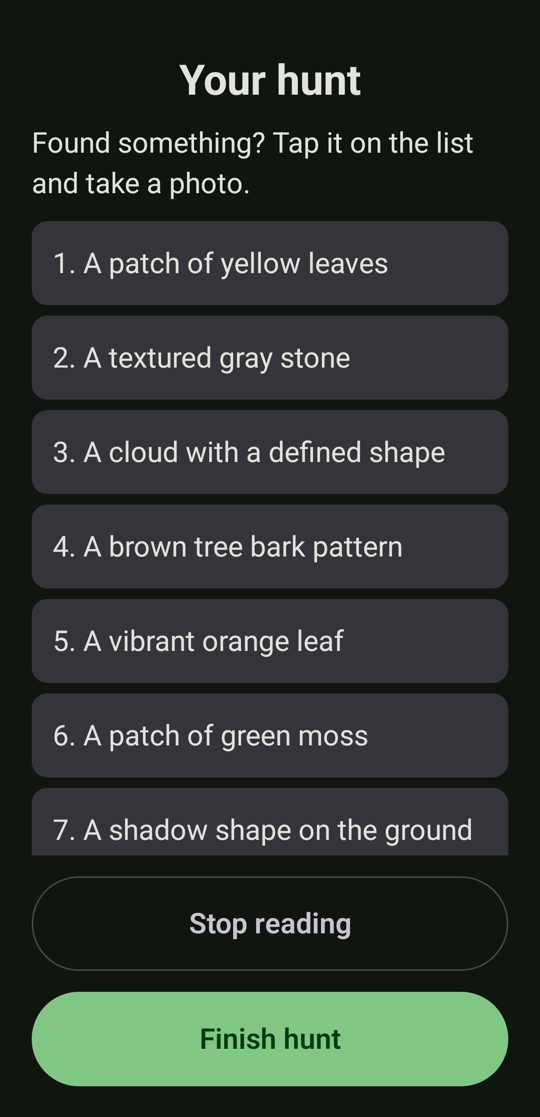\n\n## Install\n\n1. Download **`NatureQuest-1.0.0.apk`** below and open it on your phone. Android will ask you to allow installing from your browser or file manager.\n2. Open Nature Quest and tap **Download the AI model** (2.59 GB, **Wi-Fi recommended**). Progress is shown, an interrupted download continues where it stopped, and the file is checked with a SHA-256 before use.\n3. That is the only time the app uses the internet.\n\n**Requirements:** Android 12 or newer, a 64-bit ARM phone, about 2.6 GB of free storage and 2.2 to 2.6 GB of RAM while it works.\n\n## What you get\n\n- Setup in under 30 seconds: place (park, forest, garden, urban walk), 5, 8 or 12 items, age of the youngest player. English and Spanish, following the device language.\n- A hunt list written on the phone, checked by a safety validator in code (no picking or touching, no animals, nothing near water or roads), and read aloud.\n- Tap what you found, take one photo, get a short fun message and a friendly hint if it is not a match, read aloud.\n- A bronze, silver or gold medal and the time spent outside. Photos are deleted when you close the summary unless you tap **Save to gallery**.\n\n## Please read: what has and has not been checked\n\n- **Photo-check accuracy has not been measured** (there was no set of real photos to score against). The verdicts are meant to be fun and encouraging, not a reliable judge.\n- Tested on **one phone** (Pixel 10, Android 16). Speed, memory and the speech voice will differ on other phones.\n- Reading aloud needs a voice installed for the phone's language; otherwise the app stays silent and everything is still on screen.\n- The history of past hunts was not built.\n- Timings on the Pixel 10: a hunt list in about 5 to 12 s, a photo check in about 5 to 7 s, the model download in about 2 minutes on Wi-Fi. Details in [`docs/BENCHMARKS.md`](https://github.com/RZEROSTERN/hacktoberfest-week2/blob/v1.0.0/docs/BENCHMARKS.md).\n\n## Details\n\n- **APK SHA-256:** `__APK_SHA256__`\n- Signed with a dedicated key. Installing it over a debug build (or the other way round) requires uninstalling first.\n- Permissions: `CAMERA` (to check photos on the phone), `INTERNET` (only for the model download) and the network state (to warn about metered connections).\n- Model: `gemma-4-E2B-it.litertlm`, 2,588,147,712 bytes, SHA-256 `181938105e0eefd105961417e8da75903eacda102c4fce9ce90f50b97139a63c`, from
… [431 characters truncated] …
File created successfully at: <scratch>/scratchpad/release-notes.md (file state is current in your context — no need to Read it back)Publishing the GitHub Release, first re-verifying the APK being attached is byte-for-byte the one I verified and recorded.
$ {"command": "SCRATCH=<scratch>/scratchpad && ACTUAL=$(shasum -a 256 $SCRATCH/NatureQuest-1.0.0.apk | cut -d' ' -f1) && EXPECTED=$(cat $SCRATCH/apk.sha256) && echo \"attached APK sha256: $ACTUAL\" && [ \"$ACTUAL\" = \"$EXPECTED\" ] && echo \"matches the verified build\" && ~/Library/Android/sdk/build-tools/36.0.0/apksigner verify $SCRATCH/NatureQuest-1.0.0.apk && echo \"signature valid\" && sed \"s/__APK_SHA256__/$ACTUAL/\" $SCRATCH/release-notes.md > $SCRATCH/release-notes.final.md && grep -c \"__APK\" $SCRATCH/release-notes.final.md; gh release create v1.0.0 \"$SCRATCH/NatureQuest-1.0.0.apk#NatureQuest-1.0.0.apk (Android 12+, arm64)\" --title \"Nature Quest 1.0.0\" --notes-file $SCRATCH/release-notes.final.md --verify-tag --latest 2>&1 | tail -2", "description": "Verify the APK checksum and signature, then publish the GitHub Release", "timeout": 300000}attached APK sha256: a00196561e262600cf3e7881fb5685d884c88043344a94de83c117eff88f0043
matches the verified build
signature valid
0
https://github.com/RZEROSTERN/hacktoberfest-week2/releases/tag/v1.0.0The release is published. Verifying what GitHub actually serves: the asset listing, and a fresh download of the public APK compared against my checksum.
$ {"command": "SCRATCH=<scratch>/scratchpad && gh release view v1.0.0 --json tagName,name,isLatest,isDraft,isPrerelease,assets --jq '\"\\(.tagName) | \\(.name) | latest=\\(.isLatest) draft=\\(.isDraft) prerelease=\\(.isPrerelease)\\n\" + (.assets[] | \"asset: \\(.name) | \\(.size) bytes | downloads=\\(.downloadCount)\")'; echo \"--- download from the public URL and compare:\"; rm -f $SCRATCH/dl.apk; curl -fsSL -o $SCRATCH/dl.apk \"https://github.com/RZEROSTERN/hacktoberfest-week2/releases/latest/download/NatureQuest-1.0.0.apk\" && shasum -a 256 $SCRATCH/dl.apk | cut -d' ' -f1 && cat $SCRATCH/apk.sha256; rm -f $SCRATCH/dl.apk", "description": "Verify the published release asset by downloading it from the public URL", "timeout": 300000}Unknown JSON field: "isLatest"
Available fields:
apiUrl
assets
author
body
createdAt
databaseId
id
isDraft
isImmutable
isPrerelease
name
publishedAt
tagName
tarballUrl
targetCommitish
uploadUrl
url
zipballUrl
--- download from the public URL and compare:
a00196561e262600cf3e7881fb5685d884c88043344a94de83c117eff88f0043
a00196561e262600cf3e7881fb5685d884c88043344a94de83c117eff88f0043$ {"command": "gh repo view RZEROSTERN/hacktoberfest-week2 --json defaultBranchRef,visibility,url --jq '\"default branch: \\(.defaultBranchRef.name) | \\(.visibility) | \\(.url)\"'; echo \"--- branches / tags on GitHub:\"; git ls-remote --heads --tags origin | awk '{print $2}' | grep -v '\\^{}'; echo \"--- never a branch called main:\"; git ls-remote --heads origin | grep -c \"refs/heads/main$\"; echo \"--- local tree clean?\"; git status --short | wc -l; echo \"--- merged PRs:\"; gh pr list --state merged --json number,title,baseRefName --jq '.[] | \"#\\(.number) -> \\(.baseRefName): \\(.title)\"' | sort -t'#' -k2 -n; echo \"--- phone state:\"; adb shell dumpsys package mx.dev1.naturequest | grep -E \"versionName\" | head -1; adb shell \"run-as mx.dev1.naturequest ls files/ | grep litertlm\"; echo \"app language override: $(adb shell cmd locale get-app-locales mx.dev1.naturequest)\"", "description": "Final check of repository, branches, PRs and phone state", "timeout": 60000}default branch: master | PUBLIC | https://github.com/RZEROSTERN/hacktoberfest-week2
--- branches / tags on GitHub:
refs/heads/develop
refs/heads/master
refs/tags/v1.0.0
--- never a branch called main:
0
--- local tree clean?
0
--- merged PRs:
#1 -> develop: feat: scaffold Compose app with Hilt, navigation, theme and EN/ES resources
#2 -> develop: docs: add Claude Code project memory (CLAUDE.md and path-scoped rules)
#3 -> develop: feat: integrate LiteRT-LM and Gemma 4 E2B with a debug-only model spike
#4 -> develop: feat: setup screen and safe on-device hunt generation
#5 -> develop: feat: CameraX capture and on-device photo verification
#6 -> develop: feat: game loop with read-aloud, end of hunt, medal summary and photo cleanup
#7 -> develop: feat: first-launch model download with progress, resume and checksum
#8 -> develop: docs: README with screenshots, architecture and license
#9 -> develop: build: sign release builds with an optional git-ignored keystore
#10 -> master: release: Nature Quest 1.0.0
#11 -> develop: chore: merge master back into develop after 1.0.0
--- phone state:
versionName=0.1.0
gemma-4-E2B-it.litertlm
app language override: Locales for mx.dev1.naturequest for user 0 are []Nature Quest 1.0.0 is built and published, but the photo check has never been scored for accuracy, and the signed release APK has not been installed on your phone. Everything ran through your GitFlow, with 11 pull requests and no branch named main.
Release: https://github.com/RZEROSTERN/hacktoberfest-week2/releases/tag/v1.0.0. The signed APK (55 MB) is attached. I downloaded it from the public URL and the checksum matches, and it passes apksigner. The tag is v1.0.0 on master, and master is merged back into develop.
What works, checked on your Pixel 10 with the real model:
- Setup, hunt list, tap-an-item, camera, photo verdict, read-aloud, finish, medal summary, and photo cleanup all ran without crashes. Both English and Spanish ran, Spanish more.
- Hunt list takes about 5–12 s, a photo check about 5–7 s.
- The 2.59 GB model download takes about 2 minutes on Wi-Fi. I killed the app mid-download, it resumed, and the SHA-256 check passed.
- 148 unit tests pass and lint is clean.
- The release APK asks for CAMERA, INTERNET (used only for the model download) and network state.
What is not verified:
- Photo accuracy is unmeasured. The samples/ folder you said was already provided doesn't exist, and I flagged it at the start. To get the 8-of-10 result, put 10+ real photos in samples/ named like leaf1.jpg or red_leaf_2.jpg, and I'll run the benchmark. If accuracy is poor, the verification settings would need to change.
- The signed release APK has not been installed on any device. I tested the debug build, which is identical except for signing and a debug-only spike screen. Installing the release over the debug build needs an uninstall first, which also deletes the model. It re-downloads in about 2 minutes.
- Finding every item, and a summary with real photos, were never seen on the phone. I can't point your camera at a leaf; the logic is covered by unit tests.
- The speech audio was not heard. I only confirmed the engine started speaking in the log.
- I tested on one phone only.
Decisions that were mine, easy to reverse:
- I skipped step 8 (history with Room): it's marked optional and last in your priority list.
- MIT + Beerware is the license; I read it as MIT being the binding grant and the beer a non-binding request. Edit LICENSE if you meant something else.
- I added a signing PR before the release, because an unsigned APK can't be installed.
- The app uses the CPU backend by default: on this phone it was about 2× faster than the GPU. Details are in docs/BENCHMARKS.md.
What I changed on your phone:
- Installed the debug build, which still has the downloaded model.
- Granted the camera permission to the debug build.
- Saved and then deleted one test image in Pictures; the folder is back to normal.
- Reset the app's language override.
- To use the release build instead, run adb uninstall mx.dev1.naturequest and then install the APK.
Back up keystore/nature-quest-release.jks and keystore.properties privately. They are git-ignored and exist only on this Mac. If you lose them, installed apps can't be updated in place.
Every technical decision is logged in docs/DECISIONS.md (31 entries), which should cover your write-up.
Do we have i18n for it? It's a feedback given from other participants. At least english and spanish
Yes, English (default) and Spanish both exist. Before I answer from memory, I'll audit the repo for gaps: key parity between the two files, strings hardcoded in Compose code (lint can't catch those), per-app language support, and which parts follow the language.
$ {"command": "git checkout develop 2>&1 | tail -1 && git pull 2>&1 | tail -1; echo \"=== resource files\"; ls app/src/main/res | grep -E \"^values\"; python3 - <<'EOF'\nimport xml.etree.ElementTree as ET\ndef keys(path):\n r = ET.parse(path).getroot()\n out = {}\n for e in r:\n if e.tag in (\"string\", \"plurals\", \"string-array\"):\n out[(e.tag, e.get(\"name\"))] = e.get(\"translatable\") != \"false\"\n return out\nen = keys(\"app/src/main/res/values/strings.xml\"); es = keys(\"app/src/main/res/values-es/strings.xml\")\ntranslatable = {k for k, v in en.items() if v}\nprint(\"English entries:\", len(en), \"| translatable:\", len(translatable), \"| Spanish entries:\", len(es))\nprint(\"missing in Spanish:\", sorted(translatable - set(es)))\nprint(\"extra in Spanish :\", sorted(set(es) - set(en)))\nprint(\"untranslatable by design:\", sorted(k for k, v in en.items() if not v))\nEOF\necho \"=== literal user-visible strings in Compose/UI code (should be none)\"; grep -rnE 'Text\\(\\s*\"|text\\s*=\\s*\"|contentDescription\\s*=\\s*\"|label\\s*=\\s*\\{\\s*Text\\(\\s*\"|title\\s*=\\s*\"' app/src/main/java --include=*.kt | grep -v \"stringResource\\|Log\\.\\|TAG\" | head; echo \"(end)\"; echo \"=== per-app language support in manifest (localeConfig)\"; grep -c \"localeConfig\" app/src/main/AndroidManifest.xml; echo \"=== where the device language is read\"; grep -rn \"Locale.getDefault\\|getDisplayLanguage\\|setLanguage\" app/src/main/java --include=*.kt | sed 's#app/src/main/java/mx/dev1/naturequest/##' | cut -c1-150", "description": "Audit translation parity, hardcoded strings, per-app language and locale usage", "timeout": 60000}Your branch is up to date with 'origin/develop'.
Already up to date.
=== resource files
values
values-es
values-night
English entries: 91 | translatable: 89 | Spanish entries: 89
missing in Spanish: []
extra in Spanish : []
untranslatable by design: [('string', 'app_name'), ('string', 'hunt_item_numbered')]
=== literal user-visible strings in Compose/UI code (should be none)
(eval):17: no matches found: --include=*.kt
(end)
=== per-app language support in manifest (localeConfig)
0
=== where the device language is read
(eval):17: no matches found: --include=*.kt$ {"command": "echo \"=== literal user-visible strings in UI code (should be none)\"; grep -rnE 'Text\\(\\s*\"|text\\s*=\\s*\"|contentDescription\\s*=\\s*\"|title\\s*=\\s*\"' app/src/main/java --include='*.kt' | grep -v \"stringResource\\|Log\\.\\|TAG\" | head -10; echo \"(end of list)\"; echo; echo \"=== where the device language is read\"; grep -rn \"Locale.getDefault\\|getDisplayLanguage\\|setLanguage\\|Locale(\" app/src/main/java --include='*.kt' | sed 's#app/src/main/java/mx/dev1/naturequest/##' | cut -c1-140; echo; echo \"=== languages the safety validator knows\"; grep -c \"Spanish\" app/src/main/java/mx/dev1/naturequest/domain/hunt/SafetyValidator.kt; grep -n \"French\\|Portuguese\\|Frances\" app/src/main/java/mx/dev1/naturequest/domain/hunt/SafetyValidator.kt | head -2; echo \"(none above = only English and Spanish word lists)\"", "description": "Re-run hardcoded string and locale usage checks with quoted globs", "timeout": 60000}=== literal user-visible strings in UI code (should be none)
(end of list)
=== where the device language is read
data/speech/AndroidSpeaker.kt:77: Log.w(TAG, "No speech available (init status=$status, locale=${Locale.getDefault()})")
data/speech/AndroidSpeaker.kt:90: val device = Locale.getDefault()
data/speech/AndroidSpeaker.kt:91: return listOf(device, Locale(device.language)).any { locale ->
data/speech/AndroidSpeaker.kt:92: when (tts.setLanguage(locale)) {
data/speech/AndroidSpeaker.kt:103: val language = Locale.getDefault().language
domain/verification/VerifyPhotoUseCase.kt:33: locale: Locale = Locale.getDefault(),
domain/verification/VerifyPhotoUseCase.kt:37: mapOf("item" to item, "language" to locale.getDisplayLanguage(Locale.ENGLISH)),
domain/hunt/GenerateHuntUseCase.kt:50: locale: Locale = Locale.getDefault(),
domain/hunt/GenerateHuntUseCase.kt:74: "language" to locale.getDisplayLanguage(Locale.ENGLISH),
=== languages the safety validator knows
6
(none above = only English and Spanish word lists)The audit gives a clear answer, and it also turned up two real gaps. I'm confirming the more serious one against the word lists before I claim it.
$ {"command": "echo \"=== do the safety word lists cover French / Portuguese / German animals?\"; for w in araignee aranha spinne serpiente serpent cobra schlange abeille abelha lago lac fleuve; do printf \"%-10s %s\\n\" \"$w\" \"$(grep -c \"\\b$w\\b\" app/src/main/java/mx/dev1/naturequest/domain/hunt/SafetyValidator.kt)\"; done | column -c 100; echo; echo \"=== what a French phone would do today:\"; echo \" UI strings -> values/ (English fallback)\"; echo \" model language -> 'French' (locale.getDisplayLanguage)\"; echo \" safety words -> only English + Spanish lists\"", "description": "Check whether the safety word lists cover other languages", "timeout": 30000}=== do the safety word lists cover French / Portuguese / German animals?
araignee 0 spinne 0 serpent 1 schlange 0 abelha 0 lac 0
aranha 0 serpiente 1 cobra 0 abeille 0 lago 2 fleuve 0
=== what a French phone would do today:
UI strings -> values/ (English fallback)
model language -> 'French' (locale.getDisplayLanguage)
safety words -> only English + Spanish lists$ {"command": "git checkout -b feature/i18n-language-support && git branch --show-current && mkdir -p app/src/main/java/mx/dev1/naturequest/domain/language app/src/main/res/xml && cat > app/src/main/java/mx/dev1/naturequest/domain/language/AppLanguage.kt <<'EOF'\npackage mx.dev1.naturequest.domain.language\n\nimport java.util.Locale\n\n/**\n * The languages Nature Quest fully supports: UI strings, the model's prompts and answers, the voice,\n * and the safety word lists. Anything else falls back to [DEFAULT] *everywhere at once*, so a phone in\n * another language gets a consistent English app instead of English screens with a model writing\n * unchecked text in a language the safety validator does not know.\n *\n * To add a language: its `values-xx` strings and fallback hunt items, prompt examples, safety word\n * lists in [mx.dev1.naturequest.domain.hunt.SafetyValidator], and `res/xml/locales_config.xml`.\n */\nenum class AppLanguage(val code: String, val promptName: String) {\n ENGLISH(\"en\", \"English\"),\n SPANISH(\"es\", \"Spanish\"),\n ;\n\n companion object {\n val DEFAULT = ENGLISH\n\n fun resolve(locale: Locale): AppLanguage = entries.firstOrNull { it.code == locale.language } ?: DEFAULT\n }\n}\nEOF\ncat > app/src/main/res/xml/locales_config.xml <<'EOF'\n<?xml version=\"1.0\" encoding=\"utf-8\"?>\n<!-- Languages shown in Android 13+ Settings > System > Languages > App languages. Keep in sync with AppLanguage. -->\n<locale-config xmlns:android=\"http://schemas.android.com/apk/res/android\">\n <locale android:name=\"en\" />\n <locale android:name=\"es\" />\n</locale-config>\nEOF\npython3 - <<'EOF'\nimport re\nbase = \"app/src/main/java/mx/dev1/naturequest/\"\n# use cases\nfor p, old in [(base + \"domain/hunt/GenerateHuntUseCase.kt\", '\"language\" to locale.getDisplayLanguage(Locale.ENGLISH),'),\n (base + \"domain/verification/VerifyPhotoUseCase.kt\", 'mapOf(\"item\" to item, \"language\" to locale.getDisplayLanguage(Locale.ENGLISH)),')]:\n t = open(p).read()\n assert old in t, p\n t = t.replace(old, old.replace(\"locale.getDisplayLanguage(Locale.ENGLISH)\", \"AppLanguage.resolve(locale).promptName\"))\n t = t.replace(\"import mx.dev1.naturequest.domain.inference.InferenceEngine\\n\", \"import mx.dev1.naturequest.domain.inference.InferenceEngine\\nimport mx.dev1.naturequest.domain.language.AppLanguage\\n\", 1)\n open(p, \"w\").write(t)\n# speaker\np = base + \"data/speech/AndroidSpeaker.kt\"\nt = open(p).read()\nold_sel = t[t.index(\" /** Uses the device language, falling back\"):t.index(\" /** Photos and hunts never leave the phone\")]\nnew_sel = ''' /**\n * Speaks the app's language: the device language (keeping its region, e.g. es-MX) when the app supports\n * it, otherwise the fallback language, so the voice always matches the text on screen.\n */\n private fun selectLanguage(tts: TextToSpeech): Boolean {\n val device = Locale.getDefault()\n
… [1809 characters truncated] …
Switched to a new branch 'feature/i18n-language-support'
feature/i18n-language-support
app/src/main/AndroidManifest.xml | 1 +
.../java/mx/dev1/naturequest/data/speech/AndroidSpeaker.kt | 13 ++++++++++---
.../mx/dev1/naturequest/domain/hunt/GenerateHuntUseCase.kt | 3 ++-
.../naturequest/domain/verification/VerifyPhotoUseCase.kt | 3 ++-
4 files changed, 15 insertions(+), 5 deletions(-)
app/src/main/java/mx/dev1/naturequest/domain/verification/VerifyPhotoUseCase.kt:5:import mx.dev1.naturequest.domain.language.AppLanguage
app/src/main/java/mx/dev1/naturequest/domain/verification/VerifyPhotoUseCase.kt:38: mapOf("item" to item, "language" to AppLanguage.resolve
app/src/main/java/mx/dev1/naturequest/data/speech/AndroidSpeaker.kt:12:import mx.dev1.naturequest.domain.language.AppLanguage
app/src/main/java/mx/dev1/naturequest/data/speech/AndroidSpeaker.kt:95: val language = AppLanguage.resolve(device)
app/src/main/java/mx/dev1/naturequest/data/speech/AndroidSpeaker.kt:110: val language = AppLanguage.resolve(Locale.getDefault()).code
app/src/main/java/mx/dev1/naturequest/domain/hunt/GenerateHuntUseCase.kt:4:import mx.dev1.naturequest.domain.language.AppLanguage
app/src/main/java/mx/dev1/naturequest/domain/hunt/GenerateHuntUseCase.kt:75: "language" to AppLanguage.resolve(locale).promptNa
28: android:localeConfig="@xml/locales_config"Now the tests, including a guard that fails if someone adds a translation folder without listing it in the per-app language config (or the reverse).
$ {"command": "mkdir -p app/src/test/java/mx/dev1/naturequest/domain/language && cat > app/src/test/java/mx/dev1/naturequest/domain/language/AppLanguageTest.kt <<'EOF'\npackage mx.dev1.naturequest.domain.language\n\nimport org.junit.Assert.assertEquals\nimport org.junit.Test\nimport java.util.Locale\n\nclass AppLanguageTest {\n @Test\n fun `English and Spanish phones keep their language, whatever the region`() {\n assertEquals(AppLanguage.ENGLISH, AppLanguage.resolve(Locale.forLanguageTag(\"en-US\")))\n assertEquals(AppLanguage.ENGLISH, AppLanguage.resolve(Locale.forLanguageTag(\"en-GB\")))\n assertEquals(AppLanguage.SPANISH, AppLanguage.resolve(Locale.forLanguageTag(\"es-MX\")))\n assertEquals(AppLanguage.SPANISH, AppLanguage.resolve(Locale.forLanguageTag(\"es-ES\")))\n assertEquals(AppLanguage.SPANISH, AppLanguage.resolve(Locale.forLanguageTag(\"es\")))\n }\n\n @Test\n fun `any other language falls back to English, matching the English screens`() {\n listOf(\"fr-FR\", \"pt-BR\", \"de-DE\", \"it\", \"ja-JP\", \"zh-CN\", \"ar\").forEach { tag ->\n assertEquals(tag, AppLanguage.ENGLISH, AppLanguage.resolve(Locale.forLanguageTag(tag)))\n }\n }\n\n @Test\n fun `the language name sent to the model is plain English`() {\n assertEquals(\"English\", AppLanguage.ENGLISH.promptName)\n assertEquals(\"Spanish\", AppLanguage.SPANISH.promptName)\n }\n}\nEOF\npython3 - <<'EOF'\n# hunt generation: other languages fall back to English in the prompt\np = \"app/src/test/java/mx/dev1/naturequest/domain/hunt/GenerateHuntUseCaseTest.kt\"\nt = open(p).read()\nt = t.replace(''' @Test\n fun `reports progress while loading and writing`() = runTest {''', ''' @Test\n fun `asks for English on a phone whose language the app does not support`() = runTest {\n // The screens fall back to English there, and the safety word lists only know English and Spanish,\n // so the model must not be asked to write in French.\n val engine = FakeInferenceEngine.scripted(huntJson(\"a\", \"b\", \"c\", \"d\", \"e\", \"f\", \"g\"))\n\n useCase(engine)(settings, locale = Locale.forLanguageTag(\"fr-FR\"))\n\n assertEquals(\"English\", prompts.rendered.first().second[\"language\"])\n }\n\n @Test\n fun `reports progress while loading and writing`() = runTest {''')\nopen(p, \"w\").write(t)\n# photo verification\np = \"app/src/test/java/mx/dev1/naturequest/domain/verification/VerifyPhotoUseCaseTest.kt\"\nt = open(p).read()\nt = t.replace(''' @Test\n fun `retries once with a different seed after invalid output`() = runTest {''', ''' @Test\n fun `answers in English on a phone whose language the app does not support`() = runTest {\n val engine = FakeInferenceEngine.scripted(verificationJson(true, \"Nice!\"))\n\n useCase(engine)(\"a red leaf\", photo, Locale.forLanguageTag(\"pt-BR\"))\n\n assertEquals(\"English\", prompt
… [2461 characters truncated] …
exit: 1
109:> Task :app:lintDebug FAILED
137:* What went wrong:
181:BUILD FAILED in 55s
1:~/Documents/Repositorios/Training/hacktoberfest-week2/app/src/main/AndroidManifest.xml:28: Error: Attribute localeConfig is only used in API level 33 and higher (current min is 31) [UnusedAttribute]
unit tests: 154 failures: 0 errors: 0$ {"command": "python3 - <<'EOF'\np = \"app/src/main/AndroidManifest.xml\"\nt = open(p).read()\nt = t.replace(' android:theme=\"@style/Theme.NatureQuest\">', ' android:theme=\"@style/Theme.NatureQuest\"\\n tools:targetApi=\"33\">', 1)\nt = t.replace(' android:localeConfig=\"@xml/locales_config\"\\n', ' android:localeConfig=\"@xml/locales_config\"\\n', 1)\nopen(p, \"w\").write(t)\nEOF\nexport JAVA_HOME=$HOME/.sdkman/candidates/java/17.0.7-zulu; SCRATCH=<scratch>/scratchpad; ./gradlew assembleDebug lintDebug testDebugUnitTest --console=plain > $SCRATCH/build52.log 2>&1; echo \"exit: $?\"; grep -nE \"^e: |FAILED|BUILD\" $SCRATCH/build52.log | head -4; grep -nE \"Error:|Warning:\" app/build/intermediates/lint_intermediate_text_report/debug/lintReportDebug/lint-results-debug.txt 2>/dev/null | cut -c1-200; echo \"--- merged manifest has the config + the file is packaged:\"; BT=~/Library/Android/sdk/build-tools/36.0.0; $BT/aapt2 dump xmltree --file AndroidManifest.xml app/build/outputs/apk/debug/app-debug.apk | grep -i localeConfig; $BT/aapt2 dump xmltree --file res/xml/locales_config.xml app/build/outputs/apk/debug/app-debug.apk 2>/dev/null | grep -E \"A: android:name\" | head -3; unzip -l app/build/outputs/apk/debug/app-debug.apk | grep -i \"locales_config\\|res/xml\" | head -3", "description": "Mark localeConfig as API 33+, re-run checks and verify the APK contains the language config", "timeout": 900000}exit: 0
72:BUILD SUCCESSFUL in 10s
--- merged manifest has the config + the file is packaged:
A: http://schemas.android.com/apk/res/android:localeConfig(0x0101065b)=@0x7f120001
1408 01-01-1981 01:01 res/xml/data_extraction_rules.xml
444 01-01-1981 01:01 res/xml/locales_config.xml$ {"command": "SCRATCH=<scratch>/scratchpad && adb install -r app/build/outputs/apk/debug/app-debug.apk 2>&1 | tail -1 && adb shell am force-stop mx.dev1.naturequest && adb shell cmd locale set-app-locales mx.dev1.naturequest --locales fr-FR && echo \"app locale set to: $(adb shell cmd locale get-app-locales mx.dev1.naturequest)\" && python3 - $SCRATCH <<'EOF'\nimport sys, time\nsys.path.insert(0, sys.argv[1])\nfrom ui import *\ndef texts(ns): return [n[\"text\"] for n in ns if n[\"text\"] and 250 < n[\"box\"][1] < 2250]\nadb(\"shell\", \"input\", \"keyevent\", \"KEYCODE_WAKEUP\"); adb(\"logcat\", \"-c\")\nadb(\"shell\", \"am\", \"start\", \"-n\", \"mx.dev1.naturequest/.MainActivity\")\nstart, ns = wait_for(lambda n: n[\"text\"] in (\"Start hunt\", \"Empezar búsqueda\", \"Commencer\"), 15)\nprint(\"Setup button on a French phone:\", start[\"text\"] if start else None, \"| title:\", texts(ns)[:1])\ntap(start)\nfirst, ns = wait_for(lambda n: n[\"text\"].startswith(\"1. \"), 90)\nprint(\"hunt generated for a French phone:\", [n[\"text\"] for n in ns if n[\"text\"][:2] in (\"1.\", \"2.\", \"3.\", \"4.\")])\ntime.sleep(3)\nprint(\"speech:\", adb(\"logcat\", \"-d\", \"-s\", \"NQ_SPEECH:*\").strip().splitlines()[-1:])\nprint(\"crashes:\", len(adb(\"logcat\", \"-d\", \"-b\", \"crash\").strip().splitlines()))\nfin, _ = wait_for(lambda n: n[\"text\"] in (\"Finish hunt\",), 5)\nif fin: tap(fin)\nEOF\nadb shell cmd locale set-app-locales mx.dev1.naturequest; echo \"app locale reset: $(adb shell cmd locale get-app-locales mx.dev1.naturequest)\"; adb shell am force-stop mx.dev1.naturequest; adb shell rm -f /sdcard/ui.xml", "description": "Install the build and run a hunt with the app set to an unsupported language", "timeout": 300000}Exit code 127
(eval):1: command not found: adb
(eval):1: command not found: adb
(eval):19: command not found: adb
(eval):19: command not found: adb
app locale reset:
(eval):19: command not found: adb
(eval):19: command not found: adbadb isn't on this shell's PATH any more (it was earlier), so I'll add the SDK's platform-tools for these commands and retry.
$ {"command": "export PATH=\"$PATH:$HOME/Library/Android/sdk/platform-tools\"; cd ~/Documents/Repositorios/Training/hacktoberfest-week2 && SCRATCH=<scratch>/scratchpad && adb devices | sed -n 2p && adb install -r app/build/outputs/apk/debug/app-debug.apk 2>&1 | tail -1 && adb shell am force-stop mx.dev1.naturequest && adb shell cmd locale set-app-locales mx.dev1.naturequest --locales fr-FR && echo \"app locale set to: $(adb shell cmd locale get-app-locales mx.dev1.naturequest)\" && python3 - $SCRATCH <<'EOF'\nimport sys, time\nsys.path.insert(0, sys.argv[1])\nfrom ui import *\ndef texts(ns): return [n[\"text\"] for n in ns if n[\"text\"] and 250 < n[\"box\"][1] < 2250]\nadb(\"shell\", \"input\", \"keyevent\", \"KEYCODE_WAKEUP\"); adb(\"logcat\", \"-c\")\nadb(\"shell\", \"am\", \"start\", \"-n\", \"mx.dev1.naturequest/.MainActivity\")\nstart, ns = wait_for(lambda n: n[\"text\"] in (\"Start hunt\", \"Empezar búsqueda\", \"Commencer\"), 15)\nprint(\"Setup button on a French phone:\", start[\"text\"] if start else None, \"| title:\", texts(ns)[:1])\ntap(start)\nfirst, ns = wait_for(lambda n: n[\"text\"].startswith(\"1. \"), 90)\nprint(\"hunt generated for a French phone:\", [n[\"text\"] for n in ns if n[\"text\"][:2] in (\"1.\", \"2.\", \"3.\", \"4.\")])\ntime.sleep(3)\nprint(\"speech:\", adb(\"logcat\", \"-d\", \"-s\", \"NQ_SPEECH:*\").strip().splitlines()[-1:])\nprint(\"crashes:\", len(adb(\"logcat\", \"-d\", \"-b\", \"crash\").strip().splitlines()))\nfin, _ = wait_for(lambda n: n[\"text\"] in (\"Finish hunt\",), 5)\nif fin: tap(fin)\nEOF\nadb shell cmd locale set-app-locales mx.dev1.naturequest; echo \"app locale reset: $(adb shell cmd locale get-app-locales mx.dev1.naturequest)\"; adb shell am force-stop mx.dev1.naturequest; adb shell rm -f /sdcard/ui.xml", "description": "Install the build and run a hunt with the app set to an unsupported language (French)", "timeout": 300000}<device-serial> device
Success
app locale set to: Locales for mx.dev1.naturequest for user 0 are [fr-FR]
Setup button on a French phone: Start hunt | title: ['Always hunt with an adult. Just look and take photos: never pick or touch anything.']
hunt generated for a French phone: ['1. A patch of orange leaves', '2. A textured grey stone', '3. A cloud with a distinct shape', '4. Brown bark with deep lines']
speech: ['10-06 08:23:01.295 20565 20581 D NQ_SPEECH: speaking']
crashes: 0
app locale reset: Locales for mx.dev1.naturequest for user 0 are []$ {"command": "export PATH=\"$PATH:$HOME/Library/Android/sdk/platform-tools\"; cd ~/Documents/Repositorios/Training/hacktoberfest-week2 && SCRATCH=<scratch>/scratchpad && mkdir -p $SCRATCH/shots_es && python3 - $SCRATCH <<'EOF'\nimport sys, time, subprocess\nsys.path.insert(0, sys.argv[1])\nfrom ui import *\nout = sys.argv[1] + \"/shots_es/\"\ndef shot(name):\n data = subprocess.run([\"adb\", \"exec-out\", \"screencap\", \"-p\"], capture_output=True).stdout\n open(out + name + \".png\", \"wb\").write(data); print(\" saved\", name, len(data) // 1024, \"KB\", flush=True)\ndef texts(ns): return [n[\"text\"] for n in ns if n[\"text\"] and 250 < n[\"box\"][1] < 2250]\nadb(\"shell\", \"input\", \"keyevent\", \"KEYCODE_WAKEUP\"); adb(\"logcat\", \"-c\"); adb(\"shell\", \"am\", \"force-stop\", \"mx.dev1.naturequest\")\nadb(\"shell\", \"am\", \"start\", \"-n\", \"mx.dev1.naturequest/.MainActivity\")\nstart, ns = wait_for(lambda n: n[\"text\"] == \"Empezar búsqueda\", 15)\nprint(\"Spanish Setup:\", bool(start), texts(ns)[:1]); time.sleep(1); shot(\"es-01-setup\")\ntap(start)\nfirst, ns = wait_for(lambda n: n[\"text\"].startswith(\"1. \"), 90)\nprint(\"Spanish hunt:\", [n[\"text\"] for n in ns if n[\"text\"][:2] in (\"1.\", \"2.\", \"3.\")])\ntime.sleep(2.5); shot(\"es-03-hunt-list\")\nprint(\"speech:\", adb(\"logcat\", \"-d\", \"-s\", \"NQ_SPEECH:*\").strip().splitlines()[-1:])\nfin, _ = wait_for(lambda n: n[\"text\"] == \"Terminar búsqueda\", 5); tap(fin)\ntitle, ns = wait_for(lambda n: n[\"text\"] == \"¡Búsqueda completa!\", 10); print(\"Spanish summary:\", bool(title), texts(ns)[:3]); time.sleep(1.5); shot(\"es-04-summary\")\ndone, _ = wait_for(lambda n: n[\"text\"] == \"Listo\", 5); tap(done)\nprint(\"crashes:\", len(adb(\"logcat\", \"-d\", \"-b\", \"crash\").strip().splitlines()))\nEOF\nadb shell rm -f /sdcard/ui.xml; echo \"--- try the system 'App languages' screen (needs the phone unlocked):\"; adb shell am start -a android.settings.APP_LOCALE_SETTINGS -d package:mx.dev1.naturequest 2>&1 | tail -1; sleep 2; echo \"focus: $(adb shell dumpsys window | grep mCurrentFocus | head -1 | sed 's/.*{//' | cut -c1-80)\"", "description": "Run the Spanish flow, capture Spanish screenshots, and try the system App languages screen", "timeout": 300000}Spanish Setup: True ['Siempre con un adulto. Solo miren y tomen fotos: nunca corten ni toquen nada.']
saved es-01-setup 162 KB
Spanish hunt: ['1. Un cielo azul brillante', '2. Una sombra alargada en el suelo', '3. Una textura rugosa de corteza']
saved es-03-hunt-list 163 KB
speech: ['10-06 08:23:35.497 20900 20916 D NQ_SPEECH: speaking']
Spanish summary: True ['Medalla de bronce', 'Encontraron 0 de 8', 'Menos de un minuto afuera']
saved es-04-summary 166 KB
crashes: 0
--- try the system 'App languages' screen (needs the phone unlocked):
Starting: Intent { act=android.settings.APP_LOCALE_SETTINGS dat=package: }
focus: 5a18921 u0 com.android.settings/com.android.settings.Settings$AppLanguageSettingThe system App languages screen opened for Nature Quest, so the phone was unlocked there. I'll read its text (not a screenshot) to see whether it now lists the app's languages.
$ {"command": "export PATH=\"$PATH:$HOME/Library/Android/sdk/platform-tools\"; SCRATCH=<scratch>/scratchpad; python3 - $SCRATCH <<'EOF'\nimport sys\nsys.path.insert(0, sys.argv[1])\nfrom ui import *\nns = nodes(dump())\nprint(\"texts on the App languages screen:\", [n[\"text\"] for n in ns if n[\"text\"]][:14])\nEOF\nadb shell input keyevent KEYCODE_BACK; adb shell rm -f /sdcard/ui.xml; sleep 1; echo \"focus after Back: $(adb shell dumpsys window | grep mCurrentFocus | head -1 | sed 's/.*{//' | cut -c1-70)\"", "description": "Read the system App languages screen text and go back", "timeout": 60000}texts on the App languages screen: ['Nature Quest', 'Sugerencias', 'Predeterminado del sistema', 'English (Mexico)', 'English (United States)', 'Español (México)', 'Todos los idiomas', 'English', 'Español']
focus after Back: 42a43df u0 mx.dev1.naturequest/mx.dev1.naturequest.MainActivity}$ {"command": "SCRATCH=<scratch>/scratchpad && for f in $SCRATCH/shots_es/*.png; do n=$(basename $f); sips -c 2234 1080 --cropOffset 125 0 \"$f\" --out \"docs/screenshots/$n\" >/dev/null 2>&1 && sips --resampleWidth 540 \"docs/screenshots/$n\" >/dev/null 2>&1; done; ls docs/screenshots | tr '\\n' ' '; echo; python3 - <<'EOF'\np = \"README.md\"\nt = open(p).read()\nold = \"It is in **English and Spanish** and follows the device language, including what the AI writes and says.\"\nassert old in t\nt = t.replace(old, \"It is in **English and Spanish** (see [Languages](#languages)).\")\nmarker = \"## How it works\"\nsection = '''## Languages\n\nNature Quest is fully available in **English** (the default) and **Spanish**. The language covers everything the player\nmeets: the screens, the hunt items the AI writes, its feedback and hints, the voice that reads them aloud, and the safety\ncheck that screens the items.\n\n- It follows the phone's language. On **Android 13 or newer** you can also set it for this app only: *Settings > System >\n Languages > App languages > Nature Quest* (English or Español). On Android 12 it follows the phone's language.\n- A phone set to any **other language gets the English app**, with English hunts and an English voice, so the screens, the AI and\n the safety check always agree.\n\n<table>\n <tr>\n <td><img src=\"docs/screenshots/es-01-setup.png\" width=\"190\" alt=\"Pantalla de inicio en español\"></td>\n <td><img src=\"docs/screenshots/es-03-hunt-list.png\" width=\"190\" alt=\"Lista de la búsqueda en español\"></td>\n <td><img src=\"docs/screenshots/es-04-summary.png\" width=\"190\" alt=\"Resumen con medalla en español\"></td>\n </tr>\n <tr>\n <td align=\"center\">Inicio</td>\n <td align=\"center\">La búsqueda, escrita por la IA</td>\n <td align=\"center\">Medalla y tiempo afuera</td>\n </tr>\n</table>\n\nAdding another language means translating the strings and fallback hunt items, adding prompt examples and safety word lists\nfor it, and listing it in `res/xml/locales_config.xml`; a test fails if those lists disagree.\n\n'''\nt = t.replace(marker, section + marker, 1)\nt = t.replace(\"(30 entries)\", \"(32 entries)\")\nt = t.replace(\"- Spanish and English both ran on the device; Spanish got more testing.\", \"- Spanish and English both ran on the device; Spanish got more testing. Other languages fall back to English (checked on the device with the app set to French).\")\nopen(p, \"w\").write(t)\n\np = \"docs/DECISIONS.md\"\nt = open(p).read().rstrip(\"\\n\") + '''\n\n## D-032 Supported languages: English and Spanish, everything else falls back to English together (2026-10-06)\n- **Decision:** the app supports **English (default) and Spanish** across the screens, the model's prompts and answers, the voice, and the safety word lists. `AppLanguage.resolve(locale)` is the single place that decides the language: Spanish for `es-*`, English for anything else. It feeds the hunt and photo prompts and the
… [2401 characters truncated] …
01-setup.png 02-generating.png 03-hunt-list.png 04-summary.png 05-setup-no-model.png 06-download.png es-01-setup.png es-03-hunt-list.png es-04-summary.png
decisions: 32 | CLAUDE.md lines: 59
image links okFinal checks, then commit and PR through the normal flow.
$ {"command": "export PATH=\"$PATH:$HOME/Library/Android/sdk/platform-tools\"; cd ~/Documents/Repositorios/Training/hacktoberfest-week2 && export JAVA_HOME=$HOME/.sdkman/candidates/java/17.0.7-zulu && SCRATCH=<scratch>/scratchpad && ./gradlew assembleDebug lintDebug testDebugUnitTest --console=plain > $SCRATCH/build53.log 2>&1; echo \"checks exit: $?\"; grep -nE \"FAILED|BUILD\" $SCRATCH/build53.log | head -2; python3 - <<'EOF'\nimport glob, xml.etree.ElementTree as ET\nt=f=e=0\nfor p in glob.glob(\"app/build/test-results/testDebugUnitTest/*.xml\"):\n r=ET.parse(p).getroot(); t+=int(r.get(\"tests\")); f+=int(r.get(\"failures\")); e+=int(r.get(\"errors\"))\nprint(\"unit tests:\", t, \"failures:\", f, \"errors:\", e)\nEOF\nCO=\"Co-Authored-By: Claude Sonnet 5.5 <noreply@anthropic.com>\"; git status --short | cut -c1-110\ngit add app/src/main/java/mx/dev1/naturequest/domain app/src/test/java/mx/dev1/naturequest/domain && git commit -q -m \"fix(domain): resolve one supported language for prompts, so unsupported phone languages fall back to English\n\n$CO\" && git add app/src/main/java/mx/dev1/naturequest/data app/src/main/res/xml app/src/main/AndroidManifest.xml app/src/test/java/mx/dev1/naturequest/data && git commit -q -m \"feat(i18n): list English and Spanish in Android's App languages and match the voice to the app language\n\n$CO\" && git add docs README.md CLAUDE.md .claude && git commit -q -m \"docs: document languages, add Spanish screenshots and log the decision\n\n$CO\" && git log --oneline -4 && git status --short && git push -u origin feature/i18n-language-support 2>&1 | tail -1", "description": "Run the checks, commit in three groups and push the branch", "timeout": 900000}checks exit: 0
72:BUILD SUCCESSFUL in 5s
unit tests: 154 failures: 0 errors: 0
M .claude/rules/inference.md
M CLAUDE.md
M README.md
M app/src/main/AndroidManifest.xml
M app/src/main/java/mx/dev1/naturequest/data/speech/AndroidSpeaker.kt
M app/src/main/java/mx/dev1/naturequest/domain/hunt/GenerateHuntUseCase.kt
M app/src/main/java/mx/dev1/naturequest/domain/verification/VerifyPhotoUseCase.kt
M app/src/test/java/mx/dev1/naturequest/data/ShippedContentTest.kt
M app/src/test/java/mx/dev1/naturequest/domain/hunt/GenerateHuntUseCaseTest.kt
M app/src/test/java/mx/dev1/naturequest/domain/verification/VerifyPhotoUseCaseTest.kt
M docs/DECISIONS.md
?? app/src/main/java/mx/dev1/naturequest/domain/language/
?? app/src/main/res/xml/locales_config.xml
?? app/src/test/java/mx/dev1/naturequest/domain/language/
?? docs/screenshots/es-01-setup.png
?? docs/screenshots/es-03-hunt-list.png
?? docs/screenshots/es-04-summary.png
9d9e4e7 docs: document languages, add Spanish screenshots and log the decision
d5784d6 feat(i18n): list English and Spanish in Android's App languages and match the voice to the app language
2b1368a fix(domain): resolve one supported language for prompts, so unsupported phone languages fall back to English
4d3a8a2 Merge pull request #11 from RZEROSTERN/master
branch 'feature/i18n-language-support' set up to track 'origin/feature/i18n-language-support'.$ {"command": "gh pr create --base develop --head feature/i18n-language-support --title \"feat(i18n): consistent English/Spanish support and per-app language setting\" --body \"$(cat <<'EOF'\n## Why\nFeedback from other participants asked whether the app has i18n, at least English and Spanish. It does, but auditing it turned up two gaps.\n\n## Audit result\n- **Already fine:** `values/` (English, default) and `values-es/` have identical keys (89 translatable strings, nothing missing or extra); lint makes a missing translation a build error; no user-visible text is hardcoded in the UI code; the model's prompts and answers, the voice and the summary all follow the language. I had verified Spanish and English on the Pixel 10 earlier.\n- **Gap 1, a safety hole:** on a phone set to any *other* language (say French) the screens fell back to English, but the model was asked to write in French, and the safety validator only has English and Spanish word lists, so French items were not screened.\n- **Gap 2, usability:** the app did not declare per-app languages, so it was missing from Android's *App languages* settings. Someone on an English phone could not choose Spanish for just this app.\n\n## What changed\n- `AppLanguage.resolve(locale)` is now the one place that decides the language (Spanish for `es-*`, English for everything else). It feeds the hunt prompt, the photo-check prompt and the text-to-speech voice, so an unsupported phone language gets a *consistent English app*.\n- `res/xml/locales_config.xml` + `android:localeConfig` list English and Spanish in Settings > System > Languages > App languages (Android 13+; on Android 12 the app follows the system language).\n- README gets a **Languages** section with Spanish screenshots; `docs/DECISIONS.md` D-032; gotchas in `CLAUDE.md` and `.claude/rules/inference.md`.\n\n## How it was tested\n- `./gradlew assembleDebug lintDebug testDebugUnitTest` passes: **154 tests** (6 new). They check the language resolution (en/es with regions, seven other languages fall back to English), that both prompts ask for English on a French/Portuguese phone, and that the `locales_config.xml` list always matches the translation folders and `AppLanguage` (so adding a translation without listing it fails the build).\n- **On the Pixel 10:** the system App languages screen now lists *Nature Quest* with System default, English and Español. With the app set to **French**: English screens, an English hunt, English speech, no crash. With the phone's own language (Spanish): Spanish setup, hunt, speech and summary, no crash. Per-app locales were reset afterwards.\n\n## Not verified\n- I could not hear the voices; I checked that the speech engine started in the right flow.\n- Android 12 (no per-app language screen) was not tried; it follows the system language by design.\n- I did not build an in-app language switcher; the system setting is the Android-standard way. It can be added if wanted.\n\nThis is a fix to the published 1.0.0 (the s
… [264 characters truncated] …
https://github.com/RZEROSTERN/hacktoberfest-week2/pull/12{
}{
"bound": true,
"pr": {
"number": 12,
"url": "https://github.com/RZEROSTERN/hacktoberfest-week2/pull/12",
"repo": "RZEROSTERN/hacktoberfest-week2",
"host": "github.com",
"state": "open",
"base": "develop",
"head": "feature/i18n-language-support"
},
"checks": {
"available": true,
"passing": 0,
"failing": 0,
"pending": 0,
"skipped": 0,
"failingChecks": [
]
},
"mergeQueue": {
"enabled": false,
"queued": false
},
"monitor": {
"auto_fix": false,
"address_comments": false,
"auto_merge": false,
"auto_archive_on_close": false
},
"otherBoundPrs": [
{
"number": 1,
"repo": "RZEROSTERN/hacktoberfest-week2",
"state": "merged"
},
{
"number": 2,
"repo": "RZEROSTERN/hacktoberfest-week2",
"state": "merged"
},
{
"number": 3,
"repo": "RZEROSTERN/hacktoberfest-week2",
"state": "merged"
},
{
"number": 4,
"repo": "RZEROSTERN/hacktoberfest-week2",
"state": "merged"
},
{
"number": 5,
"repo": "RZEROSTERN/hacktoberfest-week2",
"state": "merged"
},
{
"number": 6,
"repo": "RZEROSTERN/hacktoberfest-week2",
"state": "merged"
},
{
"number": 7,
"repo": "RZEROSTERN/hacktoberfest-week2",
"state": "merged"
},
{
"number": 8,
"repo": "RZEROSTERN/hacktoberfest-week2",
"state": "merged"
},
{
"number": 9,
"repo": "RZEROSTERN/hacktoberfest-week2",
"state": "merged"
},
{
"number": 10,
"repo": "RZEROSTERN/hacktoberfest-week2",
"state": "merged"
},
{
"number": 11,
"repo": "RZEROSTERN/hacktoberfest-week2",
"state": "merged"
}
]
}$ {"command": "for i in 1 2 3 4 5; do R=$(gh pr view 12 --json mergeable,mergeStateStatus --jq '.mergeable + \" / \" + .mergeStateStatus'); case \"$R\" in MERGEABLE*) echo \"$R\"; break;; esac; sleep 3; done; gh pr merge 12 --merge --delete-branch 2>&1 | tail -1; git checkout develop 2>&1 | tail -1 && git pull 2>&1 | tail -1 && git fetch --prune 2>&1 | tail -1; git log --oneline --graph -3; git ls-remote --heads origin", "description": "Merge the i18n PR into develop and sync", "timeout": 90000}MERGEABLE / CLEAN
create mode 100644 docs/screenshots/es-04-summary.png
Your branch is up to date with 'origin/develop'.
Already up to date.
- [deleted] (none) -> origin/feature/i18n-language-support
* c01011a Merge pull request #12 from RZEROSTERN/feature/i18n-language-support
|\
| * 9d9e4e7 docs: document languages, add Spanish screenshots and log the decision
| * d5784d6 feat(i18n): list English and Spanish in Android's App languages and match the voice to the app language
c01011a8cb6bb747f2e0df6f7b34efa421c2f049 refs/heads/develop
7b7349911646fc9f4ed1e6cde03698f336b48699 refs/heads/masterYes, the app already had English and Spanish, but an audit found two gaps in it and I've fixed both on develop (PR #12). The fixes are not in the published v1.0.0 APK or on master yet.
What was already there
- The default English strings and the Spanish strings have identical keys: 89 translatable strings, none missing or extra, and a missing translation fails the build.
- No user-visible text is hardcoded in the UI code.
- The language also covers what the AI writes, the voice that reads it aloud, and the summary. I had seen both languages running on your Pixel before.
The two gaps I found
1. A safety hole on phones in other languages. On a phone set to, say, French, the screens fell back to English, but the model was asked to write in French. My safety word lists only cover English and Spanish, so French hunt items would not have been screened. Now any language other than English or Spanish gets the English app everywhere: screens, hunt, feedback and voice.
2. No per-app language. The app wasn't in Android's "App languages" settings, so someone on an English phone couldn't pick Spanish for just this app. That may be what the participants ran into. It is now listed there with English and Español, on Android 13 and newer; on Android 12 it follows the phone's language.
Checked on your Pixel
- The system App languages screen now lists Nature Quest with English and Español.
- With the app set to French, it showed English screens, an English hunt and English speech.
- The phone's own Spanish still works end to end.
- 154 unit tests pass, 6 of them new. One fails if a translation folder isn't listed in the per-app language config, or the reverse.
- I also added Spanish screenshots and a Languages section to the README.
Not checked: I haven't heard the voices, only confirmed that speech starts, and I haven't tried Android 12. I did not build an in-app language switcher. The system setting is the standard way, but a visible toggle on the setup screen would be easy to add if you want judges to find Spanish quickly.
Decision for you: should I cut 1.0.1? Since the safety gap is in the published release, 1.0.1 is how it reaches users. It also updates the README that GitHub shows by default (master) with the Languages section. It would be a release PR into master, a v1.0.1 tag, a re-signed APK, and a new GitHub Release, and I haven't started any of that.
yes, make a cut with v1.0.1
Cutting v1.0.1 with the same sequence as 1.0.0: release/1.0.1 from develop, version bump, final checks, PR into master, tag, merge back, GitHub Release. First the branch and version bump. The versionCode must increase to 2, or Android won't treat 1.0.1 as an update to 1.0.0.
$ {"command": "export PATH=\"$PATH:$HOME/Library/Android/sdk/platform-tools\"; cd ~/Documents/Repositorios/Training/hacktoberfest-week2 && git checkout develop 2>&1 | tail -1 && git pull 2>&1 | tail -1 && git checkout -b release/1.0.1 && git branch --show-current && ls keystore/ keystore.properties && python3 - <<'EOF'\np = \"app/build.gradle.kts\"\nt = open(p).read()\nassert 'versionCode = 1' in t and 'versionName = \"1.0.0\"' in t\nt = t.replace('versionCode = 1', 'versionCode = 2').replace('versionName = \"1.0.0\"', 'versionName = \"1.0.1\"')\nopen(p, \"w\").write(t)\nEOF\ngit diff --stat; grep -n \"versionCode\\|versionName\" app/build.gradle.kts; echo \"--- stale numbers in the README?\"; grep -n \"148\\|unit tests\" README.md | cut -c1-140", "description": "Create the release branch and bump version name and code; check README for stale numbers"}Your branch is up to date with 'origin/develop'.
Already up to date.
Switched to a new branch 'release/1.0.1'
release/1.0.1
keystore.properties
keystore/:
nature-quest-release.jks
app/build.gradle.kts | 4 ++--
1 file changed, 2 insertions(+), 2 deletions(-)
19: versionCode = 2
20: versionName = "1.0.1"
--- stale numbers in the README?
110:./gradlew assembleDebug lintDebug testDebugUnitTest # build, lint and 148 unit tests
156:- **`InferenceEngine`** is the only seam to the model. ViewModels and use cases never touch LiteRT-LM, so unit tests use a fake.The README still says "148 unit tests" (it's 154 now), so I'll fix that in the release too. Then the full verification: clean build, lint, tests, and the signed release APK.
$ {"command": "export PATH=\"$PATH:$HOME/Library/Android/sdk/platform-tools\"; cd ~/Documents/Repositorios/Training/hacktoberfest-week2 && sed -i '' 's/build, lint and 148 unit tests/build, lint and 154 unit tests/' README.md && grep -n \"154 unit tests\" README.md && export JAVA_HOME=$HOME/.sdkman/candidates/java/17.0.7-zulu && SCRATCH=<scratch>/scratchpad && ./gradlew clean assembleDebug lintDebug testDebugUnitTest --console=plain > $SCRATCH/build54.log 2>&1; echo \"debug checks exit: $?\"; grep -nE \"FAILED|BUILD\" $SCRATCH/build54.log | head -2; python3 - <<'EOF'\nimport glob, xml.etree.ElementTree as ET\nt=f=e=0\nfor p in glob.glob(\"app/build/test-results/testDebugUnitTest/*.xml\"):\n r=ET.parse(p).getroot(); t+=int(r.get(\"tests\")); f+=int(r.get(\"failures\")); e+=int(r.get(\"errors\"))\nprint(\"unit tests:\", t, \"failures:\", f, \"errors:\", e)\nEOF\n./gradlew assembleRelease --console=plain > $SCRATCH/build55.log 2>&1; echo \"release exit: $?\"; grep -nE \"^e: |FAILED|BUILD\" $SCRATCH/build55.log | head -2; BT=~/Library/Android/sdk/build-tools/36.0.0; APK=app/build/outputs/apk/release/app-release.apk; ls app/build/outputs/apk/release/ | grep apk; $BT/apksigner verify $APK; echo \"apksigner exit: $? (0 = valid)\"; $BT/apksigner verify --print-certs $APK | grep \"DN\"; $BT/aapt2 dump badging $APK | grep -E \"^package:\" | cut -c1-110; $BT/aapt2 dump badging $APK | grep -E \"native-code|application-debuggable\"; $BT/aapt2 dump permissions $APK | grep \"uses-permission:\"; echo \"localeConfig packaged: $($BT/aapt2 dump xmltree --file AndroidManifest.xml $APK | grep -c localeConfig)\"; ls -la $APK | awk '{printf \"%.1f MB\\n\", $5/1048576}'; cp $APK $SCRATCH/NatureQuest-1.0.1.apk && shasum -a 256 $SCRATCH/NatureQuest-1.0.1.apk | cut -d' ' -f1 | tee $SCRATCH/apk101.sha256", "description": "Fix README test count, run full checks, build and verify the signed 1.0.1 APK", "timeout": 1200000}110:./gradlew assembleDebug lintDebug testDebugUnitTest # build, lint and 154 unit tests
debug checks exit: 0
76:BUILD SUCCESSFUL in 36s
unit tests: 154 failures: 0 errors: 0
release exit: 0
72:BUILD SUCCESSFUL in 3m 53s
app-release.apk
apksigner exit: 0 (0 = valid)
Signer #1 certificate DN: CN=Nature Quest
package: name='mx.dev1.naturequest' versionCode='2' versionName='1.0.1' platformBuildVersionName='17' platform
native-code: 'arm64-v8a'
uses-permission: name='android.permission.INTERNET'
uses-permission: name='android.permission.ACCESS_NETWORK_STATE'
uses-permission: name='android.permission.CAMERA'
uses-permission: name='mx.dev1.naturequest.DYNAMIC_RECEIVER_NOT_EXPORTED_PERMISSION'
localeConfig packaged: 1
55.0 MB
e64f5739a153f92dec15e55ace2e2beda7d4ddbbf9e35eaa7cc1ab343c3ca893Signed, valid, version 1.0.1 / code 2, not debuggable, and the language config is packaged. To be able to tell users it updates 1.0.0 in place, I'll confirm both APKs are signed by the same key.
$ {"command": "BT=~/Library/Android/sdk/build-tools/36.0.0 && SCRATCH=<scratch>/scratchpad && for v in 1.0.0 1.0.1; do printf \"%s signer cert SHA-256: \" $v; $BT/apksigner verify --print-certs $SCRATCH/NatureQuest-$v.apk | grep \"certificate SHA-256\" | awk '{print $NF}'; done", "description": "Compare the signing certificates of 1.0.0 and 1.0.1"}1.0.0 signer cert SHA-256: e17897ff4e195e391ed588d5cb91d26c7ff5fd32fec896bfc81ba72ec8797346
1.0.1 signer cert SHA-256: e17897ff4e195e391ed588d5cb91d26c7ff5fd32fec896bfc81ba72ec8797346$ {"command": "CO=\"Co-Authored-By: Claude Sonnet 5.5 <noreply@anthropic.com>\" && git add app/build.gradle.kts && git commit -q -m \"chore(release): bump version to 1.0.1\n\n$CO\" && git add README.md && git commit -q -m \"docs: update the unit test count in the README\n\n$CO\" && git push -u origin release/1.0.1 2>&1 | tail -1 && git status --short && gh pr create --base master --head release/1.0.1 --title \"release: Nature Quest 1.0.1\" --body \"$(cat <<'EOF'\n## Release 1.0.1\n\nA patch release for **language support**, prompted by feedback from other participants (details in #12).\n\n### What changed since 1.0.0\n- **Safety fix:** on a phone set to a language other than English or Spanish, the screens fell back to English but the model was asked to write in that language, and the safety word lists only cover English and Spanish, so those hunt items were not screened. Now an unsupported phone language gets a consistent English app: screens, hunt, feedback and voice.\n- **Per-app language:** the app now appears in Android's *Settings > System > Languages > App languages* (Android 13+) with English and Español. On Android 12 it follows the system language.\n- The README gets a **Languages** section with Spanish screenshots, and `docs/DECISIONS.md` D-032.\n- The voice language now always matches the app language.\n\n### Release checklist\n- [x] `./gradlew assembleDebug lintDebug testDebugUnitTest`: passes, 154 unit tests\n- [x] `./gradlew assembleRelease`: signed APK, `apksigner verify` passes (exit 0), not debuggable, arm64-v8a only\n- [x] `versionName` 1.0.1 and `versionCode` 2 (it must increase to update 1.0.0)\n- [x] Signed with the **same certificate** as 1.0.0 (SHA-256 `e17897ff...`), so it should update 1.0.0 in place and keep the downloaded model\n- [x] Permissions unchanged: `CAMERA`, `INTERNET` (model download only), network state\n- [x] Changes on this branch: version bump and the README test count only; the language work came through #12\n- [ ] After merge: tag `v1.0.1`, merge `master` back into `develop`, publish the GitHub Release\n\n### Known limits (unchanged, also in the README)\n- Photo-check accuracy has not been measured (no photos in `/samples`).\n- Tested on one phone (Pixel 10). The signed release APK has not been installed on a device; the identical debug build was tested.\n- The in-place update from 1.0.0 is expected from the matching signature and version code but was not tried on a device.\n\nAPK SHA-256: `e64f5739a153f92dec15e55ace2e2beda7d4ddbbf9e35eaa7cc1ab343c3ca893`\n\n🤖 Generated with [Claude Code](https://claude.com/claude-code)\nEOF\n)\" 2>&1 | tail -1", "description": "Commit, push the release branch and open the release PR into master"}branch 'release/1.0.1' set up to track 'origin/release/1.0.1'.
https://github.com/RZEROSTERN/hacktoberfest-week2/pull/13{
}{
"bound": true,
"pr": {
"number": 13,
"url": "https://github.com/RZEROSTERN/hacktoberfest-week2/pull/13",
"repo": "RZEROSTERN/hacktoberfest-week2",
"host": "github.com",
"state": "open",
"base": "master",
"head": "release/1.0.1"
},
"checks": {
"available": true,
"passing": 0,
"failing": 0,
"pending": 0,
"skipped": 0,
"failingChecks": []
},
"mergeable": "MERGEABLE",
"mergeStateStatus": "CLEAN",
"mergeQueue": {
"enabled": false,
"queued": false
},
"monitor": {
"auto_fix": false,
"address_comments": false,
"auto_merge": false,
"auto_archive_on_close": false
},
"otherBoundPrs": [
{
"number": 1,
"repo": "RZEROSTERN/hacktoberfest-week2",
"state": "merged"
},
{
"number": 2,
"repo": "RZEROSTERN/hacktoberfest-week2",
"state": "merged"
},
{
"number": 3,
"repo": "RZEROSTERN/hacktoberfest-week2",
"state": "merged"
},
{
"number": 4,
"repo": "RZEROSTERN/hacktoberfest-week2",
"state": "merged"
},
{
"number": 5,
"repo": "RZEROSTERN/hacktoberfest-week2",
"state": "merged"
},
{
"number": 6,
"repo": "RZEROSTERN/hacktoberfest-week2",
"state": "merged"
},
{
"number": 7,
"repo": "RZEROSTERN/hacktoberfest-week2",
"state": "merged"
},
{
"number": 8,
"repo": "RZEROSTERN/hacktoberfest-week2",
"state":
… [139 characters truncated] …
": 10,
"repo": "RZEROSTERN/hacktoberfest-week2",
"state": "merged"
},
{
"number": 11,
"repo": "RZEROSTERN/hacktoberfest-week2",
"state": "merged"
},
{
"number": 12,
"repo": "RZEROSTERN/hacktoberfest-week2",
"state": "merged"
}
]
}The release PR (#13) is based on master and is mergeable. Merging with a merge commit, then tagging v1.0.1.
$ {"command": "gh pr merge 13 --merge 2>&1 | tail -2; git fetch origin 2>&1 | tail -1; echo \"--- master on GitHub:\"; git log origin/master --oneline --graph -3; git tag -a v1.0.1 origin/master -m \"Nature Quest 1.0.1\" && git push origin v1.0.1 2>&1 | tail -1 && echo \"--- tag points at: $(git log -1 --format='%h %s' v1.0.1)\"; git ls-remote --tags origin | awk '{print $2}' | grep -v '\\^{}'", "description": "Merge the release PR into master and create and push the v1.0.1 tag"} 7b73499..9f33ae6 master -> origin/master
--- master on GitHub:
* 9f33ae6 Merge pull request #13 from RZEROSTERN/release/1.0.1
|\
| * fa8fd36 docs: update the unit test count in the README
| * 1329980 chore(release): bump version to 1.0.1
* [new tag] v1.0.1 -> v1.0.1
--- tag points at: 9f33ae6 Merge pull request #13 from RZEROSTERN/release/1.0.1
refs/tags/v1.0.0
refs/tags/v1.0.1Tagged. Now merging master back into develop through a PR (never deleting master), then removing the finished release branch.
$ {"command": "gh pr create --base develop --head master --title \"chore: merge master back into develop after 1.0.1\" --body \"$(cat <<'EOF'\nBack-merge of `master` into `develop` after the 1.0.1 release (PR #13, tag `v1.0.1`), so `develop` has the release merge commit, `versionName = \"1.0.1\"` / `versionCode = 2` and the README test count.\n\nNo other differences: the language fixes (#12) were already on `develop`.\n\n🤖 Generated with [Claude Code](https://claude.com/claude-code)\nEOF\n)\" 2>&1 | tail -1; for i in 1 2 3 4 5 6; do R=$(gh pr list --head master --base develop --json number,mergeable,mergeStateStatus --jq '.[0] | \"#\\(.number) \\(.mergeable) / \\(.mergeStateStatus)\"'); echo \"$R\"; case \"$R\" in *MERGEABLE*) break;; esac; sleep 3; done", "description": "Open the master-to-develop back-merge PR and wait until it is mergeable", "timeout": 90000}https://github.com/RZEROSTERN/hacktoberfest-week2/pull/14
#14 UNKNOWN / UNKNOWN
#14 MERGEABLE / CLEAN$ {"command": "gh pr merge 14 --merge 2>&1 | tail -2; git fetch origin 2>&1 | tail -1; echo \"--- commits in master not in develop (expect 0): $(git rev-list --count origin/develop..origin/master)\"; git push origin --delete release/1.0.1 2>&1 | tail -1; git checkout develop 2>&1 | tail -1 && git pull 2>&1 | tail -1 && git branch -d release/1.0.1 2>&1 | tail -1; git fetch --prune 2>&1 | tail -1; echo \"--- remote branches and tags:\"; git ls-remote --heads --tags origin | awk '{print $2}' | grep -v '\\^{}'; echo \"--- local branches:\"; git branch", "description": "Merge the back-merge PR, verify develop contains master, and delete the release branch", "timeout": 90000} c01011a..93f13ac develop -> origin/develop
--- commits in master not in develop (expect 0): 0
- [deleted] release/1.0.1
(use "git pull" to update your local branch)
2 files changed, 3 insertions(+), 3 deletions(-)
Deleted branch release/1.0.1 (was fa8fd36).
--- remote branches and tags:
refs/heads/develop
refs/heads/master
refs/tags/v1.0.0
refs/tags/v1.0.1
--- local branches:
* develop
masterdevelop now contains everything on master, and the release branch is cleaned up. Publishing the GitHub Release, first re-verifying that the APK I'm attaching is exactly the one I verified.
$ {"command": "SCRATCH=<scratch>/scratchpad && ACTUAL=$(shasum -a 256 $SCRATCH/NatureQuest-1.0.1.apk | cut -d' ' -f1) && [ \"$ACTUAL\" = \"$(cat $SCRATCH/apk101.sha256)\" ] && echo \"APK checksum matches the verified build: $ACTUAL\" && ~/Library/Android/sdk/build-tools/36.0.0/apksigner verify $SCRATCH/NatureQuest-1.0.1.apk && echo \"signature valid\" && cat > $SCRATCH/release-notes-101.md <<EOF\n# Nature Quest 1.0.1\n\nA patch release for **language support**, from feedback by other participants.\n\n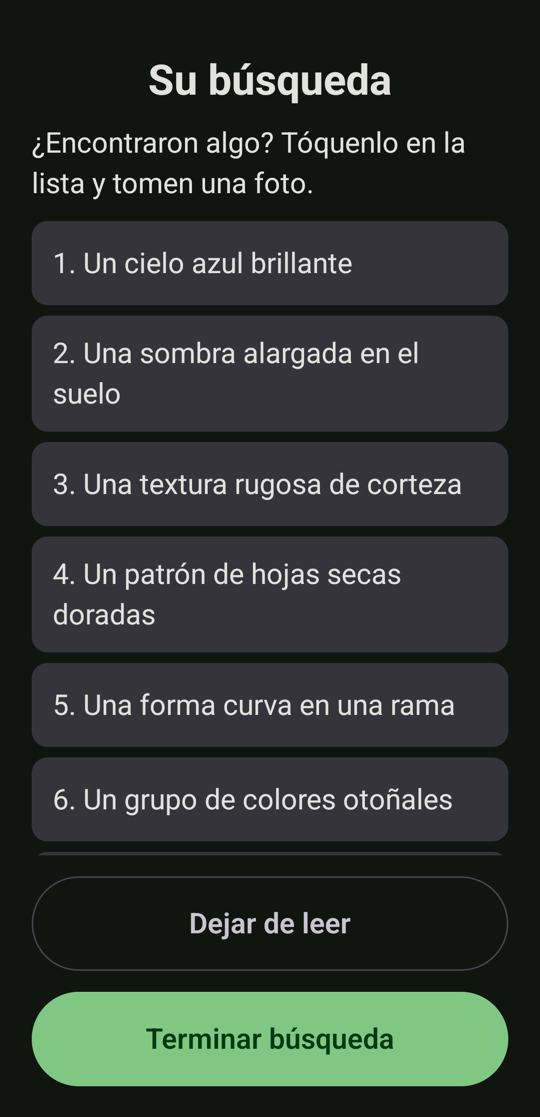\n\n## What's new\n\n- **Safety fix.** On a phone set to a language other than English or Spanish, the screens fell back to English but the AI was asked to write in that language, and the safety word lists only cover English and Spanish, so those hunt items were not screened. Now an unsupported phone language gets a consistent **English** app: screens, hunt, feedback and voice.\n- **Pick the language for just this app.** Nature Quest now appears in *Settings > System > Languages > App languages* with **English** and **Español** (Android 13 and newer; on Android 12 it follows the phone's language).\n- The voice now always matches the app's language.\n- README: a new Languages section with Spanish screenshots.\n\n## Install or update\n\n- **New install:** download **\\`NatureQuest-1.0.1.apk\\`** below and open it. On first launch the app offers **Download the AI model** (2.59 GB, Wi-Fi recommended). That is the only time it uses the internet.\n- **Updating from 1.0.0:** install the APK over it. It has the same signing key and a higher version code, so Android should update it in place and keep the downloaded model. (Expected from how Android works; I did not try the update on a device.)\n\n**Requirements:** Android 12 or newer, a 64-bit ARM phone, about 2.6 GB of free storage and 2.2 to 2.6 GB of RAM while it works.\n\n## Please read: what has and has not been checked\n\n- **Photo-check accuracy has not been measured** (there was no set of real photos to score against). The verdicts are meant to be fun and encouraging, not a reliable judge.\n- Tested on **one phone** (Pixel 10, Android 16). The signed release APK itself was not installed on a device; the identical debug build was.\n- English and Spanish both ran on the device (Spanish more); an unsupported language was checked with the app set to French. I could not listen to the voices, only confirm that speech starts.\n- Reading aloud needs a voice installed for the phone's language; otherwise the app stays silent and everything is still on screen.\n- The history of past hunts was not built.\n\n## Details\n\n- **APK SHA-256:** \\`$ACTUAL\\`\n- Signed with the same dedicated key as 1.0.0 (certificate SHA-256 \\`e17897ff4e195e391ed588d5cb91d26c7ff5fd32fec896bfc81ba72ec8797346\\`). Installing it over a debug build, or the other way round, requires uninstalling first.\n- Permissions: \\`C
… [1113 characters truncated] …
APK checksum matches the verified build: e64f5739a153f92dec15e55ace2e2beda7d4ddbbf9e35eaa7cc1ab343c3ca893
signature valid
0
https://github.com/RZEROSTERN/hacktoberfest-week2/releases/tag/v1.0.1Published. Verifying what GitHub actually serves: the release metadata, that "latest" now points at 1.0.1, and a fresh download compared against my checksum.
$ {"command": "SCRATCH=<scratch>/scratchpad && gh release list --limit 3 2>&1 | cut -c1-110; echo \"--- assets of v1.0.1:\"; gh release view v1.0.1 --json tagName,isDraft,isPrerelease,assets --jq '\"\\(.tagName) draft=\\(.isDraft) prerelease=\\(.isPrerelease)\\n\" + (.assets[] | \" \\(.name) | \\(.size) bytes\")'; echo \"--- what 'releases/latest' serves:\"; rm -f $SCRATCH/dl101.apk; curl -fsSL -o $SCRATCH/dl101.apk \"https://github.com/RZEROSTERN/hacktoberfest-week2/releases/latest/download/NatureQuest-1.0.1.apk\" && echo \"downloaded sha256: $(shasum -a 256 $SCRATCH/dl101.apk | cut -d' ' -f1)\" && echo \"expected sha256 : $(cat $SCRATCH/apk101.sha256)\" && ~/Library/Android/sdk/build-tools/36.0.0/aapt2 dump badging $SCRATCH/dl101.apk | grep \"^package:\" | cut -c1-90; rm -f $SCRATCH/dl101.apk; echo \"--- default branch README shows the Languages section?\"; gh api repos/RZEROSTERN/hacktoberfest-week2/readme --jq '.content' | base64 -d | grep -c \"^## Languages\"", "description": "Verify the published 1.0.1 release, latest link, download checksum and master README", "timeout": 300000}Nature Quest 1.0.1 Latest v1.0.1 2026-10-06T14:33:37Z
Nature Quest 1.0.0 v1.0.0 2026-10-05T23:08:08Z
--- assets of v1.0.1:
v1.0.1 draft=false prerelease=false
NatureQuest-1.0.1.apk | 57674854 bytes
--- what 'releases/latest' serves:
downloaded sha256: e64f5739a153f92dec15e55ace2e2beda7d4ddbbf9e35eaa7cc1ab343c3ca893
expected sha256 : e64f5739a153f92dec15e55ace2e2beda7d4ddbbf9e35eaa7cc1ab343c3ca893
package: name='mx.dev1.naturequest' versionCode='2' versionName='1.0.1' platformBuildVersi
--- default branch README shows the Languages section?
1v1.0.1 is out: https://github.com/RZEROSTERN/hacktoberfest-week2/releases/tag/v1.0.1. It is marked Latest, with the signed APK (55 MB) attached.
I downloaded the APK from the public releases/latest link and it matches the one I built (SHA-256 e64f5739…a893), and it reads as version 1.0.1, code 2. The README on master, the page participants see by default, now has the Languages section with the Spanish screenshots.
Steps:
- Release PR: it came from the release/1.0.1 branch (a version bump plus a README test-count fix). The language work was already on develop through the earlier PR.
- Tag: v1.0.1 points at the master merge commit.
- Back-merge: master is merged back into develop, which has nothing missing from master.
- Cleanup: the release branch is deleted.
- Checks: 154 unit tests pass and lint is clean.
It uses the same signing certificate as 1.0.0 and a higher version code, so it should update 1.0.0 in place and keep the downloaded model. That comes from how Android handles updates; I didn't try it on a device.
Still true, and stated in the release notes:
- Photo-check accuracy is unmeasured because samples/ has no photos.
- I tested the debug build on your Pixel, not the signed release APK. Your phone still has the debug build, and installing the release over it needs an uninstall first, which deletes the model.
- I haven't heard the voices, only confirmed that speech starts.
The keystore backup warning from 1.0.0 still applies. It exists only on this Mac, and losing it means future versions can't update installed apps in place.
now, help me to fill this template, retrieving the result in MD format:
<pasted_content id="5de6">
What I Built
<!-- What does it do, and how does it get people off the screen and into the world? Who is it for? -->
Demo
<!-- Share a deployed link or a video demo. -->
Code
<!-- Show us the code! You can embed a GitHub repo directly into your post. -->
How I Built It
<!-- Which open-source AI did you use (open-weight models, agent harnesses, frameworks, local inference), and how is your project built around it? -->
Why Does Open Innovation Matter?
<!-- Why does open innovation matter for what you built? What did it make possible that a closed API wouldn't? -->
My Agent Session
<!-- Optional, but judges love it. Save your session with DevRelay and embed it with the agent_session tag (see the challenge page), or link to it. -->
Prize Categories
<!-- Which partner categories are you entering? List every one that applies, or remove this section. -->
<!-- Team Submissions: Please pick one member to publish the submission and credit teammates by listing their DEV usernames directly in the body of the post. -->
</pasted_content id="5de6">
To fill this in accurately (especially the prize categories and the agent-session tag, which I shouldn't guess), I'll first check the actual challenge details and DEV's posting rules through your DevRelay tools.
{
"skill": "devrelay-challenges"
}Launching skill: devrelay-challenges{
"skill": "devrelay-knowledge"
}Launching skill: devrelay-knowledgeThe skills point to the live challenge data and two knowledge guides (dev-challenges and dev-guidelines). Loading those tools.
{
"query": "select:mcp__devrelay-gateway__get_challenges,mcp__devrelay-gateway__get_challenge_details,mcp__devrelay-gateway__get_knowledge_document,mcp__devrelay-gateway__list_agent_sessions",
"max_results": 6
}{
"per_page": 20
}{"Ok":[{"id":82,"title":"Hacktoberfest Open-Source AI Challenge: Week 4","slug":"hacktoberfest-week4-2026-10-26","description":"Register now to be notified as details drop.","details":null,"full_details":"","type_of":"challenge","starts_at":"2026-10-26T16:00:00.000Z","ends_at":"2026-10-31T06:59:00.000Z","published":true,"cover_image":"https://dev-to-uploads.s3.us-east-2.amazonaws.com/uploads/events/cover_image/82/2dc6f675-b1e1-4f3f-b542-79b3677c2651.png","location_url":null},{"id":81,"title":"Hacktoberfest Open-Source AI Challenge: Week 3","slug":"hacktoberfest-week3-2026-10-19","description":"Register now to be notified as details drop.","details":null,"full_details":"","type_of":"challenge","starts_at":"2026-10-19T16:00:00.000Z","ends_at":"2026-10-25T06:59:00.000Z","published":true,"cover_image":"https://dev-to-uploads.s3.us-east-2.amazonaws.com/uploads/events/cover_image/81/3599abf1-d96c-4e0c-bb18-89b345c3b5d0.png","location_url":null},{"id":80,"title":"Hacktoberfest Open-Source AI Challenge: Week 2","slug":"hacktoberfest-week2-2026-10-12","description":"Register now to be notified as details drop.","details":null,"full_details":"","type_of":"challenge","starts_at":"2026-10-12T16:00:00.000Z","ends_at":"2026-10-18T06:59:00.000Z","published":true,"cover_image":"https://dev-to-uploads.s3.us-east-2.amazonaws.com/uploads/events/cover_image/80/ccac777b-9893-4317-b1f9-e4f672aef7c1.png","location_url":null},{"id":79,"title":"Hacktoberfest Open-Source AI Challenge: Week 1","slug":"
… [18998 characters truncated] …
null,"full_details":null,"type_of":"challenge","starts_at":"2026-07-14T16:00:00.000Z","ends_at":"2026-08-24T06:59:00.000Z","published":true,"cover_image":"https://dev-to-uploads.s3.us-east-2.amazonaws.com/uploads/events/cover_image/48/59ef2305-39d9-475d-916b-e7cdb78ff144.webp","location_url":null}]}{
"topic": "dev-challenges"
}{"Ok":"# DEV Challenges: How to Participate\n\n**Last verified:** 2026-09-30 against `dev.to/challenges`, DEV's **Official\nChallenges and Hackathon Rules** (`dev.to/page/official-hackathon-rules`,\nupdated February 25, 2026), individual challenge pages (Frontend Challenge:\nComfort Food Edition, Weekend Challenge: Generosity Edition, Sanity Challenge,\nand the Hacktoberfest 2026 Weekend and Week 1 pages), `dev.to/mlh-hackathon`\n(the Monthly MLH × DEV Writing Challenge), `dev.to/help`, and `dev.to/++`.\n\nThis is the general guide to **entering DEV Challenges**: what they are, who can\nenter, how submissions work, how judging and prizes work, and the rules that\nrecur across challenges. It deliberately leaves out any single challenge's\nprompt, sponsor, prizes, or deadline.\n\n> ⚠️ **Which challenges are open is live data.** Use DevRelay's\n> `get_challenges` to list them and `get_challenge_details` to read one\n> challenge's full rules, prompts, rubric, and FAQ (its `full_details`). Or read\n> `https://dev.to/challenges`. **Each challenge page overrides the general\n> patterns below**, and the Official Rules override the challenge page if they\n> conflict.\n\nRelated topics: `/knowledge/dev-guidelines` (writing on DEV, AI disclosure,\nplagiarism), `/knowledge/dev` (the platform and API),\n`/knowledge/hacktoberfest` (the Hacktoberfest 2026 DEV Challenge series).\n\n---\n\n## What DEV Challenges are\n\n*\"DEV Challenges are mini Hackathons that provide a fun opportunity for y
… [15455 characters truncated] …
26-09-03`\n- `https://dev.to/challenges/sanity-2026-09-16`\n- `https://dev.to/challenges/hacktoberfest-weekend-2026-10-01` ·\n `https://dev.to/challenges/hacktoberfest-week1-2026-10-05`\n- `https://dev.to/mlh-hackathon`\n- `https://dev.to/help/reacting-commenting-engaging` · `https://dev.to/++`\n"}{
"topic": "dev-guidelines"
}{"Ok":"# DEV Community Guidelines and Best Practices\n\n**Last verified:** 2026-09-30 against `dev.to/code-of-conduct` (last updated\nJuly 31, 2023), `dev.to/terms`, `dev.to/guidelines-for-ai-assisted-articles-on-dev`\n(last updated April 8, 2024), `dev.to/how-to-avoid-plagiarism` (last updated\nJuly 19, 2023), `dev.to/llms.txt`, `dev.to/p/editor_guide`, the DEV Help center\n(`dev.to/help` and all twelve section pages), `dev.to/tag-moderation`,\n`dev.to/community-moderation`, `dev.to/trusted-member`,\n`dev.to/community-badges`, `dev.to/brand`, `dev.to/about`, `dev.to/++`, and the\nDEV Team post \"How to write a high quality post on DEV\".\n\nThis is the guide to **writing, commenting, and behaving well on DEV\n(dev.to)**: the rules that apply, how to use the editor and tags, what gets\ncontent removed, and how moderation works. It also covers the specific rules\nDEV publishes for **AI agents and automated clients**, which apply to anything\nan agent does on DEV through DevRelay.\n\nRelated topics: `/knowledge/dev` (the platform, the API, and DevRelay's DEV\ntools), `/knowledge/dev-challenges` (entering DEV Challenges).\n\n---\n\n## The documents that govern DEV\n\n| Document | URL | What it covers |\n| --- | --- | --- |\n| Code of Conduct | `https://dev.to/code-of-conduct` | Behavior, online and at DEV events |\n| Terms of Use | `https://dev.to/terms` | Includes the **Content Policy** (§11) and **Copyright/Takedown** (§7) |\n| AI Guidelines | `https://dev.to/guidelines-for-ai
… [24843 characters truncated] …
s`\n- `https://dev.to/tag-moderation` · `https://dev.to/community-moderation` ·\n `https://dev.to/trusted-member` · `https://dev.to/community-badges`\n- `https://dev.to/brand` · `https://dev.to/about` · `https://dev.to/++`\n- `https://dev.to/devteam/how-to-write-a-high-quality-post-on-dev-3me0`\n"}{
"skill": "devrelay-sessions"
}Launching skill: devrelay-sessionsI have what I need from DEV's own sources. The post below is drafted from facts verified in this project, with a few clearly marked gaps only you can fill. After it, I list what to check.
---
title: "Nature Quest: a scavenger hunt where Gemma 4 runs on the phone and the screen stays in your pocket"
published: false
description: "An offline Android scavenger hunt for families. Gemma 4 E2B runs on the phone through LiteRT-LM: it writes the hunt, checks the photos and reads everything aloud. No server, no signal needed, and kids' photos never leave the device."
tags: hf26challenge, android, ai, opensource
ai_disclosure_level: some_ai
---
## What I Built
**Nature Quest** is an offline scavenger hunt for families and kids. You pick a place (park, forest, garden, urban walk), how many things to find (5, 8 or 12) and the age of the youngest player. Then an open-source AI model **running on the phone** writes a hunt list for that place, season and age: "a red leaf", "something with a spiral shape", "bark with moss on it". The app reads the list aloud and asks everyone to put the phone away.
When someone finds something, they tap it on the list and take **one photo**. The same model checks it, answers with a short, encouraging message (plus a friendly hint if it is not a match), and reads that aloud too. When the hunt ends, there is a bronze, silver or gold medal and the time spent outside.
The theme was "Touch Grass", so every design decision started from one question: how do I make the screen the shortest part of the experience?
- Setup is **one screen with everything pre-selected**, so starting a hunt is one tap.
- The list and every piece of feedback are **read aloud**, so nobody needs to look at the phone.
- Big tap targets and a high-contrast palette, because the phone is used outdoors in the sun, for a few seconds at a time.
- One photo per find. No camera roll, no feed, nothing to scroll.
It is for **families and kids on a walk, with an adult**, in **English and Spanish**. The first screen always says: hunt with an adult, only look and take photos, never pick or touch anything.
| Setup | The hunt, written on the phone | Medal and time outside |
|---|---|---|
| 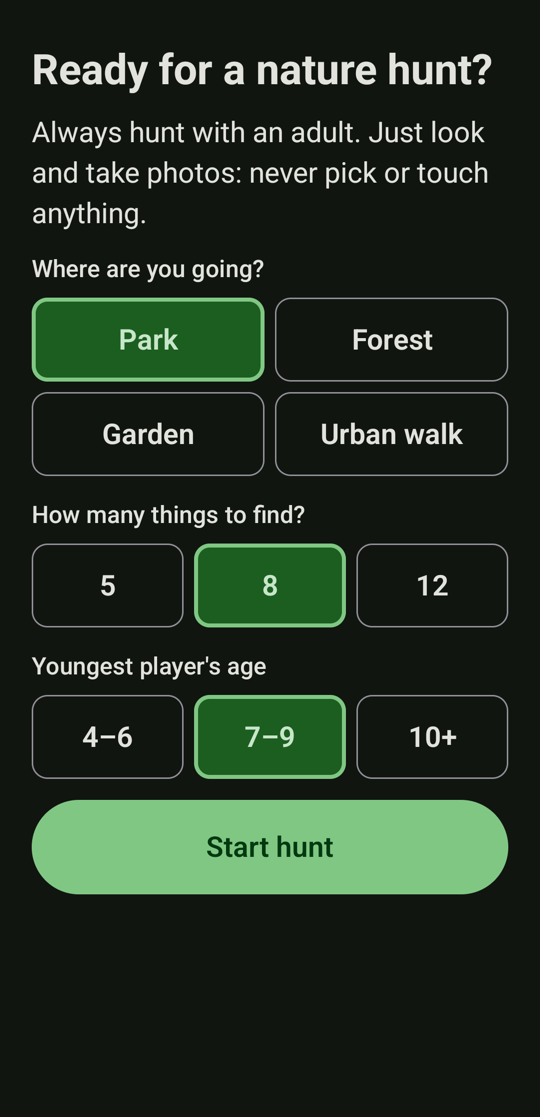 | 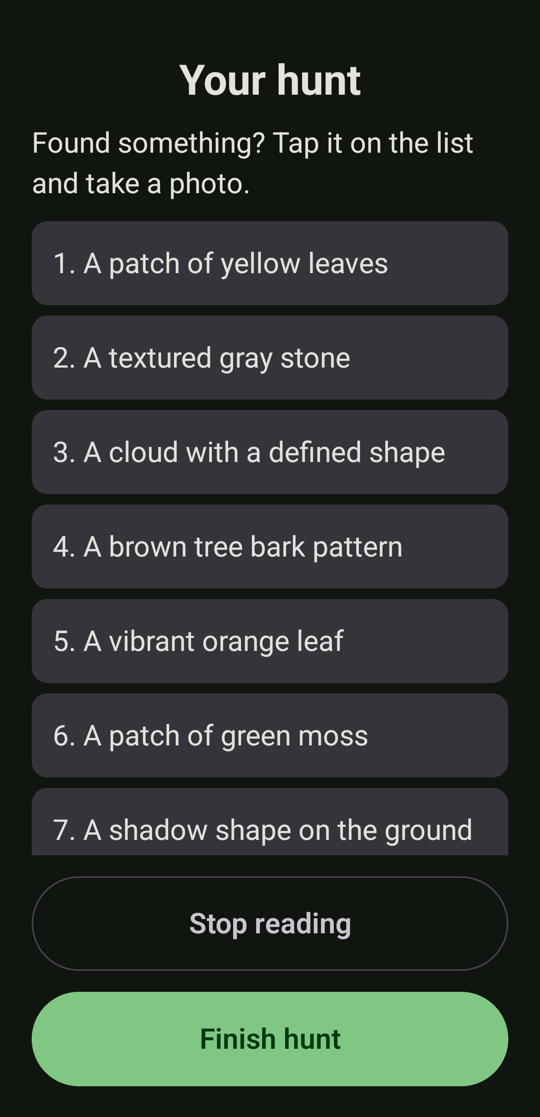 | 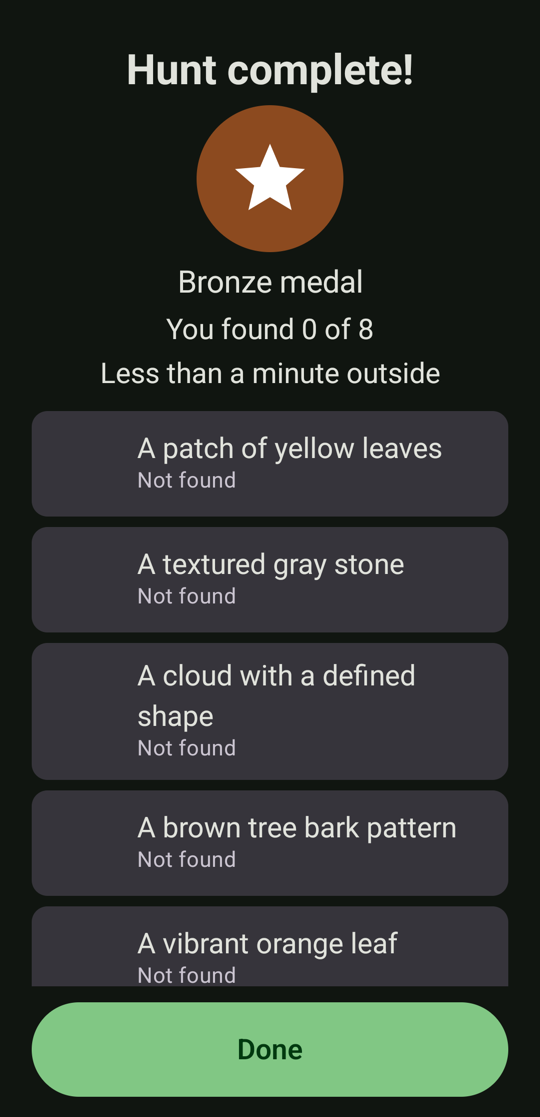 |
## Demo
There is no web demo, because the whole point is that it runs on a phone.
- **Install it:** [Nature Quest 1.0.1 on GitHub Releases](https://github.com/RZEROSTERN/hacktoberfest-week2/releases/latest) (signed APK, about 55 MB, Android 12+, 64-bit ARM). On first launch the app offers to download the AI model (2.59 GB, Wi-Fi recommended). That is the only time it uses the internet.
- **Video:** <!-- TODO: add your video, for example {% embed https://www.youtube.com/watch?v=YOUR_VIDEO_ID %} -->
### Taking it outside
<!-- TODO: fill this in after Saturday's outing with real players. This is a bonus criterion, so be specific and honest. Suggested points:
- Where you went, who played and their ages, how long it took.
- How many items were found, and how the photo checks went (right, wrong, funny).
- What you had to look at the phone for, and what the kids did without it.
- What broke or surprised you. Real quotes from the kids if you have them.
-->
## Code
{% embed https://github.com/RZEROSTERN/hacktoberfest-week2 %}
MIT licensed (plus a Beerware clause). The repo has 154 unit tests, the architecture in the README, and `docs/DECISIONS.md`, a log of 32 technical decisions with the reasons behind each, written as I went. `docs/BENCHMARKS.md` has every number quoted below.
## How I Built It
**The open pieces.** The model is **Gemma 4 E2B** (open weights, Apache-2.0) in LiteRT-LM's `.litertlm` format. It runs through **LiteRT-LM** (Apache-2.0), Google's on-device runtime, with no network and no server. The rest is a normal Android stack: Kotlin, Jetpack Compose, Hilt, CameraX and Android's own text-to-speech. Nothing closed runs in the app. (I built it with Claude Code, which is not open source. It was my pair programmer, not part of the product.)
**The shape of it.** The app talks to the model through one interface, `InferenceEngine`, so ViewModels and use cases never touch LiteRT-LM and tests use a fake. The model answers in strict JSON, which I parse with kotlinx.serialization. If the JSON is bad I retry once, then fall back to something safe: "I'm not sure, try another photo", or a built-in hunt list. Prompts are versioned text files, not strings in Kotlin.
**I benchmarked before I built.** The first real step was a debug-only screen that loaded the model and timed it on my Pixel 10. That changed the design:
- The **CPU backend was about twice as fast as the GPU**: a hunt list took 5.7 s on average on CPU and 11.9 s on GPU, and the first GPU load took 25 s against 3 s. Google's published numbers for a flagship phone did not carry over to mine.
- **Decoding is slow** (7 to 23 tokens per second), so every answer is kept short. "Twelve words at most" in a prompt is a performance feature.
- The phone **slows about 1.6x** after 25 minutes of back-to-back runs, even though the OS reported no thermal throttling. So I picked settings that hit my targets in the slow state: 140 visual tokens and a 640 px photo. A photo check takes 4.5 to 5 s on a cool phone and 5.7 to 6.5 s on a warm one.
- Peak memory is 2.2 to 2.6 GB, so the app loads the model for each use and releases it right after. A warm reload is about half a second, and memory drops to about 240 MB.
**Safety cannot live in the prompt.** The prompt asks for safe items. The model still produced "a coiled snake", "orange fungus" and "a bird's nest hidden in a hollow", and later "a cloud shaped like a deer". For a kids' app that is not acceptable, so every item now passes a deterministic validator in code (English and Spanish word lists: no picking or touching, no animals, insects or mushrooms, nothing near water or roads, no climbing, nothing to eat, no photos of people). Rejected items are regenerated, and if the model still falls short, a built-in safe list fills the gap. The model's *feedback* is checked too, because it is read aloud to children.
**Bugs the phone found that tests did not.**
- The same settings produced the **identical hunt three times in a row**. LiteRT-LM's sampler seed defaults to 0, which makes sampling deterministic. Each request now gets a random seed.
- A regex that passed every JVM test **crashed on Android**, because Android's regex engine rejects a bare `}` that Java accepts.
- Cancelling the Kotlin Flow does **not** stop native inference. You have to call `cancelProcess()` yourself.
- CameraX's in-memory JPEG already carries its EXIF rotation, so rotating it again turns the photo sideways.
- A Compose cleanup effect unbound the camera I had just bound. It read state when disposed instead of when created.
**Privacy and delivery.** Photos are processed in memory. A small copy of each found photo stays in private cache only for the summary and is deleted when you close it, unless you tap "Save to gallery". The only code that opens a network connection is the model downloader: it resumes interrupted downloads, pins an exact model revision, and verifies the SHA-256 before using the file. I tested that on the phone by killing the app at 17% and resuming. The manifest asks for `CAMERA`, `INTERNET` (download only) and network state.
**Limits, stated plainly.** I could not measure how *accurate* the photo check is: I did not have a set of real photos to score the model against, so treat its verdicts as fun and encouraging, not as a judge. I tested on one phone. Reading aloud needs a voice installed for the phone's language.
## Why Does Open Innovation Matter?
Four things an open model made possible that a closed API would not:
- **It works with no signal on the trail.** After a one-time download, there is no server to reach. The people this is for are standing in a field.
- **Kids' photos never leave the phone.** With a hosted model, "check this photo" means sending a child's picture to someone else's server. Here it is a function call on the device, and the only network code in the app is the downloader. Because the code is open, anyone can check that claim.
- **It costs nothing per hunt.** No API bill, so a family, a school or a scout group can use it as much as they like. The cost is the phone's time: about 5 to 12 seconds per hunt list and 5 to 7 per photo.
- **It is swappable and pinned.** The model is a file plus one entry in `ModelSpec` (URL, size, SHA-256), behind an interface. The app behaves identically next year, because the exact revision is pinned and checksummed instead of changing under me. And I could turn the knobs a hosted API hides: backend (the CPU-versus-GPU finding above), image resolution and memory.
The honest counterpoint: a server GPU would be faster, and probably more accurate. I traded speed and a 2.6 GB first download for privacy and offline use. For a hunt in a forest, I think that is the right trade, but it is a trade.
## My Agent Session
I built Nature Quest with Claude Code, from an empty repository to two signed releases. <!-- TODO: save the session with DevRelay and embed it here, for example {% agent_session YOUR_SESSION_ID %} (or link to it). Check the transcript for secrets and private paths first, and make the session public or judges cannot open it. -->
## Prize Categories
- **Best Use of Gemma.** Gemma 4 E2B is the core of the app, not a bolt-on. It writes every hunt, answers every photo check, and runs entirely on the phone through LiteRT-LM. The write-up above covers how I tuned it: CPU versus GPU, visual-token budget, short answers, and per-use loading.
---
*Disclosure: I built this with Claude Code as a pair programmer, and Claude helped draft this post. I reviewed and edited it, and the numbers come from the benchmarks in the repo.*
Before you publish
- The two gaps only you can fill: the video link, and "Taking it outside". The rubric gives bonus points for actually using it outdoors, and the Saturday outing is the natural source. I did not invent any field results.
- Check the disclosure line is true. The last line says you reviewed and edited it, so please read it and change whatever doesn't sound like you. The front matter already sets ai_disclosure_level: some_ai, which DEV requires for an AI-drafted post.
- Tag and deadline: hf26challenge is the required tag, and DEV allows only four tags. Submissions close Oct 11, 11:59 PM PDT, which is Oct 12, 00:59 in Mexico City. It's a new-project challenge, and the repo was created on Oct 5, after the window opened, so you're fine. Commits made after the deadline would need a note in the README.
- I haven't published anything, saved your session, or staged a draft. I can stage this as a draft through DevRelay for you to review. For the agent session, the transcript is long and includes local file paths and your email address from the session context, so I'd want to scrub those before uploading anything. Say the word on either.
Prize Categories
- Best Use of Gemma. Gemma 4 E2B is the core of the app, not a bolt-on. It writes every hunt, answers every photo check, and runs entirely on the phone through LiteRT-LM. The write-up above covers how I tuned it: CPU versus GPU, visual-token budget, short answers, and per-use loading.
Disclosure: I built this with Claude Code as a pair programmer, and Claude helped draft this post. I reviewed and edited it, and the numbers come from the benchmarks in the repo.


Top comments (4)
Nice one👍️
I'm glad you like it :D, please share it with anybody else would be interested :3
Nice execution of the Idea and explained clearly.
Thanks for your comments. Share it with the folks, if you wish :D