


Building the CI/CD pipeline for my Personal Project. The goal was to automate the process of testing, building, and deploying changes without manually performing each step.
Tools Used
- GitHub Actions: Automates the CI/CD workflow.
- Docker: Containerizes the application.
- GitHub Container Registry (GHCR): Stores Docker images.
- AWS EC2: Hosts and runs the application.
- GitHub Secrets: Securely stores production credentials and environment variables.
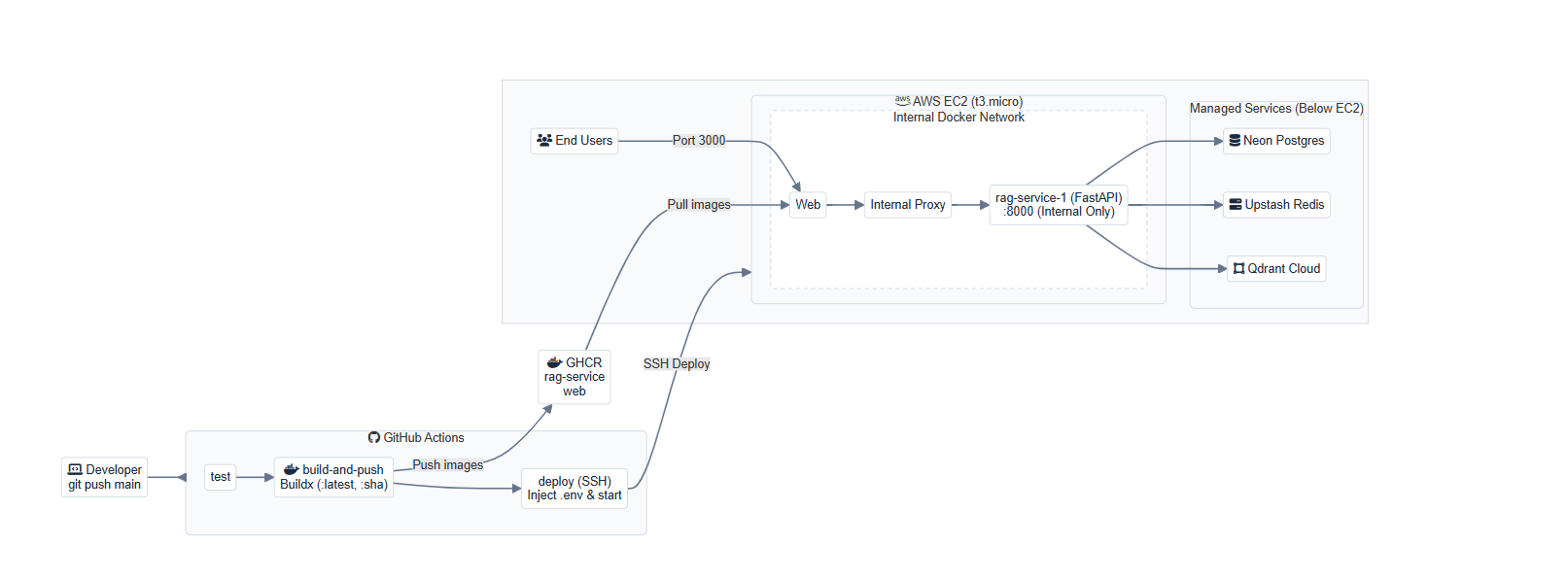
How it works ?
Things I Focused on While Building the Pipeline
- Smaller Docker Images: Used multi-stage builds to reduce image size and keep build tools out of production images.
- Non-Root Containers: Configured containers to run as non-root users to limit permissions and reduce security risks.
- Managing Secrets: Stored production credentials in GitHub Secrets and transferred them to EC2 as .env files during deployment.
- Build Caching and Image Tags: Used Docker Buildx caching to reuse layers and tagged images with both latest and the Git commit SHA.
- Application Updates: EC2 pulls the latest images from GHCR, and Docker Compose recreates the containers with the updated images.


Top comments (0)