


An S3 bucket can depend on a VPC in Terraform without being placed inside it. Put the VPC's ID in a bucket tag, and Terraform infers a dependency. Use the same ID in a subnet's vpc_id, and Terraform infers another dependency. Only the second reference configures network placement.
I built Rootform, which interprets Terraform and OpenTofu exports. This is one of the distinctions its architecture model needs to preserve.
Two references to the same VPC
Here are the three resources. The complete provider setup is at the end.
resource "aws_vpc" "main" {
  cidr_block = "10.20.0.0/16"
}

resource "aws_subnet" "application" {
  vpc_id     = aws_vpc.main.id
  cidr_block = "10.20.1.0/24"
}

resource "aws_s3_bucket" "audit" {
  bucket_prefix = "rootform-graph-example-"

  tags = {
    NetworkId = aws_vpc.main.id
  }
}
Terraform infers dependencies from resource references. The subnet's vpc_id specifies its VPC, while the bucket's tags map records metadata. The tag assignment does not configure a network path to the bucket.
After initializing the complete example, generate the default dependency graph and render it with Graphviz:
terraform graph > dependencies.dot
dot -Tsvg dependencies.dot -o dependencies.svg

Default terraform graph output with Terraform 1.12.2. Both arrows point to the referenced VPC.
Terraform describes this output as a simplified graph of resource dependency ordering. More detailed operation graphs are available with options such as -type=plan and -type=apply.
The bucket's edge is legitimate: Terraform needs to track the value used in its tag. The graph does not claim that the bucket is inside the VPC. That meaning would be added by whoever interprets the edge as network placement.
An explicit depends_on also controls operation ordering. On its own, it does not describe a network connection.
For an architecture view, the argument being set matters. Changing the bucket's NetworkId tag and changing the subnet's vpc_id describe different changes to the infrastructure, even when both reference a different VPC.
Follow a placement back to its evidence
Rootform's AWS subnet Rule interprets vpc_id as network placement. It records the target VPC and the evidence used to identify it. The output calls this placement a network Context.
For a new VPC, the ID can be unknown until apply. The plan JSON includes expression references, but not the full expression tree. A list of references tells an analysis tool which objects an expression mentions, not exactly how it uses them.
Rootform uses the configuration snapshot in a matching saved plan to verify direct references such as aws_vpc.main.id. This lets it identify the VPC while the evaluated ID is still unknown.
Generate a saved plan, export that same plan, then inspect the subnet:
terraform plan -refresh=false -input=false -out=plan.tfplan
terraform show -json plan.tfplan > plan.json

rootform run plan.json --plan-file plan.tfplan \
  --require-enrichment --no-serve -o with-saved-plan.form.json

rootform explain instance aws_subnet.application \
  --input with-saved-plan.form.json
Relevant excerpt from rootform explain:
aws_subnet.application
  Instance        managed instance of aws_subnet; planned (create)
  Provider        registry.terraform.io/hashicorp/aws
  Interpretation  applied aws.rule.subnet as subnet
  Conclusion      Interpreted as subnet by aws.rule.subnet: network context to
                  aws_vpc.main.

  Facts
    -> context network  aws_vpc.main  evidence: traversal

  Closures
    context network -> virtual-network
      via source.vpc_id, match exact by id
      resolved, 1 fact
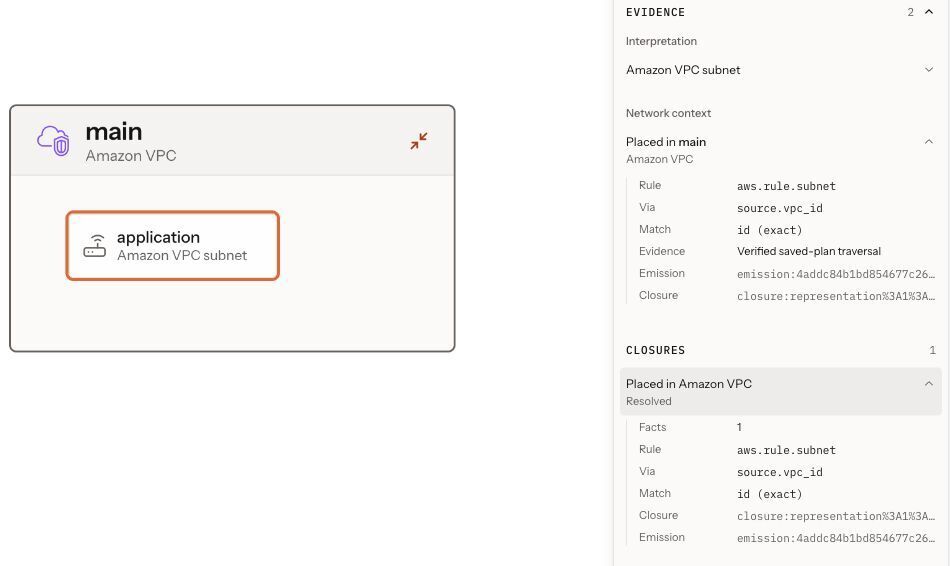
The same saved Form in Rootform 0.3.0, with the subnet selected and its placement evidence open.
Now repeat the analysis without the saved plan:
rootform run plan.json --no-serve -o without-saved-plan.form.json

rootform explain instance aws_subnet.application \
  --input without-saved-plan.form.json
Using the same plan.json, Rootform 0.3.0 produces:
| Input | Subnet placement | Target and evidence |
|---|---|---|
| JSON + paired saved plan |
resolved, 1 fact |
aws_vpc.main, traversal
|
| JSON alone |
indeterminate, unknown_until_apply
|
No established target or placement fact |
In the JSON-only run, Rootform does not treat the reference list as proof of a direct identity reference. The placement stays indeterminate. That means the available evidence did not establish it, not that the subnet has no VPC.
The bucket is also interpreted, by aws.rule.s3-bucket. That Rule does not derive network placement from tags.NetworkId.
A delivery target changes
In Rootform's synthetic Azure event-driven fixture, an Event Grid subscription changes its delivery target. To review it, we need to identify the new destination and see whether the source topic and previous queue remain in place.
Selected fields from the head plan's resource_changes entry:
{
  "address": "azurerm_eventgrid_event_subscription.claims_scored_review",
  "change": {
    "actions": ["update"],
    "after_unknown": {
      "service_bus_queue_id": true
    }
  }
}
The plan proposes an in-place update, but the destination ID is unknown until apply. The saved configuration sets service_bus_queue_id to azurerm_servicebus_queue.claims_review_priority.id.
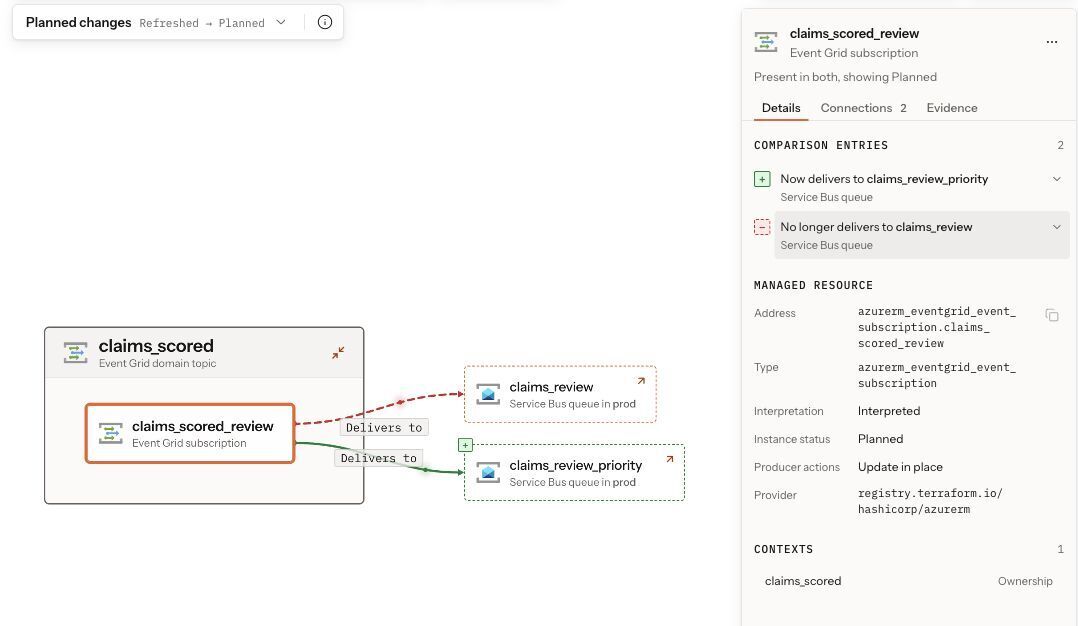
Planned changes (Refreshed → Planned): the old delivery relation is removed and the new one is added.
Rootform shows the delivers-to relation changing from claims_review to claims_review_priority. The source topic remains claims_scored, and the original queue is still present.
Rule azure.rule.event-grid-event-subscription resolves the destination through source.service_bus_queue_id: an evaluated value before the change, and a verified saved-plan traversal after it.
The subscription, both destinations and the unchanged topic are visible together, with the evidence behind the change available for inspection. These are planned delivery targets, not observed message traffic.
Reproduce the examples
The VPC example is regenerated locally. The Azure example replays the version-pinned fixture with Rootform. Its supplied plan was generated against a synthetic existing state.
| Example | Terraform | Provider | Rootform | Graphviz |
|---|---|---|---|---|
| VPC example, regenerated | 1.12.2 | AWS 6.62.0 | 0.3.0 | 12.2.1 |
| Event-driven example, exports replayed | 1.16.4 | AzureRM 5.3.0 | 0.3.0 | — |
VPC example: provider setup and commands
Create an empty directory and save the three resource blocks above in main.tf. Add this configuration to the same file:
terraform {
  required_version = "= 1.12.2"

  required_providers {
    aws = {
      source  = "hashicorp/aws"
      version = "= 6.62.0"
    }
  }
}

provider "aws" {
  region                      = "us-east-1"
  access_key                  = "example"
  secret_key                  = "example"
  max_retries                 = 1
  skip_credentials_validation = true
  skip_metadata_api_check     = true
  skip_region_validation      = true
  skip_requesting_account_id  = true
}
With Terraform, Rootform and Graphviz installed, run:
terraform init -input=false
terraform validate
terraform graph > dependencies.dot
dot -Tsvg dependencies.dot -o dependencies.svg
dot -Tpng -Gdpi=192 dependencies.dot -o dependencies.png

terraform plan -refresh=false -input=false -out=plan.tfplan
terraform show -json plan.tfplan > plan.json

rootform run plan.json --plan-file plan.tfplan --require-enrichment \
  --no-serve -o with-saved-plan.form.json -o architecture.html

rootform run plan.json --no-serve -o without-saved-plan.form.json
Open architecture.html to explore the result. Use the rootform explain commands above to inspect each Form.
This example uses placeholder credentials and does not require an AWS account. terraform init downloads the provider. Do not run terraform apply.
Azure example: replay the existing plan exports
Retrieve the pinned Rootform revision and enter the fixture directory:
git clone https://github.com/rootform-dev/rootform.git rootform-article-example
cd rootform-article-example
git checkout --detach 37f8e564134689187b41581f9bf787d931930dcd
cd examples/playground/event-driven-platform/head
Run Rootform against the supplied exports:
rootform run plan.json --plan-file plan.tfplan --require-enrichment \
  --no-serve -o analysis.form.json -o architecture.html

rootform explain instance azurerm_eventgrid_event_subscription.claims_scored_review \
  --input analysis.form.json --stage refreshed

rootform explain instance azurerm_eventgrid_event_subscription.claims_scored_review \
  --input analysis.form.json --stage planned
Open architecture.html and select Planned changes. This uses the head plan's own Refreshed → Planned comparison, without running Terraform or the Azure provider.
Real saved plans and JSON exports can contain cleartext secrets. Use synthetic inputs for public examples.
The dependency graph remains useful for understanding Terraform's dependencies. An architecture view adds claims about what those dependencies mean.
The subnet and the bucket both reference the VPC. Only one uses that reference to configure placement. Before relying on an architecture diagram in a review, I want to be able to trace that claim back to the argument and evidence behind it.


Top comments (0)