

NOTES
This post is ported over from my wiki, so the format isn't as storytelling as a blog post could be, but I wanted it here.
Bill of Materials
Home Assistant Parts
Third Party Plugin Requirements
Zoom Plugin
I followed the Read Me from https://github.com/raman325/ha-zoom-automation#installation-single-account-monitoring and set up a Zoom Plugin for my account, that will detect if I am in a meeting or not.
Pi Zero
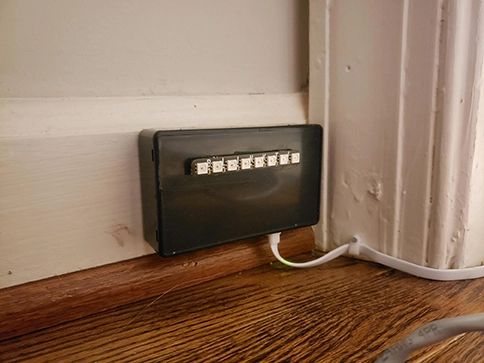
I have a tiny project Enclosure box that I dremeled a hole for the GPIO pins in the cover and I then sandwich the Blinkt onto the Pi Zero with another dremeled hole running to the micro usb power, and that's it for hardware.
For software, I installed the python packages for Pimoroni and Blinkt, which came with a lovely set of sample projects. I deleted everything except the mqtt.py file, which I then put my Mosquitto server settings.
I then added a new service in systemd to control the mqtt server
[Unit]Description=Meeting Indicator[Service]Type=simpleExecStart=/usr/bin/python2 /home/pi/mqtt.pyWorkingDirectory=/home/pi/Pimoroni/blinkt/examplesRestart=alwaysRestartSec=2[Install]WantedBy=sysinit.target
Pleased with the results, and testing by sending some messages over mqtt that changed the color, I then dove into Node-RED
Node-Red
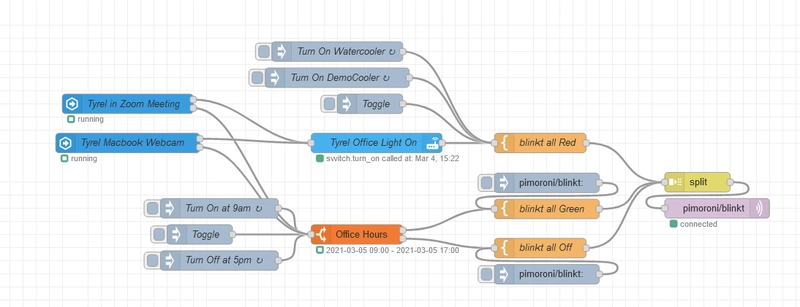
This is my first project using Node-RED, so I'm sure I could optimize better, but I have two entry points, one is from running HomeAssistant app on my mac, which gets me sensor data for my webcam, and the other is the aforementioned Zoom Presence plugin I created. These are Events:State nodes.
When either of these are True, they call first my ceiling light to turn on, which next will then add a msg.payload of
rgb,0,255,0,0
rgb,1,255,0,0
rgb,2,255,0,0
rgb,3,255,0,0
rgb,4,255,0,0
rgb,5,255,0,0
rgb,6,255,0,0
rgb,7,255,0,0
as one string. This leads to a Split, which will in turn, emit a new MQTT message for each line (I split on \n) and turn on all 8 LEDs as red. This is inefficient because I am still using the sample code for the blinkt which requires you to address each LED individually, my next phase I will remove the pin requirement and just have it send a color for all of them at once, one line.
When either of the sensors states are False, I then flow into a Time Range node, in which I check if it's between 9-5 or not. If it is, then I turn all the LEDs Green, and if it's outside 9-5 I just turn the LEDs off. I do not turn OFF the overhead light, in case it was already on. I don't care about the state enough.
I also intentionally trigger at the Office Hours node, which will inherently turn the Green on at 9:01am, and off at 5:01pm. As well as turn on Red for any long standing meeting times I have.
Images
Videos
Source
Nodered configuration source json https://gist.github.com/tyrelsouza/c94329280848f0319d380cc750e995c2


Top comments (0)