

A SQLite backup can pass PRAGMA integrity_check and still be missing records you committed.
The attached lab produces exactly that result. The live database has three rows. A copy of its main file has one row, and SQLite reports ok for both.
If your backup job copies an app.db file while the application is running, check which journal mode it uses. With write-ahead logging, committed changes can still be in the WAL file.
Download the SQLite backup and restore kit (ZIP). It includes a repeatable failure test, a backup utility, and the recorded results. Python 3.11 or newer with its standard sqlite3 module is enough. The lab runs offline with Python’s standard library.
The file was readable. The recent records were absent.
The fixture first wrote one row to the main database. It then enabled WAL mode, disabled automatic checkpointing for the test, and committed two more rows while keeping the connection open. No writes occurred during either copy.
| Database checked | Integrity result | Rows found |
|---|---|---|
| Live source | ok |
3 |
| Main-file-only copy | ok |
1 |
| Restored copy made with the backup utility | ok |
3 |
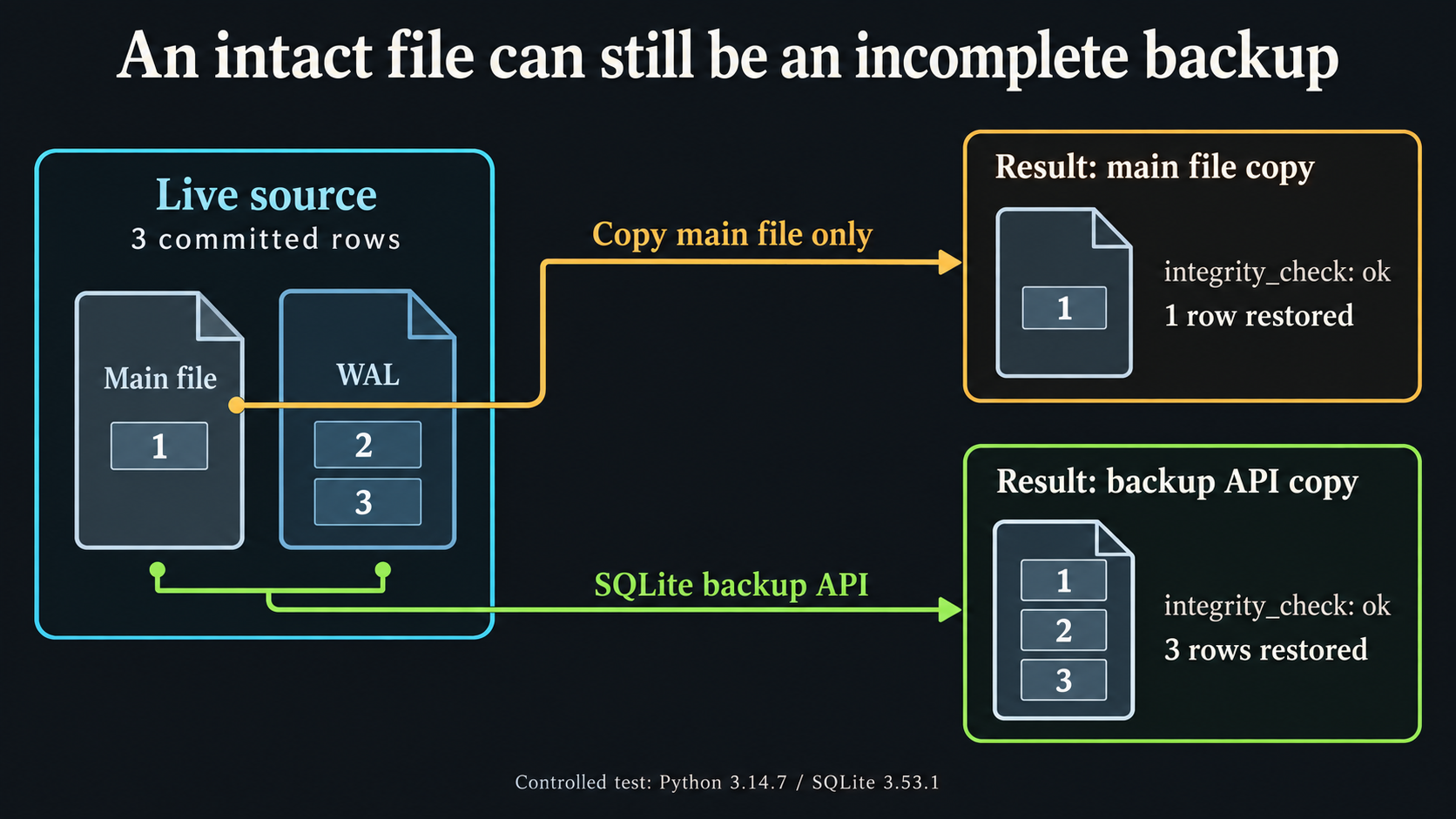
The run used Python 3.14.7 and SQLite 3.53.1 on Linux on September 8, 2026. The kit’s result.json includes the actual row IDs and contents, not just the counts.
Nothing in this example required a damaged file. The copy was structurally sound and old. An integrity check cannot tell you that an application record should have been there.
Where the two rows went
SQLite’s WAL documentation explains that writes can be committed to a separate log before a checkpoint moves them into the main database. The main file alone can therefore leave out committed work.
The online backup API reads through SQLite to produce a database snapshot. The included utility calls that API through Python’s Connection.backup method.
That is also why the test keeps the source connection open. Closing the last connection can change the WAL state. A demo that closes everything before copying can accidentally remove the condition it was supposed to test.
Run the failure test first
Extract the kit and read the two Python files. From that directory, run:
python3 run-lab.pyThe script creates disposable databases. It makes the incomplete file copy, runs the backup utility, restores that backup to another path, and opens the restored database through a separate connection. It compares the restored rows with the source records.
It also checks that the utility refuses an existing destination, rejects a missing source, rejects an invalid database, and cleans up its temporary files. Your application’s database is not used by this lab.
Make a backup you can inspect
For a database you choose, the separate utility takes a source path and a new destination:
mkdir -p backups
python3 sqlite-backup.py app.db backups/app-snapshot.db
The destination directory must exist. The script refuses to replace an existing file, so use a new name for the next backup.
It opens the source through SQLite in read-only mode, writes to a temporary file, runs an integrity check, and publishes the destination after those steps succeed. The output contains its size and a SHA-256 checksum. That checksum can help you check a later transfer; it does not establish that every application record is present.
The final publication step uses a same-directory hard link. Use a filesystem that supports that operation. If it does not, the script fails without an overwrite fallback. The default backup progress limit is 30 seconds; --timeout 120 allows a longer backup. The later integrity scan is outside that progress limit.
Check something your application cares about
After restoring to a separate location, find a recent record whose ID and content you know. Check a relationship or attachment that the application needs. For the tiny lab, the expected rows are fixed before either copy runs. In your system, decide what must survive before judging the restore.
The utility copies the main SQLite database only. Separately attached databases, uploaded files, configuration, and keys need their own handling. If your application documents a backup procedure, follow it. A generic database copy cannot replace application-specific recovery steps.
This kit does not provide retention, off-site storage, encryption, or a scheduled backup service. The test also does not simulate writers changing the database during backup, disk failure, or a power cut.
Take one backup your current job has already produced. Restore it away from production and check a recent record. If the file opens but the record is missing, your backup check has found work worth doing.
The Gitea upgrade guide has a worksheet for recording recovery checks before a rollout. More runnable resources are collected at Open Source.
Research, code, and editing used AI assistance. This article reports the attached controlled test. The original kit code is available under the MIT license.
FAQ
Can a SQLite backup pass integrity_check and still miss data?
Yes. In this controlled WAL test, a main-file-only copy passed integrity_check but contained one of three committed rows. Structural integrity did not establish that the copy included the recent writes.
What does the included backup utility copy?
It uses the SQLite backup API to copy the main database into a new file. It does not copy attached databases, application uploads, configuration, or encryption keys.
Will the backup script overwrite an existing backup?
No. It refuses an existing destination. The lab checks that a second run fails without changing the first backup.
Does the lab prove my application can recover?
No. It checks a small SQLite fixture. Restore your own backup separately, verify recent application records, and follow the application's supported recovery procedure.


Top comments (0)