

I joined Sentry to exclusively work on their self-hosted product in 2019. Back then, Sentry was just using a few services: Postgres, Memcached, Redis, and Sentry itself. But it was on the cusp of becoming a multi-service application with the introduction of Snuba and along with that Kafka, Relay, Symbolicator and others. Because it was supposed to be simple, self-hosted (or onpremise as it was called back then) did not have any tests or even any automation: just a bunch of instructions and commands to run in the README. With the rapid increase in the number of engineers working on Sentry and the changes being made, it was clear that we needed to automate the testing and setup of the self-hosted repository.
To summarize about a year’s worth of work: we created an install script based in bash (as that was the most common denominator across all platforms), and a very cursory test suite which ran the install script, tried to ingest an event, and read it back. The entire test suite took about 5-6 minutes to run and about half of that time was spent on running Django migrations, from scratch, on a fresh database, over, and over, and over. The thing is we didn’t even add migrations frequently but we still had to run them all to get the service up and running.
The solution was obviously caching but caching Docker volumes was not really a thing that seemed feasible back then. Remember, this is 2019-2020, GitHub Actions was still in its infancy. I was also barely getting comfortable with all that Bash and Docker stuff. Then I got distracted by other things, changed jobs, and eventually came back to Sentry to see that this was still a problem. So I decided to tackle it head-on. I was going to cache the hell out of those Docker volumes for our databases. We already had actions/cache now so how hard could it be? Famous last words.
I have spent about 2 weeks to completely figure this out. About 50% of this was my ignorance about basic Linux tools such as tar, file/directory permissions, and Docker’s way of storing volumes. About 30% was me not trying things locally properly and just pushing to CI and waiting for the results. The remaining 20% was the actual hard parts to figure out, mostly thanks to StackOverflow (yeah, still not on that “ChatGPT for everything” bandwagon1). I’ll summarize some of the findings here so you don’t have to go through the same pain as I did:
- Docker volumes are stored under
/var/lib/docker/volumes(by default, and please don’t change it) - You cannot
stata directory or anything under it if you don’t havexpermission on the directory itself (╯°□°)╯︵ ┻━┻ -
tardoes preserve permissions and ownership by default but only if you are running it as root (or withsudo) (╯°□°)╯︵ ┻━┻ x 2 -
tarpreserves ownership information as names and not as IDs so if your Docker container uses a user id like1000, GLHF 2 (╯°□°)╯︵ ┻━┻ x 3 - Linux (Unix?) fs permissions are not just
rwxbut there’s also ansyou can set on executables to allow them to set ownership of other things3 \(〇_o)/ - Not only GitHub Actions doesn’t run
tarwithsudo, and not only it refuses to do this, it also doesn’t allow you to runtarwith--same-owneror--numeric-owner(╯°□°)╯︵ ┻━┻ x 4 - Bonus: there are these awesome tools called
getfaclandsetfaclthat lets you backup and restore ACLs BUT NOT OWNERSHIP INFORMATION(╯°□°)╯︵ ┻━┻ x 5 - Bonus 2:
mvwould happily overwrite your target without even mentioning, especially if you usesudo.
So, with all this information, what is needed to cache Docker volumes on GitHub Actions and restore them properly? Let’s see:
- Set
+xpermission on/var/lib/docker - Set
+rxpermission on/var/lib/docker/volumes - Set
u+spermission ontar - Use
tar --numeric-ownerto create the archive — oh wait, you can’t becauseactions/cachedoesn’t let you (╯°□°)╯︵ ┻━┻(╯°□°)╯︵ ┻━┻(╯°□°)╯︵ ┻━┻(╯°□°)╯︵ ┻━┻
Side quest: Hacking tar on GitHub Actions
Once I realized that I had to change the options passed to tar, I very reluctantly decided to “wrap” the actual tar executable:
sudo cp /usr/bin/tar /usr/bin/tar.orig
sudo echo 'exec tar.orig --numeric-owner -p --same-owner "$@"' > /usr/bin/tar
Oh, but wait, you cannot sudo redirect output to a file as sudo just runs the command and redirection is done by the shell which you are not running as root. Let’s try that again:
sudo cp /usr/bin/tar /usr/bin/tar.orig
echo 'exec /usr/bin/tar.orig --numeric-owner -p --same-owner "$@"' | sudo tee /usr/bin/tar > /dev/null
Once I added this monstrosity, my GitHub Actions runs… started to hang indefinitely. Can you see the issue? ಠಿ_ಠ Well, I couldn’t. I spent about 2 hours trying to figure out why this was happening. I suspected exec might be the culprit and when I removed it, the runs at least started crashing with an error: cannot fork. What? Well, see I was doing this both in my restore and save actions. So, when the restore action ran, it wrapped/replaced tar but then did not restore the original back. After some time, save action ran trying to do the same. Now remember our “Bonus 2” learning from above: when save also backed up tar (which was actually my wrapper script) to /usr/bin/tar.orig, mv didn’t even flinch when tar.orig already existed. Now I had 2 copies of my wrapper script where the second one just execed itself. Nice fork bomb there, me4.

Once the fork bomb was defused, I was able to run actions/cache and viola! My volumes were cached and restored properly. Space time is saved Marty!
Final boss
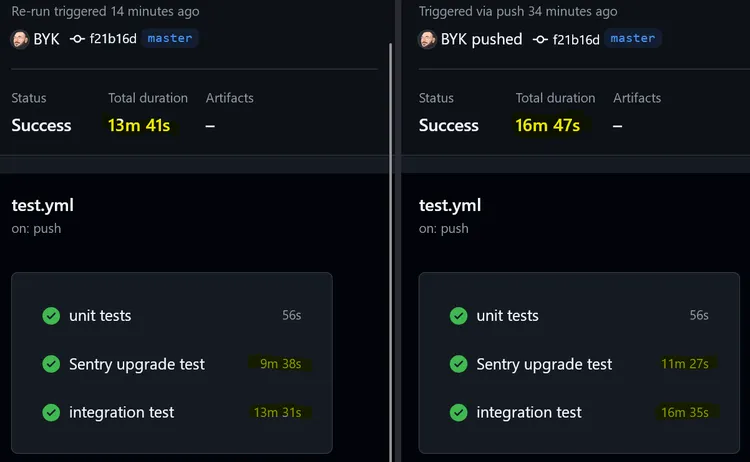
After all this, I was still not very happy as it made all action/cache calls in my workflow doubled, and with the same hack repeated in both parts. So I decided to create a GitHub Action that would contain the chaos, the madness, the fork bomb minefield, and all the other ugliness. Both from my sight and others’. Please enjoy BYK/docker-volume-cache-action and cache responsibly.
Footnotes
-
That said all images for this article was generated by DeepAI Image Generator ↩
-
Looking at you confluentinc/cp-kafka ↩
-
Yes, yes, there are even more. Can you believe it? I couldn’t either. But I digress. ↩
-
Me when I realized this: mother forking shirt balls! ↩


Top comments (0)