

Iceberg Rewrite Manifest Files: A Guide

A data engineer happily runing into the quicksand
Manifest rewrites are a critical ongoing operation in Iceberg table maintenance.
Data keeps landing, queries stay correct, and nothing looks obviously wrong. But over time, query planning takes longer, metadata reads increase, and latency creeps up even though the amount of data scanned hasn’t really changed. In most production systems, the root cause is not data layout — it’s metadata, and specifically how manifest files accumulate and degrade over time.
Manifest files are central to how Iceberg works. They’re what allow engines to plan efficiently without listing object storage. But with frequent commits, streaming writes, deletes, and long snapshot histories, manifests naturally fragment. Iceberg doesn’t reorganize them automatically, so planning cost quietly grows until it starts to matter.
This guide focuses on rewrite manifests: what they actually do, when they help, and how to run them correctly in production. You’ll learn how to detect when manifest rewrites are needed, how they interact with snapshot expiration and compaction, and why running them in isolation often delivers disappointing results.
We’ll also contrast two operational models: managing all of this manually with scripts and schedules, and handling it continuously through a Control Plane like LakeOps, which optimizes table maintenance based on real workload behavior instead of fixed timers.
The rest of the article guides you through mannual optimization with practical examples. No spec theory, no generic advice — just what actually works when Iceberg tables grow, change, and age in real systems.
Let’s begin then 🙂
Smart Automation vs Manual Scripts
Before getting into mechanics, it’s important to understand the two main ways teams approach manifest management: Automated maintenance optimization with a Control Plane like LakeOps, and doing this operation manually and ongoingly by hand, and using generic scripts.
Continuous Optimization with a Control Plane
A control plane is a layer that sits above your data lake, catalogs, and query engines and takes responsibility for operating and optimizing tables over time. Iceberg defines table structure and guarantees correctness, but it intentionally does not decide when, where, or how aggressively maintenance should run. That operational and optimization gap is exactly what a control plane fills.
Instead of running maintenance because a schedule says it’s time, a control plane continuously optimizes tables based on what is actually happening in the system. Operations run only when and where they are needed, or according to explicit policies you define, rather than blindly across all tables.
LakeOps acts as a control plane for Iceberg by continuously analyzing telemetry from Iceberg catalogs and query engines. Using this data, LakeOps builds a live understanding of how each table behaves in practice.

Cotinious Optimization and Maintenance with an Iceberg Control Plane (source: lakeops.dev)
From that telemetry, LakeOps continuously optimizes table maintenance. Manifest rewrites are triggered only when metadata fragmentation begins to impact planning or cost. Snapshot expiration runs only when retained history no longer provides real value. Compaction is optimized continuously to reduce small files before they create downstream metadata pressure. Orphan cleanup runs when metadata and data files are no longer referenced and can safely be removed.
Coordination is central to optimization. Rewrite manifests, snapshot expiration, compaction, and cleanup are not independent jobs. They are executed as part of a single, continuous optimization loop that ensures only the required operations run, only on the tables that need them, and only at the point where they actually improve performance or cost.

Automating Smart Rewrite manfiest operations (source: lakeops.dev)
Engineers don’t tune per-table schedules or chase drifting thresholds. They decide what should be optimized and within what constraints, and the control plane decides when and where to run each operation. The result is stable metadata, predictable performance, and far less work.
Learn more:
9 Apache Iceberg Table Maintenance Tools You Should Know
Start at the beginning: What Manifest Files Are
Manifest files are the core metadata units Iceberg uses to describe which data files exist and what is inside them. They sit between snapshots and actual data files and are the reason Iceberg can plan queries efficiently without scanning directories or listing objects in storage.
Each manifest file is essentially a list of data file entries. For every data file, the manifest records:
- the partition values for that file
- record count
- per-column statistics such as min and max values
- file size and other low-level attributes
When a query runs, the engine does not discover data files by walking object storage. Instead, it reads manifests referenced by the current snapshot and uses the stored statistics to decide which data files can be skipped entirely. This is how Iceberg enables predicate and partition pruning at planning time.
Manifests are immutable. Every commit creates new metadata. When a write happens, Iceberg typically creates one or more new manifest files describing the files added or removed by that commit. Over time, a snapshot references many manifests, some created recently and some carried forward from older snapshots.
This design is powerful, but it has predictable operational consequences.
Frequent small commits, especially from streaming or micro-batch ingestion, tend to produce many small manifest files. For example, a streaming job that commits every minute may generate hundreds or thousands of manifests per day, each describing only a handful of data files. From Iceberg’s point of view this is correct, but for the query engine it means more metadata to read and evaluate during planning.
Another issue is manifest clustering. Manifests are not automatically reorganized around how tables are queried. If files are appended over time with mixed partitions or evolving data distributions, manifests may contain entries that are poorly aligned with common filters. The engine still prunes correctly, but it has to examine more metadata to do so.
Snapshots make this worse if they are not expired. Each snapshot retains references to the manifests that describe its table state. Even if newer snapshots supersede old ones, the metadata remains live as long as those snapshots are kept. This means manifests that are no longer useful for active queries still participate in metadata reads and storage costs.
The net effect is subtle but significant. Query planning time increases even though data size stays flat. Metadata I/O grows quietly. Storage costs creep up due to retained metadata. None of this breaks correctness, which is why it often goes unnoticed until performance degrades.
Manifest rewrites exist specifically to address these issues. They allow Iceberg to reorganize and consolidate manifests so that the metadata layer reflects the current table state and access patterns, rather than the historical accident of how data arrived over time.
What Rewrite Manifests Does
A rewrite manifests operation restructures the metadata layer of an Iceberg table without touching the data itself.
At a high level, Iceberg takes the manifest files referenced by the current snapshot, reads the data-file entries inside them, and writes a new set of manifest files that describe the exact same live data files, just in a layout that’s cheaper for engines to plan against. The commit updates table metadata to point the current snapshot at the new manifests. The old manifests become obsolete once nothing references them anymore (usually after snapshot expiration and cleanup).
This is a metadata rewrite, not a data rewrite. No Parquet/ORC/Avro files are rewritten.
What actually improves
Rewrite manifests helps in three very concrete ways.
It reduces manifest fan-out. When you have many small commits (streaming, micro-batch), you often end up with lots of tiny manifest files. Each query has to open and evaluate those manifests during planning. Rewriting consolidates many small manifests into fewer, larger ones, which reduces metadata I/O and planning latency.
It aligns manifest layout with partitioning. Iceberg sorts data-file entries in manifests by fields in the partition spec. In practice, this tends to make partition pruning cheaper because related entries are adjacent and engines do less work to decide what to skip.
It removes “historical write shape” from the current snapshot. Without rewrites, manifests reflect how data arrived over time, not how it’s queried. Rewriting reorganizes metadata around the current state, which is usually what you actually care about for planning.
What rewrite manifests does not do
It does not compact data files. Tiny data files stay tiny. It does not change partitioning or rewrite records.
It does not delete old manifests by itself. If old snapshots still reference them, they’ll remain. Cleanup is a separate step.
Practical code examples
Below are a few examples that are actually useful in day-to-day operations, not just “hello world”.
1) Measure the problem before you touch anything
Start by inspecting the metadata table that lists manifests. Don’t assume column names — Iceberg versions and engines can differ — so first look at the schema:
\-- Spark: inspect the manifests metadata table schema
DESCRIBE TABLE EXTENDED prod.db.my\_table.manifests;
Then get a baseline count:
\-- How many manifests does the current snapshot reference?
SELECT COUNT(\*) AS manifest\_count
FROM prod.db.my\_table.manifests;
If this number grows steadily week over week while the table isn’t exploding in size, planning overhead is usually creeping up.
2) Rewrite manifests via Spark SQL procedure (the most common operational path)
This runs the rewrite in parallel using Spark:
CALL prod.system.rewrite_manifests('db.my_table');
In Spark, this returns a small result set with counters (how many manifests were rewritten, how many were added). In practice, you run the call, note the counters, and then re-check my_table.manifests to see the manifest count drop.
3) Rewrite manifests for a specific partition spec (when you’ve done partition evolution)
If your table has evolved partition specs over time, you may want to rewrite manifests for a particular spec id:
CALL prod.system.rewrite\_manifests(
  table   => 'db.my\_table',
  spec\_id => 1
);
This is useful when an older spec still contributes a lot of manifest fragmentation and you want to target it instead of doing everything blindly.
4) Disable Spark caching if executors get memory pressure during rewrites
Some environments prefer to avoid caching during maintenance to reduce executor memory footprint:
CALL prod.system.rewrite_manifests('db.my_table', false);
If you’ve ever seen maintenance jobs destabilize executor memory, this is one of the first knobs to reach for.
5) Validate the effect (simple but important)
After the rewrite, validate that you actually improved the metadata shape:
SELECT COUNT(\*) AS manifest\_count\_after
FROM prod.db.my\_table.manifests;
If the count doesn’t drop (or drops only slightly), the usual causes are that snapshots weren’t expired (old manifests still referenced), or the table’s write pattern keeps producing fragmentation faster than your maintenance cadence.
That’s the point where you either tighten the full maintenance loop (expire snapshots, rewrite manifests, remove orphans, and revisit compaction) or stop doing this manually and let a control plane keep it stable continuously.
When You Should Rewrite Manifests
Manifest rewrites are not something you run on a fixed schedule “just in case”. They are most effective when there is a clear signal that metadata, not data, is becoming the bottleneck.
The most common trigger is planning getting slower while data size stays flat. If query runtimes increase but the amount of data scanned is roughly the same, the extra time is often spent in planning and metadata evaluation. This is especially visible in engines that log planning or analysis time separately.
Another strong signal is manifest growth that outpaces data growth. If storage size grows slowly but the number of manifests keeps climbing, you are accumulating metadata fragmentation. This usually happens in tables with frequent commits, even if each commit is small.
Tables that receive streaming or micro-batch writes are prime candidates. Frequent commits tend to generate many small manifests. Even if data files are reasonably sized, the metadata layer becomes increasingly expensive to process.
A very common real-world pattern is a table that “looks healthy” in storage metrics but becomes steadily slower to query over weeks. Nothing is broken, nothing obvious changed, but planning time creeps up. That is almost always a manifest problem.
Managing Manifest Rewrites Manually
If you don’t use a control plane, the following sequence reflects what works well in production if done right and in context.
Step 1: Inspect Metadata Health
Before you decide to rewrite manifests, you need visibility into the live metadata — not guesswork, not periodic dashboards, but concrete numbers that reflect how fragmented the metadata has become.
Iceberg exposes metadata tables that you can query just like regular tables. These include tables like …$manifests, …$files, …$snapshots, etc. You can use these directly in SQL to inspect current state and spot trouble early.
Iceberg stores metadata in layers:
-   A **manifest list** per snapshot points to all manifests for that snapshot.
-   Each **manifest file** lists a subset of data files, partition values, and column statistics (min/max/null counts).
-   Manifests may be reused across snapshots.
As a result:
- Lots of small commits → many small manifests.
- Old snapshots hold onto old manifests.
- Query engines read manifests during plan time to prune partitions/files.
If manifests are fragmented or numerous, query planning becomes slow because engines read and evaluate many metadata files before they touch actual data.
This is why metadata health matters early, not late.
What to Look At
Here are the core checks you should be doing regularly — ideally automated — to monitor manifest health.
🔍 1) Count the Current Manifests
Run a live count of manifests referenced by the current snapshot:
SELECT COUNT(\*) AS active\_manifest\_count
FROM prod.db.my\_table$manifests;
A sudden jump in this number relative to data size usually correlates with planning overhead.
A steady climb over time, without data volume growth, is a strong indicator your metadata is fragmenting.
2) Look at Files per Manifest
Iceberg metadata stores statistics such as file counts per manifest. Pull a distribution:
SELECT
  CASE
    WHEN record\_count < 10 THEN '<10 rows'
    WHEN record\_count BETWEEN 10 AND 100 THEN '10–100 rows'
    ELSE '100+ rows'
  END AS manifest\_size\_bucket,
  COUNT(\*) AS manifests
FROM prod.db.my\_table$manifests
GROUP BY 1
ORDER BY 1;
If you see lots of manifests with very few rows/files, that means fragmentation. It means many small manifests (from tiny commits) that blow up planning work.
You can also look at larger manifests: if lots of manifests hold small amounts of data, it’s a sign that maintenance will be valuable.
3) Compare Manifests to Data Growth
If you track how data size and manifest count change together, you can spot divergence:
\-- number of data files
SELECT COUNT(\*) AS data\_file\_count
FROM prod.db.my\_table$files;

\-- number of manifests
SELECT COUNT(\*) AS manifest\_count
FROM prod.db.my\_table$manifests;
If manifest_count grows faster than data_file_count, that’s another sign of metadata inefficiency.
4) Look at Snapshots (Optional but Useful)
Snapshots tell you how many historical versions you’re retaining, which impacts how many manifests persist:
SELECT
  committed\_at,
  snapshot\_id
FROM prod.db.my\_table$snapshots
ORDER BY committed\_at DESC
LIMIT 10;
Long snapshot histories mean old manifests may still be referenced and not cleaned up until expiration happens.
Interpreting the Results
Here are practical heuristics data engineers use:
- High manifest count with small average manifest size → metadata fragmentation (good candidate for rewrite).
- Stable manifest count but slow query planning → the problem might be clustering, not count; manifest rewrites can help.
- Lots of snapshots older than retention needs → metadata is being kept too long; expire them first so rewrites can be effective.
- Manifest growth outpacing data file growth → metadata is drifting away from the current shape of data.
Example Scenario
Imagine a streaming table ingesting updates every minute. You might see:
- 5,000 data files
- 2,000 manifests
- 70% of manifests contain <10 files
That’s a classic candidate for consolidated manifests: smaller number of larger manifests will cut planning time dramatically, especially if queries filter on partitions that aren’t well clustered yet.
Step 2: Expire Snapshots First
Always expire snapshots before rewriting manifests. This is not a best-practice nicety — it directly determines whether a manifest rewrite will actually do anything useful.
The easiest way to achieve this is using a Control Plane for automated and optimized maintenance operations that include snapshot expirations in addition to manifest rewrites.

Automated and optimized snapshot expiration with a Control Plane (source: lakeops.dev)
Her’es a deep dive into the topic and practical solutions:
11 Expire Snapshots Optimizations for Apache Iceberg
Snapshots are what keep manifests alive. Every snapshot references a specific set of manifest files that describe the table state at that point in time. As long as a snapshot exists, all of its manifests must remain reachable, even if they describe data that is no longer relevant for current queries.
If you run a manifest rewrite while old snapshots are still retained, Iceberg can only optimize the manifests referenced by the current snapshot. Older snapshots will continue to reference older manifests, which means:
- old manifests stay in storage,
- metadata fan-out remains higher than expected,
- storage costs don’t drop,
- and in some engines, planning still touches more metadata than necessary.
This is the most common reason teams say “we ran rewrite manifests and it didn’t really help”.
Why snapshot expiration comes first
Think of snapshot expiration as pruning the metadata graph.
Until you expire snapshots, Iceberg is obligated to preserve historical metadata for correctness and time travel. A rewrite cannot remove or consolidate manifests that are still referenced by retained snapshots. Expiring snapshots reduces the metadata surface area first, so the rewrite can actually consolidate what remains.
In practice, snapshot expiration is what turns a rewrite from “cosmetic” into “effective”.
Inspect snapshot history before expiring
Before expiring anything, look at what you’re retaining:
SELECT
  snapshot\_id,
  committed\_at,
  operation
FROM prod.db.my\_table$snapshots
ORDER BY committed\_at DESC;
In many production systems, you’ll find snapshots going back weeks or months, even though nobody ever queries historical versions beyond a few days.
That’s usually accidental, not intentional.
Expire snapshots based on real needs
Snapshot retention should reflect actual recovery and audit requirements, not defaults or copy-pasted examples.
If you only need:
- a few days of rollback for operational safety, or
- short-term auditability,
then retaining dozens or hundreds of snapshots actively hurts metadata efficiency with no upside.
A common pattern is:
- retain snapshots newer than a time threshold, and
- always keep the last N snapshots as a safety net.
Example: expire old snapshots in Spark
Here’s a practical Spark SQL example:
CALL prod.system.expire\_snapshots(
  table => 'db.my\_table',
  older\_than => TIMESTAMP '2024-01-01',
  retain\_last => 2
);
This removes snapshots older than the specified timestamp while keeping the most recent snapshots for safety.
After this runs, many old manifests will become unreferenced — which is exactly what you want before rewriting manifests.
Validate the effect
After expiring snapshots, re-check your metadata:
SELECT COUNT(\*) AS remaining\_snapshots
FROM prod.db.my\_table$snapshots;
You should see a much smaller snapshot set. At this point:
- old manifests are no longer protected,
- rewrite manifests can actually consolidate metadata,
- and orphan cleanup will be able to reclaim storage.
Step 3: Run Rewrite Manifests
At this point, the current snapshot references only the metadata that still matters. That gives Iceberg room to consolidate and reorganize manifests instead of carrying forward historical baggage.
What this step actually does now
After snapshot expiration, rewrite manifests can:
- merge many small manifests into fewer, larger ones,
- reorganize data-file entries so they’re better clustered by partition and statistics,
- reduce the amount of metadata the engine has to read during planning.
If you skip snapshot expiration, most of these benefits are muted. After expiration, they show up immediately in planning time and metadata size.
Running rewrite manifests (Spark example)
In Spark-based environments, this is usually done via a system procedure:
CALL prod.system.rewrite\_manifests('db.my\_table');
This executes the rewrite in parallel across the cluster. Spark will read the existing manifests, generate a new optimized set, and commit a new snapshot that references them.
The command itself is simple. The impact depends entirely on whether you prepared the table correctly in the earlier steps.
Validate that it actually worked
After the rewrite, always check the result:
SELECT COUNT(\*) AS manifest\_count\_after
FROM prod.db.my\_table$manifests;
You should see a noticeable drop in manifest count or, at the very least, fewer very small manifests. If nothing changes, the usual reasons are:
- snapshots were not expired, so old manifests are still referenced,
- the table’s write pattern is fragmenting metadata faster than maintenance runs,
- or the table is already in a reasonably healthy state.
Why this step is cheap — but not free
Rewrite manifests does not rewrite data files, so it’s much cheaper than compaction. However, it still:
- reads all manifests referenced by the current snapshot,
- writes new manifest files,
- and commits new metadata.
On large tables with many manifests, this can still consume noticeable CPU, memory, and I/O. That’s why you should not run it blindly across hundreds of tables at once.
Practical scheduling guidance
If you’re doing this manually:
- avoid peak query hours,
- stagger rewrites across tables,
- and gate execution on actual metadata health signals rather than time alone.
Running rewrite manifests selectively, when metadata drift is real, is what keeps it a high-ROI operation instead of background noise.
Step 4: Remove Orphan Files
Once snapshots are expired and manifests are rewritten, you need to clean up what is no longer referenced.
Orphan files are data or metadata files that exist in storage but are no longer referenced by any snapshot. They typically appear after snapshot expiration, manifest rewrites, failed jobs, or aborted commits. Iceberg does not delete these files automatically, because doing so without coordination would risk correctness.
If you stop after rewriting manifests, those unreferenced files will remain in object storage indefinitely.
From Iceberg’s point of view, everything is correct after a rewrite. From your cloud bill’s point of view, nothing changed.
Skipping orphan cleanup is one of the most common reasons teams see storage costs grow even though they “ran all the maintenance jobs.” The metadata graph is clean, but the physical files are still sitting in S3, GCS, or ADLS.
This step is what turns logical cleanup into actual cost reduction.
What orphan cleanup actually removes
Orphan cleanup removes:
- old manifest files no longer referenced by any snapshot,
- metadata files left behind by rewrites and expired snapshots,
- data files created by failed or rolled-back writes.
It does not remove any file that is reachable from a live snapshot. If a file is still referenced, it stays.
Running orphan cleanup (Spark example)
In Spark environments, orphan cleanup is typically done with a system procedure:
CALL prod.system.remove\_orphan\_files(
  table \=\> 'db.my\_table',
  older\_than \=\> TIMESTAMP '2024-01-01'
);
The older_than guard is critical. It ensures Iceberg only deletes files older than a safe cutoff, protecting against races with in-flight or recently committed jobs.
Never run orphan cleanup without a time threshold.
Validate the effect
After cleanup, you should see:
- a reduction in storage usage over time,
- fewer unreferenced metadata files,
- and no change in query results or correctness.
Storage metrics won’t always drop instantly due to object store reporting delays, but the trend should flatten instead of creeping upward.
The key takeaway
Snapshot expiration and manifest rewrites clean up logical metadata. Orphan cleanup is what turns that into physical cleanup.
If you skip this step, maintenance looks successful on paper but storage costs keep rising. If you include it consistently, metadata maintenance finally translates into real, measurable savings.
Step 5: Coordinate with Compaction
Manifest rewrites optimize how files are described. Compaction optimizes how many files exist. If you ignore compaction, manifest rewrites will help briefly — then fragmentation will return.
Small data files are the main upstream cause of manifest churn. Every time a write job produces many small files, Iceberg must record them in metadata. Even if you rewrite manifests perfectly, frequent small-file writes will recreate fragmentation within days.
The optimal solution is to use an Iceberg Control Plane. LakeOps for example, compacts data 95% faster and cheaper than alternatives thanks to a rust based engine and analyzed cross-system data. Compaction is also smarter, so query times go up ans costs go down dramatically.
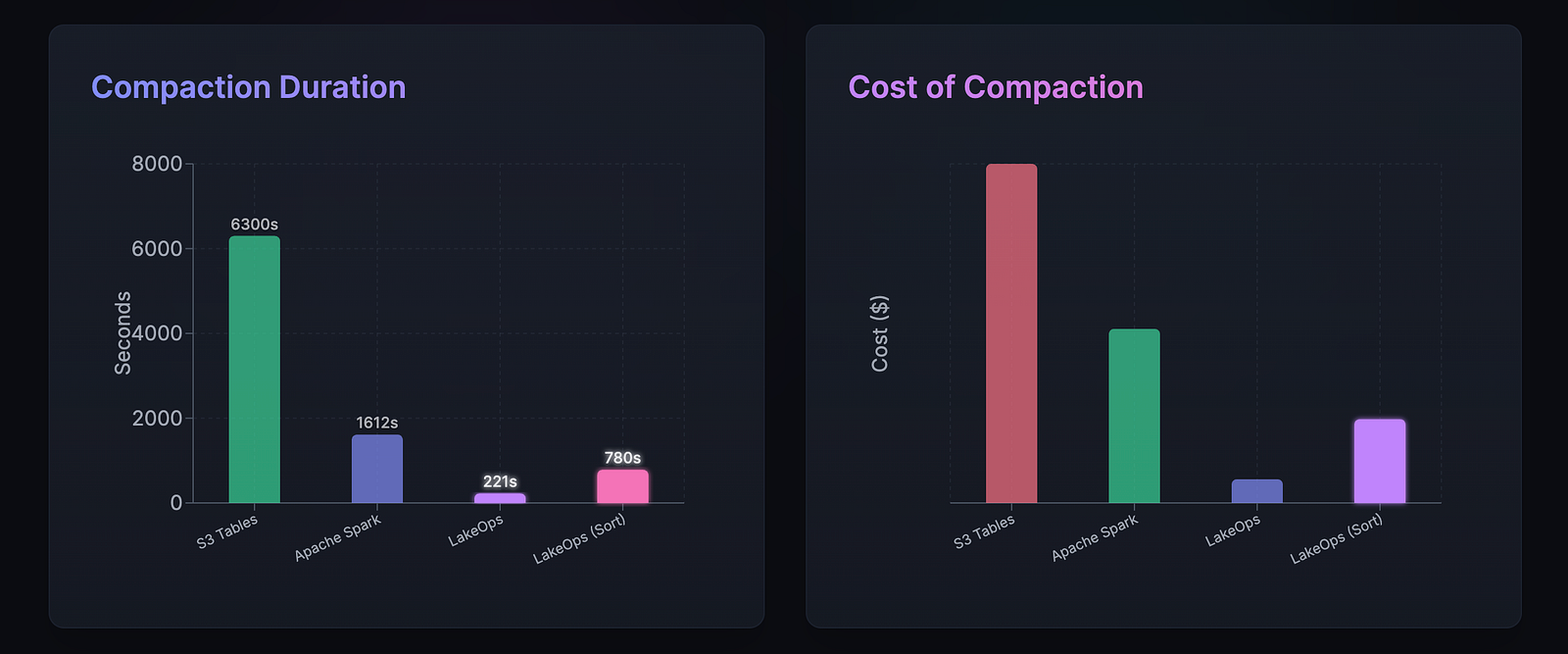
Compaction optimizagtion with a dcontrol plane (source:lakeops/dev)
In LakeOps, compaction processes are also synchronized with maintenance processes like manifest rewrites, so everything runs smoothly and you don’t have to connect and coordinate it yourself. Results are optimized and are usually far better than a home-made solution.
Example: why rewrites alone don’t hold
Let’s go back to the core problem for a second, and then see how to manually address it if you don’t use a control plane.
Consider a table with streaming ingestion committing every few minutes:
- Each commit writes 20–50 small Parquet files.
- Each commit creates one or more new manifests.
- After a week, the table has thousands of data files and hundreds of manifests.
You run snapshot expiration and rewrite manifests. Planning time improves.
Two days later, the table is slow again.
Nothing is broken. The write pattern simply recreated the same metadata pressure. This is what happens when compaction is missing or misaligned.
Use metadata to confirm compaction pressure
Before scheduling more manifest rewrites, check whether small files are the real problem:
SELECT
  COUNT(\*) AS file\_count,
  AVG(file\_size\_in\_bytes) / 1024 / 1024 AS avg\_file\_mb
FROM prod.db.my\_table$files;
If the average file size is far below your engine’s sweet spot, manifest rewrites are treating symptoms, not the cause.
Another useful signal:
SELECT
  COUNT(\*) AS manifests,
  SUM(added\_data\_files\_count) AS total\_files\_tracked
FROM prod.db.my\_table$manifests;
If file counts are high and keep growing quickly, metadata pressure will return unless compaction slows it down.
How compaction stabilizes manifest rewrites
When compaction is running correctly:
- fewer data files are created per write cycle,
- manifests grow more slowly and stay denser,
- rewrite manifests becomes an occasional cleanup, not a recurring firefight.
In stable tables, teams often find that:
- compaction runs frequently (or continuously),
- manifest rewrites run infrequently,
- snapshot expiration runs regularly.
That balance is what keeps planning predictable.
Practical coordination rule
In production, a simple rule holds up well: If manifest rewrites are needed often, compaction is not doing enough.
If you find yourself rewriting manifests weekly or daily on the same tables, it’s usually a sign that upstream file layout is unstable.
Should you add compaction code here?
At this point in the guide, full compaction code examples are usually not helpful. Compaction is engine-specific, workload-specific, and already well-covered elsewhere. What matters here is understanding the dependency:
- compaction reduces metadata churn,
- reduced churn makes manifest rewrites effective,
- without compaction, rewrites are temporary relief.
That mental model is more valuable than a generic compaction snippet.
Step 6: Add policies and guardrails
If you manage maintenance with scripts or schedulers, automation needs guardrails or it will drift out of alignment with reality.
The simpest way is to add a Control Plane.
Then you can define policies per table or for your entire lake.

Define maintenance policies with a control plane (source:lakeops.dev/)
Start by skipping inactive tables. Tables that are rarely queried or written to don’t need aggressive maintenance. Running rewrites on them just burns cluster resources without benefit.
Avoid peak query hours. Even though manifest rewrites are cheaper than data compaction, they still consume CPU, memory, and I/O. Running them during high query load increases contention and hurts user-facing performance.
Trigger maintenance based on observed metadata health, not time alone. Manifest count, average files per manifest, snapshot growth, and planning time trends are far better signals than “once a day” or “once a week”.
Finally, expect thresholds to change. Write patterns evolve, query behavior shifts, and what worked six months ago may be wrong today. Scripts that never get revisited slowly turn into background noise or, worse, a source of instability.
This is the point where many teams decide that maintaining guardrails manually is more work than it’s worth and move metadata maintenance into a control plane.
Practical steps to take
Rewrite manifests is one of those Iceberg operations that looks optional until it isn’t. When metadata is healthy, planning is fast and predictable. When it drifts, everything still works — just slower and more expensively. That’s why manifest issues often go unnoticed for a long time.
In this guide, we walked through what manifest files actually are, why they fragment in real systems, and what rewrite manifests really does under the hood. We covered when rewrites are worth running, why snapshot expiration has to come first, how orphan cleanup turns logical cleanup into real cost savings, and why compaction is the long-term stabilizer that keeps metadata from degrading again.
If you’re managing this manually, the step-by-step approach will get you there. If you want this handled continuously and optimzied, a Control Plane exists to do exactly that — operating and optimizing Iceberg tables based on real workload behavior instead of fixed schedules.
The big takeaway is that rewrite manifests only works well as part of a coordinated maintenance loop. Run it in isolation and the benefits are usually temporary. Pair it with snapshot expiration, compaction, and cleanup, and it becomes one of the highest-ROI metadata optimizations Iceberg offers.
If you’ve run into edge cases, different patterns, or lessons learned the hard way, feel free to share them in the comments.
Thanks for reading, and hope this helps keep your Iceberg tables healthy, fast, predictable, and boring in all the right ways.
Cheers 🍺
Learn more
11 Iceberg Performance Optimizations You Should Know.
13 Apache Iceberg Optimizations You Should Know.
11 Apache Iceberg Cost Reduction Strategies You Should Know.


Top comments (0)