

This is a submission for the KendoReact Free Components Challenge.
What I Built
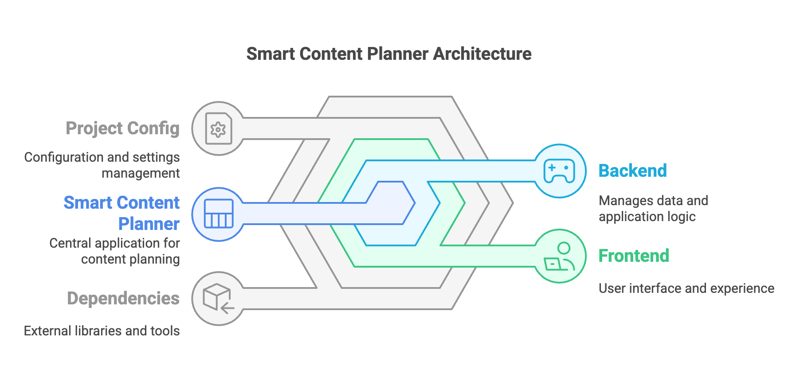
The Smart Content Planner application is designed to empower content creators by providing a streamlined platform for planning, organizing, and managing their content. Built with a modern frontend using Vite and JavaScript, and a robust backend powered by Python and Django REST, this application offers a seamless user experience. Additionally, the deployment on AWS ensures scalability and reliability. This document outlines the architecture, features, and deployment strategies of the Smart Content Planner application.
Demo

smart-content-app
Project Description
Smart Content App is a web application designed to help users plan and organize their content efficiently. It includes features such as a content planner and a smart asset organizer.
Features
- Content Planner
- Calendar View
- List View
- Smart Asset Organizer
- Asset Uploader
- Asset Library
Installation
To install the project, follow these steps:
Backend
-
Navigate to the
backenddirectory: cd backend -
Create a virtual environment: python -m venv .venv
-
Activate the virtual environment: source .venv/bin/activate
-
Install the required dependencies: pip install -r requirements.txt
-
Run the development server: python manage.py runserver
Frontend
-
Navigate to the frontend directory: cd frontend
-
Install the required dependencies: npm install
-
Run the development server: npm start
Usage To use the application, open your browser and navigate to http://localhost:3000 for the frontend and http://localhost:8000 for the backend.
License This project is licensed under the MIT License - see the LICENSE file for details.
Features
✅ Post Scheduling – Schedule social media content with a visual planner.
✅ Content Calendar – Drag & drop posts across dates and platforms.
✅ Smart Asset Organizer – Manage and categorize media assets efficiently.
✅ AI-Powered Caption Suggestions – Generate engaging captions effortlessly.
✅ Rich Text Editor – Format posts before publishing.
✅ Analytics Dashboard – Track post engagement & insights.
KendoReact Experience
I leveraged KendoReact Free Components to enhance the app's usability and efficiency:
Scheduler Component → Enables seamless post scheduling.
Grid Component → Displays and manages scheduled posts.
Editor Component → Enhances post formatting with rich-text support.
Charts Component → Visualizes engagement analytics.
Drag & Drop → Makes content reorganization intuitive.
The integration of KendoReact components significantly reduced development time, ensuring a professional and modern UI.
AIm to Impress
I integrated Generative AI to enhance content creation:
Smart Caption Generator – Uses AI to suggest compelling captions based on trends.
Post Performance Prediction – Analyzes and predicts engagement based on historical data.
Delightfully Designed
I utilized:
Kendo UI Figma Kits → To prototype and maintain design consistency.
Progress ThemeBuilder → To customize UI components to match branding.


Top comments (1)
Great work @adacodes . I hope you enjoyed it, too. I am Toni and I am the Product Manager of KendoReact. It would be very helpful if you can share your feedback our product in a quick 15 min chat. Let me know at antoniya.boynovska@progress.com