


Hi Developers!
In my previous article, Electric Utility PyProd, we built a simple interoperability production that processed CSV files from a local directory using the PyProd framework. While that example introduced the basic building blocks of a production implemented entirely in Python, real-world interoperability solutions often need to communicate with external systems.
In this article, we'll build a more advanced production that retrieves healthcare data from the public openFDA Drug Adverse Event API, analyzes the returned data, and stores healthcare analytics in InterSystems IRIS.

Along the way, we'll see how to:
- call an external REST API from a PyProd Inbound Adapter
- work with large JSON payloads efficiently
- perform batch-level healthcare analytics
- persist the results in an IRIS SQL table
- implement an entire interoperability production using only Python
Setting up
Clone the repository:
git clone https://github.com/Gra-ach/openfda-healthcare-pyprod.git

cd openfda-healthcare-pyprod
Start the container:
docker-compose up --build -dOnce the container is running, load the production:
intersystems_pyprod src/healthcare-openfda-pyprod/openfda_adverse_events.pyStep 1 – Create the Inbound Adapter
Unlike the previous example, this production doesn't wait for files to appear in a directory. Instead, the custom OpenFDAInboundAdapter periodically connects to the public openFDA Drug Adverse Event API. Rather than querying the same medication every time, the adapter rotates through a configurable list of common medications:
ASPIRIN

IBUPROFEN

ACETAMINOPHEN

NAPROXEN

LORATADINE
Each polling cycle:
- selects the next medication
- builds the REST query
- downloads the latest adverse-event reports
- saves the response as a JSON file
- sends a lightweight production message
Saving the payload to disk instead of passing it through the production keeps messages small and avoids IRIS string-size limitations.
class OpenFDAInboundAdapter(InboundAdapter):
    api_base_url: str = IRISProperty(
        description="openFDA Drug Adverse Event API URL",
        settings="API Settings"
    )
    result_limit: int = IRISProperty(
        description="Number of records to retrieve per poll",
        settings="API Settings"
    )
    api_key: str = IRISProperty(
        description="Optional openFDA API key",
        settings="API Settings"
    )
    payload_dir: str = IRISProperty(
        description="Directory where raw openFDA JSON payloads are saved",
        settings="File Settings"
    )
    medication_names: str = IRISProperty(
        description="Comma-separated medication names to rotate through",
        settings="API Settings"
    )

    def on_task(self):
        os.makedirs(self.payload_dir, exist_ok=True)

        meds = [
            med.strip().upper()
            for med in str(self.medication_names or "").split(",")
                if med.strip()
        ]

        if not meds:
            meds = ["ASPIRIN", "IBUPROFEN", "ACETAMINOPHEN", "NAPROXEN", "LORATADINE"]

        state_file = f"{OPENFDA_ROOT}/last_med_index.txt"
        os.makedirs(OPENFDA_ROOT, exist_ok=True)

        try:
            with open(state_file, "r", encoding="utf-8") as f:
                last_index = int(f.read().strip())
        except Exception:
            last_index = -1

        next_index = (last_index + 1) % len(meds)
        selected_med = meds[next_index]

        with open(state_file, "w", encoding="utf-8") as f:
            f.write(str(next_index))

        search_query = f'patient.drug.medicinalproduct:"{selected_med}"'

        params = {
            "search": search_query,
            "limit": int(self.result_limit or 50),
            "sort": "receiptdate:desc",
        }
        if self.api_key:
            params["api_key"] = self.api_key

        url = f"{self.api_base_url}?{urllib.parse.urlencode(params)}"
        pulled_at = datetime.utcnow().isoformat(timespec="seconds")
        safe_timestamp = pulled_at.replace(":", "").replace("-", "")
        pulled_at = pulled_at.replace("T", " ")
        payload_file_path = os.path.join(
            self.payload_dir,
            f"openfda_adverse_events_{safe_timestamp}.json",
        )

        IRISLog.Info(f"Calling openFDA API: {url}")

        try:
            with urllib.request.urlopen(url, timeout=30) as response:
                payload_bytes = response.read()

            with open(payload_file_path, "wb") as payload_file:
                payload_file.write(payload_bytes)
        except Exception as ex:
            IRISLog.Error(f"openFDA API call or payload write failed: {ex}")
            return Status.Error()

        msg = AdverseEventFileMessage(
            api_url=url,
            search_query=search_query,
            pulled_at=pulled_at,
            payload_file_path=payload_file_path,
            medicine = selected_med
        )
        self.business_host_process_input(msg)
        return Status.OK()
We can see the events in the log for the inbound adapter, each time info about a different medicine is requested:
Step 2 – Create the Business Service
The Business Service is intentionally simple. Its only responsibility is forwarding the metadata produced by the adapter to the Business Process.
Notice that we're no longer passing the entire JSON document between production components. The message AdverseEventFileMessage that is forwarded between the OpenFDAEventService and OpenFDAAnalysisProcess contains only:
- API URL
- search query
- selected medication
- timestamp
- payload file path
class AdverseEventFileMessage(JsonSerialize):
    api_url: str = Column()
    search_query: str = Column()
    pulled_at: str = Column()
    payload_file_path: str = Column()
    medicine: str = Column()
This keeps production efficient while preserving access to the original API response.
class OpenFDAEventService(BusinessService):
    ADAPTER: str = IRISParameter(
        value="HealthOps.OpenFDAInboundAdapter",
        description="Pure Python CSV polling adapter"
    )
    process_target: str = IRISProperty(
        description="Business process target",
        settings="Target Settings"
    )

    def on_process_input(self, input):
        return self.send_request_async(self.process_target, input)
Here are the messages in the Message Viewer:
Step 3 – Create the Business Process
The Business Process performs the analytics. Using the payload file path, it reloads the JSON response and analyzes the complete batch of adverse-event reports.
For every API batch it calculates:
- total number of reports
- serious adverse-event count
- serious adverse-event percentage
- death count
- hospitalization count
- average patient age
- most frequently reported reaction
Unlike the Electric Utility example, which generated one database row per input record, this production generates one analytics message representing the entire batch.
This greatly reduces message traffic while still preserving all meaningful statistics.
class OpenFDAAnalysisProcess(BusinessProcess):
    operation_target: str = IRISProperty(
        description="Operation that persists rows and analysis results",
        settings="Target Settings"
    )

    def _age_to_years(self, age_value, age_unit) -> Optional[float]:
        if age_value in ("", None):
            return None
        try:
            age = float(age_value)
        except Exception:
            return None
        unit = str(age_unit or "")
        if unit == "801":
            return age
        if unit == "802":
            return age / 12.0
        if unit == "803":
            return age / 52.0
        if unit == "804":
            return age / 365.0
        if unit == "805":
            return age / 8760.0
        return age

    def _load_records(self, payload_file_path: str):
        with open(payload_file_path, "r", encoding="utf-8") as payload_file:
            payload = json.load(payload_file)
        return payload.get("results", [])

    def on_request(self, request):
        try:
            records = self._load_records(request.payload_file_path)
        except Exception as ex:
            IRISLog.Error(f"Failed to read openFDA payload file {request.payload_file_path}: {ex}")
            return Status.Error()

        record_count = len(records)
        serious_count = 0
        death_count = 0
        hospitalization_count = 0
        ages: List[float] = []
        reaction_counts: Dict[str, int] = {}

        for record in records:
            if str(record.get("serious", "")) == "1":
                serious_count += 1
            if str(record.get("seriousnessdeath", "")) == "1":
                death_count += 1
            if str(record.get("seriousnesshospitalization", "")) == "1":
                hospitalization_count += 1

            patient = record.get("patient", {}) or {}

            age_years = self._age_to_years(
                patient.get("patientonsetage"),
                patient.get("patientonsetageunit"),
            )
            if age_years is not None:
                ages.append(age_years)

            for reaction in patient.get("reaction", []) or []:
                term = reaction.get("reactionmeddrapt")
                if term:
                    reaction_counts[term] = reaction_counts.get(term, 0) + 1

        serious_rate_pct = round((serious_count / record_count) * 100, 2) if record_count else 0.0
        avg_patient_age_years = round(sum(ages) / len(ages), 2) if ages else 0.0

        top_reaction = ""
        top_reaction_count = 0
        if reaction_counts:
            top_reaction, top_reaction_count = max(reaction_counts.items(), key=lambda item: item[1])

        analysis = AdverseEventAnalysisMessage(
            api_url=request.api_url,
            search_query=request.search_query,
            pulled_at=request.pulled_at,
            payload_file_path=request.payload_file_path,
            record_count=record_count,
            serious_count=serious_count,
            serious_rate_pct=serious_rate_pct,
            death_count=death_count,
            hospitalization_count=hospitalization_count,
            avg_patient_age_years=avg_patient_age_years,
            top_reaction=top_reaction,
            top_reaction_count=top_reaction_count,
            medicine = request.medicine
        )

        IRISLog.Info(
            f"Batch analysis complete: "
            f"medicine={request.medicine}, "
            f"records={record_count}, "
            f"serious={serious_count}, "
            f"serious_rate={serious_rate_pct}%, "
            f"deaths={death_count}, "
            f"hospitalizations={hospitalization_count}, "
            f"avg_age={avg_patient_age_years}, "
            f"top_reaction={top_reaction}"
        )

        return self.send_request_async(self.operation_target, analysis, response_required=0)
Here we can see the incoming and outgoing messages for the Business Process:

Here's the trace of messages for the whole cycle:

The message AdverseEventAnalysisMessage contains aggregated info about the received info about the concrete medicine:
class AdverseEventAnalysisMessage(JsonSerialize):
    api_url: str = Column()
    search_query: str = Column()
    pulled_at: str = Column()
    payload_file_path: str = Column()
    record_count: int = Column()
    serious_count: int = Column()
    serious_rate_pct: float = Column()
    death_count: int = Column()
    hospitalization_count: int = Column()
    avg_patient_age_years: float = Column()
    top_reaction: str = Column()
    top_reaction_count: int = Column()
    medicine: str = Column()
And here's the log of the Business Process with the results of calculations:

Step 4 – Create the Business Operation
The Business Operation receives the batch analysis and stores it in InterSystems IRIS. If the SQL table doesn't exist yet, it is created automatically.
Each API request produces one row containing:
- medication name
- search query
- API URL
- payload file path
- number of retrieved reports
- serious-event statistics
- hospitalization statistics
- average patient age
- top reported reaction
Once the insert succeeds, the JSON payload is moved into the archive directory.
class OpenFDADBOperation(BusinessOperation):
    archive_payload_dir: str = IRISProperty(
        description="Directory where successfully processed JSON payloads are archived",
        settings="Operation Settings"
    )

    message_map = {
        f"{iris_package_name}.AdverseEventAnalysisMessage": "save_events"
    }

    def _ensure_table(self):
        ddl = """
        CREATE TABLE IF NOT EXISTS HealthOps.OpenFDAAdverseEvents (
            id INTEGER IDENTITY PRIMARY KEY,
            payload_file_path VARCHAR(1000),
            api_url LONGVARCHAR,
            search_query VARCHAR(1000),
            pulled_at TIMESTAMP,
            batch_record_count INTEGER,
            batch_serious_count INTEGER,
            batch_serious_rate_pct NUMERIC(6,2),
            batch_death_count INTEGER,
            batch_hospitalization_count INTEGER,
            batch_avg_patient_age_years NUMERIC(10,2),
            batch_top_reaction VARCHAR(255),
            batch_top_reaction_count INTEGER,
            medicine VARCHAR(60),
            inserted_at TIMESTAMP DEFAULT CURRENT_TIMESTAMP
        )
        """
        iris.sql.prepare(ddl).execute()

    def save_events(self, request):
        self._ensure_table()

        insert_sql = """
        INSERT INTO HealthOps.OpenFDAAdverseEvents (
            payload_file_path,
            api_url, search_query, pulled_at, batch_record_count,
            batch_serious_count, batch_serious_rate_pct, batch_death_count,
            batch_hospitalization_count, batch_avg_patient_age_years,
            batch_top_reaction, batch_top_reaction_count, medicine
        )
        VALUES (?, ?, ?, ?, ?, ?, ?, ?, ?, ?, ?, ?, ?)
        """

        stmt = iris.sql.prepare(insert_sql)

        stmt.execute(
            request.payload_file_path,
            request.api_url,
            request.search_query,
            request.pulled_at,
            int(request.record_count),
            int(request.serious_count),
            float(request.serious_rate_pct),
            int(request.death_count),
            int(request.hospitalization_count),
            float(request.avg_patient_age_years),
            request.top_reaction,
            int(request.top_reaction_count),
            request.medicine
        )

        os.makedirs(self.archive_payload_dir, exist_ok=True)
        archive_path = os.path.join(self.archive_payload_dir, os.path.basename(request.payload_file_path))
        try:
            os.replace(request.payload_file_path, archive_path)
        except Exception as ex:
            IRISLog.Warning(
                f"Inserted records but could not archive payload file {request.payload_file_path}: {ex}"
            )

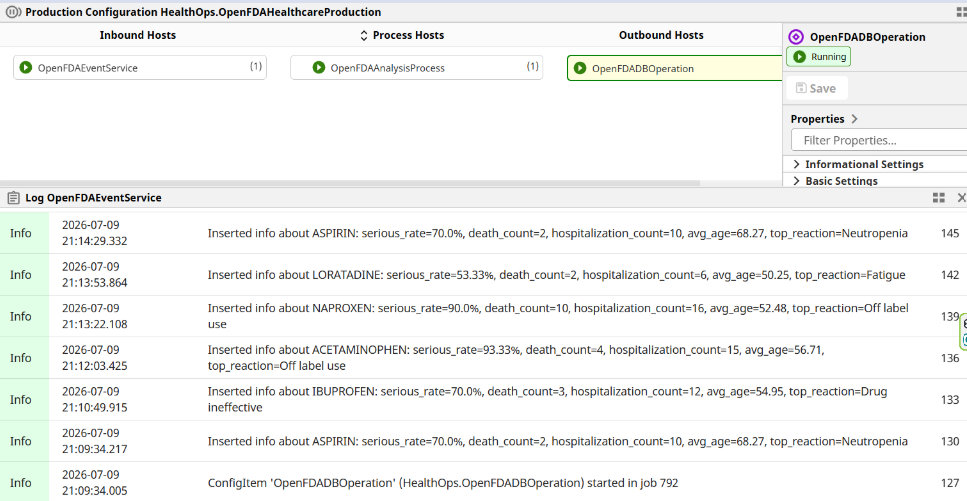
        IRISLog.Info(
            f"Inserted info about {request.medicine}: "
            f"serious_rate={request.serious_rate_pct}%, "
            f"death_count={request.death_count}, "
            f"hospitalization_count={request.hospitalization_count}, "
            f"avg_age={request.avg_patient_age_years}, "
            f"top_reaction={request.top_reaction}"
        )
        return Status.OK()
Here's the log of the Business Operation:
Step 5 – Define the Production
As with the previous example, the entire production is assembled directly in Python. It consists of:
OpenFDAInboundAdapter
        ↓
OpenFDAEventService
        ↓
OpenFDAAnalysisProcess
        ↓
OpenFDADBOperation
Because everything is defined in Python, no manual production configuration is required after loading the project.
class OpenFDAHealthcareProduction(Production):
    services = [
        ServiceItem(
            "OpenFDAEventService",
            "HealthOps.OpenFDAEventService",
            host_settings={"process_target": "OpenFDAAnalysisProcess"},
            adapter_settings={
                "api_base_url": "https://api.fda.gov/drug/event.json",
                "medication_names": "ASPIRIN,IBUPROFEN,ACETAMINOPHEN,NAPROXEN,LORATADINE",
                "result_limit": 30,
                "api_key": "",
                "payload_dir": f"{OPENFDA_ROOT}/payloads"
            }
        )
    ]
    processes = [
        ProcessItem(
            "OpenFDAAnalysisProcess",
            "HealthOps.OpenFDAAnalysisProcess",
            host_settings={"operation_target": "OpenFDADBOperation"}
        )
    ]
    operations = [
        OperationItem(
            "OpenFDADBOperation",
            "HealthOps.OpenFDADBOperation",
            host_settings={"archive_payload_dir": f"{OPENFDA_ROOT}/archive"}
        )
    ]
Step 6 – Run the Production
Start the production:
python controls.py start HealthOps.OpenFDAHealthcareProduction
Or from the IRIS terminal:
zn "ENSEMBLE"
do ##class(Ens.Director).StartProduction("HealthOps.OpenFDAHealthcareProduction")
Or in the UI in Management Portal:

Every polling cycle automatically selects the next medication and downloads a fresh batch of adverse-event reports.
Results
The production stores one summary row for every API call. For example:
SELECT
    medicine,
    batch_record_count,
    batch_serious_rate_pct,
    batch_death_count,
    batch_hospitalization_count,
    batch_avg_patient_age_years,
    batch_top_reaction
FROM HealthOps.OpenFDAAdverseEvents
ORDER BY inserted_at DESC

This makes it easy to compare medications over time and observe trends without storing thousands of individual adverse-event records.
A Note About Large JSON Payloads
One interesting challenge when integrating with public APIs is message size. Initially, I passed the complete JSON response between production components. While this works for small payloads, larger responses can exceed IRIS string limits and I got the <MAXSTRING> error. The solution used in this project is to store the API response as a JSON file and send only its location through the production.
This approach has several advantages:
- avoids large interoperability messages
- preserves the original API response
- makes troubleshooting easier
- keeps the production lightweight
It's a useful design pattern whenever you're processing large REST responses or documents.
Summary
In this article, we've built a complete healthcare interoperability production in pure Python using PyProd.
Compared to the previous Electric Utility PyProd sample, this project demonstrates a more realistic integration scenario by communicating with an external REST service instead of processing local files.
Along the way, we've seen how to:
- integrate with the public openFDA API
- rotate automatically between multiple medications
- process large JSON payloads efficiently
- calculate batch-level healthcare analytics
- archive source payloads
- create SQL tables automatically
- build an entire InterSystems IRIS production using only Python
Although this example focuses on the openFDA API, the same architecture can easily be adapted to FHIR servers, public health services, hospital APIs, or any REST-based healthcare integration.
I hope this project serves as a useful starting point for building more advanced Python interoperability solutions with PyProd.


Top comments (0)