

Update - Angular 17.2 - 3/2/24
While you still can't get Vercel Edge deployments to work until the nodejs dependencies problem is resol...
For further actions, you may consider blocking this person and/or reporting abuse


Hey! Did you try it out with the new Angular 17 yet? They added integrated SSR support to Angular. Now running "ng serve" or "ng build" automatically starts SSR server, thats awesome!
Anyway, Vercel now throws the error:
The server folder looks way different now and has .mjs modules instead of .js.
Angular 16:

Angular 17:

I came up with this solution for the app/index.js:
Try with this on the import file:
And just keep all the package.json the same without editing it.
J
Ahhhh I totally forgot about the
api/index.jsand was wondering here he gets this server/main from ... :) Anyway I could NOT get it to work yet! I tried to all different kind of imports and renaming the file from index.js to index.mjs but I couldnt find the correct way yet. Maybe you have a look at it?OR
Nothing works...
Btw the package.json is now significantly different! Thats because
ng buildalready builds browser and server app, so no more need forbuild:ssr! This also means build/deploy time went from 2 minutes to 1 minute :)You have to use require because it is JS. Did you try my code? You're importing 'server.mjs'... hence
server/server.I think thats the first thing tried but in mjs there is no require allowed anymore when I remember correct. I renamed index.js to index.mjs because it was not working.
Thanks for this! I made a few changes to my setup so I'm not always running production environments when I want to hit say staging backend.
Strip out
"vercel-build": "npm run build:ssr"from package.jsonUpdate
"build:ssr"to"ng build --configuration production && ng run project-name-here:server"Create vercel.sh in your root directory of the project
The above is just looking at what branch is being deployed, if it's main/master build:ssr will run if its any other branch my staging-environment deployment script will run.
Settings on Vercel for the project add custom build command of
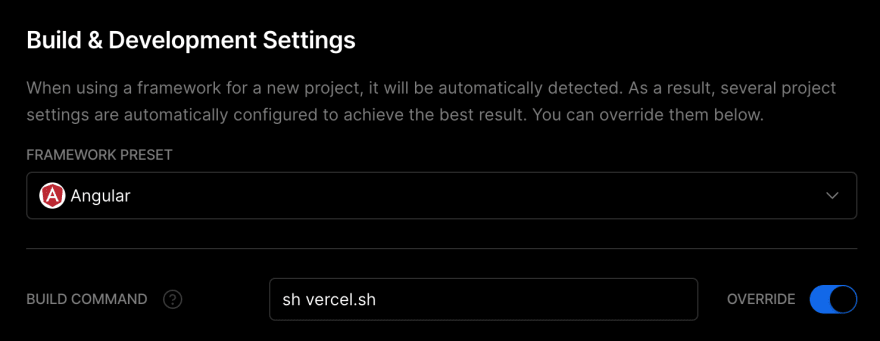
sh vercel.shThanks man for this!! It has saved me, rsss. Thanks 4 share!
calling here from 2025... guide helped me a lot getting ssr@vercel running. With Angular 19 the angular team changed the structure of server.ts a little. So a little additional changes are necessary.
First you will need to export app-constant in server.ts
export const app = express();2nd you just need to export "app" instead of calling the "app()" which was previously a function creating the express server. Paste this in api/index.js to get ready.
export default import('../dist/angular-vercel-ssr/server/server.mjs').then(module => module.app);With those to changes + added vercel.json everything works with Angular 19.
Thank you ! I deployed Anguar 19 ssr successfully according to your guide.
Thanks a lot for the article! Does this also work with Vercel Edge Runtime, which is just a subset of the Node API?
I have not tested it, but there is no reason it shouldn't work on the edge, as it is just JavaScript. You can try adding this to the
index.js:vercel.com/docs/edge-network/caching
Let me know if you figure it out!
J
It would require to also set the response header as written in the docs BUT I tried it out and it doesnt work:
There is an open feature request to remove the dependencies of Angular Universal (e.g. remove Express) so it can work on workers that dont support full Node API like Vercel Edge Functions or Cloudflare Pages BUT it will probably be closed if it doesnt get 20 upvotes in the next week:
github.com/angular/angular-cli/iss...
Yup, I just tried it and go the same error. Normally in Node.js, you could use the "browser" key in package.json to ignore certain imports, but the edge uses Deno. Until this gets resolved (I upvoted BTW), I don't see Angular Universal being possible on Vercel or any Edge. However, AnalogJS may be a different thing.
Did you find anything out in the meantime?
I got it working thangs to @trongthuong96 ! I posted it on top level
Just an update:
I have tried with Angular19
We don't need vercel.json and api folder with index.js
I didn't change anything with angular
on Vercel configuration I just changed the deployment command to
Spent hours debugging Angular 19+ SSR on Vercel and finally got it working (also tested on Angular 20 RC).
Here's the full guide with steps and code:
Angular SSR on Vercel
Hi, I'm trying to push my Angular app (v16.2) to Vercel with SSR. I followed the steps and the deployment works fine. However, when I inspect the page source, I only see an
<app-root>tag with nothing inside, indicating that the site isn't rendered server-side. I'm having trouble understanding why this is happening.Did you follow the index renaming and prerendering off part as well? I have also only tested on Angular 17.
Hey, this is my configuration but i am getting errors as show below.
api/index.js
vercel.json
package.json
using Angular V17
Please let me know on how to fix this. Thanks
Thanks for sharing this man! this is helpful
but one problem I am facing is my app is not server-rendered.
the home url is working but only the static version (with cookies disabled)
but any other url is taking more than 10 seconds to respond, resulting in 504 function timeout error.
could you please help my out?
Thanks
You may have a loop in your code. Make sure to test it with
npm run dev:ssrfirst. Usually it is a login code that should only be ran on the frontend.why is your functions pointing to
dist/YOUR_PROJECT_NAME/browser/**?Shouldn't it be from .../server/**?
No, the server is the index.js file. That is for the static files like images, css, etc
Thanks for this, How can i used with i18n ?
Not sure about that, never used i18n on any framework. Post here if you figure it out!
I do like this:
api/en/index.js
api/vi/index.js
vercel.json:
And angular.json
I don't know how to make it work with the default language (en) to use "baseHref": "/"
Thanks for the article!! One little thing: Instead of step 2 and 3 you could just go to the Vercel website and tell it to run "npm run build:ssr" or "yarn build:ssr".
Well you have to have the Vercel config file anyway, so this actually skips that step.
Wow, nice tutorial, you save me! 🙏
Thank you!! That worked like a charm after I got 404 not found errors on Vercel.
Using angular 17 ssr. This guide helped me a lot. Thank you.