

This software’s first version dates back to the 1990s, long before GitHub existed.
Technologies and capabilities were very different then, but some of those UI/UX ideas were strong enough to survive multiple major revamps, including a full rebuild from scratch this year.

Kenzap Factory
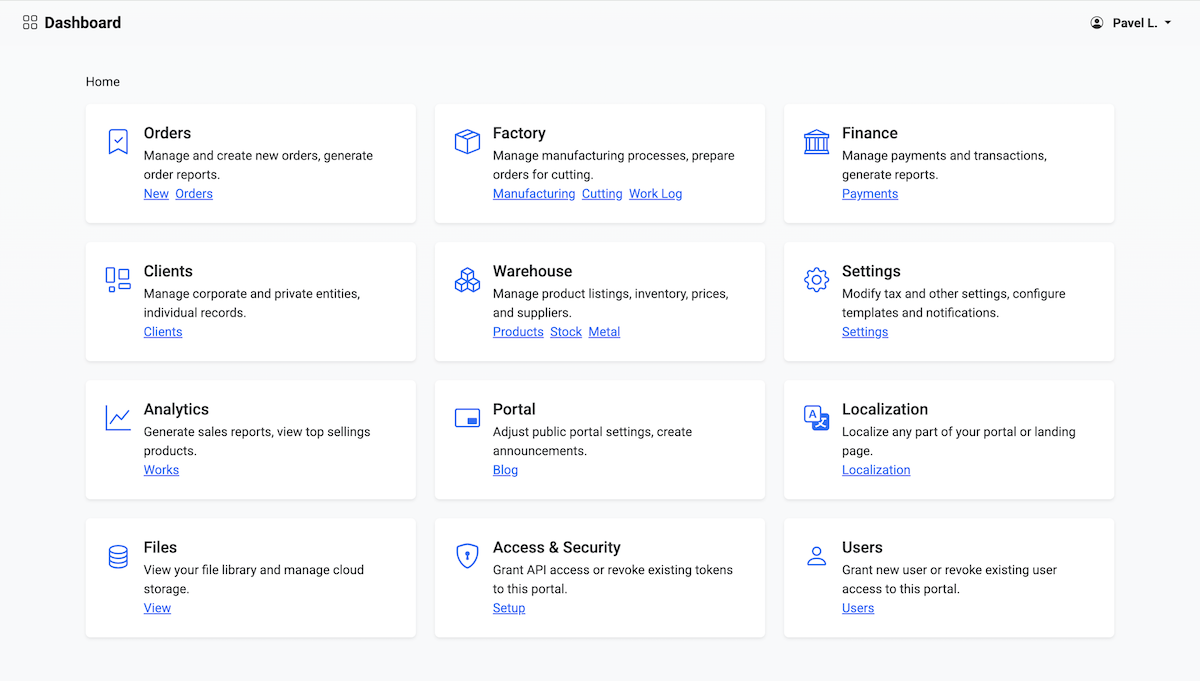
About: Manufacturing resource planning and quotation software. Production, costing, estimation and planning designed for job-based manufacturing.
Stack:
- PostgreSQL
- Redis
- Node.js
- ES6 JavaScript
Demo: https://kenzap.com
What is "Kenzap Factory"?
An ERP system designed specifically for metal fabricators. It supports real production workflows. The focus is on job shops, make-to-order production, and compliance.
Key Features:
- Manufacturing journal
- Client journal
- Access and user management
- Metal cutting and nesting integration
- Warehouse and product inventory
- Financial reports
- Analytics module
Production Workflow Support:
- Job-based manufacturing processes
- Real-time production tracking
- Cost calculation and planning
- Compliance management
User Journey
Below is a comprehensive overview of user workflows within this ERP system. Items marked with "-" are currently in development.
General User
- Securely log in to the platform using WhatsApp or Email (2FA) ✓
- Change platform language ✓
- Navigate seamlessly across the platform ✓
Manager
- Create new orders ✓
- Access order logs ✓
- Manage client records…
This ERP is built around real factory workflows, where quotations, production execution, material write-off, and financial reconciliation all happen within one operational loop.
My goal is to create software that meets all modern factory needs, is technologically fresh, and provides unlimited room for AI innovation and automation synergies.
1. Architecture Overview

The project is a Node.js + Express backend with an ES module frontend, built and served as one deployable application.
Core directories
-
server/: APIs, documents, storage gateway, extension loading -
public/: frontends (orders, manufacturing, worklog, cutting, stock, settings, etc.) -
packages/: shared runtime logic across frontend/backend (for example,tax-core) -
overrides/: tenant-specific replacements without touching core files -
server/extensions/: plugin-like runtime extensions -
dist/: compiled production output ofpublic/ -
docs/: documentation and AI-assisting files for faster development
Build model
Frontend compilation is handled with Rollup, but it can also run without compilation because modern browsers support ES modules natively.
There is no heavy frontend framework involved. I borrowed a few structural ideas from Next.js, but the codebase is intentionally framework-free and modular.
JavaScript is now mature enough to handle large-scale architecture cleanly without mandatory framework coupling.
2. Data
All business data is stored in PostgreSQL (except uploaded files).
PostgreSQL gives us relational database standards, strong JSONB support, and vector embedding support in one place.
The system uses two tables:
-
data: JSONB payload table for core ERP entities -
metering: timestamp-based machine/factory readings
2.1. data table

Core columns
-
_id— unique 40-character record ID -
pid— parent relationship ID -
sid— tenant/space ID (for SaaS mode) -
ref— logical entity type (order,product,entity,settings, etc.) -
js— full JSONB payload -
embedding— optional vector field for AI/agentic operations
This approach is opinionated. It needs query discipline and indexing strategy, but it enables very fast iteration for highly dynamic domain models.
Below is an example of an order stored with ref = order.

2.2. metering table

Core columns
-
_id— unique record ID -
time— UTC timestamp -
reading— numeric reading -
machine— machine ID -
type— reading type
In manufacturing environments, this data enables predictive maintenance, heat maps, load balancing, and scheduling optimizations.
2.3. File storage
Product images, 3D models, and other assets are stored in S3-compatible buckets.
For self-hosting, you can use SeaweedFS or any cloud object storage provider.
Storage is abstracted through createStorageProvider, so the infrastructure layer stays portable.
3. Business Workflow as Architecture
The architecture follows this factory loop:
- Quotations: manager creates quotation/order with formula-based pricing
- Production: team executes stages in manufacturing journal + logs work in worklog
- Materials: cutting and metal log manage coil usage and write-offs
- Documents: invoices, waybills, production slips generated server-side
- Finance: payments, balances, accounting exports
- Reporting: manufacturing output, employee performance, machine activity
- Forecasting: AI-driven planning and KPI analytics (currently early stage)
4. Frontend Organization

The UI is organized as operational journals:
-
public/orders,public/order,public/manufacturing,public/worklog,public/cutting,public/payments, etc. - Shared logic in
public/_/components,public/_/modules,public/_/helpers - Action-heavy, modal-heavy UX optimized for fast factory-floor execution
5. Backend Organization

-
server/_— helpers, dependencies, reusable backend components -
server/api— API routes -
server/document— PDF and export generators -
server/extensions— extension runtime -
server/scripts— migration and ops scripts -
server/server.js— Express entry point
Route strategy
- Core routes are loaded from
server/api/* - In practice, tenant-specific behavior should go to
overrides/server/api/* - Same approach for document generation via
server/document/*and overrides
Extension model
Extensions in server/extensions/* are loosely coupled feature modules.
Each extension has:
-
index.js(entry point) -
manifest.json(metadata/capabilities/permissions)
6. Dynamic Settings

Critical configuration is editable directly from the dashboard:
- brand name, VAT number, tax region
- timezone (affects cron + generated PDFs)
- invoice/email/WhatsApp templates
- system variables and attributes
- inventory and raw material pricing
- worklog and stock categories
- extension-specific settings
Settings are cached in memory for low-latency access.
7. Localization

Every text in the system is localizable (frontend + backend).
Localization helpers
-
__html('Your text')— safe translation for HTML content -
__attr('Your text')— safe translation for HTML attributes -
__('Your text')— plain translated string
Tooling
-
npm run locales:export— extract localizable strings -
npm run locales:translate:lv— auto-translate missing strings (for example, Latvian)
The translation script uses Anthropic API (server/scripts/locales-translate.js).
8. Upcoming Releases
Since the beginning of this year, at least one production feature has shipped almost every week.
You’re welcome to share feedback and ideas.
Planned work is tracked here:
https://github.com/kenzap/factory/tree/main/docs/exec-plans/active
9. License
This project is licensed under Apache-2.0.
It is friendly for commercial use and does not require publishing your modified source code.
10. Overview
For a more visual overview of the system check this video below.


Top comments (0)