


Bolt.new made it practical to build working applications from natural-language prompts — but its limits around pricing, features, and customization send many developers looking for a Bolt.new alternative that fits their stack and budget. This guide covers 10 options, each with its strengths, pricing, and a quick-start path so you can evaluate them against your own requirements.
💡 Building applications with AI-powered tools? Make sure your AI APIs are reliable and production-ready with Apidog. When developing full-stack applications — whether you're using Bolt.new or any Bolt.new alternative — you still need to test backend endpoints, validate request and response data, and debug complex integrations. Apidog handles all of this in one place: visual API testing, built-in mock servers for frontend–backend collaboration, and automatically generated, up-to-date API documentation. Start using Apidog for free to streamline your API design, mocking, testing, debugging, and documentation workflow from day one.
Why Look for a Bolt.new Alternative?
Before comparing tools, map the reason you're switching to what a replacement must provide:
| Reason | What to look for in an alternative |
|---|---|
| Pricing concerns | Free tiers, pay-per-use, or one-time purchases |
| Framework limitations | Support for Vue, Svelte, or backend frameworks |
| Customization needs | Access to generated code, export options |
| Collaboration features | Team workspaces, version control integration |
| Privacy requirements | Self-hosting options, local execution |
Each tool below addresses one or more of these concerns.
1. Lovable: The Most Popular Bolt.new Alternative
Lovable is the leading Bolt.new alternative when polished UI is the priority. It generates production-ready interfaces with clean, maintainable code.

Lovable website interface
Why choose it
- Superior UI quality — generates more polished designs than most competitors
- Supabase integration — built-in backend support without configuration
- GitHub sync — export directly to repositories
- Real-time preview — see changes instantly as you prompt
Workflow
Describe the interface in a prompt, iterate against the live preview, then export the result straight to GitHub.
Pricing
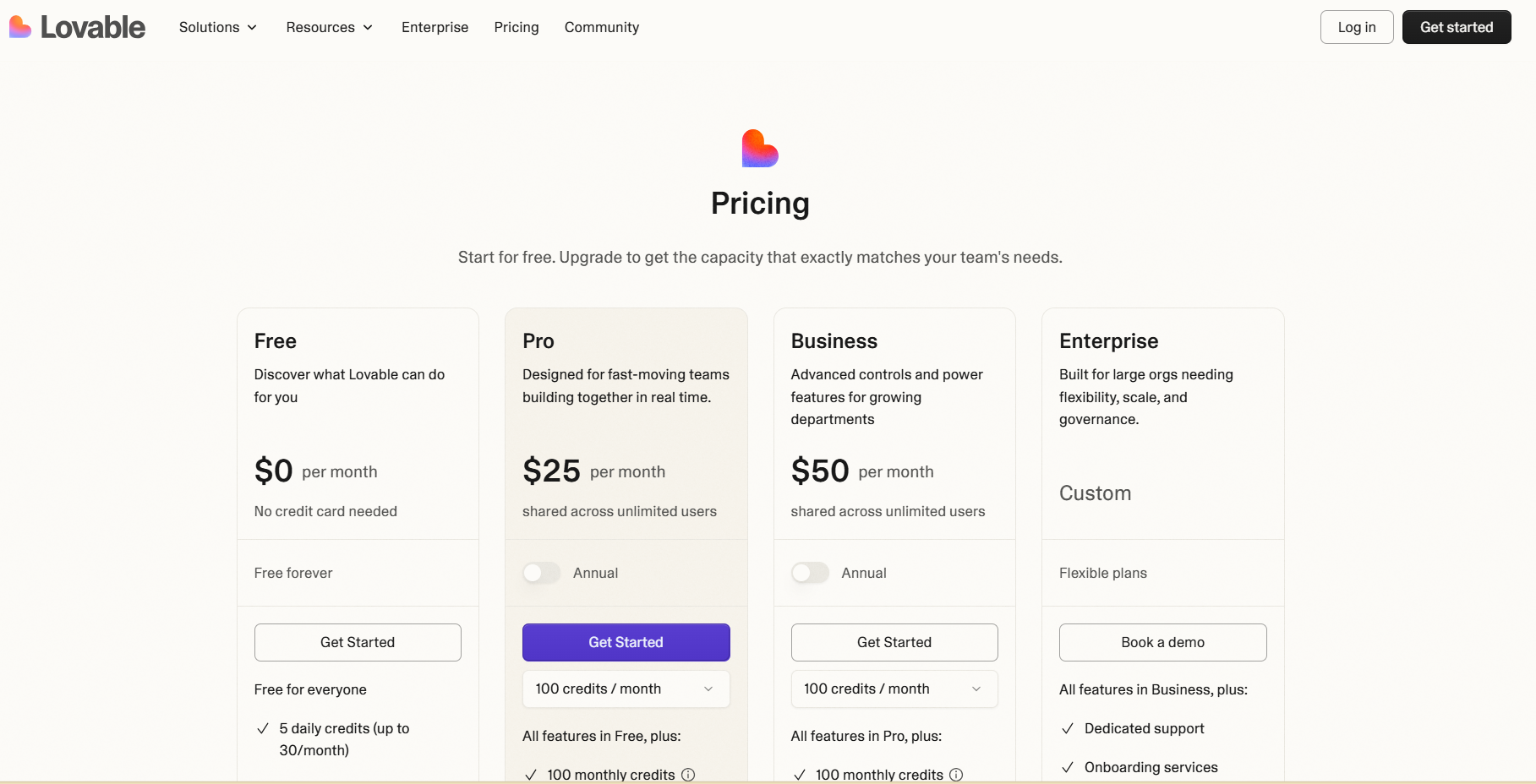
Free tier with limited generations; paid plans start at $25/month — comparable in cost to Bolt.new, with different strengths.

Lovable pricing
Best for
Frontend-focused projects where design quality matters more than backend complexity.
2. v0 by Vercel: The Enterprise Bolt.new Alternative
v0 is Vercel's entry in this space, built by the creators of Next.js and integrated with the Vercel ecosystem.

v0 by Vercel website interface
Why choose it
- Next.js optimization — generated code targets Next.js best practices
- shadcn/ui components — uses the popular component library by default
- Vercel deployment — one-click deploy to Vercel's edge network
- TypeScript-first — all generated code includes proper types
Pricing
Flexible pricing tiers spanning individual developers to enterprise teams.

v0 by Vercel pricing
Best for
Teams already on Vercel who want generation that fits their existing infrastructure.
3. Emergent: The Full-Stack Bolt.new Alternative

Emergent targets teams that want a complete application development workflow rather than just AI-assisted coding in a browser. Where Bolt.new generates apps inside a browser-based environment, Emergent turns product ideas into working applications through prompts, voice input, and automated full-stack generation. Instead of assembling the interface, backend, and deployment separately, it generates the entire stack in one workflow: describe what you want, preview it in real time, and deploy without setting up a local development environment.
Why choose it
- Full-stack app generation — frontend, backend logic, and database structure from a single prompt
- Voice Mode — build and modify applications by speaking instructions
- Live preview — see application updates while the AI generates features
- No local setup — build and run apps directly in the browser
- Instant deploy — launch applications from the platform in seconds
Pricing
Best for
Founders, product teams, and builders who want complete web or mobile applications generated from prompts rather than assembled from multiple tools.
4. Replit Agent: The Full-Stack Bolt.new Alternative
Replit Agent is a full-stack alternative that handles frontend, backend, and deployment in one environment.

Replit website interface
Why choose it
- Complete environment — database, server, and frontend in one workspace
- No local setup — everything runs in the browser
- Instant deployment — deploy with a single click
- Built-in collaboration — real-time multiplayer editing
How it works
The integrated environment removes most configuration work, which makes Replit Agent strong for rapid prototyping. One prompt like this is enough to get a connected stack:
Create a task management app with user authentication,
PostgreSQL database, and REST API endpoints
Replit Agent builds all the components and connects them automatically.
Pricing
Flexible subscription model starting with a free Starter plan that includes limited agent access for experimentation.

Replit pricing
Best for
Developers who want the entire stack handled without context switching between tools.
5. GPT-Engineer: The Open Source Bolt.new Alternative
GPT-Engineer is the open source option: MIT-licensed, runs locally, and generates complete project structures.
Why choose it
- Fully open source — MIT licensed, free forever
- Local execution — your code never leaves your machine
- Customizable prompts — modify how the AI generates code
- No usage limits — pay only for API tokens
Setup
# Install GPT-Engineer
pip install gpt-engineer

# Create a project
mkdir my-app && cd my-app
echo "Build a React dashboard with charts and data tables" > prompt

# Generate the codebase
gpt-engineer .
Best for
Developers who want full transparency and no vendor lock-in.
6. Windsurf (Codeium): The AI Flow Bolt.new Alternative
Windsurf's differentiator is "Cascade," an AI flow system that maintains context across multiple interactions instead of treating every prompt as isolated.

Windsurf website interface
Why choose it
- Cascade flows — the AI remembers context throughout your session
- Deep codebase understanding — indexes your entire project
- Free tier available — generous limits for individual developers
- Multi-language support — works beyond just web development
How it differs
Windsurf treats development as a continuous conversation rather than isolated prompts.
Pricing
Free plan with 25 monthly prompt credits — enough to test the Cascade agentic system in read-only mode — plus unlimited standard autocomplete.

Windsurf pricing
Best for
Complex, multi-step projects where context retention matters.
7. Create.xyz: The No-Code Bolt.new Alternative
Create.xyz targets non-developers and designers, prioritizing visual editing over code generation.
0
Create.xyz website interface
Why choose it
- Visual-first interface — design by dragging, not prompting
- No coding required — accessible to non-developers
- Template library — start from pre-built designs
- Hosting included — deploy without external services
Trade-offs
Create.xyz trades code access for simplicity — in most cases you can't export raw code.
Pricing
Create.xyz (now rebranded as Anything) offers a free tier with 3,000 credits, leaving significant room to experiment before committing to a paid plan.
1
Create.xyz pricing
Best for
Non-technical users who want results without any coding knowledge.
8. Tempo Labs: The React Specialist Bolt.new Alternative
Tempo Labs focuses exclusively on React, generating production-grade React components.
2
Tempo Labs website interface
Why choose it
- React expertise — optimized specifically for React patterns
- Component library integration — works with your existing design system
- Figma import — convert designs directly to code
- TypeScript default — all components fully typed
Workflow
- Import a Figma design or describe the component
- Tempo generates React + TypeScript code
- Export to your project or GitHub
- Customize as needed
Pricing
Free plan with 50 monthly GPT-4o or Claude 3.5 Sonnet prompts — enough to test the platform's React-focused capabilities.
3
Tempo Labs pricing
Best for
React developers who want deep framework expertise rather than broad coverage.
9. Lazy AI: The Backend-Focused Bolt.new Alternative
While most of these tools focus on the frontend, Lazy AI builds complete server-side applications.
Why choose it
- Backend emphasis — APIs, databases, and server logic
- Multiple frameworks — FastAPI, Express, and Django support
- Database generation — creates schemas and migrations
- Built-in authentication — user management without extra work
Example
[REDACTED PROMPT]
Create a REST API for an e-commerce platform with products,
orders, and user management
Lazy AI generates:

- Database models and migrations
- CRUD endpoints
- Authentication middleware
- API documentation

### Pricing

Flexible pricing designed for backend-heavy applications; specific tiers weren't publicly detailed in recent documentation.

### Best for

Backend developers who need server-side code more than UI generation.

## 10. Srcbook: The Notebook-Style Bolt.new Alternative

Srcbook takes a notebook approach, combining code generation with executable documentation.

### Why choose it

- **Notebook interface** — mix prompts, code, and output
- **TypeScript apps** — generates full TypeScript applications
- **Local-first** — runs entirely on your machine
- **Open source** — free and customizable

### How it works

App development as interactive documentation:
ts
// Cell 1: Describe your app
"Create a weather dashboard that fetches data from OpenWeatherMap"
// Cell 2: Generated code appears and runs
// Cell 3: Continue iterating with new prompts
### Best for
Developers who prefer an exploratory, notebook-style workflow.
## How to Choose the Right Bolt.new Alternative
Match the tool to your constraint:
| Pick | When |
| --- | --- |
| Lovable | UI quality is paramount |
| v0 | You're committed to the Vercel ecosystem |
| Replit Agent | You want everything in one browser tab |
| Cursor | You prefer traditional IDE workflows |
| GPT-Engineer | You need open source and privacy |
| Windsurf | Context retention matters for your projects |
## Testing Your Bolt.new Alternative Projects with Apidog
Whichever Bolt.new alternative you choose, the APIs it generates still need testing. Apidog validates the backends produced by any of these tools.
4
*Apidog integration testing interface*
Key capabilities for Bolt.new alternative projects:
- Test REST endpoints generated by any tool in this list
- Mock APIs while your tool generates the frontend
- Document endpoints automatically
- Share API specs with your team
Download Apidog to complement your chosen Bolt.new alternative.
## Conclusion: Finding Your Ideal Bolt.new Alternative
The right pick depends on your priorities. For most developers, Lovable offers the closest experience to Bolt.new with superior UI generation. Cursor Composer is the best fit if you prefer IDE integration. GPT-Engineer is the top choice for open source enthusiasts.
Every tool in this list solves a specific pain point — test a few against your own workflow. The AI-powered development landscape keeps evolving, and today's best Bolt.new alternative may face new competitors tomorrow.


Top comments (0)