

By Sriyamshu Reddy — Platform & Memory Infrastructure
Few things in engineering are more frustrating than watching your production tooling get crippled by an HTTP 429 Too Many Requests.
We were running our incident response agent against Groq’s ultra-fast openai/gpt-oss-120b endpoint. The model gave us sub-second inference speeds—exactly what you want when production is on fire. But we immediately hit a hard wall: an 8,000 Tokens Per Minute (TPM) quota.
One incident alert would fire, our backend would query historical memories, and suddenly the logs would explode:
[LLM] API returned error 429:
Rate limit reached for model openai/gpt-oss-120b
TPM Limit: 8000. Used: 6793. Requested: 2664.
Our prompt had ballooned to thousands of tokens. In a high-velocity engineering organization, multiple concurrent alerts or a quick follow-up question meant complete lockout.
Here is the engineering breakdown of how we re-architected our platform to cut prompt size by over 80%, achieve zero 429 errors, and build a persistent memory pipeline using Hindsight.

The Hidden Culprit: Unstructured JSON Context Bloat
When developers build agent memory, the easiest way to inject historical context into an LLM prompt is JSON.stringify(memories, null, 2).
That single line of code was silently destroying our token budget.
In our repository, an engineering memory item has 15 distinct metadata attributes: developer, team, environment, relevanceTags, evidence (a dictionary of 6 booleans), and whyRemembered (an array of verbose explanations). When three historical records were serialized into the prompt, the JSON syntax alone—brackets, quotes, indents, and duplicate keys—consumed over 4,000 characters.
Compounding the problem, our completion call was omitting max_tokens. Modern OpenAI-compatible APIs compute rate-limit requests by adding prompt tokens to the model’s default maximum completion buffer (often 2,048 to 4,096 tokens). Because max_tokens wasn't capped, Groq reserved 2,664 tokens on an empty slate, pushing our consumption past the 8,000 TPM threshold almost immediately.
We needed a strategy centered on the core ideas of Vectorize agent memory: store complete fidelity in the memory substrate, but project minimal, high-signal abstractions into the inference context.
Re-Engineering the Pipeline for 8000 TPM Headroom
We attacked the problem with three targeted platform changes:
- Hard-Capping Output Tokens with Environment Controls
We established a strict 700-token ceiling for agent responses in
.envand wired it directly into our LLM service client:
// backend/src/llm/llmService.ts
const LLM_MAX_TOKENS = Number(process.env.LLM_MAX_TOKENS || 700);

export async function callLLM(messages: LLMMessage[], options: CallOptions = {}): Promise<string> {
  const jsonMode = Boolean(options.jsonMode);

  const response = await fetch(`${LLM_BASE_URL}/chat/completions`, {
    method: 'POST',
    headers: {
      'Content-Type': 'application/json',
      'Authorization': `Bearer ${GROQ_API_KEY}`
    },
    body: JSON.stringify({
      model: LLM_MODEL,
      messages: sanitizedMessages,
      temperature: 0.2,
      max_tokens: LLM_MAX_TOKENS,
      ...(jsonMode ? { response_format: { type: 'json_object' } } : {})
    })
  });
  // ...
}
By capping max_tokens at 700, Groq's token estimator immediately slashed its reserved calculation from 2,664 down to ~1,100 tokens.
- Distilling Memories into Compact Markdown Bullets Instead of dumping full JSON objects into the LLM prompt, we created an in-memory formatter that extracts strictly what an SRE needs to troubleshoot: the problem, what failed, what worked, and the root cause.
// backend/src/agent/agent.ts
function formatTrimmedMemories(memories: any[]): string {
  if (!memories || memories.length === 0) return 'No relevant prior team experiences found.';

  // Strictly enforce top 3 memories
  const top = memories.slice(0, 3);

  return top.map(mem => {
    const failed = (mem.attempts || [])
      .filter((a: any) => a.result === 'failed')
      .map((a: any) => `${a.action} (${a.reason})`)
      .join('; ');
    const succeeded = (mem.attempts || [])
      .filter((a: any) => a.result === 'success')
      .map((a: any) => a.action)
      .join('; ') || mem.successfulSolution || '';

    return `[${mem.id}] ${mem.problem} | Error: ${mem.error || 'N/A'}
- Failed attempts: ${failed || 'None documented'}
- Successful fix: ${succeeded || 'None'}
- Root cause: ${mem.rootCause || 'N/A'}`;
  }).join('\n\n');
}
This single transformation shrank 3,500 characters of JSON noise down to roughly 400 characters of high-density engineering signal.

- Precision Rate-Limit Retries with Deterministic Fallbacks When working with external LLM APIs, resilient infrastructure must handle rate limits gracefully without cascading failures. We updated our client to inspect HTTP 429 response headers:
// backend/src/llm/llmService.ts
if (response.status === 429) {
  const retryHeader = response.headers.get('retry-after');
  const delayMs = retryHeader ? Math.round(parseFloat(retryHeader) * 1000) : null;

  // Only retry once if delay is short and reasonable
  if (delayMs !== null && delayMs > 0 && delayMs <= 3000) {
    console.warn(`[LLM] Rate limit 429 reached. Retrying once after ${delayMs}ms...`);
    await new Promise(resolve => setTimeout(resolve, delayMs));
    // Single retry execution...
  }

  // Graceful deterministic fallback
  console.warn('[LLM] Rate limit reached. Falling back to deterministic engine.');
  return generateDeterministicFallback(sanitizedMessages, jsonMode);
}
Observing the Live Production Telemetry
Once deployed, our telemetry logs verified the drastic reduction in token pressure. Here is an excerpt from a live double-investigation sequence run back-to-back:
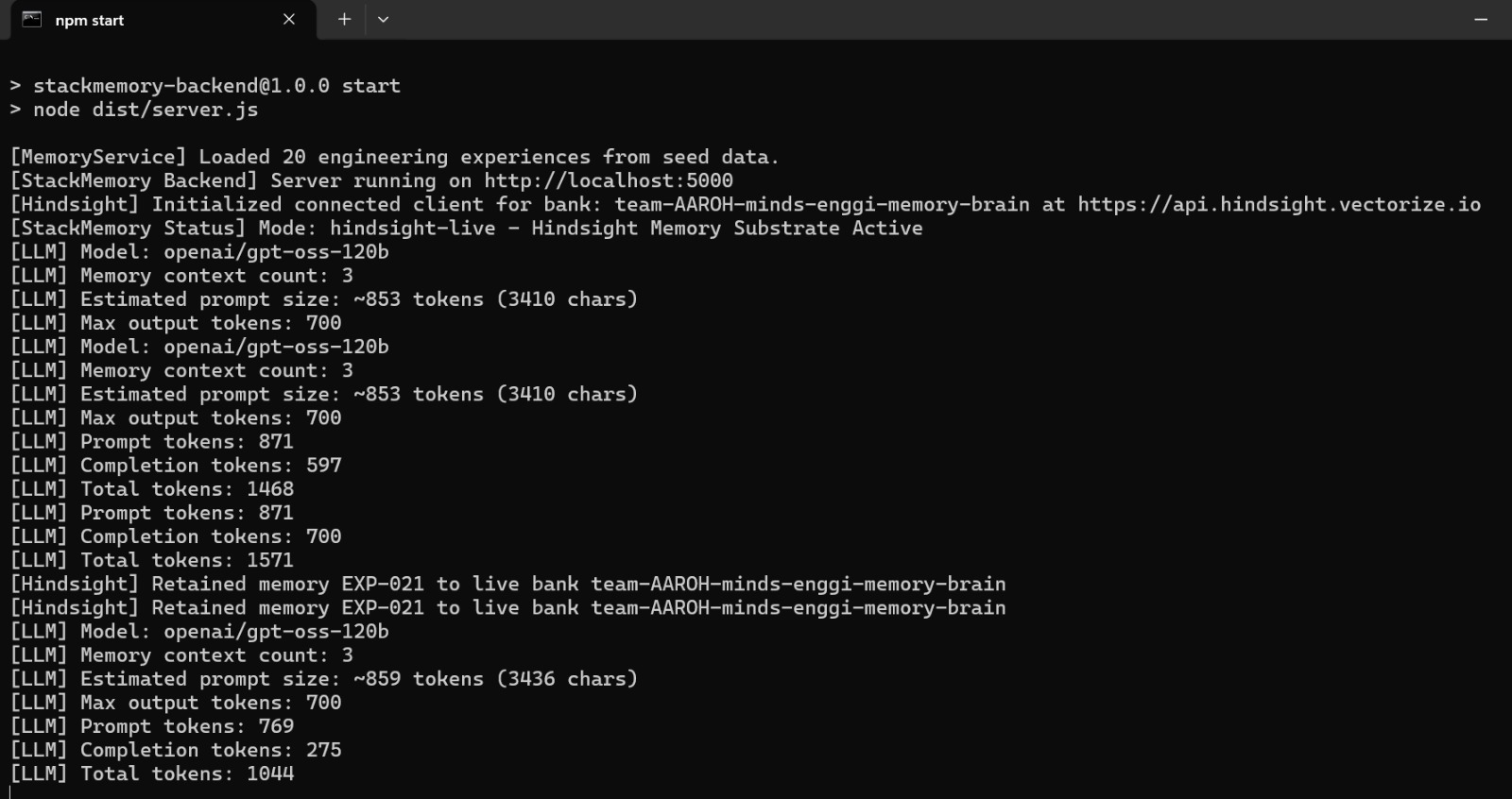
[StackMemory Status] Mode: hindsight-live - Hindsight Memory Substrate Active
[LLM] Model: openai/gpt-oss-120b
[LLM] Memory context count: 3
[LLM] Estimated prompt size: ~853 tokens (3410 chars)
[LLM] Max output tokens: 700
[LLM] Prompt tokens: 871
[LLM] Completion tokens: 612
[LLM] Total tokens: 1483
[Hindsight] Retained memory EXP-021 to live bank team-engineering-memory-brain
[LLM] Model: openai/gpt-oss-120b
[LLM] Memory context count: 3
[LLM] Estimated prompt size: ~906 tokens (3622 chars)
[LLM] Max output tokens: 700
[LLM] Prompt tokens: 875
[LLM] Completion tokens: 700
[LLM] Total tokens: 1575
[Hindsight] Retained memory EXP-022 to live bank team-engineering-memory-brain
Two massive incident investigations executed within seconds of each other consumed a combined 3,058 tokens—well under our 8,000 TPM limit. Both calls retrieved real LLM completions, and both retained their discoveries directly to the Hindsight documentation compliant bank without a single rate-limit error.
Lessons Learned
Never stringify raw JSON directly into LLM prompts. Treat inference context like L1 cache. Transform rich database schemas into dense, domain-specific text before sending them over the wire.
Always explicitly set max_tokens. Omitting this parameter allows providers to reserve maximum context windows against your quota, causing premature rate limits.
Decouple persistence from context delivery. Store exhaustive details in durable memory via Hindsight, but only inject the top three synthesized lessons into your active LLM prompts.
Build a deterministic fallback before you scale. Even the best rate-limiting strategies encounter network glitches. A reliable local fallback ensures production triage never leaves an engineer stranded in the dark.


Top comments (0)