

In my first post in the series there where a lot of people that were concerned about exposing local network to public internet, or actually might h...
For further actions, you may consider blocking this person and/or reporting abuse


You could also add a Nginx Proxy Manager after the Cloudflare Tunnel to better secure all ports AND to have multiple sites using the same domain but with different subdomains.
you don't need that, you can have multiple public hostname on CloudFlare without it, simply by adding new entry in CloudFlare. It's just matter of preference, however CloudFlare Tunnel already does most if not all what Proxy Manager, or Traefik of anything else does.
Great guide! However, I'm curious about the hidden costs — how much does running a NUC 24/7 cost you per month in electricity? And should we factor in a more reliable ISP plan to maintain uptime? I wonder how this compares to a cheap VPS ($6-8/month)
Can I use the assigned domain name instead of the internal IP in the internal docker bridge network ? Because the internal IP can re-assign upon container restart, especially if you have watchtower to periodically update all containers
Worth checking, I didn’t test it myself
Just did a quick POC and it works:
Here is the compose.yml file:
And here is the tunnel's config:
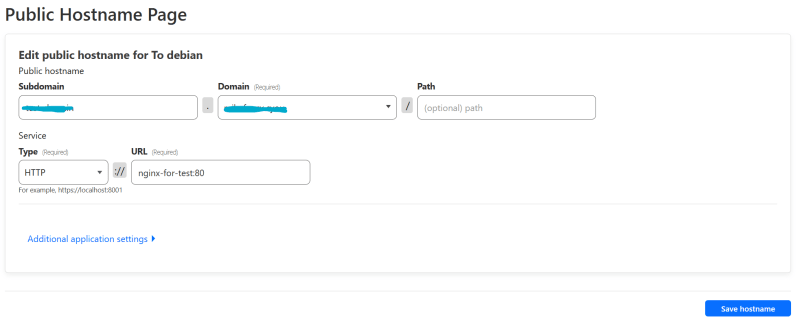
As you can see, you are free to use the domain assigned by docker demons to connect to other containers within the same bridge network
That’s good to hear! Thanks for sharing!
Thank you for writing all 3 articles in this list. Please continue writing about the docker setup you have. The containers you run and how you deployed them and what are you using them for. Please add how they are different from legacy VM setup. I'm new to self hosting. Can you suggest some articles/videos/blogs to follow and get more information.
The support is it for all technology?
What do you mean? If you can run something in docker, then yes.
ok great thanks