

If you've ever used Claude Code on your local machine while chatting with "Cowork", you've probably noticed something frustrating.
The two experiences are completely separate.
Claude Code is running on your Mac, waiting for terminal input whenever it needs approval. Meanwhile, you're having the conversation somewhere else.
That disconnect inspired me to build cowork-to-code-bridge.
The goal is simple:
Let Claude Code ask for approval directly inside Cowork, then continue running after receiving your answer.
No tunnels. No servers. No custom infrastructure.
The Problem
Imagine asking Claude Code to deploy an application.
Run the tests.
If everything passes,
ask me before deploying.
Eventually Claude Code reaches the deployment step and waits for confirmation.
Ready to deploy?
[y/n]
The problem is that the prompt appears inside your terminal.
Now you have to:
- Keep watching the terminal
- Switch away from Cowork
- Type your answer
- Return to your conversation
For long-running tasks this quickly becomes annoying.
It also becomes risky.
Many AI-assisted workflows run unattended for long periods, consuming tokens or making changes without another checkpoint.
I wanted a simpler workflow.
The Idea
Instead of asking for approval in the terminal, why not ask inside Cowork?
The conversation becomes something like this.
You:
Deploy if tests pass.
Claude Code:
Tests passed.
Deploy to production?
You:
Yes
Claude Code:
Deployment completed.
Everything stays inside one conversation.

---

# How the Bridge Works

The bridge is intentionally simple.

Instead of opening ports or exposing an API, both sides communicate through a shared directory using JSON files.
Cowork
│
▼
queue/
results/
to_cowork/
cowork_results/
▲
│
Mac Daemon
│
▼
Claude Code
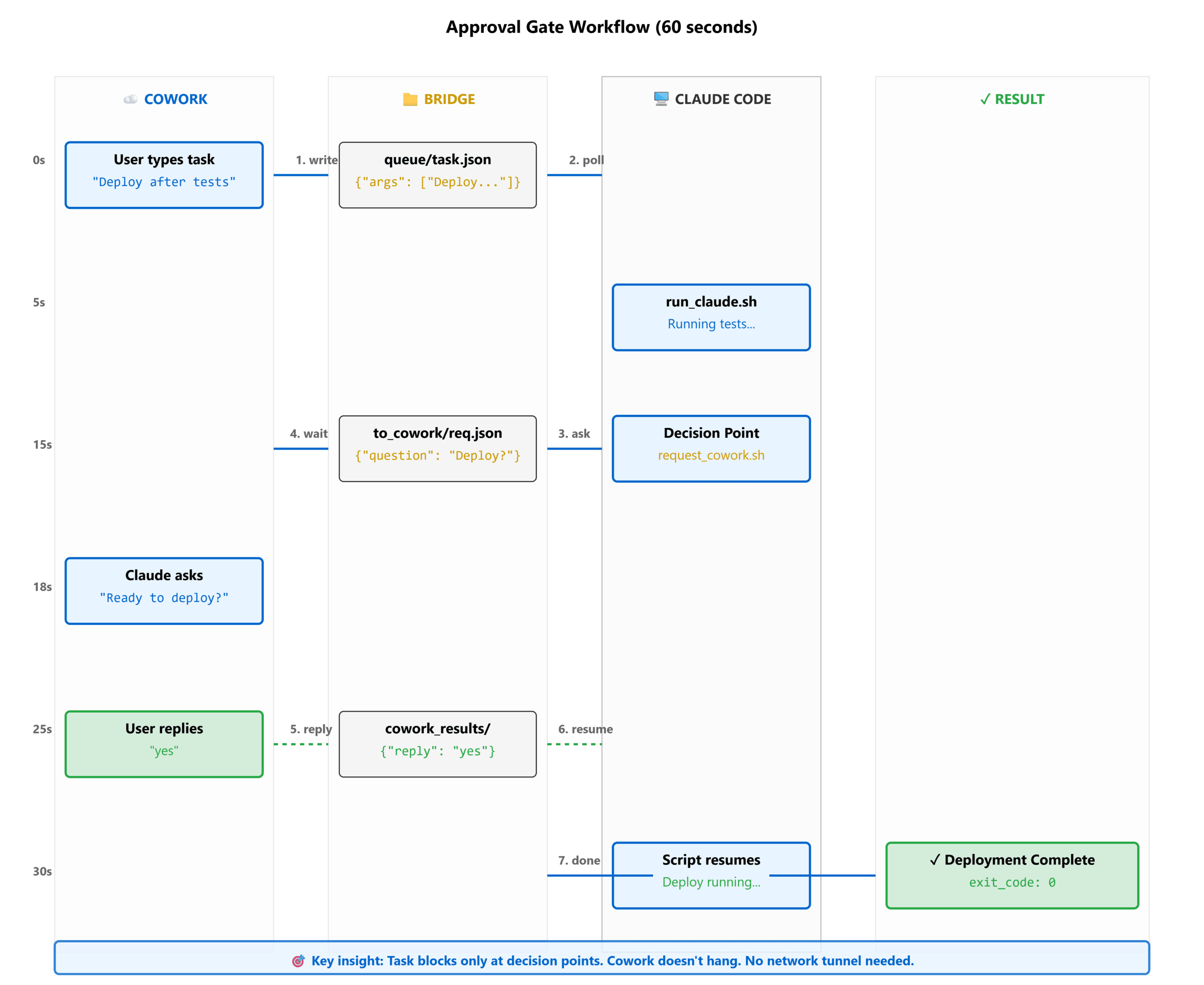
The flow looks like this:
- Cowork writes a task into the queue.
- A lightweight daemon running on your Mac picks it up.
- Claude Code executes the task.
- If approval is required, the daemon writes a request back.
- Cowork displays the question.
- You answer.
- Claude Code resumes execution.
- The final result is returned.
Since everything is file-based:
- no HTTP server
- no SSH tunnel
- no cloud infrastructure
- no open ports
Example
Here's what the workflow looks like from Python.
from bridge_client import (
call_remote_streaming,
reply_to_machine,
resume_remote,
)
result = call_remote_streaming(
"scripts/run_claude.sh",
args=[
"Run tests then ask before deployment",
"/Users/you/project"
],
interactive=True,
timeout=600,
)
while result.get("state") == "awaiting_reply":
print(result["question"])
reply_to_machine(
    result["request_id"],
    "yes"
)

result = resume_remote(
    result["cmd_id"],
    result["_deadline"]
)
print(result["stdout"])
The approval step becomes part of the conversation instead of interrupting your workflow.
Features
Human Approval Loops
Claude Code can pause whenever it needs confirmation.
Examples include:
- Deployments
- Database changes
- Large refactors
- Security-sensitive actions
Cost Limits
You can define a maximum budget for each task.
call_remote_streaming(
"scripts/run_claude.sh",
args=["Refactor project"],
max_budget_usd=2.00,
)
If the budget is reached, execution stops.

This helps avoid unexpected token costs.

---

## Permission Scopes

Not every task needs full access.

You can run Claude Code with different permission levels.
python
call_remote(
"scripts/run_claude.sh",
args=["Analyze repository"],
permission_scope="plan",
)
This makes it easier to share AI tooling without giving unrestricted access.
---
## Interactive Debugging
Sometimes Claude Code discovers missing information halfway through a task.
Instead of failing immediately, it can ask.
Need AWS credentials.
Continue?
You respond in Cowork and execution resumes.
# Why I Chose a File-Based Design
There are plenty of ways to build remote communication.
I deliberately chose files because they provide several advantages.
* Easy to debug
* No networking configuration
* Works offline
* Atomic writes
* Simple deployment
* Platform-independent
Sometimes the simplest architecture is the easiest to maintain.
# Current Status
The project currently supports:
* Interactive approval loops
* Live execution status
* Cost limits
* Permission scopes
* Idempotent task execution
* Model selection
* Open-source implementation
I'm also working on easier installation through Homebrew and PyPI.
# Getting Started
Install the daemon on your Mac.
curl -fsSL https://raw.githubusercontent.com/abhinaykrupa/cowork-to-code-bridge/main/install.sh | bash
Then call it from Cowork.
from bridge_client import call_remote_streaming
result = call_remote_streaming(
"scripts/run_claude.sh",
args=[
"Do something useful",
"/path/to/project"
],
interactive=True,
)
That's all that's required to start experimenting with approval-driven workflows.
# Final Thoughts
Large language models continue to improve, but safe automation still depends on
 good guardrails.
Approval checkpoints, budget limits, and permission controls are just as important as the model itself.
This project is my attempt to make those guardrails easier to use without adding unnecessary infrastructure.
If you're experimenting with Cowork and Claude Code together, I'd love to hear your feedback.
## Project Links
* GitHub: https://github.com/abhinaykrupa/cowork-to-code-bridge
* Documentation: https://github.com/abhinaykrupa/cowork-to-code-bridge#readme
Demo Video: https://youtu.be/IkzxMxVpKTk
If you find the project useful, consider starring the repository or opening an issue with ideas for improvement.


Top comments (0)