

Kubernetes is an incredible tool, but it's also a complex tool with a lot of buttons and levers for you to tweak.
It's easy to make a mistake and end up paying more than you should.
In this article, I'll try to list some of the most common mistakes I've seen teams make and how to avoid them.
Not upgrading your cluster
This point is mainly focusing on managed Kubernetes services like GKE, EKS, AKS, etc.
Once your Kubernetes version is old enough you need to "upgrade" your cluster to use "extended support".
The Kubernetes community supports minor versions for approximately 14 months.
Old clusters aren't just a security risk. They are a hidden tax.
Once a version reaches its end-of-life, cloud providers force you into "extended support" to keep running it securely.
The cost for this is high - often jumping from $0.10/hr to $0.60/hr for the control plane.
Relying on the 'Power of 2' Instinct
We are wired to love powers of 2. It feels right. But in Kubernetes, this instinct is killing your cluster utilization.
It's a relic of a time where we used to choose specific VMs for our workloads. In a containerized world, it's a costly habit.
"How much resources does my app need?" - "Well, I'm not sure, but let's go with 2 vCPUs and 4GiB of RAM."
What's the problem you ask?
Let's think about our example with common cloud providers VM sizes.
(For this example I chose AWS latest generation with AMD based instances of the most common families C / M / R)
| InstanceType | vCPUs | RAM |
|---|---|---|
| c8a.medium | 1 | 2 GiB |
| m8a.medium | 1 | 4 GiB |
| r8a.medium | 1 | 8 GiB |
| c8a.large | 2 | 4 GiB |
| m8a.large | 2 | 8 GiB |
| r8a.large | 2 | 16 GiB |
| c8a.xlarge | 4 | 8 GiB |
| m8a.xlarge | 4 | 16 GiB |
| r8a.xlarge | 4 | 32 GiB |
| c8a.2xlarge | 8 | 16 GiB |
| m8a.2xlarge | 8 | 32 GiB |
| r8a.2xlarge | 8 | 64 GiB |
You're probably thinking, what's the problem? I'll give the cluster to choose from c8a.large and c8a.xlarge and will get 100% utilization, that would be awesome right?
Not exactly.
We're forgetting 2 things:
- DaemonSets - Your cluster definitely has some DaemonSets running, like node-exporter, kube-proxy, etc. They need resources too
- Node allocation overhead - the values we see in the table are the node's capacity not the allocatable resources (see how EKS calculates allocatable resources or check out this great article about allocatable resources)
Let's assume for a second we kept only c8a.large and c8a.xlarge and that our DaemonSets need around 100m cpu and 256MiB of memory.
c8a.large, even when ignoring allocatable vs capacity, is not enough for a single pod.
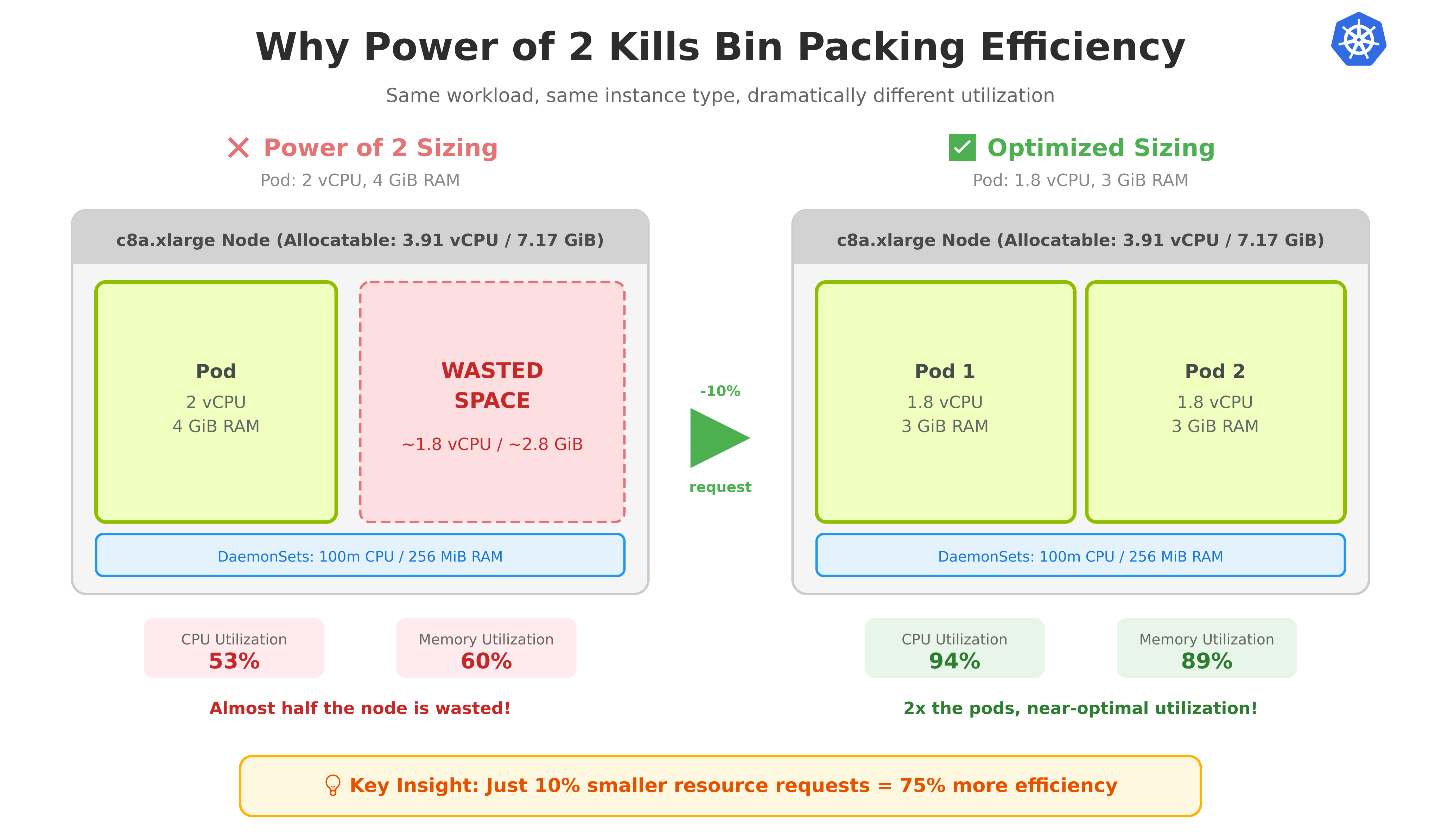
c8a.xlarge is enough for a single pod, but not for 2 - so we'll end up with 1 pod on a c8a.xlarge node with utilization of 53% CPU / 60% Memory (2,100m / 3,910m and 4,352MiB / ~7,168 MiB).
We'll be wasting almost half of our node.
Going for a larger instance can make this issue less bad, for example if we would go with c8a.2xlarge we'll end up with 3 pods on a c8a.2xlarge node with utilization of 77% CPU / 81% Memory (6,100m / 7,900m and 12,544MiB / 15,360 MiB).
Solution
Try to avoid the power of 2 instinct and try to think about where your workloads will run.
If for example we needed 3 pods of 2 VCPU and 4 GiB of RAM, unless we have a good reason to go with this specific size, choosing smaller/bigger pods and changing replicas accordingly will save us a lot of money.
For example, reducing the request to 1.8 vCPU and 3 GiB RAM allows the pod to fit efficiently on c8a.large with 95% CPU / 98% Memory utilization, or 2 pods on c8a.xlarge with 94% CPU / 89% Memory utilization.
Specific usage numbers:
-
c8a.large: 1,900m / 2,000m used. -
c8a.xlarge: 3,700m / 3,910m used.
In this example we made the pods smaller, but sometimes it makes more sense to go larger — requesting 3.8 vCPU instead of 2 vCPU can pack better on certain node sizes for example.
💡 Tip: Avoid "over-fitting" your resource requests to specific node sizes or DaemonSet configurations—these can change over time. Aim for small improvements (like avoiding exact powers of 2) rather than calculating exact values to maximize utilization.
Not rightsizing your resources
In the previous section, we've seen that small tweaking of manual pod sizing can make a big change.
In general we want our resources to be accurate as well.
Allocating too much
For example, requesting 3 GiB of memory for a workload that rarely uses more than 2 GiB of memory is a waste of resources. The same can be said with allocating CPU.
Allocating too little
Requesting too few resources can result either in failures in the workloads that are under-allocated or with a harder thing to detect - the issue of noisy neighbors.
If many of your workloads are using 110% of their allocation, it's likely that some of them won't have available resources on the actual node.
Solution
Don't guess the workload resource requirements, measure them.
Usually you should start with higher resources than what you think is suitable and after a while you can measure the actual usage and adjust accordingly.
There are tools for doing that automatically or semi-automatically - like krr or VPA and other commercial tools.
Personally, I think that for realtime needs of your workloads Horizontal scaling should be preferred over Vertical scaling - but now that in-place pod resize has reached stable in Kubernetes v1.35 and many of its earlier limitations have been removed, Vertical scaling has become a much more viable option for certain use-cases.
Choosing the wrong instance types
A lot of times, teams choose a limited amount of instance types for their clusters.
This was very common during the early days of Cluster Autoscaler.
Not allowing for enough sizes
Let's take our example from the previous section, we have a 2 VCPU and 4 GiB of RAM workload.
If we would only allow for c8a.large and c8a.xlarge we would end up with 1 pod on a c8a.xlarge node with utilization of around 50% but by allowing for c8a.2xlarge we would sometimes end up with 3 pods for closer to 80% utilization.
Generally speaking, larger nodes are more cost-efficient, you only need one set of DaemonSets and the Kubelet overhead and similar are lower for more resources you use - for example in CPU 6% is reserved for the first core, while only 0.25% will be reserved for the fourth core onwards.
Not mixing instance families
The cloud-providers have different categories for instance types, for example AWS has c, m, r families - compute optimized / general purpose / memory optimized, respectively.
Depending on your use-case, some families may suit your workload better than others.
I recall a specific case where a workload needed to be scaled up due to memory issues. Our DevOps team was concerned that the new instance size would be too large - some of the largest in our fleet.
Upon investigation, we found that our cluster was mostly configured with c and m families. We weren't utilizing the CPU we already had, we just needed more RAM. Switching to r family instances allowed us to use a smaller tier (e.g., replacing c/m 8xlarge with r 4xlarge), effectively solving the issue while saving money.
Not allowing for instance variants
Within each family, there are multiple variants. For example, within the c (compute) family, we have for the latest generation:
- c8a
- c8g
- c8gb
- c8gd
- c8gn
- c8i-flex
- c8i
Usually the "special" instance types are more expensive than the "regular" ones, but can offer better performance in some areas (like better EBS performance for c8gb or better network performance for c8gn).
Not preparing for ARM instances
All those instance types that ended with g (c8g for example) are ARM instances based on AWS Graviton.
They are usually cheaper than their Intel/AMD based instances and offer better price-to-performance.
Unlike the previous recommendation, this is usually not just "plug and play" and you need to have your workloads support ARM (in a lot of languages and tools it's very easy).
Lack of visibility
It can be tough in large environments to find where you're less efficient or where most of the money goes.
Optimizing by hunch often fails. You might spend a week improving a service by 80%, only to realize the total cost was just $200/month. Meanwhile, a 5% improvement on another area could have saved you $5,000/month.
There are some great Open-source tools built for that, like OpenCost.
Not considering Spot Instances and Reserved Capacity
My view about this one may be a bit skewed as I used to work on Spot Ocean for 4 years.
At least some parts of your workload can run on Spot Instances. This is yet again another thing that is not a "plug and play" solution — Not all workloads can run on spot instances.
One of the things that was surprising to me when I started is that Spot was fully committed to "drinking your own champagne" and most of our workloads ran on spot instances and Spot products (when I started it was Spot Elastigroup and during my time there we migrated to Spot Ocean) - I would say that over 90% of our workloads ran on spot instances (excluding managed databases and very specific services/databases).
Spot Instances can be a great way to save A LOT of money, but it should be handled with care.
For workloads that are stable and predictable, don't forget about Reserved Instances (or Savings Plans on AWS / Committed Use Discounts on GCP). If you know you'll be running a baseline capacity 24/7, committing to 1-3 years can save 30-60% compared to on-demand pricing.
Not thinking about Network costs
Network cost is something that is often overlooked, but can be a significant cost.
For example in AWS:
| Traffic Type | Cost |
|---|---|
| Internet → EC2 (inbound) | Free |
| EC2 → Internet (outbound) | Free first 100 GB, then $0.09/GB |
| EC2 → Another AWS region | $0.02/GB |
| Within same AZ | Free |
| Between AZs (same region) | $0.02/GB ($0.01 in + $0.01 out) |
For a usual cluster, transfer to outside is not "negotiable" (e.g it's what you return to your customers) but transfer within the same region is.
Optimizing your workloads to be closer to each other can save you a lot of money and improve performance.
There are other Kubernetes features you can use to optimize this, like topology-aware routing and service traffic distribution.
Not using Auto-scaling
Auto-scaling can save you money when done right, there are 2 "layers" for it:
- Workload auto-scaling - you can use tools like HPA or KEDA to scale your workloads based on metrics or events.
- Node auto-scaling - you can use tools like Cluster Autoscaler, Karpenter or Spot Ocean to scale your nodes to your workload's requirements.
⚠️ Warning: Be careful with aggressive HPA configurations on latency-sensitive workloads. Too-tight thresholds can cause oscillation—rapidly scaling up and down—which wastes resources and can actually hurt performance. Test your scaling behavior under realistic load before going to production.
When discussing cost, it's obvious that we want our compute capacity to fit our workload's requirements with as little waste as possible. However, our workloads' demands change over time according to our load and other factors (like holidays, etc).
Paying for peak capacity while your customers are asleep is simply burning money.
Beyond standard auto-scalers, specialized tools can help with niche use cases:
- Vcluster: Runs virtual clusters inside a host cluster. Perfect for isolating multi-tenant dev/test environments without paying for multiple control planes (among other use cases).
- Snorlax: Automatically sleeps selected workloads on nights and weekends, ensuring you only pay for resources when developers are actually working.
Or if you have serverless workloads, you can use a tool like Knative which offers the ability to scale to zero and scale up to the required capacity. This can be great for cases where you can "afford" cold starts.
Mismanaging Node Pools
Most node auto-scaling tools group different "kinds" of nodes into different pools, for Karpenter it's called Node Pools, for Spot Ocean it's called Virtual Node Groups.
These are similar in concept and allow you to create a group of nodes with the same configurations, you can filter different instance types, different behaviors (different set of labels/taints, how often can it be scaled down, how many at a time, etc).
Separating too much
One of Kubernetes' main cost advantages is resource sharing. Workloads with different needs (e.g., CPU-intensive vs. Memory-intensive) can run on the same node, maximizing overall utilization.
However, teams often over-segment their node pools, isolating workloads and losing this efficiency. A common mistake is creating separate pools for Spot and On-Demand instances. This can lead to situations where Spot pods trigger a new Spot node while your existing On-Demand nodes have ample free space. The cheapest instance is no instance at all.
Instead, consider combining them. By using Pod PriorityClasses, you can allow Spot workloads to run on "spare" On-Demand capacity. If a critical On-Demand pod needs that space later, the scheduler will simply evict the lower-priority Spot pod to make room.
Not separating enough
A common case where you probably should separate your node pools is when you have workloads that shouldn't be scaled down, such as long-running batch jobs or StatefulSets with slow recovery times.
In this case, it can help you avoid the case where you have this very large node that made sense when it was scaled up, but now after a while only one pod that can't be scaled down is running on it, and you're paying for a very large node that is only running one pod.
It's important to note that you can make this scenario uncommon even without a dedicated node pool but it requires some more work and planning.
The Hidden Cost of Rapid Scale-Down
Karpenter, for example, by default will scale down nodes as soon as they are underutilized, but you can configure it to wait for a certain amount of time before scaling down a node.
Now you're probably wondering why would I do that? It's wasting money right?
Technically, yes. However, since developers often lack access to configure node pools, they tend to react with the only tools they have: locking down workloads. They might set restrictive PDBs or annotations to prevent eviction, which ironically leads to worse bin-packing.
Depending on your use case, even a few minutes of consolidation delay can make a huge difference in developer experience without significantly impacting costs.
Bottom line
Kubernetes is powerful, but without proper planning, it can become a financial black hole.
Go check your node utilization right now. I bet you'll find a 'perfect' 4GB pod sitting on a partially empty node.


Top comments (0)