


On paper, lift-and-shift VM migration to Kubernetes sounds simple. Compute can be moved. Storage can be remapped. But many migration projects stall at the network boundary. VM workloads are often tied to IP addresses, network segments, firewall rules, and routing models that already exist in the wider environment. That is where lift-and-shift becomes much harder than it first appears.
Why lift-and-shift migration is challenging
In a traditional hypervisor environment:
- A VM connects to a network the rest of the data center already understands.
- Its IP address is a first-class citizen of the network.
- Firewalls, routers, monitoring tools, and peer applications know how to reach it.
- Existing application dependencies are often built around that network identity.
Default Kubernetes pod networking works very differently:
- Pod IPs usually come from a cluster-managed pod CIDR.
- Those IPs are mainly meaningful inside the Kubernetes cluster.
- The upstream network usually does not have direct visibility into pod networks.
- The original network segments from the VM world are not preserved by default.
This creates a major problem for VM migration:
- The workload can no longer keep the same network presence it had before.
- Teams often need to introduce VIPs or reconfigure the networking settings of the VM.
- That adds more complexity since changing the IP of the VM also requires changes to network firewall and load balancer configuration.
- At scale, it can make migration slower, more expensive, and harder to justify.
So while Kubernetes can be a strong platform for running VM workloads, default pod networking is often not a natural fit for lift-and-shift migration. The networking gap is one of the biggest reasons these projects become more complex than expected.
The lack of network continuity is shown in the image below.
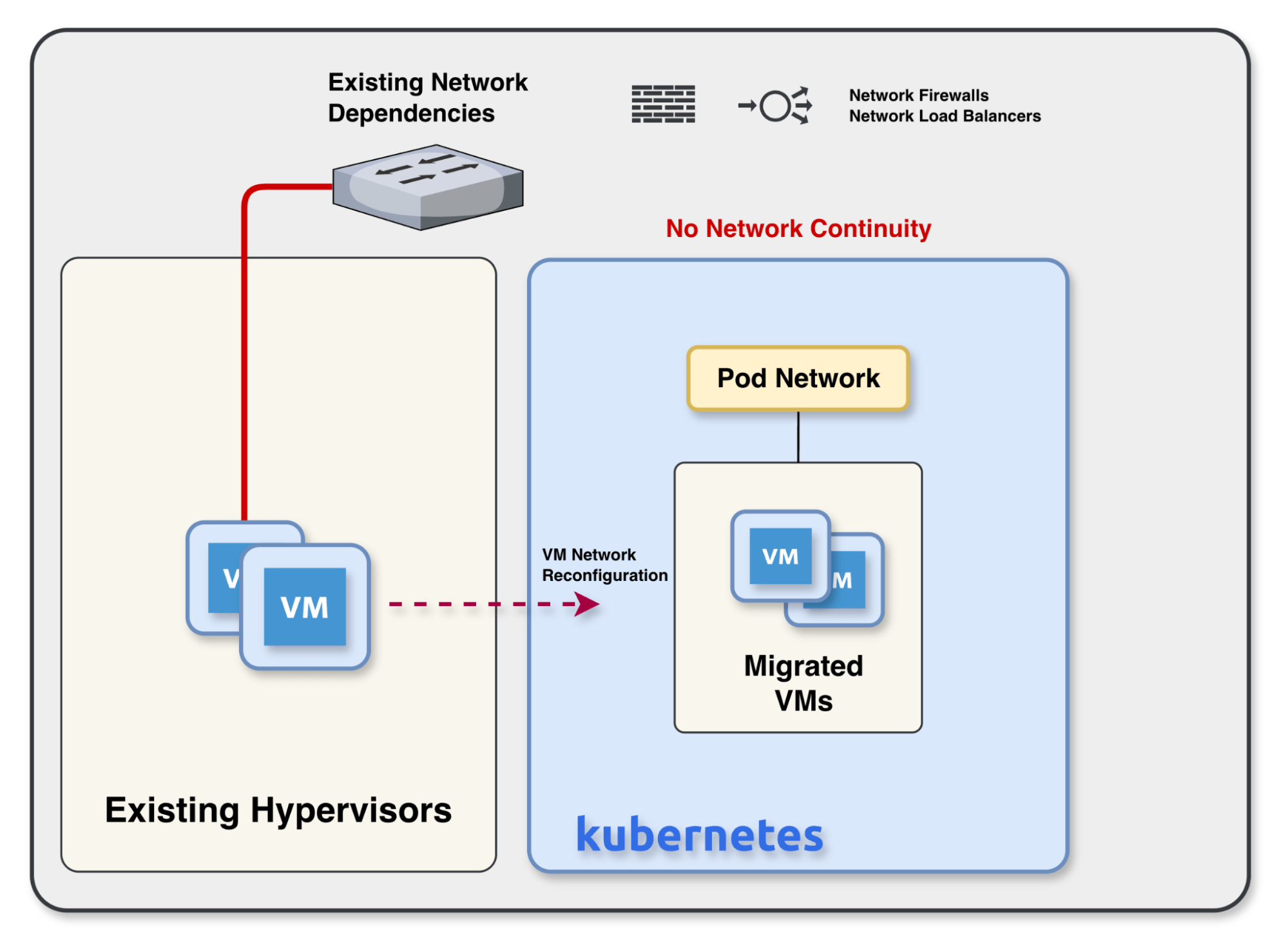
Default pod networking often creates a gap in network continuity, forcing complex reconfigurations and breaking existing dependencies like firewalls and load balancers.
Introducing Calico L2 Bridge Networks
Calico L2 Bridge Networks are designed to close that gap. Instead of forcing the VM to adapt to the Kubernetes pod network, Calico allows administrators to extend the existing layer 2 network all the way to the virtual machine running in Kubernetes.
Administrators can define a network resource in Kubernetes, and Calico creates a bridge on the cluster nodes to extend external networks. A trunk interface can be attached to the bridge, allowing VLANs to be carried all the way to the virtual machine. During migration, the migration tool can map the VM’s existing interface to interface definitions in the cluster and also inform Calico of the VM’s IP address, so Calico can keep track of that address throughout the VM’s lifecycle. Calico does all the underlying plumbing to ensure that the VM retains its network connectivity after migration.
The key point is that the VM does not need a brand new networking model just because it moved to Kubernetes. The same layer 2 network structure can be preserved, which makes lift-and-shift migration much more practical.
Why this matters
- Existing VLAN-based connectivity can be extended directly to the VM.
- Administrators do not need to re-address the VM or place it behind VIPs just to make migration work.
- Multiple VLANs can be supported through the same trunk-backed bridge.
- The network can move with the VM, instead of becoming a separate redesign project.
The network continuity offered by Calico L2 Bridge Networks is shown in the image below.
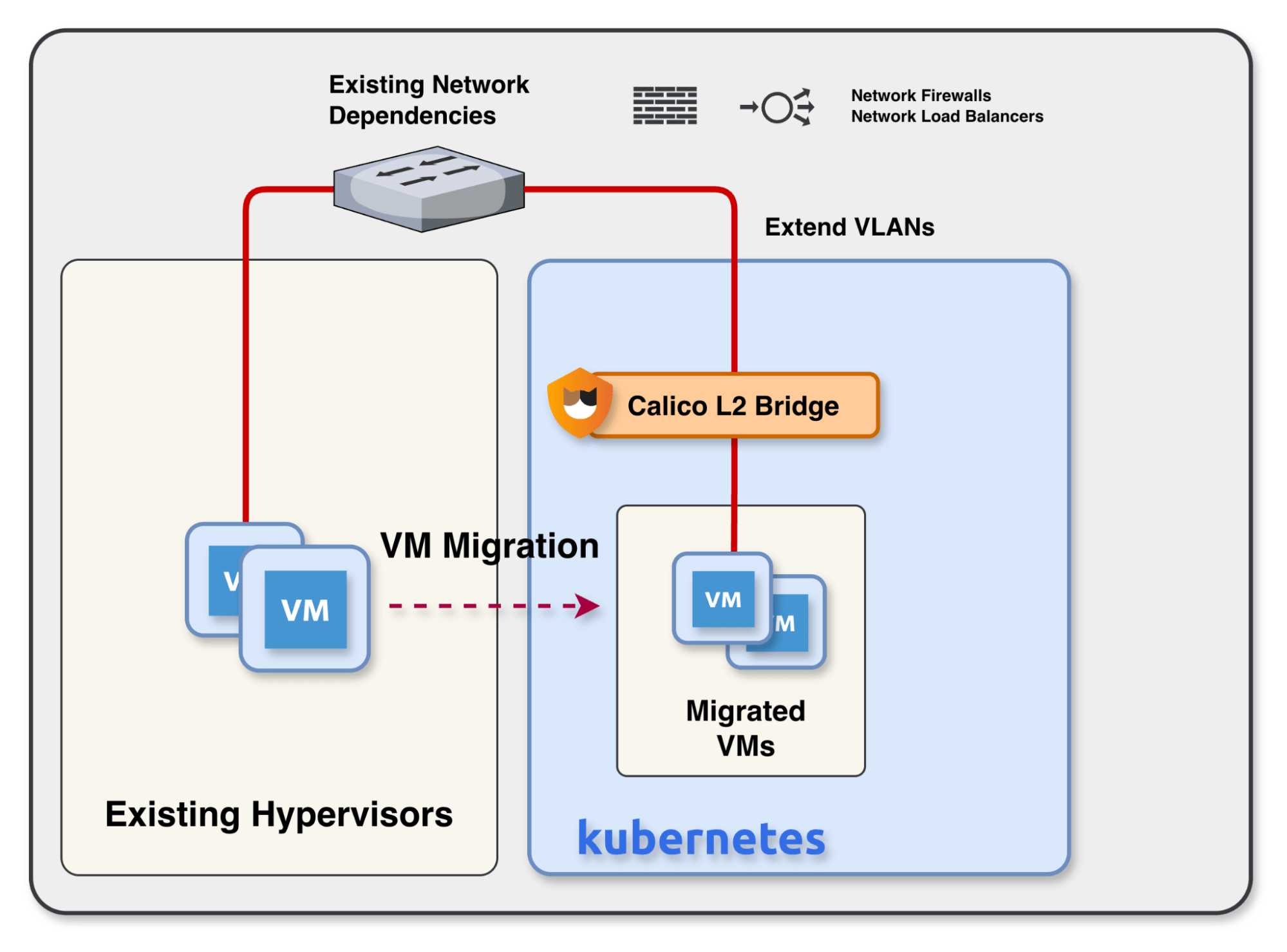
Calico L2 Bridge Networks allow you to extend existing Layer 2 infrastructure directly into Kubernetes, enabling “lift-and-shift” migrations that preserve original IP addresses and VLANs.
Readiness Assessment: Is L2 Bridge Networking Right for Your Migration?
Ask your infrastructure and networking teams:
- Do our existing VMs rely on specific VLAN tags for firewall policy enforcement?
- Will re-addressing our workloads require updating multiple external load balancers or hardcoded application dependencies?
- Do we need to maintain L2 adjacency between our legacy VM clusters and new Kubernetes nodes during a phased migration?
- Is network observability (via eBPF) a requirement for our compliance or troubleshooting workflows post-migration?
Benefits After Migration
Calico L2 Bridge Networks do more than simplify the move into Kubernetes. Once the VM is running in Kubernetes, Calico can also bring the same operational advantages that teams already expect for cloud-native workloads.
Network Observability
One major benefit is observability. Calico provides visibility into network traffic for these VM interfaces, giving administrators a much clearer view of how workloads are communicating after migration. Because Calico uses eBPF, it can capture deep insights into network behavior without relying on external tooling or guesswork. That makes it easier to understand traffic patterns, troubleshoot issues, and operate migrated VMs with more confidence.
Calico Policy Enforcement
Another major benefit is policy enforcement. Administrators can apply declarative network policy directly to these VM interfaces using Kubernetes-native constructs. Policies can be based on labels, which fits naturally into Kubernetes operations, and selectors can be used to target specific VLANs or external networks when defining policy. Teams can also migrate networking policy from their previous hypervisor environment into Calico network policy, helping them maintain the same security posture as workloads move into Kubernetes. In practice, that means teams can preserve the connectivity model they need while still applying consistent, modern security controls to VM workloads inside Kubernetes.
Live Migration
Live migration is another important benefit. Once the VM is running in Kubernetes, it can be moved from one node to another while retaining the same network configuration. That is critical for day-2 operations, because it means teams can take advantage of Kubernetes-based VM mobility without having to rework network settings each time a workload moves. The network identity stays consistent even as the VM is migrated across the cluster.
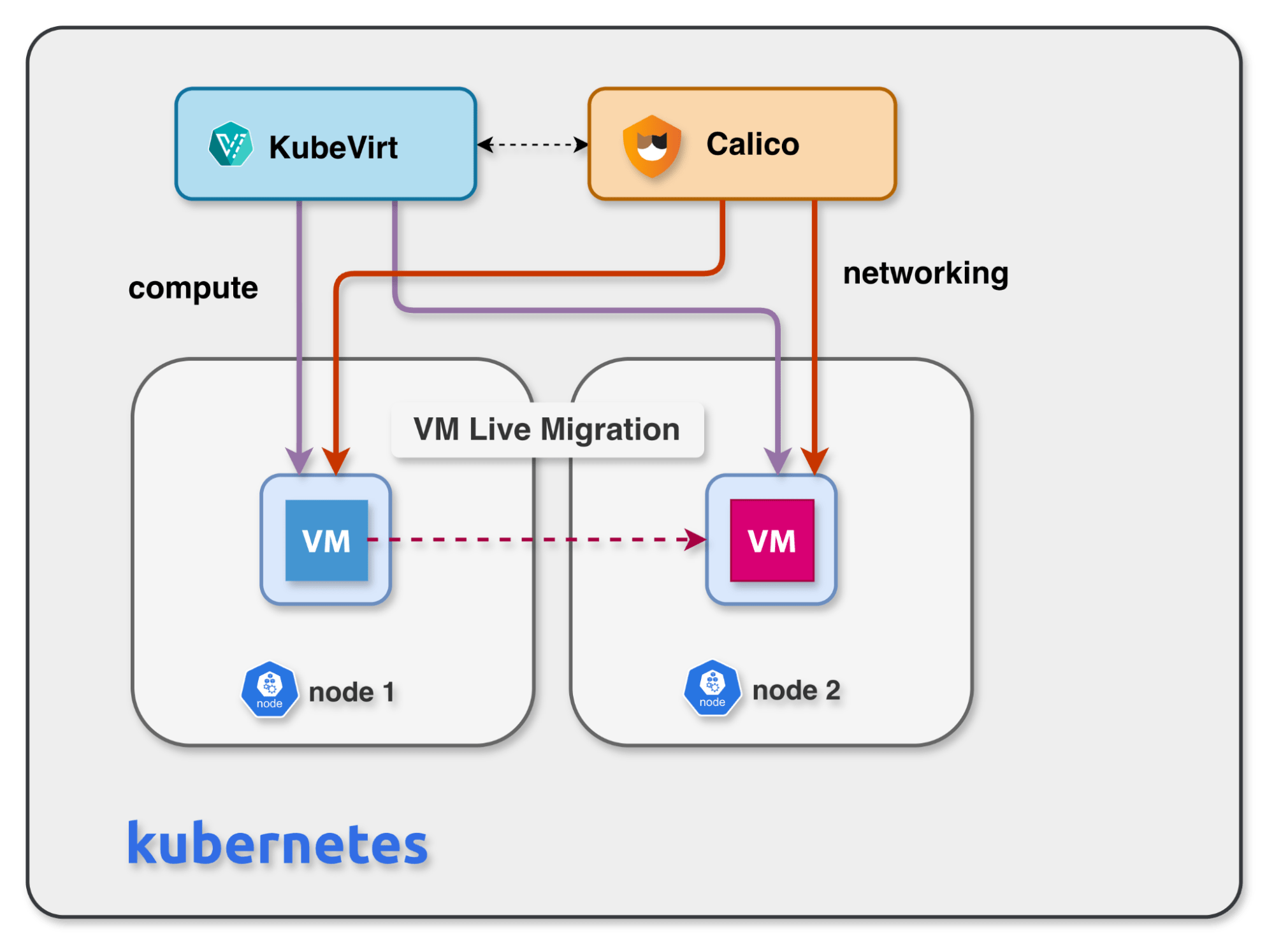
By decoupling compute and networking, Calico ensures that migrated VMs can move between cluster nodes while retaining their original network configuration and identity.
Conclusion
Lift-and-shift VM migration to Kubernetes often breaks down because the network model does not move with the workload. That forces teams to introduce workarounds such as VIPs, re-addressing, and additional operational complexity, which can quickly turn a simple migration plan into a much larger project.
Calico L2 Bridge Networks help remove that barrier by extending existing layer 2 networks all the way to the VM inside Kubernetes. That means teams can preserve familiar network configurations during migration while also gaining the advantages of running VMs on Kubernetes, including observability, declarative policy, and live migration. Instead of treating networking as a migration blocker, organizations can use Calico to make it part of a cleaner and more practical path forward.
Webinar Recording
Available on demand
Calico L2 bridge networking for virtual machines
Migrating VMs to Kubernetes? Learn how to preserve your existing IPs, VLANs, and security policies — no network rebuild required.
“Lift and shift” VM migrations with zero IP changes
Maintain existing VLANs and security dependencies
Expert guidance from Tigera’s networking team
The post Lift-and-Shift VMs to Kubernetes with Calico L2 Bridge Networks appeared first on Tigera - Creator of Calico.


Top comments (0)