

Introduction
I am preparing to use Caliburn.Micro together with MEF to build an IDE-like framework similar to VS2010. It should support plugin development, configurable menus and toolbars, and features such as Options, multi-language support, and theming. On the one hand this is a way to consolidate technical experience; on the other it can serve as a guide for friends new to WPF or interested in Caliburn.Micro.
I could not think of a great name, so the project is called Illusion—I hope it is not an illusion. 
The starting point of the project is not complicated: use MEF for plugin development, DirectoryCatalog for plugin discovery, and Export/Import to build menus, toolbars, and so on. Caliburn.Micro is an open-source framework based on the MVVM pattern. Its code is concise without being simplistic, and it is a sharp tool for enterprise application development.
Implementation
The project layout looks like this:
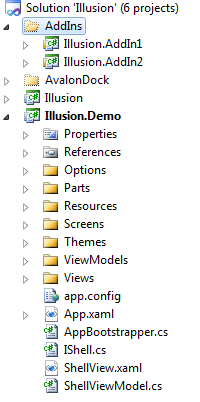
The Illusion project is the core framework. Illusion.Demo is the EXE project that uses Illusion. The AddIns folder holds several plugin projects. The solution uses the mature open-source AvalonDock for docking windows.
The running program:
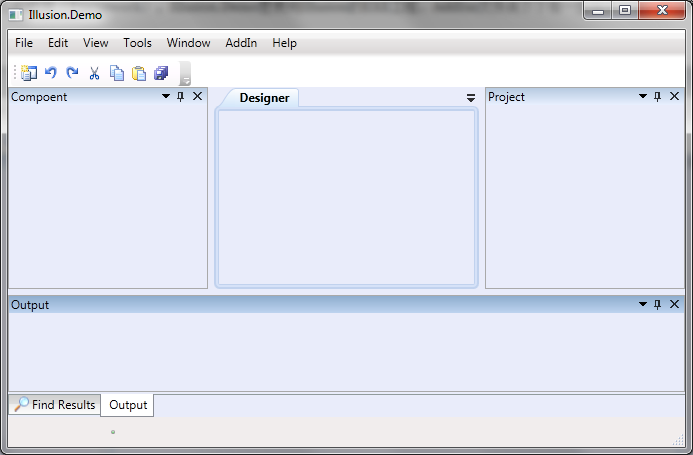
The project introduces two concepts: Part and Screen. As shown above, child items of the menu and toolbar are called Parts; docked windows such as Project are called Screens.
Configuration
The code to add a menu item looks like this:
[MenuPart(BaseMenu = WorkbenchName.WindowPart, PreviousMenu = WorkbenchName.CloseDocumentsPart)]
public class ResetLayoutPart : MenuPart
{
    public ResetLayoutPart()
        : base(WorkbenchName.ResetLayoutPart)
    {
        Icon = "Icons.16x16.CopyIcon";
    }

    public override void Execute()
    {
        base.Execute();
    }
}
The MenuPart attribute on the first line inherits from ExportAttribute and is equivalent to [Export(typeof(IMenuPart))]. BaseMenu and PreviousMenu specify the parent item and the preceding menu item of ResetLayoutPart, which together determine where the menu item appears. When the menu is clicked, Execute is called—put the menu’s action code there. You can override CanExecute to decide whether the menu is enabled, and set the IsVisible property to control visibility.
Often the same item appears both in a menu and on a toolbar. To avoid duplicate code, a MenuToolPart class is defined so that a Part can serve as both a menu item and a toolbar button.
Adding a Screen is similar to adding a Part and is omitted here.
Other Notes
You can add plugin projects that export Parts, Screens, and so on.
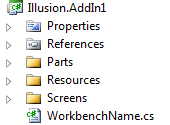
At runtime, DirectoryCatalog watches the AddIns directory and imports all plugins.
Other features—Options, multi-language, theming, etc.—are left to the code and are not described one by one here.
Chatter
The Illusion project has been written on and off for over a week. Turning ideas into code is one thing; after the passion fades comes emptiness. Working behind closed doors takes patience. Over the years I have written a lot of code in my spare time and then left it to gather dust.
I am uploading the code so we can discuss it. If you are interested in this area, feel free to contact me. I am not attaching any restrictive license; corrections are welcome, and so is taking whatever is useful. If it truly helps you, please leave a comment or give it a thumbs-up. As the saying goes in the jianghu:
Be a brother—be decent.
Download the Illusion code from here. It uses System.Windows.Interactivity and requires Expression Blend 4 or later.


Top comments (0)