TBH I don't think CSS is hard. Like any other language, if you are not working with it consistently, it won't stick. I find JS hard due to it not being the language I work with continously. With that said, I would say:
Learn the Basics first
Stay abreast to the basics before trying a framework.
Always keep a resource open, w3schools.com, css-tricks.com, dev.to or Mozilla.
Learn layout techniques before frameworks
In many cases you don't really need a framework if you learn how to utilize grid and flexbox. However, I use them in conjuction with Bootstrap. Either way, these techniques are quite powerful on their own.
If you ever find yourself wondering why a style is being overwritten, it maybe due to a class being to general and not specific enough. This is where CSS Specificity comes in.
Learn about CSS specificity, Emma Wedekind has a great article addressing this:
There are cases where you may need to center an inline element, block element, flex, grid element, or plain text. There are best and different practices for each case.
I've seen BEM mentioned often as a way to scale CSS. Do you have any experience with it?
I've briefly tried it before and found myself getting tangled in very long class names in complicated components.
One of the newer approaches that looks very promising is that "utility-first" approach. ie. lots of small utility classes that you compose in the HTML and then extract out into component-based classes. What do you think about that?
BEM is mostly about readability. If you are working within a group or with vendors that are familiar with the syntax, even seeing the code for the first time, they wouldn't have to do much to parse what classes are for what. BEM is just a naming convention, so you can still have a "utility-first" approach or atomic design to your CSS.
Overall, you can think of BEM as: '.block__element — modifier' (hence the name)
For example:
Based on the above image, I know at a glance:
This is a card component; with .card being the block
Everything with an "__" (underscore) are child elements that are dependent on the main .card class; title, text, btn, etc.
I also know that the second paragraph has a modifier signified by "--" (double dashes); meaning it inheriting styles but also changing them up; ideally you would want your modifiers below the main styles for "specificity" reasons -- this will cause them not to be overwritten.
Now take the above card for example. The HTML is the same, however,
We have a modifier in the main block. This modifier causes it to be green. Notice the modifier style under the main block style...for the same reason aforementioned--specificity.
Naming
As far as BEM classes getting a bit long. This can happen, however, this can be more the developers issue and not exactly on the naming convention itself. Do we have to spell out the word "button" or can you shorten it to "btn"? Does it still get the idea across? Thats up to you and your team.
Again I highly recommend reading up on BEM. It may or maynot be for you. I found it a bit silly at first but forced myself and my team to use it because we had to collaborate with an off-shore team that uses BEM. After a few days, it became the norm. It doesn't take long to understand the concept, just takes more time getting use to double dashes and underscores.
I've been coding for over 20 years now! (WOAH, do I feel old)
I've touched just about every resource imaginable under the Sun (too bad they were bought out by Oracle)
I once made the comparison between traditional programming languages (C/C++, Java, JavaScript, PHP, etc) vs query (SQL)
Programming languages: you start with nothing, then you have to build something out of it.
Query languages: you start with everything (SELECT *) and then need to filter out what you don't want (WHERE clauses)
I think expanded upon this to add CSS.
Style Sheets: A hybrid between both concepts. You can start with nothing, and build up to create something, OR you can start with everything, and filter down to nothing.
I've been coding for over 20 years now! (WOAH, do I feel old)
I've touched just about every resource imaginable under the Sun (too bad they were bought out by Oracle)
Also, I think CSS is a HELL of a lot easier to learn if someone simply writes a simple raw flat file with basic HTML and CSS in a single file. See how the two interact with one another, and THEN expand out to external files, preprocessors, variable, media queries, and all that other fun advanced stuff.
I think the problem with CSS is a little different than SQL or JS.
The CSS problem has more to do with how you grow your codebase and how to deal with encapsulation vs. reuse. What's essentially "global" and what's not. And then how global rules effect encapsulated CSS.
For example, most of the work I've done with CSS involved building a top-level framework to encompass majority of styling usecases.
I might build a button. But buttons are tricky. You're inheriting from global styles (for typography), then you might have a .button class base which sets some rules, and then you're dealing with individual buttons and their usecases. There's a mix and match of reuse vs redefine and every class definition inherits from a number of parent classes/elements that are only visible in HTML.
The further down you cascade, the more difficult it is to grow that codebase because any small change in a top-level definition can affect everything.
We're already getting to some weird places here. For example, the button-icon will scale improperly with button--large. If this button is placed in some header, the expected button might look different if the header specificity will override it.
And if you do fix those scaling problems, the second you change something (eg. the button--large definition), you'll face problems down the line having to fix those.
use a preprocessors - even if it is PostCSS for the file imports/css bundling
keep a settings file with colors and possibly typography and sizing
write a general CSS framework to encompass most needs (a basic grid, buttons, etc.) and utilities. Make sure the utilities cannot be repurposed other than what they were built for.
write component-specific CSS. Whether that's CSS-in-JS, BEM, or other approaches. Make sure to keep that CSS coupled only to those components
I've really liked the Tailwind approach to CSS which focuses on many MANY utilities that do exactly as they say. You're kind of writing CSS in HTML; however, a key difference is that Tailwind encourages composing their utilities into full components.
I wouldn't say it's hard. I also wouldn't necessarily say it's different.
CSS does something that honestly very few other languages or grammars do as their sole role, so it can look obsequious when compared to the rest of the stack.
I would liken CSS to hard in the same way getting out of bed every day is hard. It's not really that difficult but we're all objectively terrible at it because we're exhausted.
I'm finding a lot of success with CSS modules and BEM.
CSS does something that honestly very few other languages or grammars do as their sole role, so it can look obsequious when compared to the rest of the stack.
I like it for this reason. Its intricacies are deep, CSS animation is crazy.
I would liken CSS to hard in the same way getting out of bed every day is hard.
Yes.
It's been like learning anything else so far, RTFM and practice. You're spot on with this;
the bulk of our tutorials, memories, books, and old websites are just filled with deprecated information.
Some of the best articles I've come across are from 2011-2014.
I think what's hard about CSS isn't the language, but the archaic box model of 1999's tutorials that kludge the internet up.
The problem with CSS isn't the syntax, performance, or even really it's feature set. The problem is that it took so long for many standards to become universally adopted that the bulk of our tutorials, memories, books, and old websites are just filled with deprecated information.
The ecosystem is slow to change and we end up duct taping things together. Do that for 20 years and you may not realize that the duct tape is unnecessary by now. And you've been teaching others to use the duct tape.
For me, the difficult part has always been the actual cascade and working within that model of inheritance that's hidden in CSS but visible only in HTML. eg. the reason why a button color is green isn't because .button is green but because an element several levels up in HTML sets a color property.
And trying to compose styles within that paradigm. Meaning, trying to share styles, when to share styles, when to override, and how to compose distinct elements within each other.
I use Angular's components styles, too! It's actually pretty powerful when coupled with a basic top-level framework for grids and when using SCSS so you can use shared utilities and settings! :)
I think good CSS is hard the way good anything is hard.
If you go hunting for good representations of CSS, you can be surprised by (and learn a lot from) what's out there. Awesome lists on GitHub are a good start. Rachel Andrew (gridbyexample.com) and Chris Coyier (css-tricks.com) have a good decade worth of material around each in-and-out; alistapart.com is also good for shaping your own opinion on a subject -- especially when working alone, since these perspectives won't jump into your head on their own. Brad Frost's Atomic Design (bradfrost.com/blog/post/atomic-web...) has been great for someone who doesn't want to Bootstrap/Foundation/Semantic/Whatever.
After learning (and still relearning) concepts from professionals, the most useful things to me have been reading other people's CSS (digging through html5up.net source code was good for me) and investigating attributes I don't understand on MDN.
Fractal (fractal.build) is a sweet project for creating your own pattern library. There's also webmakerapp.com (a browser extension -- basically a local codepen) which is probably my favourite sandbox for this type of thing.
Personally, I think people got way too caught up abusing classes. I've been making use of data-* tags in HTML to isolate components within the global CSS scope; it's been nice so far --- hard to standardise across an industry, I can imagine, being relatively domain specific, but trying to standardise class usage hasn't gone any better.
Tip: After all this time, there's still no "best way", aside from being sure to leverage Grid/Flexbox within a layout. I'd say the hardest part of CSS is defining said way with future maintenance and flexibility in mind... especially from project to project; over two decades and "how to use it in a clean and scalable way" -- still relevant.
Just want to say, I love CSS. I've seen websites where the CSS is all jumbled and mixed up, and others where the CSS is the neatest and very small — today I came across this, where the CSS is around 50K, including 3 color themes for the whole site: fireship.io (also a very good learning resource!!). I aspire to make my CSS that good!
CSS is rarely taught in a way where someone can really grok it. CSS has been largely deemphasized in curricula for front end web development or introductory courses don’t adequately explain even specificity or box model. It could also be that some engineers lack an appreciation for art and design because throughout school art wasn’t a part of the curricula.
Software dev at Netflix | DC techie | Conference speaker | egghead Instructor | TC39 Educators Committee | Girls Who Code Facilitator | Board game geek | @laurieontech on twitter
CSS is complex because the language itself needs to deal with a ton of different clashes and choose what style to listen to. So there are a number of rules and hierarchies at work that aren't always obvious to the developer writing the CSS.
I put together a starter blog on this topic. In addition to the content there check out the links in the post, a lot of them point to great CSS write-ups and resources.
then you select a element and set a property and the results are different of what was expected. It happened because beyond the selection-property process, you have to know how the elements are displayed: block, inline, etc. Which is some knowledge that is underground the coding itself.
then you try to change something, and it still doesn't work or it breaks in another part. Because there is some hierarchy in the styles. It starts becoming confusing.
It reveals that to be proficient in that case, which means, to be able to translate designs into styles you have to have a knowledge of css but also develop a way of "thinkging in css". I have struggled with it. Because css seems to have many ways to do the same thing, each one deppending on some knowledge that is kind of very specific in a particular case. A case that is not present in the learning material, sometimes.
When you read about css, you read about selector and some basic properties. When you try to reproduce some complex interface, you see that to achieve that result, people did some crazy things that go very beyond a simples pair of selectors and properties. I mean, they start improvising ways to make that happen in the base of trying. It makes it seems very difficult, since when it gets to real world apps, there is not a consistent way of thinking how to get that result. For me, it seems always a battle of what I will select and then apply styles until the battle is over.
the last thing is that we usually are in a hurry to see the final state of what we want to build, and when we realize that to build it requires a ton of styling, it looks that it was much more complicated than it should be. Styling is like describing an "image" with these properties and it can get very verbose.


TBH I don't think CSS is hard. Like any other language, if you are not working with it consistently, it won't stick. I find JS hard due to it not being the language I work with continously. With that said, I would say:
Learn the Basics first
Learn layout techniques before frameworks
In many cases you don't really need a framework if you learn how to utilize grid and flexbox. However, I use them in conjuction with Bootstrap. Either way, these techniques are quite powerful on their own.
Conquer the Cascade with Specificity
If you ever find yourself wondering why a style is being overwritten, it maybe due to a class being to general and not specific enough. This is where CSS Specificity comes in.
CSS Specificity
Emma Wedekind ✨ ・ Jan 21 ・ 4 min read
Learn to Center All the Things
There are cases where you may need to center an inline element, block element, flex, grid element, or plain text. There are best and different practices for each case.
Next Step Advance Learning
Once you are more advanced and comfortable with the basics and all of the above, try:
BEM: (Block‑Element‑Modifier)
Friends with BEM-efits
Angela Damaso ・ Jan 30 '18 ・ 3 min read
SASS: (Syntactically Awesome Style Sheets)
Beginner's guide to SASS
Akanksha Sharma ・ Apr 21 '18 ・ 3 min read
Tools for Sass:
Hopefully this helps.
I've seen BEM mentioned often as a way to scale CSS. Do you have any experience with it?
I've briefly tried it before and found myself getting tangled in very long class names in complicated components.
One of the newer approaches that looks very promising is that "utility-first" approach. ie. lots of small utility classes that you compose in the HTML and then extract out into component-based classes. What do you think about that?
BEM is mostly about readability. If you are working within a group or with vendors that are familiar with the syntax, even seeing the code for the first time, they wouldn't have to do much to parse what classes are for what. BEM is just a naming convention, so you can still have a "utility-first" approach or atomic design to your CSS.
Overall, you can think of BEM as:
'.block__element — modifier' (hence the name)
For example:
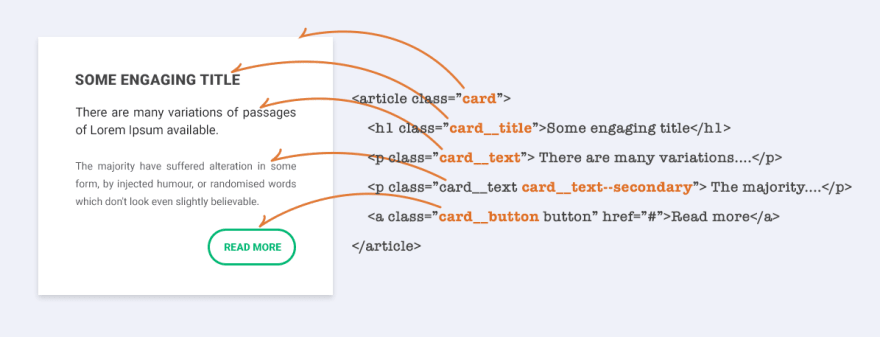
Based on the above image, I know at a glance:
.cardbeing the block.cardclass; title, text, btn, etc.Now take the above card for example. The HTML is the same, however,
We have a modifier in the main block. This modifier causes it to be green. Notice the modifier style under the main block style...for the same reason aforementioned--specificity.
Naming
As far as BEM classes getting a bit long. This can happen, however, this can be more the developers issue and not exactly on the naming convention itself. Do we have to spell out the word "button" or can you shorten it to "btn"? Does it still get the idea across? Thats up to you and your team.
Again I highly recommend reading up on BEM. It may or maynot be for you. I found it a bit silly at first but forced myself and my team to use it because we had to collaborate with an off-shore team that uses BEM. After a few days, it became the norm. It doesn't take long to understand the concept, just takes more time getting use to double dashes and underscores.
credit:
5 Reasons To Use BEM (a.k.a. why is BEM G.R.E.A.T.)
CSS isn't "hard", it is simply "different"
I once made the comparison between traditional programming languages (C/C++, Java, JavaScript, PHP, etc) vs query (SQL)
Programming languages: you start with nothing, then you have to build something out of it.
Query languages: you start with everything (SELECT *) and then need to filter out what you don't want (WHERE clauses)
I think expanded upon this to add CSS.
Style Sheets: A hybrid between both concepts. You can start with nothing, and build up to create something, OR you can start with everything, and filter down to nothing.
Also, I think CSS is a HELL of a lot easier to learn if someone simply writes a simple raw flat file with basic HTML and CSS in a single file. See how the two interact with one another, and THEN expand out to external files, preprocessors, variable, media queries, and all that other fun advanced stuff.
I think the problem with CSS is a little different than SQL or JS.
The CSS problem has more to do with how you grow your codebase and how to deal with encapsulation vs. reuse. What's essentially "global" and what's not. And then how global rules effect encapsulated CSS.
For example, most of the work I've done with CSS involved building a top-level framework to encompass majority of styling usecases.
I might build a button. But buttons are tricky. You're inheriting from global styles (for typography), then you might have a
.buttonclass base which sets some rules, and then you're dealing with individual buttons and their usecases. There's a mix and match of reuse vs redefine and every class definition inherits from a number of parent classes/elements that are only visible in HTML.The further down you cascade, the more difficult it is to grow that codebase because any small change in a top-level definition can affect everything.
Here's my example:
Now imagine that within a button, you want to display an icon with some special properties:
We're already getting to some weird places here. For example, the
button-iconwill scale improperly withbutton--large. If this button is placed in some header, the expected button might look different if the header specificity will override it.And if you do fix those scaling problems, the second you change something (eg. the
button--largedefinition), you'll face problems down the line having to fix those.My own approach:
I've really liked the Tailwind approach to CSS which focuses on many MANY utilities that do exactly as they say. You're kind of writing CSS in HTML; however, a key difference is that Tailwind encourages composing their utilities into full components.
I wouldn't say it's hard. I also wouldn't necessarily say it's different.
CSS does something that honestly very few other languages or grammars do as their sole role, so it can look obsequious when compared to the rest of the stack.
I would liken CSS to hard in the same way getting out of bed every day is hard. It's not really that difficult but we're all objectively terrible at it because we're exhausted.
I'm finding a lot of success with CSS modules and BEM.
I like it for this reason. Its intricacies are deep, CSS animation is crazy.
Yes.
It's been like learning anything else so far, RTFM and practice. You're spot on with this;
Some of the best articles I've come across are from 2011-2014.
So true! Namely, css-tricks has always been my go to.
Well yes. Gems do exist. But we still have new sites telling people to load script tags in the
<body>tag instead as well.I load my script tags in the
bodytag. What's wrong with that?I think the pendulum did a back-and-forth on that one.
I remember reading about how it was an awful thing to do because separation of concerns -- which I think lead to the abuse of classes.
Now I read about how inline CSS is useful to optimise first page load for AMP and other stacks.
I think what's hard about CSS isn't the language, but the archaic box model of 1999's tutorials that kludge the internet up.
The problem with CSS isn't the syntax, performance, or even really it's feature set. The problem is that it took so long for many standards to become universally adopted that the bulk of our tutorials, memories, books, and old websites are just filled with deprecated information.
The ecosystem is slow to change and we end up duct taping things together. Do that for 20 years and you may not realize that the duct tape is unnecessary by now. And you've been teaching others to use the duct tape.
For me, the difficult part has always been the actual cascade and working within that model of inheritance that's hidden in CSS but visible only in HTML. eg. the reason why a button color is green isn't because
.buttonis green but because an element several levels up in HTML sets acolorproperty.And trying to compose styles within that paradigm. Meaning, trying to share styles, when to share styles, when to override, and how to compose distinct elements within each other.
I do think that
SCSSor similar should become the standard. There's no reason it shouldn't at this point.With the way
SCSSand other postprocessor syntax is structured, you can visualize the hierarchy better.I also think people need to be taught about the magical
unsetvalue for any property.For sure. I am admittedly being spoiled by Angular's View Encapsulation. I hope that's the future of CSS.
I use Angular's components
styles, too! It's actually pretty powerful when coupled with a basic top-level framework for grids and when using SCSS so you can use shared utilities and settings! :)I think good CSS is hard the way good anything is hard.
If you go hunting for good representations of CSS, you can be surprised by (and learn a lot from) what's out there. Awesome lists on GitHub are a good start. Rachel Andrew (gridbyexample.com) and Chris Coyier (css-tricks.com) have a good decade worth of material around each in-and-out; alistapart.com is also good for shaping your own opinion on a subject -- especially when working alone, since these perspectives won't jump into your head on their own. Brad Frost's Atomic Design (bradfrost.com/blog/post/atomic-web...) has been great for someone who doesn't want to Bootstrap/Foundation/Semantic/Whatever.
After learning (and still relearning) concepts from professionals, the most useful things to me have been reading other people's CSS (digging through html5up.net source code was good for me) and investigating attributes I don't understand on MDN.
Fractal (fractal.build) is a sweet project for creating your own pattern library. There's also webmakerapp.com (a browser extension -- basically a local codepen) which is probably my favourite sandbox for this type of thing.
Personally, I think people got way too caught up abusing classes. I've been making use of
data-*tags in HTML to isolate components within the global CSS scope; it's been nice so far --- hard to standardise across an industry, I can imagine, being relatively domain specific, but trying to standardise class usage hasn't gone any better.Tip: After all this time, there's still no "best way", aside from being sure to leverage Grid/Flexbox within a layout. I'd say the hardest part of CSS is defining said way with future maintenance and flexibility in mind... especially from project to project; over two decades and "how to use it in a clean and scalable way" -- still relevant.
Just want to say, I love CSS. I've seen websites where the CSS is all jumbled and mixed up, and others where the CSS is the neatest and very small — today I came across this, where the CSS is around 50K, including 3 color themes for the whole site: fireship.io (also a very good learning resource!!). I aspire to make my CSS that good!
CSS is rarely taught in a way where someone can really grok it. CSS has been largely deemphasized in curricula for front end web development or introductory courses don’t adequately explain even specificity or box model. It could also be that some engineers lack an appreciation for art and design because throughout school art wasn’t a part of the curricula.
CSS is complex because the language itself needs to deal with a ton of different clashes and choose what style to listen to. So there are a number of rules and hierarchies at work that aren't always obvious to the developer writing the CSS.
I put together a starter blog on this topic. In addition to the content there check out the links in the post, a lot of them point to great CSS write-ups and resources.
The Layers of CSS
Laurie
CSS as a language is simple:
CSS isn't hard. Getting it to work in every browser on every device is hard.