


Ever wanted to display team lineups like ESPN or Sky Sports in your React Native app? Today, you'll learn how to build professional football lineup displays that look amazing and work flawlessly.
 arbab-io
/
react-native-football-formation
arbab-io
/
react-native-football-formation
Interactive drag-and-drop football formation builder for React Native. Configurable pitch, player tokens, and formation presets.
React Native Football Formation
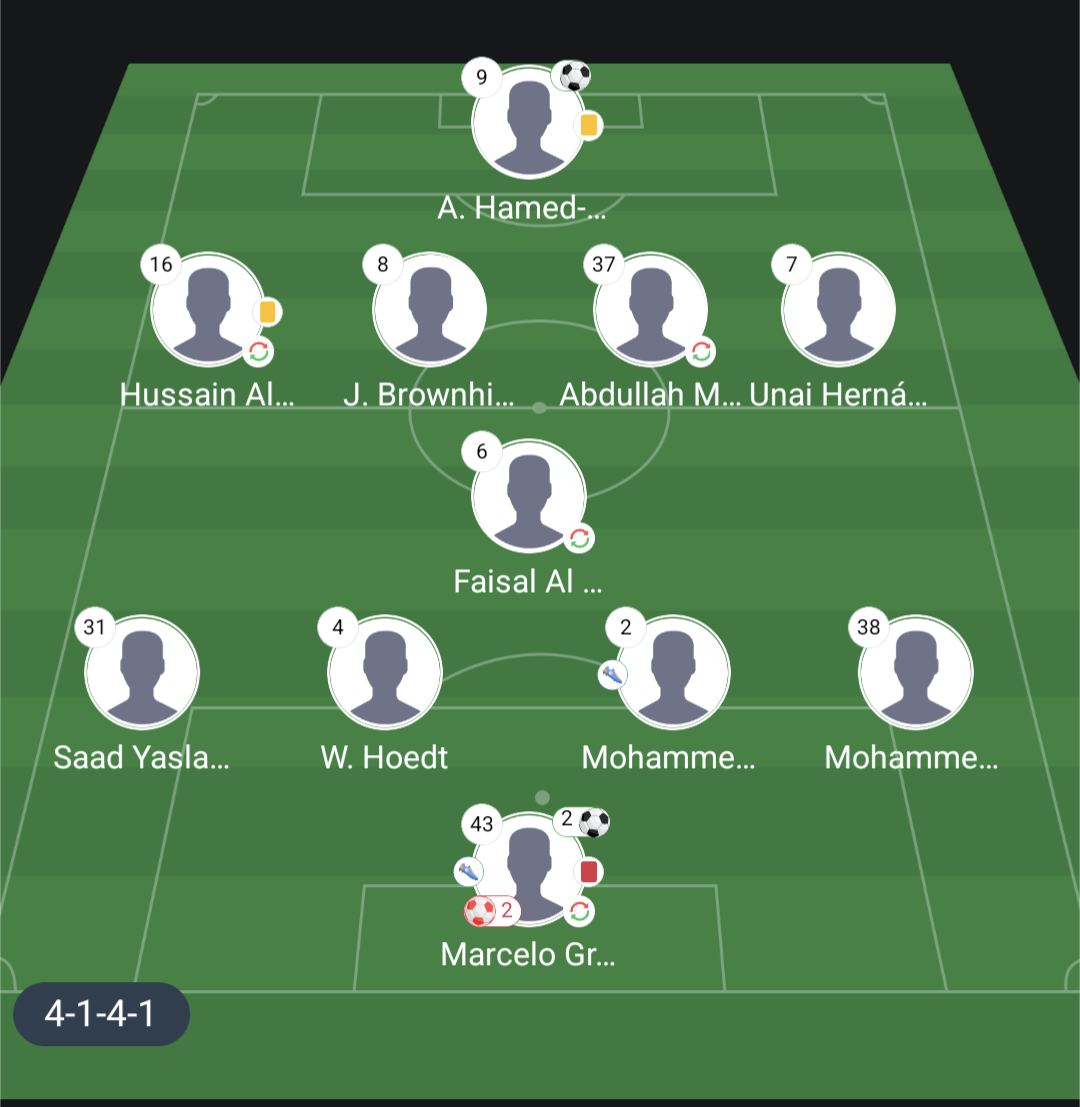
A highly customizable React Native component for displaying football/soccer team formations with player positions, stats, and match information.






Demo
Why This Package?
Building football/soccer formation displays from scratch is time-consuming and complex. This package provides:
- Production-Ready: Built for real-world sports apps, fantasy football platforms, and tactical analysis tools
- Zero Dependencies: Lightweight with no external dependencies beyond React Native core
- Battle-Tested: Supports all 24 major tactical formations used in professional football
- Developer-Friendly: Extensive TypeScript support, comprehensive documentation, and intuitive API
- Fully Customizable: Every visual aspect can be themed or completely overridden
Perfect for sports apps, match analysis tools, fantasy football platforms, coaching applications, and tactical planning software.
Features
✅ 24 Supported Formations - All major tactical formations (4-3-3, 4-2-3-1, 3-5-2, etc.) ✅ Player Statistics - Goals, assists, cards, substitutions, own goals ✅ Highly Customizable - Theme system for colors, fonts, spacing ✅…
🎯 What You're Building Today
Imagine this: Your app shows a beautiful football pitch with 11 players perfectly positioned, displaying real-time stats like goals ⚽, assists 🎯, and cards 🟨🟥. Users can tap players to see detailed stats. Everything is customizable to match your brand.
Sounds complex? It's actually super simple!

By the end of this tutorial, you'll master:
- ✅ Team lineups in 24 tactical formations (4-3-3, 4-2-3-1, 5-3-2, etc.)
- ✅ Player statistics with beautiful icons
- ✅ Custom themes and styling
- ✅ Interactive player cards
- ✅ TypeScript support
- ✅ Production-ready code
Time to complete: 15 minutes ⏱️
Difficulty: Beginner-friendly 🟢
🚀 Quick Start - Get Running in 60 Seconds!
Step 1: Install the Package
npm install react-native-football-formation
Step 2: Import and Use
import { FormationField } from 'react-native-football-formation';

function App() {
  return <FormationField lineup={yourLineupData} />;
}
Step 3: Marvel at Your Team Lineup! 🎉
That's it! Seriously. But let's make it even better...
💪 Building Your First Team Lineup
Let's create a classic 4-3-3 lineup with Manchester United's starting eleven:
import React from 'react';
import { View, StyleSheet, SafeAreaView } from 'react-native';
import { FormationField } from 'react-native-football-formation';

export default function TeamLineupScreen() {
  const lineup = {
    players: [
      {
        playerId: '1',
        matchName: 'De Gea',
        shirtNumber: 1,
        rating: '7.5',
        position: 'Goalkeeper',
        formationPlace: '1', // 1 = GK, 2-11 = outfield players
        stats: [],
      },
      {
        playerId: '29',
        matchName: 'Wan-Bissaka',
        shirtNumber: 29,
        rating: '7.0',
        position: 'Defender',
        formationPlace: '2', // Right Back
        stats: [],
      },
      // Add 9 more players (formationPlace '3' to '11')
      // Full example in the GitHub repo!
    ],
    formationUsed: '433', // The tactical setup: 4-3-3
  };

  return (
    <SafeAreaView style={styles.container}>
      <FormationField lineup={lineup} />
    </SafeAreaView>
  );
}

const styles = StyleSheet.create({
  container: {
    flex: 1,
    backgroundColor: '#0a0e27', // Dark football-themed background
  },
});
Run it! 🏃♂️ You'll see your starting eleven perfectly positioned on the pitch.
💡 Pro Tip: Use
formationPlacevalues '1' through '11'. Position '1' is always the goalkeeper!
🎨 Level Up: Adding Player Photos & Stats
Make It Real with Player Photos
Two easy ways to add photos:
Option 1: Direct URLs (Simple)
const player = {
  playerId: '10',
  matchName: 'Rashford',
  photo: 'https://cdn.example.com/rashford.png',
  // ...
};
Option 2: Dynamic Generation (Recommended 🌟)
<FormationField
  lineup={lineup}
  getPlayerPhotoUrl={(playerId) =>
    `https://api.yoursite.com/players/${playerId}/avatar`
  }
/>
Add Live Match Stats!
Let's show that Rashford scored 2 goals and got an assist:
const rashford = {
  playerId: '10',
  matchName: 'Rashford',
  shirtNumber: 10,
  rating: '9.2', // ⭐ Man of the Match!
  position: 'Forward',
  formationPlace: '9',
  stats: [
    { type: 'goals', value: 2 },       // ⚽⚽
    { type: 'goalAssist', value: 1 },  // 🎯
    { type: 'yellowCard', value: 1 },  // 🟨
  ],
};
Available stat types:
| Stat | Visual | Description |
|---|---|---|
goals |
⚽ + count | Goals scored |
goalAssist |
👟 | Assists provided |
yellowCard |
🟨 | Yellow card |
redCard |
🟥 | Red card |
totalSubOff |
🔄 | Substituted off |
ownGoals |
⚽🔴 | Own goals |
🔥 Cool Feature: Stats with value
0don't display - keeps your lineup clean!
🎯 Make It Interactive - Handle Player Taps
Add tap interactions in one line:
<FormationField
  lineup={lineup}
  onPlayerPress={(player) => {
    Alert.alert(
      player.matchName,
      `Rating: ${player.rating} ⭐\nShirt: #${player.shirtNumber}`
    );
    // Or navigate to player details:
    // navigation.navigate('PlayerStats', { player });
  }}
/>
Imagine the possibilities:
- Show detailed player stats modal
- Navigate to player profile screen
- Trigger player comparison view
- Open fantasy football card
- Display transfer market value
🎨 Custom Theming - Match Your Brand
Transform the lineup look in seconds:
<FormationField
  lineup={lineup}
  theme={{
    colors: {
      primary: '#e74c3c',        // 🔴 Your brand color
      playerName: '#ffffff',     // ⚪ Player name text
      success: '#2ecc71',        // 🟢 Success stats (assists)
      warning: '#f39c12',        // 🟡 Warnings (yellow card)
      error: '#c0392b',          // 🔴 Errors (red card)
    },
    typography: {
      fontFamily: 'Poppins-Regular',
      fontFamilyBold: 'Poppins-Bold',
      playerNameSize: 13,
      jerseyNumberSize: 10,
    },
    spacing: {
      playerCardWidth: 75,
      playerCardHeight: 60,
      playerImageSize: 48,
    },
    borderRadius: {
      playerImage: 24,  // Circular player avatars
      card: 12,         // Rounded player cards
    },
  }}
/>
Before & After 🎨
Default Theme: Clean, professional, ready to ship
Your Theme: Perfectly matches your app's branding with custom colors, fonts, and spacing!
🔥 All 24 Tactical Formations Supported
Just change formationUsed - the lineup automatically adapts!
Popular Modern Formations
// The most popular in modern football
formationUsed: '4231'  // 4-2-3-1 (Guardiola, Klopp style)

// Classic attacking football
formationUsed: '433'   // 4-3-3 (Barcelona, Liverpool)

// Defensive solidity
formationUsed: '532'   // 5-3-2 (Conte, Simeone approach)

// Classic English setup
formationUsed: '442'   // 4-4-2 (Sir Alex Ferguson era)
Tactical Variations
formationUsed: '4240'  // False 9 (Pep's Manchester City)
formationUsed: '343'   // 3-4-3 (Chelsea 2016/17)
formationUsed: '352'   // 3-5-2 (Inter Milan)
formationUsed: '4141'  // Single pivot (Makelele role)
Complete list of 24 formations:
442, 433, 4231, 41212, 451, 4411, 4141, 4321, 4222, 4132, 4240, 4312, 532, 541, 352, 343, 3511, 3421, 3412, 3142, 343d, 3241, 3331
🎮 Challenge: Build a tactical selector and let users switch between different lineups!
💎 Advanced: Custom Player Cards
Want complete control over player card design? Render your own:
<FormationField
  lineup={lineup}
  renderPlayerCard={(player, fieldWidth, fieldHeight) => (
    <TouchableOpacity style={styles.epicCard}>
      <LinearGradient
        colors={['#667eea', '#764ba2']}
        style={styles.gradient}
      >
        <Image
          source={{ uri: player.photo }}
          style={styles.avatar}
        />
        <Text style={styles.name}>{player.matchName}</Text>
        <View style={styles.rating}>
          <Text>⭐ {player.rating}</Text>
        </View>
        {/* Your custom stats display */}
      </LinearGradient>
    </TouchableOpacity>
  )}
/>
Design possibilities:
- Gradient backgrounds
- Animated player cards
- Team-specific colors
- Rarity indicators (for gaming/NFT apps)
- Live stat updates with animations
🎁 Bonus: Custom Assets
Replace default images with your own branding:
<FormationField
  lineup={lineup}
  fieldImage={require('./assets/custom-pitch.png')}
  footballIcon={require('./assets/gold-ball.png')}
  playerPlaceholder={require('./assets/mystery-player.png')}
  kickerIcon={require('./assets/boot.png')}
  renewalIcon={require('./assets/sub-arrow.png')}
/>
Perfect for:
- Team-specific pitch designs
- Branded stat icons
- Custom placeholder avatars
- Competition-specific styling
🏆 Real-World Examples
Example 1: Loading Lineup from API
function MatchLineup({ matchId }) {
  const [lineup, setLineup] = useState(null);
  const [loading, setLoading] = useState(true);

  useEffect(() => {
    // Fetch team lineup from your API
    fetch(`https://api.example.com/matches/${matchId}/lineup`)
      .then(res => res.json())
      .then(data => {
        setLineup(data);
        setLoading(false);
      })
      .catch(err => console.error(err));
  }, [matchId]);

  if (loading) return <LoadingSpinner />;

  return (
    <FormationField
      lineup={lineup}
      onPlayerPress={(player) =>
        navigation.navigate('PlayerDetails', { player })
      }
    />
  );
}
Example 2: Compare Both Teams
function MatchTactics({ homeLineup, awayLineup }) {
  return (
    <ScrollView horizontal>
      <View style={styles.team}>
        <Text style={styles.teamName}>HOME</Text>
        <FormationField lineup={homeLineup} width={350} />
      </View>

      <View style={styles.vsContainer}>
        <Text style={styles.vs}>VS</Text>
      </View>

      <View style={styles.team}>
        <Text style={styles.teamName}>AWAY</Text>
        <FormationField lineup={awayLineup} width={350} />
      </View>
    </ScrollView>
  );
}
Example 3: Tactical Formation Switcher
function TacticalBoard() {
  const [formation, setFormation] = useState('433');

  const formations = [
    { label: '4-3-3 Attack', value: '433' },
    { label: '4-2-3-1 Balanced', value: '4231' },
    { label: '5-3-2 Defend', value: '532' },
  ];

  return (
    <View>
      <SegmentedControl
        values={formations.map(f => f.label)}
        selectedIndex={formations.findIndex(f => f.value === formation)}
        onChange={(event) => {
          setFormation(formations[event.nativeEvent.selectedSegmentIndex].value);
        }}
      />

      <FormationField
        lineup={{ ...lineup, formationUsed: formation }}
      />
    </View>
  );
}
🐛 Troubleshooting Guide
Players Not Showing in Lineup?
Check these:
- ✅ Each player has unique
formationPlacefrom '1' to '11' - ✅ Values are strings ('1', not 1)
- ✅ You have exactly 11 players in the lineup
- ✅ Position '1' is the goalkeeper
Player Photos Not Loading?
// ❌ Won't work - relative path
photo: './player.png'

// ✅ Works - full URL
photo: 'https://cdn.example.com/player.png'

// ✅ Best practice - use getPlayerPhotoUrl
getPlayerPhotoUrl={(id) => `https://api.com/players/${id}.jpg`}
Lineup Looks Incorrect?
- Check
formationUsedmatches supported formations - Try both formats:
'433'and'4-3-3'both work - Verify all 11 players are present
- Ensure
formationPlacevalues are sequential
🎓 TypeScript Power Users
Full type safety included for the best developer experience:
import type {
  TeamLineup,
  Player,
  PlayerStats,
  FormationTheme,
  FormationFieldProps,
} from 'react-native-football-formation';

const lineup: TeamLineup = {
  players: [/* ... */],
  formationUsed: '433',
};

const handlePlayerPress = (player: Player): void => {
  console.log(`Tapped: ${player.matchName}`);
};

const customTheme: Partial<FormationTheme> = {
  colors: {
    primary: '#e74c3c',
    playerName: '#ffffff',
  },
};
IntelliSense will guide you through every prop and option! 🚀
🎯 Challenges to Try
Level up your skills with these challenges:
- 🥇 Beginner: Add a formation selector dropdown
- 🥈 Intermediate: Create a player stats comparison screen
- 🥉 Advanced: Animate lineup changes with transitions
- 🏆 Expert: Build a fantasy football lineup builder with drag-and-drop
Share your solutions in the comments! 👇
🌟 Complete Production Example
Here's a full working example ready for your app:
import React, { useState, useEffect } from 'react';
import {
  View,
  StyleSheet,
  SafeAreaView,
  ActivityIndicator,
  Alert,
} from 'react-native';
import { FormationField } from 'react-native-football-formation';

export default function MatchLineupScreen({ route, navigation }) {
  const [lineup, setLineup] = useState(null);
  const { matchId, teamId } = route.params;

  useEffect(() => {
    // Fetch team lineup from your API
    fetch(`https://api.example.com/matches/${matchId}/teams/${teamId}`)
      .then(res => res.json())
      .then(data => setLineup(data))
      .catch(err => Alert.alert('Error loading lineup', err.message));
  }, [matchId, teamId]);

  if (!lineup) {
    return (
      <View style={styles.loading}>
        <ActivityIndicator size="large" color="#e74c3c" />
      </View>
    );
  }

  return (
    <SafeAreaView style={styles.container}>
      <FormationField
        lineup={lineup}
        theme={{
          colors: {
            primary: '#e74c3c',
            playerName: '#ffffff',
            success: '#2ecc71',
            warning: '#f39c12',
            error: '#c0392b',
          },
          typography: {
            fontFamily: 'System',
            fontFamilyBold: 'System',
            playerNameSize: 12,
          },
        }}
        getPlayerPhotoUrl={(playerId) =>
          `https://cdn.example.com/players/${playerId}.jpg`
        }
        onPlayerPress={(player) => {
          navigation.navigate('PlayerDetails', {
            playerId: player.playerId,
            matchId,
          });
        }}
        showFormation
        showRating
      />
    </SafeAreaView>
  );
}

const styles = StyleSheet.create({
  container: {
    flex: 1,
    backgroundColor: '#0a0e27',
  },
  loading: {
    flex: 1,
    justifyContent: 'center',
    alignItems: 'center',
    backgroundColor: '#0a0e27',
  },
});
📚 Quick Reference
Essential Props
| Prop | Type | Description |
|---|---|---|
lineup |
TeamLineup |
Required - Your team lineup data |
theme |
Partial<FormationTheme> |
Customize colors, fonts, spacing |
onPlayerPress |
(player) => void |
Handle player tap events |
getPlayerPhotoUrl |
(id) => string |
Generate player photo URLs |
showFormation |
boolean |
Show tactical formation badge |
showRating |
boolean |
Display player ratings |
🚀 What's Next?
You're now a football lineup expert! Here's what to explore:
- Browse example projects
- Star the GitHub repo ⭐
- Share your lineup implementation on social media
- Contribute to the open-source project
- Request features in GitHub Discussions
💬 Join the Community!
Share your lineups! We'd love to see what you build:
- 📸 Post a screenshot in the comments below
- 🐦 Tweet with
#ReactNativeFootball - 💡 Share your feature ideas
- 🐛 Report bugs on GitHub Issues
Questions? Drop them below - I respond to every comment! 👇
🎁 Free Resources
👨💻 About the Author
Hey! I'm Arbab Rafiq, a React Native developer who loves building tools that make developers' lives easier. When I'm not coding, I'm watching football and analyzing team tactics (which inspired this package! ⚽).
Let's connect:
- 🐙 GitHub: @arbab-io
- 📦 npm: react-native-football-formation
⚡ Quick Links
| Resource | Link |
|---|---|
| Install | npm i react-native-football-formation |
| GitHub | ⭐ Star the repo |
| Issues | 🐛 Report bugs |
| Discuss | 💬 Ask questions |
If this tutorial helped you, please:
- ❤️ Give it a heart
- 🦄 Bookmark for later
- 💬 Share your lineup in comments
- ⭐ Star on GitHub
Happy coding! ⚽ May your lineups always be tactically sound! 🎯
P.S. - What's your favorite tactical setup? Tell me in the comments! Mine's the attacking 4-3-3! 🔴⚪


Top comments (0)