


Welcome to another new thought !! I was thinking about how I was struggling to understand AWS Architecture diagrams that were picture perfect, well written by scholars/Top notch Architects yet I stared at those architectures and moved on as I was overwhelmed with lot of components laid out and couldn't grasp it from the pictorial !! It could have been because of lack of confidence and/or knowledge gap.
But with relentless effort, I started by hand drafting many incorrect versions and finally perfected it with time. If I can get it right, anyone else can and hence this post it to encourage folks to do architecture diagrams!!
To narrate the learning curve, I am presenting a simple requirement-component mapping made into an architecture evolution, from simple sentences to AWS Services mapping. Nevertheless, this will lead to a sensible completion and will surprise you!! Let us start !!
Need #1: Business is currently on-premise and would like to make its presence on Cloud
AWS Cloud

Need #2: Identify the region; Region is decided based on the business requirement on where the clients/users are rather the organizations' operational area
AWS Region selection

Need #3 & #4: Web Application server & backend Database Server are to be hosted on AWS
AWS Compute(EC2), DB on AWS RDS

Need #5: Web Application needs to communicate with DB Server; There has to be mechanism to operate in cloud, a segregation, privacy, just like how it was in an on-premise data centre. For logical segregation & security, a VPC has to be created. To operate in a region, we need to select a availability zone, which is were the data centre with servers are made available for us
AWS VPC, Availability Zone

Need #6: Web Application Server has to access Internet
AWS VPC Public Subnet, Internet Gateway brings internet access to App server

Need #7: DB Server has to be safeguarded as transactional data are stored here
AWS Private Subnet with no internet access

Need #8: App server should be accessible to End Users
AWS Route 53 to access the domain/host name via Internet Gateway onto the App server in Public Subnet

Need #9: DB server should be accessible to App Server
AWS Security Groups Rules, NAT Gateway to establish connection

Need #10: Design must cover servers or region failures
Multi-AZ

Need #11: Application must ensure High Availability & Elasticity & meet the peak demands of the customers
AWS Autoscaling & Load Balancing
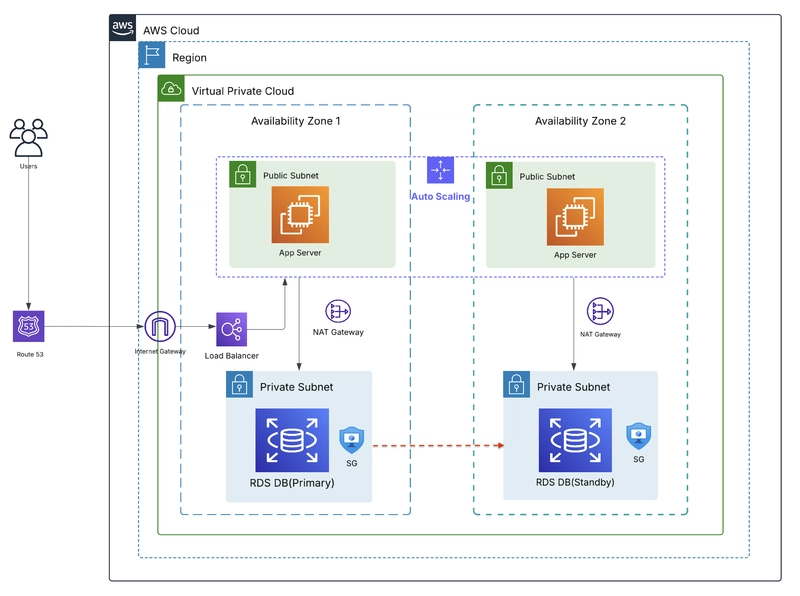
P.S. There are areas of improvement here like including Observability & monitoring, Optimization of compute services etc but to start with, I believe, that the scope represented here, will make more sense.
I believe this will create spark or motivate people to create or reading AWS architectures, going forward
Good Luck Folks !!


Top comments (1)
Well organised approach.