


you can find the newer article about this in here
Step 1. Install Laravel
With this command we install laravel
laravel new website
Step 2. Install Laravel Passport Package And Guzzle
Laravel Passport provides a full OAuth2 server implementation
composer require laravel/passport
composer require guzzlehttp/guzzle
composer require symfony/psr-http-message-bridge
Step 3. Run These Commands For Fixing Storage Permission
sudo chown -R $USER:www-data storage
sudo chmod -R 775 storage
Step 4. Run Migration
Create the tables that your application needs to store clients and access tokens
php artisan migrate
Step 5. Generate keys
With this commend you create "personal access" and "password grant" that you need them for generating access tokens
php artisan passport:install
Step 6. Add Trait To User Class
There are some helper functions in this trait
<?php
namespace App;
use Illuminate\Notifications\Notifiable;
use Illuminate\Foundation\Auth\User as Authenticatable;
use Laravel\Passport\HasApiTokens;class User extends Authenticatable #chenged
{
    use Notifiable, HasApiTokens; #changed
...
Step 6. Call Passport Routes And Add Some Configs
call the Passport::routes method within the boot method of your AuthServiceProvider and change the token life time like this
<?php

namespace App\Providers;

use Illuminate\Foundation\Support\Providers\AuthServiceProvider as ServiceProvider;
use Illuminate\Support\Facades\Gate;
use Laravel\Passport\Passport;
use Carbon\Carbon;

class AuthServiceProvider extends ServiceProvider
{
    /**
     * The policy mappings for the application.
     *
     * @var array
     */
    protected $policies = [
        // 'App\Model' => 'App\Policies\ModelPolicy',
    ];

    /**
     * Register any authentication / authorization services.
     *
     * @return void
     */
    public function boot()
    {
        $this->registerPolicies();
        Passport::routes();
        Passport::tokensExpireIn(Carbon::now()->addDays(1));
        Passport::refreshTokensExpireIn(Carbon::now()->addDays(10));
    }
}
Step 7. Finally You Need To Change The Api Driver
you need change api drive in config/auth.php like this
'guards' => [
    'web' => [
        'driver' => 'session',
        'provider' => 'users',
    ],
    'api' => [
        'driver' => 'passport',
        'provider' => 'users',
    ],
],
Step 8. Create api route
<?php

use Illuminate\Support\Facades\Route;

Route::post('login', 'UserController@login');
Route::post('register', 'UserController@register');
Step 9. Create controller
php artisan make:controller UserController
Step 10. Complete the controller
<?php

namespace App\Http\Controllers;

use App\User;
use Validator;
use Exception;
use GuzzleHttp\Client;
use Illuminate\Http\Request;
use Illuminate\Support\Facades\Auth;
use Laravel\Passport\Client as OClient;

class UserController extends Controller
{
    public $successStatus = 200;

    public function login() {
        if (Auth::attempt(['email' => request('email'), 'password' => request('password')])) {
            $oClient = OClient::where('password_client', 1)->first();
            return $this->getTokenAndRefreshToken($oClient, request('email'), request('password'));
        }
        else {
            return response()->json(['error'=>'Unauthorised'], 401);
        }
    }

    public function register(Request $request) {
        $validator = Validator::make($request->all(), [
            'name' => 'required',
            'email' => 'required|email|unique:users',
            'password' => 'required',
            'c_password' => 'required|same:password',
        ]);

        if ($validator->fails()) {
            return response()->json(['error'=>$validator->errors()], 401);
        }

        $password = $request->password;
        $input = $request->all();
        $input['password'] = bcrypt($input['password']);
        $user = User::create($input);
        $oClient = OClient::where('password_client', 1)->first();
        return $this->getTokenAndRefreshToken($oClient, $user->email, $password);
    }

    public function getTokenAndRefreshToken(OClient $oClient, $email, $password) {
        $oClient = OClient::where('password_client', 1)->first();
        $http = new Client;
        $response = $http->request('POST', 'http://mylemp-nginx/oauth/token', [
            'form_params' => [
                'grant_type' => 'password',
                'client_id' => $oClient->id,
                'client_secret' => $oClient->secret,
                'username' => $email,
                'password' => $password,
                'scope' => '*',
            ],
        ]);

        $result = json_decode((string) $response->getBody(), true);
        return response()->json($result, $this->successStatus);
    }
}
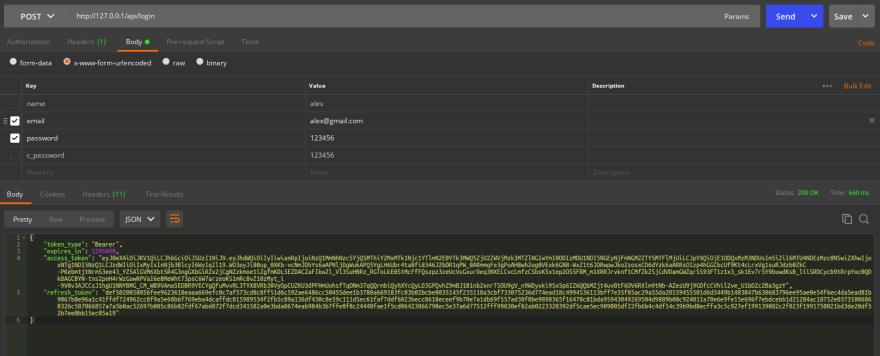
Step 11. Now lets test it
php artisan serve
Step 12. It works like a charm
You first need to register like this

And then you can register and give your tokens again
In the next parts we will make some private routes that need token, handle the exceptions and implement refresh token scenario
Create API Rest with Laravel 7.X Passport Authentication And Implement Refresh Token (Part 2)


Latest comments (22)
for calling the local api and for postman testing i made
$response = $http->request('POST', request()->getSchemeAndHttpHost() . '/oauth/token', ['form_params' => [
'grant_type' => 'refresh_token',
'refresh_token' => $refreshToken,
'client_id' => $oClient->id,
'client_secret' => $oClient->secret,
'scope' => '*',
],
'verify' => config('app.env') != DefaultSettingUtil::ENV_LOCAL
]);
First of all thanks for this tutorial, really helpful!
For those wondering what is this line for
$oClient = OClient::where('password_client', 1)->first();The passport
/oauth/tokenendpoint requires aclient_idandclient_secret, therefore that line fetches the needed information fromoauth_clientstable and use them in request.I'm seeing 2 issues in this tutorial:
1- You are fetching twice the
$oClientwhile you can do it just ingetTokenAndRefreshToken()function. There is no need to fetch that record inlogin()andregister()functions. You should remove$oClient = OClient::where('password_client', 1)->first();
login()andregister()and also remove theOClient $oClientparameter ingetTokenAndRefreshToken()function.2- There is a lack of security: the purpose of
client_idandclient_secretis to provide a unique credential to 3rd party apps. By fetchingclient_idandclient_secretwithin your controller you are assuming that the 3rd party app is authorized. Any app which knows your login endpoint could perform a brute force attack and overload your database trying to attempt a login directly inuserstable.client_idandclient_secretshould be provided to the 3rd party apps and they should send those values via request.Saying that, you will have
$request->client_idand$request->client_secretto be used ingetTokenAndRefreshToken()Great tutorial! the whole refresh_token part is difficult to get from the documents You explained it well. Thanks
I had to put
Passport::enableImplicitGrant(); in authserviceprovider boot method for using this method of sign in
Hi! Great tutorial!!
One question, why your get the first oClient?:
$oClient = OClient::where('password_client', 1)->first();
Thanks!
Hello can you help me understand why is it always
$oClient = OClient::where('password_client', 1)->first(); ? Why always one? Or like what table does this reference to?
Hi
I need one oclient user and password_client is a flag that i can use it and get a my oclient so i used it , if you have a better idea let's share it with me
for mylemp-nginx/oauth/token :
you have two way for acces to your laravel project
1- php artisan serve ==>> localhost:8000
and
2-with your lamp or zamp or ... ==>> localhost/--project name--/public
for $response request in controller => localhost:8000/oauth/token
and
for postman => localhost/--project_name--/public/api/register or login
and header only Accept => Aplication/json
Salam, I have question. By having Passport Authentication in the app, do I need to install Laravel make:auth? As we know, default Laravel auth includes forgot password, send confirmation, etc.
HI !
im trying to make post on api/register but my server never response, any idea ?
I am having same issue. let me add more detail to it.
Following above installation process in laravel 7.0. when I use postman to check register api, user get registered and inserted into database but the part:
$response = $http->request('POST', env('APP_URL').'/oauth/token', [.....
does not return anything..
I searched on internet, someone said you have to pass timeout to Guzzle's http request. I did and it throws error "Connection time out".
have u run the php artisan serve?
Nice Article,
but in an instance where the pasord is a pin and not the regular password how can that be inplemented?