

Imagine a bustling corporate office in the 1990s. Every time the Sales department makes a deal, they have to physically walk a piece of paper over to the Accounting department. Then, they have to walk another copy to the Shipping department. When Shipping sends the package, they walk a confirmation slip back to Sales, and another to Accounting.
As the company grows, more departments are added: Analytics, Customer Support, Marketing. Suddenly, the hallways are jammed with employees running point-to-point, trying to keep everyone synchronized. Papers get lost, people wait on hold, and the entire system becomes a slow, tangled mess.
In software architecture, this is known as the point-to-point integration problem. As your system grows from two microservices to twenty, the number of direct connections explodes, creating a fragile "spaghetti" architecture.
To solve this, the tech world created Apache Kafka.
Let's use the Richard Feynman Technique—translating complex technical concepts into simple, everyday analogies—to understand exactly how Apache Kafka works, why it is the central nervous system of modern data architectures, and how to use it.
1. The End of Spaghetti Architecture: The Event Hub
In our office analogy, the solution isn't to make the employees run faster. The solution is to build a central Post Office Hub.
When Sales closes a deal, they don't walk to Accounting or Shipping. They simply drop a single "Deal Closed" memo into the central Post Office. Accounting and Shipping, whenever they are ready, walk to the Post Office and read the memos they care about.

Kafka replaces chaotic N × M point-to-point connections with a clean, centralized event streaming hub.
The Technical Reality:
Traditionally, systems communicate using commands (request-response via REST/gRPC). If Service A needs data from Service B, it asks for it. However, this couples services together. If Service B is slow or down, Service A fails too.
Kafka shifts this paradigm to event-driven architecture. Instead of active commands, services publish passive events ("something happened") to a central log. Other services subscribe to these events. This decouples the systems entirely: producers don't care who consumes their data, and consumers don't care who produced it.
2. The Anatomy of a Topic: The Immutable Ledger
How does this central hub actually store the events?
Imagine a massive, indestructible Logbook. Every time a message arrives, a scribe writes it on the very last line of the book, numbers it sequentially, and stamps the time. Once a line is written, it can never be changed or erased. This is an immutable, append-only log.
But if a single logbook gets too big, a single scribe can't write fast enough, and readers will crowd around it. To scale, we tear the logbook into multiple smaller notebooks called Partitions, spread across different tables (servers).
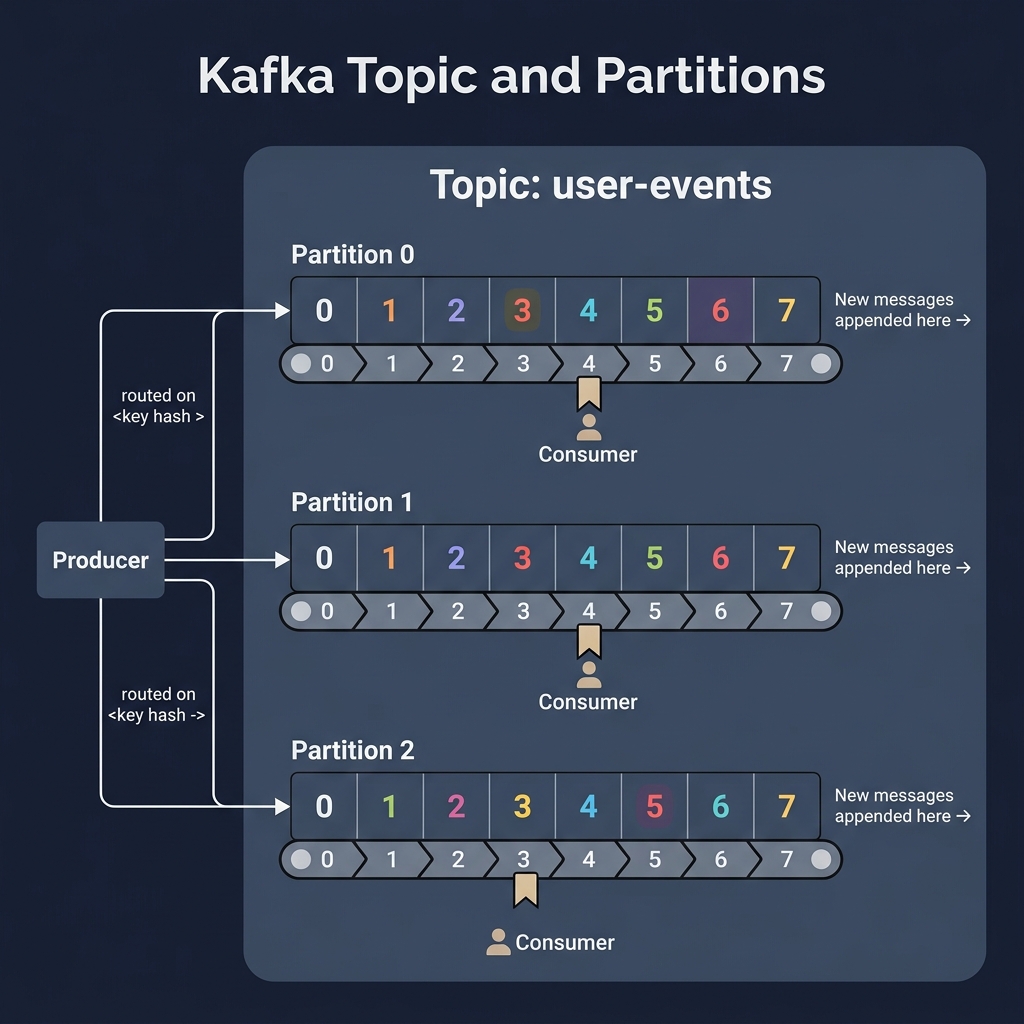 *A Topic is split into Partitions (append-only logs). Messages are ordered sequentially within each partition by their Offset.*The Technical Reality:
-
Topic: A logical stream of events (e.g.,
user-clicksororder-status). - Partition: To scale horizontally, a topic is split into partitions. Each partition is a single, totally ordered, append-only log file on disk.
- Offset: Every message inside a partition gets an incremental integer ID called an offset. Offsets guarantee strict ordering within a single partition, but not across the entire topic.
How to Configure a Kafka Topic: The Right Way
Configuring a Kafka topic is not a guessing game. According to Kafka: The Definitive Guide (2nd Edition), a poorly configured topic can cause data loss, bottlenecks, or crash your cluster's metadata memory.
To configure a topic correctly, follow this three-step blueprint:
Step 1: Calculate the Partition Count (The Throughput Formula)
Partitions are Kafka's unit of scalability. You cannot scale a consumer group beyond the number of partitions in a topic. To calculate the correct number of partitions, use the Throughput Formula:
Partitions = Max( (Target Write Throughput / Single Producer Throughput),
                  (Target Read Throughput / Single Consumer Throughput) )
- The Sizing Rule: Producers are fast (often 100+ MB/s), but consumers are slow (often limited by database writes or API calls to 10 MB/s).
- Example: If your target throughput is 100 MB/s and a single consumer thread can process 10 MB/s before hitting a database bottleneck:
Partitions = 100 MB/s / 10 MB/s = 10 partitions
- Partition Warning: Do not simply set 100 partitions "just in case". Every partition requires file descriptors and memory on the broker, and having too many partitions increases controller metadata sync time and slows down partition leader election during broker failover.
Step 2: Choose Your Topic Profile (Durability vs. Performance)
Different types of data require different configurations. You must configure your topic parameters based on your business requirements:
| Use Case | Replication Factor | min.insync.replicas |
acks (Producer) |
unclean.leader.election |
Cleanup Policy |
|---|---|---|---|---|---|
|
Financial / Transactions (Zero Data Loss) |
3 | 2 | all |
false |
delete |
|
Telemetry / Clickstream (High Throughput) |
3 (or 2) | 1 | 1 |
true |
delete |
|
User Profile / DB Sync (State Restore) |
3 | 2 | all |
false |
compact |
1. Replication Factor (replication.factor)
The number of independent brokers hosting copies of your data.
- Analogy: The number of independent vaults copying our logbook.
- The Right Way: Always set this to 3 in production. This allows one broker to go down for patching or failure without risking data availability.
2. Minimum In-Sync Replicas (min.insync.replicas)
The number of replicas that must acknowledge a write before a producer's request is considered successful (when acks=all).
- Analogy: The minimum number of vault clerks who must sign off on a new page before telling the customer the record is saved.
- The Right Way: For a replication factor of 3, set this to 2. This ensures your data is written to at least two brokers (the leader and one follower). If a broker fails, writes will still succeed. If you set it to 3, a single broker failure will block all writes.
3. Unclean Leader Election (unclean.leader.election.enable)
Determines if an out-of-sync follower (which has missed some updates) can be elected as the leader if the current leader fails.
- Analogy: If the head clerk disappears, do we allow an assistant with outdated files to take over the ledger, or do we freeze the counter?
-
The Right Way: Set to
falsefor critical topics. This prevents data loss and duplicate keys, at the cost of partition availability until the original leader returns.
Step 3: Tunings and Common Pitfalls
-
Key Hashing Trap: If you publish messages with keys (e.g.
order-id), changing the partition count later will break key-to-partition ordering because the hash modulo changes. Determine your 3-year expected throughput and configure that partition count from day one. -
Compression: Enable compression at the topic level using
compression.type=zstd(orlz4). This saves up to 50% on disk space and network bandwidth with minimal CPU cost. -
Log Retention (
retention.ms): Do not keep logs forever unless necessary. Default is 7 days. Reduce to 24-48 hours for transient pipelines to keep disks clean.
Command Line Topic Configuration Examples
To configure these topic profiles in your environment, use the official kafka-topics.sh command-line tool.
[!NOTE]
If you are running the single-node Docker Compose setup from this guide, you must change--replication-factor 3to1andmin.insync.replicas=2to1because a single broker cannot host multiple replicas. The commands below show the production-grade configurations for a standard 3-broker cluster.
Profile 1: Financial & Transactions (Zero Data Loss)
This creates a topic with 3 replicas, requiring a minimum of 2 in-sync replicas to acknowledge writes, with unclean leader election disabled:
docker exec -it kafka-kraft kafka-topics.sh --bootstrap-server localhost:9092 \
  --create \
  --topic financial-transactions \
  --partitions 6 \
  --replication-factor 3 \
  --config min.insync.replicas=2 \
  --config unclean.leader.election.enable=false
Profile 2: Telemetry & Clickstream (High Throughput)
This creates a topic optimized for massive volumes of sensor or web data. It enables compression, uses a shorter 24-hour log retention, and tolerates minor replica lag by setting min.insync.replicas=1:
docker exec -it kafka-kraft kafka-topics.sh --bootstrap-server localhost:9092 \
  --create \
  --topic telemetry-metrics \
  --partitions 12 \
  --replication-factor 3 \
  --config min.insync.replicas=1 \
  --config compression.type=zstd \
  --config retention.ms=86400000
Profile 3: User Profile & Database Sync (State Restore)
This creates a topic with log compaction enabled, retaining only the latest value for each key so consumers can restore application state instantly:
docker exec -it kafka-kraft kafka-topics.sh --bootstrap-server localhost:9092 \
  --create \
  --topic user-profiles \
  --partitions 3 \
  --replication-factor 3 \
  --config min.insync.replicas=2 \
  --config cleanup.policy=compact \
  --config min.cleanable.dirty.ratio=0.5
3. Producers: The Scribe's Assembly Line
How do events get into these partitions?
Imagine a scribe who must first translate a memo into a universal language (Serialization), decide which notebook to put it in (Partitioning), and then hold onto it until they have a big enough stack of memos to make the trip to the vault worthwhile (Batching).

The Producer pipeline serializes keys/values, decides the target partition, batches messages in memory, and sends them in bulk.
The Technical Reality:
When you call .send() on a Kafka Producer, the record goes through a pipeline:
- Serializer: Converts key and value objects into raw byte arrays (e.g., String, JSON, Avro).
- Partitioner: Determines which partition the record belongs to. If a key is provided, it hashes the key to ensure all records with the same key always land in the same partition. If no key is provided, it round-robins them.
- Record Accumulator: Instead of sending every record over the network instantly, the producer batches them by topic-partition.
- Sender Thread: A background thread that ships these batches to the Kafka brokers.
Here is a highly resilient Kafka Producer in Java:
import org.apache.kafka.clients.producer.*;
import java.util.Properties;

public class OrderProducer {
    public static void main(String[] args) {
        Properties props = new Properties();
        props.put(ProducerConfig.BOOTSTRAP_SERVERS_CONFIG, "localhost:9092");
        props.put(ProducerConfig.KEY_SERIALIZER_CLASS_CONFIG, "org.apache.kafka.common.serialization.StringSerializer");
        props.put(ProducerConfig.VALUE_SERIALIZER_CLASS_CONFIG, "org.apache.kafka.common.serialization.StringSerializer");

        // Resilience and Performance Configs
        props.put(ProducerConfig.ACKS_CONFIG, "all"); // Wait for full replication write
        props.put(ProducerConfig.RETRIES_CONFIG, 3);
        props.put(ProducerConfig.LINGER_MS_CONFIG, 5); // Wait up to 5ms for batches to fill
        props.put(ProducerConfig.BATCH_SIZE_CONFIG, 16384); // 16KB batch size

        Producer<String, String> producer = new KafkaProducer<>(props);

        // Sending an event (Key: Order ID, Value: Order Details)
        ProducerRecord<String, String> record =
            new ProducerRecord<>("orders", "order-9923", "{ \"status\": \"PLACED\", \"amount\": 149.99 }");

        producer.send(record, (metadata, exception) -> {
            if (exception == null) {
                System.out.printf("Sent order to Partition %d at Offset %d\n",
                    metadata.partition(), metadata.offset());
            } else {
                exception.printStackTrace();
            }
        });

        producer.close();
    }
}
4. Consumers & Consumer Groups: The Team of Clerks
If a topic receives 10,000 messages a second, a single consumer will quickly fall behind. We need to hire a team of clerks.
However, if they all read the same messages, they will process duplicate payments! To prevent this, we organize them into a Consumer Group. A supervisor ensures each clerk gets exclusive access to specific partitions. If a clerk fails, their partitions are instantly reassigned to the remaining active clerks (Rebalancing).

A Consumer Group splits partitions among its members. Rebalancing automatically reallocates partitions if a consumer goes down.
The Technical Reality:
- Consumer Group: A set of consumers cooperating to read from a topic. Kafka guarantees that each partition is assigned to exactly one consumer within a group.
- Rebalancing: The process of reassigning partition ownership when a consumer joins or leaves the group.
-
Offset Commits: Consumers keep track of their progress by sending a periodic confirmation ("I've processed up to offset 45") back to a special internal Kafka topic (
__consumer_offsets).
Here is a typical poll-loop consumer implementation in Java:
import org.apache.kafka.clients.consumer.*;
import java.time.Duration;
import java.util.Collections;
import java.util.Properties;

public class OrderConsumer {
    public static void main(String[] args) {
        Properties props = new Properties();
        props.put(ConsumerConfig.BOOTSTRAP_SERVERS_CONFIG, "localhost:9092");
        props.put(ConsumerConfig.GROUP_ID_CONFIG, "order-processing-group");
        props.put(ConsumerConfig.KEY_DESERIALIZER_CLASS_CONFIG, "org.apache.kafka.common.serialization.StringDeserializer");
        props.put(ConsumerConfig.VALUE_DESERIALIZER_CLASS_CONFIG, "org.apache.kafka.common.serialization.StringDeserializer");
        props.put(ConsumerConfig.ENABLE_AUTO_COMMIT_CONFIG, "false"); // Manual offset commit for safety

        KafkaConsumer<String, String> consumer = new KafkaConsumer<>(props);
        consumer.subscribe(Collections.singletonList("orders"));

        try {
            while (true) {
                // Poll Kafka for new batches of records
                ConsumerRecords<String, String> records = consumer.poll(Duration.ofMillis(100));
                for (ConsumerRecord<String, String> record : records) {
                    System.out.printf("Processing order %s: %s\n", record.key(), record.value());
                }

                // Commit offsets manually after processing the batch
                consumer.commitSync();
            }
        } finally {
            consumer.close();
        }
    }
}
5. Brokers & Replication: The Distributed Vault
Kafka doesn't run on a single machine—that would be a catastrophic single point of failure. It runs as a cluster of multiple servers called Brokers.
Imagine having three identically fortified Post Office vaults in different cities. If one is destroyed by a disaster, the mail shouldn't be lost. Kafka achieves this through Replication. For every partition, one vault acts as the Leader, and the others are Followers.

Partition replication across brokers. If the leader fails, one of the In-Sync Replicas (ISRs) is promoted to leader.
The Technical Reality:
- Leader Partition: Handles all read and write requests from clients.
- Follower Partitions: Do not serve clients directly; they constantly pull events from the leader to keep their copy of the partition log identical.
- In-Sync Replicas (ISR): Followers that are successfully caught up with the leader.
- KRaft (Kafka Raft Consensus): Modern Kafka clusters use an internal consensus protocol (KRaft) rather than ZooKeeper to elect cluster controllers, manage metadata, and coordinate leader elections instantly when a broker goes down.
6. Kafka Connect: The Universal Adapter
Imagine our Post Office wants to automatically sync database records with external storage, but we don't want to write custom client code for every single system.
Kafka Connect acts like a set of universal plugs and sockets. You plug one connector into PostgreSQL, another into Kafka, and a third into Elasticsearch. Data flows automatically between them without you writing a single line of application code.

Kafka Connect simplifies ingestion (Source Connectors) and exporting (Sink Connectors) between Kafka and external datastores.
The Technical Reality:
- Source Connector: Pulls data from an external system (e.g., capturing row inserts from MySQL via Debezium) and writes it into a Kafka topic.
- Sink Connector: Reads data from a Kafka topic and writes it to an external destination (e.g., exporting user logs into Amazon S3 or Snowflake).
7. Kafka Streams: The Real-Time Factory
Moving data is great, but what if we need to clean, enrich, or aggregate events on the fly?
Imagine our Post Office installs a robotic assembly line. Instead of just storing memos, a robotic arm grabs a continuous stream of "Deal Closed" memos, looks up the customer's history from a side database table, merges the information, and drops a brand new "Enriched Deal" memo onto a new conveyor belt.

Kafka Streams processes live records step-by-step, transforming and aggregating event streams with state stores.
The Technical Reality:
Kafka Streams is a Java client library that lets you build stateful, real-time stream processing applications. It introduces Stream-Table Duality:
- KStream: A record stream representing a sequence of independent facts (e.g., clickstream log).
- KTable: A changelog stream representing the current state of a dataset (e.g., user profiles).
Here is a Kafka Streams program that counts words from a stream of sentences in real time:
import org.apache.kafka.common.serialization.Serdes;
import org.apache.kafka.streams.*;
import org.apache.kafka.streams.kstream.*;
import java.util.Arrays;
import java.util.Properties;

public class WordCountApp {
    public static void main(String[] args) {
        Properties config = new Properties();
        config.put(StreamsConfig.APPLICATION_ID_CONFIG, "wordcount-application");
        config.put(StreamsConfig.BOOTSTRAP_SERVERS_CONFIG, "localhost:9092");
        config.put(StreamsConfig.DEFAULT_KEY_SERDE_CLASS_CONFIG, Serdes.String().getClass().getName());
        config.put(StreamsConfig.DEFAULT_VALUE_SERDE_CLASS_CONFIG, Serdes.String().getClass().getName());

        StreamsBuilder builder = new StreamsBuilder();
        KStream<String, String> textLines = builder.stream("word-input-topic");

        KTable<String, Long> wordCounts = textLines
            .flatMapValues(value -> Arrays.asList(value.toLowerCase().split("\\W+")))
            .groupBy((key, word) -> word)
            .count(Materialized.as("CountsStore"));

        wordCounts.toStream().to("word-output-topic", Produced.with(Serdes.String(), Serdes.Long()));

        KafkaStreams streams = new KafkaStreams(builder.build(), config);
        streams.start();

        Runtime.getRuntime().addShutdownHook(new Thread(streams::close));
    }
}
8. Schema Registry: The Data Contract
If a producer changes the format of its events (e.g., renaming a field), downstream consumers will instantly crash.
The Schema Registry acts like a notary office. Before a producer can send an event, it submits the event's template (schema) to the notary. The notary checks if this template complies with compatibility rules (e.g., versioning). If valid, the producer writes the data, and the consumer asks the notary how to decode it.

The Schema Registry enforces compatibility rules on message formats, preventing producers from publishing breaking changes.
The Technical Reality:
By using serialization frameworks like Apache Avro, Protobuf, or JSON Schema, you store the schema definition in the central Schema Registry. Producers register schemas, and messages are sent with a small prefix containing the schema ID. Consumers fetch the schema ID from the registry to deserialize the bytes. This guarantees that your event streaming pipeline stays robust against breaking API changes.
Quickstart: Build and Run a Complete Kafka App
To try these examples yourself, you can set up a local Kafka cluster and run the Java Producer and Consumer using the following copy-pasteable configuration.
1. Project Directory Structure
Create a new directory on your machine with the following layout:
my-kafka-app/
├── docker-compose.yml
├── pom.xml
└── src/
    └── main/
        └── java/
            ├── OrderProducer.java
            ├── OrderConsumer.java
            └── WordCountApp.java
2. Configure Infrastructure (docker-compose.yml)
Save this file in the root of your directory to boot up a single-broker Kafka cluster using KRaft mode (no ZooKeeper required) along with a web administration UI:
version: '3.8'

services:
  kafka:
    image: apache/kafka:latest
    container_name: kafka-kraft
    ports:
      - "9092:9092"
    environment:
      KAFKA_NODE_ID: 1
      KAFKA_PROCESS_ROLES: 'broker,controller'
      KAFKA_CONTROLLER_QUORUM_VOTERS: '1@localhost:9093'
      KAFKA_LISTENERS: 'PLAINTEXT://0.0.0.0:9092,CONTROLLER://0.0.0.0:9093'
      KAFKA_ADVERTISED_LISTENERS: 'PLAINTEXT://localhost:9092'
      KAFKA_CONTROLLER_LISTENER_NAMES: 'CONTROLLER'
      KAFKA_LISTENER_SECURITY_PROTOCOL_MAP: 'PLAINTEXT:PLAINTEXT,CONTROLLER:PLAINTEXT'
      KAFKA_OFFSETS_TOPIC_REPLICATION_FACTOR: 1
      KAFKA_TRANSACTION_STATE_LOG_REPLICATION_FACTOR: 1
      KAFKA_TRANSACTION_STATE_LOG_MIN_ISR: 1
      KAFKA_LOG_DIRS: '/tmp/kraft-combined-logs'

  kafka-ui:
    image: provectuslabs/kafka-ui:latest
    container_name: kafka-ui
    ports:
      - "8080:8080"
    environment:
      DYNAMIC_CONFIG_ENABLED: 'true'
      KAFKA_CLUSTERS_0_NAME: 'local-kraft-cluster'
      KAFKA_CLUSTERS_0_BOOTSTRAPSERVERS: 'kafka:9092'
3. Build Configuration (pom.xml)
Save the following Maven file to automatically fetch the required Kafka clients and streams libraries:
<project xmlns="http://maven.apache.org/POM/4.0.0"
         xmlns:xsi="http://www.w3.org/2001/XMLSchema-instance"
         xsi:schemaLocation="http://maven.apache.org/POM/4.0.0 http://maven.apache.org/xsd/maven-4.0.0.xsd">
    <modelVersion>4.0.0</modelVersion>
    <groupId>com.feynman.kafka</groupId>
    <artifactId>kafka-quickstart</artifactId>
    <version>1.0-SNAPSHOT</version>

    <properties>
        <maven.compiler.source>17</maven.compiler.source>
        <maven.compiler.target>17</maven.compiler.target>
        <kafka.version>3.7.0</kafka.version>
    </properties>

    <dependencies>
        <!-- Kafka Clients (Producer & Consumer APIs) -->
        <dependency>
            <groupId>org.apache.kafka</groupId>
            <artifactId>kafka-clients</artifactId>
            <version>3.7.0</version>
        </dependency>
        <!-- Kafka Streams (Processing Library) -->
        <dependency>
            <groupId>org.apache.kafka</groupId>
            <artifactId>kafka-streams</artifactId>
            <version>3.7.0</version>
        </dependency>
        <!-- SLF4J Simple Logger for Console Logging -->
        <dependency>
            <groupId>org.slf4j</groupId>
            <artifactId>slf4j-simple</artifactId>
            <version>2.0.13</version>
        </dependency>
    </dependencies>
</project>
4. Create Java Source Files
Save the following three Java classes inside your src/main/java/ directory:
OrderProducer.java
import org.apache.kafka.clients.producer.*;
import java.util.Properties;

public class OrderProducer {
    public static void main(String[] args) {
        Properties props = new Properties();
        props.put(ProducerConfig.BOOTSTRAP_SERVERS_CONFIG, "localhost:9092");
        props.put(ProducerConfig.KEY_SERIALIZER_CLASS_CONFIG, "org.apache.kafka.common.serialization.StringSerializer");
        props.put(ProducerConfig.VALUE_SERIALIZER_CLASS_CONFIG, "org.apache.kafka.common.serialization.StringSerializer");

        // Resilience and Performance Configs
        props.put(ProducerConfig.ACKS_CONFIG, "all"); // Wait for full replication write
        props.put(ProducerConfig.RETRIES_CONFIG, 3);
        props.put(ProducerConfig.LINGER_MS_CONFIG, 5); // Wait up to 5ms for batches to fill
        props.put(ProducerConfig.BATCH_SIZE_CONFIG, 16384); // 16KB batch size

        Producer<String, String> producer = new KafkaProducer<>(props);

        // Sending an event (Key: Order ID, Value: Order Details)
        ProducerRecord<String, String> record =
            new ProducerRecord<>("orders", "order-9923", "{ \"status\": \"PLACED\", \"amount\": 149.99 }");

        producer.send(record, (metadata, exception) -> {
            if (exception == null) {
                System.out.printf("Sent order to Partition %d at Offset %d\n",
                    metadata.partition(), metadata.offset());
            } else {
                exception.printStackTrace();
            }
        });

        producer.close();
    }
}
OrderConsumer.java
import org.apache.kafka.clients.consumer.*;
import java.time.Duration;
import java.util.Collections;
import java.util.Properties;

public class OrderConsumer {
    public static void main(String[] args) {
        Properties props = new Properties();
        props.put(ConsumerConfig.BOOTSTRAP_SERVERS_CONFIG, "localhost:9092");
        props.put(ConsumerConfig.GROUP_ID_CONFIG, "order-processing-group");
        props.put(ConsumerConfig.KEY_DESERIALIZER_CLASS_CONFIG, "org.apache.kafka.common.serialization.StringDeserializer");
        props.put(ConsumerConfig.VALUE_DESERIALIZER_CLASS_CONFIG, "org.apache.kafka.common.serialization.StringDeserializer");
        props.put(ConsumerConfig.ENABLE_AUTO_COMMIT_CONFIG, "false"); // Manual offset commit for safety

        KafkaConsumer<String, String> consumer = new KafkaConsumer<>(props);
        consumer.subscribe(Collections.singletonList("orders"));

        try {
            while (true) {
                // Poll Kafka for new batches of records
                ConsumerRecords<String, String> records = consumer.poll(Duration.ofMillis(100));
                for (ConsumerRecord<String, String> record : records) {
                    System.out.printf("Processing order %s: %s\n", record.key(), record.value());
                }

                // Commit offsets manually after processing the batch
                consumer.commitSync();
            }
        } finally {
            consumer.close();
        }
    }
}
WordCountApp.java
import org.apache.kafka.common.serialization.Serdes;
import org.apache.kafka.streams.*;
import org.apache.kafka.streams.kstream.*;
import java.util.Arrays;
import java.util.Properties;

public class WordCountApp {
    public static void main(String[] args) {
        Properties config = new Properties();
        config.put(StreamsConfig.APPLICATION_ID_CONFIG, "wordcount-application");
        config.put(StreamsConfig.BOOTSTRAP_SERVERS_CONFIG, "localhost:9092");
        config.put(StreamsConfig.DEFAULT_KEY_SERDE_CLASS_CONFIG, Serdes.String().getClass().getName());
        config.put(StreamsConfig.DEFAULT_VALUE_SERDE_CLASS_CONFIG, Serdes.String().getClass().getName());

        StreamsBuilder builder = new StreamsBuilder();
        KStream<String, String> textLines = builder.stream("word-input-topic");

        KTable<String, Long> wordCounts = textLines
            .flatMapValues(value -> Arrays.asList(value.toLowerCase().split("\\W+")))
            .groupBy((key, word) -> word)
            .count(Materialized.as("CountsStore"));

        wordCounts.toStream().to("word-output-topic", Produced.with(Serdes.String(), Serdes.Long()));

        KafkaStreams streams = new KafkaStreams(builder.build(), config);
        streams.start();

        Runtime.getRuntime().addShutdownHook(new Thread(streams::close));
    }
}
5. Start and Run
First, launch the Kafka infrastructure in the background:
docker compose up -d
Open a terminal and start the consumer to listen for incoming messages:
mvn exec:java -Dexec.mainClass="OrderConsumer"
Open a second terminal and run the producer to publish an event:
mvn exec:java -Dexec.mainClass="OrderProducer"
You will see the consumer instantly output the received order! You can also head over to http://localhost:8080 in your web browser to explore your orders topic, inspect partition offsets, and track active consumer groups visually.
References & Further Reading
This guide synthesizes core architectural patterns and code conventions from the definitive literature on event streaming:
- Kafka: The Definitive Guide (2nd Edition) by Gwen Shapira, Todd Palino, Rajini Sivaram, and Kriti Pramod.
- Mastering Kafka Streams and ksqlDB by Mitch Seymour.
- Designing Data-Intensive Applications by Martin Kleppmann.
- Apache Kafka 101 Fundamentals Course (Confluent Developer Resources).
Originally published at https://chemacabeza.dev/writing/the-feynman-guide-to-apache-kafka.


Top comments (0)