

Most tutorials show how to make React components with either hooks or ES6 classes, but I haven't found one that uses ES5 classes. Now you may ask "Why bother with ES5 ?", but I still have to support IE11 & its 2 predecessor at work (at the time of writing).
I'm going to show you a Number Spinner. Here's the basic skeleton of an ES5 React component.
// The constructor cum class declaration
function NumberSpinner(props) {
    // equivalent to super(props)
    React.Component.call(this,props);
}

// These 2 lines together form the equivalent of
// extends React.Component
NumberSpinner.prototype = Object.create(React.Component.prototype);
NumberSpinner.prototype.constructor = NumberSpinner;

NumberSpinner.prototype.render = function() {

};
A spinner has only 3 use cases.
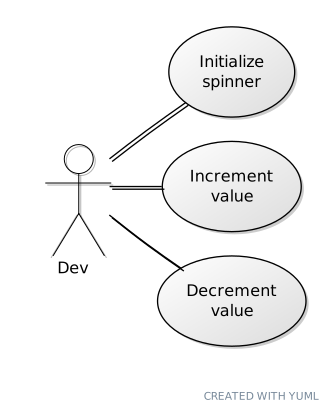
The spinner's state has only 1 property num that is added to the constructor.
this.state = {num: 0};
For the user to be able to assign an initial value to the spinner, there needs to be a prop initNum. Unlike Vue, it isn't advisable in React to initialize state with props directly like this.state = {num: this.props.initNum};. Instead the static getDerviedStateFromProps should be used.
NumberSpinner.getDerivedStateFromProps = function(props, state) {
    return {num: props.initNum};
};
Increment value
NumberSpinner.prototype.increment = function() {
    this.setState(function(state, props) {
        return {num: state.num + 1};
    });
}
Decrement Value
NumberSpinner.prototype.decrement = function() {
    this.setState(function(state, props) {
        return {num: state.num - 1};
    });
};
To render the spinner, 3 elements are needed: 1 to show the current value 2 increment & decrement buttons.
NumberSpinner.prototype.render = function() {
    var ce = React.createElement;
    var current = ce('div',{key:'current'}, this.state.num);
    var increment = ce('button',{key:'increment', onClick: this.increment}, '+');
    var decrement = ce('button',{key:'decrement', onClick: this.increment}, '-');
    return ce('div',{className:'spinner'}, [current,increment,decrement]);
};
It's been months I drafted my 1st Dev article, and Internet Explorer will be gone in 2 days. So any feedback is welcome :)


Top comments (1)
I really liked this because it captures a very specific kind of frontend engineering constraint that is easy to forget now.
Most React tutorials assume modern JavaScript from the start, so seeing an ES5 component built explicitly through constructor functions, prototypes, and React.createElement makes the underlying mechanics much more visible.
It is also a nice reminder that production code is often shaped by compatibility requirements rather than by what the ecosystem considers the cleanest or most modern approach.
Looking back at this now, it almost feels like a small piece of frontend history.
Congratulations on making it into the Hall of Fame, very well deserved. 🎉 And if you ever feel like stopping by my corner of DEV, you're always welcome.