


Deploying a full-stack app in the cloud sounds glamorous—until you’re debugging a 403 Forbidden error at 2 a.m. Here’s how I survived my DevOps capstone project—and what you can learn from it.
** What Is This Project?
I recently completed Assignment 4 of the DevOps Zero to Hero course by Pravin Mishra, a hands-on challenge to deploy the Book Review App on AWS using real-world, production-grade architecture.
The app is simple in concept:
- Browse books
- Read reviews
- Log in and write your own
But under the hood? It’s a three-tier masterpiece:
- Frontend: Next.js (React with server-side rendering)
- Backend: Node.js + Express (REST API)
- Database: MySQL (via Amazon RDS)
And the goal wasn’t just to “make it work.” It was to build it the way real companies do:
- ✅ High availability
- ✅ Network isolation
- ✅ Auto-scaling
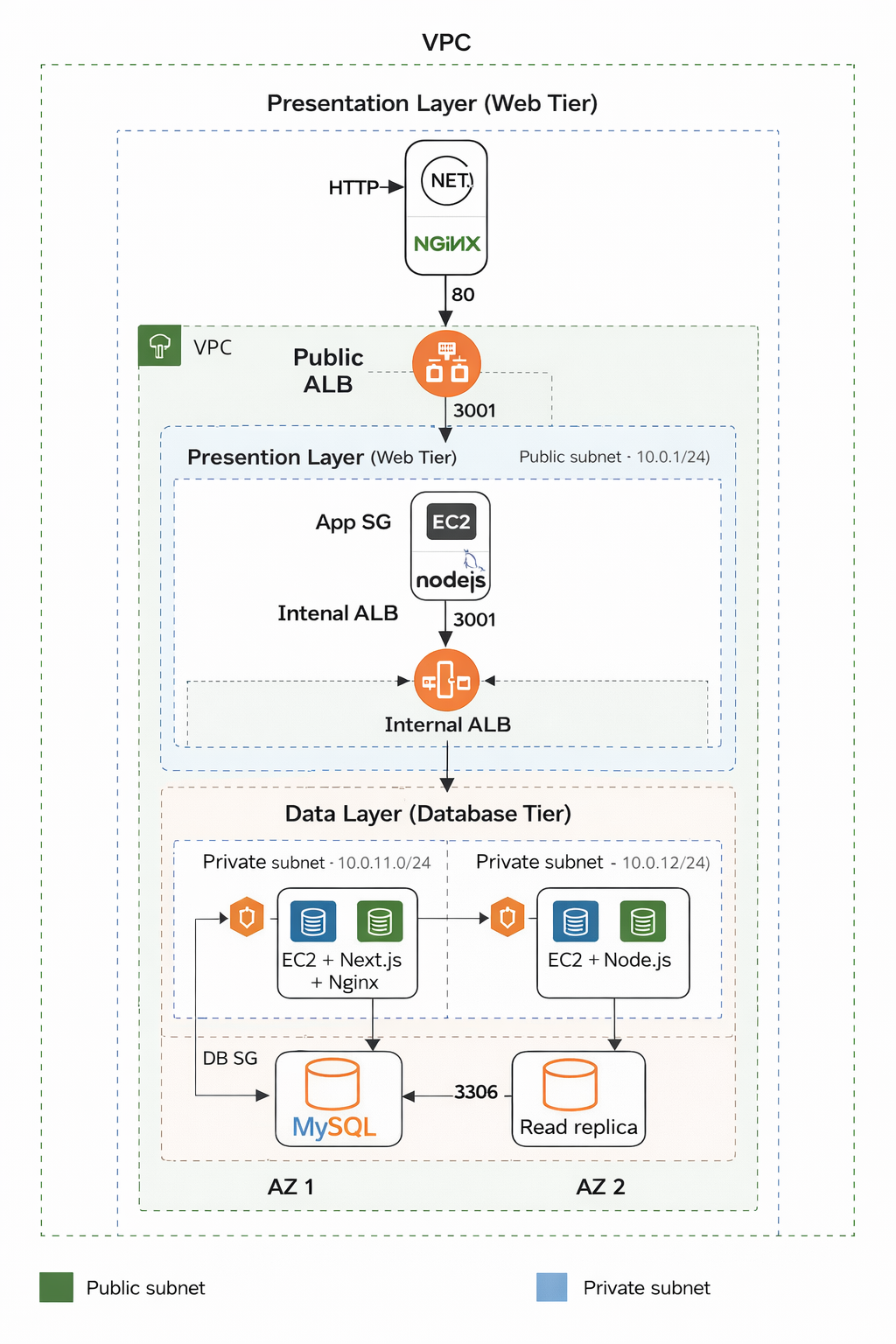
- ✅ Secure traffic flow No pressure, right? *The Architecture: Like Building a Castle Here’s what I built: Internet ↓ Public Application Load Balancer (ALB) ↓ Web Tier (Next.js on EC2 in public subnets) ↓ Internal ALB (private, not internet-facing) ↓ App Tier (Node.js on EC2 in private subnets) ↓ Database Tier (MySQL RDS Multi-AZ + Read Replica in private subnets) *Key Security Principles:
- No public access to backend or database
- Traffic flows only one way: Internet → Web → App → DB
-
Security Groups act like bouncers:
- ALB can talk to Web EC2
- Web EC2 can talk to Internal ALB
- Internal ALB can talk to App EC2
- App EC2 can talk to RDS
- Nothing else gets in. This isn’t just “best practice”—it’s how you prevent breaches.
****Step-by-Step: How I Did It
1. Lay the Foundation: VPC & Subnets
I created a custom VPC (10.0.0.0/16) with 6 subnets across 2 Availability Zones:
- 2 public (for Web EC2 + Public ALB)
- 2 private (for App EC2 + Internal ALB)
- 2 private (for RDS)
Then I ****added:
- An Internet Gateway (for public access)
- A NAT Gateway (so private instances can download packages)
Pro tip: Always enable DNS hostnames in your VPC—Next.js and Node.js need it.
- ***Lock It Down: Security Groups*
I created 5 security groups that only trust each other:
-
public-alb-sg→ allows HTTP from the world -
web-ec2-sg→ allows HTTP only frompublic-alb-sg -
internal-alb-sg→ allows HTTP only fromweb-ec2-sg -
app-ec2-sg→ allows port 3001 only frominternal-alb-sg -
db-sg→ allows MySQL only fromapp-ec2-sg
-
This “chain of trust” is the backbone of secure cloud architecture.
- ***Deploy the Database: RDS Done Right*
I launched an RDS MySQL instance with:
- Multi-AZ (automatic failover if one zone dies)
- Read Replica (for scaling reads later)
- No public access (critical!)
- Initial database name:
bookreview
**Mistake I made: I forgot to actually **create the bookreview database during setup. The app crashed with Unknown database 'bookreview'.
***Fix*: Connect via mysql CLI and run CREATE DATABASE bookreview;.
- ***Deploy the Backend (Node.js)* On a private EC2 instance:
git clone https://github.com/pravinmishraaws/book-review-app.git
cd backend
npm install

Then I created `.env`:
env
DB_HOST=your-rds-endpoint.us-east-1.rds.amazonaws.com
DB_NAME=bookreview
DB_USER=admin
DB_PASS=your-password
PORT=3001
ALLOWED_ORIGINS=http://your-public-alb-dns

>  Critical: `ALLOWED_ORIGINS` must match your **Public ALB DNS exactly**—no typos, no truncation.

I used `pm2` to keep the app running:
bash
sudo npm install -g pm2
pm2 start src/server.js --name "backend"
pm2 startup  # auto-start on reboot

5. ****Deploy the Frontend (Next.js)**
On a public EC2 instance:
bash
cd frontend
npm install
npm run build

Then I created `.env`:
env
NEXT_PUBLIC_API_URL=/api

This tells the frontend to send API requests to `/api`, which Nginx will proxy to the backend.

I ran it with:
bash
pm2 start npm --name "frontend" -- run start
- ***Configure Nginx: The Glue That Holds It Together*
My
/etc/nginx/sites-available/default:
server {
    listen 80;
    server_name _;

    location / {
        proxy_pass http://localhost:3000;  # Next.js
        proxy_set_header Host $host;
    }

    location /api/ {
        rewrite ^/api/(.*) /$1 break;
        proxy_pass http://internal-alb-dns.us-east-1.elb.amazonaws.com;
        proxy_set_header Host $host;
    }
}
The magic:
- User visits
http://public-alb→ sees Next.js- When they click “Login,” the frontend calls
/api/login- Nginx forwards to Internal ALB → App EC2 → RDS
- ***Add Load Balancers & Auto Scaling*
- Public ALB: Routes traffic to Web EC2 instances
-
Internal ALB: Routes
/apito App EC2 instances - Auto Scaling Groups: 2+ instances per tier, across 2 AZs
If one instance dies? AWS replaces it automatically.
**** The Struggle Is Real: Debugging Nightmares
**Problem 1: 403 Forbidden on ALB Health Checks
**Symptom: ALB shows “Unhealthy” targets.
Root cause:
- My
.envhadALLOWED_ORIGINS=http://alb...amazonaws>(truncated!) - Backend blocked all requests due to CORS mismatch.
***Fix*:
- Corrected
.envto full DNS:...amazonaws.com - Added a
/healthendpoint for ALB health checks
**Problem 2: “Unknown database ‘bookreview’”
**Symptom: Backend crashes on startup.
Cause: RDS doesn’t auto-create databases unless you specify it.
***Fix*:
sql
mysql -h <RDS> -u admin -p
CREATE DATABASE bookreview;
****Problem 3: Nginx Serving Blank Page
****Symptom**: `curl localhost` returns 403.
****Cause**: I was trying to serve static files from `/var/www/html`—but Next.js needs to run as a server.
**Fix**: Switched to **reverse proxy** mode (`proxy_pass http://localhost:3000`).
****Lessons Learned (The Hard Way)
1. **Infrastructure is code—and configuration is state.**
One missing character breaks everything.
2. **Test each layer independently.**
- Can you `curl localhost:3000`?
- Can you `curl localhost:3001/api/books` from the backend?
- Does `mysql -h ...` connect?
3. **ALB health checks are strict.**
Use a dedicated `/health` route that always returns `200`.
4. **Security Groups are your first line of defense.**
If traffic isn’t flowing, check SG rules before touching code.
5. **Real DevOps isn’t about perfection—it’s about persistence.**
I failed 20 times. On the 21st, it worked.
****Final Result
1.
A fully functional Book Review App
2.
Survives instance termination
3.
Scales across Availability Zones
4.
Secure, isolated, and production-ready
And most importantly: **I understand how it all fits together.**
****Want to Try It Yourself?
**GitHub Repo**:
[https://github.com/pravinmishraaws/book-review-app](https://github.com/pravinmishraaws/book-review-app)
****What You’ll Need**:
- AWS account (Free Tier eligible)
- Basic Linux & Git knowledge
- Patience (and maybe coffee)
Follow the READMEs in `/frontend` and `/backend`, and use this blog as your troubleshooting guide.
****Final Thought
Deploying this app didn’t just teach me AWS—it taught me **how to think like an engineer**.
Not “Does it work?” but **“Why does it work—and what happens when it doesn’t?”**
That’s the real DevOps mindset.
Now go build something awesome.
*Like this post? Give it a share, share it with a fellow learner, or comment below with your own deployment war stories!*
#DevOps #AWS #CloudEngineering #FullStack #NextJS #NodeJS #LearningInPublic #RealWorldDev
****


Top comments (0)